r/VintageApple • u/Howdesign • 16h ago
It eats Pentiums for lunch

412
Upvotes
Poster I’ve saved in a box.
r/VintageApple • u/Howdesign • 16h ago
Poster I’ve saved in a box.
r/VintageApple • u/burgundy740 • 6h ago

Just wanted to share my happiness with you guys, I recently got a mac classic and was very excited about it, never seen a macintosh in person here (mexico) so seeing one locally was nice. Initially it didn't power on at all, it had some serious capacitor leaks on the analog board, but thankfully it didn't have any issues with the clock battery. It took some very thorough cleaning but it's alive and looking good again.
It had a 20mb hard drive which is most likely dead and sticky and the floppy disk drive appears to be stuck. I'm planning on getting a blueSCSI anyways so it's not a big deal. The machine came with a keyboard but no adb cable and no mouse, I saw somewhere that you can use an S-Video cable instead if the grounds aren't connected with eachother, but will definitely have to get a mouse.
r/VintageApple • u/ForTheOtter • 3h ago

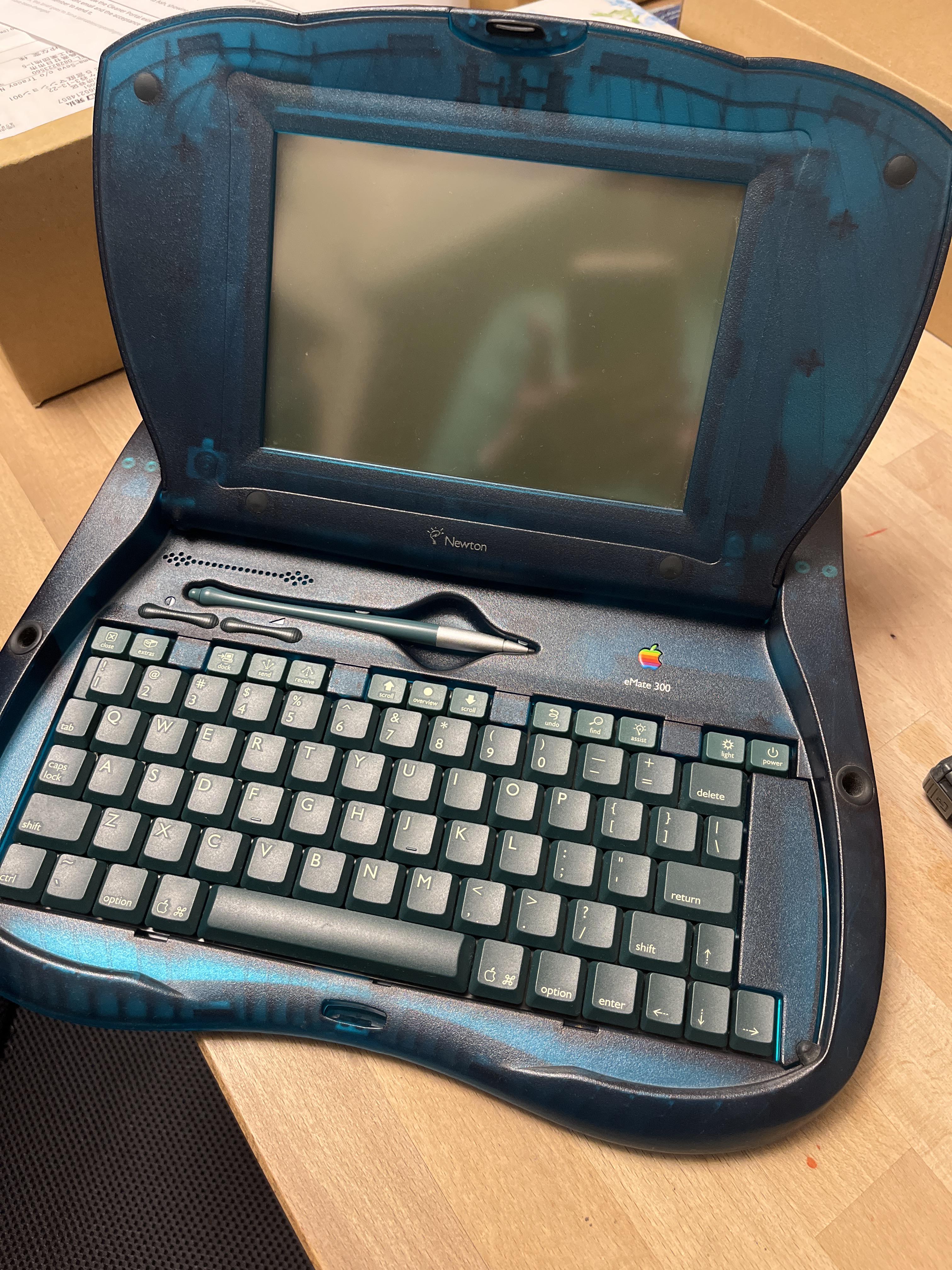
Hi everyone
I have this at home. It's working great from what i saw. It was used by a designer during mid 2000's.
I dont have any keyboard or mouse.
I don't know what to do. I don't think that i have the use of it
And if i sell it, i really dont know the price of it.
Do you have any idea?
r/VintageApple • u/retrotechguy • 7h ago
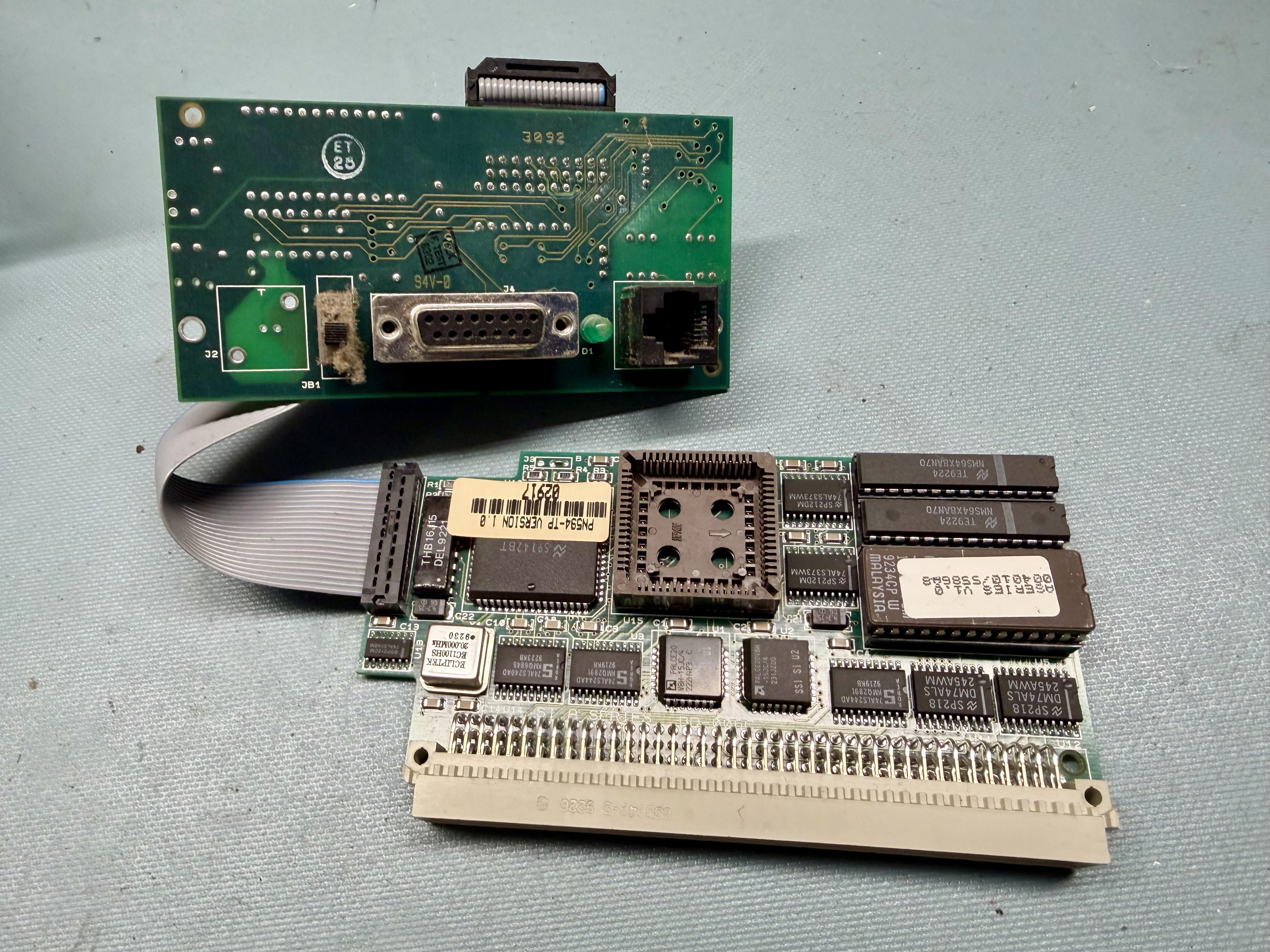
It is a PDS card (with no pass through) with a back panel card that has an RJ45, a 15 pin D, a switch, and an LED. I’m assuming this is a networking card, but what is the 15 pin connector for? Also what is the empty socket on the PDS card?
The back panel prevents me from mounting a BlueSCSI sled back there so I’m trying to figure out if I want this card installed. Thanks for any advice!
r/VintageApple • u/dt7cv • 15h ago

r/VintageApple • u/haribobosses • 9h ago
I'm wondering if I'm like the last speaker of a dying language.
r/VintageApple • u/devon7y • 14h ago

I wanted an emulated Mac Plus that feels like sitting in front of the real thing, so I made this: https://macintosh.devon7y.com
Under the hood it's Mini vMac (the WebAssembly build from Infinite Mac) running System 6 on a 4 MB Plus. The fun part is everything around it:
The desktop is loaded with apps I made for the Plus: a tiny chatbot, an image generator and a doodle guesser that all run on the 68000, plus a first-person block-building game, pinball, a tank duel and a Battleship-style game. Glider 4.06 and the Talking Moose are on there too.
Code: https://github.com/devon7y/mac-plus-ai
Disclaimer: Claude helped build the site and write this post
r/VintageApple • u/Caipe97 • 20h ago

A couple of days ago I embarked on the task of restoring the Aqua look to Panther's Finder.
Well, I'm happy to announce we have updated its look to more closely resemble Jaguar's.
Overall improvements:
More streamlined Finder look
Main features if you missed it:
Patches the stock Finder, replacing the brushed metal look with an Aqua (Jaguar-esque) interpretation of it (open for suggestions!!), by having:
Option to patch system files to have a translucent menu bar system-wide, along with traffic light icons
I've done extensive testing on both emulated and real Macs to ensure it works great, though I am open for any issues you may have!
Available at github.com/Caipe97/Aquafinder
Please if you have any suggestions regarding the design of the Finder I am open for cool ideas you have!
Disclaimer: used Claude Code to achieve this monumental task. It's something I've been yearning for the past 15 years and now it comes true!
r/VintageApple • u/Jaxermd • 1d ago

Apple had a $300/year program back in 1993 where they shipped you a box of multimedia tools for CD-ROM development. Love this box. Early CD-ROM development was so fun. Nothing like 160x120 Quicktime video with Cinepak (or later Sorenson) compression streaming off an Apple CD-150 CD-ROM Drive. Magic!
Miss Macromedia Authorware and Director all the time.
r/VintageApple • u/NCC74656 • 18h ago

so i thought id share, not sure what place to put this but this build took me most of the year. i got a couple iMACs for free and got a crazy idea to put something modern into one of them. in the end i wound up with a samsung panel, i5 intel, and a radeon GPU.
some of you might ask why not a mac mini? well at the time there was not good Egpu support and i wanted to game, also EVERYONE has alrady done that so... i took a different route. at first i thought a micro or mini itx system and that would actually fit! there were some boards from asrock where id be able to drop a off teh shelf setup in there. so why not? the dome.
as it turns out, the dome proved to be a surprising (/s) design constraint. my square area reduced drasticly as i went up so i was unable to raise the itx board above a video card OR put a card over the board. i did find some low profile cards that could fit but their performance was so poor that a moden intel igpu would have been about the same. i wasnt willing to go that route....
with out any idea of what fits where, i started looking at physical sizes of things and cutting out cardboard. ca gluing templates to see what might fit! this actually worked very well but it was hard to find the physical specs. newegg had a good sort by but as it happens, thats only length of a card, not height or thickness so it was into each products spec page and trial and error....
i think i started by sourcing a replacement panel bezel/housing. my imacs were 15" models and i wanted a 17 wide. they are hard to find for a price but i came across a ebay store that turns old macs into art work. he makes real lamps out of these guys and had a warehouse FULL of parts. so i got a full, complete top assembly minus the LED panel. however go figure.... its TOTALLY different from the 15. screw holes, cables, thickness, mounting, all ofit... none of it fit! it wasnt hard to drill new hols after making a jig, i tig welded up the old holes and got it together.
at this point i should mention, i started this in febuary i think? when i got the two systems. it is now november LOL. once id started, i knew id finish, i just had no idea what hte final build would be but i wanted it to NOT be what everone else had done.
quite a bit of amazon, facebook market, and ebay time while i looked for a 'computer' as now id decided a NUC was my only choice. what i quickly ran into was PCIE lane issues. i needed wifi, a m.2 that was 4.0 spec to run the GPU and i still needed a NVME or some kind of non 3.5 drive. even if i pulled the 3.5 appart i dont think i could have fit that in there. this landed me on a single height intel NUC i5/i7. in benchmarks there was a less than 10% difference in performance between teh two but there is a boosted power/thermal budget on the i7 and the i5 with tweaked boost settings allowed better performance than the i7 so... i went i5. the other nice thing was a m.2 for wifi, and a m.2 bkey sata, AND a m.2 4.0x4 that ran to the CPU die and not a controller. it came iwth 8gb of ram but that was a cheap upgrade. (i actually run into issues with only 16 but idk what to do about that yet). a bonus was this system had a 4 pin internal 12v PSU plug so that made life easier, no power brick.
once i had that, it was down to the PSU, GPU, and wiring. id setteled on a 6600/7600xt radeon from power cooler. a lack of hackintosh support for the 7XXX put me on the 6 and its about the same speed. also takes a good OC. but it HAD to be the power cooler red devil as its the only one that would fit! people complained about tyhe tiny crapy heatsink but thats exactly what i needed!
while i waited i started autocad and 3d printed a bunch of prototypes for the base, mounting, ports, the motherboard tray. fan shrouds, air direction fins and bevels. i bought some small 1.5-3mm nutserts so i coudl screw everything in. just melted it all in place and some bits got ca glue instead of reprinting things. the I/O was a challenge, at each step of this - i acomplished one task and created 3 more to overcome. in the end i had to mount things and sand down PCB for various ports. each one got a nutsert, 3d printed tabbed holder or some kind of bonding to other parts. i reused the factory power plug and factory holes so the OG case is not modded, just reprovisioned.
it was important to me that from the outside, you would not know its a sleeper or hackintosh. to that end i had to fit EVERYTHING inside. the PSU i found took a couple months. a meanwell for medical uses JUST fit into the allowed space and it had a 600w transient support which works perfect. my total W budget was 325 and i average far below that, even when gaming. still, alwasy good to have more than less. a simple printed box for it with some lattice work for air flow seems to work quite well. i again printed an angle plate to the bottom to hold the whole thing up on its own and screw down with in teh system.
on the bench i found the first lCD panel i bought didnt work. no idea what hte cause was so weeks of testing on that before i bought antoehr panel from another seller. then it just worked.... finding that samsung panel took a good coupel weeks as these screens are not common in monitors. laptops yes but even then, only a few models. i happened to find a pdf schematic for the panel tho so i had all its specs and pinouts which turned out to be needed as i had to make my own LVDS cables. about 70cm of them in total to go from screen to under the mac dome. the LVDS control board fit under there where the OG ram was nearly perfectly. i was able to print some hold downs and the factory bottom plate even fit. i printed a super thin piece to prevent shorting just in case. also on the screen are the LED for power and the mic, both of which i wired down and was able to use. at first id wanted to run HDMI so thats what i did. but then discovered my LVDS would not fit in the panel housing so.... had to redo all the wires to add more for the 30 pin, power, backlight, and mic/led. about 40 wires in total.
the fan was a noctua at the top, that was easy and a 3d printed dome top and fan grill kept the wires where htey needed to be and helped direct air flow. id hoped that was enough to pull air up through the openings (which i printed into the base plate) but now tha ti had to move all my stuff around and tilt/stack instead of keeping things to the side like i thought i could.... the GPU was overheating with out fans. not suprising i suppose.... i picked up a 40mm noctua and printed a shroud for it to blas from one side to the other of the gpu heatsink. that gets directed up by some fins and pulled out by the top fan. some luvers help induct more air from around the cool side of the gpu as well. this works well as its only in synthetic testing that i hit thermal limits.
bench testing with everything mocked up worked well. fedora booted first try with the m.2 to pcie adapater. id expected this as i use these adapters on my NAS with out issue. however it needed a 5v power feed that i did not have. i used a buck converter i had laying around to generate this. i had researched cards quite a bit and found a neglidgable performance decrease on x4 vs x16 for this card (4.0 anyway). i also needed radeon as at the time no one had vibe coded a nvidida gpu for mac os driver.
the assembly was decent. printed a plate to hold GPU one side and LVDS/backlight psu on the other. added a mount to the NUC shroud to screw to the gpu heatsink, screwed the psu and gpu to the large plate i made for the base. i used factory screws to hold the base plate down and im able to tip it all upside down iwth nothing moving. i played aroudn with HDMI cables from GPU to lvds but in the end i had to aliexpress a ribbon cable for this as nothing else fit properly. i only had to move things a tiny bit as most of my measurments worked out.
hte hackintosh install was a challenge. lots of problems mapping things and getting stuff to boot AND i was way out of date on bios. like .50 vs .80 however after updaing my DGPU no longer worked.... only the igpu. i also got lots of ram issues and errors, everything became unstable. several weeks of flashing back but nothing worked. there was a hard lock on flashing back more than like 12 versions but i wanted to go back 20 versions or more. what i had to do was desolder the cmos and replace it to get my older bios back. after this, my ram errors went away and my DGPU started acting as primary again.
a constant issue i had was signaling for the main screen. the 60cm lvds cable was just at its limit. the best i was able to get was some ferrite rings and insulation (not htat i could fit much in that arm) but this got things mostly stable. i get a bit of flicker when screens change but otherwise its stable. so for now thats good enough until i work out a better fix.
i wanted internal speakers as well as i wanted the mack gong and for everyting to be all in one. a small 15w class d 12v amp that i wired into the audio output of the lvds board. i also wired this board to the 3.5 mic/speaker output i made. all wiring is a one off, twisted and routed around the edge and under the video card.
I CANT EXPRESS JUST HOW TIGHT EVERYTHIGN IS IN HERE
fedora 44 loaded just fine, dual boot with sequoia. that setup was pretty easy but the macos took me a good month and a half with help from the hackintosh discord.
3d printer again for templates and i got 2 small speakers off parts express by peerless. wired them in stereo and printed a case to mount on top of the PSU. this plays audio through the plastic cd rom cover that i glued in. with a bit of easy eq in software they sound decent and have some low end.
it was at this point i fitted things together and found they actually FIT! the whole dome went down on it all. i used some USB and TB extenders for my external ports. directly soldered cat5 to the new port i bought, cut it down, mounted it, and rj45 end into the NUC. it works a treat. the DP is also and extension but its a ribbon on one end with a 90 built in. JUST fits into the card. also used fuses and some RC car plugs for the 110v psu input
i had a problem i could nto shake tho.... it did not bong when i turned it on. how???? this is where i foudn a mini mp3 player about the size of a micro sd card. i paired this with an arduino nano i had laying aorund. its set to check the 5v refrence pin on the power headder of the NUC, then sense power button pulling the 2 pin low for more than .5 seconds but less than 2.5 seconds, and then rx/tx to the mp3 player which sends pre-amp to the 15w amp for the startup bong. it does NOT bong if you hold down to shut off OR if you press it for sleep when the system is already on. i got the sound off YT and chose the performa era of bong. this took about a week to get working
i had that second black screen id been using but wanted something period correct. i found a cinema display on marketplace for free. no ide if it worked. i used magic eraser and dawn to clean the outside, retro bright on the cables, and painted the bezel with pebble grey. in the end it worked out well and looks nearly new again. im waiting on a dvi to DP cable later this week to get it plugge din but i tested it on my G4 QS and it does work. the ADC to DVI to miniDP to DP did not work tho.
i may add to this or if you have questions ig. i think this is mostly everything.
r/VintageApple • u/Specific-Package-707 • 14h ago
Hello, I have a PowerBook G4 Titanium and a Power Mac G4 MDD, both running Mac OS 9
I would like to install the official language kits on them to have more keyboard options.
I was trying to follow this tutorial:
https://www.nisus.com/NisusWriter/Support/Tips/LanguageKitsOS9.php
But I can't open the "Mac OS Install", it's not supported.
Is there any way around it?
r/VintageApple • u/retrotechguy • 17h ago
I’m an Apple II guy but have recently acquired and restored a Mac SE (4M RAM) and an SE/30 (8M RAM) Also have an unrestored Classic (memory unknown).
My question is what is the best practice for using these machines? I have a Blue SCSI that plugs on to the back and I can boot from but I have questions:
What is the best OS for these machines and where can I get good images?
How can I add software to them aside from the floppy drive?
Any great suggestions on what to use them for?
Edit to add memory sizes
r/VintageApple • u/THEtechknight • 1d ago

This one was a fun one! I custom designed hardware to drive a TFEL panel from Planar in the Macintosh Portable. I've always wanted a Dynamac which used an EL display, but those are rare and go for quite a bit of money when they do pop up.
So... I made one
r/VintageApple • u/Warcraft_Fan • 1d ago

r/VintageApple • u/prefixit • 1d ago
Hello! I have an old iMac G5 that I use to game on older games, but sadly the external drive is broken, I know the apple SuperDrive won’t work as it’s too modern, can anyone recommend a model that would work?
Thank you!
r/VintageApple • u/mastorak • 1d ago

I’m the developer of Paint 84, a 1-bit paint app for modern Macs that looks and works like a classic Mac desktop: striped title bars, menus that blink when you pick something, the tool palette, the 38 patterns, FatBits, all of it. Every pixel is black or white, there’s no gray anywhere. There’s even a CRT filter that puts old-monitor scanlines on the screen, and a night view if you want it white on black.
The part I think people here would like is getting the drawings back to the old machines. You can export a drawing as a real MacPaint document (type PNTG, creator MPNT), as MacBinary or BinHex, or as PICT. It can also build an 800K floppy disk image with the file already on it. You drag that disk onto Mini vMac, double-click the drawing and it opens in the original MacPaint, pixel for pixel the same, dithering included. The same disk image works with a floppy emulator on real hardware too. It goes the other way as well: you can open drawings straight out of old disk images.
You can also bring in any picture with File > Import Image. It turns it into black and white with a live preview, and you play with brightness, contrast, gamma and size and pick the dithering (Atkinson, Floyd-Steinberg, Bayer, halftone and a few more). That’s a fun way to get a photo onto a Mac Plus screen :-)
And then there are the modern comforts the original never had: unlimited undo (there’s a single undo setting if you want it like 1984), dithered tones and gradients that stay 1-bit, animation sprite sheets, transparency for game sprite exports, and export to PNG, GIF and the more.
It’s a paid app on the Mac App Store, so I hope it’s ok to share here.
r/VintageApple • u/Graemeski • 2d ago

Power Mac G3 Blue & White – Rev A
Originally came with a 300 MHz G3 with 512 KB L2 cache, which I overclocked to 350 MHz.
I quicky replaced the processor with a 350 MHz G3 with 1 MB L2 cache, which I overclocked to 400 MHz.
When I bought the machine, it was advertised as a 400 MHz Rev B, which was specifically what I wanted because of the IDE controller issues affecting Rev A models.
Unfortunately, it turned out to be a Rev A.
So now it's sitting there with the original 10gb drive running Mac OS 9.1
512MB ram also, Rage Pro 128 16mb?
What do i do with it - handles got screwed in transit also :(
It still lives! (Scotland)
r/VintageApple • u/CultureJaded5709 • 2d ago

Much better than the bs we have today tbh
r/VintageApple • u/TokyoFamilyStays • 3d ago

Vertical tasting of Newtons in Tokyo.
Plus a PowerBook for funsies.
I’ve got an ebook around here somewhere.
r/VintageApple • u/Jaxhunter • 2d ago
I use 40% DEET bug spray to remove the yellowing from my headlights. Does this work at all for old yellowing Macs?
r/VintageApple • u/kolomietsdmitry • 1d ago

I have a small collection of old macs which I still use. I like this distraction-free appeal and old beautiful hardware that just keeps working. One day I was on a hunt for a decent text editor for the oldest G3 iBook I have with “classic” Mac OS 9 installed.
What I wanted was quite straightforward - my ideal editor would be simple, clean, without too many capabilities - just text, basic things like search, fonts, and … markdown support. The thing is - markdown was not invented back then when this machine came out, so all the existing editors are mostly hardcore IDEs with tons of capabilities - none of which I needed. My mental image of the best editor was suspiciously close to Byword, which I used for many years on modern laptops.
I made several attempts to cope with the existing MacOS 9 apps. Tried a few, didn’t like all of them and almost dropped the idea before a thought appeared - what if I build a text editor I want, since there is no one that I like?
It proved to be an interesting journey of discovering what are the modern development options available, how to use the toolchains on modern computers, how to support other PowerPC environments (Tiger, Leopard) in addition to Mac OS 9. Of course I used LLMs - I am doing professional software engineering most of my waking time, so I just wanted to “play”, observing how the idea becomes a reality - reality that would not be possible otherwise. I’m sure I can figure it out, learn the ropes - languages, tools - and truly and fully develop an app in a “classic" (pun intended) way. The thing is - I would never do it, I don’t have this time to invest in a hand-crafted text editor app, despite all the love and admiration for these machines.
So that is what happened - I built Linewren. This is an app I’ve assembled for my own needs, according to my own taste / choice of capabilities it provides. I hope it is a small, elegant piece (with lots of bugs of course) but something that I am going to use on a daily basis and can lend a hand to others interested. This is as close to a promise to support this open source project as possible for me to give :)
(text on the pictures was deliberately adjusted to be unreadable)
r/VintageApple • u/cactusjackalope • 2d ago

It developed some issues while in my closet—the trackpad doesn’t work (it works with an external mouse), the screen has some lines, and the battery no longer holds a charge (I think). I hate to landfill it though. It still boots and runs just fine.