Hiiii just looking for help, either with fixing this or just,,,,,, figuring out how to back up my files from tty so I can re-boot.
I've been using void for a few months now and recently switched to niri with noctalia as my shell. Haven't had any problems past usual set up but I think I deleted some things by accident when I was uninstalling kde plasma ?
1st it just booted to TTY, reinstalled lightdm and now I've got a log in screen with no theming. Putting in my password it's ignored.
Running lightdm manually it says "failed to get list of logind seats"
At about 45 minutes in he begins to talk about how he sets up luks, I'm moving from arch so im not used to dracut, efibootmgr with luks (im not using grub), or btrfs. I want to remove crypttab and the key then prompt for passphrase instead like I have on arch 😔. If any of you could enlighten me with somewhat of a guide to safely change it. I've read every wiki page on the face of the earth and have been at installing this for eons, so please any help is greatly appreciated. I can provide any information upon request.
hey everyone does somebody know a solution for this ?like vm manager is running my iso files fine and it was just perfect but these days its been giving me some wifi errors , it shows that Ethernet is connected and when i run the ping command it just waits and sits there for a long time , i checked the routing and everything seems fine .
i tried troubleshooting it for hours and i dont know the issue , and tor on tails isnt connecting too i checked the clock and everything i could and i searched it up before and and i found nothing , just some outdated videos on Youtube.
Apologies if this is not the correct subreddit to ask for this kind of support.
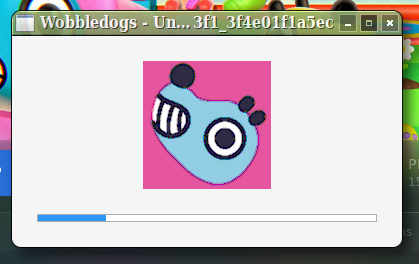
When I open Wobbledogs using Proton on Steam, this loading bar pops up and then the game immediately closes. The game runs fine on my PC running Linux Mint Debian Edition, and ProtonDB says it runs well on most distros, so it's a Void specific problem.
I have a hunch it has to do with it being a Unity game but I'm unsure how to fix it. I have used both Proton stable and experimental. I also attempted to download the Intel drivers that match my hardware and rebooted but the game still does not run.
CPU: Intel(R) Core(TM) i5-5350U (4) @ 2.90 GHz
GPU: Intel HD Graphics 6000 @ 1.00 GHz [Integrated]
Memory: 8 GB
I run Void on a 2017 Macbook Air. I may switch my main PC to Void in the future so I would like to ensure that I can open all the games I'd like to play on this laptop first.
Hello, I just started on Void a few weeks ago and I'm finally very comfortable with my setup, but I still don't know why my microphone doesn't really work yet. There is no kind of noise cancelling and my voice is very grainy, making me unable to use any voice chat. Does anyone know the reason? Am I missing any configuration?
So for context, i originally came from CachyOS and wanted to get away from systemd and perhaps try something that is most definitely not arch linux (nor debian or fedora) at all. Void Linux seemed perfect for that path so i grabbed the live base glibc image iso since i'm not aiming for xfce and am instead going for kde plasma since it's what i always used. And after flashing it onto a usb drive, it does boot into it's grub menu but after i select void linux as the option it simply would not boot.
It shows these weird green lines which obviously does not cover the screen entirely, but after they appear it just hangs and that's it. Nothing else happens and the only way to get "around" it is forcefully shut off the machine via the power button and turn it back on again, i tried booting into the usb drive again and the same exact thing happens after i select what i am trying to select in grub. Documentation has nothing to troubleshoot it as far as i can tell and i genuinely have no idea what else i'm supposed to do. So that's why i'm making this post, is there anything i can do to get around this?
(I have also attached a cropped image of my fetch in case hardware info is needed for trying to figure this out.)
I have a couple of issues I’d like to look into in more detail. First, there’s a very strange issue with the boot path: my motherboard reads the boot file only from the path /boot/efi/EFI/BOOT/bootx64.efi; it doesn’t read the file from the standard path /boor/efi/Void/BOOT (to be honest, I don’t remember the exact path). The second problem is that I live in the Village, and I’m sharing the internet with my computer via a USB cable, and for some reason this causes problems on Void. At some point, the internet goes out and only comes back after a reboot! And thirdly, help me with the sound settings! I didn’t understand anything there at all!
There’s also a problem with the greeter settings, but I think I’ve figured it out. Thank you very much if you can help me figure out at least something!
I'm trying to switch my primary bootloader from GRUB to Limine on a dual-boot setup with Void-based Bedrock Linux and **Windows (Arium 10).
Interestingly,Windows boots completely fine from Limine, and GRUB boots both Linux and Windows without any issues. However, Limine keeps throwing a kernel panic whenever I try to boot Linux.
Here is my system setup:
Storage / Partitions: Shared EFI partition (/dev/sda1`) and an ext4 Linux root partition (/dev/sda2, UUID: d80e425c-768b-4316-8613-bcedbe5702bb).
Kernel version:6.18.60_1 located at /boot/vmlinuz-6.18.60_1
Initramfs:/boot/initramfs-6.18.60_1.img
When I select Linux in Limine, I get this error on screen:
I've already tried adjusting the paths and using guid(...) syntax for the Linux entry, but Limine still fails to open the kernel on the ext4 partition, even though GRUB handles it effortlessly.
What is the correct configuration or path syntax for Limine to locate the Linux kernel in this layout? Thanks in advance!
Hey I was just wondering how void is for a daily system, I'm currently using arch however I find my WiFi is painfully slow on it at least compared to gentoo. I just did a reinstall so not much data so I'm wondering if it's worth trying void or just going back to gentoo, as I can't be asked to fix the WiFi between all the other issues I've been having with xoxo qyland and the like. How's the WiFi compatibility on it, general desktop use as well. As I saw it's starting to get a bit outdated any advice would be greatly appreciated thanks!
IS there a way to Build a live void ISO without a desktops without including thé dbus, ans everything working fine?
I once Build a live ISO without all thé requisite packagés to run libvirt/virt-manager etc
Because it was a live Build, it Build it in such a way that thé polkit wasn't necessary to run thé VM, typically on a void installéd desktop i cant get them to run without a polkit
So I'm wondering Can i get a live ISO Building that somme how blessés thé ISO to note requière thé dbus?
When I used x11 everything was fine but as soon as I started the Wayland session something was wrong, the mouse and sound was freezing every 5 seconds it was terribly annoying has anyone else had this problem?
Hello. I have been a Voidlinux user for almost 10 years, but since last week I have been experiencing this problem with KDE in my Desktop computer: KDE in Wayland does not show the panel and my chosen wallpaper. Only if I open a terminal and enter plasmashell --replace 2>&1 panel appears but with the default configuration. When that terminal is closed the panel disappears and the wallpaper becomes a black screen.
If I login into KDE on Xorg the panel is there but like a duplicated stack, cannot open a browser and the terminal prompt is missing, almost unusable.
Only Gnome in Xorg is working. EDIT: Only Gnome on Wayland is (was) working.
Whey I enter plasmashell --replace 2>&1although panel is temporally restored, the terminal shows the errors in these posts, but nothing is working to solve this problem:
I've installed several python packages through xbps-install. However the spyder ide had to pip installed into a separate python environment due to void policy about python. I need to point spyder to the python interpreter and packages already installed. I do not want to waste storage installing packages again that already exist.