Bit of a niche project, but I thought some people here might find it interesting.
I've always liked checking what aircraft are flying overhead, but constantly pulling my phone out to check a flight tracker gets a bit annoying.
I ended up building Flight Scanner. It started out as a Garmin app, but I've since brought it over to Wear OS too.
What it does: Shows nearby aircraft on a live radar directly on your watch. You can tap on aircraft to see things like their callsign, altitude, speed and aircraft type. There's also flight searching, airport/runway maps, aircraft pinning and a Tile for quickly checking nearby flights.
It's probably not something everyone needs on their wrist, but if you're into aviation or just curious about what's flying above you, it's quite fun.
(Any problems downloading please open the play store on your watch itself and search for Flight Scanner, or try and incognito window on chrome)
I'm still improving things, so happy to hear any suggestions or feedback!
(Some of you may notice this post has been remade following a post a few months ago, I've had some copyright / company style things behind the scenes so had to remove previous posts)
The ECG app is not officially available on the Global Xiaomi Watch 5. However, I found a workaround that allows us to install the ECG APK manually and activate its required permissions.
I'm sharing this guide for anyone who wants to enable ECG functionality on their Global Xiaomi Watch 5.
A little background about Xiaomi Watch 5
As far as I understand, all Xiaomi Watch 5 variants, whether Chinese, Global, or other regional versions, are equipped with ECG hardware.
There are essentially two hardware variants:
Bluetooth
Bluetooth + eSIM
In China, both versions are available, while international markets get the Bluetooth-only version.
The main software difference is:
Chinese Bluetooth version: HyperOS based on Android.
Global Bluetooth version: Wear OS.
A note about the original source
The original instructions were shared on 4PDA, a Russian-language forum. Unfortunately, I don't speak Russian, so I used ChatGPT and Google Gemini to help translate and understand the discussion.
I've reorganized the instructions into this guide to make them easier for English-speaking users to follow.
PART 1: Download and install the ECG APK
First, download the ECG APK
The original discussion is on 4PDA, a Russian-language forum:
You need a registered 4PDA account to download the APK files.
If you try to open or download the attached files without logging in, you may encounter a 404 error page like the screenshot below.
This doesn't necessarily mean the file has been deleted. Make sure you are logged into your 4PDA account first. If you don't have an account yet, simply register for a free account on 4PDA first.
IMPORTANT: Make sure you download the correct APK!
I found two different MiWearECG APK files and compared their contents.
Here are the differences I found:
MiWearECG.apk size 23.53 MB
This APK contains several components associated with Google's Wear OS ecosystem, including:
android.hardware.type.watch
com.google.android.wearable
com.google.android.wearable.healthservices
androidx.health.services.client
It also includes a native library called librive-android.so.
These findings indicate that this APK includes Wear OS and Google Health Services-related components.
MiWearECG.apk size 3.2 MB
The smaller APK contains different references, particularly those associated with Xiaomi's HyperOS framework:
com.hyperos.AI_ACTION_DESCRIPTION
com.hyperos.AI_ACTION_PROPERTY
com.xiaomi.miwear.aicr
hyperos.action.AIACTION_ACTIVITY
These references indicate integration with Xiaomi's HyperOS-specific framework.
Based on these findings, the two APKs appear to have different platform integrations. The larger APK contains Google and Wear OS-related components, while the smaller one contains HyperOS-related references.
I haven't tested the smaller APK, so I cannot confirm whether it works on the Global Xiaomi Watch 5.
Since the Global version runs Wear OS, I recommend downloading the 23.53 MB APK for this tutorial
So far, this is the only place where I've been able to find a downloadable dump/extracted copy of the Xiaomi Watch 5 ECG application.
Send it to your watch and istall it dirrectly from there
To transfer it to your watch, I recommend using AnExplorer:
Install AnExplorer on your smartphone.
Install AnExplorer on your Xiaomi Watch 5.
Open AnExplorer on both devices.
Transfer the ECG APK from your phone to your watch.
Locate the APK on your watch and install it directly. (grant permission to installl from the app)
You can also use another file manager that supports phone-to-watch file transfers.
After installing the APK, make sure the ECG app appears in your watch's app menu.
Open the app once. Initially, it should only let you proceed as far as the Wrist Orientation and Screen Orientation selection screens. You won't be able to access the actual ECG functionality yet.
This is expected. We still need to grant the required permissions through ADB before the app can work properly.
PART 2: Activate ECG using ADB (PC/Laptop)
Requirements:
PC or laptop
Android SDK Platform Tools (ADB)
Xiaomi Watch 5
Wi-Fi connection
Step 1: Prepare ADB
Download Android SDK Platform Tools from the official Android developer website:
Extract the ZIP file somewhere convenient on your PC.
Step 2: Enable Wireless Debugging
On your Xiaomi Watch 5:
Open Settings.
Go to System > About.
Tap Build Number several times until Developer Options are enabled.
Go back to Developer Options.
Enable Adb Debug and Wireless Debugging.
Step 3: Connect your watch to your PC
Make sure your watch and PC are connected to the same Wi-Fi network.
Open Command Prompt inside the Platform Tools folder.
On your watch, open Wireless Debugging and select Pair new device.
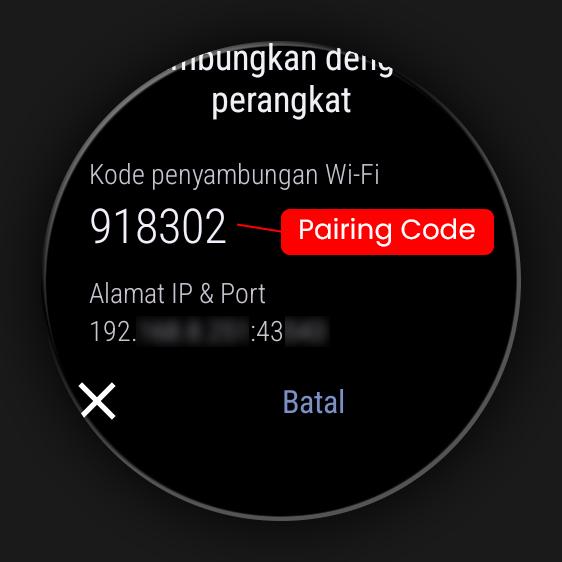
Use the displayed IP address and pairing port:
adb pair WATCH_IP:PAIRING_PORT
Enter the pairing code displayed on your watch.
After pairing, return to the Wireless Debugging screen and note the IP address and connection port.
Connect using:
adb connect WATCH_IP:DEBUG_PORT
Check the connection:
adb devices
Your watch should appear as a connected device.
Step 4: Grant ECG permissions
First, enter the watch's ADB shell:
adb shell
Execute these commands one by one:
pm grant com.xiaomi.miwear.ecg android.permission.WRITE_SECURE_SETTINGS

pm grant com.xiaomi.miwear.ecg android.permission.BODY_SENSORS

pm grant com.xiaomi.miwear.ecg android.permission.BODY_SENSORS_BACKGROUND

pm grant com.xiaomi.miwear.ecg android.permission.HIGH_SAMPLING_RATE_SENSORS
These commands grant the ECG app access to the system settings and body sensors required for ECG functionality.
note: On my watch, this command "pm grant com.xiaomi.miwear.ecg android.permission.HIGH_SAMPLING_RATE_SENSORS" returned a SecurityException, stating that HIGH_SAMPLING_RATE_SENSORS is not a changeable permission type.
I simply ignored this error and continued with the remaining commands.
appops set com.xiaomi.miwear.ecg WRITE_SETTINGS allow

appops set com.xiaomi.miwear.ecg BODY_SENSORS allow

appops set com.xiaomi.miwear.ecg USE_BIOMETRIC allow
These commands allow the ECG app to use specific Android system operations, including modifying settings, accessing body sensors, and using biometric functionality.
Then force-stop the ECG app
com.xiaomi.miwear.ecg
This command completely stops the ECG app so that it can restart with the updated permissions and AppOps settings.
Step 5: Test ECG
Open the ECG application on your watch and check whether it works.
Alternative: Using an Android phone
If you don't have a PC or laptop, you can also perform the ADB activation process directly from your Android smartphone using Bugjaeger.
The commands are exactly the same.
Enable Wireless Debugging on your watch, pair Bugjaeger with it, establish the ADB connection, and execute the commands from the Bugjaeger console.
I'm Patrick. I'm diabetic, and I'm also blind in my right eye. Small numbers on my watch were hard for me to read, so I made a Wear OS app for myself: Glucose Glance. It shows your CGM glucose in big, high-contrast numbers on your watch. It's free.
What it does:
• Large glucose number with a trend arrow • Green, yellow and red colors, plus "In range," "HIGH" and "LOW" • A 3-hour dot chart, and minutes since the last reading • Tap the number to hear it read aloud • A free watch face, or add your glucose to other watch faces
Works with: Dexcom G6, G7 and ONE+ (Dexcom Share) and Nightscout.
FreeStyle Libre users: Libre support is built but untested. If you use a Libre, I'd love your help testing it!
Why it's not on Google Play: Google only allows health apps like this from registered organizations, and I'm just a regular guy with diabetes. So I made a small installer app for Android phones that puts it on your watch over Wi-Fi, with step-by-step pictures.
You'll need: a Wear OS 3+ watch (Wear OS 4+ for the watch face) and an Android phone.
Privacy: your login and readings stay on your watch. No ads, no tracking, no accounts.
Important: Glucose Glance is not a medical device. Keep your CGM's own app and alarms on, and don't make treatment decisions based on it alone.
I'm looking for a few testers to tell me what's confusing or broken. Interested? Email lippyroboticslabs@gmail.com with your watch model and CGM (Dexcom, Libre or Nightscout).
Thank you, and take care of yourselves. 💙 Patrick, Lippy Robotics Labs
Previously had a galaxy watch 5 but it's gotten terribly slow over time. I really, really like the way the PW5 looks but I've heard great things about the OPW4. I also have a OnePlus phone so I'm wondering if it'd complement that better than the pixel watch. Anyone feel like there's a clear winner here?
I don't know much about Garmin but I'd be open to considering something like that too.
Some of my priorities are responsiveness and sleep tracking, and I guess haptic feedback too for alarms. From what I know battery life on all these is good enough for my purposes. I do go on runs so I would wanna avoid something with particularly bad GPS tracking.
What it does: your watch acts like an NFC tag. Pick something on the watch (contact, wifi, link, location, UPI request), touch a phone to it, the phone gets it. Nothing to install on the other phone. Also works with the screen off.
I made this. Only tested on a Galaxy Watch8 Classic, so reports from Pixel Watch or other Wear OS watches would help a lot. On Samsung watches, Samsung Health grabs the same NFC slot, there's a toggle in the app for that.
Hi all. I'm the solo developer of Gainr, a strength training app. It has a Wear OS app for logging lifts from your wrist. I built and tested it on the Wear OS emulator, but I don't own a physical Wear OS watch. So I'd love a few people who lift to try it on real hardware and tell me what breaks.
What the watch app does:
You start a workout on your phone, and the watch picks it up.
Log every set with weight, reps and reps in reserve. Timed exercises work too.
Rest alerts when your rest is over.
Live heart rate and calories during the workout, saved with the workout on your phone.
What I'm most interested in:
Which watch you have (Galaxy Watch, Pixel Watch, other) and whether the app installs and opens from the phone.
Whether sets logged on the watch show up on the phone, including after the watch loses Bluetooth for a bit.
Heart rate and calories readings, and battery use over a session.
Anything awkward about tapping on a small screen with sweaty hands.
Name of App: Gainr: AI Personal Trainer
Brief Description of app's features: Plans your training week, then you log sets from your phone or Wear OS watch with rest alerts and live heart rate. Progress charts and personal records on the phone.
Cost: Free to download, and the Wear OS app is on the free plan. Gainr Pro (AI coaching) is $3.99/month or $29.99/year.
About three months ago, I had a tight match at 5-5 in the second set where a disputed deuce/ad call broke the flow completely, and I was tired of either arguing over points or walking back to my bag every couple of games to check my phone. Since I play regular club matches and build apps on the side, I spent the last three months putting together Tennis Voice Pro for Android.
The whole idea is keeping your phone out of your hands on court:
Smartwatch / Bluetooth trigger: Tap your watch (or a small Bluetooth remote) as you head back to the baseline.
Spoken score announcements: Reads out points, side changes, games, and sets aloud through your phone/speaker so both players can hear clearly.
Phone stays put: No screen tapping or squinting at a phone between games.
Match & H2H log: Keeps past matches and head-to-head records organized automatically.
I’m still collecting honest feedback from folks who actually wear a watch during sports or racket games to see what feels smooth and what could be better. If you want to check it out or hear how the setup works, just ask in the comments and I’ll share the details.
For anyone using a watch on court or during workouts: how do you currently track scores or sessions without breaking your rhythm, and what would make hands-free control more useful?
Hi r/WearOS! I'm the developer of Signal Faces, made here in Perth, Western Australia.
It's a phone app full of original watch faces: nearly 600 so far, with new ones every week. Pick a face on your phone, tap Install, and a few seconds later it's on your watch. No sideloading and no extra tools.
Your watch needs Wear OS 6 or newer. That's the first version that lets a phone app put faces on the watch like this. Not sure what yours has? Check the list: https://bigsignal.com.au/watches/
The app is in testing before launch, and the first 100 testers get 60 days of Premium free: every face and no ads, with no card and nothing to cancel. (You can add up to 20 new faces a day.)
How to join (use the same Google account for every step)
Faces with the real moon phase, nixie tubes, dive bezels, a farm that changes with the weather, and lots more
Free faces, faces you unlock by watching a few short ads, and Premium faces
Search by what a face shows (steps, heart rate, weather, moon), by style or by colour
What I'm after: try a few faces and tell me what breaks, what's confusing and what you'd like to see. You can message me from the app (You → Help and support) or reply here.
Your faces and Premium belong to your Google account, so they come with you to a new phone. Privacy policy: https://bigsignal.com.au/privacy/
I'll be around to answer questions. Screenshots below.
Hi! I'm a solo dev and I built WatchMail, an email client that runs directly on your Wear OS watch and connects to any IMAP or POP3 account (Yahoo, Gmail, Orange, custom servers), not just Gmail.
No data collected, no servers in between. Wear OS 3+
I have free Google Play promo codes for people willing to test it and tell me what works, what doesn't, and what's missing. Comment with your watch model and I'll DM you a code.
I'm the developer of Wear Universal Remote – a standalone Wear OS app that turns your smartwatch into a universal Bluetooth remote control for your Mac, Windows PC, Smart TV, iPhone, iPad, or Android Phone (with zero companion app needed).
For those who saw my post a few weeks ago: the v1.2.0 update hit a slight Play Store review delay, so I used the extra time to build and bundle v1.2.1 into the release. Both v1.2.0 and v1.2.1 are officially live on the Google Play Store today!
✨ What’s New in v1.2.1:
⌚ Wear OS Tile Support: Quickly launch your favorite remote modes right from your watch’s Tile carousel with a single tap! You can pin up to 4 favorite remotes for instant access without even opening the app drawer.
🎙️ What’s New in v1.2.0:
🎤 Voice-to-Text Bluetooth HID Keyboard: Speak into your watch, and it transcribes and types your spoken words directly into any focused text box on your Mac, PC, TV, or Phone.
🌐 Global Multi-Language Recognition: Built-in support for English, Hindi, Marathi, Gujarati, Spanish,French, German, Japanese, Portuguese, Bengali, Arabic, and more.
🚀 100% Background Speech Engine: Runs completely in the background with zero system popups or dialog overlays blocking your watch screen, complete with real-time live transcription.
⚡ Auto-Send & Quick Controls: Choose between instant Auto-Send upon speech completion or manual text preview. Includes quick action buttons for Space, Backspace, Enter, and Clear.
⌚ Round Display Safe UI: Optimized layout with zero text or button clipping on round smartwatches (Samsung Galaxy Watch 4/5/6/7, Pixel Watch, TicWatch, etc.).
🎛️ All Remote Control Modes:
🔌 Zero Companion App Required: Operates via standard Bluetooth HID profile. Connects natively to Mac,Windows, Linux, Android TV, Google TV, Apple TV, iPad, and Smartphones.
🖱️ PC Touchpad & 3D Motion Air Mouse: Gyroscope-driven 3D motion pointer with deadzone tremor suppression and adaptive speed acceleration.
📺 Android / Google TV Remote: D-Pad navigation, OK/Enter, Home, Back, Mute, Power, and Volume.
👥 Meetings Remote: Mic Mute, Camera toggle, Raise Hand, and automated 1-tap Leave Call macros for Google Meet, Zoom, and Microsoft Teams (Mac & Win modes).
🎵 Music & DAP Remote: Crown-based rotary volume control, Play/Pause, and Track Skip.
💻 PC System Utility: One-tap shortcuts for Lock PC, Screenshot, App Switcher (Alt+Tab / Cmd+Tab), and Show Desktop.
📌 Setup Notes & Requirements for Best Performance:
📲 No Host App Needed: You do not need to install any app or driver on your Mac, Windows PC, TV, or Phone. Simply pair your watch via standard Bluetooth settings.
🍏 For iPhone / iPad (iOS) Users: Set Full Keyboard Access to OFF (Settings ➔ Accessibility ➔ Keyboards ➔ Full Keyboard Access = OFF).
🖥️ For Mac & Windows Regional Language Users: When typing in regional scripts (such as Hindi, Marathi,Gujarati, etc.), ensure the corresponding input keyboard layout (e.g., Inscript) is selected on your Mac/PC.
Thanks for your patience while the update went through review! Try out the new Quick-Access Tile and Voice-to-Text Keyboard and let me know how they work on your setup.
What feature or remote mode would you like to see next? Drop your ideas in the comments! 👇
My first post got hidden by Reddit's filters for almost a week, so most of you never saw it, hence (per approval of mods of course) I wanted to post an update.
CourtPoint keeps score for tennis, padel and pickleball on the watch. You tap ME or THEM after each point and it handles deuce/advantage, tiebreaks, golden point in padel and the server number in pickleball. No phone app, no account, no ads.
It's free for testers until December 1, so no code needed:
If you use custom Watch Face Format (WFF) watch faces on the Xiaomi Watch 5, you might have run into a frustrating issue: built-in complications (steps, calories, heart rate, etc.) work for a few minutes after launching the watch face, and then completely freeze.
I've seen this mentioned a few times here and there but haven't seen a fix—so I eventually let Antigravity to pull out all kinds of logs from my watch, pulled the MiWatchFace app from my watch and let multiple AI models analyze all that.
After digging deep into the system logs and MiWatchFace app decompile, (A)I figured out why it happens and built a lightweight companion app that seems to have solves it. At least so far. No root is needed, no manual steps and there is almost zero battery impact.
The Root Cause (Why it happens)
Xiaomi's complication data sources are declared with an update period of 0, meaning they rely entirely on push events rather than platform polling.
That push pipeline runs through a private binder to MiHealthService.
When a third-party WFF watch face is active, Android's cached-app freezer (am_freeze) and standby buckets treat the MiWatchFace process as disposable cache because it has no active foreground component. Once frozen, the background updates die, and your watch face gets stuck showing stale numbers forever.
Temporary fixes (like re-entering the watch-face editor or running ADB shell scripts) only temporarily wake up the process or grant short-lived allow-lists—they don't fix the underlying lifecycle decay.
The Solution: Mi Complication Bridge
Temporary manual fixes aren't helpful, and even though I also made myself a separate complications app for steps and calories etc. I was not able to replicate all of the MiWatchface complications. For example, movement minutes. So now I built Mi Complication Bridge.
It runs a minimal foreground service that maintains a persistent binder connection to TransmitRXService. Because a non-frozen process holds an active binding to the provider, Android's freezer refuses to freeze it, keeping the MiHealthService topic pushes flowing continuously.
No ADB / No Root required after initial sideload.
Self-healing watchdog: Automatically re-binds on disconnect and boots cleanly from direct boot (LOCKED_BOOT_COMPLETED).
Ultra-low power footprint: Event-driven architecture with virtually zero battery consumption.
Looking for Testers!
I've been running this locally on my Xiaomi Watch 5 for the past few days, and my complications have stayed live without a single freeze or manual re-selection. But I can't be 100% sure that there are some edge cases this app does not cover so if there are others who have the same issue - please feel free to test it out and report back the issues the app might not cover.
You can grab the APK and check out the source code and the initial analyze report that found the issue and potential fix on GitHub here.
Feedback and testing reports are very appreciated!
App name: Watchland AI Face Creator (part of the Watchland watch face app)
What it does: You type what you want ("a retro LCD with an amber backlight"), it designs 4 faces, you pick one and change anything by asking ("gold hands", "bigger numbers"). Then it builds a real Watch Face Format face and sends it to your watch. Analog, digital, cartoonish or photo-real. In the video the watch is a real Wear OS recording; the phone is drawn from the app's screens.
Cost: The Watchland app is free. The AI creator will use AI credits, because every AI picture costs real money. Pricing comes at launch.
My current watch (Amazfit Bip6) is on its last legs. I'm doing as much research as I can through Google and it's telling me WearOS is the way I need to go
I focus on Google products and I namely use my watch for health tracking, notifications/texting, and like steps.
I'm also have a fairly limited income. I'm open to refurbs and so forth. I just want something that will support what I want to do, last for a reasonable amount of time for the money, and have company support for that time.
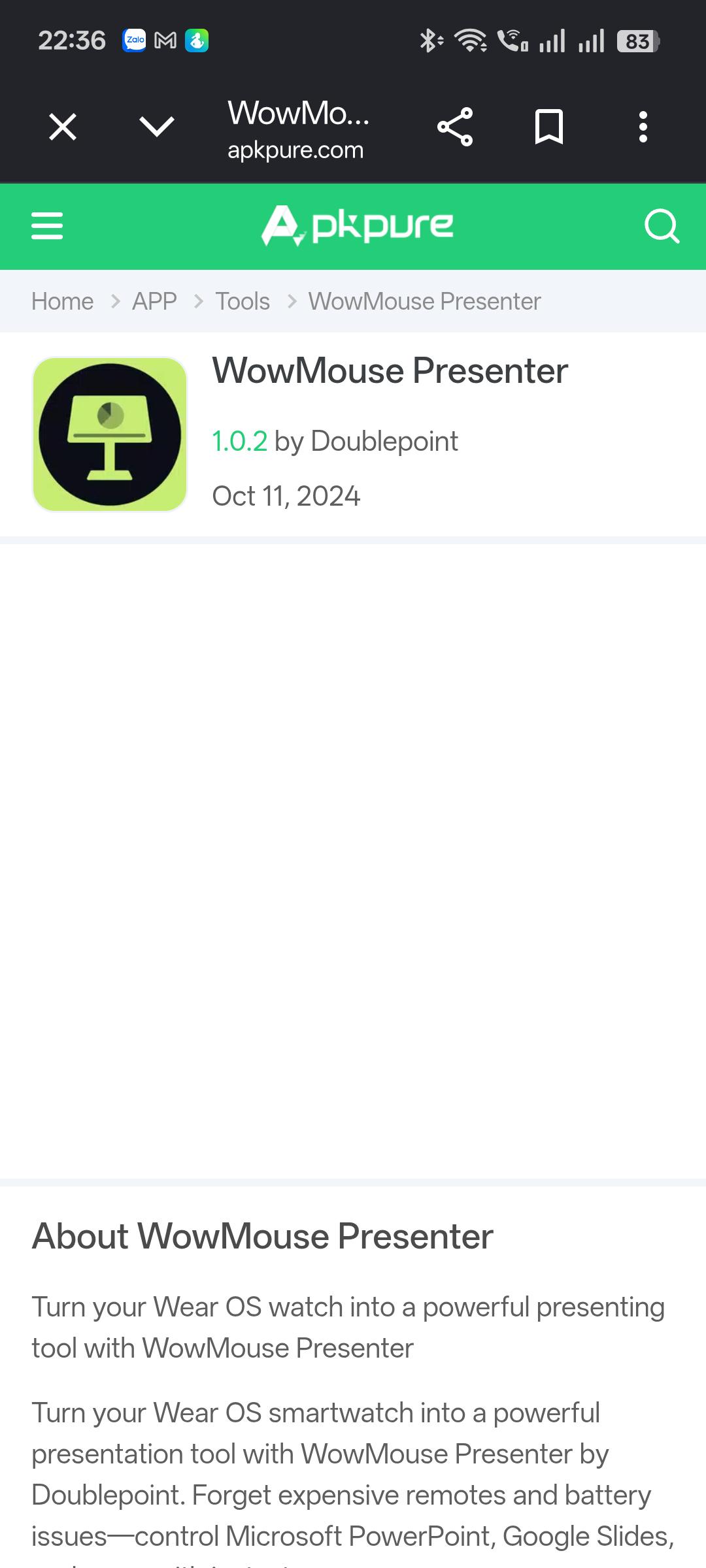
Các bro ơi có ai có file apk của cái wowmouse presenter không tôi muốn dùng để thuyết trình nhưng mà app này bị gỡ rồi và tôi cũng không tìm thấy fike apk của nó ở bất kì nên tảng nào ông nào có không cho tôi với
I won't write much, you can just take it and check it out. This feature can add new faces to you, so what was once only available to users with Huawei can now be available to you, owners of Wear OS. Just download .hwt and install .
Again, the version is at the open testing stage, errors are possible.
I have an old Fossil Gen 5 watch, I don't know what to do with it. I saw that I could change the OS to AsteroidOS but will that make a difference to the watch?
I would like some advice on if modding it will make a difference or just leave it?
Hi Team, I’m coming from Apple Watch. There is a function to set a break, e.g. 2 min, when double-tapping the display – I use it in the gym between sets. How can I set this up on the Pixel Watch? The new workout feature has not been released yet, and I wonder if there is a possibility in what we have RN Thank you
Hi r/WearOS, we're the developers of Pujie Watch Faces, the watch face designer that has been around since 2014. Version 8.0 is a complete rebuild of the app.
The headline feature: connect Claude, ChatGPT or Gemini and describe the face you want. The assistant builds it in Pujie on your phone, checks its own previews and can send it to your watch. It's a conversation, so you can keep asking for changes, and everything stays fully editable in the designer. You choose what an assistant may do. This part needs Premium and your own account with the AI service (Claude and ChatGPT work on their free plans too).
Also new: the Library as the home screen with a smarter search, undo/redo and auto-save, starter faces in your phone's colors, stackable effects (patterns, textures, lighting, bevel), a rebuilt element editor, reliable sync and 14 languages. Free users can edit any free watch face and keep three save slots.
Faces go to your watch in Google's Watch Face Format, so they run natively on Wear OS 6. On an older watch, use our "Pujie Watch Faces – Wear OS 4" app.
What it does: a scoreboard for tennis, padel and pickleball that you run from the watch. Tap the lower half of the screen for your point and the upper half for your opponent's; the phone stays in your pocket and announces the score.
Features:
- heart rate and steps from the watch end up in the match stats, game by game
- turn the bezel or the crown to look back at earlier points
- anyone with the match link follows the score live in a browser, nothing to install
- tennis, padel (golden point, advantages and the new Star Point) and pickleball
Requirements: Wear OS 3 or later, together with the phone app. Tested on a Galaxy Watch4 and a Watch6.
Cost: free, no ads, no in-app purchases, no account.
I play club tennis and padel and built this to keep score without pulling out my phone. Feedback welcome, especially on what's missing for your matches.
Hey everyone! I'm looking for beta testers for my **Cyberpunk Nixie HUD** watch face built strictly with Google's declarative **Watch Face Format (WFF)** (`android:hasCode="false"` — zero background CPU drain).
### Highlights
- **Photorealistic IN-14 Nixie Tubes** for hours, minutes, and seconds
- **Curved Neon Plasma Gauges** for live Battery % (left) and Step Goal (right)
- **86h+ Proven Battery Life** in real-world hardware discharge audits (<2.6% watch face draw)
- **Zero-OLED Emergency Eco Mode (≤20% Battery):** automatically switches to a 0.93% OPR crimson wireframe
- **Tactical HUD:** Aviation compass, weather/UV/precip, heart rate, altimeter complication, 3 color themes, and low-pixel AOD