r/widescreengamingforum • • 2d ago

Discussion LG 39GX950B 5K2K OLED — After months of use, I'm glad I made the switch

Thumbnail gallery
5 Upvotes

Hey everyone! 👋

A few months ago, I shared my experience switching from the ASUS PG32UCDM to the LG 39GX950B after my ASUS OLED died.

Now that I've had several months of daily use, I thought I'd share some updated perspectives, especially for those considering making the jump from a traditional 4K QD-OLED to a 5K2K WOLED ultrawide.

☀️ Matte vs. glossy — a trade-off I no longer regret

One of my biggest concerns when purchasing the LG was its matte coating. Coming from a glossy QD-OLED, I really appreciated the richness, saturation and perceived vibrancy of the ASUS.

And to this day, I still think the ASUS was an amazing monitor under the right lighting conditions, particularly for gaming and entertainment at night.

But that's only part of my daily usage.

I work from home, and during certain hours of the afternoon, sunlight coming through my windows made the ASUS almost unusable. It wasn't just the reflections themselves, but also the fact that the monitor simply didn't get bright enough to overcome them.

As much as I loved the picture quality at night, I was making a significant compromise during the day, which ironically was when I spent most of my time using the monitor.

The LG has fundamentally changed that experience. The combination of higher brightness and reduced reflections makes it a much more practical monitor throughout the day.

If I were to subjectively quantify it, I'd say the LG delivers around 90–95% of the nighttime visual experience I enjoyed with my QD-OLED, while being considerably better suited to my daytime usage.

Side by side, I'm sure there are differences. But when you're actually using the monitor rather than comparing two panels, those differences become much less noticeable.

With the right gaming and display settings, the colors are still fantastic. HDR has also been a noticeable improvement over my previous ASUS, and I've had no issues with text clarity on either macOS or Windows.

I think this generation of WOLED has reached a point where the real-world compromises are much smaller than I initially anticipated.

🖥️ The unexpected productivity benefits of ultrawide

Perhaps the biggest surprise wasn't the panel technology, but the aspect ratio itself.

Before owning an ultrawide, I knew I would get more screen real estate. What I didn't appreciate was how much it would change the way I work.

Being able to comfortably position two applications side by side without significantly compromising the usable width of either application is a huge advantage.

Some examples from my everyday workflow:

  • Having my coding IDE on one side and a browser previewing my changes on the other.
  • Having Microsoft Teams open alongside a browser or document.
  • Comparing content between two browser windows.
  • Working with multiple documents and copying information between applications without constantly switching windows.

Of course, you can do some of this on a regular 16:9 monitor. But I often found that splitting the screen resulted in windows that were too narrow to comfortably display their content.

With 5K2K, I get the extra horizontal workspace without sacrificing the vertical resolution I was accustomed to with 4K.

Once you figure out how to arrange and resize your windows effectively, it becomes difficult to go back.

I originally thought gaming and entertainment would be the biggest selling points of an ultrawide. Several months later, I'd argue that productivity has been the bigger upgrade for me.

🛠️ Making the most out of my ultrawide

Another interesting outcome of owning this monitor is that it motivated me to develop some personal side projects.

As much as I like the hardware, I think there's still room for improvement when it comes to the software experience surrounding ultrawide monitors.

🎛️ Pixelward

Some of you might remember Pixelward, which I previously shared with this community.

It started because I wanted a quicker and more convenient way to adjust brightness, change picture modes and control my monitor without dealing with LG Switch. It's since evolved quite a bit, partly thanks to feedback from this community. I also shared an update here.

🎬 Lumawide

My other project, Lumawide, came from a different frustration.

Whenever I watched movies or videos that didn't match the aspect ratio of my monitor, I felt like I wasn't making the most of all this beautiful OLED screen space.

So I built a media player that preserves the original video aspect ratio while making use of the remaining screen space with dynamic ambient backgrounds, rather than stretching or cropping the video.

I've recently updated Lumawide on both macOS and Windows as well.

Both apps are born out of my own everyday use cases, but I figured other ultrawide owners might find them useful too.

If you're interested:

Pixelward — External monitor controls

Lumawide — Media player for wider displays

Feedback is always welcome! 🙌

🤔 Would I make the same purchase again?

Absolutely.

I still appreciate what QD-OLED has to offer, and I'm not suggesting that matte WOLED is objectively superior to glossy QD-OLED.

But I think it's important to evaluate a monitor based on how you actually use it, rather than simply which panel looks better in a side-by-side comparison under controlled lighting.

For me, the combination of brightness, reflection handling, text clarity, HDR performance and the productivity benefits of 5K2K makes this a much better all-round monitor.

I bought it thinking I was upgrading my entertainment experience. In hindsight, I ended up upgrading my entire desktop experience.

Curious to hear whether other long-term 5K2K owners feel the same way.


r/widescreengamingforum • • Oct 19 '26

Solution Ape Out ultrawide and wider fix

Thumbnail
github.com
4 Upvotes

r/widescreengamingforum • • Oct 13 '26

Discussion NFS Porsche Unleashed finally runs as it should on Windows 10/11: widescreen, 144Hz, D3D11 support and more.

Thumbnail
reddit.com
9 Upvotes

r/widescreengamingforum • • Oct 08 '26

Solution XCOM: Enemy Within - ultrawide support mod

Thumbnail nexusmods.com
12 Upvotes

r/widescreengamingforum • • Oct 03 '26

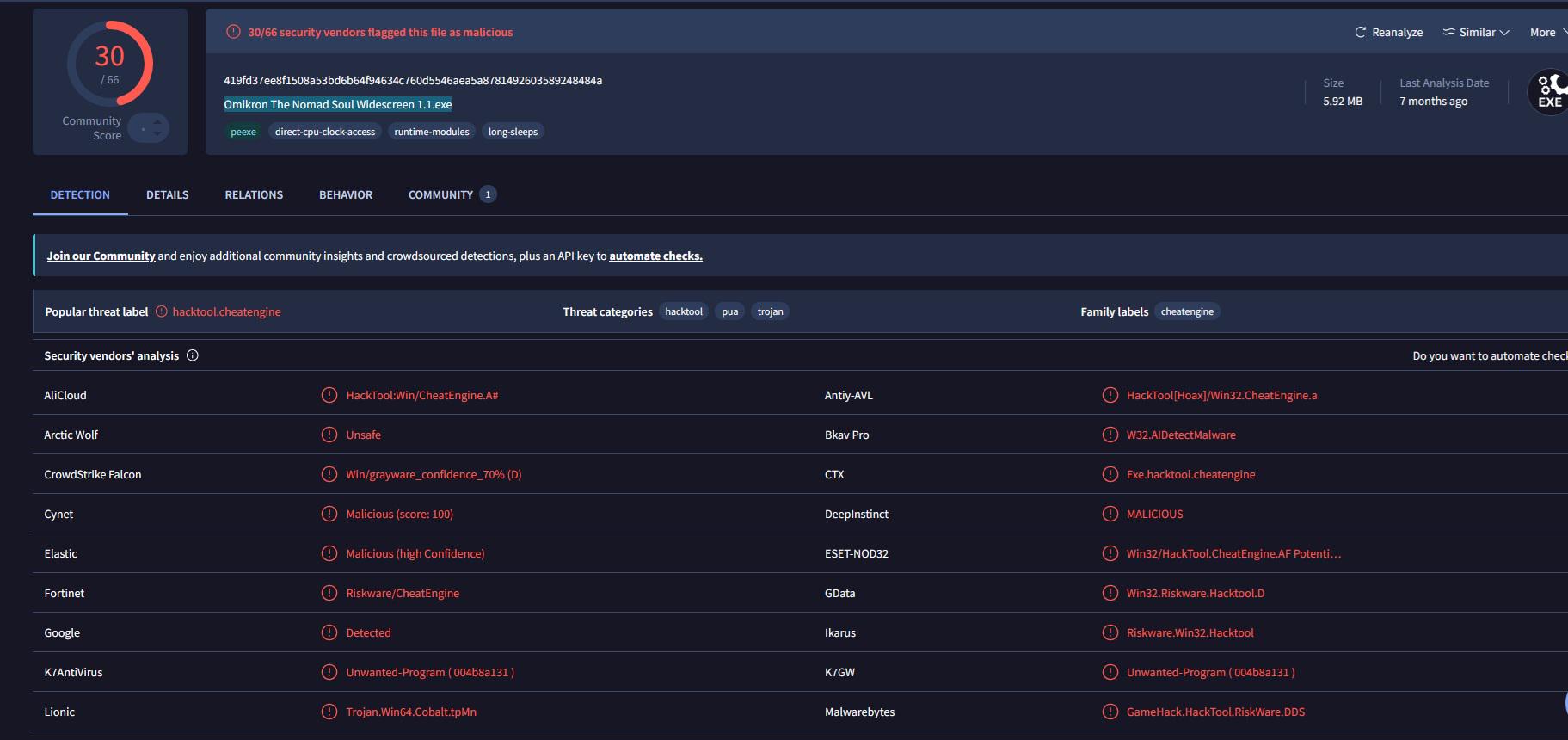
Discussion Windows defender and virus total say Omikron fix is a trojan?

Post image
1 Upvotes

I've been using this for a while but did a full defender scan because of something else and it flagged this fix as severe. ran it into virus total and it also came up as a major issue. I've been using this mod for a while now. has anyone else had similar issues?


r/widescreengamingforum • • Oct 03 '26

PSA Made a tool for if you wanna use your Ultra Wide like multiple Monitors

Post image
3 Upvotes

r/widescreengamingforum • • Oct 02 '26

Solution StarCraft II Campaign Ultrawide - Updated

18 Upvotes

Good news!

I am wrapping up a massive update to the ultrawide hack for StarCraft II. I should have it uploaded shortly to the GitHub repo.

  • Fixed many position and scale issues with the HUD scale feature such as hotkey display
  • Added FoV scaling for hub areas to prevent the image cropping closer when stretching to ultrawide (Hyperion, leviathan, etc - also have not tested cutscenes yet)
  • Added max zoom out distance and a zoom steps count selector (+100% shown - obviously impacts performance)
  • Added dark mode and a proper icon to the app
65% HUD scale and +100% zoom distance
FoV increased in Hyperion lab

r/widescreengamingforum • • Oct 01 '26

Solution End of Abyss ultrawide fix

Thumbnail
github.com
7 Upvotes

r/widescreengamingforum • • Sep 24 '26

Discussion StarCraft II Campaign Ultrawide

Post image
56 Upvotes

I'm working on a solution to play StarCraft II's campaign missions in ultrawide. I have it working now, but it is a bit clunky to make work, so I have some more refinements to make. I have also resolved the UI becoming fragmented, as past solutions have caused. This behaves more like the Warcraft III native UW support.

The real problem isn't the feasibility of the solution so much as the terms of service. This requires memory modification, which if detected, Blizzard would likely not be happy with. Despite reports of old solutions like Flawless Widescreen's now broken plugin for SC2 not resulting in bans, I would still be cautious when modifying the memory of this game.

I have included checks in the helper app to verify you are playing an offline match, and it is a campaign mission, so it cannot be used in online or competitive play. I have not had any trouble in a few days of testing, but I will play a full playthrough of the entire game (all campaigns) before I release this for other people to try out. If all is well and I release it, still note that you are assuming a risk by using it. I can't guarantee it won't be flagged by some kind of anti-cheat, resulting in an account ban.

Update: Available here!


r/widescreengamingforum • • Sep 19 '26

Video content Ultrawide Gameplay Videos of Upcoming Games - 9

5 Upvotes

r/widescreengamingforum • • Sep 18 '26

Hardware On screen info

Post image
2 Upvotes

How do you disable this? Its comes on every time I turn on the PC.


r/widescreengamingforum • • Sep 18 '26

Discussion Quad monitor concept: "The Fortress"

Post image
1 Upvotes

r/widescreengamingforum • • Sep 05 '26

Monitor stands [FS–USA] WSGF Ergotech Quad Monitor Stand (1-over-3, Freestanding) — $100 + shipping

4 Upvotes

Hey all — putting my WSGF Ergotech quad monitor stand up for sale.

A little background so you know who you're dealing with: I've been around WSGF for many years, and I help moderate the WSGF Discord. Way back, I also ran the WSGF Podcast. I'm not super active these days, but I'm a known quantity in the community and not going anywhere — so you can buy with confidence.

What it is: The Ergotech quad-monitor stand WSGF sold back in the day — heavy-duty steel, freestanding (weighted base, no desk clamp or edge mount needed), in a 1-over-3 layout (one monitor up top, three across the bottom). Built for surround/Eyefinity widescreen setups.

Condition: Good, few scratches and some dust. But this thing is a tank, so it has done well over the years.

Price: $100 + actual shipping.

Payment: PayPal Goods & Services (protects both of us).

Shipping: Ships from Houston, TX, CONUS only. It's solid steel and HEAVY, so I'll get an exact quote to your ZIP.

Local pickup welcome if you're in the Houston area!

Photos (full album: https://imgur.com/a/z9Q63NB):

Photo 1: https://i.imgur.com/RvqTzqg.jpeg Photo 2: https://i.imgur.com/uWW4AdB.jpeg Photo 3: https://i.imgur.com/Yo1ShjC.jpeg Photo 4: https://i.imgur.com/hQVOCAw.jpeg Photo 5: https://i.imgur.com/ePgW1CM.jpeg Photo 6: https://i.imgur.com/0qi3I9t.jpeg

Drop a comment or send me a DM/chat. Happy to answer anything about fit, mounting, or compatibility with your specific monitors.


r/widescreengamingforum • • Sep 05 '26

Solution [MOD] Ultrawide screen patch for Ender Lilies

Thumbnail
reddit.com
4 Upvotes

r/widescreengamingforum • • Sep 04 '26

Hardware Anyone in this community remember how to make a Matrox TripleHead2Go work?

3 Upvotes

Hi folks,

To make a long story short, I am trying to assemble a Windows XP 32 bit edition ultra-wide-screen gaming system to exhibit at a vintage computer festival(Please don't argue with me about what constitutes "vintage", this is neither the time nor the place). I am using a TripleHead2Go Digital Edition, the one with DVI.

Now, I used the TH2G quite regularly back in the day, in fact I had 2 of them attached to my primary workstation for several years. I am in fact using the exact TH2G along with the exact 3 monitors that I used to game in in the late 2000s, so I can say for absolute fact that the hardware involved is 100% compatible. I, literally, personally, gamed on this hardware in 5760x1200.

The setup is as follows: one computer running Windows XP Corp SP3 x32bit Edition and 3x Geforce 8800 GTXs(2 in SLI + 1 dedicated PhysX card). The monitors, if that maters are HP LP2475ws(yes, I have 3 identical monitors). The cable going from the PC to the TH2G is a fully-pinned-out DVI cable. The cables going from the TH2G to the screens are missing the 4 little pins around the flat pin. I checked on the cables I used back in the day(50 footers) and they appear to be missing these as well, so I don't believe the problem is the cable. Please don't point to this as the problem unless you owned one of these and know with certainty that those extra 4 pins are required.

I have tried both PowerDesk 2.07 and 2.04. I have also tried two separate TH2Gs(I owned two of them). The problem, as near as I can work out, is that it is not exposing any resolutions bellow 57hz. In order to run at the coveted 5760x1200, the monitor refresh rate has to be something like 50hz and its simply not offering my anything bellow 57hz. It shows me a bunch of 60, 70, and 85 frequencies, but nothing lower.

Again, and I cannot stress this enough: this is the exact 3 monitors and TH2G modules that I previously ran on 5760x1200 for many years until retiring it, so I know for absolute fact that it is capable of doing that resolution.

I just cannot figure out how.


r/widescreengamingforum • • Sep 02 '26

Video content Resonance: A Plague Tale Legacy is insane. [3440X1440] full game

Thumbnail
youtu.be
3 Upvotes

r/widescreengamingforum • • Aug 18 '26

Request Request for an ultrawide cutscenes mod for The Sinking City 2

10 Upvotes

Hey there!

The sequel to The Sinking City is officially launching today but since I crowdfunded the game on Kickstarter over a year ago I got access 24 hours earlier.

Unfortunately, it seems that while regular gameplay is indeed ultrawide-friendly, all of the in-engine cutscenes are constrained to 16:9 by black bars which I think could be removed by a mod, like in the case of many other games.

Should anyone else here be interested in playing The Sinking City 2 in ultrawide, I invite you to use this thread to report news on a fix, which I hope will arrive soon since the game is actually a really good AA survival horror title akin to Cronos: The New Dawn!

SOLVED: And just like that, RoseTheFlower is now offering us the solution at the following URL:

https://github.com/RoseTheFlower/UltrawideIndex/releases/tag/thesinkingcity2


r/widescreengamingforum • • Aug 16 '26

Discussion Ultrarm vs Ergotron

Thumbnail reddit.com
1 Upvotes

r/widescreengamingforum • • Aug 13 '26

Hardware [FIX FOUND] Samsung Odyssey G9 / G95C (LS49CG954ENXZA) Black Screen & No OSD – Shorted SMD Cap on Panel Driver Board

6 Upvotes

A massive shoutout to u/TenantLord in the original thread (Samsung g9 Odyssey 49 inch, Black screen and cant access menu) for guiding me in the right direction!

I'm posting this fix to help anyone else facing this issue. This specific fault is on the driver board bonded directly to the panel ribbon cables—meaning an official repair or shop quote would usually tell you the entire screen panel assembly needs to be replaced. Finding and removing this single tiny component saves you from scrapping the monitor or paying for a full panel replacement.

Monitor Model

  • Samsung Odyssey G9 / G95C 49" (Model Code: LS49CG954ENXZA)

Symptoms

  • The screen stays completely black.
  • No OSD / On-Screen Menu text appears when using the joystick or remote.
  • When plugged into power, the backlight and rear CoreSync RGB LEDs turn on briefly, then shut off, followed by the power button blinking blue.
  • Swapping cables, GPU drivers, or power drains do not fix it (lack of OSD confirms an internal hardware fault on a power rail rather than an external GPU/input issue).

Diagnosis & Location of Fault

  1. Opened the monitor to access the driver board connected directly to the panel via ribbon cables. (Because this board is ribbon-bonded to the screen, standard board replacement isn't an option without replacing the whole panel assembly).
  2. Tested the local SMD decoupling capacitors along the power rail using a multimeter on resistance/ohms.
  3. Found a clear outlier: healthy parallel capacitors in the cluster read ~2.2Ω – 2.3Ω in-circuit, but one specific tiny cap consistently read lower at ~1.8Ω.
  4. That lower resistance indicated a leaky cap dragging down the shared power rail and triggering the internal protection shut-off.

The Fix

  1. Located the specific tiny SMD cap on the ribbon-connected driver board.
  2. Desoldered/removed the faulty capacitor completely off the PCB.
  3. Re-tested the bare pads to confirm the leak/short to ground was gone.
  4. Powered the monitor back up—the display and menu system instantly turned back on! (Since decoupling capacitors sit in parallel, the rail runs normally off its remaining healthy neighbors).

Video & Photos Walkthrough

I recorded a quick video showing the exact board, the little cap, and explaining the repair:

🎥Watch the Fix & Photo Guide on Google Photos

Thanks again to u/TenantLord for the guidance. Hope this helps someone save a display that would otherwise be deemed a dead panel!


r/widescreengamingforum • • Aug 13 '26

Discussion need help! is there a native Widescreen patch where it doesn't stretch da menu with NFS High Stakes for PC? most i saw stretches everything

1 Upvotes

NFS High Stakes is dear to my heart, and i was finally able to get NFS High Stakes workin' on a modern OS, only problem, i can't find a proper Widescreen patch which doesn't stretch da Main Menu and most i seen basically stretches EVERYTHING and it's drivin' me nuts, now is there a proper Widescreen patch where it doesn't stretch da main menu like on NFS III? any help greatly appreciated thanks and been tryin' to solve it for quite some time :/


r/widescreengamingforum • • Aug 05 '26

Video content Ultrawide Gameplay Videos of Upcoming Games - 8

3 Upvotes

r/widescreengamingforum • • Aug 01 '26

Discussion Neo G9 + G7 color calibration

Post image
4 Upvotes

r/widescreengamingforum • • Jul 27 '26

Hardware 12800x2160p set up complete

Post image
4 Upvotes