r/zellij • • Oct 06 '24

Zellij vs. Other Software

60 Upvotes

Since this is a subject that comes up often in this sub, I have decided to devote this thread to the umbrella subject of "Zellij vs. Other Software".

This discussion can encompass features, usability, extendability, configurability, project status and anything else that compares the project as a whole with any other piece of software.

This is also the place to talk about personal opinions regarding the personal choice of using Zellij or other software. Questions about specific features and how to achieve them in Zellij are allowed outside of this thread. Anything else goes here.

My Personal Opinion

EDIT: The below is now also a blog post if you would like to read more.

To start us off, I'm going to share my personal opinion. Like all opinions, you are welcome to disagree with it - but since I direct the development of this project, it will be reflected in the choices I make when doing so.

History

I created Zellij as an IDE builder that is directed primarily at terminal developers (because I am one), but should also make any other terminal user feel at home (developer or not). I love the terminal, but I also think it can be a hostile platform to newcomers and power-users alike. I set out to change this, by creating an extendable platform that will enable developers to create terminal workspaces: full-fledged development environments that are applications and not a soup of bash scripts.

I did not create Zellij as an alternative or replacement for any other tool. I have used nearly all of them over the years - this is not and never was my goal.

Zellij is not a replacement. Any similarities with other software are either coincidental or features I added to the software upon request out of kindness and respect to those coming from different worlds.

Followingare some emphases taken in the Zellij development in comparison to other projects. This is by no means an exhaustive list.

Discoverability

One of the reasons terminal software is often considered hostile is that creating discoverable textual interfaces is hard. Creating discoverable interfaces in general is a challenge, and doing so without the benefit of a mouse or a touch screen is even harder. Terminal application developers understandably often skip this stage, deferring instead to cheat-sheets and manual pages that are outside the application itself. Zellij places an emphasis on having these in-app.

It is my belief that an interface being discoverable and looking good is one of the most important aspects of using software. It not only makes new and returning users feel at home, it helps discovering features and allowing users to get the most out of their software. I believe this aspect should not be an add-on, but rather a core principle of the software.

Application Platform and Runtime

Zellij is designed primarily as an application platform. It can run terminals just as easily as it can run custom built applications that we call plugins. While the plugin ecosystem is young, this is the direction the project is going.

These plugins are designed to be:

  1. Easy to develop - since the plugin system uses webassembly/wasi as a runtime, one should in the future (once some more SDKs are developed) be able to use any language to develop them (right now it's either Rust or Go). One can also use a common UI language in the form of UI components to forgo developing one's own, as well as be in sync with the rest of the user's UI and theme.
  2. More powerful than terminal applications - they can do anything a terminal application does, plus be aware of the whole workspace and communicate/spawn each other in a preditable way
  3. More secure than terminal applications - the system interface as well as application state are gated behind a permission system
  4. More portable than terminal applications - compiled binaries can run on any system that has a Zellij instance and do not require any installation

Platform (i.e. running in the terminal and not on the desktop)

I believe terminal emulation is the most ubiquitous user-facing platform we have. While not perfect, it's been around for a long while and is mostly stable. Any other platform (eg. desktop applications or browser applications) represents a lock-in of one sort or another. Either to the platform itself or to some sort of infrastructure or other translation-layer. I believe the only way to ensure that an application and indeed an application development platform lasts is to base its rendering on text. This has many other emerging properties, such as UIs (or parts of them) being replayable as well as being parsable by external tools (indeed, this is how we run our e2e tests).

I don't believe this is a limitation, I believe it's a strength. I would not want my development UI to be built from GUI assets.

Development Stage

Zellij is pre-1.0. This means the project is still being actively developed. There are some paper cuts, which I believe is the price you pay for innovation. It also means it's still taking shape and will change both in regards to its features and in regards to the development platform it offers. Everyone using Zellij right now is an early adopter. Many users are excited about being part of this journey in these early stages, but this is definitely not for everyone.

About this discussion

Lastly, my personal opinion about this discussion. I don't think it's productive or helpful. I sincirely believe everyone should use whatever software they like better. I however find that this topic invites competitiveness, bad vibes and that nothing is achieved from it more often than not. I have tried to ban it from this sub, preferring to keep this a safe-space for Zellij users to talk about the application and not have to defend or convince anyone of their choices. I am sure this is not the intent of the vast majority of those asking these questions, but they often serve to place Zellij users in this position.

I have learned though, that other people disagree strongly and find these comparisons important. So out of respect to those people, I have dedicated this thread to let them have space in our forum as well. I only ask that the vibes remain positive.

Thank you for reading.


r/zellij • • 10h ago

Problems with "default folder", new tabs/panes on Windows Powershell (zellij terminal)

2 Upvotes

I'm on Windows 11, using zellij-terminal (not Windows terminal or any other terminal GUI), running on Windows Powershell.

I'm having trouble with creating new panes/tabs, even with the general setting "Default folder" set to "current folder".

For some reason, when I navigate to a directory (a) in my filesystem, then create a new pane/tab, the new shell will start in my user's home directory instead of the current directory (a).

I already looked around in then documentation a bit, but I didn't find anything useful.

Anyone else having this problem, and was able to find a solution?


r/zellij • • 2d ago

Working alongside a Pi subagent in a visible Zellij pane

5 Upvotes

I maintain pi-subagentura. Its Zellij integration lets Pi open an interactive specialist in a visible pane. You can leave a review running there, move focus into the pane, and type a follow-up directly to the specialist that read the code.

To try it, start pi -e npm:pi-subagentura inside Zellij. Ask Pi: “Start an interactive specialist with mux set to zellij and background set to false. Have it review the tests for this change.” Selecting Zellij explicitly matters for an attached session.

Once the reviewer has a finding, focus its pane and ask which test would catch the bug. The original Pi conversation stays in its own pane.

https://github.com/lmn451/pi-subagentura


r/zellij • • 4d ago

I made Neovim's splits open as real zellij panes, one Neovim behind all of them

32 Upvotes

Hey all,

I built neopane, a tool that lets Neovim use zellij's panes instead of drawing its own splits.

:vsplit opens a new zellij pane right beside the current one, and it's the same Neovim process behind every pane, so buffers, registers, undo and LSPs are all shared. Pickers open as pinned floating panes, new tab pages get their own zellij tabs, closing a pane closes its window, and <C-w>h/j/k/l moves zellij's focus.

No config needed. Run it inside zellij and it picks zellij up automatically.

It's less about looks and more about feel. You stop fighting your muxer and Neovim, and they work together instead.

It's still early. I daily drive it on macOS (I even have nvim aliased to it) but haven't tested Linux yet. It needs zellij 0.46.0 or newer. I'd love feedback and bug reports from zellij users.

brew install spiritledsoftware/tap/neopane (or cargo install --locked neopane)

https://github.com/spiritledsoftware/neopane


r/zellij • • 5d ago

multiplexer-sidebar: a Herdr-like session & agent sidebar that also work as a live-preview dashboard for Zellij — single Python script, zero dependencies

Thumbnail
gallery
38 Upvotes

Hi everyone,

If you have ever used herdr, its sidebar is pretty iconic: it sits quietly on the side of your workspace and lets you see every project and every active coding agent at a glance.

I built multiplexer-sidebar (also aliased as multiplexer-dashboard) to bring that Herdr-style sidebar directly to both Zellij and tmux, while also letting it run as a floating dashboard with a live terminal preview.

Single Python script with no dependencies, but a Ratatui / Bubble Tea feel

Looking at the screenshots above, you might expect a compiled Rust or Go binary, or a WASM plugin. In reality, it is a single standalone Python script using only the Python 3.9+ standard library (not even curses).

There is nothing to compile or install. you can just copy-paste or curl this one file onto your laptop or any remote SSH machine and run it right away.

Even though it is a standalone stdlib script, I spent a lot of time on the renderer so it feels as clean and responsive as a full Ratatui or Bubble Tea app. It supports automatic light theme detection, mouse clicks and scrolling, responsive resizing, and live color terminal previews.

Part of why I wrote this is also to keep a beloved TUI workflow alive. With herdr shifting its focus toward desktop and mobile apps (which introduce client/server lock-in and don't share agents with the open-source herdr TUI), a lot of longtime terminal users didn't want that classic TUI experience to fade away like Arc did. Building it on top of Zellij and tmux keeps the pure terminal workflow on multiplexers that are here to stay.

Both a Herdr-like sidebar and a live-preview dashboard

You can run the script in two ways, or use both together:

  • Sidebar mode (--sidebar / --compact): If you like the herdr work style—one session per project, with multiple tabs inside each project—you can keep the sidebar open in a narrow 30-column pane on the left. You can fold or expand each project's tabs with h and l, see which coding agent (Claude Code, Codex, OpenCode, Pi, Gemini, etc.) is working or waiting on you, and press Enter to switch. On smaller screens, --compact shrinks it to a 3-column status strip (or you can just resize the sidebar pane below 24 columns and it switches automatically).
  • Dashboard mode: Bind a key to open it in a centered floating pane. As you move through your sessions, tabs, and agents, the right side shows a live preview of that terminal pane so you can glance at the output before jumping in.

How it compares to Zellij 0.46's built-in Session Manager and Agent Inbox

Zellij 0.46 recently added a great update to its built-in session manager with an Agent Inbox, and multiplexer-sidebar actually hooks into Zellij 0.46's native agent status reporting under the hood. At the same time, it takes a different approach in a few places:

  • Sidebar-first layout: Instead of a multi-panel modal plugin UI, multiplexer-sidebar follows herdr's minimal vertical tree layout. That makes it compact enough to stay docked in a narrow split next to your code without getting in the way.
  • Sessions and Agent Inbox on the same screen: In Zellij's built-in session manager, sessions and the Agent Inbox are in separate tabs, so you can't see both at the same time. Here, your sessions (and their tabs) sit on top and your coding agents sit right below them in one view.
  • Works outside Zellij and across tmux: Zellij's built-in session manager only runs when you are already inside Zellij. You can run multiplexer-sidebar in a plain shell with no multiplexer attached (like right after you SSH into a server) to preview and attach to any running session. And if you use both Zellij and tmux across different machines, you get the exact same look, keybindings (j/k, h/l, / to filter, n/r/x to create, rename, or kill sessions), and experience in both.

Quick install and setup

Since it is just one file, installation is two lines:

curl -L -o ~/.local/bin/multiplexer-sidebar \
  https://github.com/milanglacier/multiplexer-sidebar/releases/latest/download/multiplexer-sidebar
chmod +x ~/.local/bin/multiplexer-sidebar

Zellij floating dashboard keybinding (~/.config/zellij/config.kdl):

bind "Tab" {
    Run "multiplexer-sidebar" {
        floating true
        close_on_exit true
        width "80%"
        height "80%"
        x "10%"
        y "10%"
    };
    SwitchToMode "Normal"
}

Zellij persistent sidebar layout (~/.config/zellij/layouts/default.kdl):

layout {
    new_tab_template {
        pane size=1 borderless=true {
            plugin location="tab-bar"
        }
        pane split_direction="vertical" {
            pane size=32 command="multiplexer-sidebar" close_on_exit=true {
                args "--sidebar"
            }
            pane focus=true
        }
        pane size=2 borderless=true {
            plugin location="status-bar"
        }
    }
}

Repo (with tmux and compact sidebar configs too): https://github.com/milanglacier/multiplexer-sidebar

Would love to hear what you think or any feedback if you give it a spin!


r/zellij • • 7d ago

I made a herdr equivalent plugin for zellij - zaag

Post image
56 Upvotes

If you don't know herdr: it's a terminal app for running several coding agents at once. It gives you a sidebar with all your agents and their status.

I really liked it but tbh, my fingers refuse to learn Ctrl+B. So I made a kit that gives zellij the same idea:

- a sidebar with projects and agents, and their status.

- Ctrl-o g to search and jump to any agent, in any session (herdr inspired)

- a zaag command to list, read, prompt and start agents, which also works over SSH for agents on another machine

- a skill so your agents can boss each other around

It works with Claude Code, Codex and Hermes. It's plain zellij: no fork, just a plugin, a Python script and some hooks.

Repo: https://github.com/IsmailHatim/zaag


r/zellij • • 12d ago

Zellij 0.46.0 just released: it can now replace your terminal, includes an attention inbox, quick mouse-actions and a settings screen

127 Upvotes

Hi friends,

Just released a new version of Zellij. This is one I'm personally hyped over, because it includes some stuff I've been working towards for a long while. Some highlights:

  1. Zellij can now replace your terminal. This version includes a built-in GPU-accelerated terminal (totally opt-in) that you can run with `zellij terminal`. It can integrate with your desktop so that you can manage sessions and notifications from the tray.
  2. A built-in Inbox to manage programs that need your attention. The inbox (part of the session-manager) can let you know when a program needs your attention (for example: coding agents, long build scripts or tests) so that you can manage everything from one screen in whichever session you are.
  3. A new right-click menu for quick mouse actions. Using a wireless mouse? Too far from the keyboard? we got you! Open panes/tabs with the mouse. Configure it with custom actions.
  4. A new Settings screen so that you can configure Zellij with a friendly UI in addition to the configuration files
  5. Session previews in both the session manager and the new inbox, so that you can peak into other sessions (and even briefly send key-presses or mouse clicks to them). This works really nicely with the new tray icon from the built-in terminal.

Loads more! Check out the announcement for a deep dive, as well as a couple new screencasts: https://zellij.dev/news/terminal-inbox-session-previews/


r/zellij • • 27d ago

Added app-delegated & column selection to my Android SSH client so copying across Zellij split panes finally works cleanly

8 Upvotes

Hey r/zellij!

As a daily Zellij user, connecting to a session over SSH from an Android phone or tablet has always had a few frustrating friction points—especially around touch/mouse tracking, copying text cleanly inside split panes.

I’m the indie dev behind DaRemote (an SSH/SFTP and server management client with a full-featured, built-in xterm-256color terminal emulator), and in the latest updates, I spent quite a bit of time optimizing the terminal specifically for Zellij workflows:

  1. App-Delegated Selection (Native Zellij Mouse Mode): In many mobile SSH clients, touch gestures either get swallowed by local scrolling or conflict with terminal mouse reporting. With App-delegated selection, DaRemote forwards precise touch-drag coordinates directly to Zellij via mouse tracking protocols. Zellij natively handles the pane boundaries and copies the selection straight to your Android clipboard on release, so you can select text cleanly inside a single split pane just like on a desktop terminal.
  2. Local Stream Selection (Shift-Bypass Style): Sometimes you may want the client's native selection handles rather than delegating selection to Zellij (for example, to adjust selection handles manually before copying). Switching to Stream selection acts just like holding Shift on a desktop terminal. It bypasses mouse tracking and lets you do standard character-by-character selection locally on the screen.
  3. Local Column (Block) Selection for Split Panes: If you bypass mouse mode on a side-by-side split, standard stream selection grabs the border characters and the text from the adjacent pane across the whole screen width. The Column selection mode lets you drag a rectangular bounding box locally on your touchscreen to grab multi-line text or specific columns cleanly inside a single pane.

If anyone here accesses their Zellij sessions from an Android phone or tablet, I’d love to hear how these selection modes feel in your workflow or if you run into any edge cases!


r/zellij • • 29d ago

Empty tab title when exiting Yazi ( possibly due to OSC 0 / 2 )

6 Upvotes

I have a problem with application setting blank tab title that doesn't revert back. The Tab #1 at the top changes to the directory set by the Yazi then once it exits it goes to blank instead of its previous title Tab #1. This seems to be due to OSC 0 / 2 title settings. How do i disable that. Is anyone else running into this issue.

versions

➜ yazi --version

Yazi

Version: 26.9.1 (Nixpkgs 2026-09-1)

Debug  : false

Triple : x86_64-unknown-linux-gnu (linux-x86_64)

Rustc  : 1.99.0 (b940084d 2026-09-28)  

➜ zellij --version

zellij 0.45.1

EDIT-1:

i tried to set the rename the tab back to initial by using. It still blank when using the exact string Tab #1 if i use some other string it works.

~
➜ zellij action rename-tab "Tab #1"

r/zellij • • Oct 21 '26

Zellij in browser option whislists

7 Upvotes

Hi All,

I am aware of the config of the webclient (https://zellij.dev/documentation/web-client.html), but I would be happy if we could a different kind of theming like how the terminal renders in broswer, like

- having a margin
- maybe a frame around the terminal window
- Header image outside of the terminal window

What do you think?


r/zellij • • Oct 10 '26

Responsive replacement status bar

Post image
5 Upvotes

Please find attached zellij-status-bar-ng. This is a drop-in replacement to match the stock status bar but with these changes:

- The shortcuts look like GNU Nano

- Allows you to click them as buttons

- Responsive display looks great at any terminal width


r/zellij • • Sep 10 '26

Making mac keyboards act like a mac keyboard.

6 Upvotes

Maybe this is helpful to someone else

The problem I wanted to solve was that I use multiple terminal emulators on my mac to switch between projects .. typically iterm/ghosttty/alarcitty etc .. Being able to cmd+tab between sessions has been part of my workflow for decades . When I brought in Zelliij for remote attachment to terminals I was running into different behavior with cutting and pasting text. cmd+c / cmd+v on the mac along with mouse scrolling issues

I had a little time today to solve for this so I built up a repo of tools to normalize this behavior across the suite of terminal emulators I use ..

https://github.com/dallascyclist/MacKeyBoard

There's probably some tradeoffs here that I've yet to stumble into but if it helps you out great, leave a star.


r/zellij • • Sep 08 '26

zj-agent-mob: Less intrusive Herdr like features, without the new multiplexer

Post image
34 Upvotes

TL;DR: If you run multiple Claude Code, Codex agents in the background and are looking for Herdr like features, this plugin let's you quickly observe, interact, kill them from a floating pane. It also prompts you when they need input; meant to tie into your existing workflow v/s adopt a new one revolving around agents.

I have been running many claude code and codex agents (for better or for worse) as part of my workflow. It gets really hard to keep track of them, from wondering around or sitting idle waiting for my input, while they start a new village of token burners.

I built a simple plugin that's primarily a floating pane, that hooks into your Claude Code and Codex clients. It ties into with your existing zellij workflow, bringing Herdr like features v/s build your workflow around current agent limitations.

Key features:

  • Every agent at once, across sessions, with live status and the task each is on.
  • Jump to any pane with Enter, across tabs and sessions.
  • Fuzzy find with / a few characters of a task, worktree, or session narrows the list to it.
  • Told when you are away: a desktop notification the moment an agent blocks or fails. (Mac OS only)
  • Answer in place: a / r for permission prompts, A to always allow a tool, y / m to reply.
  • Kill a runaway with x, two-step so you never do it by accident.

Try it out!

https://github.com/mohseenrm/zj-agent-mob

curl -fsSL https://github.com/mohseenrm/zj-agent-mob/releases/download/v0.10.3/init.sh | sh

Caveat: Mostly vibe coded, but happy to support other agent harnesses.

Cheers! 🍻


r/zellij • • Sep 06 '26

Would there be interest in a lightweight package manager for third-party Zellij plugins?

17 Upvotes

I've been looking more into the Zellij plugin ecosystem recently, and one thing surprised me: while Zellij has a built-in Plugin Manager for loading/managing plugins, there doesn't seem to be a commonly used package manager for third-party plugins.

By package manager, I mean something closer to TPM for tmux or lazy.nvim for Neovim — not something that manages running plugin instances.

Right now, many third-party plugins seem to be installed by downloading a .wasm from GitHub Releases, putting it somewhere such as ~/.config/zellij/plugins/, and referencing it from config.kdl.

This is perfectly manageable with one or two plugins, but it starts feeling a little awkward once you have several:

  • Where did each .wasm come from?
  • What version is installed?
  • Is there a newer release?
  • How do I reproduce the setup on another machine?
  • Do I maintain my own curl/mise/just scripts for every plugin?

I'm wondering whether there's an existing solution I've missed.

If not, would people find a very small tool useful that did something like:

zpm add rashidalnaemi/zellij-commandpalette
zpm add dj95/zjstatus

zpm update
zpm outdated
zpm sync

with a simple manifest:

[plugins.commandpalette]
repo = "rashidalnaemi/zellij-commandpalette"
asset = "zellij-commandpalette.wasm"

[plugins.zjstatus]
repo = "dj95/zjstatus"
asset = "zjstatus.wasm"

The scope could be deliberately small:

  • GitHub Releases only
  • download .wasm assets
  • keep stable local filenames
  • update plugins
  • optionally pin versions / use a lockfile
  • reproduce the installation with zpm sync

No registry, dependency resolver, automatic KDL modification, plugin review system, etc.

Essentially just a GitHub Releases → local Zellij WASM manager.

With coding agents being as capable as they are now, building an MVP like this doesn't seem particularly difficult. The bigger question to me is whether this is actually something Zellij users want, or whether people have already settled on another workflow.

How do you currently manage third-party Zellij plugins?

Is there an existing project for this that I've missed?


r/zellij • • Sep 05 '26

Announcing Yazelix Nova v1! A fully integrated, popup-driven, sidebar-aware workspace with Zellij, Helix / Nvim integrations, toggleable (configurable) popups for agents, a config UI, yazi as a picker, lazygit, terminal animations and a sidebar

42 Upvotes

Original article | Source | 63-second demo

(This article describes the August 19, 2026 v1.1.0 snapshot, much has changed already in the edge branch! main and stable havent changed that much)

Note from Lucca Huguet

I've been busy building. And working. I've found the time to finish the website, finally!

And Yazelix Nova has also found its way to v1, a big moment for Yazelix, for sure.

So let's talk about Nova.

Yazelix Nova is delicious to use. Persistent popups per tab let you summon lazygit, your agent CLI (I use Codex), or Ratconfig (Nova's awesome config TUI) with a single keystroke.

The main Alt Shift H/J/K/L layer takes full advantage of our modal-editing muscle memory.

You can also configure the popups to run whatever you want, with any keybinding you want, in the popup size you prefer, retaining state even when hidden, or not, you choose.

If you use Yazelix every day, your dev speed will advance with it! Invest in it. It's worth it. It has certainly done wonders for my productivity. But it may be addicting, so be careful...

I'm blessed to use and improve it every day. It took a few years of experimenting with Yazelix Classic to find the correct boundaries across all Yazelix modules and healthier ways to build Yazelix. I accumulated important guidance and rules, most of which are now crystallized in Yazelix/Starcompass.

To me one of the best parts of yazelix nova is that every tab opens in yazi, you can press alt z for a zoxide picker (or find your project manually) and selecting a file/folder will open it in your editor and retarget that tab's cwd to that project, also renaming the tab! And future `alt z` uses inside the yazi popup will retarget it to another cwd.

So here we are: Nova is better than Yazelix Classic in pretty much every single way, with 75% less code and much easier maintenance...

This is just Nova v1, and v2 will be even better. (obs: i've since made large strides in nova v2 direction, you can have a taste in the edge branch)

Try nova: nix profile add --refresh github:Yazelix/nova/stable

If you'd like to join the fun, try it. Open issues or discussions, criticize the project, or tell me what you love about it.

Fund Nova

Nova takes sustained work. If it saves you time and brings you joy, sponsor my work on GitHub. Your sponsorship gives me more time to maintain Nova and build v2.

With that, I hand it to my coworker, Sol, to explain the details. If you'd like to try Nova first, start with the guide.

How Nova fits together

Written by GPT-5.6-Sol with xhigh reasoning and Lucca Huguet.

Yazelix Nova v1 gives Nix users a packaged terminal workspace built around Mars (Now called Nova Rio, a fork of Rio), Yazi, and Yazelix's Zellij and Helix forks. We call the forks Nova <original project> to distinguish them from the originals.

The yzx command prepares the runtime and opens the workspace. Once Nova opens, keybindings handle day-to-day work. You can configure your terminal emulator to run yzx enter or use the desktop entry that comes with yazelix and forget the cli even exists... (it's what i do)

You can learn yazelix with yzx tutor.

And you can install it via nix profile or home-manager, and we offer versions without helix, rio and even without yazi, if you dont need them or already have them.

Nova requires Nix with flakes enabled. Use yzx enter over SSH or when you want the host terminal to retain control of graphics, clipboard behavior, and notifications.

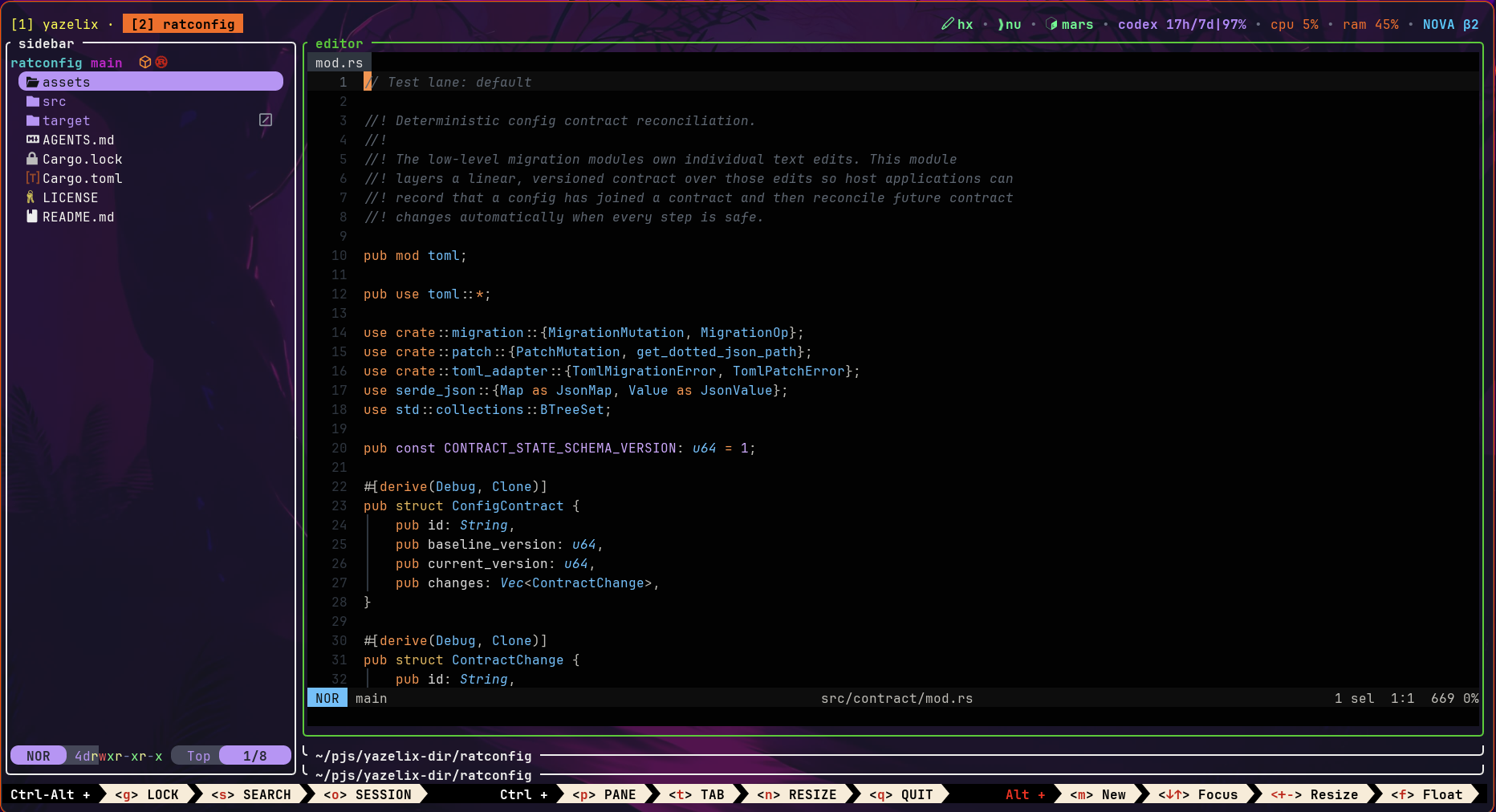
Nova 1.0 Edge workspace with Yazi, Helix, shell panes, and public project tabs

Nova v1 on Edge with Ratconfig, Mars, and Starcompass open as project tabs

Enter once, work with keys

CommandResult
yzx launchOpens Mars, then starts the managed Zellij workspace
yzx enterStarts the same workspace in the current terminal or over SSH
yzx configOpens Ratconfig from another terminal
yzx doctorChecks the runtime setup without opening Mars or Zellij
yzx tutor beginStarts the packaged tour

On Linux, packages with Mars (Now Nova Rio) install a desktop entry. If you prefer another terminal, set a profile to run yzx enter. Most days, you do not type another yzx command after Nova opens. Press Alt Shift K to open Ratconfig.

The default layout keeps Yazi beside stacked work panes. Nova extends the familiar h, j, k, and l motion grid across panes and tabs. An Alt Shift layer opens the sidebar, Git client, configuration UI, and coding agent. The command palette and full Yazi popup stay available from their own keys.

Layerhjkl
AltFocus left or previous tabFocus downFocus upFocus right or next tab
Ctrl AltMove tab leftMove pane downMove pane upMove tab right
Alt ShiftYazi sidebarGit popupConfig popupAgent popup

Ratconfig remaps the managed popup keys and edits the agent command and popup margins. You can also add a custom command popup to config.toml with its own arguments, title, keybinding, and keep-alive behavior.

Nova makes efficient use of screen space. Stacked work panes keep each task large, and the sidebar can collapse. Tools open in near-fullscreen popups and Alt Shift F gives one pane the full workspace.

One owner per concern

Nova assigns each concern to one owner:

OwnerBoundary
Nova repositoryNix package graph, yzx, root config, managed integration, and product policy
Nova RioDesktop terminal
Nova ZellijMultiplexing and the managed session surface
Nova HelixPackaged editor and workspace bridge
YaziNative file-manager behavior
Zellij Pane OrchestratorTab workspace roots and pane coordination
RatconfigTerminal configuration interface

Nova pins package outputs and leaves component implementations in their owner repositories. The maintainers removed Classic's overlapping runtime and maintenance layers. In the fixed v1.0.0 scorecard, they counted 23,272 lines of code and configuration in Nova against 91,545 in Classic, a 75 percent reduction.

Existing Classic users can translate mutable Classic settings through the frozen migration bridge, just run:

nix run github:Yazelix/nova/v17.12#yazelix -- launch

The bridge reads Classic settings.jsonc or config.toml files and converts it to nova style. It does not rewrite Home Manager declarations. Users whose Classic settings match the packaged defaults can move straight to Stable.

You see the ownership split during normal work. Yazi can open a file in the managed Helix pane without inventing another workspace root. The pane orchestrator keeps one root per tab, and an Alt z action can retarget that root. Git and agent popups receive the same tab-owned path.

Sessions keep the live workspace

Plain yzx launch and yzx enter create independent sessions. Add a name when you want a workspace you can find again:

yzx enter --session project
yzx launch --session project

Attach to a live session by its full name:

yzx enter attach project
yzx launch attach project

Packaged Zellij owns creation, attachment, switching, and process lifetime. Attachment preserves the target's tabs, panes, processes, working directories, and Yazi-to-Helix routes. Ctrl Alt o, then w, opens the native session manager inside Nova.

Configuration stays sparse

Nova stores semantic overrides under ~/.config/yazelix/config.toml. It's only what you really need, and keeps things minimal. Missing fields inherit packaged defaults, so an update can carry new defaults without rewriting a large generated file. Component-owned files live under the same~/.config/yazelix/ root when or if you choose to create them.

A user-owned file can stay small:

[appearance]
mode = "dark"

[shell]
program = "fish"

[editor]
command = "nvim"

The example selects three independent overrides. Omit any field to inherit its packaged default.

yzx config presents common settings and routes native settings to their owner's file. The Home Manager module follows the same boundary: it installs a selected package, writes the values you declare, and leaves other config files absent.

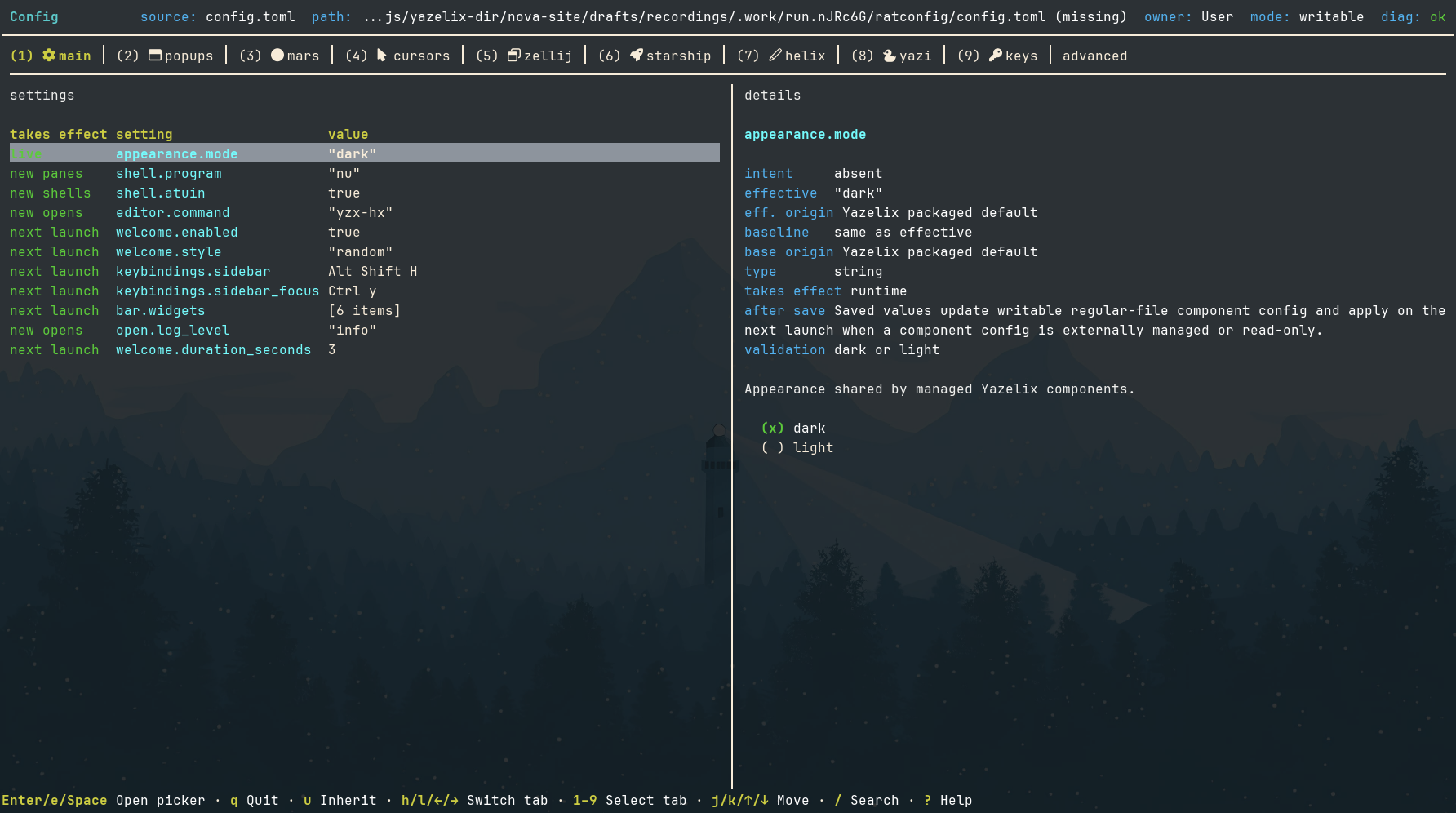
Ratconfig showing Nova's packaged defaults and an absent user config

Ratconfig separates inherited values from user intent. See the Ratconfig key contract.

Eight package variants compose three optional capabilities: Mars, managed Helix, and managed Yazi. A Rio-free package keeps enter, a Helix-free package uses your configured host editor; a Yazi-free package uses matching host yazi and ya commands.

Branches

Stable is the checked release channel. Main carries accepted updates, and Edge carries experimental dogfood. Immutable nova-v* tags select an exact release.

Platforms

The maintainers dogfood the full Linux path. Nova exposes all eight package variants for Linux and Darwin on x86_64 and aarch64. CI builds the packages and Home Manager activation on a real aarch64-darwin runner. Interactive macOS workflows and the Mars GUI still lack the complete verification that Linux receives (I do not own a mac). But we do have active users using Nova on macOS every day.

The SSH path starts with yzx enter. Nova guarantees its managed TUI and configuration there. Your host terminal owns clipboard integration, image previews, cursor shaders, and desktop notifications.

Start with Stable

Install the checked channel with Nix flakes enabled:

nix profile add --refresh github:Yazelix/nova/stable
yzx launch

Try the workspace without a profile install:

nix run github:Yazelix/nova/stable -- launch
or
nix run github:Yazelix/nova/main#yazelix-no-rio -- enter

Run yzx tutor begin after launch. The Nova Start guide covers channels, package choices, sessions, and first steps. The runtime model maps the owners behind the workspace, and the customization guide lists the supported configuration surfaces.

Have you tried Yazelix Nova?


r/zellij • • Sep 03 '26

Mobile agent bridge for zellij - MIT licensed self hostable PWA

Post image
15 Upvotes

over the last couple of weeks i built a mobile bridge to access my terminal multiplexer remotely and have some improved ergonomics when working with agents (command completion, alerts, push notifications). it is a bun service on loopback plus a web client, reached from my phone over tailscale.

there are some solutions in this space already, so this is my own interpretation of it. but would love to hear your thoughts and feedback on how this could be improved for zellij.

status quo:

- content pushes fine. `zellij subscribe --ansi --format json --pane-id <id>` follows several panes at once and emits newline-delimited JSON on every repaint.

- structure does not push at all. Nothing in the CLI announces a new pane or a renamed tab, so I poll `list-panes --json` and `list-tabs --json`

Is `zellij pipe` with a small plugin the right route for topology events, or is there a CLI verb I missed?

Repo: https://github.com/AltanS/collie

Zellij instructions https://github.com/AltanS/collie/blob/main/docs/multiplexers.md#pointing-collie-at-zellij


r/zellij • • Sep 02 '26

zellij-commandpalette - New plugin just dropped get it while it's hot.

24 Upvotes

https://github.com/rashidalnaemi/zellij-commandpalette/

zellij-commandpalette, another way to have all the keyboard shortcuts available for you to discover and use. Inspired by VS Code's command palette, and zellij-forgot.

Just install and Ctrl+K to get started.


r/zellij • • Sep 02 '26

I've built a session manager with claude code support

5 Upvotes

For months I've been running multiple claude code agents in parallel, using zellij as the terminal multiplexer to hop between them.

Keeping up with each one was a real pain in the ass:

I didn't know:

- which is waiting for an answer
- which one is finished
- which one is still running

So I've build luneta to solve this.

It lists all the agents running along with their status and allows you to quickly hop between them.

Some cool features:
- Waiting/idle/busy status for each agent
- Ranks the one that needs you the most on top
- Fuzzy find agents, press enter and you're at the right place.
- Heavily inspired in nvim's telescope plugin

You can replace zellij's default session manager entirely, because it also provides the session manager functionality out-of-the box.

https://github.com/lorenzolfm/luneta


r/zellij • • Aug 28 '26

Background Tint plugin - make each panel visually distinct

19 Upvotes

A headless Zellij plugin that gives every terminal pane you create a subtly different background color derived from your existing theme.

It applies a small, per-pane shift to its colors (hue, saturation and lightness) so pane boundaries become apparent without replacing your carefully chosen colors.

Project page: https://github.com/MarcinOrlowski/zellij-background-tint


r/zellij • • Aug 28 '26

Multiplexer best practice with tabs

2 Upvotes

👋🏼 I'm fairly new to multiplexers and had a couple of questions around how people use them with tabs and multiple projects.

My journey with Zellij and Alacritty:

First pass -

  • Multiple Zellij sessions: Feature/bug work, PR reviews and Playground
  • Each session would have multiple Zellij tabs which are a git worktree feature/bug or personal project
  • Each Zellij tab has multiple panes: Claude, Nvim, Build, Test, Scratchpad...

I have keyboard shortcuts to quickly switch between sessions and tabs but I was crashing Zellij regularly when constantly switching between sessions/tabs so I stopped doing that.

Second (current pass) -

  • Same Zellij session list but each session is in it's own terminal window so switching between sessions was done at the app level instead of the terminal

I still had issues with Zellij crashing at times so that made me take another step back.

Proposed new pass -

  • Use app tabs while running one tab-less Zellij instance per tab
  • Same pane setup per Zellij instance
  • Multiple apps per "work type": Features/bugs, PR reviews and Playground

Note:

No SSH work as of now but I plan on having a remote machine that can run agents on. At that point, I'd run a mix of local and ssh work.

MOAR NOTES:

There's a strong chance that I also don't fully understand the underlying guts of multiplexers and that's part of my problem.

I'm looking for any tips or suggestions even if it's, "You're completely doing it wrong!" But hopefully those come with helpful responses on why 😄.


r/zellij • • Aug 21 '26

Zellij 0.45 issue with compact-bar and scrolling? Scroll tooltip opens automatically when using mouse/ trackpad scrolling when F1 to show cheat sheet tooltip is enabled?

6 Upvotes

I use compact-bar with the optional F1 cheat sheet tooltip

But now when I scroll with the mouse the Scroll tooltip box opens and I can’t dismiss it?

Seems like compact mode is broken for me unless I can resolve this


r/zellij • • Aug 20 '26

Zellij 0.45: Kitty image support, Nested Sessions, Scroll by Command, new UI

131 Upvotes

Hi friends!

I'm excited to share this newest release of Zellij! Some highlights:

  1. Support for the Kitty Graphics Protocol for displaying images in the terminal
  2. First-class support for Nested Sessions for managing Zellij-inside-Zellij (eg. ssh connections)
  3. Scroll by command
  4. New UI (titles only pane frames and stacked lists for easier stacked panes management)
  5. Per-client tab sizes
  6. Fullscreening floating panes

Check it out: https://zellij.dev/news/nested-sessions-kitty-graphics-new-ui/


r/zellij • • Aug 19 '26

Zellij.online - upcoming terminal sharing a streaming service from the Zellij maintainers

24 Upvotes

Hi friends,

I'd like to share this upcoming service that me and some of the other maintainers have been building for the past few months: https://zellij.online

Zellij.online will be a terminal sharing a streaming service - allowing us to one-click share our terminals with others. It will be end-to-end encrypted, focused on privacy and user experience. This will be a paid service with a free-tier.

It's important for me to emphasize that this changes absolutely nothing about Zellij itself. Zellij will always be free and open-source, never collect your data or display ads. If you don't want to ever interact with Zellij.online, you can continue doing so and using the app as you always have.

Naturally, self-hosting is already possible today with Zellij's built-in web-server and remote attach capabilities.


r/zellij • • Aug 15 '26

How are you using Zellij while working with multiple agents simultaneously?

17 Upvotes

I actively work on 3/4 parallel agent sessions in a single tab divided into multiple panes and then have separate tabs for looking at the code and other miscellaneous stuff. Curious how others have setup their agentic coding workflow around zellij for most productivity.