r/zerosumappbudget • • Jun 19 '26

Welcome to ZeroSum!

24 Upvotes

Welcome to ZeroSum!
Our ambition is to be the very best zero based envelope budgeting app for you and your family's financial well being and peace of mind.

Here are some helpful links to get the most from ZeroSum:
Our main website: https://zerosumapp.com/
Logging in to your ZeroSum account: https://my.zerosumapp.com
Our comprehensive help pages are linked from within the App itself or at: https://help.zerosumapp.com/
Our Discord Channel - see link on front page of our website:  https://zerosumapp.com/
To report any Bugs, please see the Feedback link at the bottom of the sidebar in the Help pages.

If further help is needed please use the "Contact Support" link in the Web App (not mobile). This is in the menu that appears when you click next to your name in the left hand side bar.

This Reddit is to help one another and to discuss Zerosum and is not a formal support channel.


r/zerosumappbudget • • Jun 19 '26

ZeroSum Help

4 Upvotes

There is some really good guidance on using ZeroSum to be found in the Help Pages. These comprehensive notes should help you understand most things about the App and how it works. They are linked from within the App itself and can also be found here:

https://help.zerosumapp.com

Any other problems, that cannot be resolved in this way, then please use the "Contact Support" link in the Web App (not mobile). This is in the menu that appears when you click next to your name in the left hand side bar.

Any other problems, that cannot be resolved in this way, then please use the "Contact Support" link in the Web App (not mobile). This is in the menu that appears when you click next to your name in the left hand side bar.

This Reddit is to help one another and to discuss Zerosum and is not a formal support channel.

Just an extra “ask”.
Please do not use a tag when referring in posts to the founder/developer. He will review these forums in his own time and pick up any relevant points or issues. We need to keep his attention fully on the job of building and maintaining our favourite budgeting app!


r/zerosumappbudget • • 44m ago

Discovered the Color Blind mode today, and love it! Thank you!

Post image
1 Upvotes

I'm not even colorblind, but I am very visually inclined and I enjoy the icons and indicators it integrates into the Available column: piggy banks, check marks, caution signs, arrows, etc. It's great.

Little touches like this, particularly built with a drive towards inclusivity and accessibility, are fantastic and really grow my appreciation for the app and its developer.

Added a snip of where to find it if anyone wants to give it a go. Note: since the app is a wrapper, you can update it from the web or the app and it'll show instantly in both places!


r/zerosumappbudget • • 10h ago

CC OVERSPENT

Thumbnail
gallery
0 Upvotes

I approved some transactions today and now zerozum is telling me my Amex category is overspent when it’s. It just randomly showed up today and I don’t know how to fix it.

It says the category is overspent, but my cc is not when I just made the payment and reconciled the acct.

How do I fix this without it taking money from my ready to budget or saying I’m negative in December?


r/zerosumappbudget • • 15h ago

Suggestions

2 Upvotes

Hi - firstly thanks for Synci - its so much better! Do we need to do anything to completely delete the Lunch Flow account attributed to our name/email?

Few things I hope to see coming in the rapid release you do :)

  1. In Payees, a quick way to clear up payees with zero transactions
  2. A way to switch all imports to sentence case automatically
  3. Allow us to point an account at a URL for the bank logos - its quite fiddly getting a favicon that looks good, but I know your database must scrape decent ones for my accounts that aren't linked, but the institution does have linking ability so a decent icon does exist.

Thanks!


r/zerosumappbudget • • 15h ago

API or MCP in the horizon?

0 Upvotes

Hi, I saw it mentioned about five months ago that it was in the works. Is there any more news about that or possibly an MCP after that comes out? I’m still with YNAB because I love the way that it now organizes my finances with the MCP connection and would love to see that before my subscription renews again at the end January so I can make the switch. It’s not a deal breaker but interested if there might be a timeline. Thanks, love testing out the app so far!


r/zerosumappbudget • • 20h ago

Does account name determine if it is savings or not? Or something else?

1 Upvotes

Solved - Pedro was super quick to help out :-) to anyone who has the same problem: Make sure that the account you transfer to is set to a. asset and b. switch off "My pay lands here first".

Hi! I have two savings accounts (one that's my own, one shared with my partner). They have the same settings, but their own category in my budget. However, transfers to my own savings account appears as savings and thus does not count as spending - while transfers to the joint savings accounts does count as spending. Does anyone know how I can align this so that transfers to both accounts are not counted as savings? Thanks in advance!


r/zerosumappbudget • • 1d ago

In case you missed it, like me.

9 Upvotes

Not sure if that feature was there when I joined or if I've missed an update memo but just tried the Budget>View>Compare months option and it is simply great!


r/zerosumappbudget • • 1d ago

🏦 Synci is now Zerosum's bank sync for the UK, Europe and New Zealand (up to 5 banks on Pro)

Post image
14 Upvotes

Bank in the UK, Europe or New Zealand? Zerosum Pro now syncs your banks through Synci.

Connecting takes a couple of minutes, new transactions reach Zerosum as soon as Synci has them, and pending ones update in place when they post.

🏦 Connect your banks with Synci

  • Up to 5 banks on Pro. Open Bank Sync, choose Connect a bank under Synci, pick your bank and approve access in your banking app. Then choose Link on each account.
  • The UK, Europe and New Zealand. Thousands of banks across 30+ countries. Plaid still covers the US and Canada.
  • Included with Pro. Nothing else to sign up for or pay. Your bank login never reaches Zerosum, and Zerosum can only read, never move money.

✨ Cleaner data

  • Pending to posted. When a pending transaction posts, it usually updates in place instead of arriving a second time, so there's less to clean up in review.
  • No more waiting for the next sync. Synci tells us the moment it has new data, and Zerosum syncs right away. How often Synci hears from your bank depends on the bank: some share new transactions every few hours, others once a day.
  • Account types and last digits. Each account shows its type and the last digits of its number, so two accounts with the same name are easy to tell apart. A card starts as a Credit card when you add it.
  • Choose which balance you see. Some banks report more than one balance. Open Manage banks, select the account and pick the Balance that matches your bank app.
  • Renewing never stops a working bank. When a bank needs your approval again, it keeps syncing until you finish at your bank.

🧮 Good to know

  • On Basic? You can still sync through your own SimpleFIN provider, such as SimpleFIN Bridge, Lunch Flow or Redbark. Moving to Pro adds Synci.
  • One managed provider at a time: Plaid or Synci. Your own SimpleFIN provider works beside either.

Full details: changelog · Bank Sync guide

As always, thank you for the feedback that shaped this one. 💙


r/zerosumappbudget • • 1d ago

Your bank sync is moving to Synci - what about my other connections?

2 Upvotes

got a message today which says:

You sync your banks with Zerosum through Lunch Flow. We are moving our UK and European bank sync to Synci, and Lunch Flow stops syncing on 28 December.

Why we are switching: connecting a bank is faster and simpler, the data is better (including how pending transactions become posted ones), and you can connect up to 5 banks instead of 4. It is still included in Pro, at no extra cost.

this all sounds great. I have a couple of questions:

  • i also have a couple of connections through lunchflow that i pay for myself with my own connection as i have 6 banks to sync, not 4. Will they still work?
  • Can we buy additional connections through Synci at a discounted rate (the price on the website is 2x lunchflow)?

r/zerosumappbudget • • 2d ago

Pros and Cons?

7 Upvotes

A lot of people are switching from YNAB. I tried Zerosum early on, and it wasn’t developed enough at that time. I know the developer has really improved it. That price increased since then, and I can’t get a free trial for the current version. I tried signing up with my second email address, but it deleted the account within a few minutes.
Google said “risks” are its new and single developer, so sustainability is iffy still. How is everything finding it working out. With the small price difference, I’m not sure it’s worth it.


r/zerosumappbudget • • 3d ago

💸 v1.11.3: Ready to Budget on Your Phone, Whole-Goal Bars, Recent Transactions

Post image
45 Upvotes

Money left to budget? On your phone, tap Ready to Budget and see every category that needs money, with one tap to fund each. Goals that reach past this month now show the whole goal on the row bar, and Overview gets a Recent transactions widget.

💸 Ready to Budget on your phone

  • New: a list of what needs money. With money left to budget, tap Ready to Budget on the Budget page to see every category in budget order, with what each one needs in the same words as your budget ("Need $100.00 by the 25th", "Overspent by $12.40", "Funded").
  • New: fund it in one tap. Tap a row to open it, then tap Budget $X, or Other amount to type your own. The next row that needs money opens for you. A category with no goal offers Match last month, and Budget all at the bottom funds everything Ready to Budget can cover.
  • New: cover overspending the same way. Tap the overspent banner on the Budget page to see each overspent category in one list, with Cover $X on each row and Cover all when Ready to Budget has enough.
  • Changed: Move money and Budgeted, rebuilt. Both sheets now start from the category you tapped and show its Available before and after. You only pick the other side, and the button tells you what's missing ("Choose where it goes").

→ Budgets & Categories

🎯 Goals

  • Changed: row bars show the whole goal. For goals that reach past this month (a dated target, a yearly bill, a capped refill), the bar on your budget now fills against the whole target. A $1,000 goal no longer looks full just because this month's $125 is in. The goal card still shows This month and Whole goal separately.
  • Changed: a tick means funded. The goal icon shows a tick only once the goal is funded. A goal that's on track for this month stays a pie, in green, filled as far as its bar.

→ Row bars · Budget Goals

📊 Overview

  • New: Recent transactions widget. See the latest transactions from your register on Overview, for every account or just the ones you pick. View all opens the register.
  • New: pick what Category watch shows. In its settings, choose Favorites as before, or Custom to list the categories you pick, and add as many Category watch widgets as you like. Turn on Compare with usual spending to see what you usually spend by this point in the month.
  • Changed: Monthly net is now Net cash flow. Same numbers: the money into your accounts minus the money out.

→ Overview Page

🧾 Transactions and bank sync

  • New: All Transactions has its own Reconciled and Scheduled switches. Hide reconciled rows in your account registers and keep them on All Transactions, or the other way round, from View in each register. Nothing changes until you change it.
  • Changed: view settings grouped like the View panel. In Settings → Budget and transactions, the Transactions card now has Rows in account registers and Rows on All Transactions. All view settings in the View panel takes you there.
  • Improved: Plaid banks bring new transactions in sooner. Linked Plaid accounts now sync as soon as your bank has something new, with no daily limit.
  • Changed: connections broken for 30 days are removed. If a Plaid or SimpleFIN connection hasn't synced for 30 days, it's removed and we email you. Your accounts turn manual and every imported transaction stays. Link the bank again from Bank Sync whenever you're ready.

→ Settings · Bank Sync

🗓️ Using Set aside for next month?

  • New: set aside the rest in one tap. With Set aside for next month on in Settings → Budgeting, the Ready to Budget popover on a computer now shows Set aside remaining $X. On your phone, it's under the total in the set-aside editor. Not using it? Nothing changes.

→ Set aside for next month

🧮 Also in this release

  • Improved: the budget page and registers are quicker, and saving a transaction is faster on a computer. Going Back to a register returns you to the row you left.
  • Changed: one thin scrollbar look on a computer. The sidebar and side panels show theirs only while your pointer is over them.
  • Fixed: on a computer, the sidebar stays open or folded the way you left it.
  • Improved: Increase contrast in Settings → Appearance now makes row highlights stronger in light themes too.
  • New: Email preferences in Settings → Profile lets you choose which product update and feedback emails you get.
  • Improved: budget invites now name the invited email address, so you know which one to sign in with.
  • Improved: the maintenance page now has a Check status button and takes you back to the app by itself once we're done.
  • Fixed: pressing Undo many times in a row no longer fails partway through.
  • Improved: small icon buttons are easier to tap on a phone, such as a group's ··· menu and the goal card's buttons.
  • Fixed: a snoozed goal's row is the same height as the rows around it, and long group names in Organize categories end in "…".

As always, thank you for the feedback that shaped this one. 💙


r/zerosumappbudget • • 3d ago

Android widget?

1 Upvotes

This is absolutely a wishlist ítem because ZS is fantastic in all other respects. I just like having a widget with pinned categories on my phone!

Is there any future plan for an Android widget?

Thank you again for this excellent software!

Saudações!


r/zerosumappbudget • • 4d ago

Move Within A Day

0 Upvotes

I was logging transactions today, and realized I can't move a transaction up or down within a day in the transaction register anymore. Did we lose that ability or should I try a different browser? Currently using Brave.

Thanks friends!


r/zerosumappbudget • • 4d ago

Help with Goal scenario

Post image
2 Upvotes

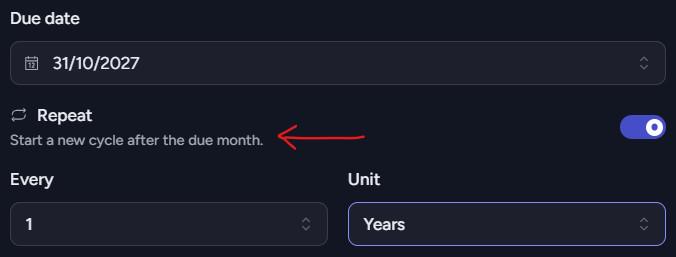
Here's the set-up:

  • Goal set in May 2026 to "Refill up to" $25 "By date" Oct 31st 2026 and "Repeat every 1 year"
  • Oct 31st 2026 came and I did not have to spend any of the $25 so next occasion is Oct. 31st 2027

Now in Nov. 2026 my wrong interpretation (Image) was that the cycle would start that Goal fresh by pushing whatever is left ($25) back-up to RTB less the $2.08 needed for Nov.

  1. The new Goal date was automatically and correctly set to Oct. 31st 2027
  2. The $25 stays in the category listed as Achieved and will stay there the full year.
  3. Tried in Nov. to manually return $25 to RTB but the Goal now ask to refill $25 (not $25/12=$2.08) and nothing for the coming year.

Next I tried:

  1. Delete the Goal and Returned $25 to RTB
  2. Set a new "Yearly" Goal in Nov. 2026 with $25 by Oct. 2027
  3. The Goal ask me to Put back the money remove from the category now thus reaching the $25 in Nov 2026 and nothing needed for the next months in the Funding plan.

What I ended-up doing:

  • Delete the Goal in Nov 2026
  • Return $25-$2.08 to RTB in Nov 2026
  • Recreate the Goal in Dec. 2026

Point #3 are really the thing that I could not figure out and I'm just wondering if I could have done things differently.

Thx.


r/zerosumappbudget • • 4d ago

Ok I feel dumb, help me please

Post image
0 Upvotes

r/zerosumappbudget • • 5d ago

Auto import/syncing

1 Upvotes

Sorry if this has been discussed previously, I’m new to Zerosum coming over from YNAB. It was super easy to import our stuff over. I’m on the trial plan and signed up for bank syncing. I was able to successfully sync them and it says it’s been updated. But I don’t see the transactions imported. Does this happen automatically or do I have to manually input each transaction? It’s been two days since I manually reconciled the accounts (manually entered transactions) since then, the Mastercard on our bank has posted more transactions but Zerosum does not show them but has recently been synced (23 min ago).

Is this normal behavior?


r/zerosumappbudget • • 6d ago

Referrals are live: give a month, get a month

Post image
30 Upvotes

Most of you found Zerosum because someone told you about it, so we built a way to say thanks.

How it works

  1. Open Settings → Referrals and copy your link.
  2. Send it to a friend who is new to Zerosum.
  3. When they pay for an annual plan on our website, they get an extra month right away.
  4. 30 days later, you get an extra month too. Nothing is charged: your renewal just moves a month later.

You can earn up to 12 months a year.

Good to know

  • It works for subscriptions billed on our website. App Store and Google Play subscriptions can't take part, because the stores don't let us add months.
  • Your friend needs to choose an annual plan at full price, on the website, within 180 days.
  • A month already added is never taken back.
  • You only see a friend's status and dates, never their name, email or what they paid.

Full rules: https://zerosumapp.com/referrals

Help article: https://help.zerosumapp.com/en/articles/5152680-referrals-give-a-month-get-a-month


r/zerosumappbudget • • 6d ago

Happy/Unhappy

6 Upvotes

I’m on a free trial until December 4th. I love the user interface and the features (price too). However, I’m unhappy with the slowness in getting transactions from the bank.

I frequently check my bank account (I’m anal about it) and find transactions that don’t show in Zerosum for up to 2-3 days. I’ve read previous posts here where Zerosum paid provider synchs four times a day. I don’t experience that issue with YNAB.

Just airing out my thoughts


r/zerosumappbudget • • 6d ago

All Transactions - My "expectations vs. reality"

4 Upvotes

I'm sooooo in ❤️ with this app.

From time to time, I like to share feedback just in case it resonates.

Right now, I see no reason to have the "All Transactions" menu item in my sidebar.

I would definitely see the point of having it, were it possible to have "Show reconciled" ON for "All Transactions" while leaving individual Account registers set to "Show reconciled" OFF. That would indeed provide me with a register that always shows ALL transactions. 😀

I see myself repeating a pattern where I show reconciled transactions briefly, to check something real quick, and then I hide them again because I'd rather see less transactions on screen. Having independent filter preferences can be confusing, I know, but this is something I'd really use.

Just my two cents!


r/zerosumappbudget • • 7d ago

Absolutely love the UI improvements. These bubbles for funding tracking make me happy.

Post image
38 Upvotes

Just a thank you!! It's wild how I felt like zerosum is phenomenal already when I came over in August, but every update just makes it even more solid and I am loving it. As a former YNABer, and someone who is very visually inclined, the switch has been amazing.


r/zerosumappbudget • • 7d ago

API access?

0 Upvotes

I tried to search in the subreddit for API access timeline but couldn’t find it. If it was already posted, sorry.

Any near future plans to support API access? I have subscribed to pro few months ago but haven’t been using it due to this. Any news around that is highly appreciated. Thanks!


r/zerosumappbudget • • 7d ago

Is Zerosum down?

1 Upvotes

I can’t get the app to open.


r/zerosumappbudget • • 9d ago

🎯 v1.11.2: Goals at a Glance, Bank Notes, a Week Calendar on Your Phone

Post image
39 Upvotes

How are your goals doing? The goal icon now tells you at a glance. Linked accounts can bring in your bank's notes, the phone calendar opens on a week, and the whole app looks cleaner and calmer.

🎯 Goals at a glance

  • New: the goal icon shows how it's doing. The icon beside each category's name on your budget is a tick when the goal is funded, a pie that fills as you get closer, and a moon while it's snoozed.
  • New: two bars for bigger goals. When a goal reaches past this month (a dated target, a yearly bill, paying off a card), click its icon, or open the goal card in the side panel, to see a This month bar and a Whole goal bar.
  • New: hide the icon if you prefer. On the Budget page, turn off Goal icon under View → Show. Your goals stay in the side panel.

→ Budget Goals

🏦 Bank sync and payees

  • New: Import bank notes. On the Bank Sync page, each linked account has an Options button (Import options on your phone). Turn on Import bank notes to fill empty notes with your bank's memo. Transactions you already have stay as they are.
  • Changed: link or manual, first. Add account now starts by asking Link a bank account or Add it manually, and linking shows your bank accounts from every connection in one list.
  • New: see why an import got its payee. Click the bank icon on an imported transaction (on your phone, open its details) to see the name your bank sent and the rule that matched it, with Edit rule right there. Manage payees is rebuilt too, with one page per payee for its auto-fill and rules.
  • New: reconcile with pending. Some banks report a balance that already includes pending transactions. When yours does, the reconcile dialog now says Balances match instead of showing a difference.

→ Bank Sync · Manage Payees

📱 On your phone

  • Changed: one tap opens the details. Tap any transaction, on any list, to see its details with the decision first: Approve or Reject for one waiting for you. Tap Edit for the full editor.
  • New: approve in one tap. Every transaction waiting for approval shows a ✓ on its card, wherever it appears.
  • New: a week strip calendar. The calendar now rests on one week, so the list of days below gets more room. Swipe it to move a week, or tap the chevron to open the whole month. The month's In, Out and To come sit on top.
  • New: iPad gets the phone layout. On an iPad held upright, Zerosum now uses the phone layout instead of squeezing the computer layout into a narrow screen.

→ Calendar · Transactions

🎨 A cleaner, calmer look

  • Changed: light and dark, rebalanced. Light mode is brighter, with near-white registers. Dark mode is quieter, with more depth.
  • Changed: icons in your register. A slim column at the start of each row shows what it still needs (approval, a category, a match to check), and status and tags are icons: a filled check for cleared, a lock for reconciled, each tag's icon in its color.
  • Changed: categories as plain text. Category color dots are gone from your budget and register, and colors now appear only in Analytics. In Settings → Appearance, themes are grouped as Featured, More themes and Neutral.
  • Heads up: the sidebar is dark again in light mode. Turned Dark sidebar off yourself? It stays off. Prefer it light? Turn it off in Settings → Appearance.

→ Themes & Appearance

🧮 Also in this release

  • New: the Overview page greets you by name, and its sentence about the month turns green when everything is covered, amber when a category needs money, red when you've overspent.
  • New: hide notes in your register: Notes joins Tags and Receipts under View → Show.
  • New: tick a few transactions and Export saves only those.
  • Changed: the budget side panel now opens with the breakdown first, and Money Moves has its own tab in History.
  • Heads up: Sign in with a code is gone from the login page. No password yet? Use Forgot password? to make one.

As always, thank you for the feedback that shaped this one. 💙


r/zerosumappbudget • • 9d ago

Grok Bot totally took over the work of entering transactions

5 Upvotes

I realize AI and especially grok is a bit divisive but as a tool it is amazing. I have my credit card transaction e-mails (they hit my inbox within seconds of a transaction), commons store receipts (amazon, whole foods etc), all forwarded to by grok bot. It enters the transaction, guesses a category, gives options for alternate categories, and will suggest where to cover overspending from or tell me how much i have left. I haven't entered a transaction into ZS in a couple of weeks now. As a YNAB user for six years before ZS it is mildly life changing.

Here is grok's slightly wordy summary of what I use it for:

I use an AI assistant called Grok Bot (mine is named Richy Rich) as a hands-on helper for my ZeroSum budget. Here's how it's set up:

How it gets in. The bot has its own cloud computer with a regular web browser. I signed in to ZeroSum on that browser once, and the login stays saved. It uses the ZeroSum website the way a person would, by clicking and typing. There's no API and no bank-level access, and it never sees my bank logins.

Logins and the vault. Grok Bot has a built-in vault for passwords, cards, and addresses. When a site needs a login, it shows me a secure form right in the chat, and I type the password there. The password is saved to the vault and filled straight into the sign-in page on the bot's browser. It never shows up as a chat message, and I don't paste passwords in chat. After that first sign-in the browser stays logged in, so day to day it's just using a saved session. Cards work the same way: the bot fills the card from the vault only at checkout, and only after I approve the exact total on an order card.

What it does:

  • Bank alerts become transactions. I forward my card alert emails to the bot's own email address. When one arrives, it checks payee history, adds the transaction with a best-guess category, and sends me tap-to-pick alternatives.
  • Receipts and orders. I send a screenshot of a receipt and it gets entered. For Amazon, it looks up the exact product names in my order history and puts them in the note, so I know what "AMAZON MKTPLACE" actually was.
  • Approving imports. It reviews the matched transactions waiting to be approved, approves them, and tells me what it approved.
  • Duplicate checks. It catches a bank alert and an imported transaction that are really the same purchase, and it knows that two cleared charges are usually separate purchases.
  • Overspending. When a category goes negative, it offers me choices of where to cover it from. It never moves money on its own, and it reports the verified Available after every edit.
  • Transfers and investments. It logs things like brokerage buys as transfers into my tracking accounts.
  • Monthly cash check. Once a month it works out how much cash in checking is above what upcoming bills need, so I know how much to move to savings.

Guardrails: it tells me about every change, never creates new categories without my approval, sends me choices instead of guessing on anything ambiguous, and only buys or moves real money after I approve the exact amount. It's an assistant on top of ZeroSum and doesn't replace my own judgment. I still look over the budget myself.