r/3DPrintingTools • • 10h ago

Dev Post PrintHaus is live on Kickstarter — from a browser floor plan to 3D-printable buildings

21 Upvotes

Hi everyone,

I built PrintHaus to help you create buildings that fit your model railway, diorama or gaming table. In the browser, you set the footprint, add windows and doors, choose a roof and pick your scale. PrintHaus then generates the parts for 3D printing.

In the video, I show how that works from the floor plan through to the printed building. The Kickstarter campaign is now live. https://www.kickstarter.com/projects/printhaus/printhaus-your-custom-home-ready-to-print

If you have questions about the app or how the parts are prepared for printing, I’m happy to answer them here.


r/3DPrintingTools • • 12h ago

My text-to-CAD tool now takes fit clearance from the printer profile, so a 20 mm peg gets a 20.4 mm hole without being asked

9 Upvotes

r/3DPrintingTools • • 2h ago

I built a free tool to move a painted 3MF between printers without starting from an STL

1 Upvotes

I’m one of the people behind FilaShift. If you’ve ever exported a project to STL just to move it to another printer, the shape probably wasn’t the bit you were worried about. It was the lettering you’d painted, or the second plate you’d already laid out.
FilaShift starts from the 3MF instead, and it’s not just a route out of MakerWorld. I can adapt a Bambu project for a Creator 5 Pro or take a Flashforge project back to a Bambu P1S. The report calls out settings it had to adjust. Open the result with File → Open Project in your destination slicer and check the preview. If your project uses five colors and your printer has four slots, that’s still a decision for you to make.
The converter is free and processes the file locally: https://filashift.com/. There’s a separate filament finder with affiliate links, but you don’t need it to convert anything.
If you try it, I’d like to know the source slicer, the target printer, and the first thing you had to fix in the preview. No need to share your model.


r/3DPrintingTools • • 12h ago

MacOS 3D file quicklook extension

4 Upvotes

I built a macOS Quick Look extension for 3MF, STEP, STL, OBJ, glTF and PLY:

Press Space in Finder, get a 3D preview.

• multicolor prints from Bambu, Orca and Prusa

• open source & fast

https://github.com/den1k/3D-quicklook


r/3DPrintingTools • • 1d ago Bravo

New Tool I spent months building my dream CAD app for any device. Today I'm giving it away for free as a thank-you for your support over the years.

Post image
234 Upvotes

Over the last few months, I've been working on my own parametric, history-based 3D modeling app. One that fits my needs without unnecessary features. With over 15 years using different CAD's, I took inspiration from Inventor, Revit, Shapr3D, Onshape and Fusion, and it's a mix of them, with a focus on flexibility and an intuitive user experience. It works on every device, even without an internet connection. It includes freeform modeling, 3D freehand splines, BIM, and tools I haven't seen in any other modeling app. It even has an AR mode for devices with a camera. There's also a tutorial to help you get started.

At first I built it just for myself. But I've made a lot of progress, and it runs well on my phone, tablet, PC and VR headset, so I've decided to release it for free.

It's another way to thank the 3D printing community for the support I've received over the years.

If you like it, great. If not, that's totally fine too. I'll keep improving it, since it's the only CAD app I'll be using from now on.

https://makerworld.com/en/@superGeometry

App: https://supergeometry.app/


r/3DPrintingTools • • 10h ago

New Tool LuCABoard is now live on MakerWorld Crowdfunding! Turning images into multi-color 3D printable reliefs

Thumbnail makerworld.com
1 Upvotes

r/3DPrintingTools • • 19h ago

New Tool Lithophane Maker for Windows: a photo to a watertight STL or 3MF on your PC, flat plates free (20-300 mm)

Post image
5 Upvotes

Disclosure first: we're Northgable and we make this app. Flat plates are free; Pro is one payment of USD 9.99.

Free web generators make lithophanes too; this one is for working offline on a Windows PC, with every setting in your hands.

What it does: turns a photo into a lithophane on your PC. Nothing is uploaded and there's no account. (Despite the similar name, it's not related to the LithophaneMaker.com website.)

Free:

  • Flat plates at the size you choose, 20 to 300 mm wide, with a frame
  • Thickness, frame, detail, mirror and negative settings
  • The 3D model view, and a preview that estimates how the plate looks lit from behind (an estimate: real filament and light will differ)
  • Saves STL or 3MF; every model is a closed, watertight mesh, so the slicer has nothing to repair

Pro, one payment through the Microsoft Store:

  • Curved panels that stand on their own
  • Round lamps: the photo wraps all the way around
  • Colour lithophanes for printers with four filaments: one 3MF with cyan, magenta, yellow and white as separate parts set to filaments 1 to 4, made from the photo in one step, no painting by hand. Each colour part is at most 0.42 mm thick, so slice at 0.1 mm layers or finer. We tested the colour 3MF in OrcaSlicer 2.5: it opens as four closed parts and slices with no errors.

What it doesn't do: it doesn't slice, print or control printers, and it's Windows 10 and 11 only. The models from your own photos are yours to print and sell.

Microsoft Store: https://apps.microsoft.com/detail/9MVQBMZV8RHF?cid=mk-rd-3dpt-2411

Question for you: when you make a lithophane today, which setting do you end up fixing by hand most often: thickness, the frame, or the size?


r/3DPrintingTools • • 12h ago

Slick Slicer — Fast slicer for big printers.

Thumbnail
reddit.com
1 Upvotes

r/3DPrintingTools • • 19h ago

New Tool I got tired of some things in Bambu Studio, forked it, and ended up with 60+ tools (tilted layers, painted settings, wave overhangs). Open source, Windows.

4 Upvotes

Hi all,

I started fixing bugs and a few things I didn't like in Bambu Studio, and a few months later I have a fork called "Orio" with 60+ additions. It's free and open source (AGPL):

https://github.com/OrioSlicer/Orio

It keeps the Bambu Studio layout, so nothing should feel foreign. Some of what's in it:

- Tilted layers (beta): slice slightly non-planar

- Wave overhangs(beta): idea from the Unlayered fork, adapted into a small illustrated window

- Paint settings on the part: speed, infill density and wall count, along Z or on the model, instead of piles of modifiers

- Scarf seam you place with the mouse, plus a brick layers mode

- Better preview: X/Y/Z sections showing the real line cross-section, a compare-with-previous-slice button, auto-slice

- Everyday comfort: detachable tool windows, movable toolbar, light/dark switch in the title bar, multi-plane cuts

I haven't compared it feature by feature with OrcaSlicer, so I won't claim it does more. It's mostly a different set of ideas on the same base.

It also reuses some Prusa and Orca work (arrange from PrusaSlicer 2.9.6, some infill patterns), credited in the README. Big thanks to the PrusaSlicer, Bambu Studio and OrcaSlicer teams.

Honest notes:

- Windows only for now

- Some features are beta and haven't been tested on many printers

- One-person project, so I'll answer as best I can

- Built with a lot of help from AI (Claude); I test everything myself on real prints

If you try it, I'd love to hear what breaks and what you'd want next. Screenshots and GIFs are on the GitHub page.


r/3DPrintingTools • • 1d ago

I made a Blender add-on that turns any 3D model into a printable silicone mould kit (with optional AI assistant)

196 Upvotes

I'm the developer of this Blender add-on. I've been casting plaster and resin from my own sculptures and got tired of building mould boxes by hand, so I built a tool for it.

Select your model, pick your printer, and it generates a complete mould kit:

- a 3D-printed shell that follows the shape (less plastic and silicone than a box)

- the silicone cavity with funnel and vents

- screw-free closures: twist-lock caps, hex caps, spring clips or external straps

- all parts oriented and packed on your print bed, exported as STL or Bambu 3MF

What else it does:

- Mould systems: one-piece shell, two-part mould with an editable parting plane, open box and tray

- Checks the model first: mesh health, undercuts, air traps, pull direction, printer fit

- Big figures get split into segments that fit your bed, with connectors and clear part names

- 35+ printer profiles (Bambu, Prusa, Creality, resin printers) or any custom bed

- Fit test plate so you can dial in clearance for your printer before the full print

- Slicer layer check (Bambu Studio / OrcaSlicer) on every part before export

- Automatic mode with recommended settings, or Advanced mode for full control

- Optional AI assistant: a Claude skill + Blender MCP – you describe what you want in plain words ("make a mould for this figure on my P1S, I'll cast plaster") and it checks the size, picks safe settings, runs Silmol and exports. It never bypasses the add-on's checks.

- Works offline, no account or activation (the AI part is optional and needs your own Claude account)

It's a paid add-on: https://silmolstudio.gumroad.com/ (launch price -30% until Dec 18, the AI skill is included in Standard and Pro). Happy to answer questions about the workflow, tolerances or what didn't work during testing.


r/3DPrintingTools • • 1d ago

Dev Post Layermate.app - Feature - ConnectMate Reminders

Post image
3 Upvotes

Before I tell you about a new feature that has been introduced, a little abit about Layermate. Layermate is a fully Vibe coded app which has been stated many times in the past. I wished i had the skills to make something like this, however, AI is here so why not use it.

I have spent hours upon hours working out bugs, testing, making sure security it up to scratch.
The App started because I used Print Inventory and didnt like it. It couldnt look into zips at the time, and I was just not for me. So I made Layermate. Layermate has grown from just your library management tool, to something I think amazing. The addons are all tools I used because I needed them. Like Queuemate, Monitormate, Imagemage, Slicermate, Spoolmate and finally Connectmate.

Connectmate, lets you connect to creators that have API's for you to download their files as well as connect with the various sites like Makersworld etc. Oh and don't forget MMF where you can add your files into your library without having them saved on your pc. All this from within the app.

One of my things that annoyed me was that Patreon and Thangs emails would always get lost and I would forget that I needed to download the latest files. So I added ConnectMate reminders. It now will connect to your patreon account and whenever there is a new release it will give you a notification to remind you to go and download the file. Again all from within the Layermate App. No need for brower plug ins or other things you need to download, its all there ready for you in Layermate.

Layermate is available for Windows, Mac, Linux with a free 7 day trial available. Note the trial does not have all the features and addons as the full copy.

Use Code "BLACK" for 20% off your purchase :)


r/3DPrintingTools • • 1d ago

TrestleFDM: FDM tree supports with resin-style tips for miniatures, plus model cutting with pins and magnet pockets

Thumbnail
gallery
22 Upvotes

More info and videos: https://trestlefdm.pages.dev

Hi! I'm the developer of TrestleFDM, a support tool for people who print miniatures, busts and figures on FDM printers.

**The problem it solves**

Printing minis on FDM usually means a trade-off. Slicer tree supports are strong, but where they touch the model they often leave big scars on faces, fingers and small details, and cleaning them up takes time before you can paint. Resin supports have tiny tips, but they are too thin to print in filament.

**What TrestleFDM does**

It mixes the two: thick, stable FDM trees that merge as they go down, ending in fine resin-style tips where they touch the model. You get the strength of filament supports with much smaller marks.

**How it works**

  1. Load your STL or OBJ.
  2. It suggests the best way up for your figure.
  3. It finds the spots that need support and places the contact points. Coloured dots show why each point is there, and you can add or remove points by hand.
  4. It grows the trees and exports a 3MF (one per plate) that opens in Bambu Studio, Orca, PrusaSlicer or Cura. Model and supports come in as separate parts with their own settings, so you just turn off the slicer's supports and print.

**Cutting models into parts**

Big or tricky figures print better in pieces. You can cut with flat planes, or organically by drawing a loop around an arm, a leg or a weapon so the seam follows the surface. It adds connectors on the cut faces (square or round pins, tabs, dowels, or pockets for magnets in different sizes), has a fit test bar to find the right clearance for your printer, and turns each part so no support touches the faces that join.

**Also**

- Several models and plates at once

- A cooling pole, so small layers get time to cool

- Saved projects

**Who it's for**

Anyone printing minis, tabletop figures or display pieces on an FDM printer who wants cleaner surfaces and less sanding, without switching to resin.

Windows, plus a Linux version (beta).

Happy to answer any questions!


r/3DPrintingTools • • 23h ago

Dev Post From an SVG and a sign brief to the slicer: five checks from two real projects

Thumbnail
gallery
2 Upvotes

I'm the developer of Solidon3D. I used the installed 0.7.1 app for two practical projects: a cutter set from a drawing, and a desk sign with a QR code and a separate stand. Both continued into ElegooSlicer, so the examples cover the handover as well as the modelling.

The cutter input was an original SVG created for this example, containing a star, a heart and a tree. I selected the contours in the app and generated separate cutter models. The sign used a simple MAKER LAB layout and our website address, with rounded corners, automatic width and height, raised detail and the stand option.

The useful part was following the decisions through to the actual job. Here are five checks from those workflows.

1. Match the selected contours to the intended parts.

For the cutter set, the contour preview made it possible to identify each silhouette before generating the models. After accepting it, I checked that the result contained the same shapes as separate objects. This catches a basic mismatch early: a drawing can include background areas or extra outlines that are not part of the intended cutter.

2. Read dimensions in the right context.

The dimensions of the arranged cutter set describe the whole arrangement, not an individual cutter. The sign and stand also have separate dimensions. For the sign, automatic sizing produced a concrete layout to inspect, but I still had to distinguish the sign itself from the space occupied by both objects.

3. Connect the visible detail to its settings.

The cutters' wall settings came from the selected printer setup. For the sign, the base thickness and raised detail were separate inputs, so its overall height included the relief. Looking at both the values and the model makes more sense than judging a wall or letter from a perspective view alone.

4. Read the report, then inspect the correction.

The cutter report retained notes even when it marked the model ready for handover. The sign workflow later produced a print-edge warning. Using the bed-arrangement action placed the sign and stand on separate plates; the report then returned to ready for handover. I checked the new arrangement before continuing.

5. Find the important result in the destination slicer.

The cutter set reached an actual preview with 60 planned layers. The sign and stand arrived together as a project with both plates present.

For the sign, Solidon3D proposed a colour-change pause before layer 16 at 3.20 mm. I accepted it, then checked the sign's slicer preview: the pause was visible at that layer. That is the connection worth verifying, rather than stopping at the setting in the originating app.

These examples use real application and slicer screenshots. They demonstrate model preparation and slicing, not physical prints, tested stand fit or a successful scan of the finished QR code. Any slicer time or material quantity remains an estimate. Food-contact suitability of a printed cutter depends on the filament, printer and cleaning process.

The published cutter walkthrough is here: https://youtu.be/TXozkEorW2Y

Product information: https://solidon3d.de/en/


r/3DPrintingTools • • 1d ago

Lamina 0.4.0: easier to start, and ready for your 3D printer

6 Upvotes

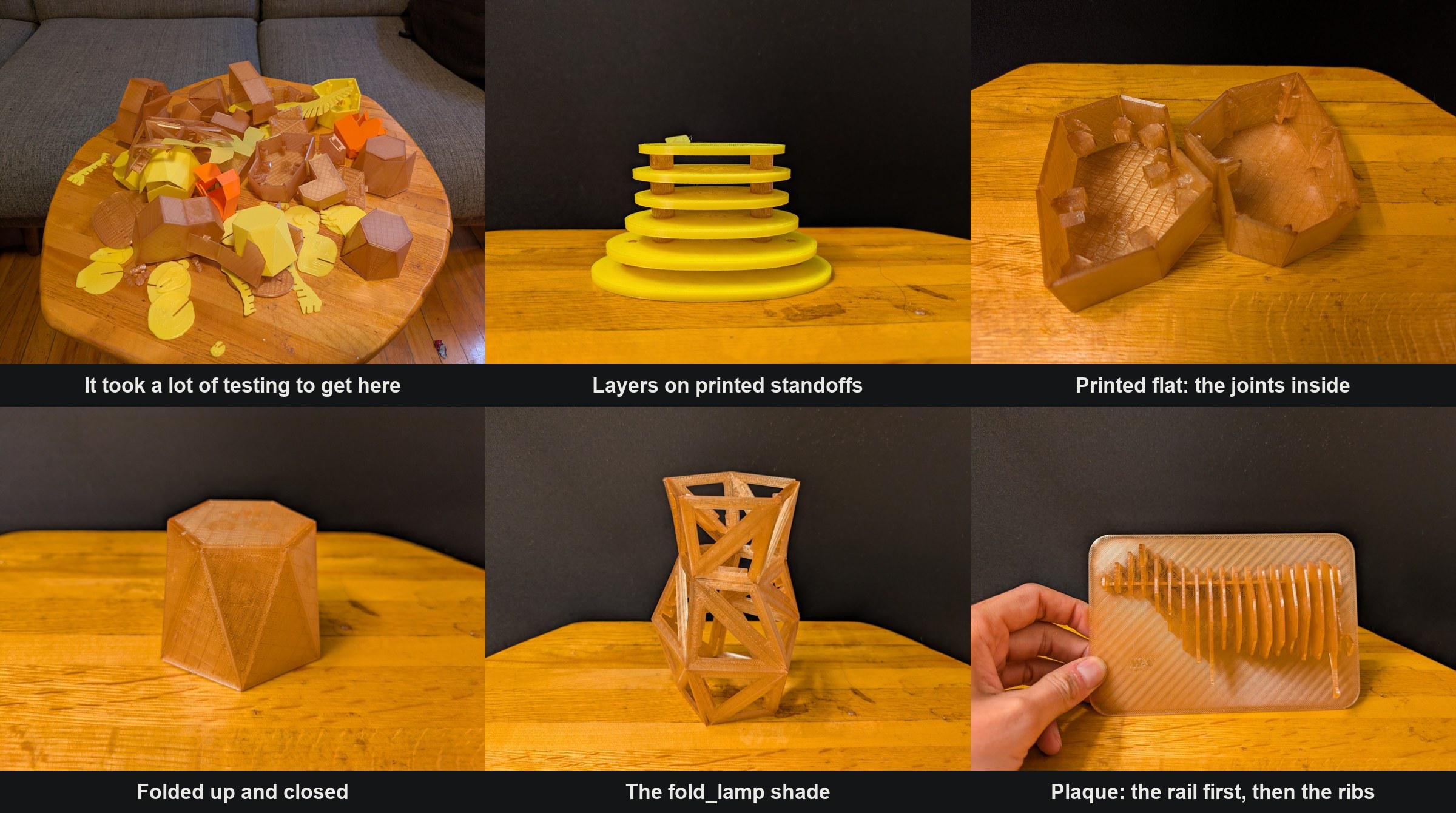
Developer here: I make Lamina. It is free and open source, and nothing is for sale. My own use: the photos are the test prints of this release from my H2C, a lamp shade printed flat and folded, layers on printed standoffs, and a cow plaque where the rail goes in first and the ribs slide onto it.

It turns any 3D model into flat parts and gives one 3MF per plate, with the settings for each part and a number on every part. It took a lot of testing to get here, and it is still young, so tell me what breaks.


r/3DPrintingTools • • 1d ago

New Tool FilaPrice find cheap-er filament

Thumbnail filaprice.com
3 Upvotes

I built filaprice.com.

This is the starting point for a website designed to track filament deals and where to get them. I run a 3D print farm and have been wanting an easier way to find filament deals across many different websites compared to what the standard prices are. This started as a local app I ran on my desktop that I found useful, so I decided to turn it into an actual website and publish for others to use as well.

It's nothing fancy and is not an all-inclusive list, but it is a starting point. One of the biggest goals I had was to keep it simple and easy to use, and not flashy. Find affordable filament and where to get it.

I'm open to ideas and constructive feedback.


r/3DPrintingTools • • 1d ago

Year in the making: Feedback on a custom print marketplace for print farms and makers

3 Upvotes

​I know there are a lot of what people call AI coded slop floating around, but not everything is and not everyone uses it as a do all. I have been building Print Farm Connect for about a year now, not throwing together a quick weekend build. The goal is to connect people who need custom 3D prints made with print farms that have open capacity.

​Makers upload their model and pick specs like material, color, infill, layer height, and quantity. Farms quote on the job, and once a quote is accepted, the farm gets protected access to the file, shares build updates through shipping, and messages right inside that job thread.

​I know some names in the space sound familiar at a glance, though my idea and things like 3DAPI are not the same.

​I would love input from both people running farms and people getting parts made:

​For print farms, do you lean toward a 3 to 5 percent fee per job, a subscription, or having both options? What helps you trust taking custom work?

​For people ordering prints, what would give you confidence to use a platform like this?

​I have been coding for years and use AI as a helper for speed and accuracy checks, not to ship unreviewed code, with real payment and security setup behind it.

​If you have thoughts from either side, drop them below. Always glad to hear what works and what does not.


r/3DPrintingTools • • 1d ago

New Tool I made SwapPilot, a free Klipper macro for multi-color printing with a single extruder — guided swaps on KlipperScreen, Mainsail and Telegram (with camera)

Post image
1 Upvotes

No AMS, no MMU, no prime tower: one OrcaSlicer file, and the printer pauses at each color change with a step-by-step window on the printer screen.

• Load + purge → Continue → cut → Yes, and the print goes on where it stopped

• Telegram panel with buttons + a heads-up 10 min before each swap

• Camera in the chat: a photo when the purge is ready (check the color from the couch), 10 s live videos, timelapse sent at the end

• AWAY mode: color-only swaps can continue by themselves; a material change always waits for you

• Power-cut resume, all settings on the screen

• Cartesian, CoreXY and delta (tested on my FLSUN V400)

Open source (MIT): https://github.com/hushamQA/klipper-swappilot

Happy to hear how it works on your printer!


r/3DPrintingTools • • 1d ago

New Tool would highlighting the actual problem edges make mesh warnings more useful?

1 Upvotes

i run 3D Print Pass, this is my own site.

you download an stl, it looks fine on screen, then your slicer throws a mesh warning at you. now you're trying to work out where the problem even is before deciding what to fix.

that's the sort of thing i'm trying to make less annoying.

in the public Studio sample, open Inspect > Findings and pick '3 non-manifold edges detected'. it highlights the measured area and shows how many edges are included, so you've got a specific place to look before choosing a repair.

try the built-in sample here: https://3dprintpass.com/Studio?sample=true

the sample has those issues deliberately so you can try the workflow. it's a mesh check, you'll still need to review your actual sliced layers before printing. it isn't a promise the part will print successfully.

if you've run into a warning like that, does seeing the area make it easier to work out your next step?


r/3DPrintingTools • • 1d ago

New Tool PrintCalc: a opensource cost calculator.

0 Upvotes

Hello! Lately, I've been working on a calculator to price 3D prints for small farms because I wasn't satisfied with the ones I found. My main reason for making this is that most of the ones I found are manual, so I wanted to make one that parses your sliced file directly while keeping it on your computer.

If you have any ideas, let me know! I'm open to suggestions and feedback!

Try it here; nothing leaves your browser: gunderson3d.github.io/printcalc/

GitHub repo: https://github.com/Gunderson3d/printcalc

Pricing reference: https://github.com/Gunderson3d/printcalc/blob/main/docs/reference/pricing.md

Main Features:

• Prices a print straight from the sliced file: material, print time, printer depreciation, electricity, labor, and hardware

• Reads Bambu Studio / OrcaSlicer .gcode.3mf, plain .gcode, PrusaSlicer binary .bgcode, and Prusa SLA .sl1 / .sl1s files

• Works for both filament (FDM) and resin (SLA) prints

• Detects the printer and the filament in each slot from the file, and won't guess when it isn't sure

• Built-in printer and material presets, plus your own

• Multi-material / multi-color jobs, priced per slot

• Multi-plate Bambu projects, with a choice of which plates to price

• Batch pricing with a quantity per job

• Per-unit hardware like magnets, screws, and inserts

• Suggested sale prices at whatever margins you set

• Manual entry for prints you don't have a sliced file for (print time plus grams or ml)

• Saves jobs as reusable TOML files, either linked to your profiles or fully self-contained

• JSON output for scripts and spreadsheets

• Runs in the browser at https://gunderson3d.github.io/printcalc/ with the same math and presets, and files never leave your Computor/phone

• Single binary for Linux, macOS, and Windows; installs with cargo install printcalc, cargo binstall printcalc, or GitHub releases

• Shell completions and a man page built in

• Embeddable Rust library (libprintcalc) if you want it in your own tools

• Open source, Apache-2.0.

Edit: added pricing reference

Edit2: clarified that this is targeted towards small farms rather than a works-for-all-sizes narrative


r/3DPrintingTools • • 1d ago

I built a free, offline CAD + slicer for iPad – design, slice and send to your printer without a computer

2 Upvotes

Hi everyone,

I'm not a programmer, but I wanted to design and print parts without sitting at a computer. Most iPad CAD apps stop at the STL and need a desktop or cloud slicer – so I built ScriptSCAD, a free, open-source suite that does the whole workflow on the iPad (and iPhone), offline.

Slicer:

- CuraEngine (the engine behind UltiMaker Cura) running locally on the iPad
- Printer library with 654 printers (from OrcaSlicer profiles) plus your own printers with custom start/end G-code
- Bambu Lab support (A1, A1 mini, P1S, X1 …) – exports .gcode.3mf for the SD card
- Send directly to OctoPrint, Klipper (Moonraker) or PrusaLink
- Import settings from G-code of Cura, PrusaSlicer, Bambu Studio/OrcaSlicer or Simplify3D
- Several objects per plate, lay on face, auto-arrange, automatic mesh repair
- 3D layer preview with time slider, print time and filament use

Design (ScriptSCAD Studio):

- Real OpenSCAD running locally – parametric models with sliders for every value
- Tap a part in 3D to move, rotate or resize it
- Optional AI: say "make the wall 2 mm thicker" and it edits the model (Apple Intelligence, ChatGPT app or Claude app – no API key)
- Import STL/3MF/OBJ to modify downloaded models, e.g. add a hole
- Export STL or 3MF with colors, or open it in the slicer with one tap

No account, no subscription, no tracking, GPL-3.0. It runs inside the free Scriptable app; install takes about 5 minutes.

Please note: the slicer is still new. Check the layer preview and stay near your printer for the first prints, especially with a new profile.

GitHub:GitHub

I'd love feedback – especially from Bambu and Klipper users, and if a printer profile doesn't work for you.


r/3DPrintingTools • • 2d ago

New Tool Free browser tool that checks if a printed part will hold a load, with orientation and infill factored in

31 Upvotes

I'm a mechanical engineer and run FEA for work, so I made a simplified version for 3D printed parts: https://will-it-break.pages.dev

You load an STL, click the face that's held and the face that takes the load, and enter the weight. It tells you whether it'll hold, shows where it's most stressed, and warns you when the layers pulling apart is what will fail. It takes walls, infill and print direction into account, and there's a button that tries a few orientations and settings and picks the lightest one that still passes.

It's free with no account, and the file stays on your computer since everything runs in the browser. I'm still pretty new to hobby printing, so if it gets something wrong on a part you've actually broken, I'd really like to hear about it.


r/3DPrintingTools • • 1d ago

Dev Post [Dev] I built a free in-browser 3D converter (STEP/3MF/STL) + photo-to-printable model — looking for feedback

0 Upvotes

Disclosure up front: I'm the developer of MeshShift (meshshift.app). The converter and viewers are free; the AI photo-to-3D part uses paid credits.

What it does, from building and testing it:

- Converts between STL, 3MF, OBJ, GLB, PLY, AMF and STEP/IGES entirely in the browser (STEP runs through OpenCascade compiled to WebAssembly), so files never get uploaded. That was the main design goal: your files never leave your machine.

- Viewers for the same formats, plus a basic repair pass (removes floating bits and internal voids, makes the mesh watertight).

- The AI part turns a photo of a pet or object into a model, then runs a print-prep step: optional base or keyring loop, exact target height, hollowing. In my tests that prep step mattered more than the AI model itself; raw AI meshes almost always need cleanup before a slicer accepts them.

Where it's still weak: very large STEP assemblies are slow in the browser, and AI models of people's faces are hit or miss.

If you try it, I'd really like to know which conversion or file broke for you, or what you'd want added next (G-code preview? unit fixes?).


r/3DPrintingTools • • 2d ago

New Tool Free tool: design custom 3D-printable helical arrow vanes and export an STL

3 Upvotes

Hey all — I'm the developer of Vane Designer, a free app I built for designing custom 3D-printable helical arrow vanes.

You pick a cut, tweak length, height, and helical, preview it on the arrow, and export an STL to print in TPU. I'm a bowhunter and wanted a simpler way to iterate vane designs without redrawing them in CAD every time.

I'm looking for feedback, and I also have an Android closed test open if anyone wants to try the app itself. The app is free.

To join the test: first join the tester group (https://groups.google.com/g/vanedesigner-testers), then opt in here (https://play.google.com/apps/testing/com.acdcrete.helicalfletching).

Happy to hear what's confusing, what's missing, or what you'd change in the designer.


r/3DPrintingTools • • 2d ago

Made a batch STEP to STL converter with part thumbnails, plus an FDM printability check

1 Upvotes

The first converts STEP, IGES, OBJ, 3MF and STL into STL, 3MF, GLB, OBJ or PLY in bulk, with no CAD install needed. It meshes STEP with OpenCascade at 0.05 mm by default, and you can tighten that for small parts. Every file also gets a shaded PNG thumbnail (iso, top, front or whatever views you want) and its size, volume and whether the mesh is watertight, so you spot broken exports before you slice. https://apify.com/alecrm98/cad-file-converter-thumbnails

The second is a printability check. It flags walls under 1.2 mm (three lines on a 0.4 nozzle), overhangs past 45 degrees in the best of 6 orientations, bridges over 10 mm, tiny holes, and parts that won't fit your build volume, with the measured number next to the limit. It also estimates filament weight for a chosen material and infill. https://apify.com/alecrm98/cad-manufacturability-check-dfm-for-stl-step

They run on Apify, so you can use them from the website, an API call, or automations like n8n or Zapier. They're two and five cents a file, and an empty input runs a free demo. Happy to add formats or checks people want.


r/3DPrintingTools • • 2d ago

I built a free cookie cutter generator for 3D printing: 104 shapes, names, your kid's drawing, ready-to-print STL/3MF

Thumbnail
youtu.be
1 Upvotes