r/3Dprinting • • 3d ago

Question What design program to use?
Post image

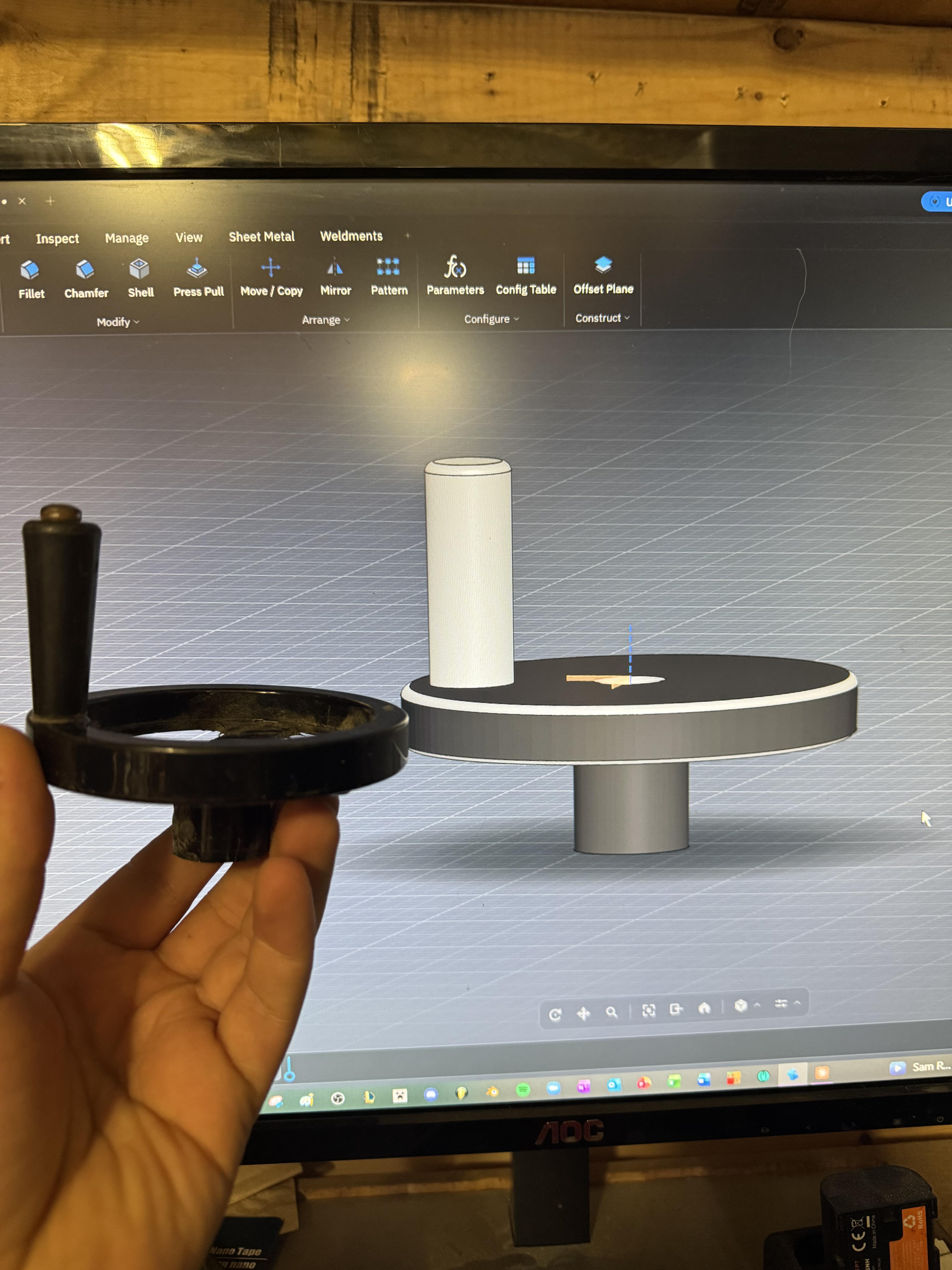
I am using solidcraft and was wondering if there was a better one or if I just need to buckle up and learn it?

This is the tail stock for my delta 46-700 tail stock

82 Upvotes

248 comments sorted by

113

u/Jhorn_fight 3d ago

Onshape or fusion 360

27

u/satchm0h 2d ago

One more vote for OnShape. I learned Fusion 360 pretty well then they started removing features from the free version. Shifted over to Onshape. Happy user.

Note that anything you design in the free version is available to anyone (if they can find it). If you want to own your work, ya gotta pony up. I’m fine with that arrangement.

18

u/reditusername39479 Bambu p1p + Ams 2 2d ago • Bravo

Good luck finding my untitled design

5

u/CraftyPancake 2d ago

What they remove from free version?

7

u/satchm0h 2d ago edited 2d ago

STEP file exports
Extensions
multi page drawings
Cloud rendering
Generative design
Simulation
CAM

…probably more and what’s next?

7

u/CraftyPancake 2d ago

Onshape has all those?

→ More replies (1)

3

u/DnDkonto 2d ago

I just did a batch export of all my designs to step files, to try them out in SolidCraft. I'm on the free version.

→ More replies (2)
→ More replies (1)

35

u/Big-Bank-8235 P2S/P1S/CoreOne/A1mini 3d ago

Onshape over Fusion 360.

Onshape is so much smoother and faster, as well as having a better modeling engine

4

u/Jhorn_fight 3d ago

I agree but I do work with a lot of flight sim hardware which seems to always be modeled in fusion

10

u/Refrakt0r 3d ago

oneshape is basically solidworks lite in a browser.. best free 3d cad imo

4

u/QuajerazRevived 2d ago

Onshape is much closer in design language and functionality to Fusion rather than Solidworks

2

u/WillD2007 2d ago

I’d disagree, Onshape and Solidworks are definitely more related then Fusion and Onshape

5

u/jrsaurusrex 3d ago

Seconding onshape. I am very much a hobbiest and self taught both in 3d design and 3d printing and onshape has been very useful. I don't feel limited like some other free design programs. I think if you are not used to 3d design or cad work (why I assume OP is asking) in general then the answer is just dive into it. It was a bit complicated for me to understand and learn to work in 3d but once you do a few simple designs things start to make a lot more sense. Plus it seems onshape has a lot of support and tutorials available on YouTube.

40

u/designbydave 3d ago

SolidCraft will be as easy and intuitive to learn as is, much better than FreeCad, however it is still very much a work in progress. Things like bugs and incomplete or missing features may hinder your learning process. You may not know when something is wrong because you are doing it wrong, or the program isn't working as intended. 

I'd recommend signing up for a free Fusion360 account to learn, then plan to transition over to SolidCraft when it becomes more mature (since SolidCraft is a Fusion360 clone, that transition should be seamless.) 

SolidCraft is rapidly developing though. The community is VERY active. I've been following them closely. At the rate they are going, it won't be long before SolidCraft blows the pants off of every free/low cost cad out there and even rival the big bucks programs. I'm very excited for it. 

12

u/boots_n_cats 2d ago

I have dropped Fusion for SolidCraft at this point. I would not recommend everyone do that but it’s certainly good enough for a lot of solid modelling and the user experience is miles better than freecad. The mcp server is also super nice. Am able to get an agent to stamp out variations of my design with different parameters and tolerances and assemble them into 3mfs with multiple plates all from a single vaguely worded typo ridden prompt. It needs a lot of work but for something that’s existed for a month or two it’s shockingly good.

1

u/StucklnAWell 1d ago

I have too, solely because of Linux support. If Fusion worked on Linux, I'd still be using it. So far, SolidCraft is an amazing Linux alternative. Much more usable than FreeCAD or AstoCAD IMO, as much as I'd like to use them.

3

u/DnDkonto 2d ago

Same. I hope my bug reports make a difference. Love that it opens in a snap.

9

u/addyrajput 3d ago

Honestly, I'd recommend learning a proper parametric CAD software like SolidWorks, Fusion 360 or Siemens NX. I personally use Siemens NX 12 for mechanical and mould design. Once you understand the basics of parametric modelling, designing parts like this becomes pretty straightforward. But if SolidCraft is getting the job done, there's no real need to switch just yet

2

u/archerdynamics 2d ago

Interesting, I'm looking at going to a place that does molds as well (investment casting) and uses NX, I wonder if it might be the same company you're at. I've poked around NX a little but it's not very happy running on my gaming desktop and it's a big learning curve coming from Fusion.

23

u/samuelgtemple 3d ago

Fusion all the way.

34

u/Fearless_Ad1055 3d ago

FreeCAD is free 👍

21

u/Disastrous-Vastrous 2d ago

Copying my comment from another post:

FreeCAD. I will shamelessly plug this software till I die. It works. It's got great beginner tutorials . it's got longevity with a dedicated team behind it. It's got plugins. It's Parametric. You can change the navigation style to fit your preference. Here's a list of YouTubers and the subjects they cover for free:

Beginners: Deltahedra

FreeCAD Tools: MangoJelly Solutions for FreeCAD

BIM (Architecture) Workbench: FCB Lounge

Complex Modeling: DuyQuang Dang

Woodworking: dprojects.woodworking

CAM Workbench: Open Source CNC

Fuqing FreeCAD people. 

11

u/Olde94 Ender 3, Form 1+, FF Creator Pro, Prusa Mini 2d ago

As a professional, i have two problems. They flow is so different from the tools i use in the industry ( inventor/solidwork/creo/onshape) and the performance on large step files is abysmal.

But it’s absolutely a very relevant tool for 3D printing

1

u/Disastrous-Vastrous 2d ago

It's very much the hobbyist/small business software. 

7

u/GoudenEeuw 2d ago

I switched from OnShape to FreeCAD a few months ago with MangoJelly tutorials. It's more capable than I would ever 3D print at home. I picked it because I was done with licensing and limitations as a hobbyist.

3

u/ohhellperhaps 2d ago

I'm in the same place. Love Onshape, but the licensing (and vulnerability to changes therein) are becoming an issue. The step from Free to paid is too large for my use case. Not quite made the move yet, however, but need to bite that bullet at some point.

5

u/bokitothegreat Prusa Core one + 2d ago

I can literally model this in freecad in 20 minutes.😁

4

u/PapaOoMaoMao 2d ago

I started with FreeCad. I've never needed to try anything else. It's had some major revisions and it's capabilities have increased massively. For what I do, it's easily enough. I'm not very skilled at using it and often watch a tutorial while trying to do that one thing I'm trying to make, but it works.

1

u/Disastrous-Vastrous 2d ago

I'm blown away at how capable it is. 

5

u/fab138 3d ago

Shapr3d

2

u/Phenylethylamne 2d ago

I love it but it misses some stuff as a amateur learner. Today i found out u can draw on curved surfaces.

59

u/Pillly-boi 3d ago

FreeCAD.

78

u/Adventurous-Emu-9345 3d ago edited 3d ago

As someone who works with CAD daily, I really want to like freecad but I find it incredibly frustrating to use and couldn't recommend it in good conscience to a beginner. Like, why do they refuse to even offer the option for button labels?

If you already have CAD experience it's at least mildly annoying to sift through dozens of tiny icons looking for a specific feature only to find out you're in the "part" workbench, when you should have been looking in the "part design" one. Come on, that's like at least two of The most basic UX design rules broken right there, for no good reason.

I can't imagine going through this as a beginner, who could at least use the labels as a clue what the given button might do.

28

u/qewer3333 3d ago

As someone who has contributed to FreeCAD on UI/UX and graphics (start page, splashscreens + some other stuff), you are right about UX, but many people don't know the reason there. It's not just "the devs didn't follow basic UX rules".

FreeCAD is a VERY old piece of free and open source software (FOSS), were talking around 25 years here. When FreeCAD was first being developed, feature based parametric design wasn't even a thing yet (or common at least), object and boolean operation based solid design was more common, and this was when the Part workbench was initially developed. As the years went by and commercial CAD suites started introducing feature based parametric CAD, that's when the Part Design workbench was later developed. And FreeCAD can't really match the speed of development of commerical CAD sadly as any FOSS project, it's continued on by volunteers and people willing to contribute.

This is not an "excuse" to defend FreeCAD, I just wanted to mention this since so many people who look at FreeCAD (and other FOSS projects in general) criticize it without knowing the reason as to why it is that way, and that it can be fixed with their help. FreeCAD has come a long way in the last few years, especially with the 1.0 release, all because of contributions from some very skilled people.

4

u/luksfuks 2d ago

Blender went through a painful invasive UI redesign, and then it took off. Why doesn't FreeCAD do the same?

2

u/qewer3333 2d ago

Not enough skilled people willing to contribute.

→ More replies (3)

15

u/Big-Bank-8235 P2S/P1S/CoreOne/A1mini 3d ago

FreeCAD lacks refinement. Going from a professional based platform like Onshape, Solidworks, or Fusion, it is very hard to go to FreeCAD, but if you learn on it, it is not that bad.

12

u/tfhfate 3d ago

I disagree, the lack of refinement can be extremely discouraging for someone learning, I self-learned all the software mentioned above and had no problem but with FreeCad I was totally lost and needed guidance, I totally support the team behind it and wish them the best but I won't suggest any beginner to start learning with it.

2

u/Big-Bank-8235 P2S/P1S/CoreOne/A1mini 3d ago

I can see that.

At least from what I have seen, people that are new to CAD would be more willing to deal with those issues, simply because they do not know what is better.

→ More replies (1)

2

u/QuajerazRevived 2d ago

I don't think that's true, though. When you're a beginner is when the quality of your tools matters the most. A beginner won't know how to make something unintuitive work, and will probably give up entirely if theres too much friction.

2

u/Pillly-boi 2d ago

I personally switched from Fusion to FreeCAD and have found it so much more fun and enjoyable to use. Fusion felt like I was designing in a web browser and I much prefer desktop apps. Plus fusion is slow and will crash because you breathed too hard. Them starting to advertise Fusion360 as a AI first CAD software didn’t help me want to stay on it either.

→ More replies (1)

3

u/Adventurous-Emu-9345 3d ago

I'm not talking about refinement, others are lacking here too (oh, what's that, you want a usable 3D threads feature in Onshape - well, screw you! no pun intended).

I'm talking UX design 101.

6

u/Big-Bank-8235 P2S/P1S/CoreOne/A1mini 3d ago

I consider UX Design to be part of what I consider "Refinement". Most professional based softwares have their UX profected and consistent.

Yeah Onshape thread tool it not great for 3d printing. Fusion is on top in that case. But once you set up some custom profiles it is comparable.

1

u/stray_r 2d ago

It's not so much refinement, as a very different paradigm.

Freecad has absolutely perfected it's way of doing things and it's way is every operation needs a very specific tool that only does one thing. Even if several of the tools wrap the same operation differently.

Fusion (now sans the 360) and I think the majority of professional and proprietary 3d CAD software has gone down the opposite route of let users grab a tool that bundles several similar operations even if they are different under the hood.

Consider a sketch on a surface of an existing object, fusion uses the same tool to extrude that sketch as a new body, join it on to the existing body or extrude and cut into the existing body. In freecad that's pocket at least the pocket and pad tools, I'm unsure if there's more tools that also do something I'd reach for with extrude.

7

u/Lorenzovito2000 3d ago

The reason that I can forgive the majority of these issues are as follows.

  1. It's free
  2. It's compatible with Linux

2

u/DatHollowBoi 3d ago

I used autocad a bit then did one project on fusion. I moved to freecad a while ago and yeah its a bit confusing at first but its really not that bad. Now i love freeCAD and would not use anything else. And in the age of AI its super easy to ask it questions and it will give you the answers 60-70% of the time.

1

u/aefie 3d ago

What do you use?

2

u/Adventurous-Emu-9345 3d ago

For 3D printing, I find Fusion to be the most powerful and user friendly. I don't love the way it handles multi-body parts and assemblies, but maybe that's my workflow.

For work, I used to love Solidworks, but we don't have it at my current job unfortunately. If I wasn't on Mac I would consider paying the 50€ per year for the home license.

1

u/agaloch2314 3d ago

Agree. I love the concept of freecad but it’s just so difficult to use coming from Fusion.

2

u/UlrichSD 3d ago

I stepped away from fusion several years ago as the free licence started to get a lot more restrictive out of principal.  I use free cas now and will say it has a very steep learning curve but once it clicked the it became a lot easier.  

I originally leaned cad 25 years ago on AutoCAD (I don't use cad professionally myself but it is part of my industry) and fusion was tough to do well coming from that.  

9

u/MisterMakerNL 3d ago edited 3d ago

Use FreeCAD so you like the other cad programs more.

4

u/StatisticianTall2368 3d ago

Try Layerling if you want something really easy to pick up. It's a free, better version of Tinkercad.

https://layerling.com/

7

u/penmoid 3d ago

SolidCraft in these recent releases is actually getting pretty good. I’ve been giving it a go lately as an alternative to OnShape. It’s definitely not as good as OnShape yet, but you’re not limited to only public documents on it (I use the free tier of OnShape). I also tried out FreeCAD as some here have suggested and I found the user experience to be very frustrating.

7

u/RaielRPI 3d ago

FreeCAD is free and open source and booming right now, but if you just need simple and streamlined you can try a free onshape account. I used onshape for years and love it still but I'm working on trying to master FreeCAD to move all my files under my own control

17

u/Krabelj 3d ago

Solidworks. I don't get it how people are able to use Fusion. I need to spend so much effort to make anything.

24

u/Kronocide 3d ago

As an experienced CAD engineer that used :

Inventor
SolidWorks
Fusion
FreeCad
OnShape
Solid Edge
SolidCraft
CATIA

My current recommendations for most people is SolidCraft, and it's free, runs locally, looks good and is easy to use

5

u/DistinctRule2132 3d ago

I tried solidcraft yesterday. Im deff switching to it. Much cheaper (free), does the job. Only thing that i dont like is that some shortcuts are not universal. But the s button and search does the job

2

u/Economy_Trip2135 3d ago

Agree. Have done work on cad since 2000. Have used them all, some professionally and now work for myself. Just started exploring solid craft and very impressed. For an inexperienced user, it seems very intuitive

1

u/Evilstib 2d ago

Have you noticed any limitations compared to fusion?

2

u/Economy_Trip2135 2d ago

I'm not that deep into it yet, just did the basic sketch, play with the solid space fillets and such. I'm going to mess with joints and such tonight or tomorrow.

→ More replies (1)

1

u/ProfessionalMockery 3d ago

I tried solidcraft about a week ago but it ended up getting extremely slow the more complex my model got. Tried mitCAD and it was much snappier with fewer bugs.

1

u/sudden_aggression 2d ago

Are there any particular hardware constraints for running this with decent performance?

1

u/Kronocide 2d ago

It runs on my Samsung smart fridge

1

u/ValuableSleep9175 2d ago

20+ years Catia v4 v5 and v6. I hate fusion but at least it is free.

Solid craft is worth trying?

1

u/MatijaKlobasa 2d ago

Solidcraft is very close to replace Fusion for my needs. The only thing they need to make work are chamfers, filets and press pull on threads and pipes. Add google drive and you have a perfect replacement. After that Fusion is done for me.

1

u/Impressive_Fish_7498 1d ago

Is it like download like fusion? The one I like that’s really solid is shapr3d I can use on my iPad on the go laptop and my pc. It just has too many pay walls. But for me it’s one of the best ones. I tried fusion in starting to get used to it but it’s not as smooth as shapr3d onshape is the worst one at least for me.

1

u/MortgageNaive6791 1d ago

I use onshape and fusion, If i’m modeling on the go i’ll use onshape bc of its model to drawing features and it’s okay on the ipad but if im actually at a computer ill use fusion360

1

u/MediumAd4983 1d ago

But no CAM support yet.

1

u/Much-Firefighter-957 1d ago

Do any of these software provide a way to scan a 3d object to digitize them? Im new to 3d printing

→ More replies (1)

3

u/archerdynamics 2d ago

Coming from Fusion it feels exactly the opposite way to me, feels like doing anything in Solidworks requires three clicks while Fusion only requires one. CAM is a different story though, I hate Fusion and trying Mastercam was a revelation.

3

u/Howlingmoki 2d ago

I've never messed with SolidWorks, but picked up Fusion fairly easily with my only prior experience being AutoCAD (r12>r12).

I've been poking at SolidCraft recently and it's been pretty damn good. I'm not quite willing to nuke F360 but if it keeps improving at the rate I've seen the past few weeks it's only a matter of time.

FreecCAD absolutely pisses me off every time I try doing much of anything with it. I only keep it around for STL>STEP conversion because sometimes it does a better job than Fusion, but the new mesh conversion in SolidCraft give me better results than FCAD or F360 as long as it's a smaller object.

2

u/ardauwu2k3 3d ago

I was planning to migrate to solid works from fusion i would love to hear your thoughts on solid works.

1

u/xEntex4 3d ago

I have used both and really prefer fusion over solid works for personal stuff. To me theres like a ranking of how "statically typed" Cad programs I have used are and to me the ranking is:

  1. CATIA V5
  2. CATIA V6
  3. Solidworks
  4. Fusion

As in Fusion feels a lot faster but can also break more easily as it let's the user get away with sketchy CAD practices more often. It's a preference thing for sure though.

7

u/Kronocide 3d ago

You like CATIA ? I suppose you're on the spectrum

→ More replies (1)

2

u/WorkingInAColdMind 3d ago

I tried many CAD attempts and failed until I got to Fusion and it finally made sense to me. I’ve tried switching to FreeCAD and others and they all have a specific way to go about doing things that just confuses me every time. I think it’s just differences in how people think.

2

u/Notsurewhyicomehere 3d ago

Seems that a lot of people who have been using Solid Solidworks for years keep using it because of the learning curve and tend to stay with them. You are not alone.

2

u/QuajerazRevived 2d ago

Really? I feel the opposite, everything in solidworks is a little bit more obtuse and complicated for no reason. For instance, you can't just turn an extrude into a cut, you have to select "extrude cut" rather than "extrude". And it runs MUCH worse in my experience, especially on lower end hardware.

2

u/insomniac-55 2d ago

Fusion, Solidworks, Onshape, Inventor...

For basic stuff they're pretty much identical. Sketch geometry, constrain it, create 3D features using extrude / revolve / sweep / loft.

If you can use one you can use the others once you know the menus and icons.

For complex designs and assemblies, they start to differ a lot more.

3

u/Parking_Rate_759 3d ago

I went from using Solidworks for 3 years (I also have my CSWA certification) to Fusion a couple months ago, and holy shit is Fusion so much better.

I'm not saying Fusion does everything perfectly, because it doesn't, nothing ever does. However, the trade offs are so worth it and I find it much easier and faster to use

1

u/Bot1-The_Bot_Meanace 3d ago

Certainly takes some getting used to. I learned solidworks in uni and switched to fusion once my license ran out

1

u/Kolognial 3d ago

Anything I do in Fusion essentially is to apply the skills I have in 2D vector graphics and to extrude the 3D from the sketches I draw. That makes it very easy for anything technical, which is what I use my printer for.

On the other hand I would never use the free forming tools in Fusion (can't even recall their actual name), because to me it is the most cumbersome process I've ever seen. It' feels like working with clay while your hands are tied behind your back.

1

u/0183653249 3d ago

I've tried Solidworks and FreeCAD many times, but always find my way back to Fusion360. Much better UI, and thus a much faster workflow (Which means my idea doesn't stop at my finger tips, but goes from my brain straight into the design) and much less time investment to see results. When I used FreeCAD I never thought "let me go explore the functionality of this program", in Fusion360 I did.

That being said, please, Solidcraft, get good fast so I can leave it all behind and finally switch to Linux for good.

1

u/engineering_bliss 2d ago

Something about it being thousands less for a seat. Also Solidworks won't develop for Mac so they can get fucked. I can model in Fusion pretty fast. Also CAM in Solidworks is dog shit.

1

u/Jim-248 2d ago

Most hobbyists learn Fusion the way I did. From You Tube videos.

1

u/AllArmsLLC 2d ago

Fusion works perfectly fine for part modeling. It's assembly constraints suck. I would greatly prefer Solidworks but I'm not gonna spend $5000/year.

SolidCraft actually looks promising, but I haven't tried to do assemblies in it yet.

PhysCAD is another new option, $50 for a license.

1

u/cd85233 2d ago

Were you also indoctrinated in school? I took a few classes and was never able to shake it. 

1

u/q-qp-p 2d ago

Being poor can make you good at many things lol

1

u/Prezbelusky 2d ago

MCP with claude xD

1

u/Ha3mster 2d ago

Its pretty much the other way for me. I started cad on fusion and have been using it for 2 years now. Downloaded solid craft to test it and I was confused.

1

u/wt_2009 2d ago

came from fusion to solidworks. what are you saying, they are the most similar cads i ever saw

1

u/Father_Johns_Pizza 2d ago

SolidWorks was by far the most difficult to learn and least intuitive for me. I personally really like rhino.

1

u/Popular_Dinner2182 7m ago

Solidwork isnt parametric

3

u/Alarmed-Property-715 3d ago

SolidEdge with Community license. It's free, you can use to make your own stuff.
I learned long time ago, so...

5

u/33cl 3d ago

Fusion

5

u/fellipec 3d ago

OnShape or FreeCAD.

For now.

2

u/ChangeExtreme7971 3d ago

Try foremkacad.pl - it's free, browser based and very easy to learn. It feels very similar to Siemens NX

3

u/numetheus 3d ago

This is easily done in Plasticity 

3

u/jjdk06 3d ago

Fusion is free for hobbyists and 100x better than freecad

2

u/red-dot-isla 2d ago

I’ve had fantastic results using Claude and a plugin called text-to-cad. Some measurements, some photos and a prompt, you get a good first draft. Spin up a subagent reviewer as an FDM expert and it’ll optimise print settings. If measurements aren’t accurate, it will give you a few test models to figure it out. Give it a go!

3

u/isendel11 2d ago

You're being downvoted because AI bad on Reddit. I have absolutely 0 cad knowledge, a full time job, a kid etc, I can't learn cad right now. I bought a 3d printer earlier this month and Claude has been amazing at building models so far. OpenSCAD is just a scripting language and Claude excels at scripting. Minor tweaks i can do myself in OpenSCAD but the time and learning curve i would have had to go through to start from scratch would have been a blocker in this moment of my life. A few prompts produce such good starting points, I love DIY and I was amazes by how it can also handle complex things, like "put a Sakura decoration on this Tarte holder i designed for my wife".

2

u/AlienZerg 2d ago

Same here! (Link to text-to-cad for those interested)

1

u/Every_Bread_5880 2d ago

Is the subagent reviewer running local? 

1

u/red-dot-isla 2d ago

No. They are in the cloud separate agents on Claude in the same session. I’ve given access to Claude to use Bambu Studio on the computer as well so it’s able to check settings. But I’ve learnt that Bambu Connect that’s in beta lets Claude send the sliced file directly without Bambu Studio changing anything (still can’t figure out why that happens). Makes the workflow a lot smoother!

2

u/Pesuri 3d ago

OpenSCAD

0

u/flappy292 3d ago

bruh..... thats like telling someone now you have a lerner permit drive this idk... semi

1

u/bubblegumpuma 2d ago

Maybe I'm just terminally computer-brained, but I have found OpenSCAD to be pretty easy to pick up for basic usage, and I personally appreciate it when people put out their files, as they're pretty easy for me to modify fairly extensively even if they aren't properly parametric.

→ More replies (1)

1

u/hobblingcontractor 3d ago

Claude and whatever it thinks is a good idea :D

5

u/Sydney2London 3d ago

Of you want to learn to cad go with what the others are saying. If you just want the file for 3d printing then this is the answer. Claude will draw this perfectly with minor back and forth.

Take a couple of photos from different angles and give it a few key dimensions and you’re done.

2

u/hobblingcontractor 3d ago

Exactly. CAD has always been notoriously hard to learn and it depends on what you're trying to do with it. Half the time I'm just trying to make sure something fits the dimensions I need or check the load bearing properties.

2

u/Sydney2London 3d ago

And what a surprise… anything related to AI on Reddit gets downvoted… almost like these kids think they can make it go away by disliking it

3

u/hobblingcontractor 2d ago

My irritation with being anti AI in 3D printing is because it seems so based in being a purist. "Why do you use a 3D printer instead of learning injection molding, cast the part out of brass, or make it out of wood?" I'm trying to print a clothes hook, not learn smelting or pressure dynamics.

→ More replies (1)

1

u/zerocoldx911 2d ago

Minor is an understatement lol

1

u/hobblingcontractor 2d ago

Depends on what you're trying to do, tbh. Sonnet 5.5 is pretty good at taking well formed requirements, turning them into something functional. Didn't need much back and forth at all to make an esp32 screen housing.

→ More replies (4)

1

u/Sydney2London 2d ago

Absolutely not true. If you work with Claude you can get this nailed in 15 minutes and 3-4 passes.

2

u/QuajerazRevived 2d ago

Yeah, why bother having a brain or any talents whatsoever when you could outsource all that pesky thinking to an ai?

→ More replies (1)

2

u/AlienZerg 2d ago

I've had good results with this text-to-cad skill in combination with Claude.

1

u/Realistic_Toe7356 3d ago

probably OpenSCAD, because when the model is text based you don't even need an MCP

1

u/hobblingcontractor 3d ago

I'll tie it into Fusion if I need something more complex because it has extra capabilities that are nice.

1

u/babydonthurtme2202 3d ago

Autodesk fusion. The hobbyist version and the student one when I'm on campus.

1

u/Topher_Caouette 3d ago

I’m a freak and I use the free version of MasterCam but I’m learning OnShape now because I was originally an Autocad guy and it feels similar. Also MasterCAM is not MasterCAD for a reason.

1

u/mcfuddlebutt 3d ago

That looks like a bevel knob for a Delta Table Saw. If you want to get a direct replacement, Facebook marketplace always seems to have one available. Also really cheap on Ebay.

Edit. Just read your text lol. I'd bet a saw handle would fit just fine with your lathe.

1

u/Quiet_Snow_6098 Only legends run Ender 3 printers 3d ago

you are doing great, just spend a few more minutes in Fusion and you would get your desired output.

Fusion is free for personal use

1

u/Rare_Bass_8207 3d ago

Tinkercad, added Fusion, now Layerling. Goodbye, SolidWorks!

1

u/tfhfate 3d ago

Any software you're comfortable using.

I learned to use SolidWorks at school then never touched a CAD software for more than 10 years and then learn 3D modeling again with Fusion360 and now I use OnShape because Fusion isn't available on Linux.

I tried FreeCAD but it's too "stiff" and unintuitive for someone learning imo. I suggest to start on the free version of the software I mentioned and if you're motivated move on to FreeCAD or wait until they improved their UI/UX

1

u/Early-Path8112 Bambu Lab P1S, Sunlu Filament Dryer 3d ago

I’ve used Inventor some… primarily used Fusion 360. Dipped my toes into Solidworks recently. I’m definitely most comfortable with Fusion 360. It works best for me.

1

u/MisterMakerNL 3d ago

Try Mitcad or SolidCraft.

1

u/Baguette_Theory Flsun V400, Elegoo Saturn 3d ago

Shapr3d is great and easy to use

1

u/Stiggalicious 3d ago

My first foray into 3D CAD was with Solidworks. I got used to it pretty quickly and it worked well for me all throughout college, but having to buy licenses after school that are that expensive is not great. Switched to the hobbyist license of 360 Fusion and it’s just about as good as Solidworks, and isn’t all that different either. The hobbyist license really is quite nice.

I tried FreeCAD after their huge update, and it’s still a highly unintuitive mess. If you’re working from scratch maybe you can get used to it, but I find it extremely frustrating to use.

I’ve been toying with Solidcraft for a little bit now and it has a ton of great potential. Still quite buggy, fillets can be very finnicky/not work at all sometimes, but it’s really great for making quick simple things for the home that don’t have super complex geometry.

I still come back to 360 Fusion for when I need to do some more complex designs.

At work we use NX, which is just miles ahead of everything else, like the equivalent between KiCAD and Cadence SysCap/Allegro, but that software also commands a price well into six figures per year.

→ More replies (1)

1

u/martinkoistinen Prusa MK3S+ / Prusa XL - 5H / Prusa CORE One+ 3d ago

SolidCraft would be just fine for that model and you’ll essentially be learning Fusion along the way. If you do anything much more complicated, you’ll be ready for Fusion (or maybe SolidCraft will have caught up by then).

1

u/Kronocide 3d ago

OP, people that are recommending you to switch to another software haven't used SolidCraft. Or maybe have tried an antic version.

SolidCraft is a REALLY good software currently, I have many years of experience on Fusion and switched to SolidCraft because I genuinely think it's a superior software for 99% of project

1

u/Early_War_7342 3d ago

Filo affo

1

u/KissesFromOblivion 3d ago

Try as many as you can and decide for yourself. Preferences and usecase varies too much.

1

u/aaabeef 3d ago

I like OnShape as there is nothing to install and it is free as long as your designs stay in the public domain. For 3D printing stuff at home this is sufficient.

FreeCAD if you need, or will need, CAM. Fusion nerfed the HSMWorks CAM in the hobbiest version and OnShape's offering is silly expensive. You also keep the designs out of the public domain and the cloud of these are concerns.

There is also PhysCAD which is pretty new, but I like that you own it, not rent it. Haven't tried it but I am going to on my next project just to support the business model.

1

u/Gamma_Ray_1962 3d ago

Can you import .stl files to modify?

Thats the only thing I don't like about Fusion. Its possible, but a real pain to do.

2

u/dns13 2d ago

You can just ask the agent to recreate the object, works very well for not that complex parts - then you have a fully editable file with history.

1

u/Gamma_Ray_1962 2d ago

Does Solidcraft have an editable history, like Fusion?

1

u/dns13 2d ago

Sure

1

u/LIOMASTIANA 3d ago

After using freecad for 2 years I switched to OnShape and my experience has been amazing in comparison.

1

u/ganadaIf 3d ago

I use layerling, its more advanced that Tinkercad but less than fusion. If you aren't wanting to build an entire engine its a good place to start

1

u/Maxspeed120 3d ago

Fusion or freecad

1

u/itsmeanmuggin 3d ago

SOLIDWORKS

1

u/Kromieus 3d ago

Fusion360 -> great for labbing out lots of cad quickly without a lot of tedium
Solidworks -> great for parametric modeling with thoughtful feature choice

1

u/Jwn5k Stratasys uPrint SE+ | X1C | E3P | TT 2d ago

Autodesk Fusion (the free hobbyist license) and Solidworks, and possibly Autodesk Inventor soon too.

1

u/LeopardHalit 2d ago

Tinkercad

1

u/qzhal 2d ago

I've enjoyed SolidCraft and Fusion. Also "designed" a part with Claude Code and OpenSCAD. It even wrapped it in a frontend I can open in my browser, adjust parameters and get a live view. It won't be my go-to for everything, but it was very impressive how I could prompt it to explain the shape and get the result I need in OpenSCAD.

1

u/balexandre Ender 3X 2d ago

https://layerling.com is free, and all you need is a browser

1

u/gringo1980 2d ago

I have a rigid table saw that had the plastic angle adjustment knob break, I would recommend not using plastic, I ordered this off amazon and have had great success with it: https://a.co/d/0gm9b9yZ

1

u/polymorph-57 2d ago

Just threw this one together in VectorForge and only took about 3 minutes. Don't know any of the dimensions for the actual part so this was just guessed from the photo.

1

u/Tictak_Fenix 2d ago

After years on Fusion 360 I migrated to Freecad and I wish I did earlier. So if you are starting, I highly recommend you to learn it. There are lots of useful tutorials. I recomend Deltahedra

1

u/Fabricensis 2d ago

Generally CAD programs range on a scale of usability to capability

Solidcraft is on the usability side of the scale, if you are feeling hampered by lack of functionality, try to go deeper in the (more expensive) side of the capability spectrum

If you do not now what function specifically you are missing, buckle up and learn

1

u/Vashsinn 2d ago

blender with cad.

I always seem to do things the hard way tho.

1

u/ThirstyThursten 2d ago

Maybe LayerLing, it's a great in between of TinkerCAD and Fusion360! And it's opensource, free and local. 😇

1

u/AKfromVA 2d ago

Honestly I took a pic of something like this and gave it as many measurements as i could and it created an STL file for me

1

u/Skrubwizard1 2d ago

I use blender but I also do organic sculpting as well as haed surface so it was a no brainer for me with a few add-ons. If youre just doing hard surface funtional stuff i'd say use fusion but there are definitely other options

1

u/Background-Twist-344 2d ago

If it’s simple geometry I just use tinkercad

1

u/GOOMH Bambu Lab P1S 2d ago

I use NX. It's not the most intuitive of the box but once you get a hang of it you will prefer it to everything else.

If you are just using it for home use you can get a free copy of the student edition which is perfect for making stuff for 3D printing. 

NX is used by all the big dogs in industry too and for a good reason imo. It just makes creating objects a breeze once you have the basics down

1

u/Hootngetter 2d ago

I bounce between FreeCad and Blender

1

u/g713 2d ago

I like Alibre

1

u/michron98 2d ago

Try to get into FreeCAD. Not as easy to learn as Solidworks and the likes, but it can do everything other CAD software can and is free and open source.

1

u/4jakers18 2d ago

Onshape Onshape Onshape Onshape

1

u/julian_vdm 2d ago

Pick one and finish the project in it. I'd use FreeCAD, but that's just me. Is this a replacement part or just something for practice?

1

u/Additional-Turnip107 2d ago

Id actually get another metal one. There not that expensive on Amazon and the weight helps while throwing. Just my 2c.

1

u/Financial-Reply8582 2d ago

I can do it for you for free.. Just DM me

1

u/SSDragon19 2d ago

I only use fusion 360 cause I used Autocad in highschool for architecture class. It was fairly easy to transition when it's the same company and alot of similarities..

Yes I have issues with it, I have tried other programs, but almost all I've tried are worse than fusion. So at this point I'm committed to it.

1

u/kerneldesign 2d ago

SolidCraft est très bon, autant rester dessus.

1

u/Accomplished_Sport67 2d ago

I use Alibre Design. One time payment and your designs aren't saved on a cloud aka someone else's computer.

1

u/DeMischi 2d ago

Unpopular opinion: make good fotos with rulers for measurement. Hook up Claude Code with opus 5.5 with MCP to solid craft and tell it recreate it step by step using the photos and a detailed description by you.

Once it is done, change things by hand that didn’t work out or tell Claude to do it.

1

u/4ndy_1uv 2d ago

easy solution: connect Autodesk Fusion to Claude and describe wahr you need. both Apps have built in APIs to Connect to each other

1

u/Kluggen 2d ago

OnShape, but these days I'd just give Claude a picture and ask it to list the dimensions for me to measure for it to make it, without any other software.

1

u/alidan 2d ago

personally I use open cad, I value having the program on my computer and able to use it no matter what

far from perfect, especially because somethings I think should be normal I have to work around and fight, last model I made was a clip to re enforce a filter that was giving way at the top, I needed to draw the entire thing out add in dummy points so I could constrain everything perfectly, and I cant add points later on I effectively have to re do the entire thing when I don't get every point I need in series, bit frustrating, not going to lie, and I have needed some functional parts recently that in my mind I can easily make, but god knows it would be a dick pain in software so I just make it un orca and boolean out the part there instead.

when it needs to be complex, I get open cad up, when it can be solved with negative primitives and a primitive, I just use orca.

1

u/--10001-- 2d ago

I tried SolidCraft a few days ago, and was impressed!

As far as i know it's an open source free AI copy of Fusion/OnShape.

I'm using OnShape, and was able to create what i wanted, while in FreeCAD wasn't.

Try OnShape if you want - it's free, but all of your designs are in cloud an public.

And if you do, search "Too Tall Toby" on YouTube - best OnShape tutorials in my opinion.

1

u/FidgetyRat 2d ago

I’m a bit of a weirdo and do all my work through Blender mainly as I did some hobby graphical work in the past and I’m used to it.

1

u/AlternativeSalsa 2d ago

You can get that STL for free from McMaster Carr FYI

1

u/bluewing Klipperized Prusa Mk3s & Bambu A1 mini 2d ago

I was able to get an approximation of your of your handle in SolidCraft, but it ain't easy. Way too many workarounds for my liking. It's very rough around the edges to be very useful yet. On the upside, for those that like the clown car UI of Fusion, it is a vibe coded knockoff UI. In fact, there is a whole lotta vibes being given off with SolidCraft throughout. So one has wonder how long before the developer either gets bored or his vibe code goes up in flames.

OnShape or Fusion would be a far better choice to you. Fusion in particular would be an easy transition because of the UI.

1

u/TheCouchStream 2d ago

Is that the saw adjustment for the craftsman table saw? I totally modeled this already if you want the file let me know

1

u/Snapon29 2d ago

Does solidcraft work on a Samsung tablet?

1

u/Pyroburner OG Tarantula, Neptune 4+ 2d ago

I mostly use tinkercad it's simple and I like the push pull style. I can double click on things and type in dimensions. A stronger tool would probably be better but it gets the job done quickly. I work as an EE so I think it feels most similar to pcb layout and it just makes sense.

1

u/jbrrr_ 2d ago

SolidCraft is great. I think you just need to learn how to design things in 3D. It's a skill that takes a lot of practice regardless of software.

Personsally, I mostly use SolidCraft now and I drive it mostly by ChatGPT/Codex using the SolidCraft MCP. But can get in there and work directly.

A few weeks ago I migrated all my legacy stuff from Fusion360's stupid ass cloud. I will soon migrate all my recently designed stuff from FreeCAD to SolidCraft (I still love FreeCAD and still use it some when I also need FEM, but can see myself only using SolidCraft and learning FieldCraft).

If you really really new to 3d part design, Plasticity and OnShape can get easier to get started than traditional parametric CAD packages.

1

u/thayeeboi890 2d ago

Freecad because I use Linux and am unemployed af

1

u/ChrissTea86 2d ago

Any chatbot AI + fusion 360. Lookup 3Djesus on YouTube

1

u/DuBDzO 2d ago

PhysCAD 🤘🏾🤘🏾🤘🏾

1

u/LeaderLed 1d ago

I could model that in probably 30 min in fusion

1

u/MortgageNaive6791 1d ago

Fusion360 all the way.

1

u/BlueBirdDolphin 1d ago

You can use F360 but what's wrong with SolidCraft? It's a very new software but you can for sure design that part.

1

u/work_blocked_destiny 1d ago

Solid craft has a long way to go before it’ll replace fusion. Just use fusion360

1

u/Afraid-Library-7995 20h ago

I use Alibre CAD, u can pay monthly or buy it outright. Very similar to fusion 360 and costs less than 1 year subscription. My only complaint is that it currently only works on windows but Linux or Mac support has been mentioned. Can also do CAM and sheet metal.

1

u/PalpitationGlum3073 18h ago

I use maya or max.

1

u/Goldisaa 14h ago

You can make it in blender but its gonna be fun

1

u/9thoracle 5h ago

For that part, almost any of them lol. Faster modeling is almost always down to how much a person knows any particular software. I am partial to Solidworks but only because I know exactly how I would set this part up ahead of time. Again, the speed that I would make it has more to do with knowing exactly what tools to use.

That being said, knowing how models work is a totally different skillset that everyone slowly builds over time, regardless of what software they use.

1

u/Wootai 3d ago

Buckle up and learn. You’re probably making a few mistakes already using extrusions instead of rotations/lathe operations for your round parts.

1

u/bob_in_the_west 3d ago

As a programmer I really like OpenSCAD.


I actually haven't tried it yet but I bet that it's also easy to let AI help create an OpenSCAD script for whatever you want to design, since the script is human-readable and thus very accessible for AI just like other coding languages. I don't know if it could help you as easily with programs like Onshape or Fusion 360 apart from telling you step by step what to do.

1

u/basshead17 2d ago

I did a little work using AI and openscad for gridfinity.  It wasn't that good.  You might be better using Blender MCP. 

1

u/tragdor85 3d ago

I started playing with openscad with qwen3.8 27b this week. Can make basic shapes and geometry super easy to the right size. More complex things like cats, humans, etc so far come out looking like snowmen that the AI builds… but it is still cool I need to learn to manually model myself and let the AI build a base.

→ More replies (1)

0

u/extreme-nap 3d ago

When you enable the AI to interact directly with the CAD program like Layerling or Fusion, it becomes an amazing teacher working along side you. You can ask it how to do specific things and get led by the hand. However, you need to recognize when it might have some incorrect details like menu structure that changed some the time the LLM training was done. But having what is essentially a private instructor can be amazing.

-2

u/gilrstein 3d ago

I rambled a little about claude in a comment above. I pasted our post to my setupp here is what I have if you want the files (i'll host and share if you want them).. feel free to update me with measurements first, I can update it.

To size it to your lathe I need 4 numbers off your old wheel:

  1. Diameter of the screw it sits on, and is that end round, flat-sided, keyed or threaded?
  2. How the old one is held on: set screw, pin or nut?
  3. Hub length: how far the wheel sits off the tailstock
  4. Outside diameter of the wheel