r/3dshomebrew • u/BIGnTASTY15 • 1h ago
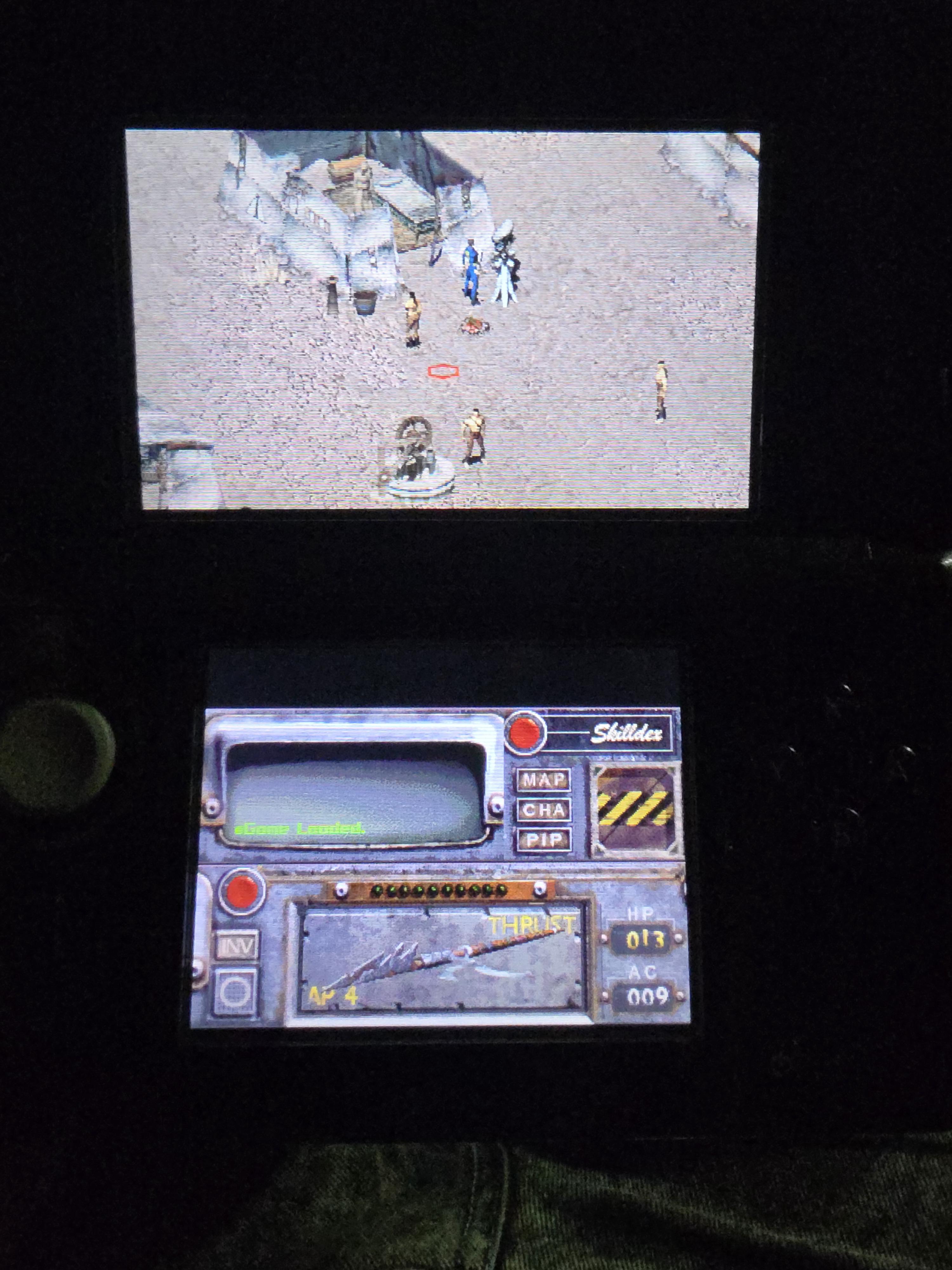
Controversial Fallout2
8
Upvotes
Got fallout 2 to run like FO1
r/3dshomebrew • u/latindiacritics • 3h ago
To view the community discussion that led to these rule additions, please visit this page here.
Hello, everyone. Latin again. We've updated the rules to better reflect the community wishes towards AI development. We also wanted to clarify some post flairs to keep things running smoothly. That way, everyone is comfortable and knows what to expect on the sub.
We've added two rules, based on general consensus in the community discussion (upvotes as well as comment type frequency).
Rule 10:
No AI Witch Hunting: No attacking, flaming, or use of derogatory language for AI usage in homebrew. Especially no active participation in group harassment of post authors. Civil discourse about AI is welcome and more than encouraged, but speech deemed uncivil, inflammatory, or unbecoming will be removed at moderator discretion.
This serves as an extension of Follow Reddiquette, but has been added to make the stance very clear. All opinions are welcome here on both sides, as AI continues to be a very prevalent topic of conversation. We will not remove civil discourse. However, there will be no tolerance for "uncivil, inflammatory, or unbecoming" language, usually used to harm a person. Posts and comments will be removed at moderator discretion, and action taken can be discussed in our modmail.
Examples of violations: a comment just saying "ai slop lmao", the word luddite, etc.
Rule 11:
All Projects Require a Public GitHub Repo: As of 23-11-2026, all projects require a public facing GitHub repository. This should serve as the primary download source for your program, as well as host the codebase.
This rule was also introduced as part of the community discussion, and is concise for a reason. All projects require a public GitHub repo. Your Homebrew can continue to have a Discord, a Telegram, an Instagram channel, but it must also include a public repository. This serves two purposes:
Going forward, all projects posted will require a public GitHub repo. No exceptions. Posts removed for violating Rule 11 can be reinstated if the user adds a repo.
We want to make sure users are aware of what flairs mean, and this serves as a guide to flairing your post accordingly. We have two flairs for users to use when introducing a project to the scene.
| New Homebrew | New Homebrew - AI FREE |
|---|---|
| AI had involvement (1-100%). | AI had no involvement. |
| Automod reply is required. | No automod reply necessary. |
This allows you to peruse homebrew at your own level of AI comfort, whether you're fine with none, some, or pure vibecode. Check the reply to the automod comment to see what level of AI involvement is within the software.
This also ties into Rule 11. Having a public facing GitHub allows users to report violations of Rule 6 (Properly Title and Flair Your Post) if:
If you have any questions, either regarding the rule changes or the flair policy, please feel free to contact modmail or me directly. Thank you for helping us keep the sub a safe place for everyone to enjoy modded software at their own pace.
LD
r/3dshomebrew • u/BIGnTASTY15 • 1h ago
Got fallout 2 to run like FO1
r/3dshomebrew • u/2figs • 2h ago

Using the official Japanese release as a base, I recently created a 3DS virtual console inject of the English translation of the Famicom Disk System version of Metroid, which successfully automatically changes disk sides, and even has English Virtual Console Menu UI. However, the only thing that is still in Japanese is the official e-manual, which is selectable from the home menu.
Rather than try to translate the Japanese e-manual, I figured something that might be nice would be to create a custom e-manual that's actually a map/item guide that I can pull up while playing, instead of using my phone.
Does anyone know how to go about doing this? I already made a few images I'd like to use for this project, which I've attached to this post. Ideally, I'd like to be able to just have all 3 images stacked on top of each other, and just be able to scroll down to the bottom. If it helps, I can DM the CIA I created.
If translating the Japanese e-manual would be significantly easier, I'd be fine with that as well. I have a Macbook, so any programs needed would need to run on that or CrossOver. Thanks!
r/3dshomebrew • u/Present_Row5982 • 2h ago
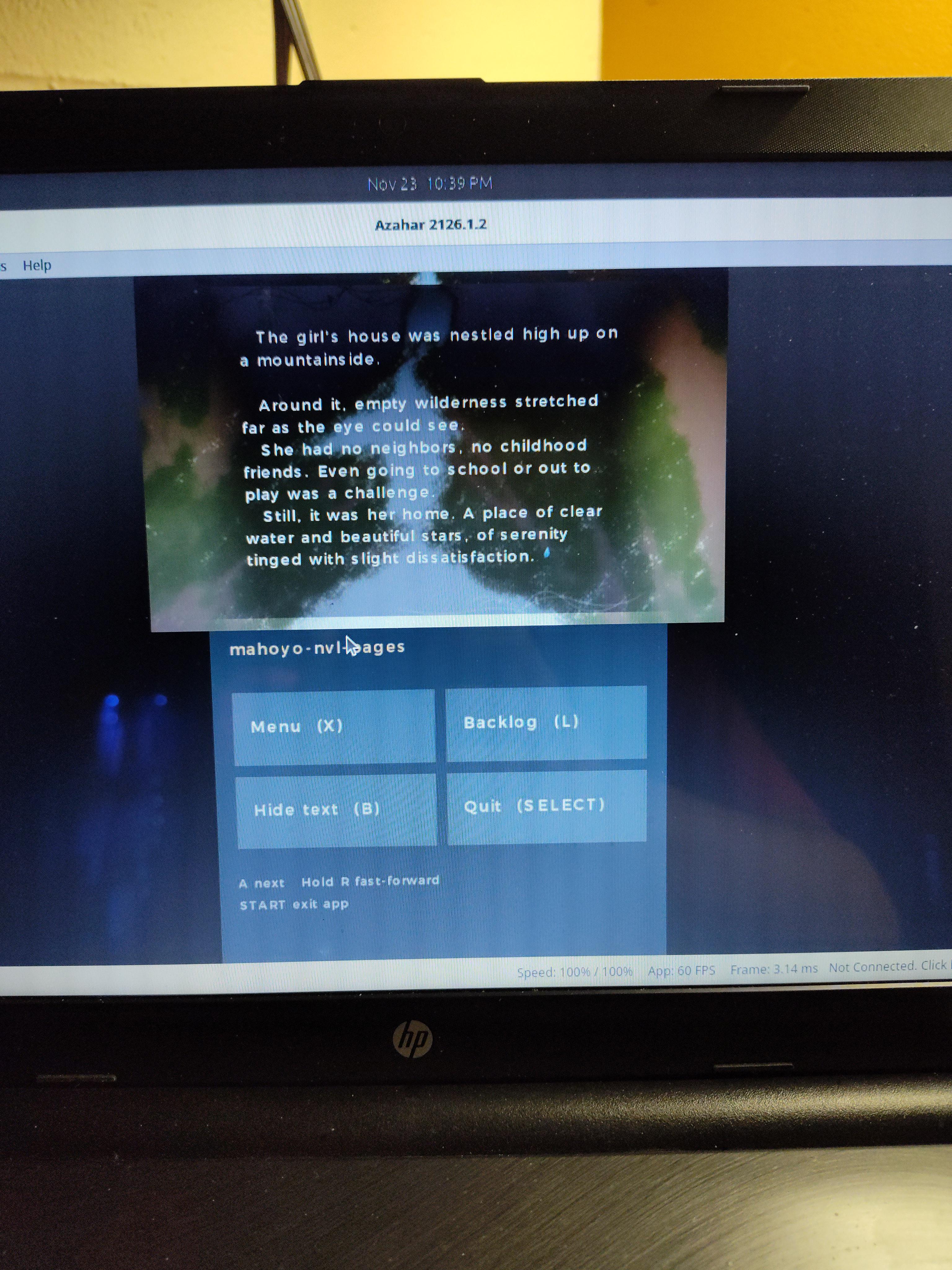
Sneak peek of a novel I'm currently converting for my engine, and in terms of news, the next release will include a cia, also, I saw that someone made a Wii u fork of my engine, and if that was you, please shoot me a DM as I would love to collaborate
r/3dshomebrew • u/meer_ok • 4h ago
I made 3DStify, a homebrew music player that plays the MP3 files on your SD card, with an interface modelled on Spotify. It installs as a CIA, and you can install it with a QR code.

cover.jpg in the album folder.In FBI, go to Remote Install > Scan QR Code and scan the QR code on the GitHub page.
3DStify.cia from the latest release.A .3dsx for the Hombrew Launcher is in the release too.
Copy .mp3 files anywhere on your SD card. sdmc:/Music/Artist/Album/ works well. 3DStify scans the card on first launch and caches your library, so later launches are instant. After adding songs, go to Settings > Rescan SD card.
| Button | Action |
|---|---|
| Touch | Tap songs, tabs and buttons; drag to scroll |
| D-Pad | Move through lists and switch tabs |
| A / B | Play or open / go back |
| Y | Play or pause |
| X | Like the current song |
| L / R | Previous / next song |
| Circle Pad | Left/right to seek, up/down for volume |
| SELECT | Turn the screens off |
| START | Exit |
This is version 1.0, and feedback is welcome. Post bug reports and feature requests in the comments or as a GitHub issue. If the app crashes, a photo of the Luma3DS crash screen helps a lot.
3DStify is a fan-made project and is not affiliated with Spotify.
r/3dshomebrew • u/meer_ok • 4h ago
Thanks to everyone who tried the first version and left feedback! I went through the comments and fixed as much as I could.
Quick clarification since a few people asked: the 3DS has no radio chip, so Meer Radio is internet radio. It streams real AM/FM stations over Wi-Fi and puts each one at its real frequency on the dial. Sorry if the first post made it sound like over-the-air radio.

Scan the QR code on the GitHub page with FBI > Remote Install > Scan QR Code, or grab the .cia / .3dsx from the releases page.
GitHub: https://github.com/meerok/MeerRadio3ds
Take a photo of the crash screen (the PC and LR values are the important part) and grab sdmc:/3ds/MeerRadio/log.txt. Post them in a comment or a GitHub issue and I'll track it down.
Keep the station and feature requests coming!
r/3dshomebrew • u/ethaseagull • 5h ago
It's been less than 24 hours since the playtest started, and with the help of the server, Retro Rewind is now running smooth as hell on old 3ds, even on large custom tracks! Granted it is not yet perfect, as the end shows, but we have come such a long way on a task I did not think would be possible. This video was sent in by one of my playtesters, and I know the "join my server" model is largely frowned upon, but it has been incredibly useful as an organized community to identify issues and discuss solutions, and while it is currently the only way to access the project early, this will be changing sooner than you might think.
Joining will get you a chance to access Retro R3wind early, but I am also excited to announce that the first public build will be releasing in just 5 days! It will be available on my GitHub with simple build instructions and a .bat included in the release to make building hands-free and as easy as possible. Stay tuned for more content and updates to come!
r/3dshomebrew • u/el_de_las_papas • 7h ago
Ignoren mi tema de konosuba XDDD y no planeo aser este juego solo en new solo que no lo pruebo en old porque no solo tengo esta
r/3dshomebrew • u/No_Swordfish_7072 • 7h ago

CALLED RBXL3D, No QR code, current version as of november 23 3:24 pm pst , game gets updates frequently so this version may already be out of date, you can find the latest cia in the discord server
If you’ve played openblox then this is similar just more optimized and for the 3ds, still in early beta so dont expect much but bigger features are for later, the project is aimed to feel like actual roblox yes it is vibecoded
To play maps u need to get the map file in .rbxlx or .rbxl from an older client before 2013 then put the maps in sd/3ds/RBXLPlaces and go back to the game
If you have questions or wanna keep up with the project u can join the discord server https://discord.gg/pqv7Rae5w
r/3dshomebrew • u/Altruistic-Story941 • 7h ago

This sounds weird but, my top screen has a failing backlight but it’s permanently dim i guess, but the bottom screen is fine, and I was wondering what if there was a plugin to switch the screen mid game so if the top screen is too dark you can just switch, obviously the O3DS is terribly slow but hey someone even ported GTA Vice city to it so who knows? And also would it be hard to make? Here’s also a picture of my O3DS, it doesn’t look too bad in camera but it kind of does irl and I also configured the screen settings in filter settings in the Rosalina menu. (PS: I cannot repair the backlight right now due to the back screws being stripped when I bought it. Just wondering anyway. Many thanks).
r/3dshomebrew • u/Weigh13 • 8h ago

Yes AI helped, yes it's awesome.
An unofficial fan app that brings spelunkr.tv to the New Nintendo 3DS. Spelunkr's always-on channels, built from the Internet Archive, play right on the handheld: live channels, the guide, what's up next, reactions and chat. It also has a few retro touches, like a wood-paneled channel dial and waiting-room music.
It runs entirely on the 3DS, with no computer or server needed.
Still in testing and not yet public.
Made with love for spelunkr.tv. All credit for the channels and programming goes to its creator.
r/3dshomebrew • u/DoctorUtsugi • 8h ago

Hi all. I want to share something I've been working and I think it reached a point where I can share it.
SMZ3 is the randomizer that mixes Super Metroid and A Link to the Past into one game. I wanted to play it on a handheld without a laptop running the tracker, so I made the 3DS do everything: the game plays on the top screen and the bottom one is a touch tracker with the map, items, checks and hints, plus shortcut rows to equip Zelda items or switch beams. Seeds are made on the 3DS itself from your two ROMs, all offline.
The part I'm most excited about works on the console too: a daily challenge with three windows a day (same seed and one goal for everyone, one attempt on a real clock), a weekly seed and ladders, and races for 2 to 8 players, also against people on PC and Android.
It keeps 4 runs plus the daily, has quick save and load, and the 3D slider works as fast forward as a cute gimmick. Runs are drawn pixel perfect, with 4:3, full-height and fullscreen options in the pause menu. It installs as a CIA with its own icon and banner (or a .3dsx), built on snes9x_3ds.
Install the CIA with FBI and put the ROMs in /3ds/SMZ3 and that's it
If it runs badly on your 3DS, tell me which model! I only tested it in my new 3DS.
Get it from: https://github.com/doctor-utsugi/smz3-universe/releases/latest
r/3dshomebrew • u/Pigniouffe • 8h ago
Hi everyone. Please help me. I hacked my New 2ds about 2 years ago, i can launch every other game card but this one. It really bothers me. Do I have to remove homebrew for it to work?? Thank you all
r/3dshomebrew • u/agge2010 • 8h ago
I looked around everywhere and couldn’t get the answer to my question. I’m not super educated on how ports and that type of stuff works but I was just wondering, since we have Mario kart wii running on 3ds through vibecoding, wouldn’t it be possible to do the same but for new super Mario bros wii? Nsmbw is my favorite game of all time and if it somehow got ported to 3ds I would genuinely shed tears of joy. Thanks.
r/3dshomebrew • u/FreeZombies • 11h ago
Ported Dune 2 for 3DS and added bottom screen support. Get it here:
https://github.com/Karolynaz/OpenDUNE3ds
P. S. AI (adobe illustrator) wasn't used, because I made UI screens in Figma.
r/3dshomebrew • u/RemarkableDirt3665 • 12h ago

r/3dshomebrew • u/Wise-Interest2131 • 12h ago

Hi r/3dshomebrew! I've been working on a native port of **Pokémon Stadium 2 (N64, US)** for the **New Nintendo 3DS**, and it's now in a solid beta (v0.7n).
**This is not an emulator.** The game's code was translated to native ARM with static recompilation ([N64: Recompiled](https://github.com/N64Recomp/N64Recomp)), running on oneup03's [rt64-3ds](https://github.com/oneup03/rt64-3ds) runtime, so it runs far better than N64 emulation on the 3DS.
**What works**
* Menus and battles: Stadium, Gym Leader Castle, Free Battle
* **Transfer Pak**: bring your Pokémon from Red/Blue/Yellow/Gold/Silver/Crystal (ROM + save from the SD card)
* **GB Tower**: play your Game Boy games inside Stadium 2, with your real save and sound (tested with all six)
* Music and sound effects
* **Stereoscopic 3D** (use the slider)
* Installs as a **.cia** with its own HOME Menu icon and banner (or .3dsx for the Homebrew Launcher)
**What you need**
* **New 3DS / New 3DS XL / New 2DS XL** (Old 3DS is not supported: not enough RAM/CPU)
* Custom firmware (Luma3DS): https://3ds.hacks.guide
* **Your own** Pokémon Stadium 2 US ROM (`NP3E`, .z64), dumped from your cartridge, renamed to `stadium2.z64` and placed in `sdmc:/3ds/PokemonStadium2/`
* ~150 MB free on the SD card
**No ROM or game files are included.** Please don't ask for them.
**Download:** https://github.com/leonzordhue/PokemonStadium2-3DS/releases/latest (or scan the QR code below)
Install the .cia with FBI, put the ROM in the folder above, and play. Game Boy ROMs and saves for the Transfer Pak / GB Tower go in `sdmc:/3ds/PokemonStadium2/gb/`. The README has the full step-by-step guide and the controls.
**Known issues**
* In the GB Tower the Game Boy game can run a little below full speed.
* Mini-games and the Pokémon Academy are less tested, and a few small graphical glitches may remain. Reports are very welcome!
If something doesn't work, please open an [issue](https://github.com/leonzordhue/PokemonStadium2-3DS/issues) with your 3DS model, the format (.cia or .3dsx) and what happened.
**Credits:** N64Recomp and N64ModernRuntime, oneup03 (rt64-3ds and BanjoRecomp3D, the base of the 3DS recomp ports), michiiik (pokemonStadiumGSRecomp, the PC recomp of Stadium 2), mstan (PokemonStadiumRecomp, reference for the Transfer Pak and GB Tower), devkitPro/libctru.
Pokémon and Pokémon Stadium 2 are trademarks of Nintendo, Creatures and GAME FREAK. This is a non-profit fan project with no affiliation. GPL-3.0.
r/3dshomebrew • u/meer_ok • 13h ago

Someone on here asked for a radio app for the 3DS yesterday, so I built one.
The 3DS doesn't have a radio chip, so it plays real AM and FM stations from their internet streams over Wi-Fi. Every station sits at its real frequency on the dial, so it still feels like tuning a radio.
Or grab the .cia from the releases page.
GitHub: https://github.com/meerok/MeerRadio3ds
It's pretty new, so if something breaks or there's a station or feature you want, let me know in the comments. Thanks to whoever suggested it!
Note: I did use AI for some help with the UI and finding radio sources but most coding was done by me
r/3dshomebrew • u/SecurityAvailable364 • 13h ago
r/3dshomebrew • u/TopSheepherder5517 • 14h ago
Now available if you want to play it
r/3dshomebrew • u/Unusual_Diet_6651 • 14h ago
¿Alguien ha logrado usar conectar una new 3ds/2ds al PC usando una VPN para así poder stremear el PC mientras estás fuera de casa?
r/3dshomebrew • u/onehellofapothead • 16h ago
Hi,
I've been working with Claude on another 3DS homebrew app: a theme manager and installer that hooks into the stock HOME Menu, and it even has partial badge support. Right now it's EUR-only, so if you'd like to help bring it to other regions, contributions are more than welcome.
I also really enjoy UI work, so I pulled the app's interface out into its own 3DS UI library, built on citro2d, citro3d and libctru. You're welcome to use it in your own homebrew.
The QR code for installing is on the GitHub page. It works with themeplaza and the official themes in the green shop.. :)
3DStockTheme: https://github.com/albxncom/3dstocktheme
3ds-uikit: https://github.com/albxncom/3ds-uikit
