r/4kdownloadapps • u/Individual_Two8050 • 5h ago
4K Video Downloader+ new errors in past 24-48 hours

14
Upvotes
r/4kdownloadapps • u/Wrong-Bandicoot-4872 • 9d ago

Hey everyone!
Black Friday came early at 4K Download, and we're offering 30% off all Pro licenses and the 4K Bundle!
Here's what's included in the sale:
🎬 4K Video Downloader Plus – Download unlimited videos, playlists, entire channels, and more.
🎵 4K YouTube to MP3 – Save your favorite music, podcasts, and audio in MP3, M4A, or OGG.
📱 4K Tokkit – Download TikTok videos, hashtags, sounds, and entire accounts.
🖼️ 4K Image Compressor – Compress and convert images and PDFs.
Or grab the 4K Bundle and get all four Pro apps plus 4K Video Downloader for Android!
A few things worth mentioning:
✅ One-time payment, lifetime license
✅ Future updates included
✅ Up to 3 computers per license
✅ 30% off until December 4, 2026
No subscriptions, just the tools you need to save your favorite content.
And if you've been thinking about upgrading to Pro, this might be a good time! 🚀
r/4kdownloadapps • u/Wrong-Bandicoot-4872 • 19d ago

Not every failed download has the same cause. Sometimes it's the video itself, sometimes it's an app setting, and sometimes the platform has changed something that requires an update on our end.
Before contacting support, here are four quick checks to help narrow down the issue.
1. Can you play the video in your browser?
Open the original link and try playing it.
2. Can you download a different public video?
Try downloading another publicly available video from the same platform.
3. Are you running the latest version?
Open 4K Video Downloader Plus and go to Tools > Check for Updates.
Platforms like YouTube regularly change how they deliver content, and these changes can occasionally break downloads. App updates often include compatibility fixes.
If you're already using the latest version and multiple public videos still fail, the issue may require a fix from our developers.
4. Can the app save files to your selected folder?
Try switching the download location to a regular folder, such as Downloads or Videos.
If you're using Smart Mode, you can change the destination in its settings. Make sure the folder exists, has enough free space, and allows the app to write files.
If downloading works after changing the folder, the issue was likely related to the original save location.
Still getting the same error?
Contact our support team and include:
The more specific the report, the easier it is for our team to investigate.
And if the problem is caused by a platform change, we'll need to address it on our side. Repeatedly retrying the same download won't necessarily fix it.
r/4kdownloadapps • u/Individual_Two8050 • 5h ago
r/4kdownloadapps • u/Jay_15219 • 5h ago
My downloads just stay at 0% and dont download so does anyone know why this is happening?
Its only recently started doing this and Im using the latest version on PC
Thanks
r/4kdownloadapps • u/MasterChief___117 • 1d ago
Was able to download videos with no problems.
I deleted and reinstalled the app still didnt work.
Bought lifetime license and still unable to download. Feels like I wasted my money...

r/4kdownloadapps • u/East_Beautiful_9476 • 1d ago
r/4kdownloadapps • u/Euphoric-Rub1025 • 1d ago
From today, i can't download 256kbps with Youtube to MP3, with professional licence and Youtube premium membership, from Youtube Music.
r/4kdownloadapps • u/Needleshe • 1d ago
I just can't take it anymore, it's bad enough that Youtube decides to translate names of videos into the language of the country I live in, they also shove that robot dub, which sounds awful.
That being bad enough as it is, EVERY TIME I try to download a video, 4k just Takes whatever name from which ever language youtube provided, and starts downloading WITH THAT TRANSLATED NAME.
I have to MANUALY rename EVERY SINGLE VIDEO I download into the orginal one.
What is EVEN THE POINT of downloading the video with the translated name ? What if I want to find that video online later ? And all I have is the translated name ? I CAN NOT FIND IT THEN, Because the search engine is NOT going to look for the video based on the translated name
r/4kdownloadapps • u/klara4k • 1d ago
To remove music and keep the voice in a YouTube, Dailymotion, Rumble, Vimeo, Bilibili, Twitch, SoundCloud, and any other video or audio hosted elsewhere, download the video first with 4K Video Downloader Plus and then apply the Extract Voice or Extract Vocals tool (depending on your desired outcome) from Media Tools. The app separates speech from background noise, including music, on your computer, so the file isn’t uploaded anywhere. If you’d rather not install a downloader and process a local file that doesn’t need to be downloaded first, use LALAL.AI Voice Cleaner online or a video editor with voice isolation, such as CapCut or DaVinci Resolve Studio.
Modern tools don’t simply cut frequencies or lower the volume. They use machine learning models that recognize the patterns of human speech and split the audio into two parts: a voice track and a background track. The voice track keeps dialogue and narration, while the background track takes the music and other sounds.
Two terms are easy to confuse here:
The difference matters because tools are tuned for one or the other. For a vlog or an interview, choose a speech tool. For a music video where you want the singer, choose a vocals tool.
Results are best when the speaker is clearly audible. If the music is louder than the voice, or sung lyrics play under the speech, some artifacts in the voice track are inevitable.
4K Video Downloader Plus downloads videos from YouTube and other sites, and its built-in Media Tools process the audio right after the download. For speech, the tool you need is Extract Voice. It separates the voice from music and other background sounds, so you don’t need a separate editor or an online service.


4. Open Media Tools. Find the downloaded video in the list and click the atom icon next to it.

5. Select Extract Voice. In the window that opens, choose Extract Voice to separate speech from the music. If you’re working with a song and want the singer’s voice, choose Extract Vocals instead.

6. Get the result. Wait for processing to finish. The processed file appears under the original download as well as the Processed list, and you can play or open it like any other file. The processed output file comes in the same format as the input one if you haven’t chosen to convert video to audio or to another video format in step 3.

Media Tools use machine learning, and all processing runs on your computer. Your files aren’t uploaded anywhere or used to train models, and nothing is shared with third parties. The tools don’t generate new sound either; they only separate what’s already in the recording.
Processing uses the CPU by default. On compatible systems, GPU acceleration turns on automatically and works much faster, with NVIDIA and AMD graphics cards recommended. On older computers without a dedicated GPU, processing can take noticeably longer. Check what setup is required for processing before you start.
Note that Media Tools are available with a Pro license of 4K Video Downloader Plus. If you only need the audio, use 4K YouTube to MP3, which includes the same tools and doesn’t require any additional steps, as it converts video to audio automatically.
r/4kdownloadapps • u/Vegetable-Crabster • 1d ago

The real challenge right now is finding a PS5 that isn't sold out or ridiculously overpriced.
Until then, there's no shortage of GTA 6 content to enjoy, like gameplay discoveries, easter eggs, and hours of analysis.
4K Video Downloader Plus can help you keep your favorite videos available offline and download entire playlists while you wait for a reasonably priced console.
r/4kdownloadapps • u/Letspaintvr • 1d ago

r/4kdownloadapps • u/Wrong-Bandicoot-4872 • 2d ago

Our team is investigating the issue and working on a fix. We'll share an update once we have more information. 🤝
r/4kdownloadapps • u/Knight200091 • 3d ago
r/4kdownloadapps • u/klara4k • 6d ago
Tomorrow, November 20, Vimeo On Demand goes offline for good. If you bought or rented a film there, you lose streaming access once it closes. But you still have today: open your Vimeo purchases page and download anything the creator allowed offline downloads for. You can also ask for a refund, but on Vimeo it goes through the seller. You message the creator, and they have to request the refund from Vimeo on your behalf, so don’t leave it to the last minute. Vimeo stopped new sales back in September, but plenty of people who paid for indie films and courses there will only notice when the page stops loading.
It’s not the only case this month. On November 17, Sony switched off Spotify, Google Cast, Netflix and Prime Video on 71 of its older audio and home theater devices, and the hardware itself still works fine. A Google user lost the Lord of the Rings movies they had paid for earlier this year. As a cherry on top, YouTube is now testing a 30-day window before permanently terminating some channels, which tells you how often that happens.
None of these were scandals, these are just licensing deals running out, business decisions, and policy changes. And it merely means that content usually disappears because the platform (or a creator) simply moves on, and your library goes with it.
Any service you use today could be next. So here are three things we’d suggest doing, not just this week but from time to time:
1. If you’re a creator, keep your own originals
This one matters most. Your channel is not your archive since accounts get flagged by mistake and platforms change rules. YouTube Studio lets you download your own uploads (in quality no higher than 720p, though), and Google Takeout can export a whole channel. Better still, keep the original source files from your editing project.
In case you don't, use 4K Video Downloader Plus to back up your own videos.
2. Make a list of what you love, even if you don’t save the files
It sounds too simple, but most “lost” content isn’t really lost. People just can’t remember what it was. Export your playlists, and write down channel names, video titles and links somewhere outside the platform. When a video goes private or a channel vanishes, a title and an upload date make it far easier to track down a re-upload or an archived copy.
💡4K Video Downloader Plus allows you to mass-download playlists from YouTube, SoundCloud, and Naver, as well as save private content from YouTube, Vimeo, SoundCloud, Facebook, Dailymotion, Flickr, Bilibili, and Naver (if you have access to it).
Just spend 20 minutes on it, and you won’t have to find out the hard way the next time a platform shuts down or a creator gets blocked (unfortunately, some of them will).
r/4kdownloadapps • u/Funny-Flight-4372 • 6d ago
can't download subtitles..... something is wrong with downloading substitles on 4k
r/4kdownloadapps • u/EastNarrow5214 • 7d ago
As of today I can't download anything using 4K Tokkit. I've tried existing links as well as adding new ones. I've also tried with a VPN with no success. It was working fine yesterday. I'm on windows 10 and am using the latest version and I have the pro license.
r/4kdownloadapps • u/Wrong-Bandicoot-4872 • 7d ago

We've just rolled out version 26.4.0 for 4K Video Downloader Plus, 4K YouTube to MP3, and 4K Video Downloader for Android!
This update is all about making downloads more reliable, fixing annoying bugs, and giving you a little more control over how things work.
Here's what's new 👇
🎧 Original YouTube audio on Android
You can now choose the Original audio track when downloading YouTube videos, instead of getting a dubbed version. No more surprises when playing downloaded videos!
📁 More control over deleted files
On desktop, there's a new option under Settings > Advanced that lets you choose whether deleted files go to the trash or are permanently removed.
▶️ Better YouTube downloads
🎵 TikTok, Bilibili, and Twitch fixes
✨ A smoother experience
For 4K Video Downloader Plus, we've also improved Smart Mode messaging, playlist subtitle language selection, and video duration display.
The update is available for:
Already updated? Let us know if you've noticed any improvements or if there's something else you'd like us to fix next!
You can download the latest update here 👈
r/4kdownloadapps • u/Pandorajfry • 8d ago
Is there plans to make it possible to download age restricted YouTube videos?
r/4kdownloadapps • u/No-Speech5776 • 9d ago
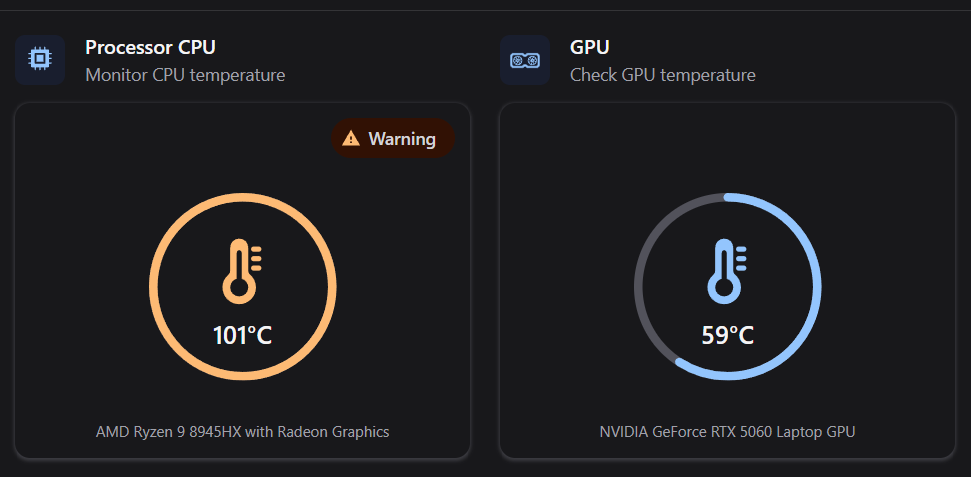
Hey, its been 2 years since I am using 4K video downloader+ and it came to my observation that the video conversion that happens after downloading the video is painfully slow on my windows 11 laptop(it has ryzen 9 and rtx 5060) but it works perfectly fine in my MacBook air M1. My ryzen 9 CPU runs at 101°C while converting, it would be much better if there is an option to choose to offload the video processing to GPU.
r/4kdownloadapps • u/BackCritical2203 • 11d ago
Everything was working perfect except for the past 2 days I would say 40% of videos downloaded are in 360p quality. I have the latest version. Windows 11.
r/4kdownloadapps • u/Vegetable-Crabster • 12d ago

We’d love to know: what’s the main reason you download videos?
Not a Microsoft 365 backup story, to be clear: that’s a different problem. But watching Microsoft go dark today made us think about how many people keep important stuff only “somewhere online”. One outage and it’s gone or unreachable.
When you find a video you know you will need again, save it immediately instead of postponing it. It only takes a minute, and you can access the file offline, no matter what the state of the internet is.
4K Video Downloader Plus can help you set up automatic downloads, so the stuff you care about is already on your drive before the next outage hits.
r/4kdownloadapps • u/atiaa11 • 13d ago
Some youtube videos download, some do not (even for the same channel/account) for the past 1-2 days. Anyone else?
r/4kdownloadapps • u/slypleasure33139 • 13d ago
Hi, I am using window11. I noticed that my memory was a bit high. I spent a moment and installed PC manager, and I noticed that every new install, leaves something behind, so I spent the better part of an evening, reversing all the install's and then installed the most current.
the removal of the older install's ended clearing it all up.
Passing it along
r/4kdownloadapps • u/pacula13 • 15d ago
Hi. Since yesterday I am unable to download videos from any site
4K Video Downloader+ version 26.3.5.0396
macOS Monterey 12.7.4. Macbook Pro 2019 Intel i9
I've tried restarting the app, restarting the computer, re-downloading and reinstalling the app, clearing log files from Application Support/4k Video Downloader+, trying to find a newer beta version (none available), trying previous versions of the app, performed the Internal YouTube Reset, lowered the "Download Intensity", cleared the link cache & tried smart mode toggling on/off, logged out and back in, enabled VPN, disabled VPN, disabled proxy, & disabled firewall/antivirus,.
does anyone please have any more ideas for a fix? thanks!
r/4kdownloadapps • u/Vegetable-Crabster • 15d ago
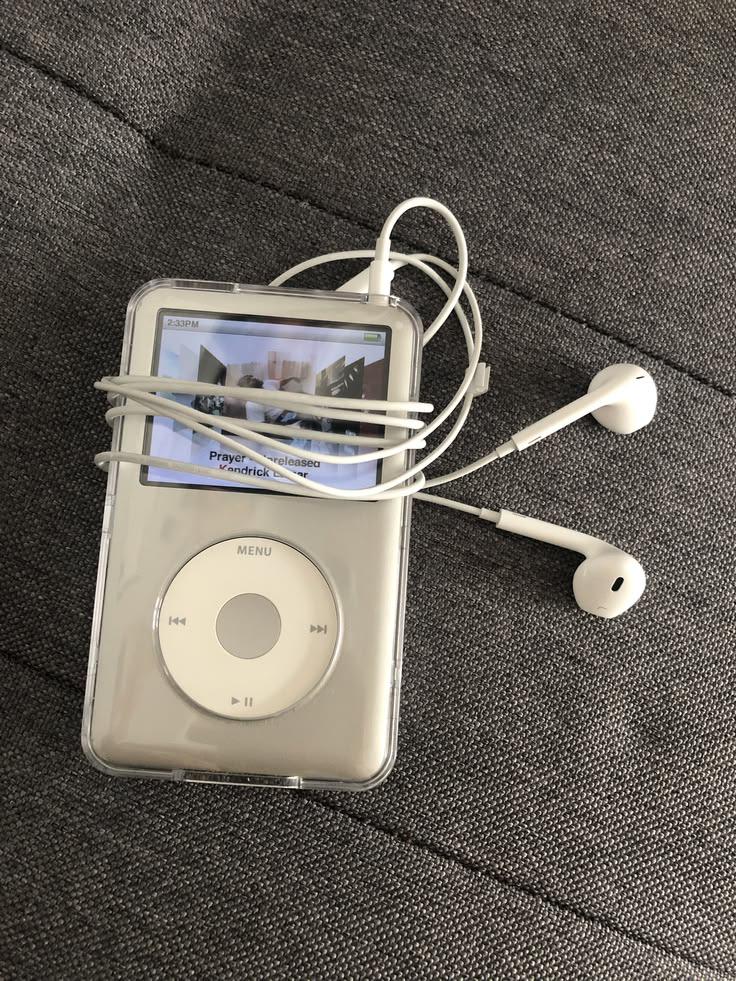
Remember when you had an MP3 player loaded with your favorite songs and knew exactly what was coming next?
Recently, it feels like MP3 players seem to be making a comeback, just like vinyl. Maybe people are getting tired of renting access to music through streaming services and want to own their collections again.
Do you still use an MP3 player or collect physical media?
If you're building your own digital music library, 4K Video Downloader Plus can help you save songs and podcasts as MP3 files and transfer them straight to your player.