r/AMDHelp • • 7d ago

Help (Software) Cyberpunk is capped at 60 fps for some reason

1 Upvotes

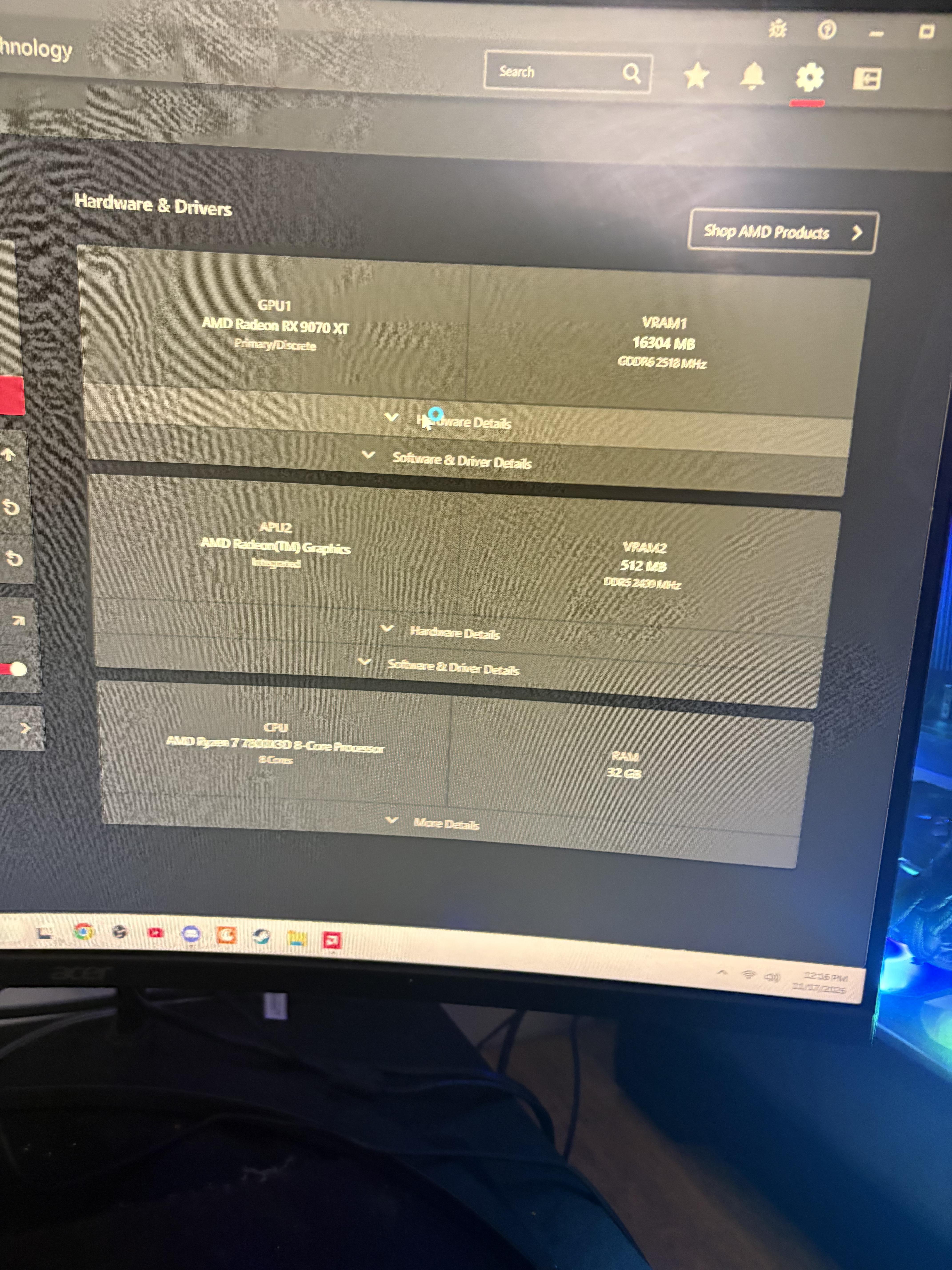
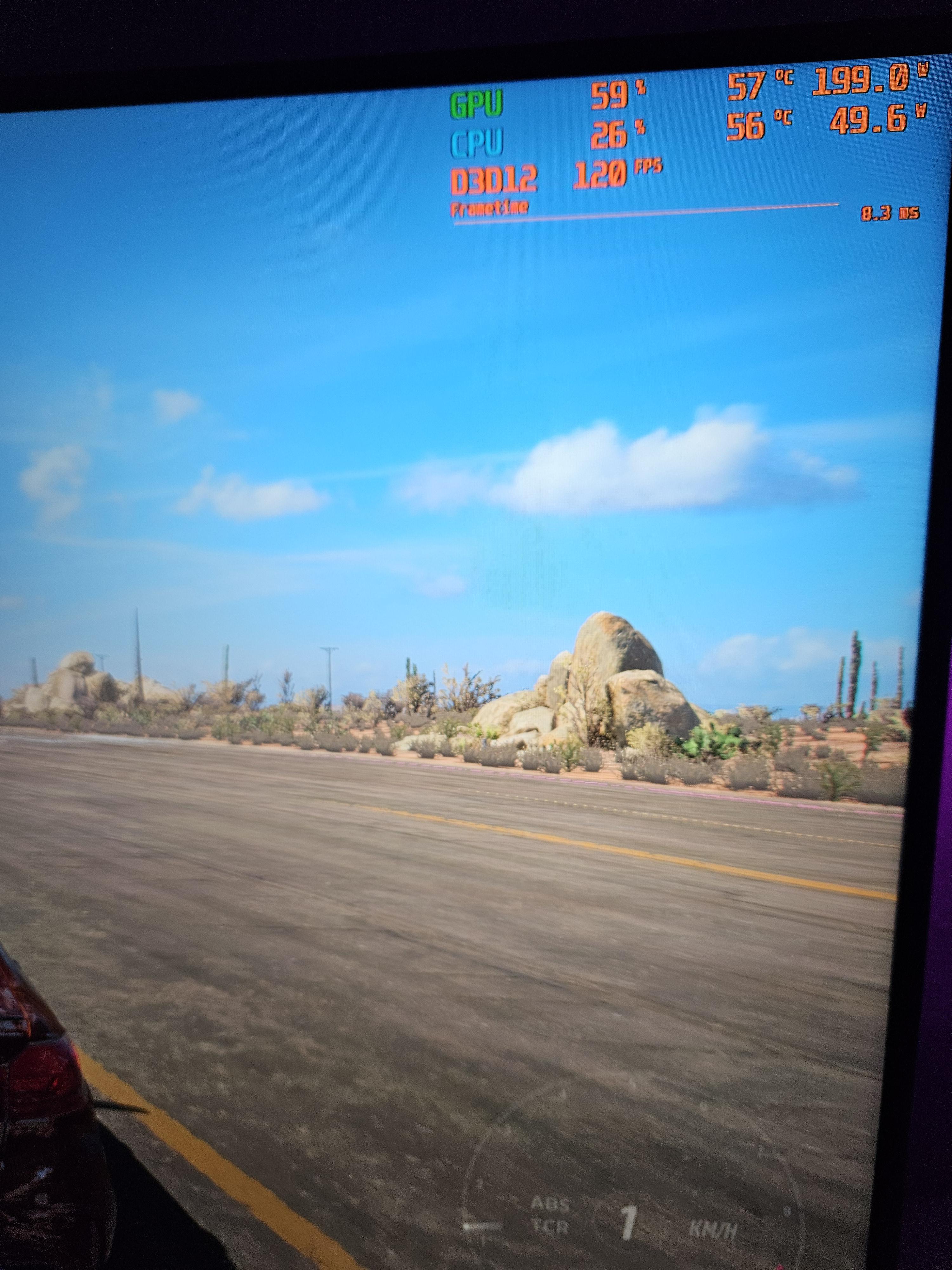
I recently got a new PC (RX 9070 XT, Ryzen 7 9850X3D) which is pretty overkill but I cant seem to get the game to uncap 60 fps? doesn't matter if I make the graphics to low or high, its stuck at 60, I tried disabling Vsync, FreeSync, and other fixes people say online nothing worked, only thing that worked was enabling frame generation in game, which I really don't want to use, does anyone know what is the issue? (I also uncapped the fps cap in the game settings) Edit: solved, check comments


r/AMDHelp • • 7d ago

Tips & Info to the people who use FSR4 on a 24" 1080p Monitor

3 Upvotes

obviously FSR4 Native looks best, balanced or even quality is not good enough for me on 1080p so i stick with Native which is ok, but now i tried KCD2 with 4k Virtual Super Resolution + FSR Balanced and it looks even better, the image seems cleaner and more stable when moving around.

on top of that my GPU usage went slightly down

am i trippin or does that make actually sense??

edit:

specs: 7700XT, 7800x3d, 32GB DDR5 6000


r/AMDHelp • • 7d ago

Help (CPU) Desperately need help with DMZ FPS. Dropping to ~60 FPS in demanding areas with an RTX 3080 Ti + Ryzen 7 5800X

2 Upvotes

PC Specs:

  • Ryzen 7 5800X
  • RTX 3080 Ti (12 GB)
  • 32 GB DDR4 RAM @ 3200 MHz
  • ASUS TUF X570-PRO (Wi-Fi)
  • 1440p resolution
  • Liquid CPU cooler (approximately 5 years old)
  • Getting roughly 90–100 FPS in DMZ with a large portion of my game hanging down in the 60-65 range in any sort of heavy traffic graphical area, trying to reach a consistent 120 FPS.

Things I've already tried or investigated:

  • Graphics settings: Most settings are already on Low or optimized for performance. Tried increasing some settings to Medium, which actually decreased FPS, so I reverted them.
  • DLSS: Experimented with different DLSS configurations, including Quality/Balanced and CNN Legacy vs. Transformer. The two DLSS models performed similarly.
  • NVIDIA settings: Investigated Reflex, GPU performance settings, and NVIDIA's performance overlay.
  • BIOS/PBO: Experimented with Precision Boost Overdrive, CPU power limits, boost clock override (+100 MHz), and Curve Optimizer (negative offset). Didn't see meaningful FPS improvements and reverted the BIOS tuning.
  • Ryzen Master: Attempted automatic overclocking and per-core Curve Optimizer tuning. Ran into repeated errors/crashes and eventually stopped using Ryzen Master.
  • MSI Afterburner: Already have a custom GPU fan curve and existing GPU overclock (+90 core, +900 memory). Monitored GPU clock speeds, temperatures, and utilization.
  • RAM: Verified DOCP/XMP is enabled and memory is actually running at 3200 MHz.
  • Temperature monitoring: Checked CPU/GPU temperatures and possible thermal limitations. My GPU has previously reached around 83°C, so cooling is something I've been investigating.
  • Performance monitoring: Used NVIDIA's overlay, MSI Afterburner, and Task Manager to examine CPU/GPU usage, clocks, and background processes. Have observed GPU utilization below 100% during gameplay.
  • Background processes: Investigated what was running while gaming and whether anything was consuming system resources.

I'm looking for realistic FPS comparisons from people with similar hardware, particularly Ryzen 5000-series CPUs paired with RTX 3080/3080 Ti/3090 GPUs. I'd also appreciate suggestions beyond the usual "lower your settings" or "enable XMP," since I've already explored those. My game feels terrible so often I can't stand it


r/AMDHelp • • 7d ago

Help (General) Is this normal for a 7900xtx XFX

Post image
1 Upvotes

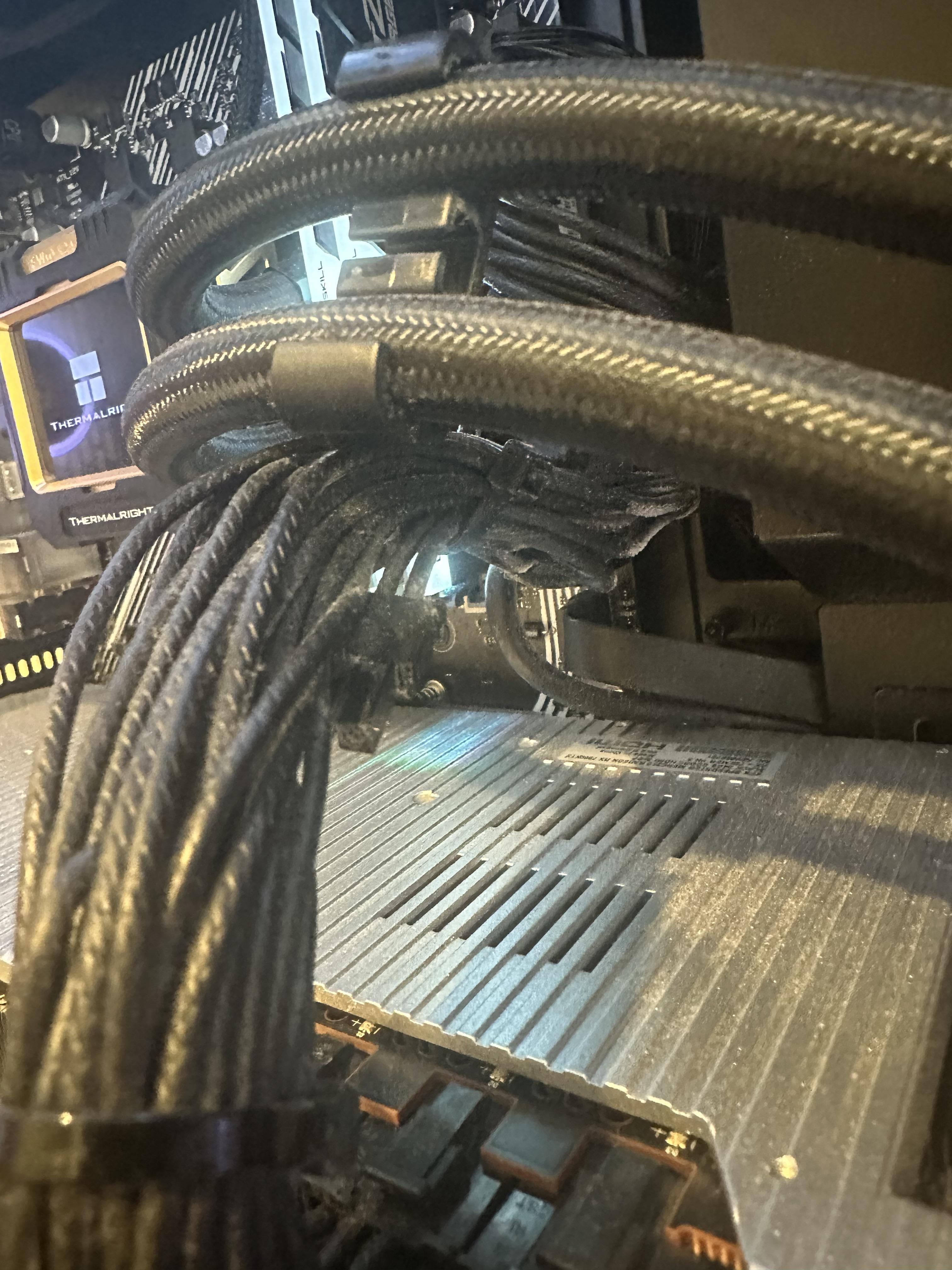
Ive noticed something weird with my gpu wires and was wondering if this was normal. As you can see their seems to be two unconnected wire ends. Should i be worried?

Also if i do have to fix this could i also have some wire recommendations for my card(7900xtx XFX)


r/AMDHelp • • 7d ago

Help (CPU) Ryzen 7 3800X random hard resets, WHEA 18 Cache Hierarchy Error on nearly every core. CPU or motherboard?

2 Upvotes

Computer Type: Desktop

GPU: Radeon RX 6950 XT

CPU: Ryzen 7 3800X

Motherboard: ASRock X570 Phantom Gaming 4

BIOS Version: P5.90 (flashed from P3.10 on 24 Oct 2026)

RAM: 16GB G.Skill Ripjaws V 3200 MT/s, XMP on

PSU: Seasonic Focus GX-850 V4 (replaced a SilentiumPC 750W, same problem on both)

Case: Corsair 4000D Airflow

OS: Windows 11 26H2, build 26300.9974, clean install on a new drive since June 2026

GPU Drivers: AMD Radeon driver 32.0.21043.19003 (26 June 2026), no Adrenalin

Chipset Drivers: AMD Chipset Drivers 8.09.28.1124, updated today (crashes were already happening before the update)

Background Applications: Brave and Spotify during the last crash

Description of Original Problem:

The PC was built in 2020 and randomly hard resets. The sound starts looping, the screen goes black (sometimes with a thin white bar in the middle) and the PC reboots. No BSOD, no dump. It happens in games and also with just a browser and Spotify open. Sudden load changes seem to trigger it (for example joining a Roblox game, which often crashes it instantly), but it also happens near idle.

Event Viewer:

Every crash is logged as Kernel-Power 41 with BugcheckCode 0, plus WHEA-Logger Event 18: "A fatal hardware error has occurred", reported by Processor Core, Cache Hierarchy Error. It comes from many different cores (APIC IDs 0, 2, 4, 7, 8, 9, 13, 15), not one bad core. Example (APIC ID 9): ErrorSource 3, MCABank 5, MciStat 0xbea0000000000108, MciAddr 0x7ffd7bb22e00, ErrorType 9. If I read it right, it is an uncorrected error, so it is fatal.

What I tried:

New PSU (Seasonic GX-850), same problem.

MemTest86: no errors.

BIOS updated to P5.90, tested on default settings.

New SSD and fresh Windows 11 install.

Different Windows power plans.

BIOS (AMD CBS): Typical Current Idle, Global C-state disabled, Core Performance Boost disabled. Still crashes.

OCCT CPU test, 20 min: no errors.

OCCT 3D Adaptive, 20 min: passed once with boost off, but the crashes are random so I do not know if that means anything.

OCCT 3D Adaptive Switch test (boost off) crashed the whole PC while the CPU was almost idle.

I do not want to change any voltages in the BIOS.

HWiNFO before crashes: Tctl about 49-60 C, package power 30-50 W, +12V about 12.04-12.09 V, GPU about 48 C, Vcore 1.39-1.49 V, SoC 1.087 V. Before the OCCT Switch crash (boost off): package power about 32 W, GPU 73 C, +12V 12.04 V. No overheating or obvious voltage drop, but HWiNFO sampling is too slow to catch very short dips.

I also hear an electrical screech in headphones on the front panel, and a thump once per second during the OCCT Switch test (probably coil whine).

Question: does Cache Hierarchy Error on many different cores point more to a failing CPU or to the motherboard CPU power delivery? Is there any way to tell them apart without a spare CPU or board? I am a student and do not have spare AM4 parts.

Thanks!

r/AMDHelp • • 7d ago

Help (GPU) Non stop crashing

Post image
2 Upvotes

I know little to nothing about pc’s and now I’m having an issue where it’s constantly crashing I’ve tried ddu I’ve tried uninstalling some updates etc. and also now the amd adrenaline app is not opening and all the yt tutorials are saying go to a file called “cn” WHICH I DONT HAVE. Literally wtf happened my pc is unusable 🥲 (picture in case that helps at all)


r/AMDHelp • • 7d ago

Help (General) Strix Halo (AI Max+ 395) NPU gets stuck in a hang loop (LiveKernelEvent 141, ipustack.sys) until reboot. 9 times in 6 weeks. I tried everything and it's driving me crazy.

3 Upvotes

Hi all, I've been fighting an NPU problem on my Strix Halo laptop for about 6 weeks and I'm running out of ideas. Everything I've checked and tried is below, plus the troubleshooting form at the end. Any help or pointers would be really appreciated.

System

  • ASUS ProArt PX13, Ryzen AI Max+ 395 / Radeon 8060S (no dGPU), 128 GB (96GB RAM / 32 GB VRAM)
  • Windows 11 26H2 retail, build 26300.10075 (was on Insider until 20 Nov, same problem on both)
  • BIOS HN7306EAC.314 (latest)
  • GPU driver 32.0.32029.2010 (Adrenalin, clean install)
  • NPU driver 32.0.20102.4480 (kipudrv.inf / ipustack.sys, latest I can find)
  • Windows AI runtime: AMD VitisAI EP 1.8.58.0 + Framework 1.8.80.0, WinML AMD NPU EP 2.1000.81.0

The problem

Every few days the NPU starts timing out and never recovers:

  • A live kernel dump in C:\Windows\LiveKernelReports\WATCHDOG every 60-110 seconds, bucket LKD_0x141_Tdr:6_IMAGE_ipustack.sys
  • No BSOD, the PC keeps working, games keep running, but it never stops by itself
  • Only a reboot fixes it, and the restart itself usually hangs, so I end up holding the power button
  • Closing the lid during a storm = laptop never wakes up (forced power-off)
  • Ending a WorkloadsSessionHost.exe during a storm hangs Task Manager
  • Restarting the NPU device (pnputil /restart-device) during a storm froze Windows completely
  • Starting a WPR GPU trace during a storm hangs too

When it happens

  • Usually 25-30 min into Star Citizen (Turbo, 75-85 W). The game itself keeps running fine
  • But also 3 times with NO game running, just desktop use (most recently tonight, 2.5 h after boot)
  • Once it starts, it keeps going long after the game is closed

What I've already ruled out / tried

  • Turned off Click to Do: still happens
  • Left Windows Insider for retail (in-place upgrade): still happens
  • Capped power to 75 W: still happens. Switching to 55 W mid-storm doesn't stop it
  • Temps are fine during storms (CPU & GPU ~75 °C)
  • No WHEA errors at all, CPU-only undervolt (iGPU untouched)
  • Latest BIOS, clean GPU driver install, latest NPU driver (same storms on NPU driver 3930 and 4480)
  • Sent an AMD Bug Report Tool report and a Feedback Hub report

Side note: on Insider, WorkloadsSessionHost.exe (Windows AI) also crashed 30-60 s after almost every boot in onnxruntime_vitisai_ep.dll 1.8.0.87 (0xc0000409 fail-fast). That crash stopped after I moved to retail, but the NPU storms didn't, so I think they're separate issues.

Questions

  1. Anyone else on Strix Halo (Flow Z13, PX13, HP ZBook Ultra G1a, Framework Desktop on Windows, etc.) seeing ipustack.sys 0x141 live dumps? They're silent, check C:\Windows\LiveKernelReports\WATCHDOG or Reliability Monitor.
  2. Is there a newer NPU driver than 32.0.20102.4480, or a known fix/workaround?
  3. Has anyone from AMD acknowledged this?

I'd like to keep the NPU and Windows AI features working, so I'm not looking to disable the NPU. Happy to share dumps or more info. Thanks!

Computer Type: Laptop (ASUS ProArt PX13, HN7306EAC)

GPU: Radeon 8060S integrated (40 CU, 32 GB VRAM carve-out), no dGPU

CPU: Ryzen AI Max+ 395 (Strix Halo), 16 cores / 32 threads, XDNA 2 NPU

Motherboard: ASUS HN7306EAC (laptop)

BIOS Version: HN7306EAC.314 (latest)

RAM: 128 GB LPDDR5X soldered (96 GB system / 32 GB VRAM)

PSU: Stock 200W ASUS charger

Case: N/A (13" laptop). Temps during storms are fine, ~75 °C

Operating System & Version: Windows 11 Pro 26H2, build 26300.10075 (retail; Insider until 20 Nov, same problem on both)

GPU Drivers: AMD Software 26.11.2 (driver 32.0.32029.2010), clean install

NPU Driver: 32.0.20102.4480 (kipudrv.inf / ipustack.sys)

Chipset Drivers: AMD Chipset Software 8.09.28.1124

Background Applications: Discord, G-Helper (instead of Armoury Crate), Edge, Phone Link, TIDAL. Star Citizen when it happens while gaming. Chris Titus WinUtil telemetry tweaks applied.

Description of Original Problem: The NPU gets stuck in a loop of timeouts: LiveKernelEvent 141, bucket LKD_0x141_Tdr:6_IMAGE_ipustack.sys, a live dump every 60-110 s that never stops until a reboot (and the restart itself usually hangs). Usually starts 25-30 min into Star Citizen, but has also happened 3 times on the desktop with no game. Full details in the post above.

Troubleshooting: Click to Do off, left Insider for retail, capped power to 75 W (switching to 55 W mid-storm doesn't stop it), latest BIOS, clean GPU driver install, latest NPU driver (same on NPU driver 3930 and 4480), temps fine, no WHEA errors, CPU-only undervolt (iGPU stock). Sent AMD Bug Report Tool and Feedback Hub reports.


r/AMDHelp • • 7d ago

Persistent AMD Vega 7 Driver Crashes – Ryzen 5 4600G, LiveKernelEvent 141/117/1B0, Black Screens and System Freezes

2 Upvotes

Hi everyone! I've been trying to solve this problem for approximately 2–3 years, and I'm hoping someone here might help me identify the actual cause.

PC specifications:

- CPU: AMD Ryzen 5 4600G (integrated Radeon Vega 7 graphics).

- GPU: No dedicated graphics card.

- Motherboard: ASRock A520M-HDV.

- RAM: 16 GB DDR4 (2 × 8 GB PNY modules).

- Storage: Kingston 240 GB SATA SSD.

- PSU: Thermaltake Smart BX1 750W 80+ Bronze.

- Operating System: Windows 11.

- Graphics Driver: AMD Adrenalin 26.5.2 WHQL.

Description of the problem:

My PC randomly experiences graphics driver crashes, black screens, and system freezes.

Sometimes the screen goes black for a few seconds and then recovers. Other times, the entire computer freezes, the audio also stops or gets stuck, and applications stop responding or crash.

The problem can happen while gaming, watching videos, browsing the internet, or even when the computer is practically idle on the desktop.

One important detail is that the very first crash happened approximately ten minutes after I turned on the PC for the first time in 2024, before I had installed any games or additional programs.

Errors reported by Windows:

- LiveKernelEvent 141.

- LiveKernelEvent 117.

- LiveKernelEvent 1B0.

- THREAD_STUCK_IN_DEVICE_DRIVER (0xEA).

- AMD Crash Defender notifications.

- AMD reports indicating that the graphics driver stopped responding.

Things I've already tried:

- Reinstalled AMD graphics drivers multiple times.

- Used the official AMD Cleanup Utility to perform a clean driver installation.

- Tried different video connections, including VGA directly.

- Replaced the power supply, but the problem persisted.

- Tested each RAM stick individually. The issue occurred with both configurations.

- Ran Windows system file checks, which found no integrity violations.

- Disabled browser hardware acceleration, which reduced some browser-related crashes.

- Checked AMD Adrenalin settings. No custom overclocking or performance tuning is enabled.

Interestingly, the Microsoft Basic Display Adapter has remained stable, although performance is extremely slow.

My questions:

  1. Could the integrated Vega 7 GPU itself be defective?
  2. Could the motherboard or the CPU's memory controller be responsible?
  3. Could faulty RAM cause these GPU-related errors?
  4. Could installing a dedicated graphics card bypass the problem, or might the issue persist?
  5. What would be the best way to identify the faulty component without randomly replacing hardware?

I'd really appreciate any suggestions or advice from people who have experienced something similar. I've been trying to solve this for a long time, and I would really like to understand what's actually failing before spending money on new components.

Thank you very much!

Update: MemTest86 results

I ran MemTest86 (version 11.7) overnight. It successfully completed all 4 passes with 0 errors.

This makes a RAM module defect less likely, although it doesn't completely rule out memory-related issues.

I still haven't tested the system with a dedicated GPU, which could help determine whether the integrated Vega 7 graphics are responsible for the problem.

I'm continuing to investigate before replacing any components. Any suggestions are welcome!


r/AMDHelp • • 7d ago

I really need help with my gaming pc

Post image
17 Upvotes

I don't wanna bore you with technical details.

I have an RX7900XT 20GB and ryzen 7 75700x3d, 32gb ram ddr4 few months ago I could run any game at 1440p 120 fps capped smoothly, but now I have terrible frame drops. I tried everything I reinstalled drivers. I update drivers. I reinstall windows almost everything I can get it to have a stable frame rate. The games are still playing at 120fps capped, but it drops to 50-70 very often PLEASE GIVE ME ADVICE!!!! on my opinion, the thermost are very okay!


r/AMDHelp • • 7d ago

Help (CPU) Ryzen 9955GX 90 Degrees Temp for Hours Bad?

4 Upvotes

Edit: I meant 9955HX. I play modded games and two terhmal readings connected to my cpue are around 90 degrees. Would gaming with those degrees be detrimental to my cpu? Should I try to undervolt? I'm new to this and this is my first high end pc so any kind of insight would greatly be appreciated.


r/AMDHelp • • 7d ago

Help (Software) Mic isnt working on record

Post image
3 Upvotes

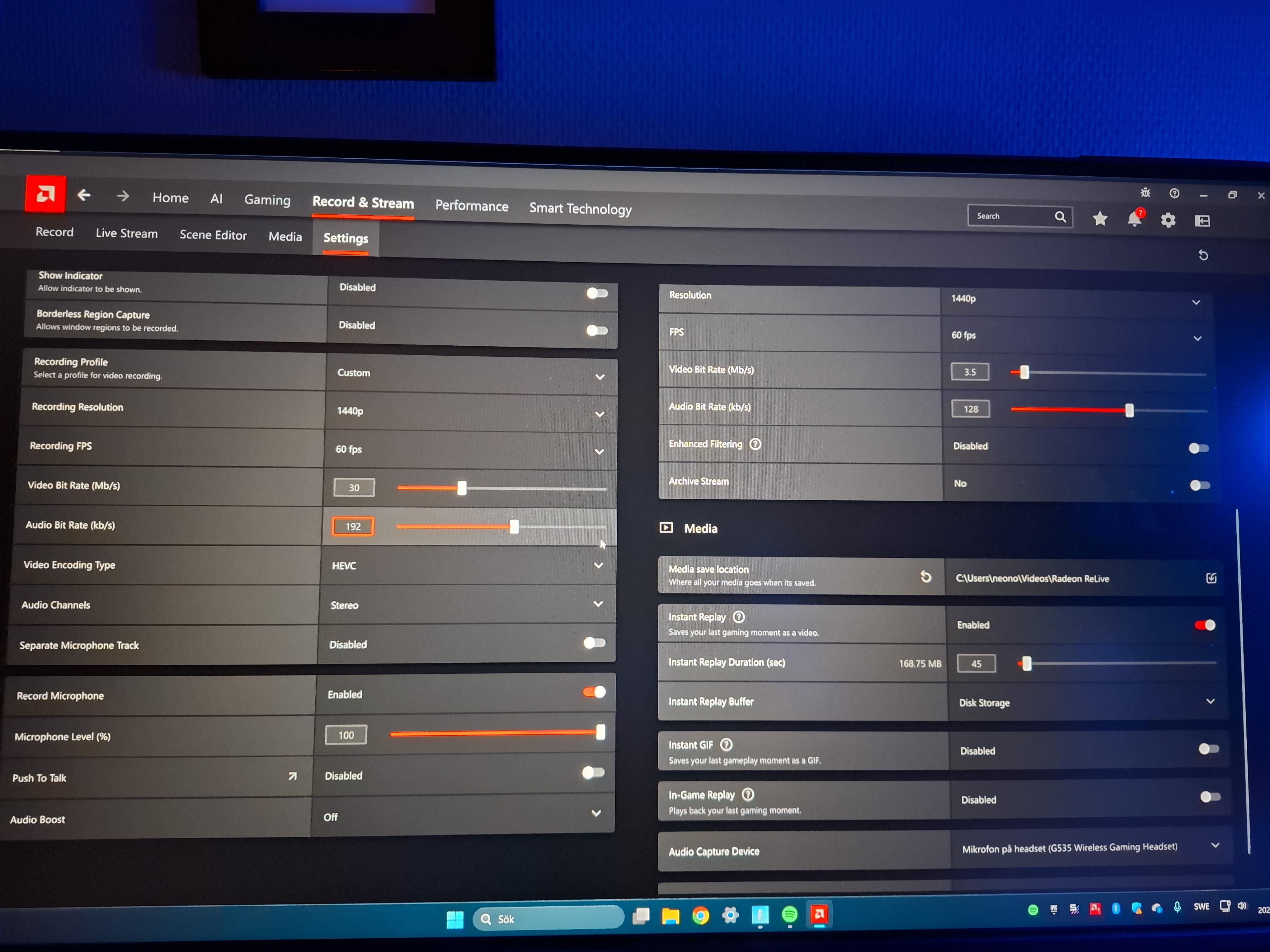
My mic isnt working on adrenalin, it didnt work when I first launched the software but after tweaking my settings to these a couple days ago it worked. However when I tried taking a clip today again to see if it worked, my mic wasnt getting picked up. I have also disabled audio enchancments in windows settings.


r/AMDHelp • • 7d ago

Sapphire NITRO+ RX 9070 XT not detected on MSI PRO B850-P WIFI, but works perfectly in another PC. Tried almost everything.

2 Upvotes

Hi everyone,

I'm having a really frustrating issue with my brand-new Sapphire NITRO+ RX 9070 XT. The GPU works perfectly fine in my older PC, but my newer PC doesn't detect it at all.

I've spent hours troubleshooting and I'm running out of ideas. I'm hoping someone here has experienced something similar.

My current PC (GPU not working)

  • GPU: Sapphire NITRO+ Radeon RX 9070 XT
  • Motherboard: MSI PRO B850-P WIFI (MS-7E56)
  • CPU: AMD Ryzen 7 7800X3D
  • RAM: ADATA XPG Lancer Blade DDR5 32GB 6000MHz CL30
  • PSU: MSI MPG A850G PCIE5 850W
  • BIOS: E7E56AMSI.2A93 (September 3, 2026)

My previous RX 6750 XT works normally in this exact system.

Older PC (RX 9070 XT works)

  • GPU: Sapphire NITRO+ RX 9070 XT
  • Motherboard: ASUS TUF GAMING B550-PLUS
  • CPU: AMD Ryzen 5 5600X
  • RAM: DDR4
  • PSU: SilentiumPC Supremo FM2 Gold 750W

The RX 9070 XT works in this older PC, including its RGB lighting.

The problem

When I install the RX 9070 XT in my MSI B850 system:

  • The PC powers on normally.
  • The GPU appears completely inactive.
  • No RGB lighting on the GPU.
  • GPU fans don't spin, even briefly.
  • No video output from the GPU.
  • The GPU doesn't appear in Windows Device Manager.
  • I can boot into Windows and enter BIOS using the Ryzen 7800X3D's integrated graphics while the RX 9070 XT is installed.
  • The motherboard's VGA debug LED does not stay on.

The RX 9070 XT has never worked in this motherboard, not even once.

Everything I've tried

Power supply and cables:

  • Tested with MSI MPG A850G PCIE5 850W.
  • Swapped in my older SilentiumPC Supremo FM2 Gold 750W PSU.
  • Tried the Sapphire 16-pin to 3×8-pin adapter.
  • Tried the native 16-pin GPU power cable from the MSI PSU.
  • Checked power connections.
  • Confirmed the motherboard's additional PCIe power connector is connected.
  • My old RX 6750 XT works in the new PC.

Motherboard and PCIe:

  • Tested the RX 9070 XT in both PCIe slots.
  • Tried PCIe Gen3 and Gen4 settings.
  • Tested PCIe power management settings, including disabling ASPM.
  • Enabled Above 4G Decoding.
  • Disabled Re-Size BAR.
  • Confirmed UEFI mode is enabled.
  • Tried different BIOS configurations without success.

BIOS:

  • Originally running BIOS E7E56AMSI.2A75 (September 10, 2025).
  • Updated to E7E56AMSI.2A93 (September 3, 2026).
  • The BIOS update made no difference.

Cross-testing:

  • RX 9070 XT works in my older ASUS B550 PC.
  • RX 6750 XT works in my newer MSI B850 PC.
  • RX 9070 XT doesn't work in either PCIe slot on the MSI B850.
  • Changing PSUs doesn't fix the issue.

What I'm trying to figure out

Has anyone successfully used a Sapphire NITRO+ RX 9070 XT with an MSI PRO B850-P WIFI motherboard, especially with a Ryzen 7 7800X3D?

Could this be a motherboard compatibility or PCIe initialization issue, even with the latest BIOS installed?

Is there anything else worth testing before I consider an RMA for the motherboard?

At this point, the GPU works in one system, the motherboard works with another GPU, and I've tested two PSUs, multiple power connections, PCIe slots, BIOS versions and settings.

Any suggestions would be greatly appreciated. Thanks!


r/AMDHelp • • 7d ago

Help (CPU) another post about my fx 8350 temps

2 Upvotes

I noticed that my temps only get this high with windows 10 ltsc 21h2. I used the same fan control settings on windows 11 and i never went above 60C on windows 11. Does anyone know what i could do? its not the thermal paste or the cooler


r/AMDHelp • • 7d ago

Help (General) Shimmering and Jagged edges in some games!

2 Upvotes

Computer Type: Desktop

GPU: 9070 Powercolor Reaper 16gb

CPU: i5 11600k

BIOS Version: n/a

RAM: 32gb CORSAIR VENGEANCE RGB PRO 3600MHZ CL18 DDR4

PSU: Corsair 750w E

Case: Corsair 4000x

Operating System & Version: WINDOWS 11

GPU DRIVERS: AMD 26.11.2

Background Applications: DISCORD

Description of Original Problem: Hi all!

Last week I swapped from a 3070 to a new Powercolor 9070 Reaper, and have been experiencing shimmering and jagged edges in a few games, especially in Deadlock.

I know the obvious answer is ‘go back to Nvidia’, but I wanted to see if there was a fix to this because the graphics are stunning just lots of shimmering!

I’ve attached videos. I’m also on an i5 11600k if that makes any difference or has any impact on the shimmering at all.

I used DDU before I put in the 9070, so all the Nvidia drivers should be gone and not clashing with anything.

Anyone else had this issue and been able to fix it?

Thanks!

TROUBLESHOOTING: I’ve tried all the anti-aliasing stuff, done driver updates, used DDU


r/AMDHelp • • 7d ago

Help (General) Memory channel B not detected after swapping 5700X3D → 5800X3D + new cooler (B550)

2 Upvotes

Specs: ASRock B550 Phantom Gaming 4/ac (BIOS P4.00), Ryzen 7 5800X3D, Corsair Vengeance LPX 2x16 GB DDR4-3200 (CMK32GX4M2E3200C16), Thermalright Peerless Assassin 120 SE, Montech Century II 850 W, RX 6800 XT, Win 11.

based in NYC

I swapped my 5700X3D (being RMA'd for WHEA crashes) for a 5800X3D and replaced the stock Wraith with a Peerless Assassin. Before the swap, both sticks were detected in A2 + B2.

Now:

- A2 + B2 → only 16 GB, Windows only sees A2

- A1 + A2 → 32 GB, both sticks work

So both sticks and channel A are fine, but nothing on channel B is detected.

Also have tested 1 stick in B1/B2 a couple times, no dice

Questions:

  1. Is uneven/too-tight cooler mounting pressure a likely cause? Should I just loosen and re-tighten evenly? (have done this a few times)
  2. What do I look for when checking CPU pins for channel B?
  3. Anything else to try before taking it to a shop?

Thanks!


r/AMDHelp • • 7d ago

Help (Software) Title: RX 9060 XT NEW: driver Code 31, Valorant freezes/restarts, and a black screen with audio still playing.

Post image
4 Upvotes

Specs

  • CPU: Ryzen 7 5800X
  • Motherboard: ASRock B450M Steel Legend (BIOS up to date)
  • GPU: Gigabyte RX 9060 XT Gaming OC 16GB (new, replaced a GTX 1660 Super), 1x 8-pin
  • PSU: Cooler Master 600W (TM-6001-ACABN1), probably from around 2020, no visible 80+ label, dusty
  • OS: Windows 10,
  • UEFI boot, CSM disabled

Problems

  1. Right after the game started (Valorant Deathmatch), or a few seconds into it, the PC froze and then restarted on its own. Event Viewer showed Kernel-Power Event 41 (Critical) with BugcheckCode 2684354561 (0xA0000001) and parameter1 0x0. There was no normal blue screen.
  2. After the restarts, Adrenalin showed a warning that the AMD Software version wasn't compatible with the installed driver. Windows showed "Your hardware settings have changed, please reboot", plus a "LoadLibrary failed with error 87" error. The GPU got a yellow warning in Device Manager (Code 31), and games failed with "A D3D11-compatible GPU is required".
  3. Once the GPU was also shown as Disabled in Device Manager and I had to re-enable it.
  4. SmartAccess Memory shows Disabled in Adrenalin, while GPU-Z reports Resizable BAR as Enabled.
  5. After I changed Adrenalin settings (Anti-Lag and AMD Sync), I got a black screen in Valorant while a YouTube video kept playing with sound. The PC didn't restart, and I had to power it off manually.
  6. ----What I tried (add these):
  • Tested several Adrenalin versions, each time with a clean install (DDU or AMD Cleanup Utility): 26.3, 26.5, 26.10.1, 26.11.1 and 26.11.2.
  • Only 26.3 works. The others gave me the driver failures described above (Code 31 / driver mismatch warning / LoadLibrary error 87, or crashes and black screens in games).
  • DDU in Safe Mode and a clean driver install with Factory Reset. The Code 31 error and the driver mismatch warning came back.
  • AMD Cleanup Utility and a fresh install of 26.10.1. This fixed the Code 31 / driver loading problem.
  • Disabled XMP/DOCP, and set the GPU tuning preset to Power Efficiency.
  • Tried a Power Limit reduction in Adrenalin.
  • Enabled Above 4G Decoding and Resizable BAR with CSM disabled, then later disabled both in BIOS to test stability.
  • Checked that the 8-pin cable is fully seated.
  • Tested heavy games: Little Nightmares and Spider-Man 2 (Very High, ~122-165 fps). Temps looked fine (GPU ~46-55°C, CPU ~66-75°C) and there was no crash.

SO how i can know the real cuse or there is any solution ?


r/AMDHelp • • 7d ago

Help (Software) Adrenalin now showing SmartAccess Memory as "Unsupported"?

4 Upvotes

I only just noticed it today. I know it wasnt like this a few days ago so it probably happened after updating to 26.11.2? In the bios rebar shows enabled tho Gpu: 9070xt Cpu: r7 9800x3d


r/AMDHelp • • 7d ago

Help (General) Is there a way to make an FCLK adjustment permanent on an RX 6800 XT?

2 Upvotes

I have an RX 6800 XT that suffers from black screen issues. I've managed to fix the problem by using MorePowerTool and lowering the FCLK to 1650 MHz.

Is there any way to make this adjustment permanent? It gets reset whenever I update my GPU drivers, and if I want to test the GPU in another PC, I have to go through the entire process again.

Is there a way to save this adjustment directly to the GPU's BIOS or make it persist across different systems and driver updates?


r/AMDHelp • • 7d ago

Help (Software) PBO limits R7 5700x

3 Upvotes

Ryzen 7 5700x and B550 M K (ver 1.0)

Even manual operation limits power consumption to 71.6 watts. Manual PPT at 88 or 100 watts did not help. PBO - Advanced.

Help pls


r/AMDHelp • • 7d ago

Help (General) PC Freezes and goes black screen ONLY when gaming

Thumbnail reddit.com
2 Upvotes

r/AMDHelp • • 7d ago

Help (CPU) Está bien 75 grados en juegos ?

2 Upvotes

Tengo una duda 75 grados es mucho ?

Tengo un ryzen 5 5500x3d tiene un disipador se-224-xts y pasta térmica artic mx-4 y en reposo se mantiene entre 40min y 55aprox

Y bajo carga normalmente se mantiene estable en 70-75 grados 75 grados y normalmente se clava ahí y no sube más pero igual siento que es bastante temperatura o no ?


r/AMDHelp • • 7d ago

Help (General) ryzen 7 9850x3d underperforming in cinebench

2 Upvotes

Hey guys, I tried looking for some other threads about this. I tried some recommended stuff in BIOS and other places, but so far nothing has helped.

On cinebench 2026 it says that the ryzen 7 9850x3d should hit around 5300, or maybe even higher. Mine has been consistently scoring around 4k.

My performance in games has been fine, but i just wonder if these numbers mean anything, or what to do about them.

What do you guys think? I have used HWiNFO as well to monitor its temps and stuff, it seems to be performing fine, I dont see any reason for it to underperform, maybe its a BIOS thing but idk what to change. Also im uncertain of what other information to include in this post to be helpful.

Computer Type: Desktop

GPU: gtx 5070 ti

CPU: RYZEN 7 9750x3d 8 core

Motherboard: gigabyte b850

BIOS Version: American Megatrends International, LLC. F6, 7/16/2025

RAM: corsair vengeance 32gb 6000

PSU: ASRock Steel Legend SL-1000G 1000W 80 Plus Gold & Cybenetics Platinum Full Modular Power Supply ATX3.1 & PCIe5.1 Ready with Dual Color 12V-2x6 Cable 10 Years Warranty

Case: Fractal Design North XL Charcoal Black TG Dark

Operating System & Version: windows 11

GPU Drivers: nvidia 32.0.16.2101

Chipset Drivers: AMD smbus version 2.0.0.29

Background Applications: HWiNFO, task manager

Description of Original Problem: cpu scoring low on cinebench, it scores around 4k when cinebench says it should be around 5.3k at least.

Troubleshooting: tried adjusting bios and other settings.


r/AMDHelp • • 7d ago

Help (General) Fullscreen fps drops

Thumbnail reddit.com
2 Upvotes

r/AMDHelp • • 7d ago

Help (GPU) RX 9070 XT Crashes Traced to HAGS on AM4 (5900X/X570)

9 Upvotes

Summary of the issue:

I recently upgraded from an RTX 2070 Super to an XFX Quicksilver AMD Radeon RX 9070 XT and have been experiencing persistent system instability.

After roughly three weeks of troubleshooting, I believe I've narrowed the issue down to Hardware-Accelerated GPU Scheduling (HAGS).

With HAGS disabled, the system has been completely stable for over three weeks without a single crash. to verify my findings, I reenabled HAGS and was able to reproduce the issue again. at this point, HAGS is the only setting I've found that consistently correlates with the crashes.

The crashes are somewhat inconsistent:

  • Complete system freezes/hangs
  • Black screen while Windows continues running in the background
  • Audio continues playing normally during black screen events
  • No automatic recovery or driver timeout
  • Occasionally, the system performs a hard reboot with no BSOD or warning message
  • Sometimes I reboot and find the GPU driver is disabled in Device Manager

The issue does not appear to be workload specific. I've experienced crashes during gaming, normal desktop usage, and relatively light tasks like watching YouTube.

What I've tried to solve the issue:

Over the last three weeks, I've tried the following:

  • Upgraded PSU from 750W to 1000W
  • GPU connected with 2 separate 8pin PCIe cables from PSU
  • Updated motherboard BIOS to Version 5044
  • Always had latest Chipset Drivers
  • Used different DisplayPort/HDMI monitor cables
  • Tested different monitor refresh rates
  • Disabled FreeSync and Resize BAR or SAM
  • Swapped RAM modules, tried 4, 2 and 1 setup too
  • Disabled D.O.C.P memory overclocks
  • Ran the system at stock settings
  • Changed multiple BIOS settings like forcing the GPU to run on PCIe 4 and 3
  • Performed two clean installations of Windows 11
  • Tested multiple AMD Adrenalin driver versions:

    • 26.8.1
    • 26.9.2
    • 26.10.2
    • 26.11.1
    • 26.11.2

I used AMD Clean up tool utility with DDU every time I changed drivers. Disabling HAGS completely eliminated the crashes.

Additional Information

Event Viewer has not provided many useful clues. Following hard resets, the primary events logged are Kernel-Power 41 entries, but nothing that clearly identifies the root cause.

I captured kernel memory dumps for further analysis following instruction from u/AMD_Vik from different post and I uploaded the file to: memory.dmp

System specifications:

  • OS: Windows 11 25H2 OS Build : 26200.10075
  • CPU: AMD Ryzen 9 5900X
  • CPU Cooler: iCUE H150i ELITE CAPELLIX Liquid CPU Cooler
  • GPU: XFX Quicksilver AMD Radeon RX 9070 XT
  • Motherboard: ASUS ROG Strix X570-E Gaming (BIOS Version: 5044)
  • RAM: Corsair Dominator Platinum 32GB (4x8GB) DDR4 3600
  • Storage: Samsung 980 PRO 1TB PCIe NVMe
  • PSU: Cooler Master Elite Gold 1000W 80 PLUS GOLD
  • Display: LG 27GX700A-B 27-inch Ultragear QHD OLED

Given that I'm running an older AM4 platform, I'm also curious whether this might be a platform specific issue.

If anyone has experienced this and found a workaround, or can help analyze the kernel dumps, any insight would be appreciated.