r/AdobeIllustrator • u/Much_Report_7475 • 10h ago
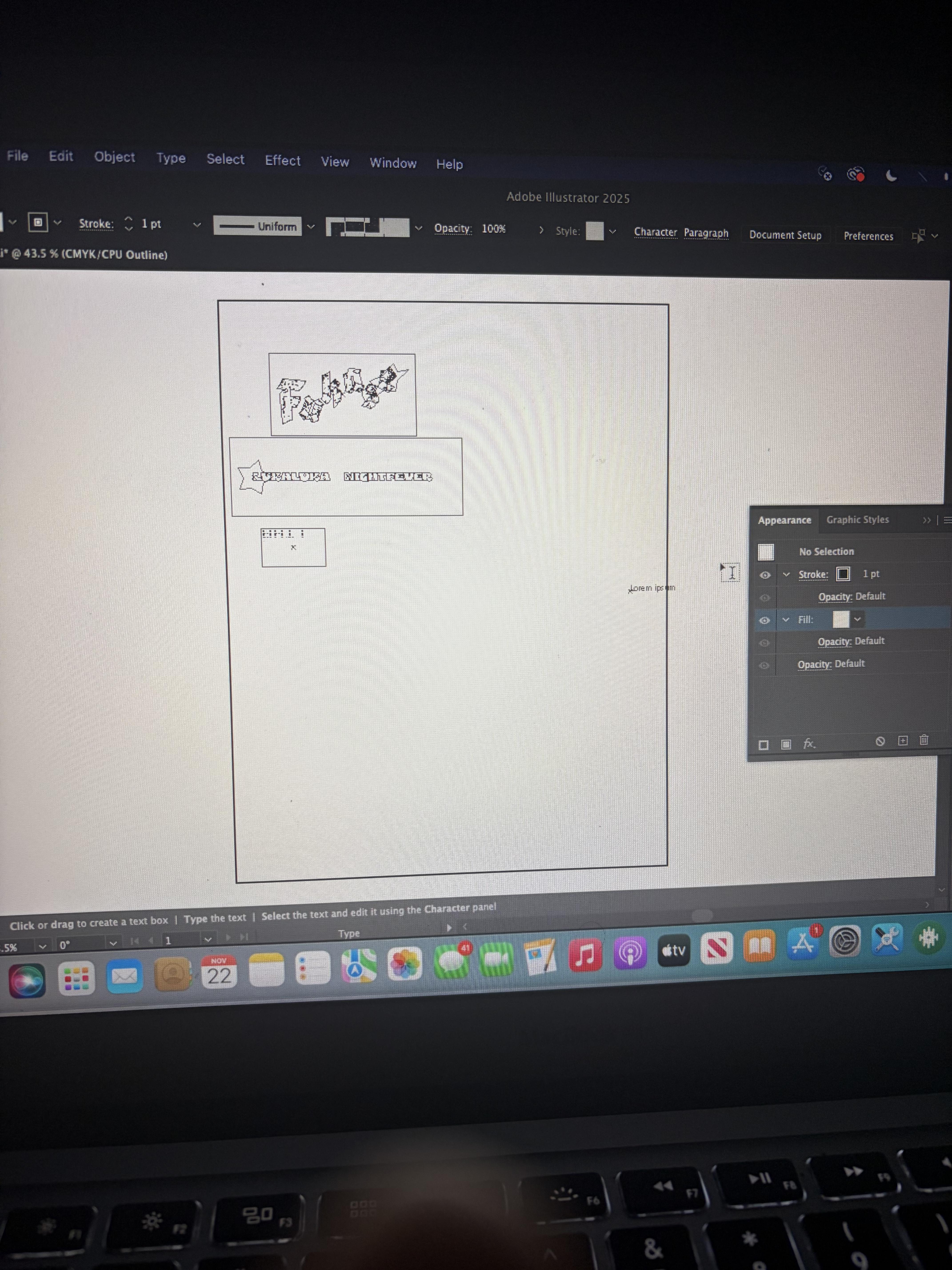
How to fix this
New to illustrator and I was trying to make the 8HIT font gradient but it was not working and now I somehow made everything white
r/AdobeIllustrator • u/Much_Report_7475 • 10h ago
New to illustrator and I was trying to make the 8HIT font gradient but it was not working and now I somehow made everything white
r/AdobeIllustrator • u/Haunting-Flamingo-93 • 15h ago
As the title says, I want to add this rounded, ink type effect to my illustration. I didnt add any effect onto the font, it was already that way. Does anyone know a way I could do this? I cant think of any way other way than doing it myself with the pencil tool or something.
r/AdobeIllustrator • u/Resident-Round6728 • 21h ago
I’m not sure what the name of this graphic design style is but I wanted to know how to achieve this or if there are any tutorials. I’ve tried to look on YouTube for retro photoshop effects but I couldn’t find one that resembling this .
r/AdobeIllustrator • u/Warv2004_ • 1d ago
For school I had to recreate a picture or drawing in Adobe Illustrator and use some skills I have learned since September. I have decided to recreate a cover of Banjo Kazooie. I am happy with the result, even though I am sure that if I learn more about the software I can make it much better😇 It's also the first project I really tried to use my drawing tablet to make things :)
I put the cover that I tried to recreate also in the post :)
r/AdobeIllustrator • u/Local-Dimension3626 • 1d ago
Title… also I can’t select that object and as you can see my layer isn’t locked or anything.
r/AdobeIllustrator • u/Ambrosaure • 1d ago
r/AdobeIllustrator • u/imjustunluckyy • 1d ago
I'm going around in circles looking for a solution but I can't find anything.
I would like the part of the text "em Águas de Moura, zona de" to be right-side up, and the rest to remain as it is.
I've already tried "flip", but it keeps changing the beginning of the text to another point. I want it to stay where it is.
How do I solve this?
P.s.: I also tried the Reverse Path Direction and it didn't work.
r/AdobeIllustrator • u/Hemmyway • 1d ago
Hi everyone!
I'm hoping someone here might know how to create this kind of progressive blur effect in Illustrator.
I'm looking to achieve a blur that gradually increases towards the edges of a vector shape, while keeping parts of the object completely sharp and unblurred. So, essentially, I need a smooth transition from sharp edges/details to increasingly blurred areas, rather than a uniform blur across the entire object.
The shapes were originally created in Figma, but unfortunately, exporting them as SVGs doesn't seem to preserve the blur effect properly. Since my end goal is to use these graphics as SVGs on a website, I need to find a way to recreate the effect in Illustrator while keeping everything SVG-compatible.
I've been trying to figure this out for ages and have searched everywhere, but I haven't been able to find a smooth, reliable solution. It feels like something that should be possible, but I'm slowly going crazy trying to work it out.
Any ideas, tutorials, workarounds, or alternative approaches would be hugely appreciated. You're honestly my last hope!
Thank you so much!
r/AdobeIllustrator • u/LukeChoice • 2d ago
Hey everyone, Luke from Adobe here.
Coming back to the series focused on quality-of-life improvements in different areas of Illustrator, and this time I wanted to talk about font management. Covering what’s been out for a while, but also how things are evolving inside the current beta.
When the updated Font Browser was released, it made it easier to search, browse and activate fonts from Adobe Fonts directly within Illustrator, with improved filtering by name, style, foundry, language and classification.
Font Libraries were added to help curate collections based on styles, projects, clients, etc.
You can also navigate your fonts through categories such as Recent, Active and More Fonts, making it easier to find and manage the typefaces you use regularly.
The latest beta takes font discovery further with natural-language search, meaning that you can describe the type of font you're looking for rather than needing to know its name.
You could search "bold futuristic" or "playful handwritten" directly inside the fonts field, and it will return two types of results directly within the Your Fonts or the Discover More tab:
Even if there are no exact matches in your existing library, Illustrator can still suggest related fonts to explore.
This is designed to make font discovery more intuitive and help you find typefaces that fit your creative direction without leaving Illustrator.
You can now apply fonts directly from the Discover More tab with a single click, without having to download and activate them first.
Simply select a font and Illustrator will automatically activate and apply it to your selected text, with the download happening in the background so you can keep working.
If you don't have any text selected, the font will be ready to use the next time you type.
------------------------------------------------------------------------------
As always, I am interested to hear your thoughts on your experience with the recent updates, but also what you think about some of the new stuff in the works.
r/AdobeIllustrator • u/OrangeFire2001 • 2d ago
I have to use this for a production piece and just noticed that the Effect > Warp > Fisheye filter doesn't evenly distort, it ends up resolving the shape to a (more or less) box when it gets too extreme. Which means even at medium values, the distortion is not even all the way around. I find this distressing, though not a deal breaker at this point, but it will make my task a little more difficult. I needed a more even-all-around circular distortion. The same seems to go for most of the Warp effects when applied on a perfectly circular shape where I want complete evenness all around. ☹️ FYI u/LukeChoice
r/AdobeIllustrator
•
u/Studiosus01
•
3d ago
Hello community! I’ve created an illustration and am wondering where it could be used?
r/AdobeIllustrator • u/Beanie-2018 • 3d ago
If anybody is using Illustrator for t shirt and print designs on a Mac, M3 or M4, how much RAM is required, and how much is preferred?
I've read that more RAM is better but I've also read that a bigger internal drive is more important than RAM. However, it seems like a Samsung 990 Pro in an enclosure could work.
There are tons of reviews and threads about this, from a hypothetical computer spec perspective, but I'd like to know what configuration actual Illustrator users.
r/AdobeIllustrator • u/Ravingdork • 3d ago
I frequently run into the issue of having a pattern fill, such as the diamond crosshatch below, that I want to warp/distort so that it appears to be wrapping an unusual shape (a cylindrical corndog-shape in this case).
However, everything I've tried, such as Distort and Transform effects or Envelope Distort or Warp, only seem to impact the shape--leaving the fill pattern unchanged. How do I get the diamonds above to compress near the top and bottom, and to follow the curve of the widening neck?
It's easy enough to do with color fills, gradients, and meshes, but when it comes to patterns, they always seem unalterable and I'm always totally lost as to what to do.
r/AdobeIllustrator • u/divaschematic • 3d ago
I can see several people have aske this but I still can't work it out and the one thread that seems to answer it the link that solves it doesn't work! https://www.reddit.com/r/AdobeIllustrator/comments/kswr6f/hi_i_created_a_custom_pattern_brush_and_even/
Anyway basic pattern, want it to not have the gap. I know it's something to do with the bouncing box, so I added a blank shape behind it to fill the whole box but that didn't' work either (is it just replicating the transparency I suppose?) What am I doing wrong?


r/AdobeIllustrator • u/PatienceFuture7697 • 3d ago
Whenever I create a new document, it appears that the canvas is looked.
I have it for a couple of month now. It's an extra step and super annoying.
Chat Gpt couldn't help me on that, doese annyone know why that is or why that happen?
r/AdobeIllustrator • u/wiz_6 • 4d ago
Hi, I'm a beginner in Illustrator and trying to recreate this logo style for work..
(Attached: Reference image + my current attempt)
I traced the outline of the image using pen tool and filled with linear gradient
tried using 'apply gradient along stroke,' and I also looked at Freeform Gradients, but my version still doesn't look quite right.. especially the smooth color transitions and I want a loop in the "k" overlaps gradient like..
Could anyone share the best workflow or tips to get this gradient looking clean and natural? Any advice on the subtle shading where the path crosses over itself..?
r/AdobeIllustrator • u/hauntedGeologist • 4d ago
I'm making a logo for a small project & every time I try to export to an .svg file, the lettering comes out super weird in random places. It's not even consistent in where it makes errors between multiple exports. I tried googling the problem, but every source I could find fixed the problem by increasing the decimal value for the export (currently it's at 5, and I tried 6 & 7 and had the same problem) or by checking for any extra unnoticed paths/anchor points, which I also couldn't find.
Also, the lettering in the file isn't just text; I converted it to outlines while I was working with it, so I don't think any issues that .svg files have with text would be the problem either.
Does anyone know what else might be causing this?
r/AdobeIllustrator • u/avidrabbit • 4d ago
I am trying to set up a work flow where I design in Illustrator and animate in After Effects. However, when I save an artboard as a .psd, the layers I want to animate flatten into a single layer. This seems to be happening predominately with imported images. I thought it was because they were linked, but the layers still flatten when embedded.
r/AdobeIllustrator • u/R3APER_PL • 4d ago


Hello, I have been having a problem with one thing for a long time and I don't know how to solve it. I'm creating an outline (like the one on the left side of the photo) and I'd like the top of it to use the "profile" I set, i.e. narrowing, but when I set it, the bottom of the line also decreases (which is logical, look at the object on the right side of the photo). The only solution I have currently found is to cut the line on the bend and use a profile (see the middle object in the photo) but I don't know what to do next, if I use a round end of the outline I am able to eliminate this empty space but then it doesn't fit my work style (see the third photo). Is the only solution to "make" the filling by hand? Thank you for your help
r/AdobeIllustrator • u/yarche • 5d ago
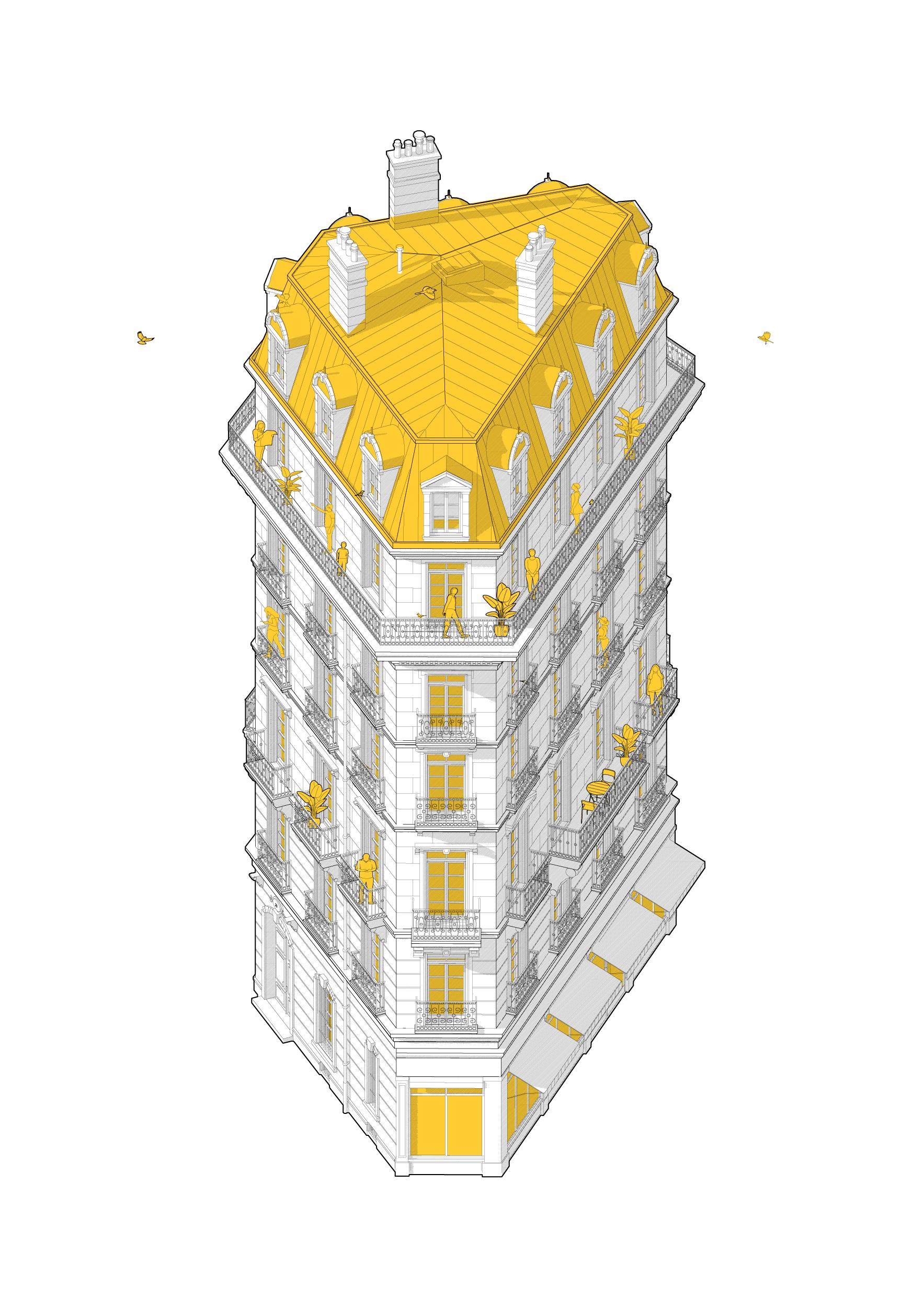
As an architect I work in urban and architectural representation
This building occupies the smallest urban block in Paris, at 125 rue Vieille du Temple, where three streets meet. It is a typical remnant of the Haussmannian restructuring of the capital: a sliver of land shaped by the new street alignments.
Hope you enjoy it.
Modeled in Blender and MCP and hand-traced in Illustrator
r/AdobeIllustrator • u/BannedFromTheStreets • 5d ago
Hey Guys,
For work I have made about 240 stickers that are separated in groups of 3, i have 80 groups of stickers that need to be spresd on 4 pages. All the stickers a unique and of different shapes.
Is there a way to automate and optimize the disposition of sticker on said pages without having to manually place, rotate and resize every sticker one by one? Its a kid activity book so I dont want a rigid straight grid for the stickers.
Thanks in advance.
r/AdobeIllustrator • u/onlydesign • 5d ago
I do some of my work in the sign industry, and showing Channel Letters on a building quick and easy in Illustrator has always been either processor time intensive, time consuming, destructive to the live text and usually all of the above. This is a simple trick for Proofing to the customer to get the basic look and feel of the "3D" Effect of the returns.
Use a Transform effect, then save it as a Graphic Style for one-click reuse.
r/AdobeIllustrator • u/ResponsibleSky1139 • 5d ago
Sup, which workspace is best to use for ordinary things?