r/Aiarty • • 23h ago Bravo

Showcase/Creations [Midjourney + Aiarty] Lost in a Cozy Little Jungle 🌿

Thumbnail
gallery
163 Upvotes

A little world where nature has taken over in the loveliest way. 🌿💚

Images created via Midjourney and enhanced by Aiarty Image Enhancer


r/Aiarty • • 22h ago

Showcase/Creations Restore Blurry Faces and Fine Details with the Best AI Image Enhancer

Post image
1 Upvotes

A beautiful portrait deserves more than just a quick sharpen.

Look closely at the delicate pearls, intricate lace, soft curls, and tiny details around the face. These are often the first things to lose definition when an image is blurry, noisy, or low-resolution. And pushing sharpness too far can leave skin looking artificial.

That's where Aiarty Image Enhancer makes a difference.

With AI-powered deblurring, denoising, and detail enhancement working together, Aiarty helps bring clarity back to facial features, hair strands, and intricate textures while keeping the original character of the portrait intact.

And it goes well beyond portraits. Whether you're restoring old family photos, enhancing everyday shots, or preparing RAW images for larger prints, Aiarty offers a flexible workflow with:

  • Up to 8× AI upscaling for higher-resolution images
  • Multiple AI models for different image types and enhancement needs
  • Batch processing to handle entire photo collections
  • 100% local processing with no need to upload your photos to the cloud
  • A true lifetime license with future software and AI model updates included

No complicated editing workflow. Just more detail where it matters, without losing the natural look.

🎁 Black Friday Deal: Make every detail count, from treasured memories to everyday shots. Aiarty Image Enhancer lifetime licenses are now up to 49% off, with extra savings using code BF26-EXTRA. One-time purchase, lifetime updates, no subscription.


r/Aiarty • • 4d ago Heartwarming Bravo Popcorn

Showcase/Creations [Midjourney + Aiarty] Little Hideaways in a Greener World

Thumbnail
gallery
741 Upvotes

Little houses, lush greenery, rainy afternoons, and nowhere else to be.

Images created via Midjourney and enhanced by Aiarty Image Enhancer


r/Aiarty • • 4d ago

Showcase/Creations [Midjourney + Aiarty] Empires of the Cosmos

Thumbnail
gallery
262 Upvotes

Images created via Midjourney and enhanced by Aiarty Image Enhancer


r/Aiarty • • 4d ago

Showcase/Creations [Midjourney + Aiarty] Somewhere in a European Fairytale

Thumbnail
gallery
208 Upvotes

A Little Corner of Magic🖤

Images created via Midjourney and enhanced by Aiarty Image Enhancer


r/Aiarty • • 6d ago Bravo

Showcase/Creations [Midjourney + Aiarty] Celestial Reverie

Thumbnail
gallery
285 Upvotes

Echoes of Eternity ✨

Images created via Midjourney and enhanced by Aiarty Image Enhancer


r/Aiarty • • 5d ago

Showcase/Creations [Midjourney + Aiarty] 4K Wallpaper Dump

Thumbnail
gallery
77 Upvotes

r/Aiarty • • 5d ago

News/Updates [🎁Black Friday] All-in-one AI image enhancer for everyday shots, RAW files, and old photos

Post image
2 Upvotes

The one group photo where everyone’s looking at the camera came out grainy. The bird you waited an hour to photograph is tiny in the frame. And the old family photo you finally found could use a little more clarity.

Aiarty Image Enhancer is built for photos like these. It brings denoising, deblurring, and AI upscaling into one desktop app, so you can choose the model, enhancement strength, and output size that fit each photo.

  • Grainy indoor phone photos. Reduce shadow noise at the original size while keeping skin texture visible.
  • Compressed photos from group chats. Reduce blocky JPEG artifacts and rough edges when the shared copy is all you have.
  • High-ISO RAW files. Clean up noisy shadows while retaining fine texture in feathers, fur, and fabric.
  • Tight crops for print. Add resolution when cropping in on a distant subject leaves too few pixels for the print you want.
  • Faded family scans. Correct color casts and reduce heavy grain for a cleaner digital copy of an old print.
  • Small portraits with soft faces. Improve definition around the eyes and hair, and upscale the image for a reprint.

You can download all AI models to your computer for fast access and offline processing. Your photos stay on your device, whether you’re editing one image or batch processing a full shoot or family album. The true lifetime license is a one-time purchase with future software and AI model updates included. It covers personal and commercial use, including paid client work.

🖤 Our Black Friday offer is live!! Use code BF26-EXTRA at checkout for up to 49% off eligible Aiarty Image Enhancer lifetime licenses.


r/Aiarty • • 6d ago

Showcase/Creations Age of Titans

83 Upvotes

A civilization beyond the limits of human imagination. 🪐


r/Aiarty • • 6d ago

Discussion Aiarty Feedback & Feature Requests Megathread

3 Upvotes

Hey everyone! 👋

We're opening up a dedicated thread for all things Aiarty feedback. Whether you've been using Aiarty for a while or just started exploring it, we'd love to hear what's working for you, what's not, and what you'd like to see us improve.

This thread is open to feedback on Aiarty Image Enhancer, Aiarty Video Enhancer, and Aiarty Image Matting.

Feel free to share anything, including:

  • Feature requests - What's missing from your workflow?
  • AI model improvements - Any specific details, textures, or types of footage you'd like us to handle better?
  • Performance & stability - Processing speed, hardware compatibility, crashes, or bugs.
  • UI & workflow - Anything that feels unintuitive, unnecessary, or could be made easier?
  • Existing features - What do you love? What could use some improvement?
  • Wild ideas - Even if they sound ambitious, we're all ears.

There's no formal format required. Screenshots, before-and-after comparisons, and real-world examples are always welcome.

We'll keep this thread open and use it as an ongoing space to collect feedback and inform future development. While we can't promise every suggestion will make it into the next update, we genuinely want to understand what would make Aiarty more useful for you.🖤

- Aiarty Team


r/Aiarty • • 7d ago

Showcase/Creations [Midjourney + Aiarty] The World Is Bigger Than Us

Thumbnail
gallery
236 Upvotes

My kind of escapism.

Images created via ChatGPT and enhanced by Aiarty Image Enhancer

Also, for anyone interested, Aiarty's Black Friday sale is live. Worth checking out if you're looking for a reliable AI image enhancer with a perpetual license rather than another subscription. Use code BF26-EXTRA for a little extra off through December 4.

Sharing the prompts below in case anyone wants to experiment with this style.

Slide 1&4. Medieval fantasy kingdom built into a massive vertical cliff, ivory stone castles with golden domes and slender spires, delicate bridges, intricate architecture, white and cream houses cascading down forested hillsides, weathered cliffs with green vegetation, colorful banners on ancient walls, a tranquil lake mirroring the city in shimmering gold, a lone cloaked traveler with a wooden staff and white wolf in the grassy foreground, wildflowers, dark trees framing the scene, half moon in a dusty blue sky, soft peach clouds, golden floating particles, warm late afternoon light, breathtaking vertical composition, nostalgic Japanese fantasy animation background art, vintage hand painted gouache and watercolor, intricate architectural linework, subtle paper grain, muted earthy greens and antique gold, soft atmospheric perspective, dreamlike serenity, timeless storybook aesthetic.

Slide 2. A colossal ancient sacred tree rising from an endless green meadow, impossibly massive ivory white weathered trunk with moss patches, enormous twisting roots forming hollow archways, sprawling branches supporting a vast emerald canopy, hundreds of golden fireflies drifting upward along the trunk. Two tiny cloaked travelers sit at a low wooden table beneath the tree, surrounded by whimsical woodland fairies with translucent pastel rainbow wings. Distant rolling countryside meets a peaceful blue horizon, creamy cumulus clouds against cornflower blue sky, dappled golden sunlight filtering through foliage, tiny wildflowers in the foreground. Symmetrical vertical composition, monumental scale. Nostalgic Japanese fantasy animation background art, vintage hand painted gouache and watercolor, delicate ink linework, stippled foliage, weathered canvas texture, paper grain, faded pigments, muted moss green and warm ivory palette, flat painterly shading, enchanting fairy tale atmosphere.

Slide 3. Vast surreal ancient futuristic fantasy landscape: two enormous ivory leaf shaped flying vessels glide silently overhead, tiny passengers on top, delicate mechanical parts and colorful fabric ribbons trailing behind. A colossal pale sandstone megastructure stretches across rolling green hills, monumental curved buttresses and towering stone pillars receding toward a distant ocean. A tiny medieval adventurer runs through the grassy foreground carrying a staff with fluttering flags. Windswept meadows, scattered wildflowers, enormous peach cumulus clouds, faded powder blue sky. Muted olive greens, warm cream architecture, extraordinary scale and depth. 1980s Japanese fantasy animation style, hand painted gouache illustration, delicate ink outlines, intricate architectural linework, vintage screen printed textures, weathered paper grain, stippling, faded pastel pigments, flat painterly shading, warm natural daylight, whimsical retro futurism, poetic visual storytelling, serene yet adventurous atmosphere, highly detailed vintage fantasy book illustration.

Slide 5. A picturesque medieval fantasy village on snow covered rolling hills at winter twilight. Dozens of timber framed cottages with steep rooftops buried in thick snow, a large central tavern with enormous amber lit windows, tall stone chimneys releasing glowing smoke. Winding snowy paths reflect warm golden light. Tiny villagers gather outside the tavern. Three weary fantasy travelers in heavy woolen cloaks and rustic backpacks walk through deep snow in the lower left foreground; one has silver white hair and a pale sage green cloak. Distant snow covered forests fade into blue gray. Delicate snowflakes drift through the air, warm embers rise above rooftops. Elevated panoramic viewpoint, muted slate blue snow contrasted with amber and burnt orange window light. Nostalgic Japanese fantasy animation background art, vintage hand painted gouache and watercolor, delicate ink outlines, intricate architectural linework, textured brushstrokes, stippling, aged paper grain, flat painterly shading, atmospheric depth.

Slide 6. A mysterious ancient fantasy world at midnight: impossibly tall ruined stone towers rising into a dark blue night sky, colossal ancient structures fading into atmospheric darkness in a distant valley, thousands of tiny luminous pale blue particles gathering around forgotten ruins. A monumental ivory sandstone cliff dominates the right, weathered surfaces engraved with golden inscriptions and runes, dark moss and vegetation along the edges. A narrow stone staircase ascends diagonally up the rock face; scattered parchment pages drift through the air. A solitary tiny traveler in a burnt orange robe holds a glowing golden lantern at the staircase's foot. A still dark teal lake reflects the traveler and warm lantern light with golden sparks. Nostalgic Japanese fantasy animation background art, vintage hand painted gouache and watercolor, fine ink linework, stippling, aged paper texture, faded pigments, muted midnight blue and antique ivory palette, flat painterly shading, dreamlike solitude, extraordinary scale.


r/Aiarty • • 7d ago

Showcase/Creations [Midjourney + Aiarty] Imagined Civilizations

Thumbnail
gallery
124 Upvotes

A glimpse into an alternate future

Images created via Midjourney and enhanced by Aiarty Image Enhancer


r/Aiarty • • 7d ago

Discussion Best Image Enhancer for Wildlife Photography?

Post image
5 Upvotes

The best frame of the morning can be the hardest one to edit. The timing is right, but the light is low and the subject is farther away than planned. A tight crop makes the grain harder to ignore. Push the denoise a little too far and the fine texture starts to disappear. Push the sharpening and suddenly there’s a bright outline that wasn’t there before.

Here’s how I’d use five different AI photo enhancers, depending on what the shot needs.

  • Aiarty Image Enhancer: If noise is the main issue, I’d start at 1× and adjust the strength while checking the finest texture in the frame. If a tight crop needs more resolution, I’d try 2× and compare it with the original at the size I plan to share.(Note: If you’ve had your eye on a lifetime license, Aiarty’s Black Friday sale is live. Use code BF26-EXTRA for extra savings through December 4.)
  • Topaz Photo: If the subject looks a little soft, I’d try the Wildlife sharpening model and bring up the strength gradually. I’d check the outline against the background for halos before going any further.
  • Lightroom: If the RAW file is already in my catalog, I’d start with AI Denoise. I’d check the texture at 100% before deciding whether the image needs any extra sharpening.
  • DxO PureRAW: After a morning of shooting at high ISO, I’d pick out the keepers and run them through DeepPRIME with lens corrections before bringing them into Lightroom.
  • ON1 NoNoise AI. If the shadows are full of color speckles, I’d adjust color noise first. Then I’d bring down the luminance noise just enough to clean up the shadows while keeping some texture in the fur.

If I’m comparing two upscale settings, I export both at the same final dimensions and flip between them. If the extra detail only shows up when I zoom way in, I’m happy with the lighter edit.


r/Aiarty • • 10d ago

Showcase/Creations [Midjourney + Aiarty] Nature has its own way of painting. 🎨🌿

Thumbnail
gallery
50 Upvotes

Images created via Midjourney and enhanced by Aiarty Image Enhancer


r/Aiarty • • 12d ago

Showcase/Creations [SD + Aiarty] The Floating Kingdom

Thumbnail
gallery
170 Upvotes

☁️🏰🎨 Generated with Stable Diffusion, upscaled with Aiarty Image Enhancer.

If you're experimenting with Stable Diffusion, here are a few SD models worth checking out for different art styles.


r/Aiarty • • 11d ago

Tutorial/How-To How to Use a Realistic AI Image Generator for Natural-Looking Portraits

Thumbnail
gallery
14 Upvotes

When an AI portrait looks a little off, I’d check three things before touching the skin texture. Where was the camera? Where was the light? What was the person doing? You can usually trace the oversized nose, glossy cheeks, or stiff smile back to one of those.

If you’re trying out a realistic AI image generator, here’s a prompt you can use to test portrait photorealism. The setup is simple enough that you can change one line and see what it actually does.

👉 Still deciding which tool to try? Here’s a roundup of realistic AI image generators.

1. Start with this prompt

An eye-level, chest-up photo of a woman in her late 30s at a kitchen table, taken from a couple of steps away. She’s wearing a faded navy sweatshirt, with one forearm resting on the table. Her shoulders are angled slightly toward the window and she’s looking back at the camera as if someone just said her name. Overcast daylight from a window to the left of the camera. Her left-facing cheek is softly lit and the far cheek is a little darker. Slight redness around her nose, a few loose hairs at her temple. The nearer eye is in focus, and you can still make out the back of a kitchen chair behind her.

2. Change the line that matches the problem

  • The nose looks too big and the ears seem to disappear. Pull the camera back. Try “waist-up portrait taken from across a small kitchen table,” then crop to chest-up afterward. Changing the camera distance can give you more natural facial proportions.
  • The face looks flat or glossy. Give the light a direction and describe what it does. Try “window light from camera left, with a soft shadow on the far cheek and a small highlight on the bridge of the nose.” Check that the nose shadow falls away from the window. If both cheeks are equally bright, the model may have given you a front-lit beauty shot.
  • The skin looks like sandpaper. Replace the long list of pores, freckles, and wrinkles with one local detail, like “faint redness around the nostrils.” At chest-up distance, you’re mostly looking for variation in skin tone. Save visible pore detail for a tighter crop.
  • The smile looks pasted on. Give the face a moment to react to. Try “she’s looking just past the camera at someone talking, with the corner of her mouth starting to lift.” Check the eyes and mouth together when you pick a frame.

3. Run a small A/B test before rewriting the whole prompt

Generate four frames with “soft natural lighting,” then four with the window description above. Keep the rest of the prompt and settings the same. If your tool exposes seeds, reuse the same four in both sets. Look at the nose shadow and the position of the bright spot in each eye. You’re looking for a change that shows up across several frames. One good result can just be a lucky seed.

4. Fix small defects after you pick the frame

An earring that merges into the hair is a good candidate for a masked edit. Cover the earring and the few strands it touches so the model can redraw the join. If the whole face has awkward proportions, pick another frame. That’s usually faster than patching the nose, jaw, and eyes one at a time.

If you upscale, compare the original and the upscale at the same display size. Look at the lower eyelids and the skin beside the nose. Those are the first places I’d check for newly drawn lashes or a patch of skin that’s suddenly too smooth. If you see either, dial back face restoration and compare again.


r/Aiarty • • 12d ago

Showcase/Creations [Midjourney + Aiarty] Little Worlds

Thumbnail
gallery
99 Upvotes

Images created via Midjourney and upscaled by Aiarty Image Enhancer.

🖤 Aiarty Image Enhancer's Black Friday Sale is LIVE!

No subscriptions. No credits. No recurring fees. Just a true lifetime license with:

✨ Lifetime updates, including future AI models
✨ Downloadable AI models for fast, private, offline processing
✨ Commercial use included
✨ Flexible licensing options for Windows and Mac

One purchase. All the freedom to create.

🎟️ Use code BF26-EXTRA for an extra Black Friday discount!

⏳ Limited-time offer - ends December 4, 2026.


r/Aiarty • • 13d ago

Showcase/Creations [Midjourney + Aiarty] Peaceful Moments

Thumbnail
gallery
233 Upvotes

Images created via Midjourney and enhanced by Aiarty Image Enhancer


r/Aiarty • • 12d ago

News/Updates Aiarty’s Black Friday Deals Are Live! Get a Lifetime Photo/Video Enhancer at Our Lowest Price🎁

Thumbnail
gallery
0 Upvotes

🔥 Aiarty’s Black Friday deals are live! If all you need is cleaner photos or sharper footage, a full editing suite is a hard sell. So is another subscription or a credit balance you have to check before running a big batch.

Both Aiarty enhancers are on sale as standalone apps. Pick the one you need and pay once.

  • True lifetime license. Get every feature, plus future software and AI model updates, with one payment.
  • Fast access to all models, even offline. Download every AI model to your computer so it’s ready when you need it. Try another model, rerun an export, or process a whole folder without spending credits.
  • Commercial use included. Use the same license for your own projects and paid client work.
  • Flexible device options. Choose up to 3 Windows PCs, 3 Macs, or 1 Windows PC + 1 Mac if you work across both platforms.

Shop the Black Friday Deals👇

🏷️ Use BF26-EXTRA at checkout for an extra discount on top of the Black Friday deal.


r/Aiarty • • 14d ago

Showcase/Creations [Midjourney + Aiarty] Echoes of an Enchanted Past

Thumbnail
gallery
150 Upvotes

Images created via Midjourney and enhanced by Midjourney Image Enhancer


r/Aiarty • • 13d ago

Discussion Which AI Video Editing Tools Are Worth Adding to Your Workflow?

1 Upvotes

The AI editing features that make the most sense to me are fairly unglamorous: finding dialogue, cutting retakes, fixing captions and cleaning up audio. Those are the jobs I'd want help with before paying for another way to generate B-roll.

Here’s how I’d choose between different AI video editors.

1. CapCut: My starting pick for TikTok, Reels and YouTube Shorts

CapCut gets my recommendation for beginners making short videos. Caption styling, background removal and straightforward timeline editing cover much of what those projects need.

My reservation is the free-versus-Pro boundary. Some caption functionality requires Pro, so I’d test the exact captions, fonts and effects I wanted before building a full video around them.

2. Descript: The AI video editor I’d consider for podcasts and interviews

Descript makes sense when the video follows a conversation or script. Editing dialogue through a transcript is an appealing way to assemble interviews, tutorials and talking-head videos. It also includes tools for removing retakes and filler words.

I’d keep the cleanup fairly restrained. A hesitation, breath or laugh can carry meaning. Removing everything that looks unnecessary in the transcript can leave a conversation feeling rushed.

3. Adobe Premiere: My preference for complex YouTube and client projects

Premiere’s strongest argument, to me, is having transcript editing, footage search and speech cleanup inside the same application where the project gets finished. Those features address useful parts of a larger editing job.

If I already worked in Premiere, I’d explore those tools before adding another subscription. Keeping revisions manageable matters a lot once a project has several versions, supporting footage and client feedback.

4. DaVinci Resolve: My pick for a free desktop video editor

Resolve would be my choice if I wanted a free editor with room to grow into more detailed color and audio work.

The distinction worth checking is Resolve versus Resolve Studio. Several AI features people recommend, including Magic Mask, voice isolation and text-based editing, require Studio. The free editor is substantial, but it doesn’t include the full AI toolkit.

5. OpusClip: Worth considering for turning long videos into Shorts

OpusClip is interesting when the time-consuming part is finding short excerpts inside a longer recording. It can suggest clips, generate captions and reframe footage for vertical delivery.

I’m more cautious about trusting its selections. A clip needs a clear opening, enough context and a satisfying ending. I’d judge those before its Virality Score. Podcasters also report needing to adjust cuts and restore context.

6. Runway: For generative changes to existing footage

Runway belongs on my shortlist for tasks such as removing an object, replacing a background or changing the appearance of a shot. Its Edit Studio supports those kinds of edits.

I’d test a difficult section first, especially if product shapes, logos or faces need to stay consistent.

-----

For anyone choosing an AI video editor, my advice is to start with the task consuming most of your time. Run one real project through two candidates and compare the finished exports, including the corrections.


r/Aiarty • • 15d ago

Showcase/Creations [Midjourney + Aiarty] Christmas in Every Brushstroke

Thumbnail
gallery
124 Upvotes

Images created via Midjourney and upscaled by Aiarty Image Enhancer


r/Aiarty • • 14d ago

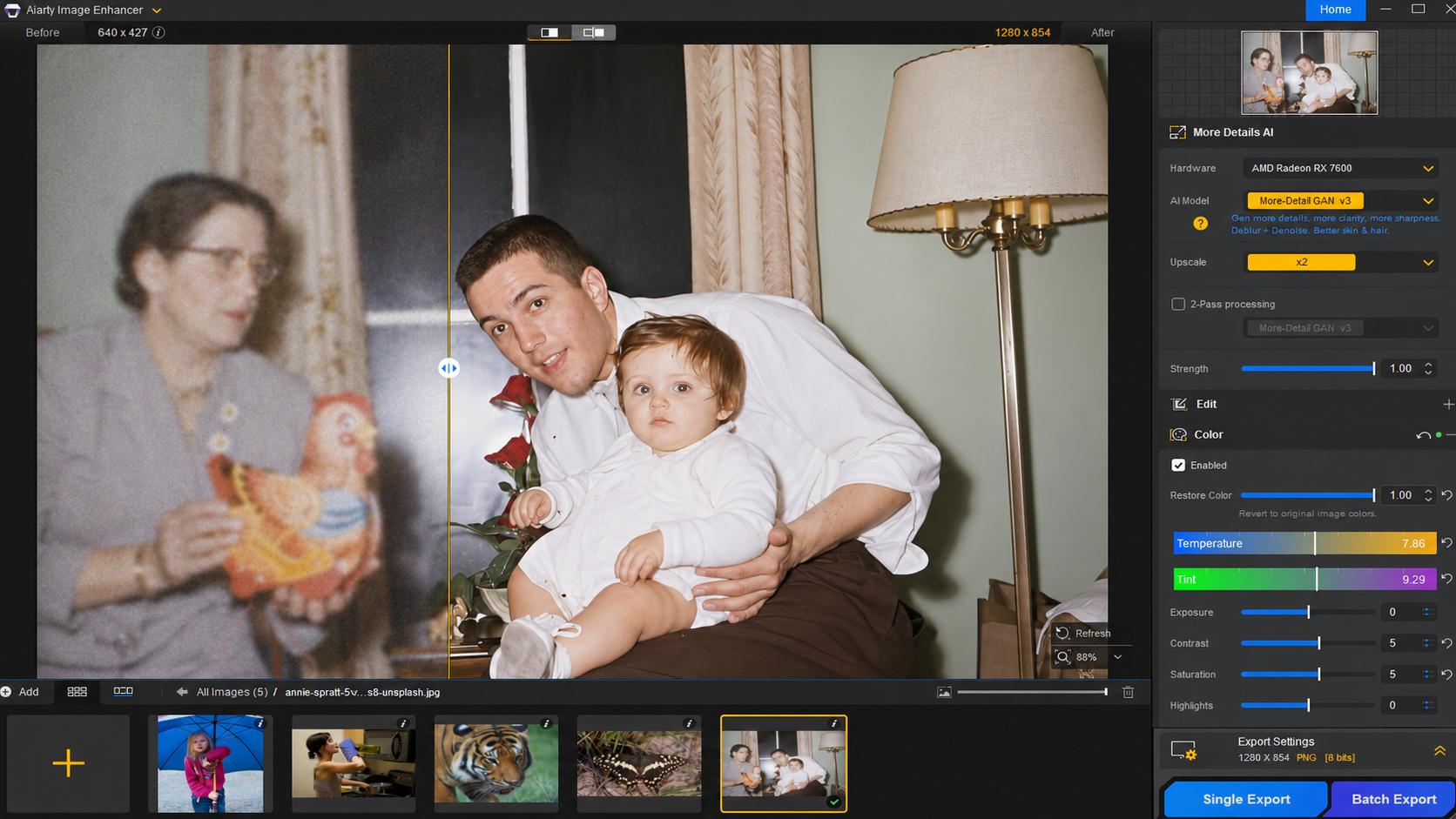
Showcase/Creations Best Photo Enhancer for Photo Restoration: Fix Blurry Faces and Recover Detail

Post image
2 Upvotes

Restoring an old portrait means dealing with more than blur. Noise, compression, and low resolution can all hide facial detail. The challenge is bringing back clarity while keeping the person’s features and expression recognizable.

Aiarty Image Enhancer combines AI photo restoration with dedicated face enhancement, giving you control over both the overall image and individual faces. Here’s how those tools help.

1. Reduce noise and blur across the photo

Before adding more facial detail, check the quality of the whole image, including hair, clothing, and the background.

Aiarty’s Real-Photo model prioritizes a natural photographic look, while More-Detail GAN emphasizes texture and definition. Use 1× enhancement to improve quality at the original dimensions, or try 2× upscaling when a small photo needs more pixels for display or printing.

2. Match face restoration to the amount of blur

A slightly soft portrait and a tiny face in an old family photo need different levels of reconstruction. Aiarty offers two dedicated face restoration models:

  • Fidelity: A starting point when facial features remain fairly clear and preserving the original appearance matters most.
  • Rebuild: Worth trying when visible facial features are blurred and need stronger reconstruction.

AI estimates plausible detail where the original image lacks information. Check the eyes, mouth, and expression against the source when deciding which result to keep.

3. Enhance faces while keeping skin texture natural

If skin becomes waxy or facial features look too pronounced, lower Face Restoration Strength independently of the overall enhancement.

You can also adjust how restored details blend into the photo. Alpha Overlay favors the original colors and appearance; Gradient Overlay makes stronger reconstruction more apparent on degraded faces. These controls help balance clearer features with a familiar, natural look.

4. Restore individual faces in group photos

Some faces in a family photograph may already be clear. Aiarty lets you select which detected faces receive restoration, so you can concentrate on the blurry ones. An optional 2-Pass Face Restoration mode adds further refinement. Compare it with a single pass to see whether it improves detail without overprocessing. Image enhancement runs locally on your computer, keeping personal photos off cloud servers.


r/Aiarty • • 14d ago

News/Updates Aiarty Video Enhancer 3.9 Is Here!! Pause. Preview. Stay in Control.

Post image
1 Upvotes

Aiarty Video Enhancer 3.9 is here - with more control over long exports and multiple enhancement jobs. Preview footage from paused exports, launch all queued tasks together, and preserve subtitle formatting when copying.

What's new?👀

1. Review processed footage before the full export finishes

When you manually pause an export, Aiarty generates a playable preview file containing the footage enhanced so far. Once it’s ready, click to review the result, a useful checkpoint when working through a longer video. You can also cancel preview-file generation at any time while it’s in progress.

2. Manage multiple tasks with greater visibility

A new Start All Tasks button lets you launch queued jobs together, while improved information for active exports gives you a clearer view of work in progress.

3. Preserve subtitle formatting through the workflow

When copying text-based subtitles, Aiarty now retains their original formatting. This release also adds support for copying image-based subtitles in MKV files, extending subtitle support for more video workflows.

Alongside these changes, we’ve addressed several known issues.☺️


r/Aiarty • • 15d ago

Discussion Best Laptops for AI in 2026: 7 Picks Compared for GPU, VRAM & Local AI

2 Upvotes

Not every laptop marketed as an "AI PC" is actually good at running AI workloads. A laptop with an 80 TOPS NPU might handle Copilot+ features beautifully but still struggle with Stable Diffusion, local LLMs, or AI video enhancement. Meanwhile, a machine with a powerful GPU and enough VRAM can make a much bigger difference for demanding creative and development tasks.

Here are seven AI laptops worth considering, depending on your workload and budget.

7 Best AI Laptops: 👉 Full Comparison Here 👈

  • ASUS ROG Zephyrus G16 (2026) - Best Overall: Up to NVIDIA RTX 5090 Laptop GPU with 24GB VRAM and a 50 TOPS Intel NPU. A strong all-round option for Stable Diffusion, AI image generation, video enhancement, CUDA workloads, and creative production. The main drawbacks are its premium price and relatively high power consumption.
  • HP ZBook Ultra G1a - Best for Local LLMs: Powered by AMD Ryzen AI Max+ PRO 395, with up to 128GB unified memory and up to 96GB assignable to graphics workloads. Particularly useful for running larger local language models, development, and memory-intensive AI tasks. However, CUDA-dependent software may still favor NVIDIA hardware.
  • ASUS ROG Flow Z13 - Best Compact AI Laptop: Combines Ryzen AI Max+ 395, Radeon 8060S graphics, and up to 128GB shared memory in a 13.4-inch design. A compelling portable option for experimenting with local models without carrying a full-size workstation.
  • Dell XPS 16 - Best Premium Windows Laptop: Features Intel Core Ultra Series 3 processors, up to 64GB RAM, and a high-resolution OLED display option. Well suited to coding, productivity, and lighter AI workloads, although integrated graphics limit its appeal for intensive generative AI.
  • ASUS Zenbook A16 - Best for Copilot+ and Battery Life: Snapdragon X2 Elite Extreme with an NPU rated at up to 80 TOPS. Designed for efficient on-device AI, transcription, productivity, and portability. Just make sure your essential software works properly on Windows on Arm.
  • Lenovo IdeaPad Slim 5x Gen 11 - Best Value: Snapdragon X2 Plus, up to 80 TOPS NPU, and up to 32GB RAM. A more affordable entry into Copilot+ computing for students, office users, and everyday productivity. Not intended for heavy local AI inference or GPU-intensive image generation.
  • MacBook Pro M5 Pro/M5 Max - Best for macOS: Offers Apple's unified-memory architecture, GPU Neural Accelerators, and up to 128GB memory on M5 Max configurations. Excellent for macOS-based creative workflows, local models, and video production, but less suitable for CUDA-specific development.

What Actually Matters When Buying an AI Laptop?

1. GPU and VRAM matter more than NPU TOPS for heavy AI workloads.

If you're generating images, enhancing videos, rendering 3D scenes, or running GPU-accelerated models, prioritize a capable GPU.

For example, AI video enhancement software relies on GPU acceleration for upscaling, denoising, deblurring, and frame interpolation. A dedicated RTX GPU with sufficient VRAM can be far more useful for this kind of work than a high-NPU-TOPS laptop with integrated graphics.

2. Memory can become the biggest limitation for local LLMs.

A fast GPU won't help much if your model doesn't fit into available memory. For local inference, machines offering 64GB or 128GB of unified or shared memory can be especially attractive. The exact requirements depend heavily on model size, quantization, and context length.

3. NPUs are useful, just not for everything.

NPUs are designed for power-efficient on-device inference. They're particularly effective for live captions, webcam effects, transcription, and background AI features. But don't assume an 80 TOPS NPU will outperform a dedicated RTX GPU in image generation or video processing. They're designed for different workloads.

How Much RAM and VRAM Should You Look For?

A few practical starting points:

  • Everyday Copilot+ and productivity: 16GB RAM with a compatible 40+ TOPS NPU.
  • AI coding and multitasking: 32GB RAM is a more comfortable target.
  • AI image generation: 32GB system RAM plus a capable GPU with enough VRAM for your preferred models.
  • AI video enhancement: 32GB+ RAM and ideally 8GB+ dedicated VRAM for demanding projects.
  • Local LLMs: 32GB–64GB available memory for many smaller or medium-sized quantized models.
  • Larger local models: 64GB–128GB unified/shared memory can significantly expand your options.
  • CUDA-based development: Prioritize NVIDIA RTX graphics and VRAM capacity.

These aren't universal minimum requirements, but they're useful guidelines before spending money.