r/Androidheadunits • • 1h ago

[TOOL][QCM6125][A13] QCM6125-BUILDER v1.0 — Debloat, Patch & Build Signed OTAs

1 Upvotes

Build your own modified, signed OTA for the XTRONS IQP94M245P / HCT LF2 and other (QCM6125, Android 13) – offline, from the stock update.zip, with a guided text interface.

What is this?

A single-file Linux tool that takes the stock update.zip and produces a flash-ready update.zip with exactly the apps and patches you choose. No Android build tree, no manual image editing. It never touches the device and never touches the MCU.

Highlights

  • One file + your update.zip – put qcm6125-builder.pyz and the stock update.zip in one folder, run it, done. Everything else is bundled.
  • Guided TUI in four steps: Inputs → Debloat → Patches → Review & Build, with grouped lists, a detail panel, a risk/stage filter and a live build log. Wide terminals get a master-detail layout.
  • Debloat with explanations – all 185 app folders of the image, each with a short description, the size on disk, and a risk rating (SAFE / FEATURE / RISK / REQUIRED, modelled after the Universal Android Debloater levels, rated by hand – not taken from the UAD database; guessed entries are marked “(?)”). The header shows how many apps you remove and the estimated space you free.
  • Package lists – mark many apps at once: Telephony, SIM/eSIM, NFC, Google apps, Google services, head-unit multimedia, cameras, utilities, printing, wallpapers, Qualcomm telemetry, factory tools, backup, phone projection, optional hardware (cameras, TPMS, CD/DVD, TV tuner, iPod, fan, AV-IN, NFC) and the risk lists. The filter lists originate from Universal Android Debloater Next Generation; the descriptions and risk ratings for this firmware were reviewed and maintained separately for this tool.
  • Safety net – core head-unit apps (launcher/recents, SystemUI, Settings, HCT manager, CAN bus, DSP/amplifier setup, Bluetooth phone and music, radio, system file picker, package installer, WebView, keyboard, network stack, …) are flagged and the build is refused until you explicitly confirm. Important apps (browser, file manager, maps, Play services, gallery, …) get a warning with recommended alternatives. Per-app notes explain side effects (for example: “remove Play services only together with GSF and Play Store”).
  • Your own APKs – drop extra APKs into the same folder; the tool detects them (package name via aapt2, arm64 check) and preinstalls them into the ROM. HCT Tools offers them after the first boot – nothing installs silently.
  • Patches (switchable) – Recents grid (options: big main tile on/off, always-visible close-all button), overview scaling overlay, Settings with the Developer options tile always visible, root visible to apps (/system/xbin mode 0755, so apps like Shizuku can find Magisk's su), Vulcan launcher as replacement home screen, HCT Tools (installer + built-in English manual of the HCT firmware research), Magisk boot (root daemon).
  • Magisk root – v1.0 uses prebuilt Magisk boot/vbmeta inputs matched to the supported LF2 firmware; the Magisk app can be preinstalled optionally, root is exposed through `/system/xbin/su` for apps such as Shizuku, and Magisk root plus Zygisk work on the tested IQP94M245P.
  • Checks you can rely on – dynamic-partition size budget (the group limit from the stock manifest, 6140 MiB on this firmware) is enforced; every file written into the images is read back and compared; payload signature, hashes and the AVB chain are verified; the finished update.zip is signed.
  • Clean output – the output folder contains only update.zip, build.log and verify.json.

Supported firmware

Only LF2 SC138 V2_13 (20260717) – build fingerprint Doro/S10A/QCM6125:13/S10A_123/eng.hct.20260717.154837:userdebug/release-keys. The bundled patches and boot image only fit this build; the tool refuses any other firmware.

Compatibility / other XTRONS models

Tested:

  • XTRONS IQP94M245P – HCT firmware LF2 SC138 V2_13 (20260717) (QCM6125, Android 13 on an Android 11 vendor base)

Reportedly the same Android firmware, not tested by me: according to firmware-request replies attributed to XTRONS support in the XTRONS Facebook group, the same Android package was supplied for these models:

  • IQ92MTVP
  • IQ94MTVP
  • IQP9253BP
  • IQ84A3AP
  • IQP12ACHLP
  • TIQ742P

This points to a shared HCT/QCM6125 software branch. It does not prove that the MCU firmware is interchangeable, and the tool never touches the MCU. Before you build, check that your unit reports the same fingerprint as above. The tool rejects any other firmware before building. If you run one of these models, please report your result.

Want your model added? Post:

  • model name / seller and the firmware version shown in Settings
  • the output of getprop ro.build.fingerprint, ro.product.customer.id, ro.build.device.version and ro.product.device
  • whether your update.zip is a full A/B OTA (contains payload.bin)

Screenshots

Step 1 – Inputs

Step 2 – Debloat

Package lists

Step 3 – Patches

Step 4 – Review & Build

Current development (v1.1, experimental)

While looking for the video problem I compared the XTRONS LF2 package with the Dasaita G13 packages (zst27_sc138_13, build 20260811). What I found:

  • The Android layer is the same HCT build: same 13 partitions, same dynamic-partition group, same vendor properties, same OTA signing certificate, same panel configuration. Only the customer layer differs: launcher, Bluetooth, radio and DSP apps (LF2* vs ZST27*), the customer id, a newer kernel build, and the MCU family (XTRONS HCTGS_HCT vs Dasaita MTCHS_HA4Z).
  • The device version (V1/V2/V2.1) is not just a label. It encodes the filesystem of /data: Dasaita V1 uses f2fs with file-based/metadata encryption, Dasaita V2.1 uses plain ext4. The XTRONS LF2 vendor fstab is byte-identical to the Dasaita V1 one, so the XTRONS “V2” corresponds to the Dasaita “V1” layout, not to V2.1. That is what the HCT updater check (“Device version (V2) does not match update package version (V2.1)”) protects: flashing V2.1 would switch /data from f2fs to ext4.
  • The dtbo contains hardware-specific audio/pinctrl nodes (different between XTRONS and Dasaita), so a foreign dtbo changes the audio configuration. The builder always keeps the dtbo of your own stock.
  • I have not flashed any Dasaita package on an XTRONS unit and do not recommend it: the MCU and customer coupling (steering keys, CAN, DSP, Bluetooth, Zlink) is unknown, and the update tools check the device version and the MCU customer. Never flash another vendor's MCU image. The XTRONS unit above is the only tested one.

What is being built for v1.1:

  • A start question for your unit's manufacturer and firmware profiles per brand, so that the tool knows which firmware counts as supported for you.
  • An analysis mode that opens other HCT QCM6125 update.zip files (for example Dasaita) without extracting them and tells you what differs (build, device version, /data layout, customer layer, partition budget). A command-line version exists already: qcm6125-builder analyze update.zip --unit XTRONS.
  • The Magisk boot image created from the firmware's own boot.img instead of a prebuilt file.
  • Clearly marked experimental builds for other firmware.
  • Only as an explicit opt-in: an override of the HCT device-version check, and only where the /data layout is identical. The MCU is never touched.
  • Find and fix the video problem (see above), and more verified models once people report their results.

None of the v1.1 features are in the v1.0 download below.

Requirements

  • Linux x86_64 with glibc ≥ 2.17 (Arch/CachyOS tested; Ubuntu 22.04+, Debian 11+, Fedora should work; Alpine/musl and ARM are not supported)
  • Python ≥ 3.9 (with curses, lzma, bz2), e2fsprogs (debugfs, e2fsck, resize2fs, dumpe2fs), Java ≥ 11
  • ~12 GiB free disk space; the folder must be writable (~300 MB helper-file cache)
  • A terminal with true colour (for example Konsole, kitty, GNOME Terminal) shows the full theme; other terminals use a 256-colour approximation.

The tool checks all of this itself and prints the install command for your distro.

How to use

mkdir ~/rom && cd ~/rom
cp /path/to/qcm6125-builder.pyz .
cp /path/to/update.zip .        # the stock LF2 V2_13 update.zip
cp my-extra-app.apk .           # optional: apps to preinstall
python3 qcm6125-builder.pyz
  1. Inputs – press e to extract the update.zip; firmware, dependencies and your extra APKs are checked (a shows the APK list).
  2. Debloat – Space toggles an app, Tab switches the stage filter, f the risk filter, l opens the package lists.
  3. Patches – switch patches, the Recents options and your APKs on/off.
  4. Review & Build – read the warnings, confirm critical apps with c if needed, press Enter to build (d shows the full lists). About 3–5 minutes on a modern PC.

The result is out/<profile>/update.zip. There is also a plain CLI (plan, check, build, sizes, …) – python3 qcm6125-builder.pyz --help.

Flashing

  • Copy update.zip to the root of a FAT32 USB stick (the file must stay below 4 GB) and install it from recovery (Apply update from SD card or USB).
  • Do not choose “Wipe data / factory reset” unless you want to lose everything.
  • Keep the original update.zip – it is the known way back.
  • Recovery access when stuck in a bootloop is described in the HCT Tools manual (RST pinhole method).

Status – please read

Use at your own risk. The generated update.zip is built and verified offline (payload signature, AVB chain, filesystem check, read-back of every written file). On my IQP94M245P I flashed a ROM built with this tool from a USB stick in recovery (with a data wipe): it boots, Magisk root and Zygisk work, and the preinstalled apps and the Recents changes work. Video playback is broken (see above).

  • Signed with the AOSP test keys, like the stock package (same OTA certificate as the stock).
  • Magisk boot/vbmeta are prebuilt inputs in v1.0; the tool does not create them yet.
  • The default result is not identical to the preinstalled set of the stock; you choose what is removed and what is added.
  • Rating and description of the apps are my own assessment from names and general Android/Qualcomm knowledge – “(?)” means guessed. Please report wrong entries.

What is in the bundle / third-party components

  • Android host tools (avbtool, fec, aapt2, signapk) and AOSP test keys
  • Magisk (boot image with the Magisk daemon, plus the Magisk app as an optional preinstalled app)
  • Vulcan launcher (replacement home screen)
  • HCT Tools (own app: installer + manual, English)
  • Patched Launcher3QuickStep and Settings of the stock firmware

All third-party parts keep their own licenses.

Download

Feedback wanted

Which apps did you remove, what broke, which descriptions or risk ratings are wrong? Does video work on your unmodified stock? Posting your build.log and the saved profile (config/profiles/<name>.profile.json) helps a lot.


r/Androidheadunits • • 1h ago

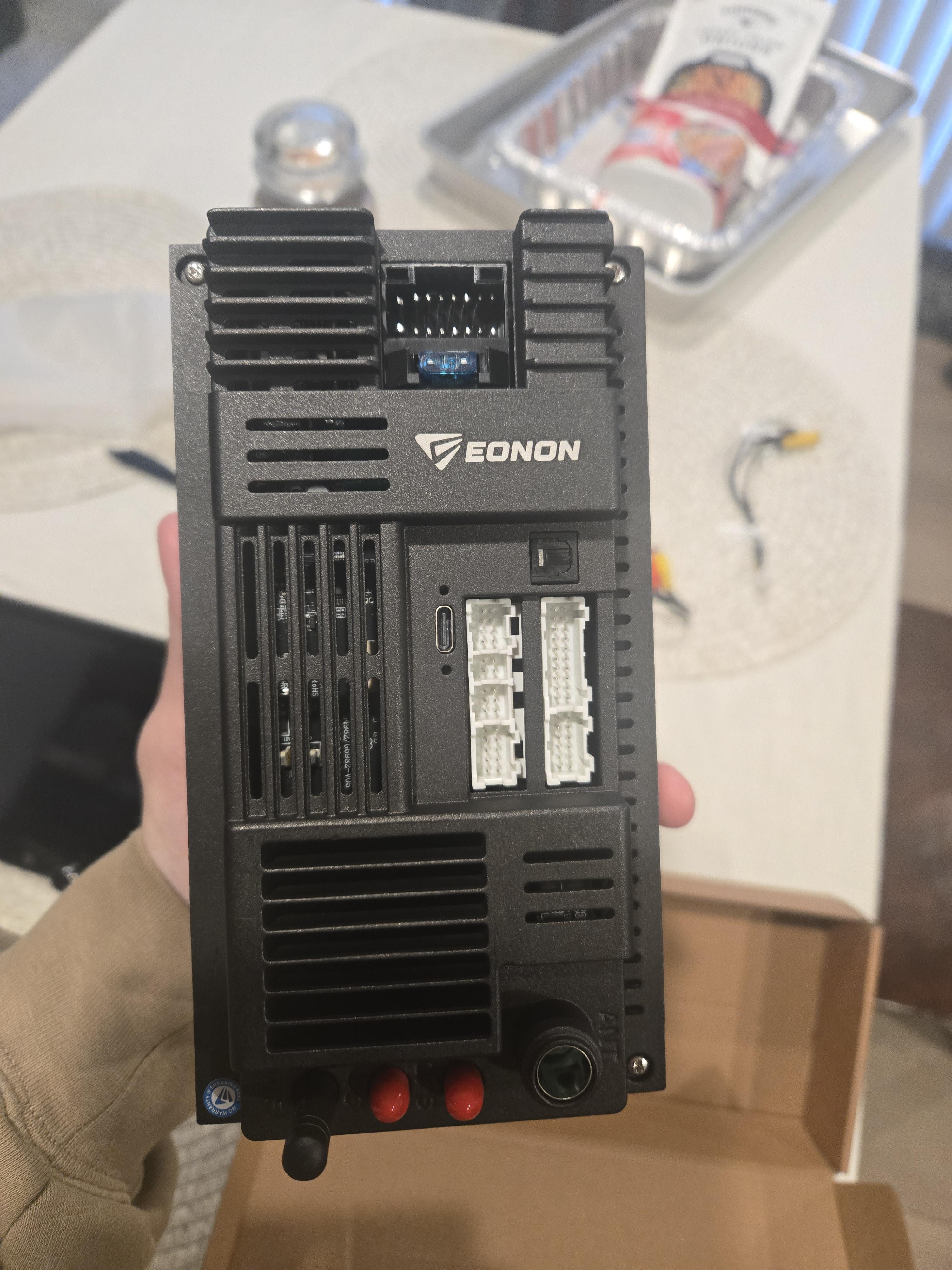
pioneer radio avh 220ex

Post image
1 Upvotes

r/Androidheadunits • • 1h ago

HU Suggestions (Astra J/Buick Verano) and things to watch out for

1 Upvotes

Hi everyone,

I want to replace the CD400 in my 2011 Opel Astra J and I’m settled on a vertical "Tesla-style" unit (7" replacements sit too far away and floating horizontal screens stick out too much and are ugly).

What I'm looking for:

  • Minimum 6GB RAM.
  • Software: Which brands have the least buggy stock software? If none are great, which ones are easiest to tinker with or flash custom firmware on? (I know UIS7862 chip is older but has lots of resources around, but newer UIS7865 units seem more locked down ).
  • Brands I've found so far: Srnubi and Hizpo (on AliExpress with EU shipping), plus ISUDAR and Junsun outside AliExpress (pricier, and their listings are vague about exact chips/amps).

Questions:

  1. Any brand recommendations?
  2. Are there other things i should be aware of or stuff they leave out of listings that I should ask for before ordering?
  3. Do you recommend any EU based store with good HUs?

Thanks!


r/Androidheadunits • • 2h ago

Built Roadie (Open Source): Native YouTube for Android Head Units — Zero Play Services, SponsorBlock, DeArrow, Wi-Fi Phone Queue & EN/AR Keyboard

4 Upvotes

If you run an aftermarket Android head unit (Teyes, Junsun, Topway/TS10, Atoto, Dasaita) or AI Box, you usually have to pick between SmartTube (great features, but TV-remote UI), NewPipe (zero GMS, but phone portrait UI), or ReVanced (breaks on updates + needs MicroG).

I built Roadie specifically for horizontal car screens—100% Kotlin, Jetpack Compose, and Media3, in a single APK with no Google Play Services, no root, and no ads:

Note for phone-projected Android Auto: Google blocks third-party video UIs on non-rooted phones, so Roadie exposes Home, Subscriptions, and History as an audio MediaLibraryService there. For full native video, install the APK directly on your head unit, AI Box, or AAOS.

GitHub & v0.3.0 APK: Github Repo


r/Androidheadunits • • 3h ago

Can't get any sound from this new head unit through the speakers mk8

Post image
1 Upvotes

Anyone got any ideas?

Absolute nightmare of a job fitting this thing. It came with the correct wiring harness for high level trim with amp and factory satnav. The original radio unit is not responding at all either although the small screen above the vol button does display and react to air con buttons etc


r/Androidheadunits • • 3h ago

Please help me with part finding!

Post image
1 Upvotes

r/Androidheadunits • • 5h ago

Building my own Tesla-style HUD

Thumbnail
gallery
12 Upvotes

3D car

- A 3D model of your car in a studio scene, with a floor reflection, a soft shadow and headlight beams

- Drag to look around the car; double-tap or wait 5 seconds and it turns back

- Choose the paint: white, silver, grey, black, red or blue

- While driving, the camera moves to a chase view behind the car, the wheels turn with your speed, and lane lines show your route

- More car models in the future

- Or use your own photos of your car instead

Map and navigation

- Free vector map (OpenFreeMap) or Google Maps with live traffic

- Heading-up driving view that zooms with your speed

- Built-in search, Home/Work shortcuts, favourites and recent trips, with up to 3 routes to choose from

- Google Maps and Waze turn-by-turn shown on the dashboard

- Long-press the map to drop a pin and get directions to it

- Offline maps (10–50 km around you)

- After a restart, it offers to continue the trip you didn't finish

Engine data (OBD-II)

- Works with ELM327 adapters, both classic Bluetooth and Bluetooth LE

- Speed, RPM, coolant temperature, battery voltage and stored fault codes

- Warning lights only when needed: engine cold or overheating, battery voltage out of range

- Engine and Fuel cards with diagnostics, range and Find fuel

- Trip stats: this drive, today and this week (distance, time, km/L)

Everyday use

- Tesla-style dock: up to 6 pinned apps, recent apps, app drawer and voice

- Music card (YouTube Music, Spotify and others), which resumes when the car starts

- Brightness and volume you can slide without looking

- Day and night themes that switch at sunrise and sunset

- The dashboard comes to the front when the car starts

- Weather at your location and at your destination

Runs well on slow head units

- The screen only redraws what changed, and the 3D car only draws while it moves

- Low-performance mode turns on automatically on units with under ~2.5 GB of RAM

Updates itself from GitHub, and installs silently on Android 12 and newer


r/Androidheadunits • • 5h ago

LTE

Post image
1 Upvotes

Hi everyone. I’ve got a Chinese android unit from AliExpress which I’m currently using a mifi router for connectivity which I’m trying to avoid if possible, if I bought one of the leads with the SIM card slot would that work or will there be missing hardware in the unit?


r/Androidheadunits • • 6h ago

Need help removing update software for mcu yellow message on ui7862s android 10 headunit.

Thumbnail
gallery
1 Upvotes

Updated apps and other things using the built in AppStore and now have this error message. Unsure how to remove it since I’m not the most knowledgeable about android stuff. Any help would be appreciated. Can get any other additional info needed if I’m missing some key info.


r/Androidheadunits • • 8h ago

[RELEASE] OpenLink (CarLink Mod) — Custom Vehicle Identity for CarPlay/AA + Hidden 3-Finger Gesture Menu

5 Upvotes

Hi everyone,

I wanted to share a custom modded build of the CarLink/OpenAuto receiver engine called OpenLink.

Key Features:

  • Custom Vehicle Identity: Change your vehicle label (Manufacturer/Model/OEM display name) directly in the settings with live "Save and reconnect" sync for Apple CarPlay.
  • Hidden 3-Finger Gesture Menu: Access app settings without bulky on-screen buttons cluttering your drive view.
  • Clean Branding & Word Validation: Removed clutter and updated clean labels.

Credits & Acknowledgments: Full credit goes to the original developers and open-source contributors of the CarLink/OpenAuto ecosystem. This is an experimental, non-commercial build created for testing and community enjoyment.

📥 Download & Source Code: Due to subreddit link filters, I have placed the GitHub repository link in the first comment below!


r/Androidheadunits • • 10h ago

My Car Launcher for Android compatibily from API 21 Android 5.1

Thumbnail gallery
0 Upvotes

I have released version 1.2 with lot of new functions and much better UI and features.


r/Androidheadunits • • 10h ago

Android Auto Spracheingabe funktioniert nicht mehr

1 Upvotes

Leider funktioniert die Spracheingabe bei Android Auto nicht mehr. Als hätte ich kein Microphone mehr. Auch werden mir keine Anrufe mehr angezeigt. Was habe ich verstellt und wie kann ich das korrigieren?


r/Androidheadunits • • 12h ago

Android 14 First stable boot on PX6 MTCE device

Thumbnail
gallery
16 Upvotes

So I have an old android headunit. A PX6 device. It was running a android 10 install and had been locked there with no upgrade path for years.

Together with Qwen and Opus i've been working all week to port a newer android to this head unit. Since support for android 10 ended years ago and slowly apps where no longer available for this device. Also there was a nasty bug that made an old webview mandatory. So the device was very vunerable in this day and age.

I settled on android 14 for now because this was the newest version I could go to with only shims under the hardware blobs. It also still runs a older but supported linux kernel.

The biggest hurdle was not having UART pins or MTP USB port on this unit. So I had to first make a adb over UTP work in recovery. Once that hurdle was taken I made adjusted bootscripts that would reset to said recovery on panics and when the deadmans switch for ADB over UTP was not reached.

From then on it was rapid iteration. It took about 22 attempts to get at this stage.

I am now working on shims for the HCT framework to get bluetooth, physical buttons, GPS and stearing wheel back.

After that I can start work on reverse engenering the 4 blobs used now. Once those blobs are reversed engeneerd there is nothing standing in the way of going to even higher Android versions. Although there is no rush because android 14 is set to sunset in 2030. So don´t know if my car has an horizon that long...

I have a repo with all the steps, results and tools I made with the AI:

https://github.com/switchboy/VibeBakingFirmware

There is no release yet, but the repo can be used as a recipie for your own AI to make you a firmware update!


r/Androidheadunits • • 12h ago

Wireless AA Glitches In Call

Thumbnail
gallery
1 Upvotes

Hello, I just got a new aftermarket mutimedia for my 2017 Toyota Yaris. I use a 2 Ram 64GB system which I understood is okay to run Android Auto.

I talked to the manufacturer about a problem where when I use Wireless Android Auto, the whole system lags and glitches ONLY DURING A CALL. He told me to perform a factory reset that didn't solve the problem.

Tried Wired Android Auto, but everytime I connect it to the mutimedia, the ZLink just wont find my device. It worked only for a couple of times, and now works randomly.

I am asking for your help, I am out of options.

Edit: By the way, while trying to use wired Android Auto the multimedia keeps on charging and discharging the phone like it cant connect to it.


r/Androidheadunits • • 14h ago

Made a free OBD-II gauge app that works on Android Auto (sideload only, open source)

Thumbnail
gallery
4 Upvotes

I got tired of the OBD apps that are either full of ads or want a subscription just to show RPM, so I wrote my own. It works with the cheap Bluetooth ELM327 adapters from Amazon/AliExpress, including the knockoff ones.

The part I actually care about is that it runs on the car screen through Android Auto. You get big RPM and speed gauges plus six tiles with little live graphs (coolant, voltage, throttle, etc). It switches to a light theme during the day and dark when your headlights come on, or you can force one.

On the phone side it also does:

- live dash with RPM/speed gauges and tiles for coolant, intake temp, MAP, MAF, timing, fuel level, load, battery voltage

- reads and clears check engine codes (asks before clearing so you don't wipe something by accident)

- logs every drive automatically with distance, avg/max speed, max RPM and estimated fuel used, and you can export a CSV per trip

- km/h or mph

- a demo mode so you can poke around without being in the car

The catch: Android Auto only lets "navigation" apps draw their own screen, so I had to register it as one. That means it can't go on the Play Store, and opening it on the car screen replaces Google Maps while it's up. You'll need to turn on Unknown sources in the Android Auto developer settings (tap Version 10 times to unlock them). Install the apk using KingInstaller.

Some other limitations I'll be upfront about:

- fuel numbers are estimates based on MAF and assume petrol, so they'll be off on diesels

- BLE-only adapters don't work yet, it has to be classic Bluetooth or dual mode

- cheap clones are slow (5-10 readings a sec) so the less important sensors update a bit slower

APK and source are here: https://github.com/bilalhq/OBD-Dash

It's been working fine in my car, but I've only tested it on a couple of adapters. If you try it and something breaks or your car reports weird numbers, let me know and I'll take a look. Feature ideas are welcome too.


r/Androidheadunits • • 1d ago

I got tired of my Android head unit's launcher, so I built my own: two apps side by side, widgets, and a phone dashcam

Thumbnail
gallery
9 Upvotes

Hey everyone,

For the past months I've been working on a launcher for Android head units and those Android "AI boxes" that plug into CarPlay (Carlinkit, Ottocast and similar). It started because I wanted Maps and music on screen at the same time without fighting split-screen every time I got in the car. It kind of grew from there.

It's called CarBox Launcher. What it does right now:

Two apps side by side. Maps on the left, YouTube, Spotify or a radio app on the right. Drag the divider to resize them, or expand one panel when you need the whole screen.

SmartBar. A bar that's always visible with the time, signal, Bluetooth and speed. Open it for quick toggles (Wi-Fi, Bluetooth, hotspot, GPS), the track that's playing and your favorite apps.

Portal. Open an app from the drawer in a small floating window, then drag it to the left or right edge to make it a panel, or to the top to go fullscreen.

Built-in widgets. Music player, phone dialer, weather, trip computer and a 10-band equalizer. You can put them in a panel next to navigation.

Creative Mode. If the two-panel layout isn't your thing, you can build your own dashboard: place apps and widgets wherever you want, resize them, and use multiple pages.

Themes. Change the whole look around the panels.

Companion app (free, on Play Store). Phone notifications on the car screen, calls and contacts through your phone, and it can turn your phone into a dashcam with the live video on the car screen.

Voice assistant. Open apps, navigate, call people or switch layouts without touching the screen.

There's a 15-day free trial. If you like it, a lifetime license is €15 as a donation on Ko-fi, with no subscription.

I'm a solo dev, so it's not perfect. Every head unit is a little different and I'm still fixing things box by box. That's exactly why I'm posting: if you have one of these units, I'd really appreciate you trying it and telling me what breaks.

Website (download + guide): carboxlauncher.com

Happy to answer any questions in the comments.


r/Androidheadunits • • 1d ago

"Share trip progress" button missing in Google Maps on Android Auto with Galaxy S25 Ultra (works on S23 Ultra in same 2023 Ford Focus SYNC 4)

1 Upvotes

Has anyone else run into this on a Galaxy S25 Ultra (Android 17, One UI 9.0)? In Google Maps on Android Auto, the "Share trip progress" button is completely missing, and voice commands (both Gemini and Google Assistant) only send a static ETA text instead of a live sharing link.

A/B test in the exact same car (2023 Ford Focus, SYNC 4):

- Galaxy S25 Ultra (Android 17, One UI 9.0): "Share trip progress" button and overflow menu are missing from the ETA card (see attached blurred screenshot).

- Galaxy S23 Ultra: "Share trip progress" button is present and works as expected.

Additional behavior:

- In Google Maps > Navigation settings, the "Driving notifications" toggle automatically switches back to OFF as soon as I leave the menu, even though permissions are enabled.

- Sharing trip progress directly from the Maps app on the phone itself still works fine.

What I already tried:

- Matched screen zoom/DPI and font settings from the S23 Ultra.

- Tested both wireless and USB connections.

- Checked permissions (Location = Always, Nearby Devices, Physical Activity, Notifications).

- Cleared cache/data for Maps, Android Auto, and Google Play Services, ran Reset App Preferences, removed extra Google accounts so only one remains, and tested both Stable and Beta versions.

- Also submitted an in-app feedback report, a Samsung Members report with system logs, and a post on the Google Android Auto Help community.

Curious if more S25 Ultra owners on Android 17 / One UI 9.0 see this or if it's tied to a specific build.


r/Androidheadunits • • 1d ago

Missing audio - XC70 2004

1 Upvotes

Hope one of you can help me spent 4 hours installing an Android Auto in my 2004 XC70. Once I got it all installed there is no audio playing everything else works fine. I had a HU 850 before I installet the new headunit. Please help


r/Androidheadunits • • 1d ago

Giving away 10 premium theme codes for StradaOS (free, open-source launcher for Android car head units)

Post image
31 Upvotes

Guys, this one’s for you!

StradaOS is a free, open-source (GPL-3.0 licensed) launcher for Android-based automotive head units. It installs just like any other app—no root access or system flashing required.

We’ve already hit nearly 13,000 downloads and over 450 stars on GitHub! As a token of appreciation, I’m giving away 10 codes. Each winner can choose one of these premium themes:

• Faro: Features a carbon-fiber background, a beam of light, and a car whose headlights turn on when night falls.

• Carbono: A deep, midnight-blue aesthetic featuring a large representation of your vehicle, available in 8 different colors.

How to enter:

  1. Leave a comment on this post and include a photo of StradaOS running in your car.
  2. Tell us which feature you use the most.

The giveaway starts now! I’ll randomly select 10 winners from the comments (one entry per person). I’ll reach out to each winner via private message to request their head unit’s unique ID (found under: Settings → Personalization → "Unlock" in the themes section), as each code is activated through that screen.

Beyond themes, the app includes offline maps, turn-by-turn navigation, a speedometer (via GPS or OBD), maintenance reminders, an OBD-II scanner, wired Android Auto compatibility, and support for 12 languages. It’s compatible with Android 4.1 and up.

Learn more about the project here 👇🏽

• Website: https://lordnordic-debug.github.io/StradaOS/

• GitHub: https://github.com/lordnordic-debug/StradaOS


r/Androidheadunits • • 1d ago

Junsun V1 plus won't boot in the cold (~0°C / 32°F) and CarPlay keeps disconnecting. Problems since day one

1 Upvotes

Hey everyone,

I've had my Junsun V1 plus for about 5 months now, and it's been acting up since the very beginning. I'm hoping someone here has run into the same thing or knows what's going on.

Problem 1: Won't turn on when it's cold
When the outside temperature is around 0°C (32°F) or lower, the unit simply doesn't power on. The screen stays dead until I've driven roughly 15 km, and only then does it boot up. In warmer weather it starts normally.

Problem 2: Frequent CarPlay disconnects
CarPlay drops out regularly while driving. Sometimes it reconnects on its own, but often the only fix is hitting the reset pinhole on the unit. I end up having to do this pretty much every day.

Any advice, troubleshooting steps, or similar experiences would be really appreciated. I have also already updated it, and also updated the CANBUS system.

Thanks in advance!


r/Androidheadunits • • 1d ago

My Android head unit now has a live map, music and weather on one screen, and it looks like it came with the car

Thumbnail
gallery
55 Upvotes

Most Android head units ship with a launcher that's either a phone home screen squeezed onto a car display or a pile of neon widgets. I wanted my screen to look like it came with the car, so I built Aurora Dash.

👉 Google Play: https://play.google.com/store/apps/details?id=app.auroradash

What it looks like in practice

It's one calm, full-screen dashboard made of a few tiles:

  • 🗺️ Live map in a tile. Waze or Google Maps runs inside the dashboard, with rounded corners and turn-by-turn directions. Tap the top of the map for full screen, press Home to put it back.
  • 🎵 Music. Album art, play/pause, skip, seek, shuffle and repeat for YouTube Music, Spotify and other players. It resumes playing when you start the car.
  • 🌦️ Weather for driving. Current conditions, the next 3 hours, high/low, a heads-up when rain is coming, and the next sunrise or sunset.
  • 🚗 Driving tile. GPS speed with a speed warning, or a compass with altitude, plus trip distance and time.
  • 🧭 Floating dock. Your nav, music, phone and favourite apps over any app with one tap, then it hides. Useful on units with no system buttons.

Built for weak car hardware. It's about a 6 MB download, starts instantly and stays light on memory. I've spent a lot of time testing on Android 9 to 17, on everything from cheap 720p units to ultra-wide and 12-13" screens, and keeping it from hogging the CPU while a map is running.

Other bits

  • Dark, light or auto theme (switches at sunrise/sunset), with night dimming
  • Works on standard, ultra-wide and large screens
  • English, 繁體中文, 简体中文
  • No account, no ads, no tracking. Location stays on the device, apart from fetching the weather.

About the Accessibility permission: placing the map window on its tile and giving you Back/Home buttons on units that lack them needs Android's Accessibility Service. It's off until you turn it on, an in-app screen explains it first, and it only looks up where app windows are. It doesn't read or store anything on screen.

Price: free to install with a 7-day Pro trial. After that, Pro (the live map tile and a few extras) is a one-time unlock, no subscription.

It works on Android head units and on CarPlay/Android Auto AI boxes that run Android. It isn't a CarPlay or Android Auto app itself.

I'd love feedback, especially which unit or box you run it on and what's missing for your setup. Bug reports and setup photos are very welcome on the Discord. More info is on the website.


r/Androidheadunits • • 1d ago

Aftermarket radio

Thumbnail gallery
1 Upvotes

I’m having an issue with rear audio output on my radio. It’s on a 2012 Ford F150 XLT


r/Androidheadunits • • 1d ago

Ts7 headunit

1 Upvotes

Hi

I have ts7 android headunit. Im not able to change launcher on this properly.ive installed 3rd party launcher and Whenever I press home and back from any app its always loading the original home launcher even though I've already set the 3rd party launcher as the default in the settings. Any solutions


r/Androidheadunits • • 1d ago

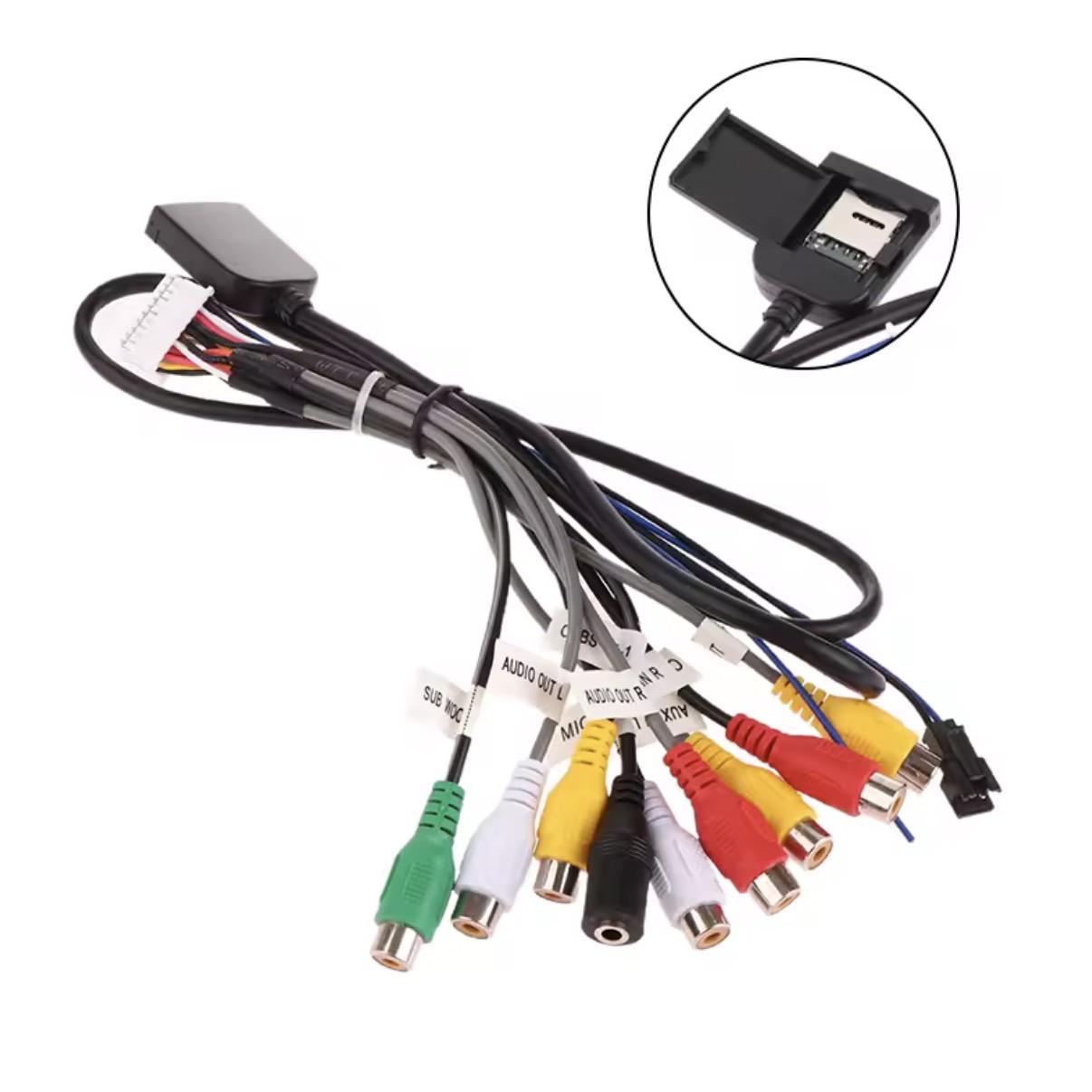
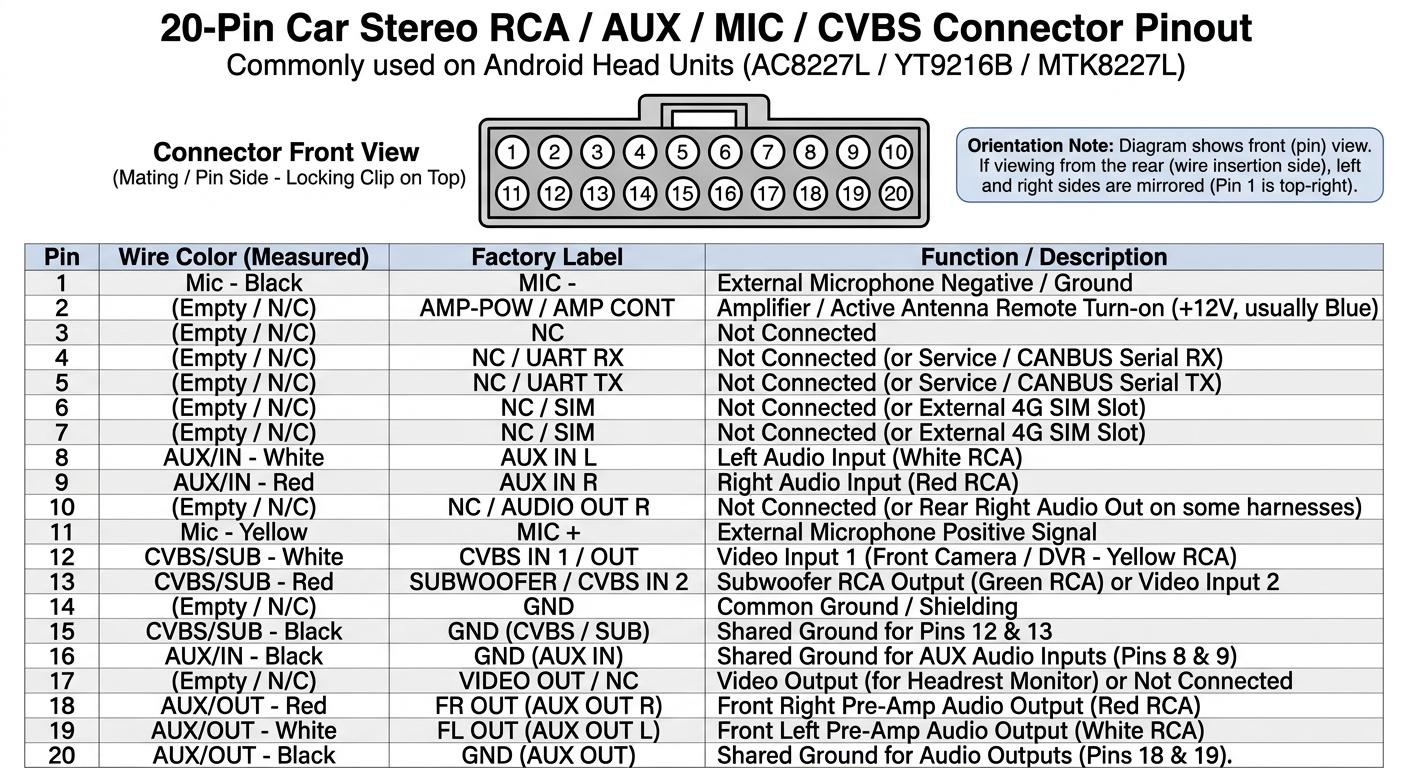
20-Pin RCA / AUX / MIC / CVBS Harness Pinout for Android Head Units (AC8227L / YT9216B / MTK8227L)

Post image
1 Upvotes

Since finding a clear pinout diagram for the 20-pin auxiliary/RCA harness on budget Android head units can be a real headache, I mapped out and verified the connections on mine and put together a complete reference chart.

This sequential numbering (1–10 top row, 11–20 bottom row, viewed from the front/pin side with the locking clip on top) is commonly found on AC8227L / YT9216B / MTK8227L boards.

Quick notes before wiring:

  • Orientation: The diagram shows the front (mating/pin) view. If you are inserting pins from the rear (wire side), left and right are mirrored (Pin 1 is top-right).
  • Empty pins: Pins 3–7 and 10 are typically unpopulated on standard harnesses (usually reserved for external 4G SIM slots or factory UART/service ports).
  • Amp Remote: If you're hooking up an external amp or powered sub to the AUX/OUT pins (18–20), Pin 2 (AMP-POW) provides the +12V remote turn-on signal.
  • Disclaimer: While this layout is standard for this board family, always double-check with a multimeter or the pinout sticker on top of your head unit before powering anything on, as some third-party replacement harnesses swap the MIC and +12V pins