Have you restarted your iPad? Are you on the latest iPadOS 27 version?
i tried markup too
Are you saying you tried to Export in Markup Mode? That should work as it spits out everything as text - that's what Markup is.
Another workaround is exporting the pdf to the Files app and trying to print from the Files app.
If the file is corrupted on-device visit iCloud.com in Safari and grab the (hopefully) uncorrupted file from the cloud, save it to Files and print from there.
If more than one file is corrupted on devicebut you have iCloud sync on and your files are in iCloud (before deleting local files, log into iCloud.com using your web browser and confirm that all your notes and attachments are fully visible and up to date there) then you can delete your local Notes database then reinstall: to disable sync go to Settings > your_ID > iCloud, and show all until you see 'Saved to iCloud' > then toggle off NOTES for sync. You'll be asked if you want to Delete From iPad and you say yes. That clears your (synced) Notes app locally. Then quit Notes, restart your iPad for good measure, check to make sure Notes is empty, then reenable iCloud Sync (be on good WiFi is you have a lot of files) and let your files repopulate/resync
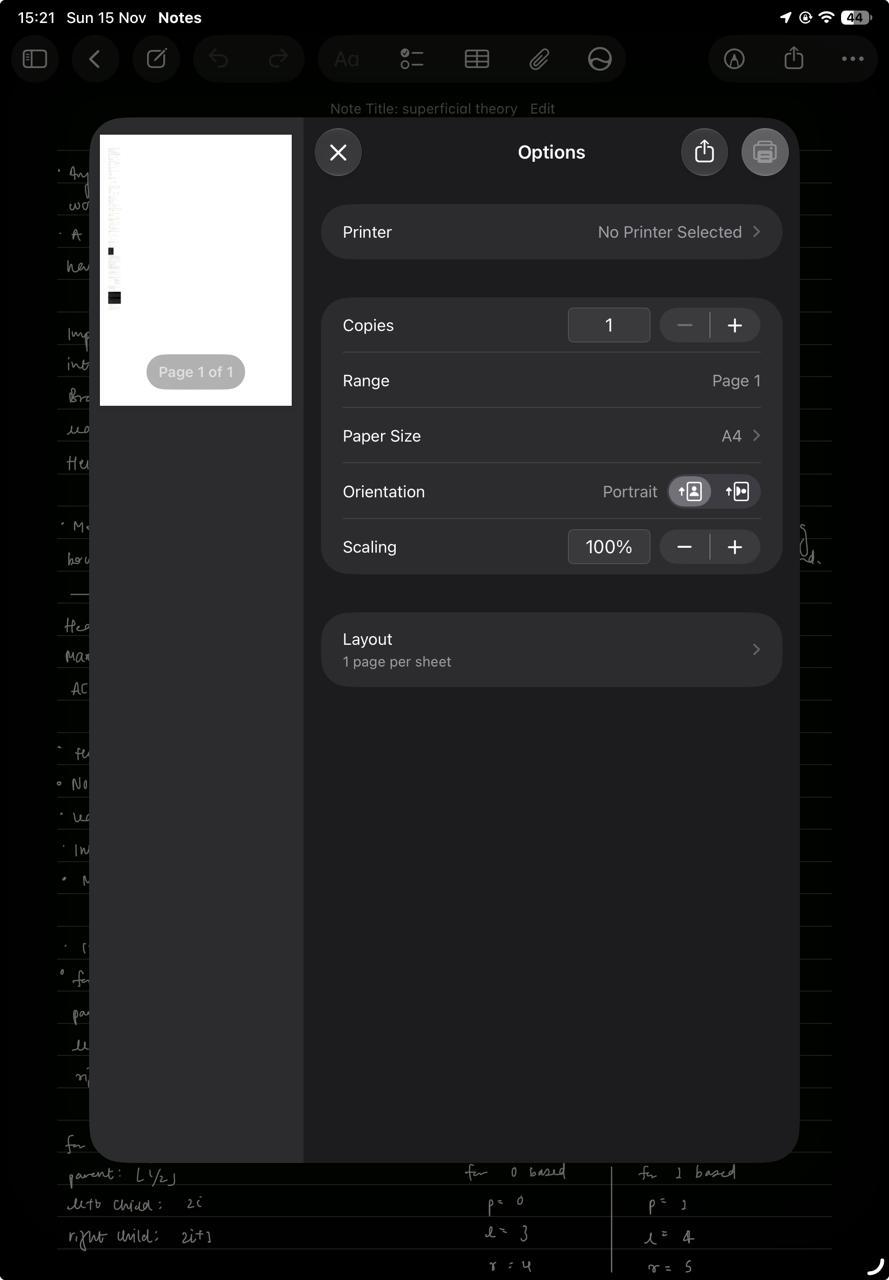
all of em.. and yeah as you told i restarted my ipad too but eventually nothing worked at all.basically the thing am facing is after updating to ios 27 the print then pdf don't work due to wrong formatting and condensing everything to one page(as youcan see if it's visible to you in the photo). earlier on ios26 I was able to do that.
The canonical version of synced files lives inside iCloud - whatever is local and saved/updated goes up into iClould then gets synced to all other devices (unless you update it again from that device or another then that version goes into iCloud).
If you weren't using that pdf in the intervening two months, especially if you hadn't viewed it after saving it to Notes you may have created a pdf that saved wrong and was corrupted in the first place. Since you say you downloaded the PDF iCloud version from iCloud.com, and the downloaded copy has the same problem, it seems like the page structire got corrupted.
I'll say this: I've experienced this before with 3rd-party print-to-pdf iOS apps - they just didn't save pdfs right.
If it only shows one page in print preview but the text seems intact you might be able to use a desktop computer app to recover it.
one more thing I forgot to add my notes are handwritten not text actually... I have free plan of goodnotes too and that properly formats the pages one by one without condensing everything in one unlike apple notes rn. speaking of it I aren't you experiencing it? is it working fine for you? like the print to pdf thing. btw one thing that you said about old notes so no these all are recent notes even a newnote has the same issue. idk but i think that issue lies with apple notes. though i have noticed that not everyone is facing this same issue for some people it works fine for some people other workarounds like export to markup or open in pages works but for some of us including me nothing is working
aren't you experiencing it? is it working fine for you?
I just tried with a PDF in Notes in iOS and the print preview looks completely normal. If you're only seeing one page on that document but not others, and it won't open on Apple or 3rd-party apps, I'd lean towards thinking it's a corrupted file, not OS-related.
If you screenshot the Notes app (same goes for some other iOS apps), you will see a full page option in the preview. When selected, tap the share button and then under options, choose PDF. It might just make it one long page, but at least it’s a PDF.
•
u/AutoModerator 10d ago
Thank you for posting on r/AppleNotesGang!
Please check our Wiki for answers, guides, and FAQs: https://www.reddit.com/r/AppleNotesGang/wiki/index/
I am a bot, and this action was performed automatically. Please contact the moderators of this subreddit if you have any questions or concerns.
1
u/terkistan 9d ago edited 9d ago
Have you restarted your iPad? Are you on the latest iPadOS 27 version?
Are you saying you tried to Export in Markup Mode? That should work as it spits out everything as text - that's what Markup is.
Another workaround is exporting the pdf to the Files app and trying to print from the Files app.
If the file is corrupted on-device visit iCloud.com in Safari and grab the (hopefully) uncorrupted file from the cloud, save it to Files and print from there.
If more than one file is corrupted on device but you have iCloud sync on and your files are in iCloud (before deleting local files, log into iCloud.com using your web browser and confirm that all your notes and attachments are fully visible and up to date there) then you can delete your local Notes database then reinstall: to disable sync go to Settings > your_ID > iCloud, and show all until you see 'Saved to iCloud' > then toggle off NOTES for sync. You'll be asked if you want to Delete From iPad and you say yes. That clears your (synced) Notes app locally. Then quit Notes, restart your iPad for good measure, check to make sure Notes is empty, then reenable iCloud Sync (be on good WiFi is you have a lot of files) and let your files repopulate/resync
1
u/miraino_eve 7d ago
Have you tried doing a screenshot?
If you screenshot the Notes app (same goes for some other iOS apps), you will see a full page option in the preview. When selected, tap the share button and then under options, choose PDF. It might just make it one long page, but at least it’s a PDF.