r/AppleReminders • • 23d ago

Apps megathread for November 2026

8 Upvotes

A monthly megathread to discuss apps. You can promote your own app or discuss an app you like.

Only apps that integrate with Apple Reminders qualify, both in this community and in this thread.

Threads about apps outside of this megathread will be removed. See the community rules.


r/AppleReminders • • 13h ago

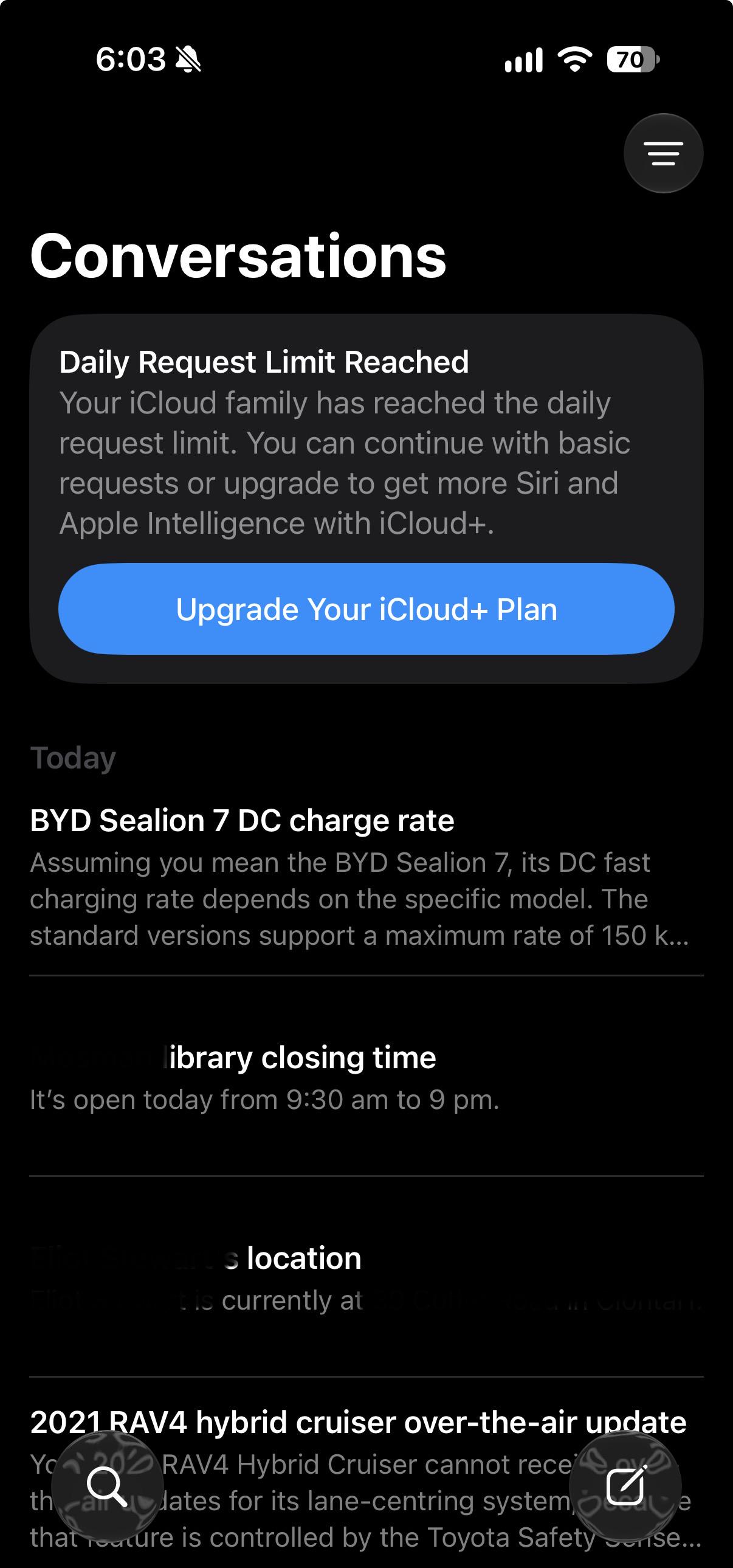
Having to take 4 prompts to add a single task to my to-do list so frustrating and eating my limits. Even with 2TB iCloud+

Post image
2 Upvotes

r/AppleReminders • • 2d ago

iOS Reminders app not syncing

0 Upvotes

Can anyone help me out with this? I am trying to make reminders in the Bee app, and it used to sync over to Apple Reminders for a bit, and then now it stopped. I checked all the permissions and whatnot. It thinks it's copying it over, but it doesn't anymore. Does anyone have a fix for this?


r/AppleReminders • • 4d ago

Reminders heating up my iPhone 18 pro

4 Upvotes

My reminder app is heating up my iPhone 18 Pro. When I had a iPhone 17 Pro, it also heated it up.

I tried deleting your app and saving the data, I tried resetting default settings on the whole iPhone, I tried turning off iCloud sync.

If I force close the reminders app, then I reopen it. It takes about 45 seconds to open and show my reminders.

I’m using reminders for like four minutes that killing my battery. Then my phone while start heating up.

Anybody else having this issue or suggestions?

UPDATE:

Yesterday I went to the Apple Store. They think it was a bug somewhere too. iPhone passed all test.

So we ended up resetting the iPhone to new. (Don’t restore from backup).
Sign into my Apple account.
When doing that, all reminders, contacts, calendar, Apple App that is synced from iCloud.
Thank goodness.

Now I have to reinstall all 3rd party app.

I’m hoping this will fix my issue.

I’ll keep you guys updated if this fixes my issue. 🤞


r/AppleReminders • • 11d ago

I spent a month building an iPhone “capture everything” shortcut. It partly works, but I need help simplifying and finishing it.

Thumbnail reddit.com
1 Upvotes

r/AppleReminders • • 11d ago

No longer able to set reminders quickly and easily on my watch - what settings might be causing this?

Thumbnail reddit.com
1 Upvotes

r/AppleReminders • • 14d ago

Personal Context for Contacts

Thumbnail reddit.com
1 Upvotes

r/AppleReminders • • 16d ago

Why does Siri keep asking whether it should use Reminders when I always say yes?

Post image
4 Upvotes

r/AppleReminders • • 17d ago

How do you keep track of all the little things you need to remember?

Thumbnail gallery
4 Upvotes

r/AppleReminders • • 19d ago

Can Reminders batch tasks?

12 Upvotes

My ‘Today’ list is populated from tasks on multiple other lists. For example, I might have tasks from lists titled, admin, workflow, phone, emails, meeting prep, etc.

Apple Reminders lists the tasks in no particular order. Each morning, I drag and drop the tasks so each category is together (I work in time blocks). Is there a way to get the app to arrange them by list so I don’t have to do it?


r/AppleReminders • • 19d ago

Reminder stuck for a while

Post image
1 Upvotes

anyone has also encountered the reminder stuck by the lock screen option? All the options cannot be selected for a few seconds and the banner is black. I’ve encountered this for several IOS versions.


r/AppleReminders • • 22d ago

When All Alarms work…..except for Urgent Reminders

Thumbnail reddit.com
4 Upvotes

r/AppleReminders • • 23d ago

Reminders sync with Mindnode

3 Upvotes

Anyone else who uses reminders synchronised with MindNode to schedule from MindNode and execute on remainders? How have you structured it? Are you satisfied?


r/AppleReminders • • 23d ago

Add 1 or multiple / bulk items with notes to Apple Reminders List

Thumbnail
reddit.com
4 Upvotes

r/AppleReminders • • 27d ago

I'm having a brutal problem with Apple Reminders that seems to be related to old data in iCloud.

8 Upvotes

So, I'm ADHD and heavily dependent on Reminders to keep me on task. I'm using it on a Mac, iPad, and iPhone, all running (as of yesterday) 27.2, plus an ancient Apple Watch (which I'm pretty sure isn't the cause of the problem - keep reading).

The problem is that, starting roughly around when I originally updated to Golden Gate, the Reminders UI started getting slower and slower, would hang when I checked a task as completed, and eventually just became completely unresponsive.

Called Apple Support, we spent hours trying to debug the issue, no love.

So, to try and isolate the issue, I deleted the 3rd party reminders app I was using (Unforgetful) and I turned off iCloud reminders on all my devices, deleted all the reminders from each device, and from the iCloud web interface, then re-started syncing. After a few hours, things seemed to be working but still kind of slow... I did not reinstall Unforgetful, assuming it was the cause of the issue and I did not re-pair the apple watch.

But 2 weeks later the problem is back: hangs, unresponsive UI, etc... but this time, when I tried to turn iCloud syncing back on, the devices all froze on what seemed like a permanent spinner.

I turned everything off again, deleted everything again, created 3 test reminders (one on Mac, one on icloud, one on iPhone), and turned on iCloud syncing on the Mac and iPhone. Same behavior. So, I let it sit and, after about 30 minutes, the spinner went away on the Mac and I decided to scan the remindd log:

~/Desktop/Reminders scripts » log show --last 24h --predicate 'process == "remindd" AND eventMessage CONTAINS     "Record changed"' \
  | grep -oE 'recordID: <[A-Za-z]+/[0-9A-F-]+' > ~/Desktop/remindd-records.txt
wc -l < ~/Desktop/remindd-records.txt                 # total deliveries
sort -u ~/Desktop/remindd-records.txt | wc -l         # distinct records
sort -u ~/Desktop/remindd-records.txt | sed -E 's/recordID: <([A-Za-z]+)\/.*/\1/' | sort | uniq -c | sort -rn
  278491
  138731
  135437 RecurrenceRule
  1150 Reminder
  1024 Alarm
  1023 AlarmTrigger
   75 ListSection
   18 List
   3 SmartList
   1 ManualSortHint

So, with only 3 reminders total there are nearly 136 thousand unique recurrence rules!?!

Can anyone suggest a fix for this? I can't figure out how to clean out these rules from iCloud and I'm fairly sure frontline Apple Support is just going to run through a script involving me logging out of icloud a few times. (I also have no idea if something is still creating more and more of these RecurrenceRules...)

r/AppleReminders • • 28d ago

How do I move a task from the inbox to my lists

2 Upvotes

Some of my entries/tasks are stuck in the “Inbox”, how do I permanently move them out to a desired list?

When moving a task, what is the difference between “Add To” and “Move To”?


r/AppleReminders • • 29d ago

Is anyone else super frustrated with how easy it is to accidentally mark something completed?

21 Upvotes

Recently I’ve been falling in love this app. But I find it bizarre that it is way too easy to accidentally mark something complete…. And there is literally no way to work around this issue.

There is no option either in the app or in settings to choose to confirm—to toggle on or off a pop-up that would ask something like “are you sure you want to mark this complete?” or even just “confirm”before a task is marked completed.

To me this is either a huge oversight, or based on some bizarre logic to which I am not privy.

But it is maddening, especially where widgets are concerned. I have my widgets set up in an ideal way so that everything is visible to me… Yet even just scrolling through them, I regularly accidentally mark things complete. And then of course they disappear.

The only “solutions” I have found so far are to:

  1. Use the “show completed“ option (which creates visual clutter) or
  2. Scroll through the “completed“ list at the end of every day to look for anything that shouldn’t be in there, and unchecking it (wastes time).

Is anyone else frustrated with this?


r/AppleReminders • • Oct 22 '26

Siri Ai in Reminders app

8 Upvotes

Omfg !!! I fking hate AI !!! Why tf is it everywhere?????
Im trying to write title of my reminder that i want to add, and after i write it , siri deletes what i wrote and writes something stupid as a suggestion that she thinks its the correct title !! Bitch i chose a title in a way that would help me remind stuff and i don’t want to read a paragraph that u replace in order to get reminded of something!!! Fuck who ever decided that every single fucking thing in human existence needs AI contributions!!


r/AppleReminders • • Oct 20 '26

It is funny that Apple chose to expand color options for Shortcuts app more than for Reminders

Post image
20 Upvotes

r/AppleReminders • • Oct 19 '26

Apple Reminders I SOLVED —> Severe Sync & Start Problems

Post image
9 Upvotes

Hi there,
After month, I finally solved a problem I had with Apple Reminders and I think it is worth sharing:

THE PROBLEM
I used to have too many Apple devices where I did not disconnect my Apple Account from (old iPhones, MacBooks, etc.). I never thought that this might become a problem one day, since I did not sell them (do not judge me… ).

At one point, I realised that my Apple Reminders App was not syncing anymore across devices. At some devices, items were marked as done, on some not (you have no idea how often I complained to my boyfriend ‘seems that I have to take care of XYZ tomorrow?’ - it was not checked in my list - however he already took care of XYZ. Yes, I will keep him…).
On top, my app took 30-60 seconds to open properly: The App started, the screen went blank and then, the reminders and list appeared after some time.

THE PAINFUL WAY TO SOLVE IT
I tried it all - everything you all mentioned on Reddit/online:
- Restarting the app
- Restarting the phone
- Deactivate the account on one device
- Deactivating the account on ALL devices (I did it 2x to ensure I have deactivated it everywhere)
- Deleting ALL (!!!) existing lists, setting them up completely from scratch
- Deleting ALL shared lists, setting them up completely from scratch
- Switching the sync mode off and on and off and on…..
- Deleting the app and reinstalling it again and again and again…
- Deactivating battery saver mode
- Deactivating recurring reminders
- Deleting all short cuts
- Deleting all make.com processes
- Of course: Deleting all checked items (recently deleted list as well) and even having a short cut running every evening deleting the checked items
- Checking on iCloud.com which device is syncing in which time, see if there are non-synced items
- Deleting all tags - everywhere
- Deleting all lists again from iCloud.com

There was no sync issue anymore but the app took AGES to start. I was very close to call the support hotline but I did not (reason is my ADHD…. those of you who know, they now).

THE SOLUTION
And just randomly this evening I found the solution - and I feel quite stupid. It’s the F******* TEMPLATE list(s)…

All the time, there must have been an issue (more several) with the F**** template lists I had stored (I used to have a list for short trips over the weekend, what I need to pack for a trip with my dog, etc.).
Those were the reminder lists I did not delete previously. So I deleted all of them.

And BOOM. It works. The app starts smoothly, on any of the devices again - within seconds. Feeling quite stupid but sharing that in case anyone is having a similar problem: Do not delete everything several times but delete the right lists ;)


r/AppleReminders • • Oct 16 '26

Why does apple reminder suck so much for MacOS

5 Upvotes

At least give me a `Done` or Submit button, what am I supposed to do after modifying reminder, do to different text box and press ESC?


r/AppleReminders • • Oct 15 '26

Keep updating reminders until completed

12 Upvotes

I have several reminders on my Apple calendar. Is it possible to set it up so that if a reminder is not completed on a given day, it automatically will show up again on the next day? And keep doing this until I either market as completed or delete it? I would be happy using Shortcuts or doing it natively or any other way that you can think of. Thanks much.


r/AppleReminders • • Oct 16 '26

How do I remove these reminders from Apple Calendar?

Post image
2 Upvotes

r/AppleReminders • • Oct 14 '26

Run Vibration Alert After Reminder Alert

3 Upvotes

i’ve created a shortcut to calculate the driving distance to an appointment location and remind me when I should leave. I’ve added a reminder action to alert me when I should leave, but the reminder action sound is not loud enough
. Is it possible to add a vibration or some other sound so that the notification is louder


r/AppleReminders • • Oct 13 '26

Reminders Gone from iPhone

1 Upvotes

I deleted the Mail app from iPhone, and my Reminders disappeared. They are not in my iCloud. They are not on my Macbook. They do not show as Recently Deleted. I've tried changing my Settings--unsyncing/resyncing. I've tried reinstalling the Mail app. My reminders may have been associated with my old work email. Is there a way that the IT dept at my former employer can login as me and access my reminders easily?