r/AppleWatchApps • • 1d ago

News Start here: How to share an Apple Watch app

7 Upvotes

Welcome to r/AppleWatchApps. This is a place to discover what your Watch can do and share the apps you’re glad you found or built.

Sharing an app? Lead with what someone can do on their Apple Watch. If you include photos or video, show the Watch experience in the first image or clip. A short video walkthrough is encouraged. A screenshot or a concrete example works too. Give context alongside the App Store link.

Found something good? Pick the flair that fits the app or jump into What’s on your wrist?, our fortnightly thread. Share an app you discovered here or elsewhere, why it deserves a shout-out, and what you use it for on the Watch. Keep recommendations independent: skip apps you built, work on, market or earn from.

Built something good? Developer posts are welcome. Disclose your connection up front, tell us what the Watch features cost and share a direct App Store or TestFlight link when available. Wait at least three months between promos for the same app. Put smaller updates in your original thread, or message the mods before reposting early for a major Watch update or public launch.

What a good recommendation looks like

  • App: On Pace
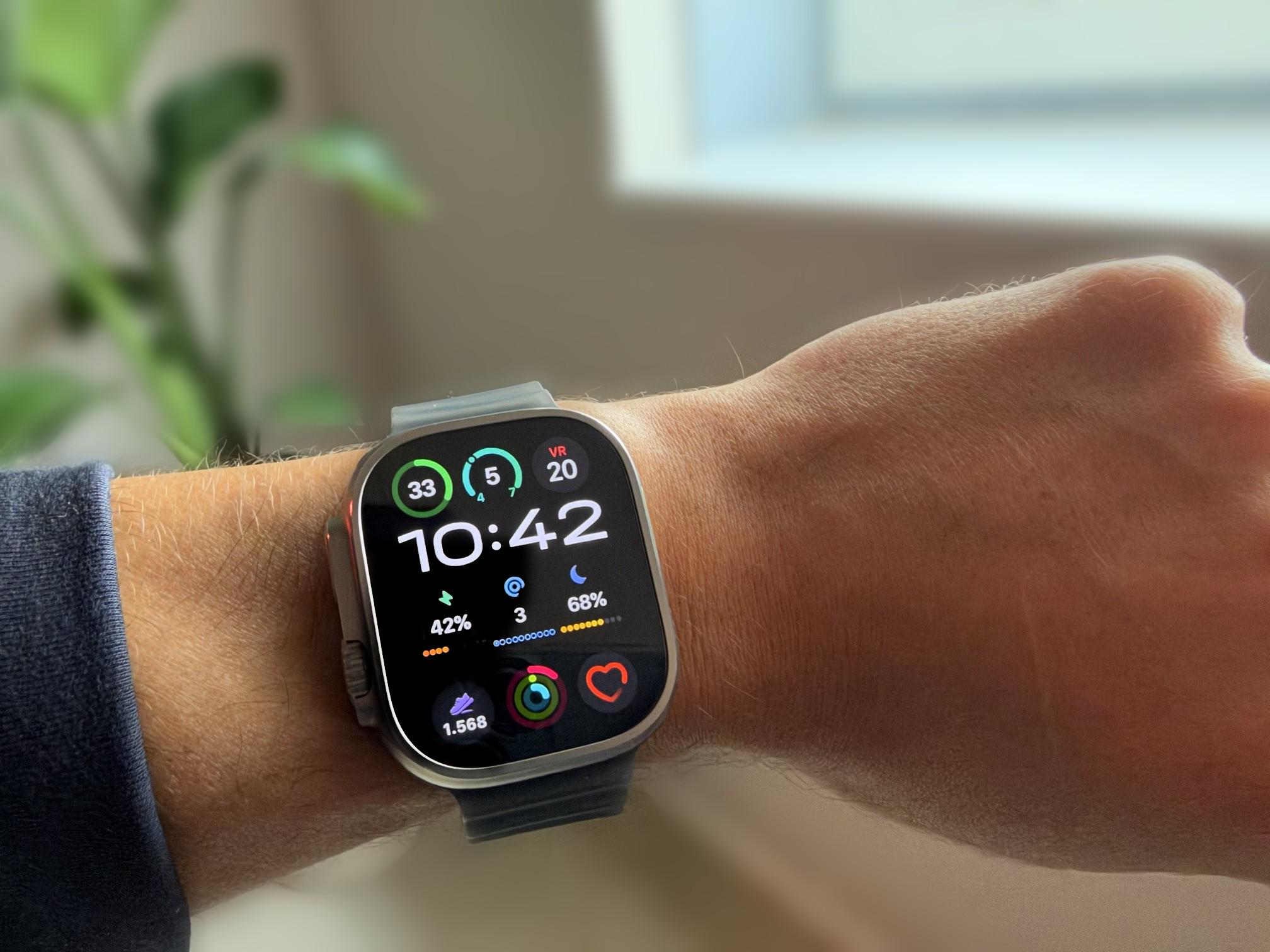
  • On the Watch: Its complication compares today’s steps with your usual pace right on the watch face. Handy if you want a quick sense of whether you’ve walked more or less than usual.
  • Price: US$0.99 one-time when checked.
  • Link:

App Store Link

Full community rules.


r/AppleWatchApps • • 1h ago

Games Land on Wrist – An airplane landing game for Apple Watch ($0.99)

1 Upvotes

Land on Wrist is a pixel art airplane landing game designed for smartwatches.

Control your plane, manage your speed and altitude, and try to land safely on the runway.

Available for $0.99 on the App Store.

https://apps.apple.com/us/app/land-on-wrist/id6832057539


r/AppleWatchApps • • 7h ago

Health & Fitness [Freemium] HangSpine 1.0.5 for Apple Watch — now free to download: it detects every hang by itself, and an AI coach sets up your plan from one sentence

1 Upvotes

Hi all — I'm the developer of HangSpine, a dead-hang and hangboard timer for Apple Watch. 1.0.5 just went live: the app is now free to download, and there's a lot new on the wrist. Here's a quick tour.

Auto detection: grab the bar and it starts

You tap Start, wait out the 3-2-1 countdown, and grab the bar. The watch senses your wrist posture the whole time, so the timer starts when your arm goes up into a hang and stops when you let go. No tapping mid-set with numb fingers.

Counting got more honest too. A Reddit user pointed out in October that a 60-second hang shouldn't be recorded as a stack of 15-second ones. It isn't anymore: one continuous hang is one rep, logged at its real length.

There's also an experimental "trace learning" feature, on by default: it records the motion trace of every session and uses your thumbs up/down labels to tune detection to the way you personally mount and dismount. Parameters are re-computed in batches and synced to the watch; nothing goes to any server of mine.

It's now free

HangSpine used to be a paid app. From 1.0.5 it's free to download, and the free plan is one you can stay on: your first 100 auto-detected sessions on the watch, the manual timer, all your history, stats and iCloud sync. Unlimited auto-detection after that is the optional Pro part: US$3.99 a month (an auto-renewing subscription, no free trial) or US$19.99 once, US prices. Pro also raises the cloud AI allowance from 5 questions a day. Anyone who bought the paid version gets lifetime Pro automatically.

AI guided setup: describe your week in one sentence

On the phone you can set a hangboard protocol up by hand in the editor, or type one sentence, something like "first time on a hangboard, 15 minutes". The coach comes back with a complete plan: grip, edge depth, hang and rest times, reps, sets. Every number stays editable, and you can change one just by saying "make the hangs 10 seconds". Apply it and it becomes a training block you can send to the watch.

It starts in local mode: the on-device coach works offline and sends nothing. Cloud AI is off until you turn it on, and every answer is labelled Local coach or Cloud AI. The on-device one is rule-based, so it handles plain requests best.

Also new in 1.0.5: hangboard protocols on the watch (repeaters, max hangs, custom sections, with rest cues), a new Today screen with a 26-week heatmap, and a climber profile with grades in Ewbank, YDS, V-scale or Font.

If you give it a try, I'd love to hear how detection behaves for you. In Detection Traces on the phone you can label any hang accurate or misjudged, and that's the feedback that tunes it. No bar nearby? Raising your arm overhead and holding still is enough to trigger it.

App Store: https://apps.apple.com/app/id6817156558?ct=reddit_applewatchapps_105

Full changelog and more screenshots: https://hangspine.com/en/105.html


r/AppleWatchApps • • 21h ago

Question Best free unlimited browser for AP?

2 Upvotes

For Apple Watch*


r/AppleWatchApps • • 1d ago

Music & Audio Do you use your apple watch as recorder?

7 Upvotes

I recently realized how convenient the Apple Watch is as a voice recorder. Having it right on my wrist helps me remember to actually hit record, which is the part I usually forget when I’m relying on my phone.

Do you use yours this way too? Mostly for quick voice notes, or for longer things like meetings and lectures?

I’ve also been looking at how different apps handle what happens after you stop recording. Here’s a quick comparison based on their published features:

- Voice Memos: Built in and saves audio, with transcription on supported iPhones depending on language and region. Probably enough for occasional voice notes.

- Just Press Record: One-tap recording from a watch-face complication, plus editable, searchable transcripts. One-time purchase.

- Granola: Focused on meeting notes. Records on the Watch, then transfers to your iPhone for processing. Requires watchOS 11 or later.

- Memova: Records on the Watch, with on-device transcription and offline search on iPhone. Recording, local transcription and search are free, with paid Pro features available. Optional cloud audio transcription uploads selected audio when you choose and authorize it.

For me, the next question is whether I’ll actually go back and use what I recorded. Audio playback, a readable transcript, and searchable notes serve pretty different needs.

Before relying on any app for a longer session, I’d try it with the screen off, check how it works away from the phone, and see how long syncing takes. And of course, get permission from the people you’re recording.

I put the full comparison with sources on Memova’s blog if you want more detail. It covers published features rather than a side-by-side performance test.

What app do you use, and do you actually revisit your recordings afterward?


r/AppleWatchApps • • 1d ago

Games I made an army game that runs entirely on Apple Watch — steer with the Digital CrownMy Apple Watch game is finally out: 100 missions, offline, no ads

Post image
4 Upvotes

r/AppleWatchApps • • 1d ago

Health & Fitness I built RunZone – an Apple Watch app for heart-rate zone training, running and hiking

Thumbnail
runzone.app
2 Upvotes

Hi everyone,

I'm the developer of RunZone, an iPhone and Apple Watch app I've been building since March.

I started it because I wanted a workout app that focused on training by effort, provided useful fitness insights, and didn't require another account or an expensive subscription.

What RunZone does on Apple Watch:

  • Live heart-rate zones (Z1–Z5), pace, distance and workout metrics.
  • Distance, pace and heart-rate zone goals with voice and haptic guidance.
  • Real-time coaching to help you stay within your target pace or heart-rate zone.
  • Workouts for running, indoor running, hiking, walking and mixed cardio.
  • Workout shortcuts through complications and the Action Button.

On iPhone, you can review routes, heart-rate zone distributions, workout details, recovery and training trends.

Privacy was also important to me. RunZone doesn't require an account or operate its own health-data backend. Workout and health data stays within your devices and the Apple ecosystem.

Pricing: Outdoor running on iPhone is free. Apple Watch workouts and advanced features require Premium, currently available at an early-stage introductory price of $1/month or $10/year in the US.

App Store: https://apps.apple.com/app/id6761166548

Website: https://runzone.app — More details, screenshots, and a short video showing RunZone in action.

I'd be interested in feedback from other Apple Watch users, particularly on the workout experience and what you'd like to see improved.


r/AppleWatchApps • • 1d ago Heartwarming

Games I made an arcade brick breaker game for Apple Watch

17 Upvotes

Hi! Solo dev here and i've become quite obsessed with developing Watch games that i enjoy. Thank you so much to those that tried Pinball. I'm back with Brickstorm an 80's vibe brick breaker game.

Turn the Digital Crown to steer the paddle. Each tower is ten floors: clear one and the next drops in from above.

**Rainbow:** hit a prism and your ball takes its colour, then clears every matching brick

**Abyss:** whirlpools drag it off course

**Forge:** conveyor rows

**Temple:** Introduces portals which is a fun dynamic

- **Neon:** floor 1 is your watch's real time, built from bricks, and some other fun patterns

There's also endless Storm, fireballs, lightning, lasers and multiball. It has Easy / Normal / Hard modes and saves your climb on every floor, so it's good for a quick go.

🎁 **10 free codes for testers.** It's brand new and I'd really value honest feedback from real wrists:

- How does it play? Does the crown feel right for steering?

- Does it run smoothly on your watch? (Tell me which model, especially older ones.)

- Is it fun? Which tower hooked you, and which one did you get stuck on?

Reply saying which watch you've got and I'll DM codes to 10 random people. All I ask is a few lines of feedback here afterwards.

Not a tester? Low beta launch price until 7 December. No ads, no in-app purchases, no data collected:

https://apps.apple.com/app/id6829541408

(or search **"Brickstorm Watch Game"**).


r/AppleWatchApps • • 2d ago

Utilities Remote by Hand: watch os tv remote with gestures. Lean your hand to control tv.

2 Upvotes

Simple remote control is available right from your control center as a widget and Siri commands. Also have an Apple Watch app with gestures: lean hand to control your tv.

If your hands are full of salsa you can open an app from the widgets stack and fully control your tv without any tap of the display.

Just take a look at it. It’s free

https://apps.apple.com/kz/app/remote-by-hand/id6827060508

https://remotebyhand.278labs.co.uk


r/AppleWatchApps • • 2d ago

Lifestyle [Apple Watch] WalkAware: Nearby Places, $2.99 → $0.99 for 48

4 Upvotes

Hi everyone, I've just released WalkAware, my first standalone Apple Watch app, and to celebrate I've dropped it from $2.99 to $0.99 for the next 48 hours.

WalkAware helps you notice the places around you while you walk: the museum around the corner, the library you've passed a hundred times. It looks outward from where you are, up to 5 km, shows the nearest notable place on a watch-face complication, and gives you a short Wikipedia description with its source. You can also turn on alerts for when you arrive somewhere and hand off to your iPhone for more.

It runs on watchOS 10 or later, with no account and no ads.

App Store: apps.apple.com/app/walkaware-nearby-places

It's a small solo project, so any feedback is really welcome. Thanks for taking a look!


r/AppleWatchApps • • 2d ago

Music & Audio [Freemium] Control D-REC on your iPad from your Apple Watch

2 Upvotes

Mayowa from Knight AI+AV here. If your iPad is on a stand to record a rehearsal, we built D-REC's Apple Watch app so you can start, stop or mark a moment from your wrist.

Open D-REC on the iPad and turn on Control from Apple Watch in Settings. Then choose the iPad in the Watch app. The controls go through your iCloud account. The iPad makes and keeps the recording.

D-REC is freemium. Without an account, you can record up to 10 minutes at a time and copy the transcript. Pro adds longer recording and file exports.

https://drec.live/get


r/AppleWatchApps • • 2d ago

News [iOS] [ECG Reports] [$2.99 -> $0.99] [Apple Watch ECG journal and PDF reports]

Thumbnail
apps.apple.com
3 Upvotes

Hey people,

I’m Christos the a developer from Crete! 😄

I just released ECG Reports v4.1 (my newest update) and dropped the app from$2.99 to $0.99 through November 30 for Black Friday. It’s a one-time purchase and the price is already live on the US App Store.

I made ECG Reports so I could find my Apple Watch ECGs again, remember what I’d written about them, and bring the right recordings and notes to an appointment.

With 4.1, you can ask Private AI “Show me my last two ECGs,” then follow up with “What did I write about the second one?” You can put those recordings and notes into a PDF draft and review it before sharing. I also added German, Italian and Spanish across the app, the on-device chat and exported PDFs.

Private AI runs on-device with Apple Intelligence on compatible devices. It’s an optional $3.99 one-time unlock in the US.

The cheapest app/premium app atm on AppStore with no subscriptions and full support. You have an Apple Watch? You must have the best option for ECG recordings.

For all the information you want you can always check my site: https://ckesid.gr/ecg-reports/

ECG Reports BLACK FRIDAY DISCOUNT

Thank you all! Cheers


r/AppleWatchApps • • 2d ago

Health & Fitness I logged my readiness score from 4 apps for 27 days (Apple, Bevel, Oura, and the one I build). Different numbers, mostly the same story.

Post image
5 Upvotes

I've been logging my daily readiness/recovery scores from Apple, Bevel, Oura and ohmybody (disclosure: ohmybody is the app I build solo, ohmybody.ijustinz.com) since Oct 26. 27 days so far.

What I noticed:
- When something big happens, they all agree. I got sick around Nov 2-4 and every source tanked together (some down to the teens).
- Day to day they're often far apart. Nov 9-16 the spread between highest and lowest was 40-50+ points most days. Bevel and ohmybody sat around 10-25 while Oura stayed around 55-80.
- Correlation with ohmybody: Bevel r = 0.97, Oura r = 0.79, Apple r = 0.58. Apple moves the least like the others, and its 0-10 scale is chunkier.
- Apple's scores were the most generous on average (mean 63) and ohmybody the harshest (mean 52, biggest swings).

My take: every app has its own algorithm, so the absolute number doesn't mean much, but the overall trends usually line up 📈🤔

Do these results match what you'd expect? Anyone else compared multiple apps on the same days?


r/AppleWatchApps • • 2d ago

News ‎I made a tiny pixel pet that lives on your Apple Watch 🐾

Thumbnail
gallery
0 Upvotes

Hi everyone! I'm a solo developer and TickyPet is my first Apple Watch app.

It's a cozy virtual pet that lives right on your wrist. Your pet starts as an egg, hatches, and then you take care of it through the day: feed it, play with it, pet it and let it sleep. All the art is hand-made pixel art.

Details:

- Platform: Apple Watch (watchOS)

- Price: $1.99

- App Store: https://apps.apple.com/us/app/tickypet/id6813815102 

I'd really love your feedback, especially on the art style and what features you'd like to see next! 🐾


r/AppleWatchApps • • 2d ago

Health & Fitness I made a complication to have Apple Health's steps vs average chart on my Apple Watch's face

Thumbnail
gallery
12 Upvotes

Last week I asked in r/AppleWatch if there was a way to get the steps chart from the Health app on my watch face, the one with today in orange against your average in grey. The answer was basically no, you can show the step number but not that chart, so I built it.

It's called On Pace. The complication compares your day with the average of your last 4 weeks, same as Health does. There's the line chart, a bars version and a small ring. It also does week, month and year, and distance, calories and floors. 45 complications in total.

One thing I added because it annoyed me is that you can compare a day only with the same weekday. Saturdays and Mondays look different normally, I noticed because against the normal average every weekend looked like a disaster.

It's $0.99 once, no subscription. No account, no ads, and your data stays on your phone and watch.

Happy to hear what you'd change and if there's another Health chart you'd want on your face... hope you like it! https://apps.apple.com/app/id6835619709


r/AppleWatchApps • • 3d ago

Games I made a maze game for Watch where you play by tilting your wrist

Thumbnail
youtu.be
1 Upvotes

Hi! I'm the dev for Tilt Maze Garden (a small maze game for iPhone) and now supports Apple Watch: you tilt your wrist to roll a seed through a garden maze.

The twist is that falling isn't just a reset. Hedges sprout where you fall and stay there, so a failed run reshapes the maze for the next try. You can undo recent growth if a hedge blocks a route you still need.

I'd love feedback, especially on how the tilt controls feel on a small screen.

App Store: https://apps.apple.com/app/id6821364809


r/AppleWatchApps • • 3d ago

News Interval X – More than a workout timer: automatic rep counting, heart rate tracking and Apple Watch integration

Thumbnail
gallery
1 Upvotes

Hi everyone!

I'm an independent iOS developer from France and a sports enthusiast. I've just released my new application: Interval X – Every Second Counts.

PROBLEM

As someone who regularly trains, I wanted to develop an application that I could use during my own workout sessions.

There are already many interval timers available, but I wanted to go further.

Why should I count my repetitions manually when my Apple Watch and AirPods already have motion sensors?

Why not combine a workout timer, automatic repetition counting, heart rate monitoring and performance statistics in a single application?

That's how Interval X was born.

COMPARISON

Two well-known competitors are Seconds Pro and SmartWOD Timer.

Seconds Pro offers customizable interval timers, voice guidance and Apple Watch integration.

SmartWOD Timer is particularly suited to functional fitness, with AMRAP, EMOM and Tabata timers.

With Interval X, I wanted to offer a different approach by making better use of the Apple ecosystem, particularly the motion sensors available in the Apple Watch and compatible AirPods.

The main difference is that Interval X can automatically count squats and push-ups, allowing you to focus on your exercises rather than manually counting repetitions.

My objective is not simply to measure time, but also to measure performance and progress.

KEY FEATURES

• Fully customizable interval timers.
• Exercise durations, recovery periods and rounds.
• Creation and storage of multiple training routines.
• Native iPhone, iPad and Apple Watch applications.
• Synchronization between devices.
• Voice guidance and countdowns through AirPods.
• Heart rate monitoring using Apple Watch.
• Automatic squat counting using Apple Watch motion sensors.
• Automatic push-up counting using compatible AirPods motion sensors.
• Workout history and repetitions per round.
• Heart rate and recovery charts.
• Daily, weekly, monthly and yearly performance statistics.

Automatic repetition counts are estimates, and I'm continuing to improve their accuracy.

PRICING

I've decided to keep the pricing simple, without a subscription.

• Free to download.
• Three free workout sessions.
• €14.99 one-time purchase for lifetime access.
• No monthly or annual subscription.

AVAILABILITY

Available on iPhone, iPad and Apple Watch, in English, French and Simplified Chinese.

App Store:
https://apps.apple.com/app/interval-x/id6828038227

Website:
https://intervalx.digitrame.fr

This is only the beginning of the adventure. I already have several ideas for future versions, particularly around automatic exercise detection and performance analysis.

As an independent developer, I'm interested in your experience, feedback and suggestions.

What other exercises would you like your Apple Watch or AirPods to recognize automatically?

Thank you for taking the time to read my post!

Interval X – Every Second Counts.


r/AppleWatchApps • • 3d ago

Health & Fitness Throttle Health is live on iOS and Apple watch!

4 Upvotes

​

​

​

Hey all, Robin here.

I do hybrid training, so running and lifting, and every app I tried got me wrong. Heavy leg day? "Easy session", because my heart rate stayed low.
5 hours of sleep? Still a decent score. And no idea why a number went up or down.

This and also the fact that most fitness apps had a couple
Of metrics I missed so I had to keep 3 apps to account for my needs.

So I started making Throttle next to my job. It uses your Apple Health data to tell you how recovered you are, how much you can train today and how you slept, and it shows you what moved each number.

Also you really don't need to lift for it. If you just run and want solid metrics, or only want to know how you slept.

This is version 1 and there's a lot more coming. If something sucks, let me know.

It's on the App Store now: https://apps.apple.com/app/throttle-health-training/id6831547958

First 5 persons will get the first 6 months for free, DM/respond for a code. in return i hope to receive feedback on what is working well and what not etc. (3 spots left)

  • Readiness through the day, and you can see what moved it
  • Target load, so how much you can train today
  • Sleep score with every part of it shown, plus sleep debt
  • HRV, resting heart rate, vitals, stress
  • Your workouts with heart rate, zones and the route
  • You can rate a workout 1 to 10 and that actually counts in your readiness.

All of that is free and stays free. No ads, no account, and your data stays on your phone.

Pro is for the advanced stuff:

  • Training load, training status and load focus
  • VO2 max, fitness age and race time predictions
  • Running dynamics, splits, best efforts and a workout replay on the map
  • Heat acclimation and heart rate recovery
  • Trends, your full history and a journal that shows what affects your scores
  • Custom goals which you can set yourself,

Pro is €2.99 a month or €14.99 a year (early bird) you keep that price, and you can try it 14 days for free.

It works on Series 6 and newer, SE 2 and up, and every Ultra. You need iOS 27.

More on https://throttle.health

Reddit: https://www.reddit.com/r/ThrottleHealth/

Curious what you think.


r/AppleWatchApps • • 3d ago

Productivity An offline text-to-speech reader for Apple Watch (and iPhone)

10 Upvotes

Hey Apple Watch fans

I wanted to share my latest app, Watch Reader. It reads your EPUBs books, articles, RSS feeds, and other text files aloud on your Apple Watch and iPhone.

It builds on my Ant browser app, which has a voice reader built in, but this one is all about being a really good ebook, article and PDF reader.

The special thing is it works completely offline. The voice model generates the speech on the device, which is great for privacy too...(and it's not using Apple's built-in robotic voices you may know).

You can download it free from www.watchreader.com.

Would love to hear what you think!


r/AppleWatchApps • • 3d ago

Games ArcEmu 4.0: Nintendo DS on Apple Watch

10 Upvotes

Hey everyone, ArcEmu dev here!

The next ArcEmu update brings Nintendo DS games to Apple Watch, the first emulator to do so. The beta is now available on TestFlight, and I’d love to hear from Apple Watch users who want to try it.

I’m especially interested in how the controls and screen layout feel on your wrist, as well as performance across different Watch models.

Try the beta: https://testflight.apple.com/join/Qcb2JA8s

It’s still a beta, so your feedback will help shape the release. Suggestions for making it more comfortable to use on the small screen are especially welcome.

Happy to answer any questions about ArcEmu or DS support on the Watch. Thanks for testing!


r/AppleWatchApps • • 3d ago

Productivity I made a planner for the week you repeat, and the watch app opens at whatever’s on now. 3 months of Plus free for the first 500

Thumbnail
gallery
2 Upvotes

Hi all, solo dev from the UK. Ethos is a planner for the week you repeat. You set each day's routine once (run on Tuesdays, school drop-off at 8:15, reading before bed) and tick it off as the day goes. I built the watch app so I could get through the day without pulling my phone out, and it's now the part I use most.

What it does on the watch:

- Opens on what's on now, with a line marking the time, so one glance tells you where you are in the day

- Tick a task with a tap, or a double tap when your other hand's full

- Reminders come with Done and Snooze 10 minutes, so you can tick things off from the notification without opening the app

- When it's your turn for a shared job (bins, the school run), the notification has Done and Pass it on

- When someone in your group ticks theirs, you can cheer them from the notification

- It schedules its own reminders for the next two days, so they still come through when your phone's in another room

- The people in your groups sit across the top, with how their day's going

- You can keep it on your watch face or in the Smart Stack

You set things up on the iPhone (or iPad, or Mac) and the watch gets it from your phone. The routine, reminders, widgets and the watch app are free.

Code: ETHOSWATCH gives the first 500 people three months of Ethos Plus free:

https://apps.apple.com/redeem?ctx=offercodes&id=6825910332&code=ETHOSWATCH

It's on the monthly plan, so after the three months it renews at £0.99 / $0.99 a month unless you cancel before then. Plus adds iCloud sync between iPhone, iPad and Mac (and lets the watch catch up through iCloud when your phone's out of range), inviting people into your groups (joining one is free), and a few other bits.

No Ethos account, no server of mine, no analytics. Your planner stays on your devices and in your own iCloud.

App Store: https://apps.apple.com/app/id6825910332

Happy to answer anything. If you wear your watch all day, I'd like to hear what you'd want a planner to do on it.


r/AppleWatchApps • • 3d ago

Beta Test Dooder, the AI assistant for Apple Watch: big new beta build, shaped by this sub's feedback

13 Upvotes

For anyone who isn't playing GTA VI this weekend.. 😉

A few weeks ago I shared Dooder here, a little AI that lives on your Apple Watch. I've been blown away by how many of you installed it and took the time to send feedback. Thank you. A lot of this new build came straight from your comments, emails and bug reports.

What Dooder does

  • You talk to it on your Watch and it answers out loud, with a card on screen
  • It runs on the Watch itself, over cellular or Wi-Fi, so you don't need your iPhone nearby once it's set up
  • It connects to your apps: Google Flights, Notion, Canva, Jira, your calendar and thousands more
  • It asks before using an app, and again before it saves or changes anything

The video shows it checking the weather, finding the cheapest flight to Melbourne, saving it to Notion, making a Canva poster and updating a Jira ticket, all from my wrist.

New in this build, from your feedback

  • Answers come as clear cards: weather, flights, lists, prices and more
  • Turn the Digital Crown to change Dooder's outfit
  • A guided setup on iPhone and Watch
  • A Smart Stack widget, plus a notification when Dooder needs your OK
  • Loads of fixes and improvements when you lower your wrist mid-request

It's free to try

  • Dooder AI is built in and free during the beta. Get an invite code at dooder.ai/beta
  • Or bring your own AI: sign in with your paid ChatGPT plan, or add a Claude API key

Try it
TestFlight: https://testflight.apple.com/join/c42uMmzU

It works on any Apple Watch with watchOS 26 (Series 6 or later, SE 2nd generation or later, any Ultra), plus an iPhone on iOS 26 for setup. It runs best on Series 9 or later. More at dooder.ai.

It's still a beta, so things will break. Tell me what does, and what you'd want to do from your wrist.

Full disclosure: I trimmed the bits of the video where Dooder is thinking. Nothing is sped up


r/AppleWatchApps • • 4d ago

Health & Fitness I built a breathing app for Apple Watch that taps each breath on your wrist, so you can do it with your eyes closed (3 months free for this sub)

2 Upvotes

I'm Dhruv, the developer. I've practised pranayama for over 20 years, and my watch measured my stress all day without ever helping me do anything about it. So I built Vayu.

On the watch, Vayu taps each phase of the breath (in, hold, out), so you can follow along with your eyes closed: in bed, in a meeting, on a plane. Your heart rate shows live on the watch during the session, and afterwards the iPhone app shows your HRV from Apple Health.

Techniques: box breathing, 4-7-8, cyclic sighing, extended exhale, CBT breathing, coherent breathing (5 in, 5 out), and three pranayama practices: Anulom Vilom, Bhastrika and Kapalbhati.

Pricing (freemium): your first guided session is free on the iPhone. Watch sessions need Pro, which is $8.99 a month or $59.99 a year in the US.

For this sub: code VAYUCREATOR gives you 3 months of Pro free. This link opens the App Store with the code filled in: https://apps.apple.com/redeem?ctx=offercodes&id=6744126459&code=VAYUCREATOR It's on the monthly plan, so it renews at $8.99 after 3 months unless you cancel in Settings.

App Store: https://apps.apple.com/app/id6744126459

I'd love feedback, especially on how the taps feel on your wrist and which breathing pattern you'd want next.


r/AppleWatchApps • • 4d ago

Health & Fitness Best swimming app?

4 Upvotes

Need: Time, distance, lap time, active calories, METs, HR, stroke count.