r/Appstore • • 48m ago

PSA: DO NOT PURCHASE AN APP SUBSCRIPTION FROM APPLE STORE if there is chance you want to see a refund. Even if the app company wants to refund you, you can be denied by Apple's systems, Apple's decision is "final," and you'll never get the money back.

0 Upvotes

Screwing customers/consumers over: If you sign up and pay for an app through the app store, you got charged, and the app didn't meet expectations, wasn't functioning properly, you didn't want to extend your trial... whatever your reason to cancel and get a refund is... you reach out to the app maker and they "can't" give you a refund, you have to go through Apple's refund system. Apple can deny the refund and there is NOTHING you can do about it once they make a final decision. So, moral of the story is, DO NOT BUY AN APP(S) FROM THE APP STORE if you think that possibly you'll need a refund, because there is a good chance you won't see that money ever again.


r/Appstore • • 51m ago

Offline video downloads just landed in Widezilla!!

Post image
1 Upvotes

r/Appstore • • 2h ago

Snowball widget

1 Upvotes

I am not promoting the app, but I am working on some Christmas widgets for my app.
Do you like this snowball?


r/Appstore • • 2h ago

[Self-Promotion] I was tired of spending hours finding a movie so I built What 2 Watch

Post image
1 Upvotes

I'm a big movie lover and was always spending the first half hour of movie night scrolling between the various streaming services.

So I built What 2 Watch, it's a simple yet powerful app that helps you find a movie and where to watch it. You can search for movies by title when you know what you want, or use powerful filters to narrow it down when you don't. You can also build a watchlist and track what you watched. The newest feature released today is Movie Affinity it tells you at a glance if a movie fits you based on your watch history.

There is no account, no ads, no trackers. The app is free to download with an optional subscription and I'm currently running a special launch price. It covers movies only (for now).

Get the app here from the App Store Feedback is very welcome !


r/Appstore • • 3h ago

[Beta] Secret – private photo & video vault for iOS (TestFlight)

Thumbnail testflight.apple.com
1 Upvotes

r/Appstore • • 3h ago

[Self-Promotion] [iOS] I'd love your FEEDBACK on my Pedometer app called 🐧Penguin Step Counter. Just beware of spicy mode if you don't have a sense of humor.

Post image
1 Upvotes

First off, you can download the app from the App Store and try it for free. There is a paid plan, but it won't prevent you from actually trying out the app and giving me your honest feedback.

Basically, I built an app that helps me get my steps in and get outside walking more. But I'll be honest: I have a little bit of a dark sense of humor, and so I created this app so that you have this little pudgy penguin that gets even more fit as you continue to actually get your steps in day over day.

But my absolute favorite part is that there are different modes. Spicy mode is my favorite, where the penguin will actually roast you if it notices that you haven't gotten off the couch or you're not getting your steps in. It'll drop F-bombs. It's actually really funny. I laugh out loud sometimes when I'm using it.

There are a few social features in there, but mostly I would love to see what you think. If there's anything that you think is overdone or a little confusing, or if there's one killer feature in there that you're like, "This is where you should focus your attention," that would be super helpful.

Just the link to the App Store.

https://apps.apple.com/us/app/penguin-step-counter-pedometer/id6831137240

Thanks in advance.
Kevin


r/Appstore • • 4h ago

[Self-Promotion] [iOS] [50% OFF] Slidely: Slideshow Maker — Lifetime PRO for $8.99 (72 Hours Only!)

1 Upvotes

r/Appstore • • 4h ago

[Self-Promotion] I'm a manga artist and developer, so I built the drawing app I always wanted: Infinite Canvas

1 Upvotes

Hey everyone! I draw a lot of manga and work as a developer. I didn't want to juggle 10 different apps, each good at one thing and each with its own subscription, so I built one app for my own workflow.
Infinite Canvas is a native iPad drawing app with truly endless zoom. Think of the feel of Procreate, Clip Studio Paint and Aseprite on one infinite canvas.
Features:

  • Endless zoom: go from the big picture down to the tiniest detail. Strokes stay razor sharp at every zoom level because they're rendered as shapes, not pixels.
  • Native Swift and Metal engine with a responsive Apple Pencil feel (pressure, tilt, low latency)
  • Procreate-style gestures: two-finger tap to undo, three-finger tap to redo, pencil double-tap to switch to the eraser
  • Palm rejection and a brush-size preview when hovering (supported iPads)
  • Animation, including frame-by-frame
  • Pixel art and pixel art animation
  • Manga and webtoon workflow
  • Process recording, so you can easily share how you drew something
  • 3D reference models for figures and hands, so you can pose them and draw over them
  • Hand tracking: control the 3D hand model with your own hand via the camera. No more twisting your hand in front of a mirror to find the right pose.

Pricing: Sketching on the infinite canvas is free. If you need more, there's Pro as a one-time purchase: no subscription, buy once and keep everything.

Download https://apps.apple.com/us/app/drawing-art-infinite-canvas/id6821920663


r/Appstore • • 5h ago

[Update] Natida: Pizzeria Duo — Grow fresh pizza toppings right on your iPhone Home Screen with live interactive widgets 🌿🍕

Post image
1 Upvotes

Just released the Farmhouse Garden update for my indie iOS pizzeria game, Natida: Pizzeria Duo!

Instead of only buying ingredients in the shop, you can now cultivate your own botanical greenhouse—and tend it straight from your iPhone Home Screen without launching the app:

- 6 Fresh Crops: Grow San Marzano tomatoes, bell peppers, sweet basil, garden mushrooms, red onions, and golden pineapples on a real-time growth cycle.

- Interactive Home Screen Widgets: Use the Small widget for one-tap contextual care (plant, water, feed, clear garden beetles, or harvest), or add the Medium/Large potting bench widget with a live tool belt to switch between Water, Fertilizer, Bug Spray, and Seeds.

- Instant Pantry Sync: Every ripe harvest sends +4 fresh toppings straight into your pizzeria kitchen to slice and bake onto customer orders.

Would love to hear your feedback on the widget layout and interactive controls—do you use interactive widgets on your Home Screen?

App Store: https://apps.apple.com/app/id6833450224


r/Appstore • • 5h ago

Shifting Source - Keto and fasting

Post image
1 Upvotes

r/Appstore • • 12h ago

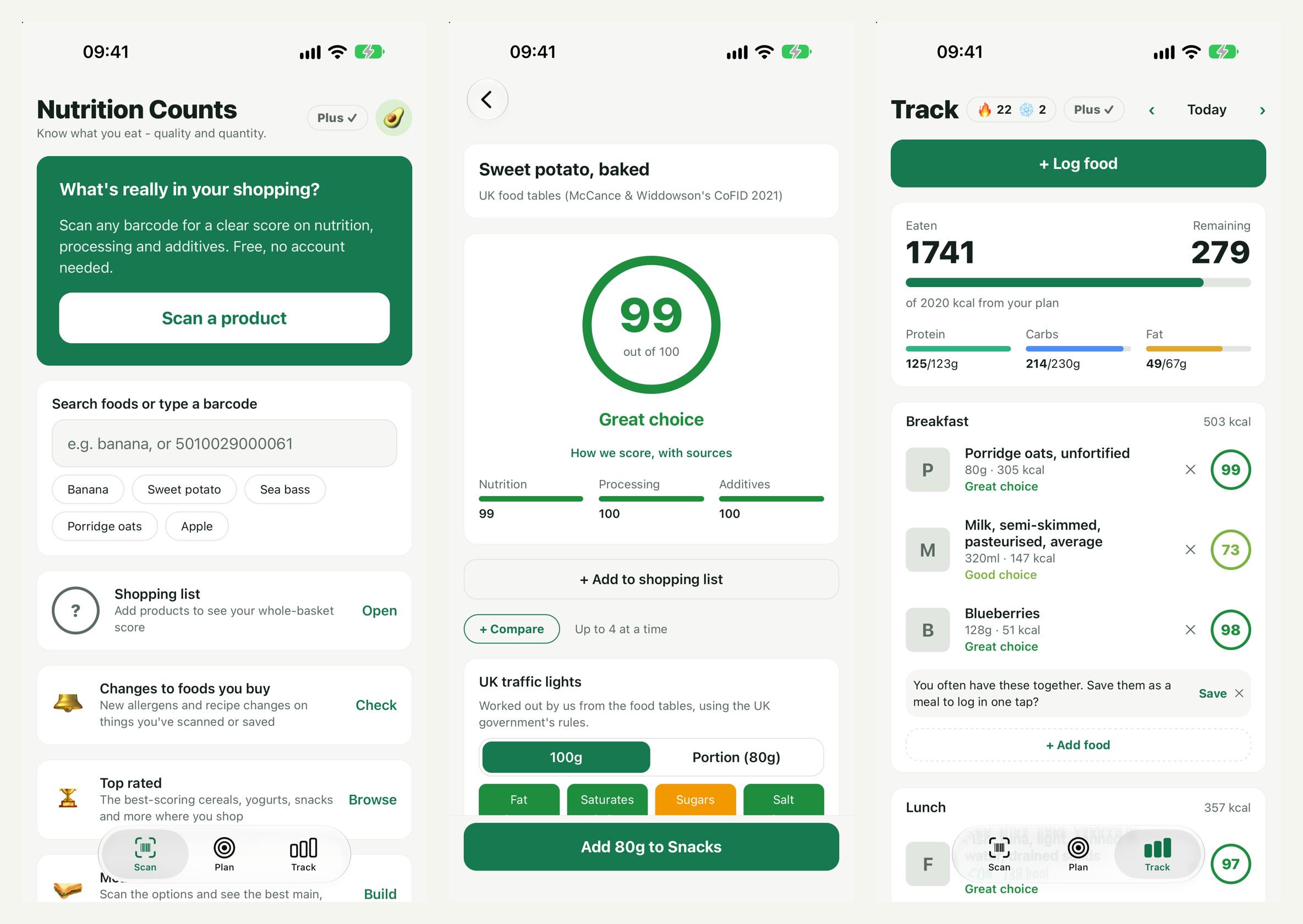
[Self-Promotion] I built a free iPhone app that scores food out of 100, then shows how good your whole day was

Post image
1 Upvotes

I’m the developer. The idea came from a chat at home: scanner apps tell you whether a product is any good but have no idea how much of it you ate, and calorie counters add everything up but treat a can of cola the same as a piece of salmon if the numbers match. So Nutrition Counts does both.

  • Scan a barcode for a score out of 100 from nutrition, processing and additives, with the reasons and where they come from
  • Log your day and see the quality of what you ate, not just the calories
  • Apple Watch app for logging water and favourites
  • Bring your old diary over from MyFitnessPal, Lose It! or Cronometer
  • Hide the numbers if you’d rather not see them

Free to download, and scanning, the diary and planning stay free. Plus is optional (£5.99/month or £34.99/year), with 15 days free for new accounts and no card needed.

https://apps.apple.com/gb/app/id6823688363

A question for anyone who uses a food app: when a score says something is “Have less often”, do you want the reason first, or a better swap first?


r/Appstore • • 12h ago

[Self-Promotion] I built an iPhone app to read in the hour before a date, a dinner or a new job: 207 hand-written conversations (Pro is free this week)

0 Upvotes

Thaw is for the hour before: a first date, a dinner with people you barely know, a new job, a long call with family. You tell it who you'll be with and where, read two or three conversations, and walk in with them in your head.

This week the full version is free for anyone: https://apps.apple.com/redeem?ctx=offercodes&id=6827105990&code=THAWFREE (the link works until Nov 29).

Each conversation is three linked lines: a question to open with, two follow-ups for after they answer, and a line to change the subject if it dies. Three linked lines stick in memory far better than a list of random questions, and you're never stuck after the first answer.

It starts light. Two taps, "that worked" or "didn't land", make the next one a step deeper or a step lighter, so a stranger never gets the deep one. If you do need a glance mid-conversation it's built for that too, but nobody has to see a phone.

Everything is written by hand: 207 conversations. 42 are free, enough to try every situation; the rest is a one-time purchase, no subscription. No account, no tracking.

One limitation: the conversations are in English for now, though the app itself speaks 17 languages. Tell me which language you'd want and it moves up the list.

https://apps.apple.com/app/apple-store/id6827105990?pt=126420608&ct=r-appstore&mt=8


r/Appstore • • 13h ago

[Self-Promotion] Backmark 2.0: plan trips day by day and cook step by step from the things you saved (iPhone)

Thumbnail gallery
1 Upvotes

r/Appstore • • 14h ago

An iPhone timer that doubles as a tiny desk sign

Thumbnail reddit.com
1 Upvotes

r/Appstore • • 15h ago

[Self-Promotion] I made a Mac app that updates App Store listings in every language at once. Looking for feedback from fellow developers

Thumbnail gallery
0 Upvotes

Hey everyone! I'm an indie developer, and this is a tool I built for my own App Store work. Now I'm sharing it to see whether it's useful for others.

Why I made it

Every time I released an update, I spent more time in App Store Connect than writing the actual code. My apps are translated into 11 languages, so each release meant pasting the description, keywords and "What's New" into every language by hand, checking nothing was over Apple's character limits, and then making and uploading screenshots for every language and screen size.

What it is

AppShipper is a Mac app that connects to your App Store Connect account and handles that routine:

  • Translates your store page into all your languages at once (on-device with Apple Intelligence, or with your own AI key) and checks every field against Apple's limits
  • Lets you review every language side by side, then sends it all with one click
  • Makes App Store screenshots with a device frame and captions, translates the captions and uploads them for every language and size
  • Creates a version, picks the build and submits for review, and tells you exactly what's still missing
  • Collects reviews from every country, with suggested replies

No sign-up and no AppShipper servers: it uses your own App Store Connect key and talks directly to Apple.

It's free for one app (everything except AI agents), and there's a sample-data mode to try it without connecting an account. Pro unlocks all your apps.

I'd love your thoughts on:

  1. If you publish apps, which part of App Store Connect wastes the most of your time?
  2. Do you localize your store page? If not, what's stopping you: translation quality, the time it takes, or not seeing the benefit?
  3. Is there anything you'd want a tool like this to do that it doesn't yet?

Mac App Store: https://apps.apple.com/app/id6818973355

Thanks for reading! I'll answer every comment.


r/Appstore • • 20h ago

DoneAgo: know the last time you did anything

Post image
1 Upvotes

DoneAgo is a "last time" tracker. You make a card for anything you do now and then, tap it when you do it, and it shows how long ago that was. Watered the plants 6 days ago. Changed the bed sheets 2 weeks ago. Gave your dog flea meds 28 days ago.

That's basically it. There are no streaks, schedules, or guilt.

Why it's useful

  • You act at the right time. You can see whether something needs doing now or can wait.
  • No more second-guessing. Did I take my meds? Did you already feed your cat? It's right there.
  • You notice your habits, like how often you actually clean the fridge.
  • There's less to keep in your head.

New: QR codes

You can now make a QR code for any card, print it, and stick it where the thing happens. Put one on the plant pot, the cat food container or the pill box. Scan it with your phone camera and it logs right away, no need to open the app and look for the card.

You choose what a scan does: log a state directly, or ask you each time. You can change that later without reprinting the sticker.

Other features

  • Custom states: not just "done". Use things like Fed / Hungry, Full / Empty, On / Off.
  • Notes, photos, #tags and amounts on each log (like "500 ml #fertilizer")
  • Reminders after a set time, or at a set time on the day
  • Auto switch: a card can flip to its next state by itself after a set time
  • Insights and Timeline: see your patterns, and every card's logs on one screen
  • Home screen widgets: tap to log without opening the app
  • iCloud sync and Apple Watch on iOS, Google Drive backup on Android

iOS: Download here


r/Appstore • • 21h ago

reCAPTCHA App - App Store

Thumbnail apps.apple.com
2 Upvotes

Kijjiikkkkiiii


r/Appstore • • 22h ago Bravo

[Self-Promotion] Backmark 2.0: plan trips day by day and cook step by step from the things you saved (iPhone)

Thumbnail gallery
1 Upvotes

Hi r/Appstore. I'm the developer of Backmark, a one-time purchase iPhone app for the things you save: share the link, Reel, screenshot and many more from any app.

2.0 came out today. Until now Backmark was good at finding a save again. This update tries to make the saves useful:

  • Saved places turn into a trip plan, day by day, with notes and the route
  • Saved recipes open in cook mode, one step at a time, with tap-to-start timers
  • You can ask a plan a question: answers come only from your saves and show where each came from (Apple Intelligence, compatible iPhones)
  • Voice notes are written down on the iPhone in 10+ languages
  • Siri and Spotlight can find saves and open plans, once you turn it on

The new screens are in the gallery. $4.99 once, no subscription, no account: https://apps.apple.com/app/apple-store/id6808695961?pt=129409326&ct=v2-reddit&mt=8

What I'd like feedback on: which of these would you actually use, and which feels like one feature too many? And if you plan trips in another app, what does it do that this should?


r/Appstore • • 1d ago

Volf – a walking game where a pixel dog clears the fog over your city. Looking for testers

Thumbnail testflight.apple.com
1 Upvotes

Hi! We're Make It Crazy, a small studio, and we've been building Volf, a walking game for iPhone. It's now in open beta on TestFlight and we'd love some real walkers to try it.

How it works:

  • Your city starts under fog. Tap Start a walk and pocket the phone.
  • Volf, a pixel dog, walks with you. Every new street you walk clears the fog and gives XP.
  • Places (cafés, parks, museums) hide in the fog. Walk past one and you find it.
  • After the walk you see your steps, XP and track, and can share a picture with your start and end hidden.
  • Volf has a room: pet him, dress him, throw him the things he finds. He learns tricks as you level up.

What we're asking: use it on your normal walks for about a week (no need to change your route) and tell us whether it made walking any different, plus anything confusing, broken or slow (especially GPS, battery or notifications). In-app purchases are free in TestFlight.

Join the beta: https://testflight.apple.com/join/WYtfUsCp

Feedback form: https://docs.google.com/forms/d/e/1FAIpQLSfDOg3uyoVhJIvvMXSvizJREKv9C41snknGpeWIkD_9hLAMiQ/viewform

Happy to answer anything in the comments.


r/Appstore • • 1d ago

[Self-Promotion] I built a pickleball score keeper for Apple Watch (free this month, feedback welcome)

Post image
1 Upvotes

I play a lot of pickleball and we kept losing track of the score and who was serving, especially in doubles. So I built a watch app. You tap for whoever won the rally, it keeps the score and shows who serves next, and each game gets saved as a Pickleball workout in Apple Fitness.

The latest update lets you choose which side serves first. I would love to hear what is missing or what annoys you.

It is free for the rest of November, then $1.99 once, no ads.

https://apps.apple.com/us/app/watchstats-pickleball-scorer/id6826029192?pt=129627759&ct=rd-appstore&mt=8


r/Appstore • • 1d ago

[Self-Promotion] 'What Four Bars' turns a song into a practice loop you can slow down, transpose or play along to

Thumbnail gallery
1 Upvotes

The four bars before the chorus. The bass line buried in the mix. The solo you can follow at 80% speed. What Four Bars is an iPhone and iPad app for getting straight to the bit you want to practise.

See how the song fits together. Import a track and Apple’s Music Understanding framework maps its tempo, key, beats, bars, phrases and sections. The colour-coded waveform shows the song’s structure at a glance. Tap a section to select it, snap a loop to exact bar boundaries, or zoom in and drag the edges yourself. You can go from seeing the whole song to looping four bars in a few taps.

Hear the part. Then take its place. Split the track into four or six stems and use the built-in mixer to solo, mute or turn down individual parts. Solo the bass to work out what it’s doing, then mute it and play over the rest of the band. You can see the separated parts in the waveform and use the same loop while you change the mix. Both the song analysis and stem separation happen on your device.

Make the loop work for you. Slow it down without changing pitch, nudge the tempo up 1 BPM at a time, transpose it into a key that suits your voice, or add a count-in so you’re ready for beat one. Save the passage as a clip to come back to later.

Three tracks free. One purchase if you want unlimited use. The unlock is £29.99 in the UK and covers both iPhone and iPad. No subscription, no ads and no account. Requires iOS or iPadOS 27 or later.

If you’re learning a song right now, try it on the passage you keep rewinding. I’d love to hear what you were practising, whether the app found the bars you expected, and what got in your way.

What Four Bars on the App Store


r/Appstore • • 1d ago

I made an army game that runs entirely on Apple Watch — steer with the Digital CrownMy Apple Watch game is finally out: 100 missions, offline, no ads

Post image
2 Upvotes

r/Appstore • • 1d ago

Lockstead: iPhone photo and document vault with a separate passcode, $19.99 once for unlimited items

1 Upvotes

If someone knows your phone passcode, I wanted private files to have a separate lock. I built Lockstead for iPhone with its own 6-digit passcode and optional Face ID.

It encrypts photos, videos and documents on the phone with AES-256. Encrypted backup goes to your own iCloud, with a recovery key for restoring on a new phone. There's no account, no ads and no subscription. It doesn't support platforms other than iPhone.

The free tier holds up to 25 items. Unlimited items cost $19.99 once, with Family Sharing. Viewing, backup and export are always free.

https://apps.apple.com/app/id6833012748

Is that free-versus-paid boundary clear, or would you read it as putting access to existing files behind a purchase?


r/Appstore • • 1d ago

Jobs & Jobs Workers: a Home and Personal Services Marketplace with one app for clients and one for pros

1 Upvotes

Jobs and Jobs Workers are the two sides of one marketplace for home and personal services. Clients use Jobs to hire, pros use Jobs Workers to work, and the whole job happens inside the apps, from the first request to the payment.

Jobs (for clients):

- Post what you need: cleaning, handyman, moving, pet care, hairstyling and 40+ more categories

- Compare quotes for the whole job, so you know the total upfront instead of paying by the hour

- Check each pro's reputation: stars, completed jobs, and photos and videos from other clients

- See each pro's available days and times and book a slot without texting back and forth, or ask for someone right now

- Chat, track the job and pay by card, all inside the app

- Every pro is identity-verified and checks in with a QR code when they arrive

Jobs Workers (for pros):

- Job requests nearby come straight to your phone. $0 per lead, always !

- Quote your own price for the whole job with all the details, not by the hour

- Choose your days and hours, take bookings sorted by the closest one, and turn on immediate jobs only if you want them

- Keep every job's details, history and schedule organized in one place

- Build your reputation with reviews, photos and videos from your clients

- Reviews go both ways and are double-blind: pros rate clients too, and neither side sees the other's review until both are in, so there are no revenge reviews

- Get paid by card straight to your account through the app

Both apps are free, in English and Spanish, live across the US.

Jobs: https://apps.apple.com/us/app/jobs-app/id6796558122 

Jobs Workers: https://apps.apple.com/us/app/jobs-workers/id6796834766

Have you ever hired someone for your home through an app, or worked through one? What was the most frustrating part? Would love to hear your experience and any feedback on the apps !


r/Appstore • • 1d ago

I created SixDots: a Free iOS app to learn Braille

Post image
1 Upvotes

I've been working on a small iOS app called SixDots, designed to make learning Braille more accessible and engaging.

The idea was to build a simple learning experience that helps anyone get familiar with Braille, practice the alphabet, and gradually improve their reading skills.

With SixDots, you can:

  • Learn Braille through interactive lessons covering the fundamentals.
  • Practice recognizing Braille characters through exercises.
  • Test your knowledge with interactive quizzes.
  • Track your progress as you improve your Braille skills.

It's free, lightweight (just 4,1 MB), and deserves a spot on your iPhone.

I'd appreciate it if some of you gave it a try. I'm particularly interested in feedback about the learning experience, UI, missing features, and anything that could make the app better.

App Store: https://apps.apple.com/us/app/sixdots-learn-braille/id6834662151