r/ArtCraftAI • u/velocityvector2 • 11h ago
Do you think this is the end of an era?

584
Upvotes
r/ArtCraftAI
•
u/BrettMaster
•
14h ago

Hopefully this well get people to stop asking why the ArtCraft apps stopped getting updates every day!
I just saw this notice in the app launcher and thought id pass it on.
r/ArtCraftAI • u/Apprehensive_Fly_493 • 7h ago

When I posted SketchCraft 0.3.0 here, it was a push/pull 3D modeler that opened the files architects send you (DWG, IFC, point clouds) and could raise walls from a floor plan. Thank you to everyone who tried it and left feedback. A lot of what follows came straight from your comments.
Here's what changed in the 10 releases since:
**It feels much more like SketchUp now**
- A Classic look (sky, ground, black profile edges) and a real menu bar: File, Edit, View, Camera, Draw, Tools, Window, Help
- Right-click works reliably on Windows mice and touchpads
- Import your SketchUp keyboard shortcuts, or set your own
- Old .skp files open properly (SketchUp 6, 7, 8 and 2017), with dimensions kept
- Three layouts: Classic, Floating, or Vertical tools (tools on the left)
- A "Coming from SketchUp" guide that maps every tool and shortcut
**For woodworkers and makers**
- A cut list that knows lumber (2x4, 1x6...) and board feet
- Cut plan: packs your parts onto real sheets and boards, with diagrams drawn to scale, the waste shown, a shopping list and the cost. It prints part labels too
- CNC: one DXF per part (outlines, through holes, pockets by depth, dog-bone corners)
- Joinery: dado, rabbet, tenon and mortise
**For 3D printing**
- Print check: is it solid, are any walls too thin, where are the overhangs, does it fit your printer
- Fix model closes holes, flips reversed faces and removes junk, all in one Undo
- 3MF export, next to STL
**Texturing**
- Paint on the model in 3D, a UV editor (seams, unwrap, pack) and vertex painting
- Position Texture with SketchUp-style pins, and projected textures (box, cylinder, sphere)
- Edit a texture in PhotoCraft and it comes back onto the model when you save
- FBX export for Unity, Unreal and Blender
**Architecture**
- Room mode: drag out rooms like in The Sims, combine or cut them, and pull whole walls
- 26 fixtures and furniture pieces that snap to walls
- Drawing sheets: plans, elevations, sections, dimensions that stay attached, hatches, line weights and tables, exported as crisp vector PDFs
- A finished two-storey Townhouse example to open and take apart
**Everything else**
- Plugins, including SketchUp Ruby scripts, in a locked-down sandbox
- Curve tool, Make faces and Flatten for messy DWG/DXF linework
- 7 languages, auto-updates, a portable Windows ZIP, Linux ARM, and an early Android tablet build
- AI agents (Claude and others) can drive it over MCP. Every agent or plugin command has a time limit, and your saved work is never overwritten
**Your feedback from last time**
- Top/Front/Side views now work in Parallel projection. Fixed in 0.3.10, thanks to a community contributor
- Orbit around the picked element, an easier hide/unhide toggle, and the view bar in the Vertical layout are logged for 0.3.11
Still free and open source (MIT). No account needed, and it runs offline.
Download: https://github.com/jasonsutter87/sketchcraft/releases/latest
Website: https://trysketchcraft.com
What should I build next?
r/ArtCraftAI • u/timmmmb • 14h ago

This is awesome news!
The latest version of the launcher includes a font library of over 2000. The script filter doesn't yet work as you can see, but hey, a win is a win 😄
Edit: Fonts are not actually working yet as per my comment below. Might need to wait for the next builds or refactor to utilise them.
Nightly builds are on their way, too. Don't go installing them in prod... or do, you only live once.
Edit2: Fonts are working in 0.20.1 and are system-wide by default. Quickly installed two and they're available in LibreOffice Writer
r/ArtCraftAI • u/Putrid-Proposal67 • 21h ago
A guy at work reported to me that Acrobat takes multiple minutes to open some PDF files and often it just flat out crashes.
So I installed pdfcraft on his PC and made him promise to only use it for reading since that is what they mostly do in his department anyway.
A few days later I noticed that pdfcraft has been installed on other PCs in the same department, so apparently word of mouth has spread
r/ArtCraftAI • u/plugsnpixels • 6h ago
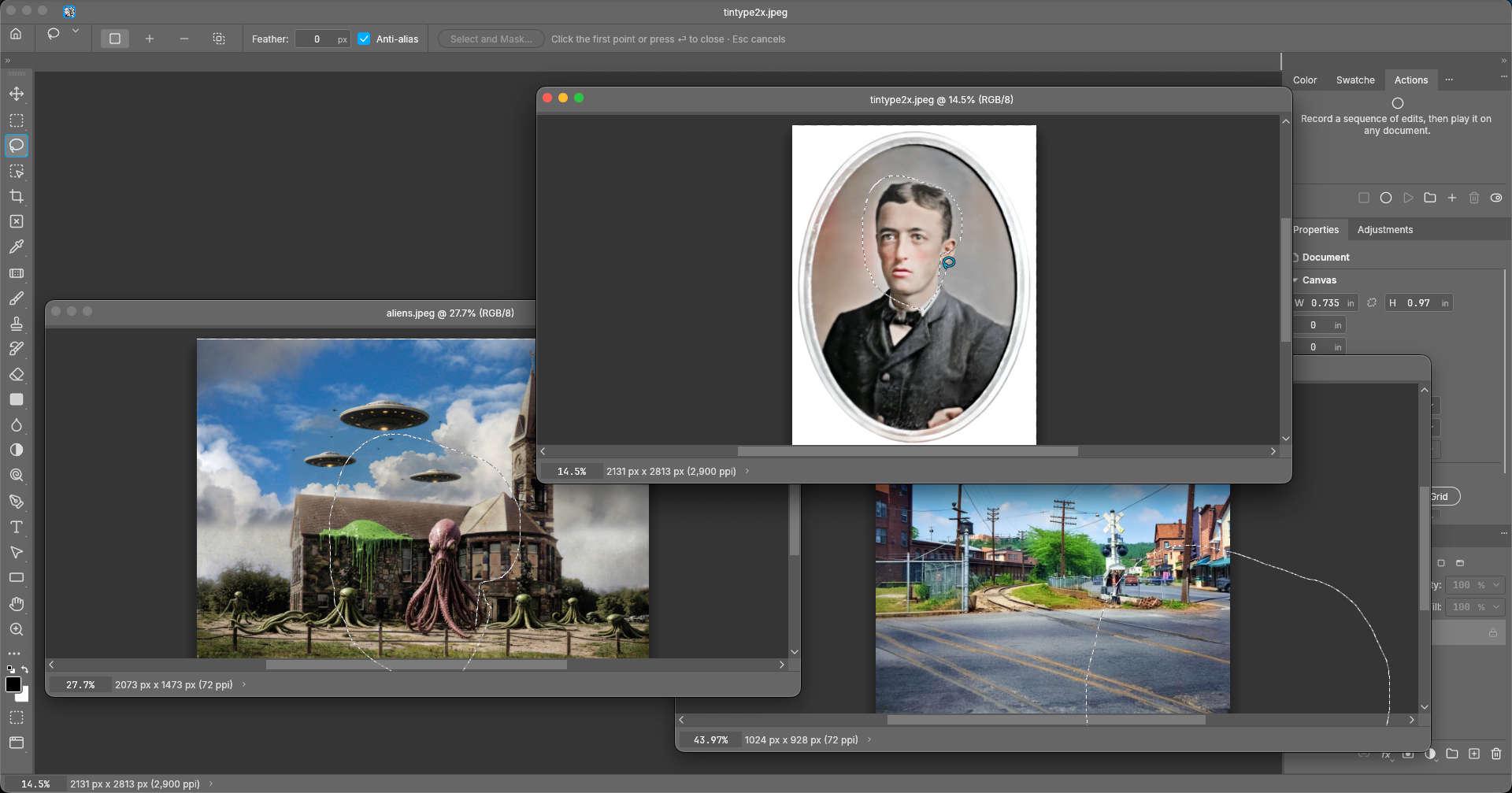
Please advise if anyone else is seeing this (M2 Mac Mini, latest Tahoe). I've used Photoshop since 1992 so I know how this is supposed to work...
These are super buggy behaviors when trying to perform simple low-level tasks and seem to have regressed from earlier versions. (The good news is, the conflicting tabbed and floating images displaying at the same time is not occurring now.) So as much as I love the PhotoCraft concept, it seems pretty unusable for me right now.
Try: Open a few random images in PhotoCraft at the same time.

r/ArtCraftAI • u/phil-haderer • 54m ago

I work in graphics, and when PhotoCraft came out, I decided to create a Photoshop replacement app for PhotoCraft using Claude. (In fact, Claude wrote 100% of it's code.) It features SOTA models like MiniMax H3 Image, MOSS/KroMoss, Krea 2/Krea 2 Turbo, Qwen Image 2.1 Edit, Flux 3 Klein and others. It offers the most important generative AI functions, like text-to-image, fill selection, edit canvas, expand canvas, remove selection, upscale and more.
Here's the link to the GitHub repo: https://github.com/phil-haderer/pxc
The readme includes install guides and example pictures which where created with PxC.
If you like, you can test it. I'd be glad to get bug reports.
r/ArtCraftAI • u/RickiDangerous • 1d ago

Public release candidate for Photocraft V0.24 is out for testing. This release may have bugs from the big refactor so please report any as Github Issues
r/ArtCraftAI • u/MusicianFew8701 • 1h ago
theres a official release for android of the launcher and apps?
r/ArtCraftAI • u/mb2m • 20h ago
Guess I’m withdrawal…
r/ArtCraftAI • u/poudenes • 8h ago
In the old situation i had WP/LR plugin to sync folders to WordPress setups. LightCraft doesn't have this option so I build a new tool to do the same (with Claude code). It's not fully finished. Still wanna add some new features to it. when done will post the github repo :)
r/ArtCraftAI • u/Clemens_Ratte-Polle • 10h ago
hi.
Does Filmcraft or Photocraft have the ability to automatically adjust hand held photographies of the same object?
I want to make a film of each 5 seconds photo stills for an time lapse.
thx
r/ArtCraftAI • u/hamza_1988 • 11h ago
I wish someone would do it. I really like SpeedTree but it's closed source (owned by Unity), offers little to no customization or MCP support and it has some features that just drive me mad. It's been the industry standard for creating foliage for years and it's time for a switch. Please make it happen, anyone? :D
r/ArtCraftAI • u/Low-Specific-1101 • 20h ago
I'm learning how to use EffectCraft and video editing in general. I'd like to know how to use masks to crop images and incorporate them into animations. I'm Brazilian, so I haven't been able to find much content that could help me with this.
r/ArtCraftAI • u/DamageNo9147 • 1d ago

I made a community plugin for FigCraft that documents a component for handoff, and 0.11.0 just came out as a pre-release.
Select a component, a component set or a variant, run Generate documentation, and you get one Section on the same page with eight frames in a column:
A few things I care about:
- Update has seven options, so a rerun replaces only the frames you choose (your Cover and Changelog are never replaced).
- If you delete a frame by hand, it comes back when Update names it. If not, the panel tells you it was not made, instead of failing silently.
- The documentation comes out in English or Brazilian Portuguese.
- The release zip is reproducible (same build, same SHA-256) and has no machine paths inside.
Honest limitations: it's pre-1.0. Translucent bands change color over colored components, the Layouts frame gets tall when the instance is tall, and the panel shows one warning at a time. All listed in the release notes.
New in the 0.11 permissions: it asks for write access and 28 host commands (7 more than 0.10.0). FigCraft shows it as "can edit the document" after you import the manifest.
Images are from a test component, not a real design system.
Download, SHA-256 and full notes: https://github.com/rickbenetti/figcraft-handoff-components/releases/tag/v0.11.0
I'm a designer, not a programmer, and I built it with Claude Code, testing every step in the app myself. If you try it on your own components, I'd really like to know what breaks.
Independent community project, not affiliated with or endorsed by the ArtCraft team.
r/ArtCraftAI • u/yuanlin2004 • 1d ago
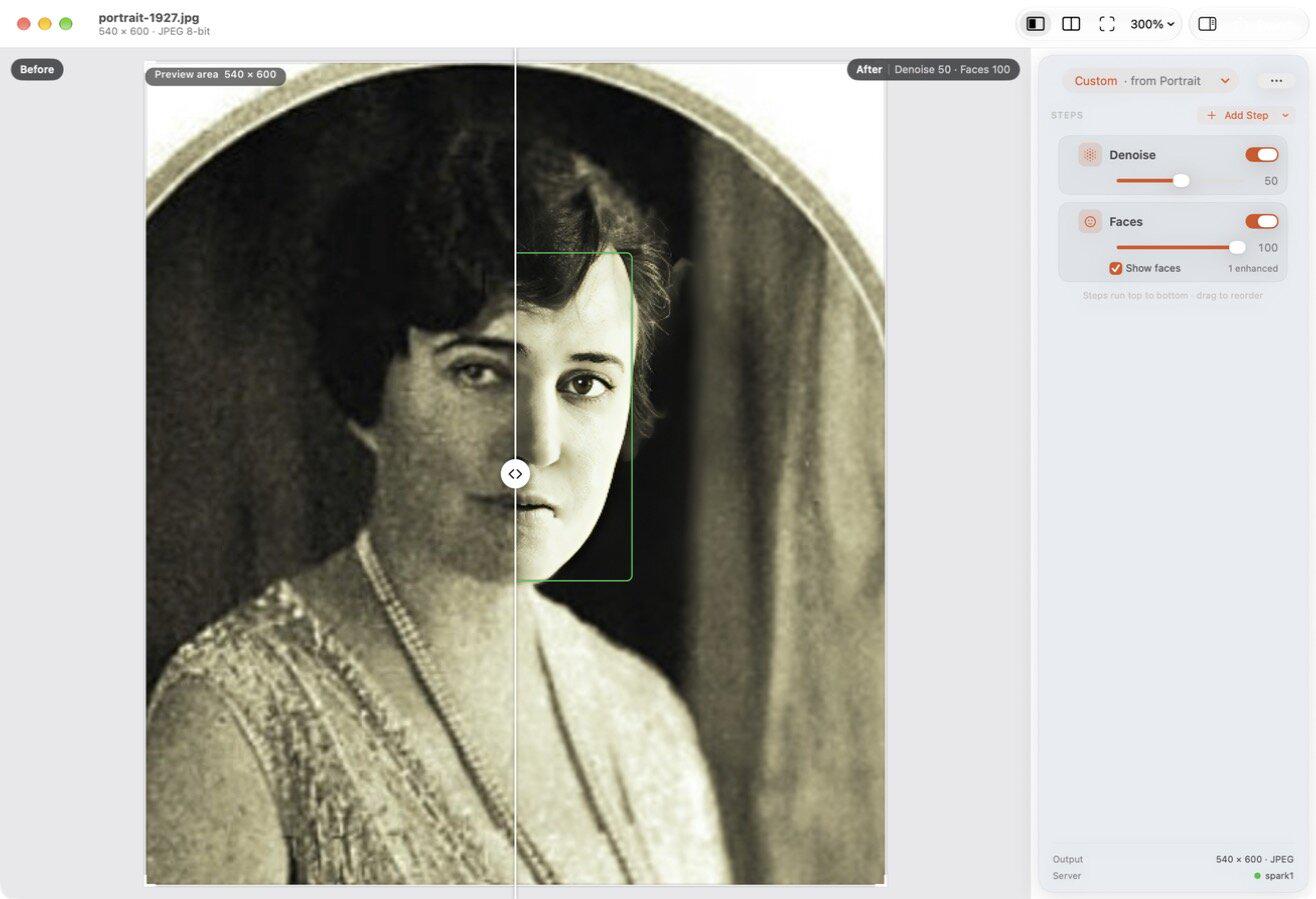
PAINITE is a free, open-source (Apache-2.0) photo enhancer that runs on your own hardware, so your photos never leave your network.
It has two parts:
One server can serve every computer on your network.
What it can do:
You can chain several in one pass and preview the result on any part of the photo in a few seconds before exporting.
Guide: https://yuanlin2004.github.io/PAINITE/
Repo: https://github.com/yuanlin2004/PAINITE
I'd love to hear how it works on your photos.
r/ArtCraftAI • u/Huntakillaz • 10h ago
You guys should do is from the launcher, like the Fonts have another section for AI Where you can pick and choose which local Ai's you want to install or connect to an online one. In preferential order or free, local and opensource first and paid online closed last
Of course categorize them by their uses, so Image Ai are grouped together, Video AI together and so on and so fourth With each category having the icons on which Apps they can be used under.
r/ArtCraftAI • u/YEEG4R • 2d ago

This wasn't in the patch notes, but the "low-res pixelated 96ppi mess of a printing output" issue has been addressed!
Both my laser and inkjet printers finally have the original high printing quality, matching PDFgear and similar software printing output. And the colors are somehow more accurate in PDFCraft, matching the image on the screen.
This marks a major milestone: PDFCraft is now usable for the average person. I'm very happy to ditch PDFgear, and I don't have to look at Acrobat ever again!
Yes, there are milestones to reach (encrypting files with digital certificates, editing watermarks etc.) and bugs to iron out. I don't care that the roadmap says it's only 67% ready. What we have now is more than enough for the basics!
r/ArtCraftAI • u/lenvonk • 1d ago
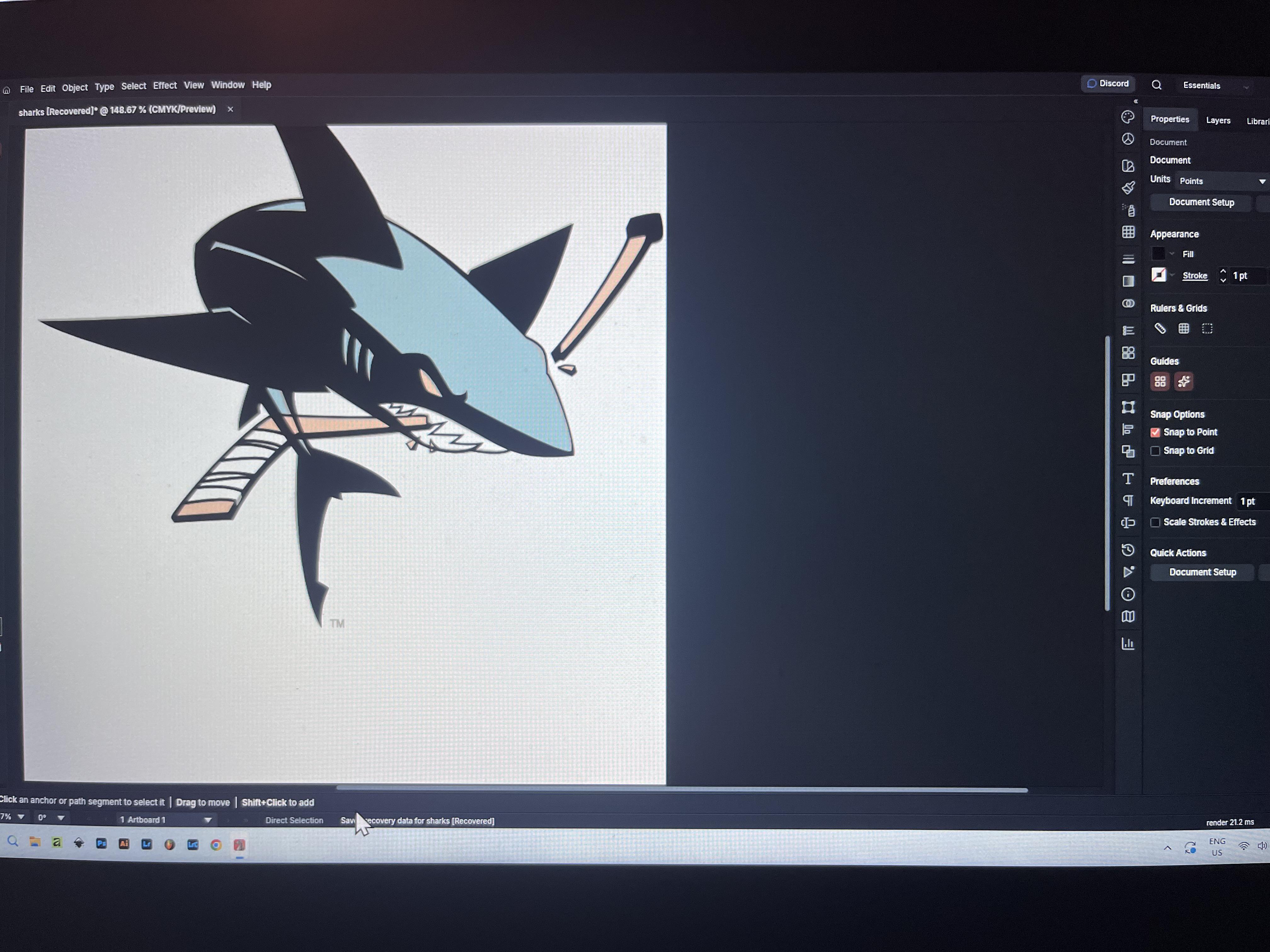
I’m a high school comm tech teacher and our school board only allows us to use Adobe programs so I’m over the moon that my students won’t have to pay Adobe for a membership as app. As their semester ends! I gave it a quick little whirl with this shark and forgot I wasn’t in illustrator within 5 minutes, I realized that I wasn’t toggling between properties and layers nearly as much as I need to in illustrator, I love Vectorcraft! Great work! Yay open source.
r/ArtCraftAI • u/Educational_Lion6130 • 1d ago

r/ArtCraftAI • u/defnotaloser • 1d ago
Right now, setting PDFCraft as default pdf app doesn't show the pdf thumbnail of the first page. I guess they are working on it, meanwhile I made an interim solution since this one thing helps me a lot.
Github project: https://github.com/rajatmo/explorer-thumbs
r/ArtCraftAI • u/DotRakianSteel • 1d ago

It's official, crazy times to be alive. I'm thinking about creating a "community Datacenter" shared resources etc.. What do you people think?
r/ArtCraftAI • u/Opening-Pie2182 • 19h ago
With an option to use your own AI provider or local LLM. Kinda gotten used to it in Google Docs and like like the future of Office software. I know that modifications can be done via CLI, but a side by side layout is much more intuitive.
r/ArtCraftAI • u/Delicious_Recover543 • 2d ago
I assume this is why the refactoring is done, needed and takes some time.
https://www.softwareimprovementgroup.com/blog/artcraft-adobe-clone-ai-code-quality/