r/Avid • • 4d ago

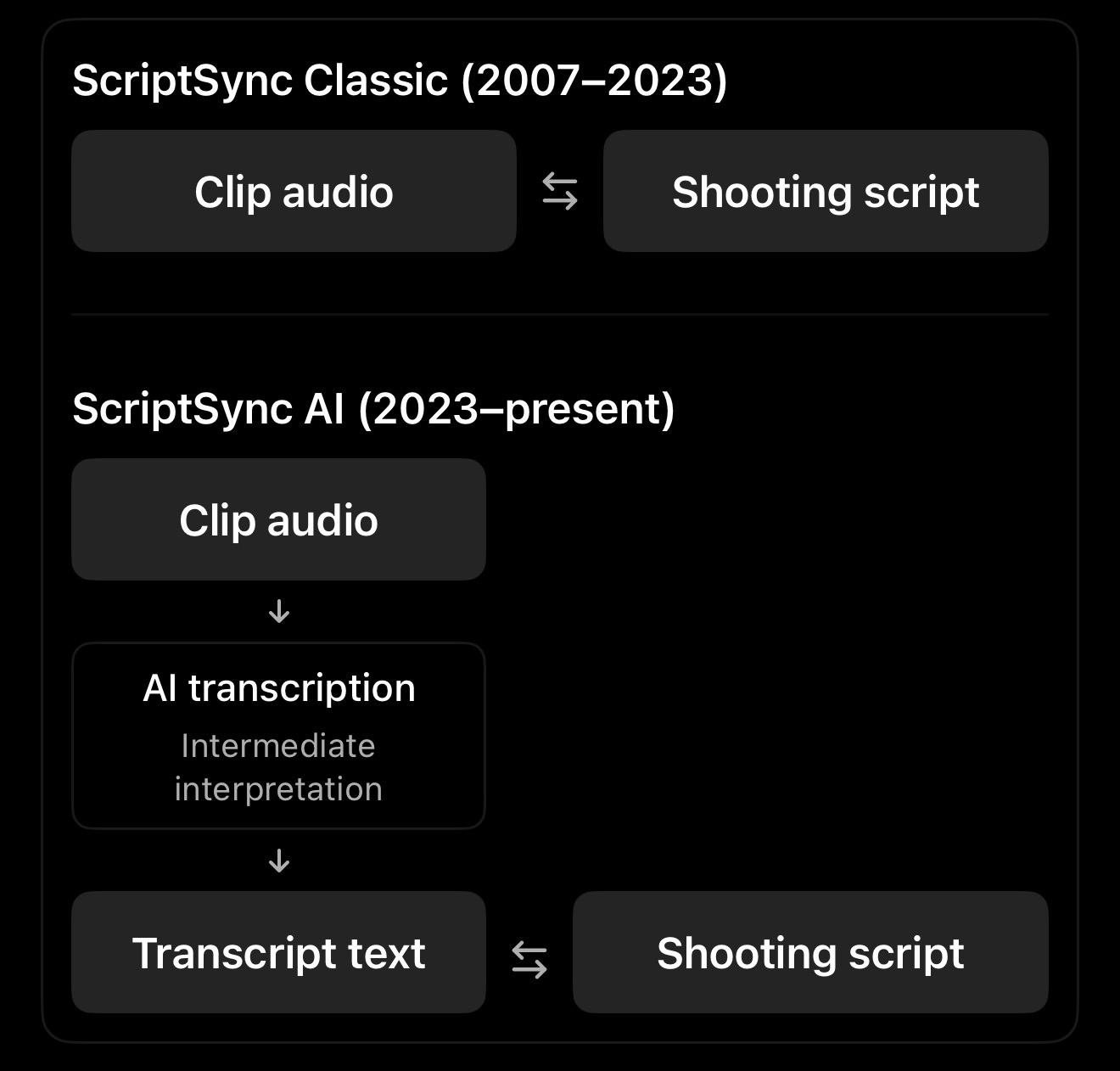
Flow chart comparison of ScriptSync Classic and ScriptSync AI
Post image

This diagram illustrates a fundamental difference between ScriptSync Classic and AI.

Classic compares clip audio directly against the shooting script to create marks in the script bin.

ScriptSync AI introduces an intermediate interpretation of the audio (aka a transcript) then attempts to reconcile the existing script with that interpretation. The result is fewer marks than Classic.

6 Upvotes

5 comments sorted by

2

u/editgems 4d ago

I used ScriptSync AI on my last gig this year and I found it added too many marks. Basically at every line break. So instead of spending time manually adding we would be reviewing the marks and deleting ones that were unnecessary. Maybe I need to spend more time with it because I think would be great if you could organize your script into blocks/paragraphs and it would add only on the beginning. But on the whole I found it really interesting and am curious how it evolves! The transcript window on its own is superb!

1

u/ckahn 4d ago edited 4d ago

I may be misunderstanding your point but... One mark per script line is the intended granularity of ScriptSync, not an example of excessive marking.
Each line represents a distinct point in the dialogue that an editor should be able to locate in the source clip. This was the aim of Classic and AI versions.

2

u/editgems 4d ago

I see, I think sometimes it came across as excessive. In keeping with the script formatting, depending on how fast they deliver, an actor could run a block of dialogue in a short time and it seemed excessive to have marks that would equate to every few seconds. So for the purposes of the workflow when script syncing with AI, us AEs, would actually be removing marks it made because the editors preferred marking the beginning of a segment in the dialogue. I guess what I’m trying to say is I wish there was more functionality, where you could select maybe add a marker only when the dialogue follows a line break perhaps.

2

u/ckahn 3d ago

The Modern Family ScriptSync demo from years before AI shows marks on successive lines within a block of dialogue -- per-line marking is the long-standing behaviour, not something AI introduced. The reason for it is access: with a mark on each line you can click any sentence in a speech and jump the clip straight to it. A single mark at the top of the block lands you at the start of the speech and leaves you scrubbing to the sentence you actually want.

I also don't follow the delivery-speed point. Script marks are indexed to lines in the script bin -- they aren't clip or sequence markers, and they don't appear in the source/record monitors or the timeline. Their frequency in time doesn't clutter any view, because there's no view where they pile up. And if a given editor wants fewer, deleting marks is trivially quick; placing marks the engine missed is manual sync work.

A recent script had the line "I'm thirty four" but ScriptSync AI transcribed it as "I'm 34" and didn't place a mark on the line. This missed marks issue is the problem that the flow diagram comparison of Classic to AI is trying to illustrate -- that the move to ScriptSync AI in 2023 has degraded the accuracy and frequency of marks compared to Classic's direct comparison of audio to script from 2007 to 2023.

2

u/ckahn 3d ago edited 3d ago

Or to look at it another way: The dialogue indentation setting for the script bin establishes which portions of the script are eligible for synchronization. ScriptSync then attempts to associate those lines with corresponding positions in the recorded dialogue. So the behaviour you are flagging as excessive is precisely what the system was configured to accomplish! So to achieve fewer marks you could change the indentation of all the lines of dialogue after the first line. Mission accomplished, but a strange goal to have.

Like this:

              ALEX
          I went to the station
         looking for your brother,
         but nobody had seen him.
         So I came back here.

By adjusting the target indentation only for the first line then lines 2 3 and 4 would be ignored by the scanning.