r/BuildWithClaude • • 2h ago

Project I can't do a thing without claude now, so I put it next to my screen all the time

2 Upvotes

Not proud of this but I can't do the simplest thing without Claude anymore.

The other day I got stuck creating an API key. An API key. Hate to say it but I'm a software engineer. But Claude writes everything now so when something lands back on me I have no idea where I am.

And I was already asking it about everything. Every time meant going back to the terminal, pasting a screenshot, explaining what I'm looking at. That was killing me.

So I made it sit next to my screen. A little round thing ( named it sidemoon) on top of everything. I only press one shortcut, it screenshots the active window I'm on and the answer shows up.

It's my real Claude Code sessions on the other end so it already knows what I'm working on. I ask it stuff like I would ask the guy sitting next to me. Code, docs, a youtube video I don't get etc...

I built the whole thing with Claude Code. It wrote the Swift app and the tests, I tested it on my two Macs and shared the feedback back and forth until the version was stable.

Its Mac and Claude Code only for now. Free and open source, you can download it at sidemoon.app. Its a few days old so it'll probably break somewhere, tell me if it does.
sidemoon.app

github.com/EdonZo/sidemoon


r/BuildWithClaude • • 1h ago

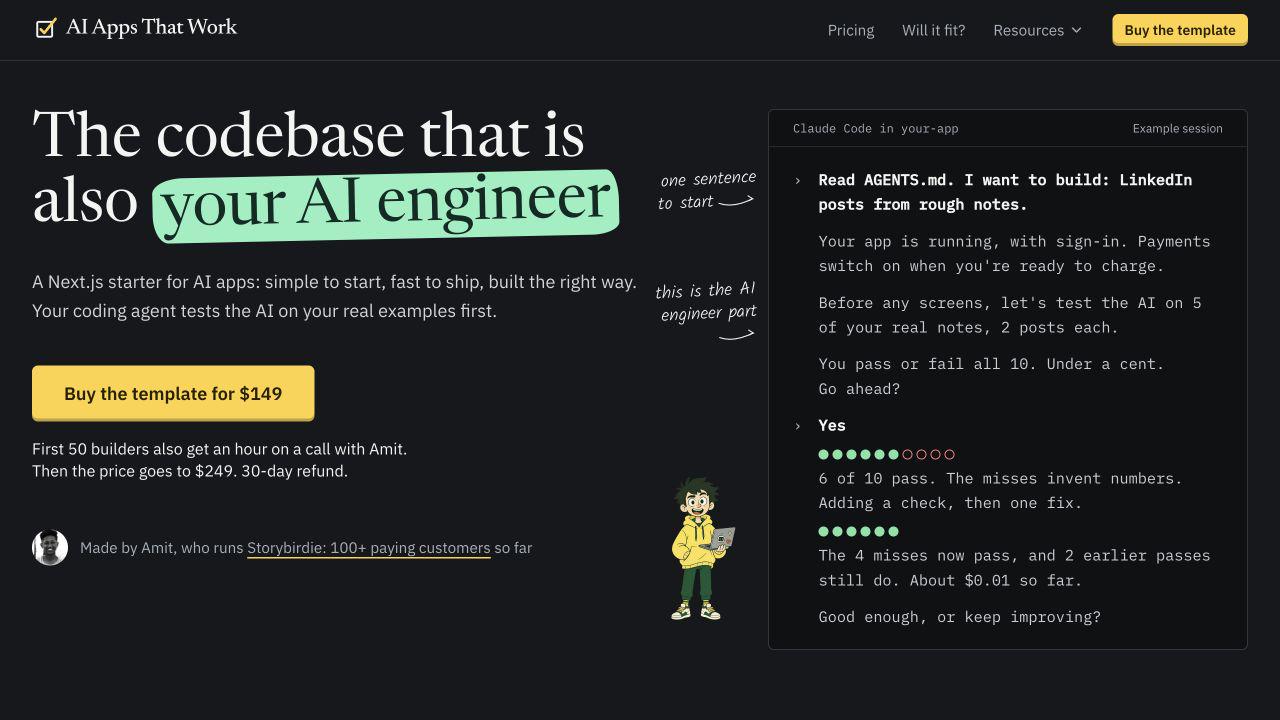
Project Claude Code handles the AI engineering. my job is reviewing about 10 outputs at a time

Post image
1 Upvotes

when i say a coding agent can be your AI engineer, this is the part i mean

you explain the app and what a useful answer looks like. before building screens, Claude Code starts with about 5 varied real inputs and gives you roughly 10 outputs to review

you pass or fail them and say what went wrong. it groups the recurring misses into checks, tries a fix on the failures first, then mixes in two earlier passing examples, blind, so you can see whether the fix broke something that worked

no asking you to label 100 examples up front. each round ends with: good enough, or keep improving?

i built this into AI Apps That Work, a Next.js codebase where the agent handles setup, testing the AI, tracking what users redo and what it costs, and bringing you fixes to review. sign-in, payments and an admin are already there

the workflow came from building Storybirdie, my AI app for filmmakers, where Claude Code handles the AI engineering. the small review rounds are now part of the template's instructions and lab

it's $149 once and you own the code. there's a fit checker if you're starting an AI app: aiappsthatwork.com

the screenshot shows the homepage's example session


r/BuildWithClaude • • 2h ago

Project Got tired of fake Stripe screenshots, so I built a way to share verified revenue with Claude

1 Upvotes

Hey all, for the past six months I've been building Journey with Claude, and I thought this would be a good place to share it.

I've never really believed half the Stripe screenshots that get posted on here. "Hit $10k MRR in 30 days" with a cropped dashboard. Maybe it's real, maybe it's inspect element, there's no way of knowing.

You connect Stripe, Supabase and Github, and the numbers in your updates come directly from them. Revenue from Stripe, users from Supabase, progress from Github. No screenshots, no editing, just what's actually there.

You post short updates (Moments) and they add up to one timeline of your journey, so people can see how you actually got there, not just the highlight. You can also turn a Moment into an image and share it on X.

Its free to use and startup.


r/BuildWithClaude • • 3h ago

Tip/Resource 10 GitHub Repos for AI Motion Graphics & Video Editing With Claude

Thumbnail
youtu.be
1 Upvotes

If you’re experimenting with Claude for video editing, motion graphics or faceless content creation, I put together a list of 10 GitHub repos worth checking out.

Made a quick breakdown here: https://youtu.be/VlPK_9R8Rn4

Curious what other repos you guys are using!


r/BuildWithClaude • • 3h ago

Project I directed the product, Claude built the game: my free language app for web and Android

1 Upvotes

I used Claude chat and Claude Code to make Polyglot Game Master, a free, open-source language game you can play in a browser or install on Android. The finished app has built-in lessons and doesn’t need live AI while you play.

Play: https://doonoo.github.io/polyglot-game-master/
Source and Android releases: https://github.com/doonoo/polyglot-game-master

The idea began as a Gemini gem. I moved it into Claude chat to make a pre-built version with the content included, published as a Claude artifact. After that I did most of the work in Claude Code on the GitHub repo.

Claude wrote and extended the game engine: practice games, boss fights, two-player mode, checking answers with small typos, and the phone layout. It also wrote lessons, bilingual stories, grammar tips and the additional French, Portuguese, Mandarin and Arabic courses.

For bug fixes, I gave it screenshots from my phone. It worked on those and kept the automated tests passing before releases. It also handled the Android wrapper and the build workflow that produces the APK. I added the signing secrets myself. Claude drew the lion mascot in code, generated the icons, built the NES-style music and sound effects, wrote the README and took the screenshots.

My work was the product decisions: which languages and modes to build, what to cut, testing it on my own phone and releasing it. For example, the listening rounds were something I chose to remove.

The app is MIT-licensed, free to try without an account, works offline after loading and keeps progress on the device. I’d welcome feedback on whether the first few minutes make sense and which game modes are worth developing further.

Tech stack: HTML/JavaScript, a Python build script, JSDOM tests, Capacitor for Android, and GitHub Actions for builds.


r/BuildWithClaude • • 3h ago

Project I let Claude play Balatro unattended for 4 full runs. It dies the same way every time.

Thumbnail
youtube.com
1 Upvotes

I built a pipeline (mostly with Claude Code) where Claude Sonnet 5.5 plays complete runs of Balatro on its own, with no human input, and every decision is logged with the reasoning it gave. A second pass then reads the whole decision log, finds the move that actually lost the run, and turns it into a narrated episode: cut, script, AI voice, title card, thumbnail. All automated, all from the log.

What I've learned from 4 runs:

  • It reached ante 5, 6, 5 and 7 (of 8). Every run died the same way: plenty of chips and +mult, never multiplicative scaling, until a boss blind outgrew it.
  • It's very good at explaining any single decision and bad at noticing that the sum of them is a losing strategy.
  • It loves booster packs. One run bought 17 and was still broke at ante 5.
  • My favorite death: it spent its last suit-changing card to close a 1,796-point gap, then lost the boss by 4,906.
  • A run is 113–156 decisions, ~4.5M input tokens but only ~100K output, and costs roughly $2.50–$7 in API.

How Claude is used: Sonnet 5.5 plays the game through a game-state API. Claude also writes the narration from the log and picks the pivotal decision. The voice is AI (ElevenLabs), the footage is the real game.

Free? The episodes are free on YouTube. I made the channel, it's called AnteMortem. This is the one I'd start with: https://www.youtube.com/watch?v=8Ukv65nYi3Q

Next week I'm running Opus 5.5 on the exact same seed as one of the Sonnet runs. My bet is it plans better but still overbuys packs. Anyone want to predict how far it gets?


r/BuildWithClaude • • 4h ago

Project I built a site that turns YouTube playlists into 24/7 TV channels, where everyone watches together

1 Upvotes

I created Malk.tv, a platform where you can turn any YouTube playlist into live 24/7 TV. Every station is always on - you open the guide, flip channels, and land in the middle of something, the way surfing used to work. Some nights that's an '80s music video you forgot existed, and some nights it's a GTA San Andreas radio song or a scene from a movie you haven't seen in years.

Everyone tuned in is watching the same second, so the chat is people reacting to the same moment, like watching TV with strangers. There's a live viewer count on every station, so you can see who else is up at 2am watching Star Trek videos.

I've curated about 35 stations to start: '80s music videos, every GTA radio station song by song, classic movie scenes, Star Trek, jazz, cartoons and more. You can also make your own: sign up, paste any public playlist, and you've got a 24/7 station.

The whole things is built with Claude, including the promo video (remotion). Under the hood there's no streaming server. Every station is a playlist on a shared clock, and every video streams straight from YouTube.

No account is needed to watch - feedback is very welcome!
https://www.malk.tv/


r/BuildWithClaude • • 11h ago

Project I wanted context7 but free and on my own server, so I built it with Claude Code: ExactDocs (very early release)

Thumbnail
gallery
4 Upvotes

TL;DR: a self-hosted, free alternative to context7. It serves your agent the docs for the exact version you use, from your git repos, public or private, with nothing leaving your machine.

The problem

I use context7 a lot, because from what I've seen, coding agents write noticeably better code when they read the docs for the version I actually run. What bothered me was that I couldn't run it myself. I wanted something free, on my own machine or homelab, that could also read private repos without anything leaving the box.

What I built

You point ExactDocs at a git repo (GitHub, GitLab, Gitea, anything), pick a tag, branch or commit, then the folders that hold the Markdown docs. Claude Code then gets MCP tools to search and read them.

  • The version is a hard filter. Ask about v1.3 and you get v1.3 docs or an explicit "no result".
  • Results are the original Markdown with the path, heading, commit SHA and a link to the file.
  • resolve-library-id and query-docs behave like context7's, so switching is mostly a URL change.
  • Default search is BM25 on SQLite and needs no models. Embeddings, rerankers and an agentic mode are optional and can run locally on CPU.
  • There's a web UI too (screenshots below).

How I used Claude Code to build it

Claude Code wrote most of the code. I did the design and the issues, reviewed everything, and said "no, not like that" a lot. The repo has an AGENTS.md and a set of skills in .agents/skills/ (how to claim an issue, how to test, the architecture rules, how to release) that every session works from. That setup is a big reason it stayed coherent across ~200 commits.

Security and data

It runs on your own machine or server and has no telemetry. It only connects to the git hosts and model endpoints you configure. Git credentials for private repos are stored encrypted and never returned by the API. Apache-2.0, so the code is all there to review.

Try it

uvx exactdocs serve
# or
docker run -d -p 3000:3000 -v exactdocs-data:/data ghcr.io/sircypkowskyy/exactdocs:latest

Then exactdocs config --client claude --new-token prints the MCP snippet for Claude Code.

Repo: https://github.com/SirCypkowskyy/ExactDocs
Docs: https://sircypkowskyy.github.io/ExactDocs/

Disclosure: I'm the author. It's a very early, test-quality release, so things will break, and the config may change under you. Tell me where it breaks, ideally in GitHub issues. If anyone wants to contribute, I'd be happy to take outside PRs :)


r/BuildWithClaude • • 6h ago

Project I built a local, offline library for your Claude.ai exports (search, annotations, branches, 12 languages)

Post image
1 Upvotes

Claude.ai lets you export your data, but the export is a big JSON file that is hard to read. CEV turns it into a local website you read in your browser, offline:

- each new export is added to the previous ones: nothing is lost, even conversations you deleted on claude.ai

- search in titles and content, with typos allowed (formulas too)

- favorites, notes, titles, highlighter, links between conversations, series

- a structure view of branched conversations (edited messages, retried answers)

- export as .md, .odt, .docx, .pdf; reading aloud with offline voices

- 12 languages

Free and open source (MIT), tested on Linux; Windows and macOS not tested yet, feedback welcome.

https://github.com/fordomfreefr/claude-export-viewer


r/BuildWithClaude • • 6h ago

Help/Question I built an arcade game with Claude, and now I can't beat my own creation.

1 Upvotes

Recently, I decided to build a small arcade game with Claude, just for fun. What started as a simple Pac-Man-inspired idea turned into something surprisingly challenging.

I'd say the collaboration was roughly 60% AI and 40% human. I contributed the ideas, game mechanics and creative direction, while Claude handled much of the implementation.

I gave Claude quite a bit of creative freedom. Everything went well until I actually started playing.

Here's the funny part: I helped create a game that I can't finish. My personal best is 7,404 points, nobody has made it past Episode 5 so far, and I haven't even seen the ending myself.

How is it possible that I contributed 40% to creating something that I can't beat?

Should I ask Claude to make it easier, or should I accept that the machine has outplayed its own creator?

Has anyone else built something with Claude that ended up challenging them in unexpected ways?

If there are any experienced arcade players here, I'd love to see someone finish it.

https://www.onesurvives.com/


r/BuildWithClaude • • 7h ago

Project A stop gate that makes Claude Code prove "done" with command output

1 Upvotes

Repo: https://github.com/Furox-Art/plan-auditor - MIT, 2.6.5.

The annoying part of agent work is not the code, it is the summary at the end. "Tests pass, refactor complete" is indistinguishable from "I changed the assertion until it went green" unless something re-runs the checks outside the agent's own process.

plan-auditor is that something, and for Claude Code it wires in as a stop hook: scripts/stop_gate.py delegates to the same evaluate_workspace the CLI uses, so the hook and plan-auditor audit cannot disagree about what counts as done. hooks/gate_hook.py is the primary gate; copy the skill folder into ~/.claude/skills/plan-auditor/ and point the blocking hook at one of them.

What a plan step has to look like: at least one behavioral check (run, exec or pytest). regex and file_exists exist for convenience and cannot verify a step on their own. The verification contract is sealed when the plan is approved and can only be tightened afterwards.

Exit codes are the interface: 0 proven, 1 failed, 2 blocked, 3 UNKNOWN. 3 withholds completion rather than passing it, which is what makes an inconclusive check safe to run in a loop. Evidence lands in a SHA-256 hash chain, and a completion claim needs it HMAC-authenticated, because a bare chain is only tamper-evident - anyone with write access to the workspace can rebuild an identical one.

Install:

pipx install plan-auditor
npm i -g plan-auditor

The npm package is a thin Node launcher around the same CLI and needs Python on PATH. Python 3.11+, no third-party runtime dependencies, no LLM anywhere in the verification path.

The limit: it proves the sealed commands exited as declared. It cannot tell whether a command that exits 0 actually tests the behavior you asked for. A weak check seals exactly as cleanly as a strong one.


r/BuildWithClaude • • 13h ago

Project Claude Code plugin to run your job search on a schedule

3 Upvotes

It’s called Job Tracker. It’s free, runs locally, and is MIT-licensed.

You pick the job boards and company careers pages to watch, set your filters, and schedule a sweep. It finds roles, checks them against your criteria, and drafts applications.

It can also fill in application forms. You can approve manually, or enable auto-apply if you want to delegate that. There’s a local kanban board, so you can keep track of where things stand. Your job search data is stored on your machine.

How it works: it’s built entirely on Claude Code’s plugin system, with skills for each step. During a sweep, subagents split up the work: one searches each board, another scores each role, and an auditor checks that nothing was sent during the sweep and that there’s evidence behind every decision to drop a role.

How is it different from Claude only: The local MCP server gives Claude dedicated tools for common job search tasks, so it doesn’t have to figure out each step from scratch. Roles, preferences, and application statuses are saved in a local database, so it can look them up instead of relying on chat history. That makes it less likely to lose track of things or make them up.

To try it, open Claude Desktop → Code → Plugins → Add marketplace, enter adamwardecki/job-tracker-mcp, then run /job-tracker:setup.

Website · GitHub

If you’re job hunting right now, I’d love to hear what you think. What would make this more useful for you?


r/BuildWithClaude • • 7h ago

Help/Question Everyone's talking about Claude skills. Which ones do you actually use for building an app?

1 Upvotes

Hi everyone!

I'm building an app with Claude Code (Expo + React Native, Supabase) and keep seeing people talk about skills, but I'm not sure which ones are actually worth using.

Which skills would you recommend for app development? Drop them in the comments with:

  • What it does
  • Link

Would be great to collect a good list here for everyone. Thanks!


r/BuildWithClaude • • 8h ago

Help/Question Getting Claude co-work to access the internet?

1 Upvotes

I had the Claude desktop client installed on my computer for the past year, and I remember it being a struggle to get it to access the internet directly. Then some change was made on my computer, and all of a sudden Claude CoWork could access the entire internet. It could SSH into servers, it could download PDF documents directly from URLs, and it was great. But then my computer crashed, and I had to reinstall Windows. Now I can't figure out how to get the Claude client unrestricted access to the internet.

Every prompt, it responds back that it needs a connector to be able to simply download a PDF from the internet, or SSH into a server, or connect to an API over the internet. Does anyone know how to give it direct access to the internet? I've tried and tried searching and using Claude to find methods, and it keeps referencing settings that just simply don't exist. Previously, I had to use the "add folder" option and just give it my desktop folder. All of a sudden, it had access to my computer, and it could use the shell and access everything on the internet from there, but I'm trying to figure out how I can get to that point again.


r/BuildWithClaude • • 9h ago

Tip/Resource How do you keep a Claude Project organized for a goal that spans months?

1 Upvotes

i set up a Project for an ongoing LinkedIn posting goal. curious how people keep a Project organized for a goal that runs for months - do you keep everything in one long chat, split chats by topic, rewrite the project instructions as things evolve, or just start a fresh Project every so often?


r/BuildWithClaude • • 1d ago

Tip/Resource Claude Code engineer's 28-minute prompt guide is gold

Post image
67 Upvotes

r/BuildWithClaude • • 12h ago

Project You can read Claude Code as a chat and keep typing in its real terminal right below, and too few people know it.

1 Upvotes

cmux, a terminal app for macOS, takes a Claude Code or Codex session that is already running in one of its terminals and shows it as a chat. It doesn't start another agent. Permission prompts stay in the terminal.

Try it: Turn on the Agent Chat UI flag, which is off by default in 0.65.2.2, and run "Open terminal as chat" from the command palette. The chat opens in a side split, with its own input box.

My setup: I read Claude's replies in the top 85% of the window and type in the real Claude terminal in the bottom 15%, about 9 rows. The chat is read-only and follows the session of that terminal. Long replies are easier to read this way, and I keep the terminal with all its commands.

cmux made the app, the panes and the chat. I made the chat open by itself on top and removed its input box. My part isn't public, but you can write the split in cmux.json: a browser pane above, a terminal below, 0.85.

https://github.com/manaflow-ai/cmux/tree/main/agent-chat


r/BuildWithClaude • • 17h ago

ClaudeWebsiteDesign/SEO/Marketing I get rid of my old portfolio and rebuilt it with Claude Code in 3 Hours as a little game.

Thumbnail
nourddin.me
2 Upvotes

r/BuildWithClaude • • 17h ago

Tip/Resource I stopped relying on Claude's memory and built a system that makes sure it remembers all the most important things I do and tell it about my business.

2 Upvotes

I run two small businesses and use Claude every day, including a few scheduled routines (a morning brief, a weekly follow-through check, a daily comment sweep).

The problem I kept hitting: Claude's memory is built to remember me as a person, not to run a business. A decision made in one chat didn't reliably show up in the next one, I couldn't see or correct what it had kept, and none of it was available to any other tool.

Here's what I built instead. No code.

  1. A Business State page in Notion. It says what's true right now: a priority order, one section per business with a "Verified" date, a "No longer true" list, and which app holds each live number. Its first line says facts on this page beat memory, old documents or a routine's own instructions.
  2. Four lists (Notion databases):

    • Decisions: what changed, the date, and what it replaces
    • Open loops: everything unfinished, with an owner and a next step
    • Routine log: one row each time a routine runs, so routines don't redo each other's work
    • Running things: every project, skill, routine and automation, so any chat can see what else is set up
  3. A short "state contract" pasted into every project's instructions: read the page before acting, take live numbers from the apps, write back after any work that changes something.
  4. Two skills that carry the read-first and write-after steps into every chat.

What changed in practice: when I renamed a programme, I said it once. It was logged as a decision, Claude searched my website, emails and payment pages for the old name, listed every place it still appeared and fixed them. One routine even flagged that its own instructions still used the old name.

A test you can run now: open a brand new chat and ask "What did I decide about [something you settled last week]?" If you get last month's answer or a vague one, it's guessing.

Happy to share the prompts I used for any of the steps. I've also written the whole build up as a guide if that's useful.


r/BuildWithClaude • • 1d ago

Project Claude Code builds my apps, but the UI never looked really good. So I built my own free & local visual editor (with Claude)

26 Upvotes

Hey, I'm Andrea 👋 half dev, 50% designer. for sure 100% a nerdy girl 👩‍💻

The problem
I do freelancing, and I always need new landing pages for my customers. Claude Code build them in minutes and everything works great, but usually they just don't look good. Not even close to what I'd make by hand. And fixing the UI by prompt is really painful: "make that smaller", "no, the other button", then screenshots, more prompts, and sometimes it hallucinates and changes a whole section to fix one detail.
So I switched to Lovable and Framer for their visual editors. They work great, but you're stuck with their agent, their hosting and their credits, and they get expensive realllly fast. I already pay for Claude Max, and I like my setup on my own computer with my skills and tools.
I didn't want to give that up.

Also, the Claude mobile app with remote control is just at an higher level compared to any other startup for me, I'm just used to use it.

To the point: what I built 💅
I put the two worlds together. Feega is a free visual editor that runs on your machine, right next to Claude Code.
You open your app, click anything on the page and change it like in Lovable: spacing, colors, fonts, hover effects. The change is saved straight into your code. Claude does the building, and I do the "make it pretty" part by hand.
When I do need Claude, I right click an element, hit **Copy for agent**, and paste. Claude knows exactly which element I mean. No more describing it.

How I used Claude Code to build it
I built most of it with Claude Code. Since I'm on my own, I usually have a single Claude session with Opus 5.5 at low effort, and it manages a team of sub agents divided for each tasks I give it, like one fixes a bug, one writes the docs, one builds a feature. Then the main agent reviews, tests and decides what goes in.

What I learned
**Claude is great at code and so-so at taste.** I mean, the UI made by Claude works great, but I also teach design in an uni in Italy, and I just want something more, something only humans can do now.
**"Done" doesn't always mean done.** Claude sometimes builds a piece and forgets to connect it. Now I always ask it to show me the full e2e test in my local chrome, from the button to the result, via screenshots or directly a video recording of the screen.

If you want to try it out
Free & open source. Works in VS Code, Cursor and Windsurf, or with “npx feega”

Repo: https://github.com/andreabuttarelli/feega
Website: https://feega.app
Docs: https://docs.feega.app

It's young, so it'll break somewhere. Tell me where 🙏
Feedback are always welcome, especially the hardest one!!!
Happy (vibe)coding!! 🌈


r/BuildWithClaude • • 16h ago

Project 5 habits that let me build a free networking study site with Claude

1 Upvotes

I work in IT support and I'm studying for the CCNA, a Cisco networking exam.With Claude I built Step by Packet: 51 animated guides where you click Next and watch a network protocol work, one packet at a time.

It's free

https://stepbypacket.com

This post is more about how I work with Claude than about the site. Five habits made it possible for someone who doesn't code:
A handover note, like at the end of a shift
One file with the accounts, the decisions and what comes next. Every new chat starts by reading it, and at the end Claude updates it. I never have to explain the project from zero.

Screenshots instead of tutorial
Cloudflare, Google Search Console, a LinkedIn page: all new to me. When I get stuck, I send a screenshot and ask "where do I click and what do I type?" I get the exact button, and the exact text for each field.

My "yes" is the only publish button,
Claude makes changes on a copy of the site and gives me a preview link to click through. Nothing goes live until I say yes.

It tests before I look
Before showing me anything, Claude opens the pages in a browser by itself, phone size included, and checks that nothing breaks or jumps around.

I don't write in English
I write to Claude in my first language, and the guides come out in English. If English isn't your first language either, you don't have to switch.

What still goes wrong
Claude can sound completely sure about a networking detail and still be wrong. I'm still learning, so I don't catch everything. When readers point out a mistake, I fix it.

If you build with Claude without a coding background, what habit helped you the most?


r/BuildWithClaude • • 18h ago

Project Planes Trains & Automobiles Realtime Tracker

Thumbnail nealanddel.com
1 Upvotes

The events in Planes Trains and Automobiles start at 4:45pm on the Tuesday before Thanksgiving. I always thought it would be fun to track their location in real time as if the events were happening right now. On Tuesday morning I went through a quick requirements & brainstorming discussion with Claude chat and then handed the docs off to Claude Code. It was all done in the morning before work and I did a redesign later that evening. I’m open to ideas and recommendations.

https://nealanddel.com/


r/BuildWithClaude • • 23h ago

Project Tablet Volume Control App

1 Upvotes

I'm new to this sub, but I recently build a really simple android app for my son's tablet that allows me to limit the speaker and/or headphones volume. It can be a general setting, a scheduled setting, an output setting, or a mix.

I mostly created this because we've found that winding down the volume of the tablet helps transition to bedtime and while he enjoys his headphones, he gets tired of wearing them. When the headphones are off the tablet is full volume and pressed to his ear.

I have no experience in app development and I wanted to see if there's interest before I figure out how to launch something like this to the public. I also don't know if something already exists.

Thanks for reading questions.

J


r/BuildWithClaude • • 1d ago

Project I got tired of uploading my PAN card and bank statements to random PDF sites, so I built 53 PDF tools with Claude Code (most never leave your browser)

Thumbnail
docs.evernth.com
3 Upvotes

Every time I needed to compress a PDF for a visa form or merge some bank statements, I ended up on one of the usual PDF sites, uploading private documents to a server I knew nothing about. So I built my own: docs.evernth.com

What it does

  • 53 PDF tools: merge, split, compress, rotate, reorder, crop, watermark, page numbers, Bates numbering, compare, metadata, and more
  • Many of them run fully in your browser. Merge, split, rotate, organise, compress, crop, watermark, compare and others never upload your file. You can check the network tab.
  • Compress to a target size (for example "under 200 KB") for email, resume, passport, visa and exam forms
  • AI tools: chat with a PDF, summarise it, or extract tables and data

What about the tools that do upload?
Some tools still need a server, like conversions and the AI features. For those:

  • Your upload is deleted as soon as the job finishes
  • The result is deleted 5 minutes after you download it, or after 1 hour if you never do
  • There's a "Delete now" button if you don't want to wait
  • To be upfront: the AI tools send the text to Google Gemini. It says so in the FAQ.

How Claude helped
I built it with Claude Code. The most useful part was moving tools that used to run on the server into the browser: Claude ported the backend handlers to client-side pdf-lib code and wrote Playwright tests to check that the output matched. It also did a lot of the tedious edge-case work: odd page sizes, annotations, and a step-by-step quality ladder for compressing to a target size.


r/BuildWithClaude • • 1d ago

Project I got tired of losing track of 6 parallel Claude Code sessions, so I built a medieval kingdom dashboard for them

Thumbnail
bc3.github.io
3 Upvotes

I kept running Claude Code across several repos at once and losing track of which terminal was doing what. So I built sir-claude — it renders your project folders as a 3D kingdom (Warcraft II–style): each folder is a building, size = activity, color = status, with day/night cycles. Click a building to get that project's terminal and a readable history of what Claude actually did.

It's fully local, no account, no cloud — npx sir-claude and you're in. npm: https://www.npmjs.com/package/sir-claude (source isn't public yet, happy to talk through how it works in the comments).

Built it for myself first, sharing in case anyone else juggling multiple agent sessions finds it useful.