r/ClockworkPi • • 23h ago

uConsole Finally replaced keyboard and hatred trackball!

Post image
137 Upvotes

Good Lord, why didn’t I do this sooner? The keyboard keys have become so soft and responsive, now I can actually type properly. As for the trackball, that’s now a thing of the past, like a bad dream. Thank you, Lulu, this is a piece of art!


r/ClockworkPi • • 1d ago

uConsole Custom OS - Agentic KVM & Command Cneter

Thumbnail
gallery
49 Upvotes

Built a custom OS image based on cm4 raspbian, Serves as an Agentic KVM and command center like a herdr across network clis. Custom Cyberdeck compatible interface for easy navigation.

Single command center to control agents on multiple instances, tailscale integration built in

Supports Dpad and xyab buttons

Opensource:

https://github.com/ankurCES/Lapis-Zero ( Supports the Uconsole Clockwork pi and the cardputer zero)

Supported Android companion app in repo as well


r/ClockworkPi • • 8h ago

Someone have a uconsolen for sale? Sweden/EU

1 Upvotes

Hey!
If someone have a uconsolen for sale in Sweden/EU I can be interested!


r/ClockworkPi • • 1d ago

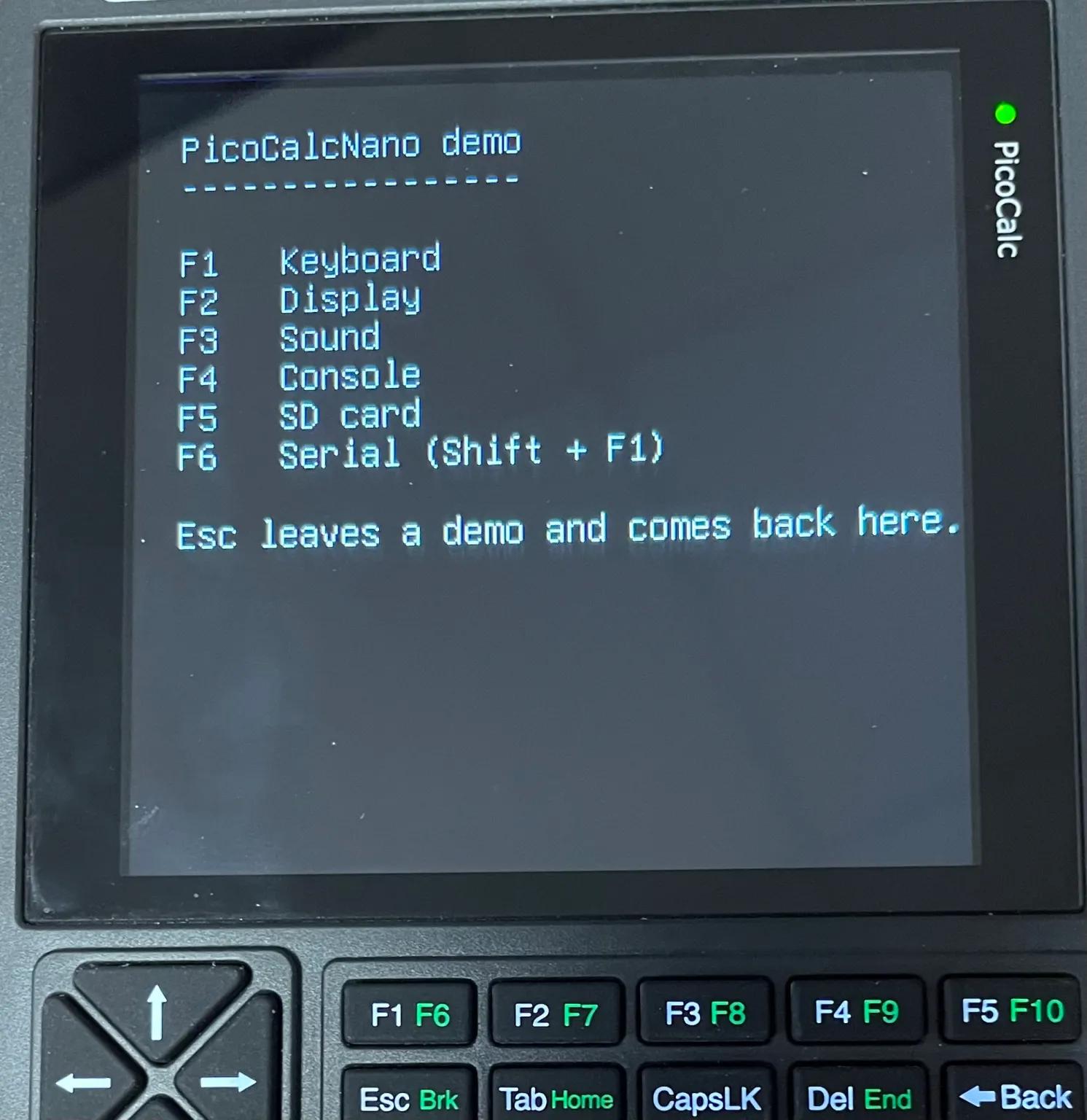
PicoCalc PicoCalc: I wrote C# drivers (keyboard, display, SD, sound, console) so it can run .NET nanoFramework programs

Post image
14 Upvotes

Hi all,

I wanted to write C# programs directly on my PicoCalc, but nanoFramework had no support for its hardware. So I built the missing drivers myself, in pure C# (no custom firmware, no native code), and published them as NuGet packages.

What's in there:

- Keyboard: reads the PicoCalc keyboard over I2C

- Display: text output on the 320x320 screen (Unifont, so lots of characters)

- SD card: a C#-only FAT driver, since the built-in SD support isn't available on Pico targets

- Sound: play melodies from a simple string, plus basic sound effects

- Console: a small console that ties keyboard and display together, so Console.ReadLine-style programs just work

In the attached photo you can see the demo menu (keyboard, screen, sound, console, SD), and the PicoCalc playing a little tune through the speakers.

A few honest notes:

- It's early (0.x). I developed and tested it on a Pico 2 W; my original Pico W hasn't been retested with the latest firmware yet.

- You need a recent nanoFramework firmware (1.18.0.96 or later).

- Everything is open source (Apache 2.0).

Repo and install instructions: https://github.com/sydney680928/PicoCalcNanoFramework

I'd love to hear from other PicoCalc owners: is anyone else using nanoFramework on it, and which features would you want next (graphics primitives, images, GPIO helpers...)?


r/ClockworkPi • • 2d ago

ericOS UPDATE

Thumbnail
reddit.com
3 Upvotes

I would like to let you all know that the first build for ericOS is now out for everyone to try. Thanks to everyone who joined the Discord and I hope to hear from you guys soon. If anyone thinks its worthy of a video, I'd love to check them out. See yall!

ericOS Github Repo


r/ClockworkPi • • 4d ago

FOR SALE [EU-GER] [H] ClockworkPi uConsole CM5 16GB RAM Lite – Black [W] eBay / Local Cash

Thumbnail
gallery
124 Upvotes

A repost of my eBay listing, but I'd like to get some visibility here with enthusiasts. A sloppy translation from my German posting:

  • RPI-CM5 16 GB Lite (CM5116000)
  • HackerGadgets adapter board for the uConsole
  • HackerGadgets AIO V2 (RTL-SDR/LoRa/GPS/RTC/USB hub/USB 3.0/RJ45 Ethernet)
  • HackerGadgets AC1200 BT/WiFi card (supports monitor mode)
  • HackerGadgets 8-antenna array, including mount
  • HackerGadgets NVMe battery carrier board
  • 2x SONY VTC6 18650 Li-ion batteries (3000 mAh, 30 A)
  • V-dipole antenna and 137 MHz SAW filter with LNA for satellite tracking

All expansions are installed in the uConsole (see photos). There are very light scratches on the back caused by the use of the fold-out kickstand; the screws also show signs of wear. Otherwise, the uConsole and all expansions are in excellent condition and fully functional. Please note: No SD card or SSD is included.

Here's the posting: https://ebay.io/m/69OWqY - €649. In a bit of a tight spot for some money right now, and the price currently listed is one that I've already reduced several times, so I'm not looking to go down further. You can also pick it up if you live at/near Tübingen. Feel free to PM me if you have any questions!

EDIT: Sold! Thanks, everyone, for upvoting and commenting on my post!


r/ClockworkPi • • 4d ago

FOR SALE [EU-HUNGARY] uConsole CM5 4GB Lite

Thumbnail
gallery
97 Upvotes

Specs & Details:

  • Core module: [Raspberry Pi CM5 (4GB RAM, Wi-Fi)
  • Color: [Matte Silver]
  • Condition: minimal wear, screen is scratch-free, everything is working
  • Location: Hungary [EU]
  • Included: uConsole unit, CM5 4GB Lite, 2x Samsung 3500mAH / 18650 batteries, No MicroSD card or SSD!
  • Price € 370 shipped within the EU.
  • Please comment here first, then send me a PM (private message).

r/ClockworkPi • • 4d ago

Interest check: 915 MHz LoRa expansion board for the uConsole CM4

3 Upvotes

I designed a small internal LoRa expansion board for my ClockworkPi uConsole CM4. If the prototype works, I’ll have up to nine spare boards available in Canada. I’d only charge what each board cost me, plus shipping.

The capacitors and 3.3 V regulator are already soldered, and the board keeps the stock speaker contacts. You’d supply and solder a Heltec HT‑RA62‑HF (902–928 MHz) module and provide your own 915 MHz antenna.

I’ll test fit, speaker operation, and two-way Meshtastic messaging on the first board before offering the spares. Just gauging interest for now. Would anyone want one?


r/ClockworkPi • • 5d ago

FOR SALE [USA-TX] [H] ClockworkPi uConsole CM5 16GB RAM / 64GB eMMC – Black [W] PayPal G&S, Local Cash

Thumbnail
gallery
85 Upvotes

STATUS : SOLD

Selling my ClockworkPi uConsole in matte black, fully assembled and in excellent condition.

Specifications:

  • Raspberry Pi Compute Module 5 (CM5116064)
  • 16GB RAM / 64GB built-in eMMC
  • Wi-Fi and Bluetooth
  • 5-inch 720p IPS display
  • Built-in QWERTY keyboard, trackball, and gamepad controls
  • External Wi-Fi antenna

Please note:

  • No 18650 batteries included
  • No 4G/LTE module or NVMe upgrade
  • No original box
  • Will be securely packaged for shipping

Asking $549 + shipping, OBO.

Local pickup available in the Dallas/Coppell, TX area.

Payment via PayPal Goods & Services for shipped orders or cash for local pickup.

Please comment before PMing. Happy to answer questions!


r/ClockworkPi • • 5d ago

PicoCalc Wikipedia on Picocalc - Raspberry Pi Pico 2 W

Thumbnail
gallery
61 Upvotes

So I just ported my Wikireader Gen2 wikipedia offline app to the Picocalc.

And it now supports pictures. Hopefully colour soon.

Basically I wanted The Hitch Hikers Guide to the Galaxy for real.

Had a struggle with memory limitations, i.e. the Pi Pico 2W doesn't really have any, so its not a smooth scroller, but a page at a time, and its currently just text. But (if you have a powerful PC and the time) you can convert the entire English Wikipedia offline and running on the picocalc.

Basically you take a ZIM file (from kiwix.org) which is a compressed offline version of various wikipedias, put it through the zimprep program and put the resulting files on the picocalc (strips out pics, footnotes, fluff).

Takes a few hours to distill, and so it can then run fast on the picocalc as all the hardwork has already been done preparing it.

Release here https://github.com/geoffwolf98/picowikiguide/releases

Yes the uf2 file massive (5mb) due to the unicode font support.

Comes with a small zip file which has the Top 100 Wikipedia articles in, as the full English (8 million+ articles) version is 65Gb so you will have to create that yourself - but I will try and uploaded to the archive.org like I did with the Wikireader Gen2 ones. You need a big SD card then.

Works quite well, very fast, has a fun loading screen, works as a uf2 file.

Searching, favourites, find in article search, switch to another database, calc, random, history, follow links, sections, jump to section

All this is offline, I did it on a pico 2 W, I assume the pico 2 works as well?

Memory is tight.

Install

copy the PWGSTATE.DAT to root, the TOP100 directory as is to the card.

copy picowikiguide-n.n.n.uf2 (or whatever the current version is) to pico2-apps directory - or however you run them from wherever.

Press F5 for help


r/ClockworkPi • • 5d ago

Well I messed up :(

Thumbnail
gallery
11 Upvotes

Accidentally cut my HackerGadgets uConsole FPC cable. Can I use a standard PCIe cable?

I thought I was missing one FPC cable because of the video I was watching, so I stupidly cut the cable to fit a narrower connector on my CM4 setup assuming it just was a voltage cable.

Later, while watching the installation video, I realized where the cable was actually supposed to go.

The worst part? I didn’t even need that battery board connection for my CM4 setup.

Does anyone know if a standard 16-pin Raspberry Pi PCIe FPC cable would work as a replacement, or do I need the original HackerGadgets cable?
I’ll attach the installation video for reference. youtu.be/MFqarK-WaqA?si=B3pPcn0rs8BuMDv6
Any help would be appreciated!


r/ClockworkPi • • 5d ago

Question Uconsole Backplate Mod

4 Upvotes

Hi all,

So I’m new to the Uconsole, it is my first cyber deck and goddam this device is not for weak hearted who give up easily 💀

I came from knowing next to nothing about hardware to fixing it to where I finally have it working. 🙏🏻 So now I want to send a backplate design I bought to be 3D printed, but not with cheap plastic but a good material.

Can anyone recommend a service? First time I am doing this too. But this little machine is AWESOME. But it makes you crazy to customize so please let me know.


r/ClockworkPi • • 7d ago

uConsole I gave my uConsole dual touch screens and you can too!

Post image
217 Upvotes

TL:DR; Everything you need is here: https://github.com/haKC-ai/haKCdevConsole

Pic related, its a stitched together AI image from real images showing all 3 states you can use this in.

720p on a uConsole is cozy until you need a terminal and docs open at the same time. So I bolted a Surface Duo to the top of it.

How it works. No HDMI and no USB video. The Duo turns on USB tethering, the uConsole sees it as a network card (rndis_host), and Windows App on the Duo RDPs straight across the cable. No cloud, no relay, no Tailscale. Just two USB addresses talking on 3390.

The trick is one line:

gsettings set org.gnome.desktop.remote-desktop.rdp screen-share-mode extend

Instead of mirroring, GNOME spawns a virtual monitor sized to the Duo (1800x2700 @ 2x) inside the same Wayland session. It's a real second monitor, not a remote login. The keyboard and trackball drive it, and you get touch on the Duo for free.

What else is in the repo

  • Both panels act as one tall screen. Ctrl+Alt+1 sends a window to the top half, Ctrl+Alt+2 to the bottom, Ctrl+Alt+0 to both.
  • A D-Bus watcher moves the top bar over when the Duo connects, and the dock runs on both screens.
  • The trackball cursor was invisible on the Duo. GNOME magnifier at 1.0x fixes it. Don't ask, it works.
  • RDP is locked to loopback plus the enrolled USB interface, and auth stays on. (USB IDs aren't crypto. The password still matters.)

The dock. DUO_DOCK_V10.3mf bolts onto the uConsole screen area with 4x M4x8 countersunk screws. The bottom half of the Duo slides in and clicks into place, and the top half opens like a laptop. It prints flat with no supports. Mine is PETG on an AD5M.

Tested on: uConsole CM4, Ubuntu 26.04.1 ARM64, GNOME 50.1, GNOME Remote Desktop 50.2, Tiling Assistant 54, Duo 1 on a DUO-DE Treble build.

https://github.com/haKC-ai/haKCdevConsole

NAME............................................haKCdevConsole
Collective.............................................haKC.ai
Host.............................uConsole CM4 / Ubuntu 26.04.1
Display............................Surface Duo / DUO-DE Treble
Link....................................USB tether > RDP :3390
Size.......................................2 SCREENS / 1 CABLE
Dock..........................................DUO_DOCK_V10.3mf
Supplied by......................................../dev/CØR.23
Release date..............................................1994

GROUP NEWS: Dual screens on a uConsole. No HDMI. No dongles.
            No cloud. One USB cable and a Duo from the drawer.

NFO:  Duo bolts on top, RDPs back over USB tether, and GNOME
      treats it as a real second monitor. Touch included.

GR33TZ: SecKC, LEGACY CoWTownComputerCongress, ClockworkPi
        crew, DUO-DE, ACiD, iCE, badge lords

SHOUTZ:
        [*] everyone with a Duo in a drawer "just in case"
        [*] l33t soulz still runnin' 720p on a 5" panel.
            help has arrived.

        FU to [LAMERZ] mirroring their screen instead of
        extending it.

           ───── ▓ signed, /dev/CØR.23 ▓ ─────
              "two screens > one. come fight us."

r/ClockworkPi • • 8d ago

Selling cyber deck uconsole

Thumbnail
gallery
138 Upvotes

I don’t want to write down everything that’s in the photos it’s a lot just inbox me and asking for u don’t know anything but I am looking to get $650 for all of it I need the money it’s worth more of course just inbox and we can talk


r/ClockworkPi • • 8d ago

How to clear up voice reception on AIOv2

67 Upvotes

So far I've been able to get the AIOv2 working on 27MHz band. My neighborhood is terrible for reception so I drove up to a 2000ft hill nearby to find out what kind of traffic I could get. Normally my Yaesu gets pretty clear reception up there. Does anyone have any tips on how to lower the noise with the AIOv2?


r/ClockworkPi • • 8d ago

Question 3D-printable mods for uConsole

5 Upvotes

I finally have an access to a 3D printer. How should I utilize it to make my uConsole better?

Post your favourite models!


r/ClockworkPi • • 9d ago

Finally got some usage for my PicoCalc

Thumbnail
gallery
170 Upvotes

r/ClockworkPi • • 10d ago

Question How Do I Put This! On There ..

Post image
0 Upvotes

r/ClockworkPi • • 11d ago

uConsole Verdict: Thoroughly Impressed

Post image
148 Upvotes

It's very impressive how much can be done on a base CM4. I've only had my uConsole for about six days now and it's been incredibly easy to set up and configure for all sorts of things. Mine is already running a persistent OpenTAK server, a persistent DOMCA instance for BLE LoRA devices, GNOME Calls/Chatty for cellular integration, Pigdin for Discord integration, and ZeroTier in the background for VPN routing. And it's all been very stable.

Too bad the trackball is actually unusable for about the first 20 hours of trying to get it to pick up reliably. However, I've noted that changing the sensitivity settings helped fix this before the trackball itself started to wear in. Other things I've noticed that arent mentioned as much: the keyboard is incredibly stiff and tiring to type on after a few hours of pushing code. Also, the included ribbon antennas are... not great. Serviceable, but with much to be desired. (BLE only receivable out to about ten yards with poor consistency, WiFi antenna needs ro be directly next to a router to get full signal gain.)

9/10 as it comes. Will be a 10/10 device once upgraded to fix the trackball/keyboard, expand the memory capabilities, and upgrade the antennas.


r/ClockworkPi • • 11d ago

FOR SALE Uconsole trade

Thumbnail
gallery
12 Upvotes

Hey people! I ordered a uconsole several months ago and realized that it would take a hot minute for it to arrive so I bought one from aliexpress. Well the original just arrived. I am now desperate for a devterm. Would anyone want to trade their devterm for this extra uconsole of mine? I could throw in bagteri3s also as well as a hackergadgets nvme board with lipo and a 10000mah lipo that will fit in the case that is 38.5 wh. The lipo has been through 9 cycles. I have no idea how many the 18650s have been through. I am willing to send the cm4 as well. The kick stand itself came bent so that is somethng to consider. I will ship it in its original box


r/ClockworkPi • • 13d ago

uConsole I need help. No boot screen.

Post image
77 Upvotes

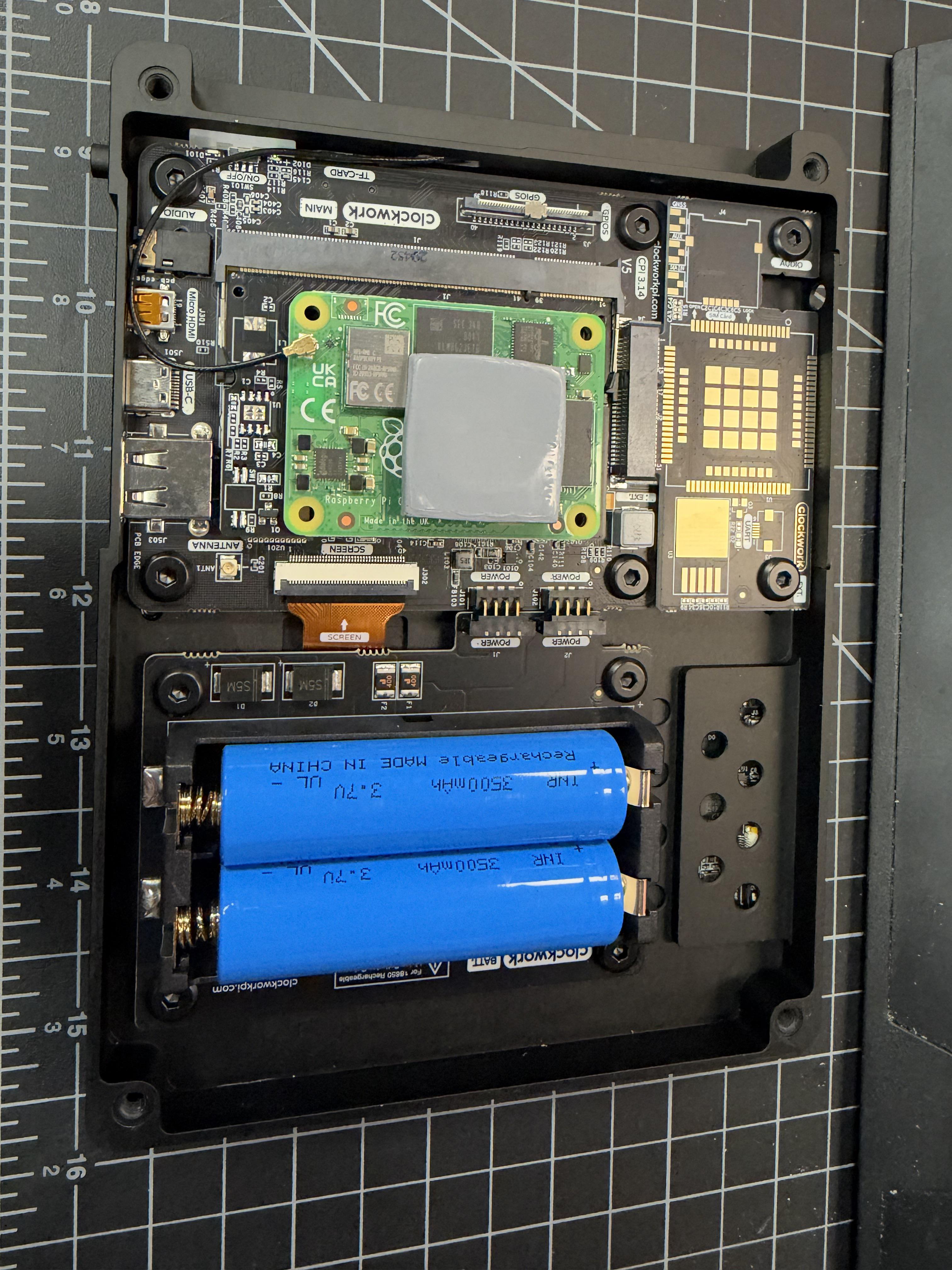
Hello. I just recently assembled this uconsole and need some help. I have a flashed SD and fresh, charged batteries. There is a tiny green light near the power button and that is all the activity I can see. Can you tell from this photo if I have something hooked up incorrectly/


r/ClockworkPi • • 14d ago

FOR SALE [EU/Austria] uConsole + CM4 8GB + 128GB + Wi-Fi Antenna Mod – €329

6 Upvotes

Hi everyone! I’m selling my uConsole.
Specifications:

  • Raspberry Pi Compute Module 4 – 8GB RAM
  • Light external antenna modification installed
  • 2× genuine Samsung INR18650-35E (3500 mAh each)

The uConsole is a great little machine, but I’ve not found a daily usecase for it

Price: €329 + shipping

Located in Austria (EU). Shipping within the EU is possible. Local pickup is also welcome. Wildcard: I go to Serbia from time to time, so can handover it in RS or HU in person.

Payment and shipping details can be discussed via PM.

Feel free to ask questions. Pictures are be posted soon.

Cheers!


r/ClockworkPi • • 15d ago

uConsole Military top shroud for uConsole

Post image
61 Upvotes

Sorry for all the posts lately, I’m on vacation so I’ve had a lot of time to tinker with my uConsole!

I designed a camo top shroud for it, made to work with the AIO V2 expansion card.

  • No extra screws needed, it uses the original ones
  • Works in PLA and PETG, printed at 0.12 mm but fine up to 0.2 mm
  • Split across two plates so the buttons don’t waste filament
  • Two power buttons included: one that sticks out a bit (like in the photos) and one that sits flush, so the GPS antenna fits without moving it

More info here : https://makerworld.com/fr/models/3593231-military-top-shroud-for-uconsole


r/ClockworkPi • • 15d ago

uConsole ArchangeSDR: a lightweight RTL-SDR scanner that only stops when detecting activity (runs great on the uConsole)

Post image
39 Upvotes

I built a small scanner for my uConsole and it's open source: ArchangeSDR.

The idea: A classic scanner stops on anything above its squelch, carriers, data bursts, interference. ArchangeSDR checks the demodulated audio for speech (syllable rhythm, pauses, voice band, voice pitch), so the log only fills with people actually talking. No AI involved for that part, which keeps it light on the CM4.

What it does

  • Sweeps your ranges fast (0.1 s per 2 MHz hop) and only listens where a narrow signal shows up
  • Tries AM, FM and SSB, rejects carriers, data and tones
  • Records the whole conversation until 20 s of silence, with a short preview
  • Learns interference: a frequency that never speaks gets banned (and you can whitelist false positives)
  • Several dongles can share the sweep, handy if you have the AIO board's SDR and a USB stick
  • "Join" opens a frequency in GQRX, SDR++, rtl_fm or your own command
  • Optional transcription (whisper.cpp locally, or any OpenAI-compatible API) with search
  • Optional push notifications to your phone via ntfy
  • Default frequency ranges for 16 regions, EN/FR/DE/ES, dark and light themes

Why it fits the uConsole

  • One Python file, only distro packages (numpy, GTK 4, librtlsdr), nothing to compile, no pip
  • Works on Raspberry Pi OS / Debian, Arch and friends, ARM and x86
  • The window stays usable in a short tiled window (i3 / Hyprland)
  • Works with any RTL-SDR, including the Blog V4 (HF through its upconverter)
  • If you use uBonsole, it plugs into its menus and reuses its files

Repo: https://github.com/bt0r/ArchangeSDR

It's a 1.0, so I'd love feedback, especially from other uConsole owners: which dongle you use, how it behaves on your CM4, and frequencies/regions I got wrong.