r/CodingForBeginners • u/aajsbak19376373 • 2d ago
Cant see what im running (pycharm)
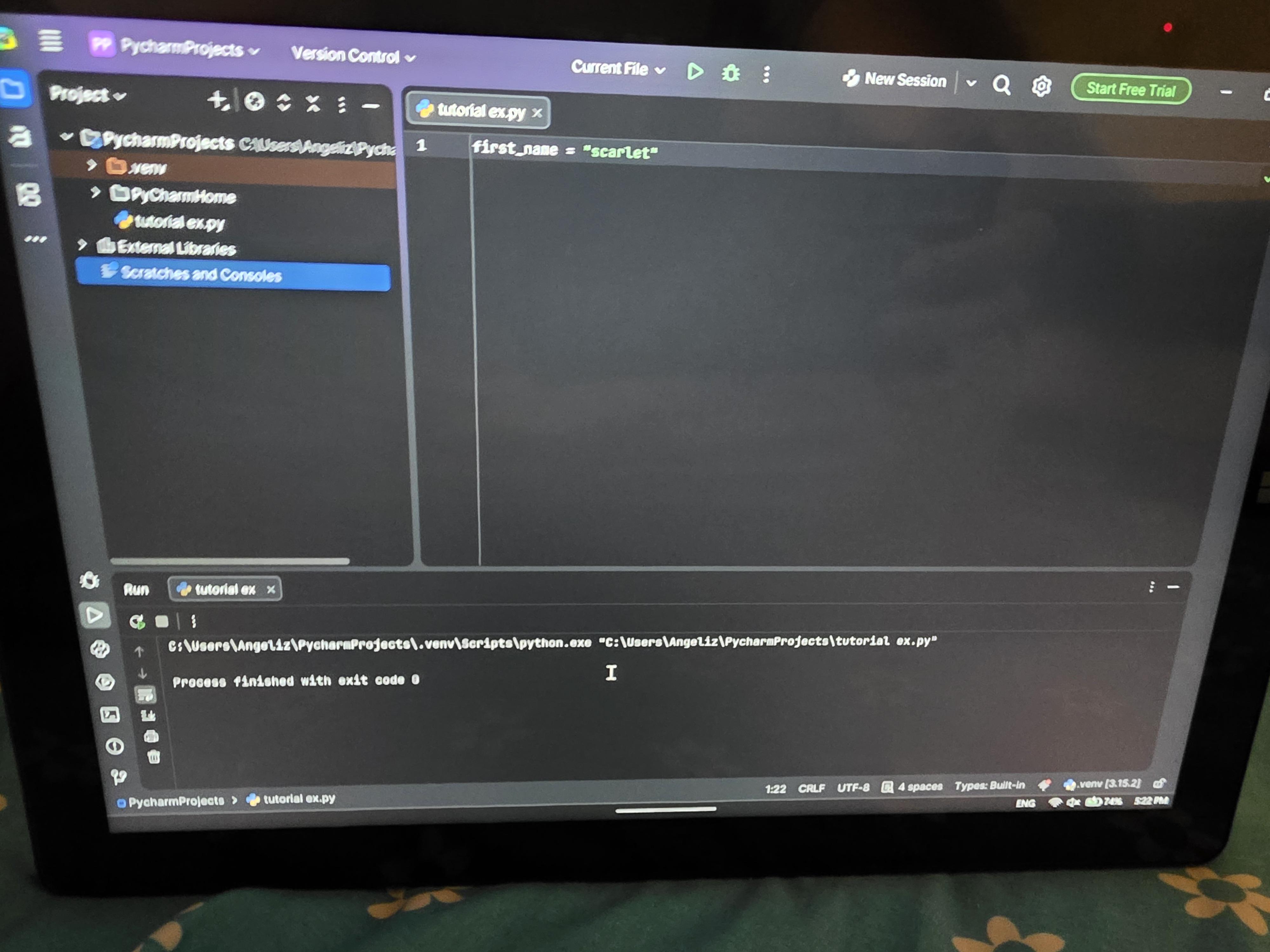
I have 0 knowledge on anythong coding related and im following a tutorial (https://youtu.be/ix9cRaBkVe0?si=flrH6JpjhOJuwbTO) on which im on minute 6:52 and i cant see what im running, the green result of what i write is not there. Whats there is just some default info????
0
Upvotes
4
u/ninhaomah 2d ago
And pls pls pls pls pls ... Learn to screenshot
4
u/nckrkllkc 2d ago
You won't see the output on the screen without typing `print(first_name)`.
3
u/littlehavenbigsign 2d ago
If you're actually at 6:52 I'd suggest looking at what the code actually says around there, or perhaps just rewatch from 6:35. Your code is not the same as the example.
Code isn't magic. It does what you tell it to do. Your code isn't the same as the example in the video, so it doesn't do the same thing as the video.
2
u/mattynmax 2d ago
Well yeah. Your code doesn’t print anything… I’m not sure what exactly you expect to be seeing…
2
u/ConditionOrdinary607 2d ago
You didn't complete the code. The first line he wanted you to type was a variable, with your name in it (which you did).
But you aren't telling Python what to do with that variable.
If you continue watching, he says to type in the following
print(first_name)
This tells Python "Take the first name variable and display it on the console".
There are other things you could do with variables which you'll learn later (I hope).
2
u/planet_eater211 2d ago
it's not showing anything because you just created a variable and didn't do anything with it , add this print(first_name)
1
u/Flame77ofc 2d ago
first install Python on the official website then open a terminal them execute
python file.pydon't forget to install libraties if it has withpip install <package(s)>1
u/OskarsSurstromming 2d ago
A program doesn't print every command you give to it, what your one line is doing is an assignment of a string to a variable. That means your variable is now usable is if it were the string, so if you know use the print() function with the variable as an argument print(variable), print will output the variable to the terminal window
1
u/xarop_pa_toss 2d ago
Alright so the program is running. If you had looked up, you'd have learned that Exit Code 0 means that the program ran and finished with no errors, which is good.
All your program does is create a variable and then does nothing with it and finishes right away. If you want to see that variable on your terminal for example, on line 2 you can write
print(first_name)
And then run the program again. You should now see scarlet on the output and then the exit code 0.
By 6:52 in the video, he is using exactly this so your code isn't like what he has in the video. You thought it was easier to come ask reddit than to just pay attention to the video?
1
u/buzzon 2d ago
It is missing a print. Without a print, this is invisible operation that happens in the computer's brain.
1
u/LohenFeuer 1d ago
Usually, I'm trying to be forgiving towards beginners but this really infuriates me. Like what do you even expect? You literally have the solution in the tutorial? If you're not able to see a difference between what you wrote and what's seen in the tutorial, maybe programming is not for you. Also we live in 2026, can we please learn to screenshot? Or at least take a good picture, this is not even in focus...
Honestly, at that point I can only guess that this is ragebait
1
u/SokoJok 1d ago
You only assigned a string to a variable. If you want it to show any thing, you have to print(frist_name) for example