r/Cplusplus • • 8d ago

News Day 2 of learning c++
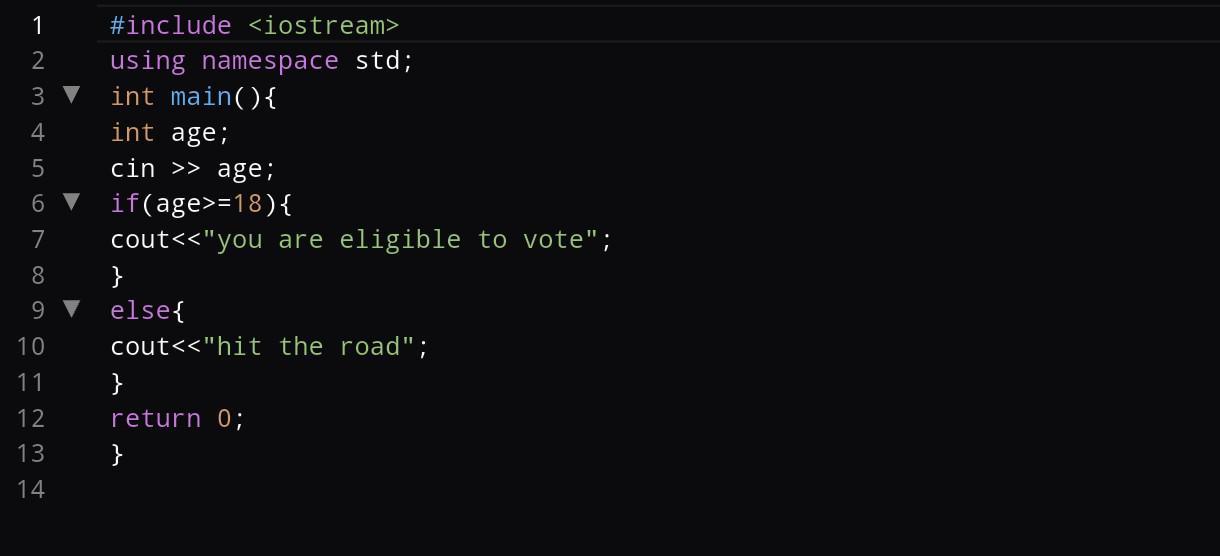
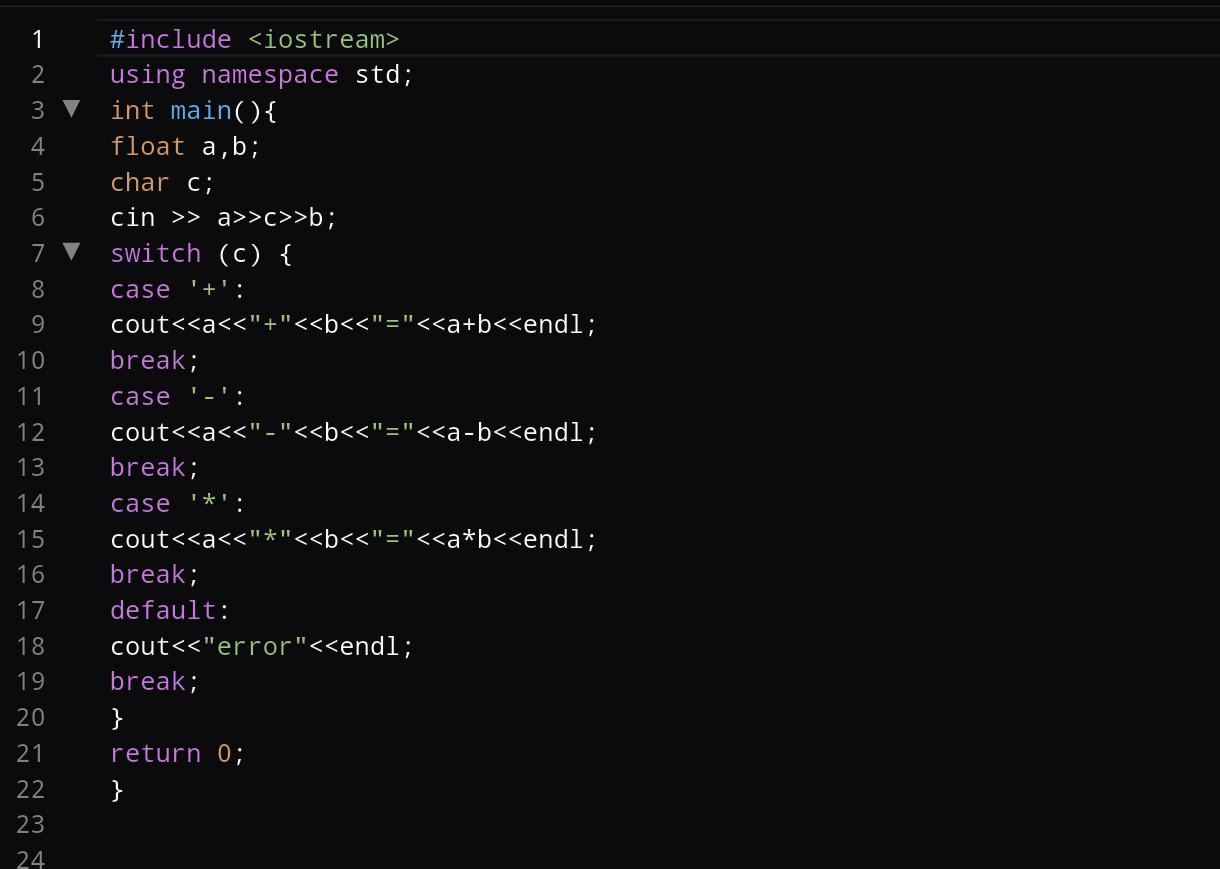
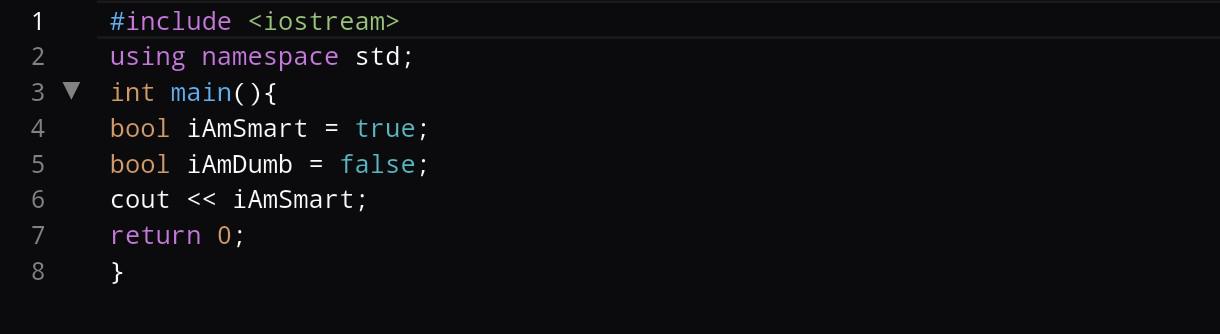
Day 2~ so far it's going good , made some basic progress, got to know about global/local variables,if/else statements;blocks, switch cases with the help of which I made myself my first basic calcultor , but the best one is probably the use of "cin" . Found out I can do much more with cin. Turns out floats are pretty useful too

94 Upvotes

37 comments sorted by

30

u/BlackMarketUpgrade 8d ago

If you plan to program in c++ for a while, it's better just to get used to typing those std:: prefixes explicitly. Drop the using namespace std; and put some indents in there and you will be looking pretty solid. keep it up!

2

u/Nesbyy 8d ago

Also prompt the user. I mean currently its for you but when someone else opens the console ask them a queation. How should the user know that they need to enter their age when they start the program?

5

u/AKA-HERO 8d ago

It's just for practice but i made one with question tag otherhand

1

u/AKA-HERO 8d ago

Thanks for the tip

2

u/Clean__Cucumber 8d ago

wait, why should one do that? i am not a CS major etc. but i had c++ in university and there we used the namespace std; so why should i stop using it?

5

u/mobile_site_refugee 8d ago

you will eventually work outside the std namespace, so it’s better to be explicit now to not cause issues down the line

-1

u/Cross_22 8d ago edited 7d ago

It's common for people to be explicit about all namespaces. Personally as a long-time C++ user I don't see the point. You obviously don't want to do "using namespace some_questionable_third_party_lib;" but std is now an intrinsic part of C++, no reason to have that extra std:: noise everywhere. It's basically cargo culting at this point.

1

u/jader242 6d ago

Came here to say this. Not sure why every cpp tutorial out there has people do this, imo it’s not good practice at all until you understand namespaces

12

u/rip_void_0 8d ago

is it must be there is a space like

int main(){

  int a =5;
}

why your code is like

int main(){

int a = 5

}

-6

u/AKA-HERO 8d ago

Well it compiles anyway

17

u/Psilocybe_Fanaticus 8d ago

Proper formatting allows others to read your code and it helps you spot errors faster

6

u/AKA-HERO 8d ago

So I am gonna have to work on that

3

u/vovcke 8d ago

It will compile like this too

int main() {int age;cin>>age;if(age>=18){cout<<"you are eligible to vote";}else{cout<<"hit the road";}return 0;}

but its an incoherent mess.

5

u/AKA-HERO 8d ago

The bool example output was 1

2

u/FounderOfYou 8d ago

where are you learning c++ from?

2

u/AKA-HERO 8d ago

My cousin is a software engineer , he teaches me

-11

u/Middlewarian 8d ago

I'm building a C++ code generator that helps build distributed systems. I'm willing to spend 16 hours/week for six months on a project if we use my software as part of the project. See my profile for more info.

1

u/kevkevverson 8d ago

Bro why do you keep posting this

-2

u/Middlewarian 8d ago

I post a small fraction comared to all the ads for FOSS stuff here.

2

u/Friendly-Pear8068 8d ago

what is "using namespace std;". Btw what if someone write letters like " i am twenty years old"

1

u/AKA-HERO 8d ago

Will let you know when I am experienced enough

-3

u/Friendly-Pear8068 8d ago

I dont know what is "using namespace std;" But i can answer other question.

First include " string" libary to your code. It in standart libary so you can call with "std::string age;"

btw if you dont know what std means, it means standart.

Then write std::getline( cin , age) ;" it s like cin but getline gets full line whatever you write in.

Then use "if" to see what type thing "age" have (like int or string ) i dont actualy know how you can see the type in "if" (because i'm begginer too) so research it i am sorry about that

If you interest, cin can get string but there is a problem. Try this code and you will se why we dont use cin.

#include <string>

std::string x;

cin >> x; (write "hello world " when program want)

std::cout << x;

2

u/siva_sokolica 8d ago

Happy learning!

If you are using C++23 or younger, I would recommend you use the print function!

It's similar to cout, except it will allow you to automatically "format" your string.

So, instead of having to write std::cout << "You are " << age << " years old."; you can simply say std::print("You are {} years old.", age);

Rewriting your program to be "idiomatic", ie. adhere to the best, standard C++ practices:

int main(int argc, char** argc) {
  int age;
  std::cin >> age;

  if (age >= 18) {
    std::print("You are eligible to vote!");
  } else {
    std::print("Get out of here!");
  }

  return 0;
}

2

u/AKA-HERO 8d ago

Thanks for the tip

1

u/WorstCaseBound 8d ago

Hey what font is that in ur editor?

-4

u/AKA-HERO 8d ago

Why do u even ask this ?

2

u/c_cpp_CSharp 7d ago

my suggestion ins to use indentation and white spaces anywhere you can to make it more readable .

#include <iostream>

using namespace std;

int main()
{
  int age;
  std::cin >> age;

  if (18 <= age) //swiched as yoda style , its good practice to put no car in the left side
  {
    cout<<("You are eligible to vote!")<<endl;
  } 
  else
  {
    cout<<("Get out of here!")<<endl;
  }

  return 0;
}

2

u/NaNpsycho 7d ago

This atrocious formatting has got to be intentional.

2

u/Tiaoshi 6d ago

My lord, indent your code lol

1

u/LGN-1983 8d ago

Please format your code properly

1

u/Xnomai 8d ago

Just write all in one line it will compile anyway AI still can read it.

1

u/RyuXnet_7364 8d ago

A couple of years ago at uni, I helped a classmate debugging a C code, no indentation whatsoever. Every line was nailed to the left side.

3

u/Xnomai 8d ago

I would say it's a sign for criminal tendencies.

3

u/RyuXnet_7364 8d ago

You guessed right because to help him I had indented a function for him with, we debugged it, then asked me to glue it back left, I tried to convince him but I saw it in his eyes.