r/Dell • • 3h ago

Discussion Dell latitude 755 tower

2 Upvotes

Delete if needed after 5 minutes and i got mild autism

So I got a dell latitude 755 tower and site is purged has a q6600 cpu and 5 gigs of ram and a 240 gig ssd and only 15 drivers and 2 OS systems no 7 or 8 and no parts list and I would post pictures but I ain’t good at censoring them


r/Dell • • 7h ago

Help Dell Inspiron 15 3520 Display coming apart

Thumbnail
gallery
4 Upvotes

My mom has a Dell Inspiron 15 3520 where the display appears to be coming apart. I just took a look at the service manual and it appears that the display is considered a single unit and it isn't obvious if this is repairable. I won't be able to get hands on this machine for a couple of weeks, but figured I'd start by asking this group if there was any way to fix this display or if I should be considering trying to source a replacement before my mom comes through for the holidays?

Thanks,
Craig


r/Dell • • 1h ago

Help Alienware R10 outdated bios attestation failure

1 Upvotes

Can someone email me or forward me the email from Dell with the updated bios. I have version 3.94.0.5. I need 3.92.2.5. irev bios 98.10.0 is the update that gives that version. I can't get dell to let me speak to tech support despite giving them all the information they ask for.


r/Dell • • 10h ago

Discussion I hate Dell

5 Upvotes

Had a Dell laptop today that kept crashing with a critical process died blue screen every time I tried to run a malware scan.

​At first I thought it was overheating because the heatsink was getting hot and the fan wasn't kicking on. Opened it up, saw the fan was fine, changed the thermal setting in BIOS to Cool, and ran the scan in Safe Mode. It finished with no issues.

​Pulled the crash dumps in WinDbg to see what was actually killing Windows in Normal Mode and it was Dell SupportAssist. Dell marks their own preinstalled bloatware as a critical Windows process, so when a scanner tries to close background apps to run a scan, Windows thinks a core system process died and blue screens the whole computer.

​Uninstalled SupportAssist and the rest of the Dell bloatware and the scan finished in Normal Mode without crashing once.


r/Dell • • 10h ago

Discussion There is some hope for intel thinkpad battery life afterall

Thumbnail gallery
4 Upvotes

r/Dell • • 7h ago

Discussion Rate my Dell optiplex 3070sff build 😌

Thumbnail gallery
2 Upvotes

The specs are :
I5-9400F
GTX 1650 overclocked to 2040 MHz and 4560 mhz
24 GB of rams (16 sodimm +8 dimm) sticks
storage : m.2 Nvme ssd 512 gb SATA ssd 120 gb HDD 512 Gb
Psu 200w
CPU Cooler jungle leopard KF-900 swapped fan with arctic p12 pro pst and some random 120 mm exhaust fan


r/Dell • • 5h ago

Help DDPM causing stuttering and lagging especially on AMD machines?

1 Upvotes

Hi guys, wondering if any of you have experienced stuttering and lagging with DDPM (Dell Device and Peripheral Manager)?

I have 2 types of machines (both AMD-based and non-Dell) that continually micro-stutter/lag when DDPM is installed. Both are on the latest version 2.3.0.17 of DDPM (but this issue has been happening for a while now, across software versions).

Interestingly enough, I don't notice that it happens on Intel-based machines. Also, when the Dell monitors are disconnected, the problem seems to become better (but not entirely resolved).

The minute DDPM is uninstalled (stopping the services doesn't work), the system goes back to normal - the cursor is smooth and the micro-lagging stops.

I wish I did not have to use DDPM, but I use many peripherals from Dell (given by my workplace) that require it to customize the settings. DDPM makes using the computer so incredibly annoying, especially when the mouse cursor skips across the screen instead of gliding normally.

Does anyone have the same issue, and how do we escalate this to Dell?

Thank you!

=====

The affected machines:

  • HP EliteBook 645 G11 (AMD 7535U, Win11 24H2 LTSC and Win11 26H2)
  • GMKtec K6 (AMD 7840HS, Win11 24H2 LTSC)

The seemingly unaffected machine:

  • HP Zbook 8 16 G1i (Intel 265H)

r/Dell • • 9h ago

TechDirect Support Issues

1 Upvotes

Did something internally change at Dell for processing tech support requests?

I've had self-dispatch rights for 3 yrs now assigned to my support profile, yet was never able to actually submit a self-dispatch ticket in the TechDirect portal. So instead I would open a tech support ticket, but either way, the support team there promptly opened the work orders and dispatched boxes to send laptops in to the repair center, almost always the same day I submitted the request. In other words, I've been sending off laptops for repair getting responses on the same or next business day like clockwork until about 2-3 weeks ago.

For the last couple of weeks, the few tickets I opened were routed to their basic (outsourced?) technical support team, took days to receive a response (if at all) and after multiple emails back and forth with their team before they finally, seemingly reluctantly, opened a dispatch and sent the return box. To add insult to injury the last box I got didn't have the return label in it, so I had to ask for a copy of the return label, and still haven't received it.

I'm also a Dell Premier customer, and just placed a few large orders to replace some aging laptops early next year.

Sum it up: I've been doing the same thing in their TechDirect portal for the last 3 years, always got quick service. Last few weeks they started pushing back and basically fighting me about their internal processes, what team the tickets get directed to, etc.

Frankly I don't care what team handles what - I'm expecting a repair box when we ask for one for broken laptops we already paid to have fixed with their full, extended support including accidental damage.

Anyone else experiencing the same? Any advice to break through the red tape? Any insights what's going on? (Sure, I can speculate, but would be nice to know some real facts.)


r/Dell • • 10h ago

Help DELL Precision 7670 Bios flash help

1 Upvotes

Hey there, im m30 and i got a few Dell Precision 7670s because my company is throwing them out, but i have 1 problem they are security locked in the bios and the company im working for wont give me the password, so i need some advice how to flash the bios otherwise and not turning it on


r/Dell • • 14h ago

R10-r13 pcie instabilities with a rtx 5070 card.

2 Upvotes

Will Dell Alienware ever fix their bios issues, I understand limiting over clocking on weak vrm set ups.. I’m not looking to over clock, rather simply down grade the pcie slot from its unstable 5.0 to a stable 4.0 or even 3.0 would work fine with me … I just need a toggle in the bios … I get they want to advertise 5.0 ready but if it can’t run 5.0 properly what’s the point … do they not want to admit another mistake like the 4400mhz ram ordeal ?

For sanity sake the card works fine in a old xps8910se from 20 million years ago…


r/Dell • • 11h ago

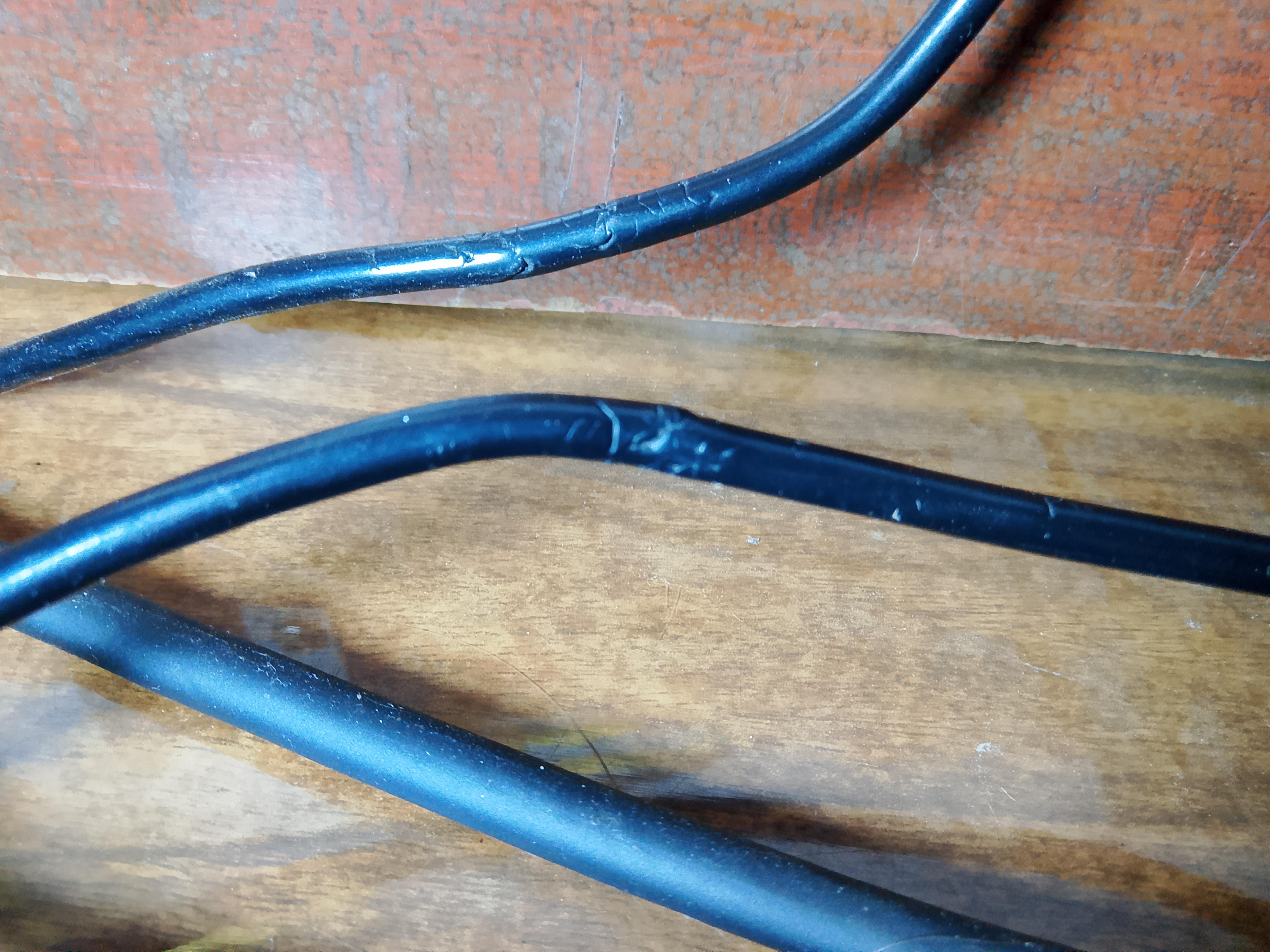
Discussion Did still safe to use my charger?

Post image
1 Upvotes

Hi everyone,I’m a Dell Precision 5520 user (its used 130 w ac), and I recently noticed this damage on my charger cable. Is it still safe to use if the laptop is working and charging normally? Since I don't have the option to replace it right now, how risky is it to keep using it? Would wrapping it in electrical tape help extend its lifespan? Also, where can I buy an original/high-quality replacement charger?Thanks in advance!


r/Dell • • 1d ago

Help My pc light is blinking 2 orange and 7 white, how do I fix it?(don't mind my feet)

Post image
21 Upvotes

How do I fix ts


r/Dell • • 16h ago

How to install SSD to Dell precision 7730

Thumbnail reddit.com
1 Upvotes

r/Dell • • 18h ago

Discussion Advice on a new Dell Laptop?

1 Upvotes

I've been using my Dell XPS 13 for almost a decade now. It's probably my favorite laptop I've ever owned. My last couple of laptops before that were Acer and Lenovo and I wasn't a big fan of either so when I wanted to get a new laptop I wanted to try Dell as I never had a Dell laptop before which was when I got my XPS. It's come up on that time again when I'm planning to get a new laptop again especially with Black Friday deals around the corner. I'd like to get another Dell laptop but I'm in the predicament of not knowing which one to get.

I loved my XPS but wanted to get something that could handle more labor intensive tasks. I plan to use it for Data Science work, rendering/animating in programs like Blender and hobby stuff in Godot. Because of that I was leaning towards a gaming laptop as they seem like they can handle such intensive tasks. I saw that Dell had Alienware laptops and I vaguely remembered hearing about them back in the day and was thinking about getting the Aurora 16 but from the reviews I read it's not that reliable of a laptop. As a result, I'm back to square one for what laptop to get as I didn't see many options for Alienware laptops after that. I also found that they offer workstation laptops which I thought would be helpful as well but haven't found anything that fits what I'm looking for there either. Realistically I know I could just aim to get another XPS but would like to upgrade a bit to something that can handle more than what my old XPS did. Any advice on what laptops I should be checking out would be greatly appreciated!


r/Dell • • 18h ago

Help broken monitor?

1 Upvotes

I have an old monitor from dell, the e1909wf, I came to it this morning and it wont turn on or show an image, it just sits there with the power button flashing blue.
the buttons aren’t responding so I can't even use the tests it mentions in the manual, so I think it might be dead but just checking if there's anything I've missed.


r/Dell • • 18h ago

Discussion Dell G16 7630 (LA-M536P) – Consumo de 536 mA al conectar 19.5 V, calentamiento de GPU y ausencia de encendido

1 Upvotes

Hola, colegas. Saludos desde Nicaragua.

Quisiera compartir un caso de diagnóstico con el que estoy bastante bloqueado y agradecería mucho la orientación de técnicos con experiencia en reparación de placas de laptops gamer.

Equipo: Dell G16 7630

Placa madre: LA-M536P

Síntomas iniciales:

El propietario comenta que, al presionar el botón de encendido, el LED permanece en ámbar fijo y, en algunas ocasiones, presenta un código de parpadeo de 3 veces naranja y 1 vez blanco.

Al recibir el equipo, comprobé que nunca había recibido mantenimiento interno, algo que también confirmó el propietario.

Procedimiento de diagnóstico realizado:

  1. Retiré la batería principal, ya que se encontraba desactivada y presentaba una tensión de 10.02 V.
  2. Desconecté los periféricos y conecté una fuente de laboratorio a 19.5 V, limitada a 1 A.
  3. Para mi sorpresa, sin presionar el botón de encendido, la placa comenzó a consumir aproximadamente 536 mA.
  4. Durante esta condición observé que la GPU se calentaba considerablemente.
  5. Realicé una inspección visual, pero no encontré componentes quemados ni daños evidentes.
  6. Desconecté la fuente y realicé mediciones de resistencia respecto a tierra. Inicialmente no encontré valores que me permitieran identificar claramente un cortocircuito.
  7. Decidí levantar un extremo de cuatro bobinas identificadas como R22, ubicadas cerca de la GPU.

Resultado obtenido:

Al retirar las cuatro bobinas y volver a conectar la fuente:

\- El consumo bajó de aproximadamente 536 mA a 91 mA.

\- La GPU dejó de calentarse.

\- La placa permanece sin responder al botón de encendido.

Realicé otra comprobación: al reconectar individualmente cualquiera de las cuatro bobinas, el consumo vuelve a subir aproximadamente a 500 mA.

También he obtenido una lectura de aproximadamente 0.8 Ω respecto a tierra en el lado de salida de las bobinas, aunque todavía estoy verificando la interpretación de esta medición.

Mis dudas principales:

  1. ¿Podría tratarse de un problema interno de la GPU o debería investigar primero el circuito VRM y sus componentes asociados?
  2. ¿Existe la posibilidad de que el PCH esté involucrado en este comportamiento?
  3. ¿Esas cuatro bobinas podrían corresponder a las fases de un mismo regulador multiphase?
  4. ¿Es normal encontrar 91 mA de consumo en esta placa al conectar únicamente la alimentación de 19.5 V, con batería y periféricos desconectados?
  5. ¿Qué procedimiento recomendarían para determinar si el consumo excesivo proviene de la GPU, del PCH o de alguna etapa de alimentación?

Mi intención inicial era aislar la alimentación de la GPU para comprobar si la laptop podía iniciar utilizando los gráficos integrados del procesador, pero hasta ahora no he conseguido que responda al botón de encendido.

Soy autodidacta y aficionado a la electrónica. Estoy tratando de aprender y realizar un diagnóstico correcto antes de sustituir componentes o intervenir de manera más invasiva.

Agradezco cualquier orientación, experiencia con esta placa o recomendación de mediciones que me permita continuar el diagnóstico.

¡Muchas gracias por su tiempo y por compartir sus conocimientos!

Saludos desde Nicaragua.


r/Dell • • 1d ago

Discussion Battery health

2 Upvotes

Hey everyone

So I’ve just put a brand new battery in my dell 5430 and I’d like some hints and tips on how to maintain it properly ? Things I should and shouldn’t do that will lessen the life of it etc.
Thanks
T


r/Dell • • 22h ago

Discussion 7410 Only Boots when Unplugged

1 Upvotes

I’m experiencing a strange issue where a 7410 I inherited from work only boots when the charger is disconnected. I haven’t used this system previously. When plugging the charger in, the light at the front lights up for 1 second then turns off and the caps button remains on, but the laptop does not boot when pressing the power button.

After disconnecting the battery, the laptop boots fine. I can then connect the charger, the system remains on and the battery also charges.

Could this be a motherboard issue? Or hopefully just a battery issue? There is no visible damage on the motherboard or battery.


r/Dell • • 1d ago

Help Dell Latitude 5510 keyboard failing, is the laptop toast, or is a replacement worth it?

3 Upvotes

The keyboard on my Dell Latitude 5510 has started acting up. Several keys are super inconsistent sometimes they work fine, and other times I have to press them repeatedly or really hard to get them to register.

Nothing has ever been spilled on it. It was a bit dusty, so I tried cleaning it and accidentally broke two keycaps in the process. I've already ordered a replacement keyboard, so I'm covered there, but I'm wondering if this is a sign of a bigger issue. I've heard people say that once a Dell keyboard starts dying, it’s basically time to replace the whole laptop. Is that actually true, or should swapping the keyboard fix it?


r/Dell • • 1d ago

Black screen of death Dell AW2725Q

1 Upvotes

Does anyone know where the service tag for the Dell AW2725Q is? I got the black screen of death defect and want to get a replacement and trying to start the rma process. I bought it on amazon and dont have the box anymore.


r/Dell • • 1d ago

Help Dell Latitude 5320 can't turn on.

1 Upvotes

I turned on the laptop normally nd it booted normally and afterwards I launched a game and my laptop black screened and the speaker repeats the last audio like static. Now i can't turn on the laptop not event the screen lights up.

The light code is 2 amber and 4 white. How do i go into fixing this or am I cooked.


r/Dell • • 1d ago

Review Thermal pads on Dell Inspirion 16 7620 2-in-1 i7-1260P NVIDIA GeForce MX550 in millimeters

Post image
7 Upvotes

If you have any corrections, comments, notes, or concerns, please write below. I will correct them.


r/Dell • • 1d ago

Help Poweredge R730XD CPU0704 Errors

1 Upvotes

I've been trying to track this down for months, no luck so far so I'm hoping someone can help.

At random times, the system will error out and go into a boot loop until I power cycle it (either from the button or the IDRAC cold boot option). It's usually a few days between indicents, but it can happen more than once a day.

The sequence is generally:
CPU0704 on CPU2
CPU0000
PWR2262

I have seen it on CPU1, but very rarely.

Then it tries to hard reboot and gets a series of CPU9000 errors along with a PWR2264.

After that, it loops:
CPU0000
SYS1003
RAC0703
SYS1003
Over and over until I power cycle it.

I've already tried swapping the CPUs (v3s instead of the original v4s), removing the secondary GPU that was in a CPU2-linked slot, moving one of the 2 NVMEs from CPU2 to CPU1, setting the CPU to Performance in the BIOS (listed as an old fix for PWR2262, but my thinking is that that's a side effect for the CPU0704 and not the cause), and rearranging the RAM. Nothing's worked, I've had it go up to 2 weeks without a crash, but it eventually does. I did have one unused NVME drive and one that was bad & undetected by the system - I removed both and also no change.

BIOS & firmware are all up to date, and I did try some older versions, as well as going through and installing every version with a microcode update in order.

I haven't completed a full Memtest86 on it yet just due to the time it takes, I've let it run for 6+ hours without it finding any errors.

There's no OS log, Unraid doesn't seem to have the IDRAC plugin and the system log just stops dead when the crash happens, no errors before that.

I did save a SupportAssist log, https://drive.proton.me/urls/J31D5RPF0R#GE6sjPmCO2Pz - but any ideas about where I should be looking next would be helpful.


r/Dell • • 1d ago

Other Why won't they just ship my laptop?

1 Upvotes

I ordered a laptop on 11/12, and it said the estimated delivery was 11/23. We'll, it hasn't shipped yet, so I imagine that estimate is going to be blown by and disregarded as "an estimate only." I understand what estimate means, but as far as I can tell there has just been no movement.

I sent a support email, amd was basically told "we're still producing the laptop." With the holiday, I'm sure its now going to take an extra week for shipping.