r/Drime • • 5h ago Heartwarming

Announcement Highlights: Whiteboards V2, Pages, & Drive Improvements | Week 4 November 2026

Post image
44 Upvotes

Hi everyone,

This week, we're introducing Whiteboards V2 rebuilt from the ground up and packed with hundreds of templates for you to choose from as well as major updates to Pages including synced blocks.

We've also made the web app experience faster and easier to use with improvements to folders, previews, search, and file management.

Here's everything that changed.

Web Application

Whiteboards

https://app.drime.cloud/whiteboards

  • Introduced a completely redesigned infinite whiteboard.
  • Added hundreds of templates to help you get started.
  • Added automatic upgrades for existing whiteboards when you open them.

Pages

https://app.drime.cloud/dpages

  • Introduced synced blocks which let you reuse the same content across multiple pages.
  • Added columns to arrange text, images, and other blocks side by side.
  • Added pages inside pages to turn any block into a separate page.
  • Added custom colors for text and database selection options.
  • Added multiple file uploads by dragging, pasting, or selecting several files at once.
  • Added the ability to insert videos from your Drive with our own video player.
  • Added editing for shared databases so users with permission can update them from shared links.
  • Added a database property to link pages directly.
  • Added drag and drop reordering for database select options.
  • Added colored task blocks and previews of Drive files.
  • Improved block editing with new options for arranging blocks, link cards, and image links.
  • Improved version history to include database content when restoring an earlier version.
  • Fixed YouTube videos not playing correctly when embedded.
  • Fixed password-protected pages not requesting their password.
  • Fixed custom page icons not displaying correctly in the sidebar.

Drive

  • Added first page thumbnails for Word, Excel, and PowerPoint files to help you recognize them faster.
  • Added colored tags with the option to filter files by color.
  • Added drag to select for quickly selecting multiple files.
  • Added advanced search filters such as type:pdf, owner:me, and is:starred.
  • Added a Recents page for files you recently opened, edited, or uploaded, organized by day.
  • Added show in folder when hovering through search results so you can jump to the file's location.
  • Added middle-click support to open folders and files in new tabs.
  • Added CSV and TSV spreadsheet file editing in Sheets with formulas, sorting, and filters.
  • Added sorting for photo albums by date or name.
  • Improved file previews with their own URLs and support for closing them via the browser's back button.
  • Improved loading speed for folders with thousands of files.
  • Improved image thumbnails so they load faster.
  • Improved the Shared by me section to show the shared folder instead of every file inside it.
  • Improved trash deletion by requiring you to press and hold the button to prevent accidental deletion.
  • Improved search speed on accounts with many files.
  • Fixed compatibility issues with Sony ARW RAW images including portrait orientation.

PDF Editor

  • Added smooth pinch-to-zoom with a trackpad.
  • Improved performance and rendering quality when opening large PDFs.
  • Improved flattening and text editing on rotated pages.

Activity Center

  • Added support for notifications in your selected language.
  • Improved Notifications with a redesign and renamed it Activity.
  • Improved Activity by grouping items by day with a cleaner layout and clearer actions.

UI & Experience

  • Improved animations, menus, dialogs, date pickers, and loading states for a smoother experience.

Android and iOS

Version 2.43.0

  • Introduced a customizable homepage with widgets for files, photos, music, backups, Pages, Sign, and more.
  • Added Quick Notes for creating notes and checklists from the homepage that sync with Pages.
  • Added widget resizing, reordering, and hiding with layouts that sync between devices.
  • Improved the iOS music player with larger album covers, better playback controls, podcast features, and a redesigned mini-player.
  • Improved interfaces across several tools such as Pages, Whiteboards, Sign, and Family.
  • Fixed iOS Live Photos support issues.
  • Fixed automatic photo backup reliability issues.
  • Fixed photo folder selection issues on Android.
  • Fixed how deleted photos are handled in albums and Memories.

Windows

Version 2.9.307

  • Introduced backup downloads with a dedicated downloads tab, progress tracking, and automatic resume.
  • Improved app startup and window opening speed.
  • Improved backup handling for developer folders and files such as .git and .env.
  • Improved backup scheduling with updated date and time controls.
  • Fixed several issues that caused sync to stop or get stuck on scanning.
  • Fixed excessive CPU usage caused by repeated folder scanning.
  • Fixed an issue where signing out of one computer also signed you out of your other devices.
  • Fixed missing Drime options in the Windows File Explorer context menu.
  • Fixed notification button and screenshot copying issues.

Rclone

  • Fixed slow and failed uploads by lifting the temporary request limits.

What's next

  • Drime Docs public release
  • macOS Finder integration improvements
  • More Drive and Pages improvements

Closing thoughts

It's been a busy week for us here at Drime. We rebuilt Whiteboards from the ground up, introduced major updates to Pages, and made Drive faster and easier to use, not to mention we dealt with service interruptions along the way, which caused further delays to both the security audit and the ToS changes as we worked to get things back to normal.

We want to reiterate that we know how important both the security audit and the ToS changes are. Both are still coming and remain a priority for us. We appreciate your patience and understanding.

Please note that the mobile update is still pending approval on both platforms, so do check back once in a while to see when the new update becomes available on your platform.

Black Friday is almost here and we have something planned for our subscription plans! Stay tuned.

See you in the next one!


r/Drime • • 6d ago

Announcement Changelog: Drime Family, Developer Platform, Encrypted Pages in Vault, Mobile & Desktop Improvements | October 2026

Post image
61 Upvotes

Hi everyone!

A little late this month, but here's our October changelog!

October was another busy month at Drime. We launched Drime Family, opened our Developer Platform, brought end-to-end encrypted Pages into Vault, and shipped tons of improvements across Drive, Mobile, Windows and macOS.

Here's a quick recap of the biggest changes.

Drime Family is here!

One of our most requested features finally launched!

  • Share your storage with family members while everyone keeps their own private account and files
  • Shared Family Room for photos, documents and folders
  • Individual storage limits
  • Child accounts and parental controls
  • Co-managers, trusted contacts and family ownership transfers
  • Family management directly from mobile

Developer Platform & OAuth 2.0

Developers can now build apps that connect securely to Drime!

  • OAuth 2.0 with PKCE
  • Developer Console and app management
  • Configurable permissions and dedicated app folders
  • Webhooks and integration analytics
  • Users can manage connected applications

Documentation: https://docs.drime.cloud

Vault & Pages

  • Drime Pages is now available inside Vault, with end-to-end encrypted content!
  • Improved encrypted video streaming, including large 4K videos
  • Faster search in large Vaults
  • Individual Vault unlock codes and biometric unlocking on mobile
  • Pages gained Mermaid diagrams, linked databases, row templates and more improvements

Drive & Sharing

  • New Large List view for folders containing thousands of files
  • More reliable large uploads and archive extraction
  • Upload Manager now stays available even after refreshing the page
  • File Requests can automatically create folders for each sender
  • Password-protected File Request uploads
  • Improved folder sharing and file management

Mobile

October brought another wave of Android and iOS improvements!

  • Photo Backup reliability improvements
  • Better Live Photos handling
  • Faster Gallery navigation and pinch-to-zoom layouts
  • Full folder sharing and a new Shared with me section
  • Improvements to Vault, Sign and Send & Track

Windows & macOS

Both desktop apps continued receiving frequent updates throughout October.

Windows:

  • New Rescue Folder to protect files not yet uploaded
  • Improved Folder Sync and Backup recovery
  • Safer file exclusions and mass-delete handling
  • Better sync reliability and network recovery

macOS:

  • Improved Vault mounting and large file transfers
  • Better recovery of stuck Finder items
  • Improved real-time sync reliability
  • Finder integration improvements and reduced unnecessary background activity

New Help Center

We also launched a completely new Help Center, with hundreds of guides and an AI assistant.

That's just a selection of what we shipped in October. There were also dozens of smaller fixes, performance improvements and reliability updates across the platform.

Thank you again to everyone reporting bugs, sharing feedback and helping us improve Drime!

Read the full October changelog here:

https://drime.cloud/blog-posts/behind-the-cloud-%E2%80%93-october-2026-update

See you in the next one!


r/Drime • • 1h ago

Drime tray icon Windows desktop

Thumbnail
gallery
0 Upvotes

[SOLVED] I noticed that the Drime tray icon isn't hardly visible, because it's a white icon on a light grey (almost white) background. Because of this I can't hardly see it. See attached image, so you can see how it looks now. I'm on Windows 11.

Why not make the Drime icon green (#56E16C), according to the Drime brand style? In Windows Explorer, Drime has this green icon. Hope you can make it the same color, so people notice it bettter. I attached an image of it as well. Thanks for taking this into consideration.


r/Drime • • 2h ago

Drime Photo Backup with Android App: How to redo sync from scratch?

1 Upvotes

Something went wrong with backup and want to redo sync from scratch. However, it seems impossible because Drime retains the hash of all files that had previously been synchronized, even after ALL the files and folders under Drime's "Camera upload" folder have been permanently deleted and cache for Drime's Android app has been cleared.

Also tried manually uploading the missing photos and videos from Drime's Android app by going to Gallery > Albums > Device, choosing the folders with the green cloud icon, and selecting the photos/videos for upload but all these end up in the root directory of the Workspace, unindexed.

Have searched the Help articles but can't locate any guidance on what to do.

Could u/Empty_Win_297 and the Drime team please shed some light on how best this can be resolved? TIA!


r/Drime • • 15h ago

Drime is taking up too much RAM when idle

7 Upvotes

My PC has been laggy over the last few days, and when I open Task Manager, I see that Drime is taking up more than 1GB of RAM in total.

Note that Drime is idle, and no syncs or backups are ongoing. I tried restarting my PC, but after some time, it goes back to this high RAM usage.

Considering RAM prices nowadays, I can't afford to buy another stick or upgrade my PC.

Is anyone else experiencing the same thing?


r/Drime • • 11h ago

I wish there was S3, FTPS/FTP

1 Upvotes

It’s really frustrating that the founders have outright rejected supporting these protocols without much consideration, especially when competitors like Filen and FileLu already offer them. FTPS is essential for practical use cases like saving CCTV footage (such as from Dahua cameras) directly to the cloud, while S3 compatibility has become the baseline standard for AI agents, automated backups, and general workflows. Relying on rclone serve ftp isn't a realistic alternative for everyone since it forces you to maintain a VPS or keep a local machine running 24/7. Rather than closing the door completely, I really hope the team will reconsider adding these down the line.


r/Drime • • 23h ago

My Vault Folder is forever stuck in Loading state

Thumbnail
gallery
5 Upvotes

I uploaded my photos to a folder in my Vault, but I can’t open the folder on either my MacBook or the web. The folder has more than 10k photos/videos and it's almost 90gb now. It just keeps loading. Could you help me troubleshoot this?

- I can open my vault on web, can see the folders but my photos folder is stuck on loading. And then it lands on blank page.
- I can't even see my vault folders on my Macbook anymore. It stuck on loading.


r/Drime • • 18h ago

Family room not intuitive.

0 Upvotes

Sorry, but I need to vent my frustration with family room. Somehow I was able to find it on android, add family member, create folder TEST, upload file in that folder and outside of the folder. Member says he can access only TEST folder and file in it, but not file outside of that file. Why are not ALL files in family room automatically accessible for family member? Other problem, windows browser, took me many clicks before I was able to locate family room. And now, for christ sake I have no idea, how to open TEST folder there. Clustered with quadrillion options, i just want to click on folder and see files in it.


r/Drime • • 1d ago

Invite email not received on custom domain

2 Upvotes

I’m trying to invite a member to the workspace, but they aren’t receiving the invitation email. Their email client is Microsoft, while invitations sent to Gmail accounts are received successfully.

There are no security restrictions in place, and the invitation domain is currently set to allow all domains.


r/Drime • • 1d ago

rClone Copy operation get stuck

Thumbnail
reddit.com
2 Upvotes

r/Drime • • 1d ago

Thumbnails not generating on mp4 uploads

2 Upvotes

Some videos show thumbnails but majority dont


r/Drime • • 1d ago

Preserving folder dates when uploading to Drime

9 Upvotes

Does anyone know of a way to preserve folder dates when uploading and storing folders in Drime?

I have a lot of folders I want to store on there which is currently easily viewed by date (going back years). However, uploading them onto Drime resets every modified folder date to the uploaded date/time.

File date gets preserved but not folder dates.

Have tried transferring with rcloneview from another cloud to Drime, uploaded in web, folder sync, uploaded with mac Drime app and even archiving and opening, but nothing working.

Drime support not answering after a month now (even sent a follow up).

Has anyone been able to get their folder modified dates preserved on upload?


r/Drime • • 2d ago

Windows desktop - Synchronization problems

5 Upvotes

Is anyone else having synchronization issues with the Windows application?

Since the latest version, it keeps freezing and crashing for me—on two different computers. In particular, it’s no longer possible to upload or sync the vault.

I’d welcome any advice or solutions! ;)


r/Drime • • 2d ago

Can the drime team please bring brew cask for macos drime?

6 Upvotes

Many well known macos apps have homebrew support and drime is missing this.

Edit0: u/Empty_Win_297 ? It takes less than 10 mins to create a cask and share it here. Then you can take your time to update it on the website


r/Drime • • 3d ago

Question on "Folder sync" behavior

9 Upvotes

What happens if I sync two machines on one Drime folder?
Example, I have a Mac and a PC.

  1. I make a folder on Drime "Documents sync".
  2. I Folder sync my Mac Documents folder to "Documents sync".
  3. I also sync my PC Documents folder "Documents sync".
  4. (Let's add an Android Documents folder here as well :')

//

  1. Will it merge similar subfolders?
  2. What about files of same name? Do I have option to choose "Overwrite older/newer file" "Rename with suffix '-0x' (where 'x' is a sequential number)"? (In this case, there's only 3 possible same filename collisions from PC-Mac-Android, so suffix -01 and -02)
  3. The files synced from PC won't be auto downloaded to Mac and Android's* Documents folder, yes (online-only) (*and vice-versa)?

Thank you!


r/Drime • • 3d ago

Trying to delete specific folders but after few seconds they come back...

8 Upvotes

I copied from my Synology several folders with pics but then I deleted some I finally didn't want to keep. No problem to delete the majority of them but I have 3 folders that I can't delete. They are not special or so, all the pics inside were deleted but the main folder stays. I tried on the Web or the app, same issue, after few seconds I delete them they just come back... weird.

Any idea why and how to fix it?. Thx for your help.


r/Drime • • 3d ago

Unable to sync gdrive files through rclone directly into a vault

3 Upvotes

I'm trying to export everything off of my google drive into a Drime Vault through Rclone. It seems that the only access is to the main Drime folder and not any vault. Is this correct?

Any recommendations here? I would rather skip downloading locally and then have to reupload...


r/Drime • • 3d ago

Drime is down again!

19 Upvotes

Yesterday Drime was down for over 6 hours, and now it’s down again.

What is happening to Drime?


r/Drime • • 4d ago

Announcement Update: Drime is back to normal

70 Upvotes

Hi everyone,

Drime is now back to normal following service disruptions that began this morning (CET).

An issue affecting 3 of our application servers disrupted Drime's web app and API, preventing many users from uploading, downloading, or accessing their files properly.

We identified the issue quickly, but due to its nature, restoring the affected services took longer than expected.

All services are now fully operational, and your files remained safe throughout the incident.

This isn't the level of reliability we expect from Drime, and we're sorry for the disruption.

Thanks for your patience and understanding!


r/Drime • • 4d ago

one directional sync in drime -how?

8 Upvotes

What I would like to do is to have my photos, other files upload onto Drime, so I can delete them from the HDD. I would also like to have easy access on Drime, so backup does not really work well here.

Is there an option within Drime for one directional sync? Can I use the drive Drime App creates on my computer to simply drop my files into the folder structure (/photos/2026/11 whatever), and then it would upload it and make it accessible online, while would remove it offline from my computer automatically? I am not very well versed with cloud storage, so not even sure how this drive works. Thank you


r/Drime • • 4d ago

Does drime scan your files?

18 Upvotes

I am hearing there's webdav support coming next year and webdav to vault is also not possible technically.

I am a researcher and having pirated research papers from sci-hub and ebooks from zlib is normal for any researcher and even for prestigious ones who are not tied to a university.

In zotero, the webdav sends it as a .zip file unencrypted. So can drime bots extract the zip and read my files and ban my account like how pcloud does for copyrighted material? Id be happy if webdav to the vault is possible somehow.

Additionally, I bought drime because it has rclone support but later to realise it is only for the standard drive and not the vault. Will it ever bring rclone to the vault?

Edit0: People who are downvoting, do you have a rationale behind downvoting? I am asking a legitimate question to a business which I paid for. Stop bootlicking corporate entities blindly.

Edit1: u/Empty_Win_297 ?


r/Drime • • 4d ago

Anyone else getting a 500 Server Error right now?

29 Upvotes

I'm currently getting hit with a 500 Server Error on Drime (started around 1:32 PM CST / 05:32 UTC today, Nov 21, and has been going on for over 10 minutes) and can't access my storage.

Just wanted to flag it here for the Drime team as well, I've also sent an email to support.


r/Drime • • 4d ago

Stacking? Upgrade Now v/s Add to my plan?

7 Upvotes

If I already have a Lifetime plan and paid on the "Upgrade now" link, how do I stack it?

Or did I make a mistake and should have done "Add X TB to my plan" instead?

Also, is sending an email is the only way to stack it? it doesn't auto apply?


r/Drime • • 5d ago

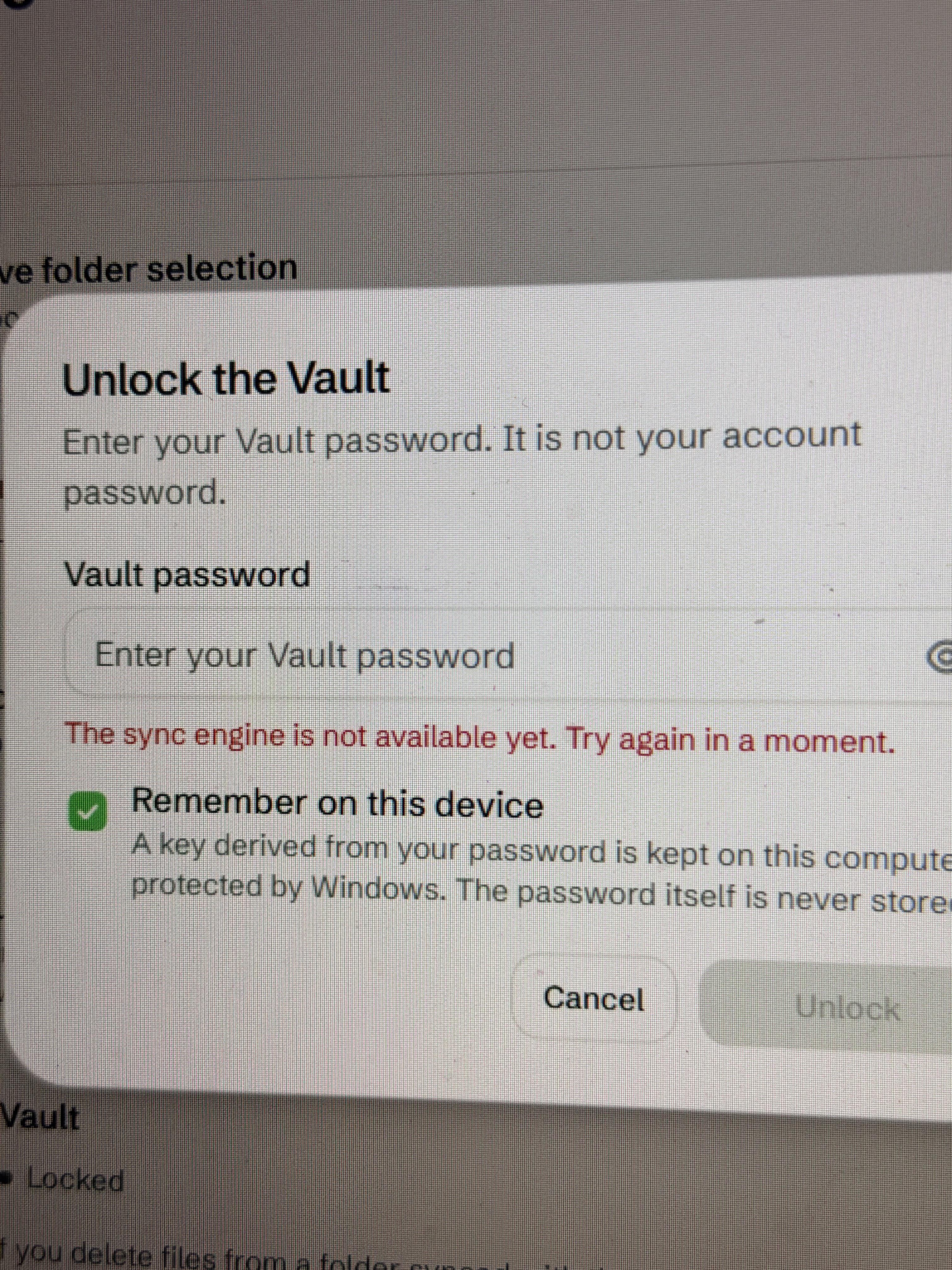
The sync engine is not available yet. Try again in a moment

Post image
4 Upvotes

After last update when I want to open vault I see this message:

The sync engine is not available yet. Try again in a moment


r/Drime • • 5d ago

PDF Edit - Can't Fully Flatten All Markups

3 Upvotes

PDF markups can't be fully flattened by Drime using the function under Export > Flatten even when the options for "Annotations" and "Form fields" are both toggled.

I tested this by first marking up multiple PDF files with a full PDF editor, then having these files flattened with Drime, and finally checking the flattened files with a full PDF editor to verify those original markups are still editable.

Text editing is also limited to unrotated PDF files. That means PDF files marked up after a rotation can't be edited by Drime.

These are not a deal-breaker for me but thought I'd highlight my observations for future enhancement.

Edit: Corrected typos.