r/EAApp • u/OkButterscotch8111 • 23h ago
DOES ANYONE PERHAPS HAVE AN UNUSED FIFA 18 EA APP ACCOUNT PLEASE REALLY NEED IT?
reddit.com
0
Upvotes
r/EAApp • u/d9wHatena • 28d ago
This is a troubleshooting guide of the EA App.
First thing first:
Q: I tried all, but still the EA App does not work! A: The current version of the EA App is broken. Give up, and wait for a week or two, maybe three.
Unfortunately this is the truth. Eventually a sane version will be released. Play other games and wait.
TOC:
Update often fails. This can be usually fixed. (EA should d**. Why do users have to do it manually?) There are several ways. Try the method #1 or #2 first.
StagedEADesktop\EADesktop and copy the content to EADesktop. But don't delete the original EADesktop. See below for the detail. Thanks to this post at r/linux_gaming.I explain the latter two here. The EA App is found in C:\Program Files\EA Desktop\EA Desktop. Call it <folder>. When the EA App can't update itself, the new version is extracted nearby <folder>, but the process stopped halfway.
Sometimes EADestager.exe is found at (parent of <folder>)\StagedEADesktop\Destager\EADestager.exe, and running it fixes. Sometimes it doesn't work.
Or you can repair by copying all files and directories in (parent of <folder>)\StagedEADesktop\EADesktop to <folder>. (Should check that both look almost the same.) When doing this, do not delete the entire original folder, since it contains necessary data. Just let the new files and folders replace the corresponding old ones. In particular you will lose your installed games, meaning you have to download them again, even if they do exist on your drive.
If you are on Linux (including SteamDeck) and don't know how to run exe files above, read this. Otherwise you can skip.
In Proton, each game has its own virtual Win drive, called "prefix". In order to run the EA App installer or EADestager.exe, you have to run them inside the game's prefix.
To do that...well, if you have the Lutris or Heroic launcher, you can use them to specfiy the prefix and the needed exe. (Probably this is the only way.) If you're playing a game on Steam as a "non-steam game" you can change the target exe.
The EA App can be run on its own, and it also runs in background when you're playing a game. Call the former as the foreground mode.
The foreground mode is necessary to download a game you have bought.
You can run games' exe files directly. Even in that case the EA App runs in background, handling the credential. Obviously directly launching a game is better. Games are installed under C:\Program Files\EA Games.
From my personal impression the app can sometimes work in background even if the foreground mode is broken.
r/EAApp • u/OkButterscotch8111 • 23h ago
r/EAApp • u/savageclownxxx • 1d ago
I have been trying to fix this issue for weeks. Did every possible solution posted online; hell, I even did everything said by AI bots, but to no avail. EA support is probably the worst support out there; they didn't provide a single proper solution. Does anyone know how to fix this issue?
my pc specs are 9070xt 7700x and 32gb ram
r/EAApp • u/Yagiz_285 • 2d ago
r/EAApp • u/DAneberkenezer • 3d ago
Guys I have a question. I bought DS2 off steam and its not in my EA account. Ususally it gets added to my EA app when i download and EA game and sign in butnot for DS2. I checked the key that came with steam and it wont activate in the EA app and EA support said the CD key wont activate for them either. So am i supposed to believe steam sold me a fucked CD key?
r/EAApp • u/Sh4dow425 • 3d ago
I have used it before as I play the sims from the launcher. It's been some time since I played it and when I tried to launch the game, it first asked me to re-login to the EA app and before I can even type my email it just closes itself. Same thing happens when I try to just launch the app directly. I can select to log in from google but it still just closes itself before I can finish that process. It stays open for about 4 seconds before it closes/crashes.
Somethings I have already tried:
Restarting my computer
Uninstalling and reinstalling application
Selecting "App Recovery" from programs file location
Stopping all EA background programs in task manager
Selecting run as administrator
Nothing seems to be working and I can't login to play my game. I am on windows 11
r/EAApp • u/Specialist-Art2649 • 3d ago
r/EAApp • u/Wolf_Elegant • 3d ago

I'm trying to download a game and I have plenty of space in the drive but it won't download. Any guesses?
r/EAApp • u/Specific-Ad8334 • 4d ago
r/EAApp • u/skelzi4ek • 5d ago
r/EAApp • u/Dear-Juggernaut2125 • 6d ago
Hi everyone, I'm really hoping someone can help me out. 😔
I recently bought A Way Out on Steam so I could play it with my friends, and I was so excited to start. But when I launched it, the game asked me to sign in with an EA account. I'd never had one, so I made a new one just to play.
When I tried to link it to my Steam account, it said my Steam account is already linked to an EA account. I'm so confused, because I've never had an EA account before, and I've never shared my Steam login with anyone.
I'm not very sure how all this works, and I don't know how to contact Steam or EA support. I'm honestly worried that I won't be able to play with my friends.
If anyone has run into this before, could you please tell me:
Any guidance would mean a lot to me. Thank you so much for taking the time to read this. 🙏
r/EAApp • u/BoringBuilder9087 • 6d ago

Hey guys, I need some help.
A while ago I think (I'm not too sure because I don't play a lot of online EA games) i tried to play skate through steam and was informed that my account was banned, I didn't pay much attention because I honestly couldn't be bothered or I had thought it was a bug, but now I am trying to play battlefront 2 a game which I was able to play sometime last year when the hype was ramping up again and I am still banned, I've logged into my EA account through the website and looked at my account penalties and found out I received a ban in apex legends (A game which I don't play) and an account ban for "account takeover"
so someone has hacked my account and I have no way to get into it other than my account being linked to steam which i also cant unlink due to account management being restricted and I also can't switch back to my own email.
I tried to create an appeal on my account through the website and every time it just says my ticket wasn't created I really need help because all my garden warfare 2 progress is on that account lol
r/EAApp • u/Yagiz_285 • 7d ago
r/EAApp • u/Ok_Somewhere1801 • 7d ago
r/EAApp • u/PaddockVibes • 8d ago
So this issue only and only happens when I play F125 and with no other EA game. It works for an hour or so properly and then randomly poof, game stops, event viewer shows the error above on event ID 7034.
No issues before or after, no issues with any other games, temps are okay, memory is fine, all is okay otherwisw
I have tired everything:
Reinstalling Game
Reinstalling Steam
Repair/Reinstall AntiCheat
Stopping overlays
Stopping game bar/Steam overlays
Checked my Ram with OCCT (No issues)
Verified Steam game identity
Ran as administrator
Cleared Shader Cache
I genuinely don't know what to do anymore, it just stops in the middle and it ruins the experience. Can someone please help - I have RTX 4060. This error wasn't forever, it only started a few months ago, some people said it might be windows update related, but no way to rollback
r/EAApp • u/Euphoric_Bottle_9327 • 9d ago
Hello everyone. Recently, EA added an update that prevents me from making purchases. I live in Kazakhstan, and to make purchases in EA Play, I need to use a VPN. I play Apex and FIFA 27. In Apex, I can buy coins through their online store, but in FIFA, I can only do it through the EA launcher
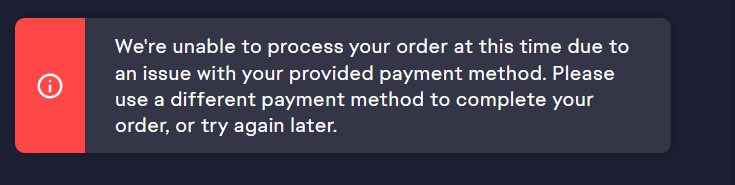
I’m speechless when it comes to how EA operates. Three days ago, I was banned, and support claimed I was exploiting vulnerabilities—which simply isn’t true. I’ve reached out to them, but they’ve been silent for three days now. Meanwhile, the game is full of cheaters, yet they do nothing about that—instead, they ban legitimate players. Thanks, EA.
r/EAApp • u/Big_Goldberg • 11d ago
Hello everyone,
I'm having a persistent problem launching Battlefield 3 purchased on Steam.
The game used to work perfectly. I last played it approximately two months ago, when I successfully launched it and spent a few minutes configuring the graphics settings. EA still shows 6 minutes of playtime.
Now, when I try to launch the game, nothing happens.
WHAT HAPPENS:
IMPORTANT: The same problem occurs on two completely different computers, using the same Steam and EA accounts.
Other EA games purchased on Steam work correctly, including Dead Space 3 and Battlefield Hardline.
TROUBLESHOOTING ALREADY PERFORMED:
LOG FINDINGS:
The EA App log reports:
Game launch error: [9] (LaunchFailed)
The Steam launcher log contains:
Link2EARequest
followed by:
LocalHost web launch opened
However, the launcher shuts down before game monitoring starts, and bf3.exe is never created.
My EA App version is 13.827.2.6342.
I have also found reports from other users experiencing very similar problems with the Steam version of Battlefield 3.
Thanks in advance.
r/EAApp • u/Intrepid_Owl6630 • 13d ago
my f1 25 keeps crashing and i have tried everything it was working a few months ago and after the most recent update it wont stop crashing
r/EAApp • u/spiderninja903 • 13d ago

not sure if this is an ea app problem but i have validated the game files but it wont let me launch


