Welcome to the /r/Filmmakers Official Filmmaking FAQ And Information Post!
Below I have collected answers and guidance for some of the sub's most common topics and questions. This is all content I have personally written either specifically for this post or in comments to other posters in the past. This is however not a me-show! If anybody thinks a section should be added, edited, or otherwise revised then message the moderators! Specifically, I could use help in writing a section for audio gear, as I am a camera/lighting nerd.
Topics Covered In This Post:
1. Should I Pursue Filmmaking / Should I Go To Film School?
2. What Camera Should I Buy?
3. What Lens Should I Buy?
4. How Do I Learn Lighting?
5. What Editing Program Should I Use?
1. Should I Pursue Filmmaking / Should I Go To Film School?
This is a very complex topic, so it will rely heavily on you as a person. Find below a guide to help you identify what you need to think about and consider when making this decision.
Do you want to do it?
Alright, real talk. If you want to make movies, you'll at least have a few ideas kicking around in your head. Successful creatives like writers and directors have an internal compunction to create something. They get ideas that stick in the head and compel them to translate them into the real world. Do you want to make films, or do you want to be seen as a filmmaker? Those are two extremely different things, and you need to be honest with yourself about which category you fall into. If you like the idea of being called a filmmaker, but you don't actually have any interest in making films, then now is the time to jump ship. I have many friends from film school who were just into it because they didn't want "real jobs", and they liked the idea of working on flashy movies. They made some cool projects, but they didn't have that internal drive to create. They saw filmmaking as a task, not an opportunity. None of them have achieved anything of note and most of them are out of the industry now with college debt but no relevant degree. If, when you walk onto a set you are overwhelmed with excitement and anxiety, then you'll be fine. If you walk onto a set and feel foreboding and anxiety, it's probably not right for you. Filmmaking should be fun. If it isn't, you'll never make it.
School
Are you planning on a film production program, or a film studies program? A studies program isn't meant to give you the tools or experience necessary to actually make films from a craft-standpoint. It is meant to give you the analytical and critical skills necessary to dissect films and understand what works and what doesn't. A would-be director or DP will benefit from a program that mixes these two, with an emphasis on production.
Does your prospective school have a film club? The school I went to had a filmmakers' club where we would all go out and make movies every semester. If your school has a similar club then I highly recommend jumping into it. I made 4 films for my classes, and shot 8 films. In the filmmaker club at my school I was able to shoot 20 films. It vastly increased my experience and I was able to get a lot of the growing pains of learning a craft out of the way while still in school.
How are your classes? Are they challenging and insightful? Are you memorizing dates, names, and ideas, or are you talking about philosophies, formative experiences, cultural influences, and milestone achievements? You're paying a huge sum of money, more than you'll make for a decade or so after graduation, so you better be getting something out of it.
Film school is always a risky prospect. You have three decisive advantages from attending school:
- Foundation of theory (why we do what we do, how the masters did it, and how to do it ourselves)
- Building your first network
- Making mistakes in a sandbox
Those three items are the only advantages of film school. It doesn't matter if you get to use fancy cameras in class or anything like that, because I guarantee you that for the price of your tuition you could've rented that gear and made your own stuff. The downsides, as you may have guessed, are:
- Cost
- Risk of no value
- Cost again
Seriously. Film school is insanely expensive, especially for an industry where you really don't make any exceptional money until you get established (and that can take a decade or more).
So there's a few things you need to sort out:
- How much debt will you incur if you pursue a film degree?
- How much value will you get from the degree? (any notable alumni? Do they succeed or fail?)
- Can you enhance your value with extracurricular activity?
Career Prospects
Don't worry about lacking experience or a degree. It is easy to break into the industry if you have two qualities:
- The ability to listen and learn quickly
- A great attitude
In LA we often bring unpaid interns onto set to get them experience and possibly hire them in the future. Those two categories are what they are judged on. If they have to be told twice how to do something, that's a bad sign. If they approach the work with disdain, that's also a bad sign. I can name a few people who walked in out of the blue, asked for a job, and became professional filmmakers within a year. One kid was 18 years old and had just driven to LA from his home to learn filmmaking because he couldn't afford college. Last I saw he has a successful YouTube channel with nature documentaries on it and knows his way around most camera and grip equipment. He succeeded because he smiled and joked with everyone he met, and because once you taught him something he was good to go. Those are the qualities that will take you far in life (and I'm not just talking about film).
So how do you break in?
Cold Calling
- Find the production listings for your area (not sure about NY but in LA we use the BTL Listings) and go down the line of upcoming productions and call/email every single one asking for an intern or PA position. Include some humor and friendly jokes to humanize yourself and you'll be good. I did this when I first moved to LA and ended up camera interning for an ASC DP on movie within a couple months. It works!
Rental House
- Working at a rental house gives you free access to gear and a revolving door of clients who work in the industry for you to meet.
Filmmaking Groups
- Find some filmmaking groups in your area and meet up with them. If you can't find groups, don't sweat it! You have more options.
Film Festivals
- Go to film festivals, meet filmmakers there, and befriend them. Show them that you're eager to learn how they do what they do, and you'd be happy to help them on set however you can. Eventually you'll form a fledgling network that you can work to expand using the other avenues above.
What you should do right now
Alright, enough talking! You need to decide now if you're still going to be a filmmaker or if you're going to instead major in something safer (like business). It's a tough decision, we get it, but you're an adult now and this is what that means. You're in command of your destiny, and you can't trust anyone but yourself to make that decision for you.
Once you decide, own it. If you choose film, then take everything I said above into consideration. There's one essential thing you need to do though: create. Go outside right fucking now and make a movie. Use your phone. That iphone or galaxy s7 or whatever has better video quality than the crap I used in film school. Don't sweat the gear or the mistakes. Don't compare yourself to others. Just make something, and watch it. See what you like and what you don't like, and adjust on your next project! Now is the time for you to do this, to learn what it feels like to make a movie.
2. What Camera Should I Buy?
The answer depends mostly on your budget and your intended use. You'll also want to become familiar with some basic camera terms because it will allow you to efficiently evaluate the merits of one option vs another. Find below a basic list of terms you should become familiar with when making your first (or second, or third!) camera purchase:
- Resolution - This is how many pixels your recorded image will have. If you're into filmmaking, you probably already know this. An HD camera will have a resolution of 1920x1080. A 4K camera will be either 4096x2160 or 3840x2160. The functional difference is that the former is a theatrical aspect ratio while the latter is a standard HDTV aspect ratio (1.89:1 vs 1.78:1 respectively).
- Framerates - The standard and popular framerate for filmmaking is called 24p, but most digital cameras will actually be shooting at 23.976 fps. The difference is negligible and should have no bearing on your purchasing choice. The technical reasons behind this are interesting but ultimately irrelevant. Something to look for is the camera's ability to shoot in high framerate, meaning anything above the 24p standard. This is useful because you can play back high framerate footage at 24p in your editor, and it will render the recorded motion in slow motion. This is obviously useful!
- Data Rate - This tells you how much data is being recorded on a per second basis. Generally speaking, the higher the data rate, the better your image quality. Make sure to pay attention to resolution as well! A 1080p camera with a 100 MB/s data rate is going to be recording higher quality imagery than a 4k camera at a 200 MB/s data rate because the 4k camera has 4x as many pixels to record but only double the data bandwidth with which to do it. Things like compression come into play here, but keep this in mind as a rule of thumb.
- Compression - Compression is important, because very few cameras will shoot without some form of compression. This is basically an algorithm that allows you to record high quality images without making large file sizes. This is intimately linked with your data rate. Popular cinema compressions for cameras include ProRes, REDCODE, XAVC, AVCHD. Compression schemes that you want to avoid include h.264, h.265, MPEG-4, and Generic 'MOV'. This is not an exhaustive list of compression types, but a decent starter guide.
- ISO - This is your camera sensor's sensitivity to light. The higher the ISO number, the more sensitive to light the camera will be. Higher ISOs tend to give noisier images though, so there is a tradeoff. All cameras will have something called a native iso. This is the ISO at which the camera is deemed to perform the best in terms of trading off noise vs sensitivity. A very common native ISO in the industry is 800. Sony cameras, including the A7S boast much higher ISO performance without significant noise increases, which can be useful if you're planning on running and gunning in the dark with no crew.
- Manual Shutter - Your shutter speed (or shutter angle, as it is called in the film industry) controls your motion blur by changing how long the sensor is exposed to light during a single frame of recording. Having manual control over this when shooting is important. The standard shutter speed when shooting 24p is 1/48 of a second (180° in shutter angle terms), so make sure your prospective camera can get here (1/50 is close enough).
- Lens Mount - Some starter cameras will have built in lenses, which is fine for learning! When you move up to higher quality cameras however, the standard will be interchangeable lens cameras. This means you'll need to decide on what lens mount you would like to use. The professional standard is called the PL Mount, but lenses and cameras that use this mount are very expensive. The most common and popular mount in the low level professional world is Canon's EF mount. Because of its design, EF mount lenses can easily be adapted to other common mounts like Sony's E-Mount or the MFT mounts found on many Panasonic cameras. EF is popular because Canon's lenses are generally preferred over Sony's, and so their mount has a higher utility.
- Color Subsampling - This is easier to understand if you think of it as 'Color Resolution'. Our eyes are more sensitive to luminance (bright vs dark) than to color, and so some cameras increase effective image quality by dedicating processing power and data rate bandwidth to the more important luminance values of individual pixels. This means that individual pixels often do not have their own color, but instead that groups of neighboring pixels will be given a single color value. The size of the groups and the pattern of their arrangement are referred to by 3 main color subsampling standards.
- 4:4:4 means that each pixel has its own color value. This is the highest quality.
- 4:2:2 means that color is set for horizontal pixels in pairs. The color of each two neighboring pixels is averaged and applied to both identically. This is the second best quality.
- 4:2:0 means that color is set for both horizontal and vertical pixel 4-packs. Each square of 4 pixels receives a single color assignment that is an averaging of their original signals. This is generally low quality. For more info on color subsampling, check out this wikipedia entry
- Bit-Depth - This refers to how many colors the camera is capable of recognizing. An 8-bit camera can have 16,777,216 distinct colors, while a 10-bit camera can have 1,073,741,824 distinct colors. Note that this is primarily only of use when doing color grading, as nearly all TVs and computer monitors from the past few decades are 8-bit displays that won't benefit from a 10-bit signal.
- Sensor Size - The three main sensor sizes you'll encounter (in ascending order) are Micro Four-Thirds (M43), APS-C, and Full Frame. A larger sensor will generally have better noise and sensitivity than a smaller sensor. It will also effect the field of view you get from a given lens. Larger sensors will have wider fields of view for the same focal length lenses. For example, a 50mm lens on a FF sensor will look roughly twice as wide-angle as a 50mm lens on a M43 sensor. To get the same field of view as a 50mm on FF, you'd need to use a 25mm lens on your M43 camera. Theatrical 35mm (the cinema standard, so to speak) has an equivalent sensor size to APS-C, which is larger than M43 and smaller than Full Frame.
So Now What Camera Should I Buy?
This list will be changing as new models emerge, but for now here is a short list of the cameras to look at when getting started:
- Panasonic G7 (~$600) - This is hands down the best starter camera for someone looking to move up from shooting on their phones or consumer camcorders.
- Panasonic GH4 (~$1,500) - An older and cheaper version of the GH5, this camera is still a popular choice.
- Panasonic GH5 (~$2,000) - This is perhaps the most popular prosumer DSLR filmmaking camera.
- Sony A7S (~$2,700) - This is a very popular camera for shooting in low light settings. It also boasts a Full-Frame sensor (compared to the GH5's M4/3 sensor), allowing you to get shallower depth of field compared to other cameras using the same field of view and aperture.
- Canon C100 mkII (~$3,500) - This is one of the cheapest true digital cinema cameras. It offers several benefits over the above DSLR cameras, such as professional level XLR audio inputs, internal ND filters, and a better picture profile system.
3. What Lens Should I Buy?
Much like with deciding on a camera, lens choice is all about your budget and your needs. Below are the relevant specs to use as points of comparison for lenses.
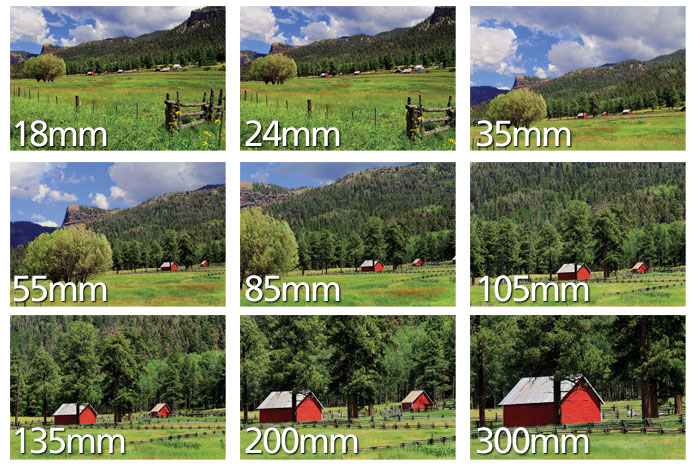
- Focal Length - This number indicates the field of view your lens will supply. A higher focal length results in a narrow (or more 'telescopic') field of view. Here is a great visual depiction of focal length vs field of view.
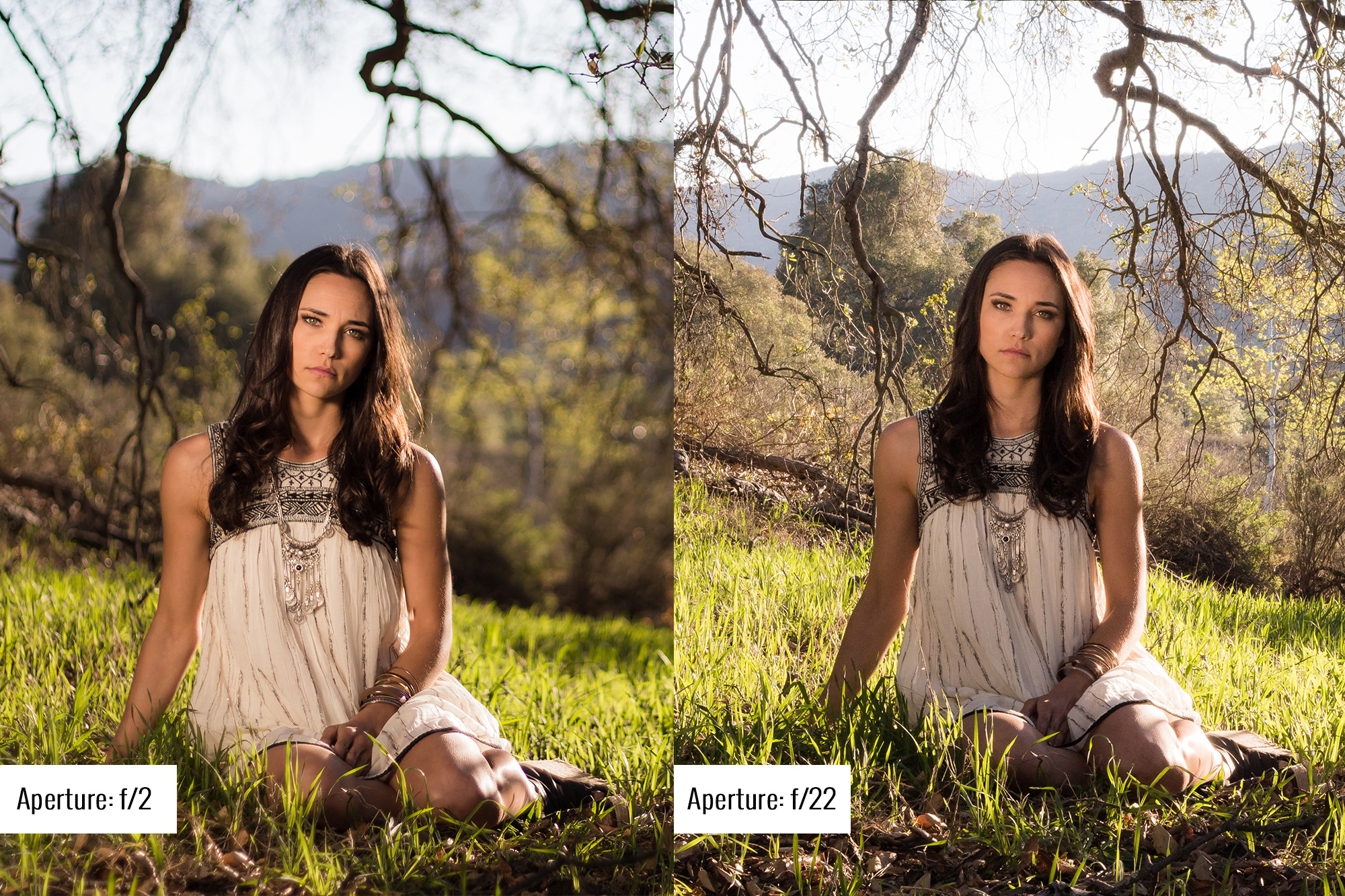
- Speed - A 'fast lens' is one with a very wide maximum aperture. This means the lens can let more light through it than a comparatively slower lens. We read the aperture setting via something called F-Stops. They are a standard scale that goes in alternating doublings of previous values. The scale is: 1.0, 1.4, 2.0, 2.8, 4.0, 5.6, 8.0, 11, 16, 22, 32, 45, 64. Each increase is a doubling of the incoming light. A lens whose aperture is a 1.4 will allow in twice as much light than it would have at 2.0. Cheaper lenses tend to only open up to a 4.0, or even a 5.6. More expensive lenses can open as far 1.3, giving you 16x as much light. Wider apertures also cause your depth of field to contract, resulting in the 'cinematic' shallow focus you're likely familiar with. Here is a great visual depiction of f-stop vs depth of field
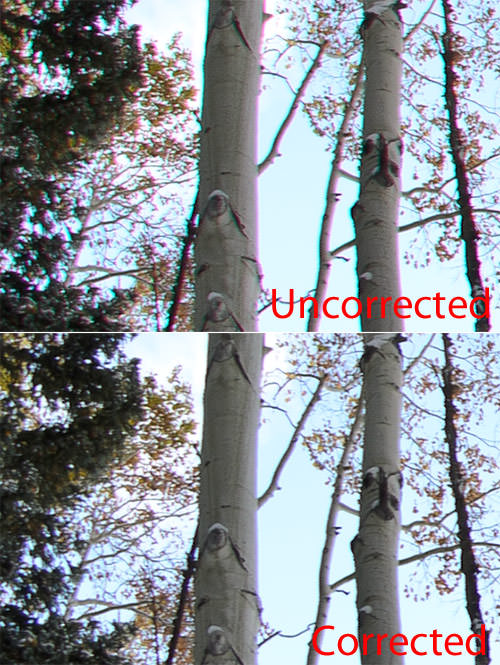
- Chromatic Aberration - Some lower quality glass will have this defect, in which imperfect lens elements cause a prism-style effect that separates colors on the edges of image details. Post software can sometimes help correct this, as in this example
- Sharpness - I'm sure you all know what sharpness is. Cheaper lenses will yield a softer in-focus image than more expensive lenses. However, some lenses are popularly considered to be 'over-sharp', such as the Zeiss CP2 series. The minutia of the sharpness debate is mostly irrelevant at starter levels though.
- Bokeh - This refers to the shape of an out of focus point of light as rendered by the lens. The bokeh of your image will always be in the shape of your aperture. For that reason, a perfectly round aperture will yield nice clean circle bokeh, while a rougher edged aperture will produce similarly rougher bokeh. Here's an example
- Lens Mount - Make sure the lens you're buying will either fit your camera's lens mount or allow for adapting to is using a popular adapter like the Metabones. The professional standard lens mount is the PL Mount, but lenses and cameras that use this mount are very expensive. The most common and popular mount in the low level professional world is Canon's EF mount. Because of its design, EF mount lenses can easily be adapter to other common mounts like Sony's E-Mount or the MFT mounts found on many Panasonic cameras. EF is popular because Canon's lenses are generally preferred over Sony's, and so their mount has a higher market share.
Zoom vs Prime
This is all about speed vs quality vs budget. A zoom lens is a lens whose *focal length can be changed by turning a ring on the lens barrel. A prime lens has a fixed focal length. Primes tend to be cheaper, faster, and sharper. However, buying a full set of primes can be more expensive than buying a zoom lens that would cover the same focal length range. Using primes on set in fast-paced environments can slow you down prohibitively. You'll often see news, documentary, and event cameras using zooms instead of primes. Some zoom lenses are as high-quality as prime lenses, and some people refer to them as 'variable prime' lenses. This is mostly a marketing tool and has no hard basis in science though. As you might expect, these high quality zooms tend to be very expensive.
So What Lenses Should I Look At?
Below are the most popular lenses for 'cinematic' filming at low budgets:
- Rokinon Cine 4 Lens Kit in EF Mount (~$1,700)
- Canon L Series 24-70mm Zoom in EF Mount (~1,700)
- Sigma Art 18-35mm Zoom in EF Mount (~$800)
- Sigma Art 50-100 Zoom in EF Mount (~$1,100)
Lenses below these average prices are mostly a crapshoot in terms of quality vs $, and you'll likely be best off using your camera's kit lens until you can afford to move up to one of the lenses or lens series listed above.
4. How Do I Learn Lighting?
Alright, so you're biting off a big chunk here if you've never done lighting before. But it is doable and (most importantly) fun!
First off, fuck three-point lighting. So many people misunderstand what that system is supposed to teach you, so let's just skip it entirely. Light has three properties. They are:
- Color: Color of the light. This is both color temperature (on the Orange - Blue scale) and what you'd probably think of as regular color (is it RED!? GREEN!? AQUA!?) etc. Color. You know what color is.
- Quantity: How bright the light is. You know, the quantity of photons smacking into your subject and, eventually, your retinas.
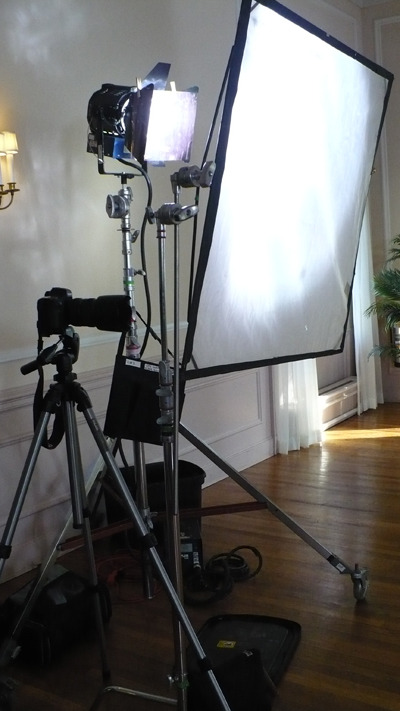
- Quality: This is the good shit. The quality of a light source can vary quite a bit. Basically, this is how hard or soft the light is. Alright, you've got a guy standing near a wall. You shine a light on him. What's on the wall? His shadow, that's what. You know what shadows look like. A hard light makes his shadow super distinct with 'hard' edges to it. A soft light makes his shadow less distinct, with a 'soft' edge. When the sun is out, you get hard light. Distinct shadows. When it's cloudy, you get soft light. No shadows at all! So what makes a light hard or soft? Easy! The size of the source, relative to the subject. Think of it this way. You're the subject! Now look at your light source. How much of your field of vision is taken up by the light source? Is it a pinpoint? Or more like a giant box? The smaller the size of the source, the harder the light will be. You can take a hard light (i.e. a light bulb) and make it softer by putting diffusion in front of it. Here is a picture of that happening. You can also bounce the light off of something big and bouncy, like a bounce board or a wall. That's what sconces do. I fucking love sconces.
Alright, so there are your three properties of light. Now, how do you light a thing? Easy! Put light where you want it, and take it away from where you don't want it! Shut up! I know you just said "I don't know where I want it", so I'm going to stop you right there. Yes you do. I know you do because you can look at a picture and know if the lighting is good or not. You can recognize good lighting. Everybody can. The difference between knowing good lighting and making good lighting is simply in the execution.
Do an experiment. Get a lightbulb. Tungsten if you're oldschool, LED if you're new school, or CFL if you like mercury gas. plug it into something portable and movable, and have a friend, girlfriend, boyfriend, neighbor, creepy-but-realistic doll, etc. sit down in a chair. Turn off all the lights in the room and move that bare bulb around your victim subject's head. Note how the light falling on them changes as the light bulb moves around them. This is lighting, done live! Get yourself some diffusion. Either buy some overpriced or make some of your own (wax paper, regular paper, translucent shower curtains, white undershirts, etc.). Try softening the light, and see how that affects the subject's head. If you practice around with this enough you'll get an idea for how light looks when it comes from various directions. Three point lighting (well, all lighting) works on this fundamental basis, but so many 'how to light' tutorials skip over it. Start at the bottom and work your way up!
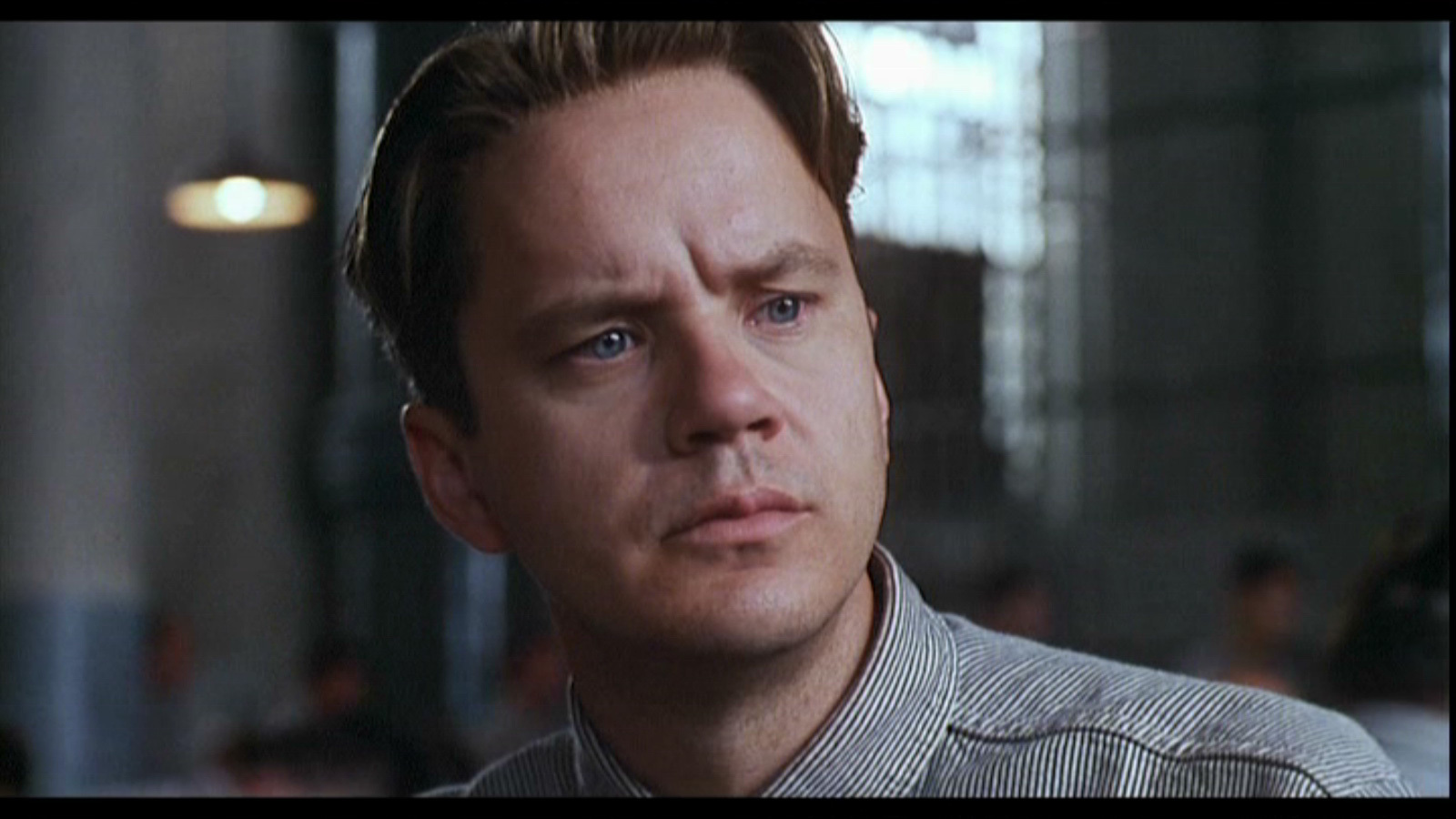
Ok, so cool. Now you know how light works, and sort of where to put it to make a person look a certain way. Now you can get creative by combining multiple lights. A very common look is to use soft light to primarily illuminate a person (the 'key) while using a harder (but sometimes still somewhat soft) light to do an edge or rim light. Here's a shot from a sweet movie that uses a soft key light, a good amount of ambient ('errywhere) light, and a hard backlight. Here they are lit ambiently, but still have an edge light coming from behind them and to the right. You can tell by the quality of the light that this edge was probably very soft. We can go on for hours, but if you just watch movies and look at shadows, bright spots, etc. you'll be able to pick out lighting locations and qualities fairly easily since you've been practicing with your light bulb!
How Do I Light A Greenscreen?
Honestly, your greenscreen will depend more on your technical abilities in After Effects (or whichever program) than it will on your lighting. I'm a DP and I'm admitting that. A good key-guy (Keyist? Keyer?) can pull something clean out of a mediocre-ly lit greenscreen (like the ones in your example) but a bad key-guy will still struggle with a perfectly lit one. I can't help you much here, as I am only a mediocre key-guy, but I can at least give you advice on how to light for it!
Here's what you're looking for when lighting a greenscreen:
- Two Separate Lighting Setups: You should have a lighting setup for the green screen and a lighting setup for your actor. Of course, this isn't always possible. But we like to aspire to big things! The reason this is helpful is that it makes it easier for you to adjust the greenscreen light without affecting the actor's lighting, and vice versa.
- Separate the subject from the greenscreen as much as possible! - Pretty much that. The closer your subject is to the screen, the harder it is to keep lights from interfering with things they're not meant for, and the greater the chance the actor has of getting his filthy shadow all over the screen. I normally try to keep my subjects at least 8' away from the screen at a minimum for anything wider than an MCU.
- Light the Green Screen EVENLY: The green on the screen needs to be as close to the same intensity in all parts as possible, or you just multiply your work in post. For every different shade of green on that screen you'll need make a separate key effect to make clean edges, and then you'll need to matte and combine them all together. Huge headache that can be a tad overwhelming if you're not used it. For this reason, Get your shit even! "But how do I do that?" you ask! Well, first off, I actually prefer to use hard light. You see, hard light has the nice innate property of being able to throw itself a long distance without losing all its intensity. The farther away the light source is from the subject, the less its intensity will change from inch to inch. That's called the inverse square law, and it is cool as fuck. If you change the distance between the light and the subject, the intensity of the light will shift as an inverse to the square of the distance. Science! So if you double the distance between the light and the subject, the intensity is quartered (1 over 2 squared. 1/4). So, naturally, the farther away you are the more distance is required to reduce the intensity further. If you have the space, use it to your advantage and back your lights up! Now back to reality. You probably don't have a lot of space. You're probably in a garage. OK, fuck it, emergency mode! Now we use soft lights. Soft lights change their intensity quite inconveniently if they're at an oblique angle to the screen, but they kick ass if you can get them to shine more or less perpendicular on the screen. The problem there of course is that they'd then be sitting where your actor probably is. Sooo we move them off to the side, maybe put one on the ceiling, one on the ground too, and try to smudge everything together on the screen. Experiment with this for a while and you'll get the hang of it in no-time!
- Have your background in mind BEFORE shooting: Even if your key is flawless, it will look like shit if the actor isn't lit in a convincing manner compared to the background. If, for example, this for some reason is your background, you'll know that your actor needs a hard backlight from above and to camera right since we see a light source there. Also, we can infer from the lighting on the barrels that his main source of illumination should be from above him and pointing down, slightly from the right. You can move the source around and accent it as needed to make the actor not-ugly, but your background has provided you with some significant constraints right off the bat. For that reason, pick your background before you shoot, if possible. If it is not possible to do so, well, good luck! Guess as best as you can and try to find a good background.
What Lights Should I Buy?
OK! So now you know sort of how to light a green screen and how to light a person. So now, what lights do you need? Well, really, you just need any lights. If you're on a budget, don't be afraid to get some work lights from home depot or picking up some off brand stuff on craigslist. By far the most important influence on the quality of your images will be where and how you use the lights rather than what types or brands of lights you are using. I cannot stress this enough. How you use it will blow what you use out of the water. Get as many different types of lights as you can for the money you have. That way you can do lots of sources, which can make for more intricate or nuanced lighting setups. I know you still want some hard recommendations, so I'll tell you this: Get china balls (china lanterns. Paper lanterns whatever the fuck we're supposed to call these now). They are wonderful soft lights, and if you need a hard light you can just take the lantern off and shine with the bare bulb! For bulbs, grab some 200W and 500W globes. You can check B&H, Barbizon, Amazon, and probably lots of other places for these. Make sure you grab some high quality socket-and-wire sets too. You can find them at the same places. For brighter lights, like I said home depot construction lights are nice. You can also by PAR lamps relatively cheap. Try grabbing a few Par Cans. They're super useful and stupidly cheap. Don't forget to budget for some light stands as well, and maybe C-clamps and the like for rigging to things. I don't know what on earth you're shooting so it is hard to give you a grip list, but I'm sure you can figure that kind of stuff out without too much of a hassle.
5. What Editing Program Should I Use?
Great question! There are several popular editing programs available for use.
Free Editing Programs
Your choices are essentially limited to Davinci Resolve (Non-Studio) and Hitfilm Express. My personal recommendation is Davinci Resolve. This is the industry standard color-grading software (and its editing features have been developed so well that its actually becoming the industry standard editing program as well), and you will have free access to many of its powerful tools. The Studio version costs a few hundred dollars and unlocks multiple features (like noise reduction) without forcing you to learn a new program.
Paid Editing Programs
- Avid Media Composer ($50/mo or $1,300 for life) - This is the high-level industry standard, but is not terribly popular unless you're working at a professional post-house for big budget movies.
- Adobe Premiere Pro ($20/mo) - This used to be the most popular industry standard editor for low to medium budget productions. It is still used quite often, so knowing Premiere is a handy skill to maintain.
- Davinci Resolve Studio ($300) - This is a solid editing program built into the long time industry-standard color grading suite. Since Resolve added editing, its feature set and reputation has been on the rise. It's eclipsing Premiere now and set to be the undisputed industry standard for video editing and color grading for all but the absolute highest level productions. This is the best overall choice if you're looking to find your first editing program.
- Final Cut Pro X ($300) - This is the old standard for low-high budget editing, replaced by Adobe Premiere and now again by Resolve. It is available on Mac platforms only, and is still a powerful editor.