r/FirefoxAddons • u/ethereal072 • 20h ago
ROSINT Extension - View contributions of profiles that hid their activity
addons.mozilla.orghttps://github.com/yoshik08/ROSINT-Extension (pls star lol)
built from forking this repo
r/FirefoxAddons • u/ethereal072 • 20h ago
https://github.com/yoshik08/ROSINT-Extension (pls star lol)
built from forking this repo
r/FirefoxAddons • u/Houssam_LR • 1d ago
Hi all, I'm the developer. Easy Screenshot and FireShot haven't been updated in years, so I built SnapFrame as a modern replacement.
What it does (free):
- Full page, visible area, or a selected region
- Crop and boxes, save PNG/JPG, copy to clipboard
- Shortcuts: Alt+Shift+S (full page), Alt+Shift+A (area)
There's an optional one-time Pro ($19, no subscription) for arrows, text, highlighter, blur and multi-page PDF. The free part stays free.
Screenshots never leave your computer. No account, no ads, no analytics.
https://addons.mozilla.org/firefox/addon/snapframe-screenshot/
It's brand new, so I'd really value bug reports and feature requests.
r/FirefoxAddons • u/LimberMay • 1d ago
You can try the interactive demo: https://relim.dev/resession
https://addons.mozilla.org/en-US/firefox/addon/resession-cookie-manager/
All features are free :)
r/FirefoxAddons • u/chiliraupe • 1d ago
YouTube puts the same recommendations back on the home feed and in the sidebar, even when I already scrolled past them and did not click. I did not want another tool that hides the whole homepage or depends on YouTube watch history.
This one dims a tile only after it was on screen for two seconds and then out of view for two seconds. Fast scrolling does not count. Videos I actually open stay clear. Dim strength is a slider from 0 to 100%.
Seen here means I scrolled past a tile, not that I watched the video. Those two things are not the same, and the extension is built around that difference.
It works on Home, Subscriptions, Search, the watch page sidebar, and Shorts. On a Shorts page the current Short is marked after two seconds on screen. That timer is separate from the feed rule.
Everything stays in the browser. No account, no tracking. Seen and watch intent entries expire after 65 days. Settings stay. It asks for storage, tabs, webNavigation, and access to youtube.com, so it can keep that history locally and apply the dim.
It is free and open source (MIT), and it is live for Chrome, Edge, and Firefox. I built it myself. Repo and store links are at the end. If a tile is dimmed too early or not at all, I want to hear that.

Repo: https://github.com/codingismynewgaming/youtube-attention-cleaner
Chrome: https://chromewebstore.google.com/detail/dim-+-filter-seen-youtube/idefplgokaljonmomjlnffdafbkeghdc
Firefox: https://addons.mozilla.org/firefox/addon/youtube-attention-cleaner/
r/FirefoxAddons • u/Brilliant_Love7754 • 1d ago
r/FirefoxAddons • u/Holmbone • 1d ago
I'm looking for an extension for downloading audiofiles embedded in a websites. I tried searching but could only find ones specifically for YouTube.
r/FirefoxAddons • u/oren-vidastra • 2d ago
I publish this free add-on. It lets you record voice notes and audio right from Firefox. Feedback welcome. https://addons.mozilla.org/en-US/firefox/addon/voice-notes-audio-recorder/
r/FirefoxAddons • u/benstone326 • 2d ago
r/FirefoxAddons • u/usamamuneer • 3d ago
r/FirefoxAddons • u/mekineer • 3d ago
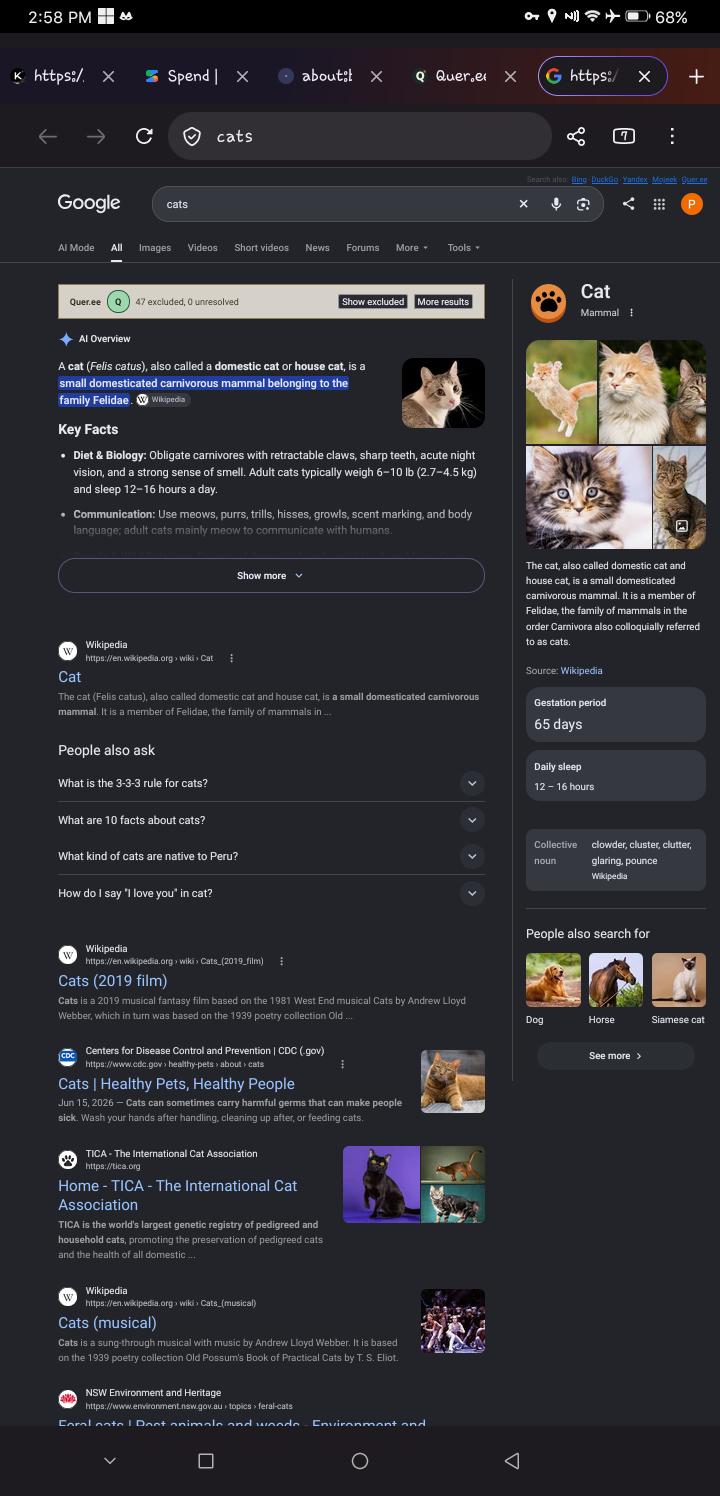
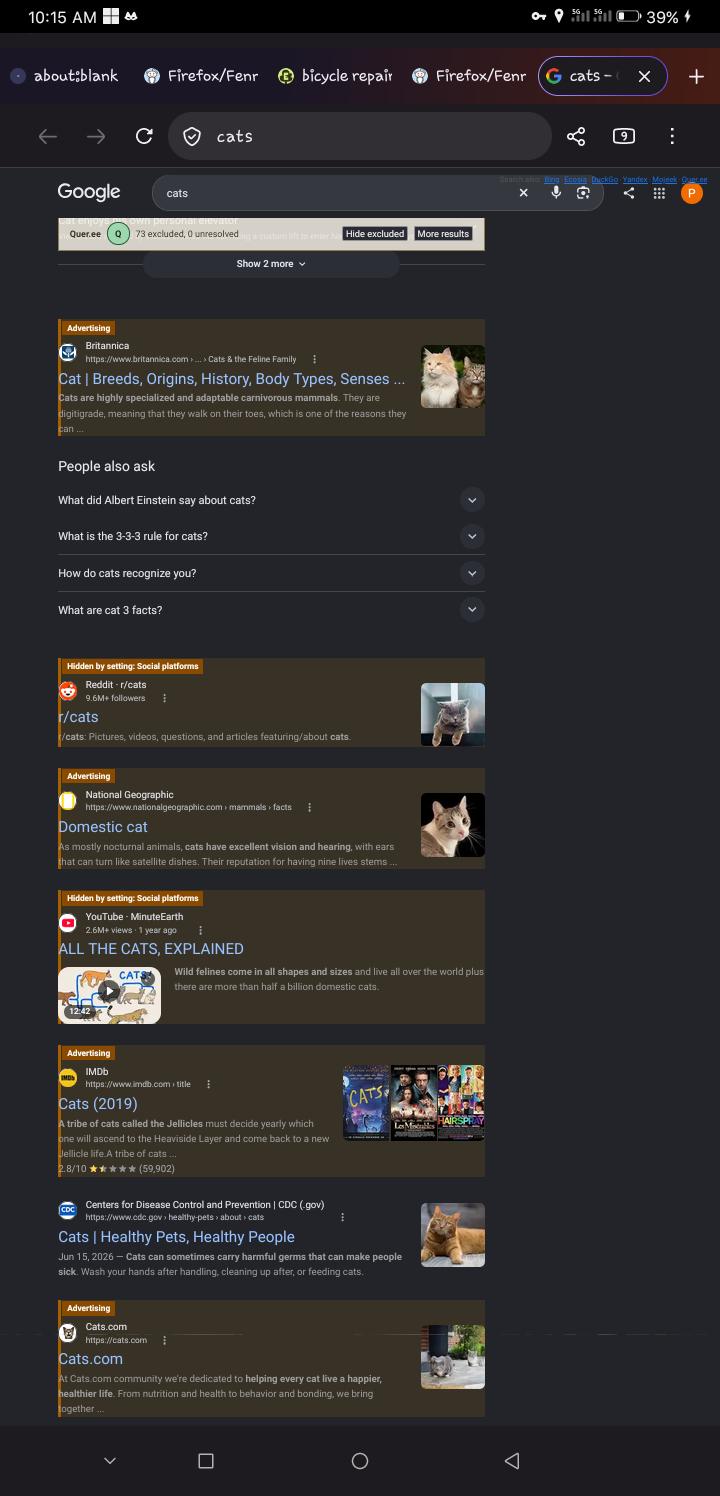
(uBO+Q / Quer.ee integration) is a modified/enhanced uBlock Origin that filters Google and Bing results by commercial nature (hiding corporate/advertising/shopping/tracking-heavy pages via categories and signals), keeps non-commercial ones (public-interest, government/education, professional, personal), and auto-paginates/loads more until enough remain.

Here I tap/click on "Show excluded":


r/FirefoxAddons • u/AppleSpecialist423 • 3d ago
Available on firefox also: https://addons.mozilla.org/en-US/firefox/addon/read-aloud-extension/
r/FirefoxAddons • u/Lazzarri57 • 3d ago
r/FirefoxAddons • u/Glittering_Annual128 • 3d ago
Hi i think this one is a better download side bare (instead of opening in a new window)
https://addons.mozilla.org/addon/better-downloads-sidebar/
Note : you should disable `ctrl + j` from shortcuts so you can use it with the extension (enter to `about:preferences` look for 'shortcuts' and go all the way down to `tools` and delete the value of the 'downloads' you can either left it empty or change it to something else) then `ctrl + j` will work on the extension.
r/FirefoxAddons • u/Key_Green6012 • 3d ago
I needed an add-ons its a simple website blocker with breathing timer, asks why you are here reason logs them and put a views statistic all in your pc. Not something new there are many I found others not to my liking. you can always disable extensions from settings easily if firefox would provide uses a extra steps to turn off some extensions which we could turn on would be nice.
Firefox review process was smooth took about 4/5 day.
Do give it a little try or any suggestions on what I should change. Thank you
r/FirefoxAddons • u/hand_g • 4d ago
Made a pretty big update.
Hand Design is a full visual redesign for Firefox, Floorp and other Firefox-based browsers. 24 themes, live Design Studio, custom PDF viewer, etc.
In 2.0 the biggest thing is Notes — basically a lightweight Obsidian inside the browser:
* folder tree
* live preview editor
* \[\[wiki links\]\]
* tags, graph view, daily notes, templates
* notes are just normal .md files
Also:
* you can now mix parts of different themes (window style from one, new tab from another)
* a lot more colors and shape options in Studio
* screen share picker looks more like Discord now
Works on Windows. Installer can set up Floorp if you don’t have it.
GitHub: github.com/WiWaSu/Hand-Design---browsers-redesign-
Latest release: github.com/WiWaSu/Hand-Design---browsers-redesign-/releases/tag/v2.0.0
Would appreciate feedback, especially on the notes part.
r/FirefoxAddons • u/Hatfield91 • 4d ago
This is TeachAtlas. Just hit record, click around a website like you normally would, and it makes a step-by-step guide with screenshots.
You can edit everything and export the finished guide.
It’s free to try, and I’d love to hear what y’all think of it.
Firefox Add-on link.
https://addons.mozilla.org/en-US/firefox/addon/teachatlas
TeachAtlas homepage link
https://chx91.github.io/teachatlas-legal/home.html
r/FirefoxAddons • u/Key_Green6012 • 4d ago
I needed an add-ons its a simple website blocker with breathing timer, asks why you are here reason, logs them and put a views statistic all in your pc. Not something new there are many I found others not to my liking.
Firefox review process was smooth took about 4/5 day.
Do give it a little try or any suggestions on what I should change. Thank you
r/FirefoxAddons • u/Fantastic_Course_867 • 4d ago
Ever have so many tabs open that finding the one you're looking for becomes a pain?
QuickTab lets you:
I originally built it as a small experiment, but I've started using it myself and realized how useful it can be.
I'd love to get some honest feedback from Firefox users who regularly work with lots of tabs!
https://addons.mozilla.org/en-US/firefox/addon/quicktab-tab-search/
r/FirefoxAddons • u/TuffyCoder • 4d ago
Made a tiny extension that auto‑removes unnecessary scripts and speeds up pages. It blocks trackers, fingerprinting and sketchy scripts, works on Firefox for Android, and it's open source.
Still experimenting, so any feedback, reviews, or suggestions are welcome if you try it.
Extension: https://addons.mozilla.org/firefox/addon/scriptguard/
Website:
r/FirefoxAddons • u/Deep-Independent3875 • 4d ago
Hi all!.. I made a search engine extension, with upto helium browser's around 10k+ search lists. Has features to share your configurations with others, favourites, configurable shorcuts etc.
Check it out at:BangSearch
Let me know any improvements you'd like and please tell me your experience on it. Thanks
r/FirefoxAddons • u/UncleSamms • 4d ago
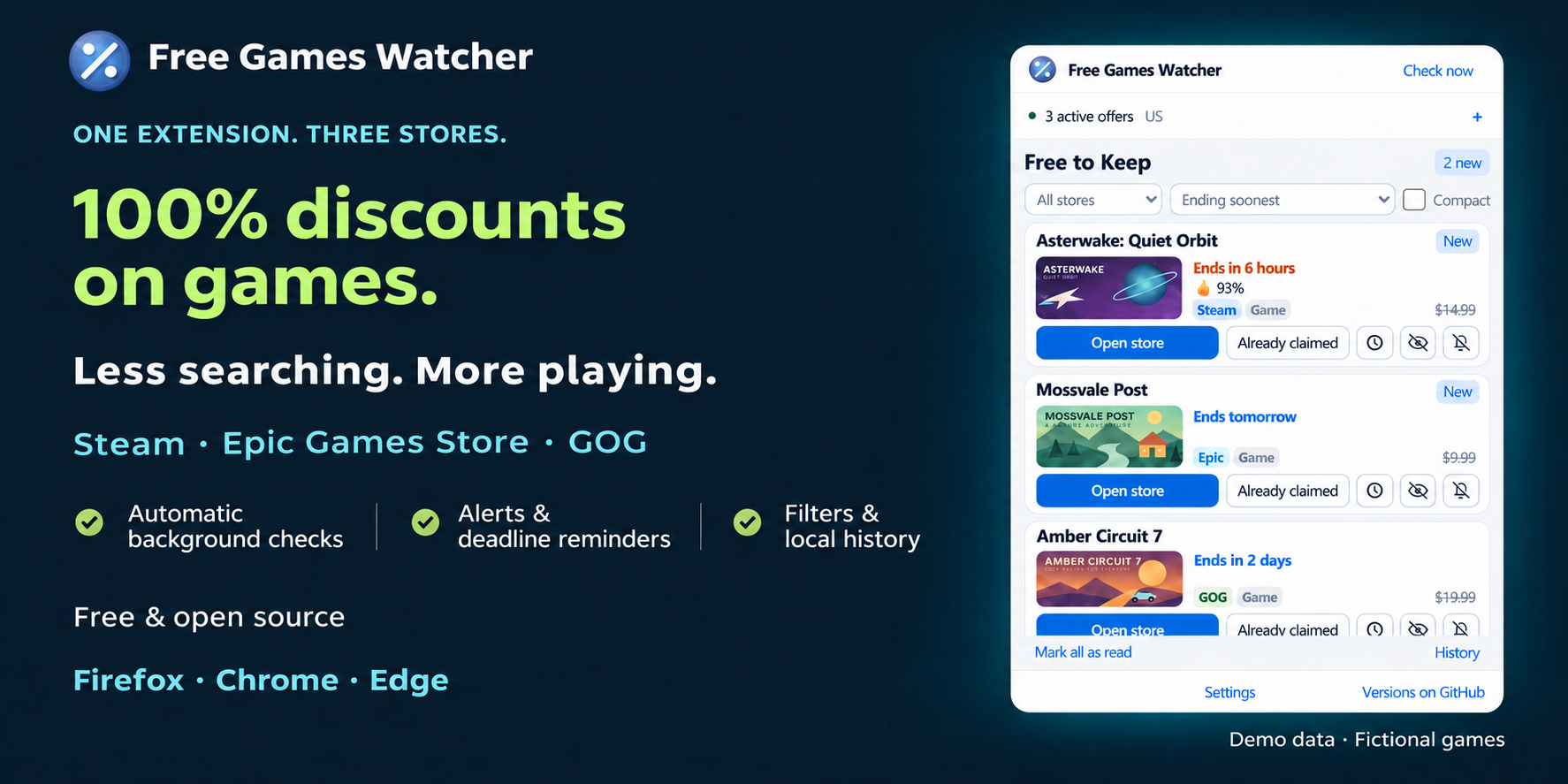
Like many people, I enjoy getting paid games for free. I wasn’t satisfied with the existing tools for tracking 100% discounts across game stores, so I built my own. Maybe others will find it useful too.
It’s called Free Games Watcher, and it tracks offers on Steam, Epic Games Store and GOG. It checks for offers in the background, notifies you about new 100% discounts and approaching deadlines, and lets you filter results and keep a local history.
It’s free and open source, with no ads, paywalls or built-in analytics.
No store login or account connection is required to find offers.
---
Find your next free game
Make the list yours
Choose a country, check interval and quiet hours. Filter by genre and platform, exclude unwanted content or titles, and sort the results. Steam offers also support rating and review-count filters.
Keep track of your finds
Mark a game as ‘Already claimed’, snooze it for 24 hours, hide the current offer or ignore the game. Search your local history and export settings and personal marks. Light and dark themes follow your system.
Privacy
Settings, history and personal marks stay in your browser. There is no developer-operated backend or built-in analytics. The extension does not read your game libraries or claim games automatically.
---
I’ve been working on it since spring, expanding it from a basic Steam-only prototype into a three-store extension. I used AI to write the code and have been testing, revising and fixing it myself throughout development.
So, if you're interested, you can check it out here:
I’d really appreciate your feedback on how the extension works for you and what you’d like to see improved.