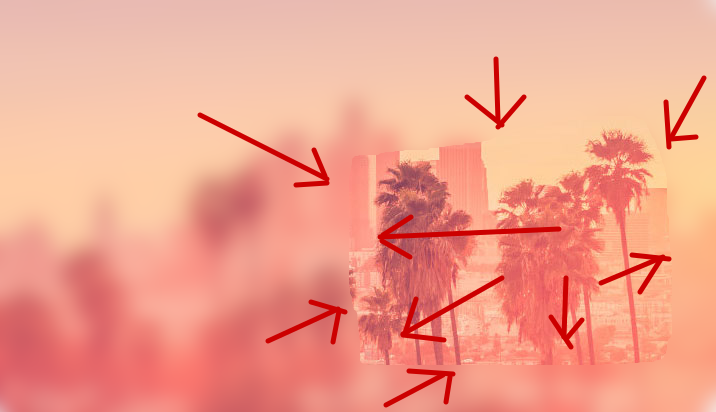
I need some assistance. Whenever I attempt to blur a section of an image in GIMP, the result shows large, unattractive blur lines. I’m new to using GIMP on desktop and am unsure how to resolve this issue. I've attached an image highlighting the blur lines as an example.
Could anyone guide me on how to fix this problem? Thank you in advance for your help!
For reference, I am using GIMP 2.10.30 on an x86_64 Intel NUC Mini PC with integrated graphics, and my operating system is Linux Mint 21.3 XFCE.
Hello I don't really get what your issue is. Is it that the limit between blurred/not blurred is too harsh ? Are you blurring one layer and having another on top with no blur ?
What I mean is that whenever I apply a Gaussian blur or any other type of blur to a section of an image, the blurred edges appear in a very unappealing way. I'm not an expert in GIMP, nor do I use it often, so it's a bit difficult for me to describe, but I’ve explained it as best as I can. I'm not a photo editor either; I only use GIMP casually for cropping images or increasing their size, nothing else.
1
u/CelebsinLeotardMOD Nov 29 '24
Hello, everyone.
I need some assistance. Whenever I attempt to blur a section of an image in GIMP, the result shows large, unattractive blur lines. I’m new to using GIMP on desktop and am unsure how to resolve this issue. I've attached an image highlighting the blur lines as an example.
Could anyone guide me on how to fix this problem? Thank you in advance for your help!
For reference, I am using GIMP 2.10.30 on an x86_64 Intel NUC Mini PC with integrated graphics, and my operating system is Linux Mint 21.3 XFCE.
Looking forward to your suggestions!
1
u/thomasoldier Nov 30 '24
Hello I don't really get what your issue is. Is it that the limit between blurred/not blurred is too harsh ? Are you blurring one layer and having another on top with no blur ?