r/GoogleAppsScript • • Jul 26 '25

Question Delete old gmail threads within a label (exclude Sent and Starred)

Could someone help me fix the code?

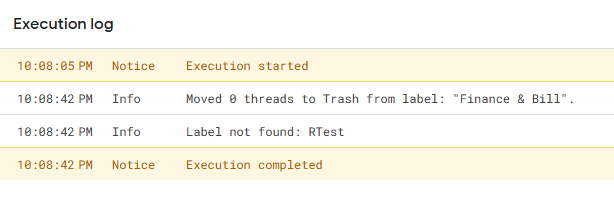
I have quite some threads (oldest is 12/11/2023, not in Sent folder, not starred) meeting the deletion requirement, but the code does not delete any of those old threads.

What is wrong with the code?

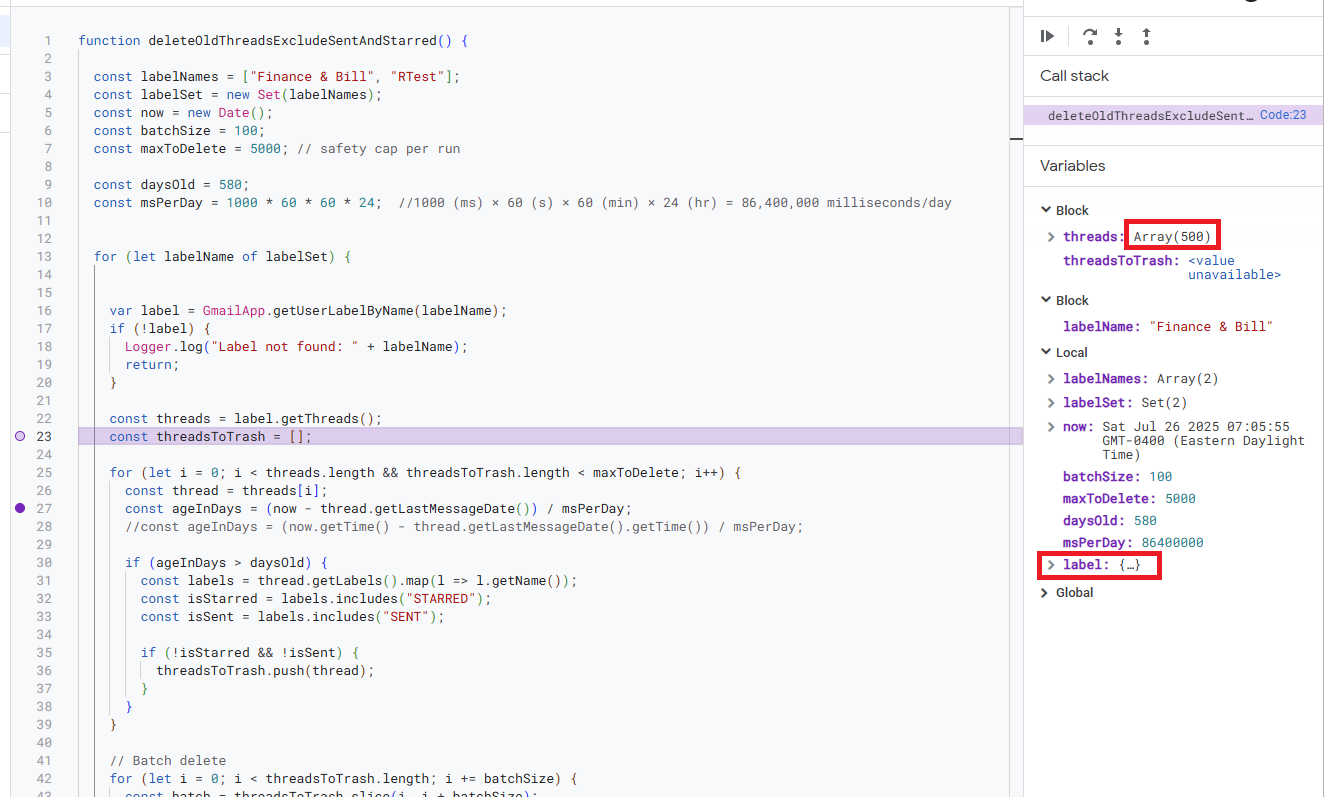
Edit: I added two screenshots, for debug variables, not sure why Array size for threads is only 500, not 4314. It seems the code can only read first 5 pages of gmail thread (there is limit 500?). Not sure why label does not have value
function deleteOldThreadsExcludeSentAndStarred() {

  const labelNames = ["Finance & Bill", "RTest"];
  const labelSet = new Set(labelNames);
  const now = new Date();
  const batchSize = 100;
  const maxToDelete = 5000; // safety cap per run

  const daysOld = 530;
  const msPerDay = 1000 * 60 * 60 * 24;  //1000 (ms) × 60 (s) × 60 (min) × 24 (hr) = 86,400,000 milliseconds/day


  for (let labelName of labelSet) {
    
    
    var label = GmailApp.getUserLabelByName(labelName);
    if (!label) {
      Logger.log("Label not found: " + labelName);
      return;
    }

    const threads = label.getThreads();
    const threadsToTrash = [];

    for (let i = 0; i < threads.length && threadsToTrash.length < maxToDelete; i++) {
      const thread = threads[i];
      const ageInDays = (now - thread.getLastMessageDate()) / msPerDay;

      if (ageInDays > daysOld) {
        const labels = thread.getLabels().map(l => l.getName());
        const isStarred = labels.includes("STARRED");
        const isSent = labels.includes("SENT");

        if (!isStarred && !isSent) {
          threadsToTrash.push(thread);
        }
      }
    }

    // Batch delete
    for (let i = 0; i < threadsToTrash.length; i += batchSize) {
      const batch = threadsToTrash.slice(i, i + batchSize);
      GmailApp.moveThreadsToTrash(batch);
      Utilities.sleep(1000); // slight delay to avoid rate limits
    }

    Logger.log(`Moved ${threadsToTrash.length} threads to Trash from label: "${labelName}".`);

  }


}
1 Upvotes

64 comments sorted by

View all comments

1

u/stellar_cellar Jul 26 '25

Add stop points at key points and run it in debug (click left to the line number l, purple circle will appear); when execution reach the stop you can look at the values of the variables; you may found some clues on what's going on with your code.

1

u/VAer1 Jul 26 '25 edited Jul 26 '25

Thanks, I am not IT folk, just getting code from online source, putting piece and piece together, then make up whole program. Not exactly sure if I did debugging correctly

I did try daysOld = 530 (not same as debug screenshot), which could not delete anything either. Even if it is daysOld = 580, the cutoff date is 12/23/2023, which should still delete quite some threads. I decide to use 580 and test deleting smaller amount of threads.

Edit: I added two screenshots, for debug variables, not sure why Array size for threads is only 500, not 4314. It seems the code can only read first 5 pages of gmail thread (there is limit 500?). Not sure why label does not have value

2

u/stellar_cellar Jul 26 '25

In the debug panel, label is an object so you have to click on the arrow to show it's properties.

If you look at the documentation for the getThreads(), it says that if the size of the threads is too large, the call may fail (could explain why you only getting 500 out 4000); the function does support using a "start" and "max" parameters, so try doing it in batch of 500:

https://developers.google.com/apps-script/reference/gmail/gmail-label#getThreads()

1

u/VAer1 Jul 26 '25

Thanks, I will take a look at it, and see how to modify the code. At least I know what causes the issue (500 limit).

Another question: let us say this program will take quite a few minutes to run, during the time, it is quite possible that new emails hitting the label, which will "mess up" some variables. Does it matter?

1

u/stellar_cellar Jul 26 '25

Unless you're getting tons of email, it shouldn't be an issue. Also be aware it may get threads that are in still in the trash folders, i recommend removing the labels when moving them to the trash, or using the GmailApp search() function (the query parameters offers more refinement)

1

u/VAer1 Jul 26 '25

How can I set up code structure that each label has its own daysOld value? Some like an array for labels and another array for dayOld.

For some label, I can keep the threads for 500 days; for some label, I may only want to keep it no more than 100 days.

what kind of code for such combination set of data?

1

u/stellar_cellar Jul 26 '25

turn dayOld into an array and each element represents the number of days for each corresponding elements in the labels array.

1

u/VAer1 Jul 26 '25

How to write the code structure?

1

u/stellar_cellar Jul 26 '25

const labels = ['label 1', 'label 2'];

const daysOld = [500, 100] ; //500 for label 1 and 100 for label 2

if (ageInDays > daysOld[i]) //during the loop, 'i' variable can be used to get the daysOld element in addition to the label element

→ More replies (7)

1

u/True_Teacher_9528 Jul 26 '25

You could also use an object where each label is a key and the days old is a value, that way your number of labels can grow and you won’t have to worry about two different arrays and their indexes.

1

u/VAer1 Jul 26 '25

threadsToTrash.push(thread);

What does original code push mean? It only temporarily appends data to the array? It does not actually deleting it at this point, correct? It will not mess up with next label.getThreads(start, batchSize), correct?

Another curious question: I expect the program taking a few minutes to run, during the running time, if new message hits the label, it seems it will slightly affect parameter value accuracy. Let us say, the code is dealing with threads index 0-99 now, suddenly 2 new emails hit the label, when code tries to deal with threads index 100-199, it is possible that index 100 and index 101 were original index 98 and original index 99, which were already processed during index 0-99 (two new emails just pushed them to next batch. Now the question is -- if original index 98 and index 99 were appended to threadsToTrash, then these two threads would be appended to threadsToTrash again in the new batch index 100-199 , what happens if same thread is appended to threadsToTrash array multiple times?

1

u/stellar_cellar Jul 26 '25

The push() function simply append the thread to the threadsToTrash array, which is used later to actual delete those threads.

New emails that comes during execution may alter the index, I am not sure if that would a problem: appending a thread twice to an array won't be an issue, the function to move them to trash should be fine with duplicates in the array (it's something to test for in order to be certain).

1

u/VAer1 Jul 26 '25

Actually, there is another "issue" not related to duplicates in the array threadsToTrash.

What if two emails hit the label right before the line of code GmailApp.moveThreadsToTrash(batch) (but after array threadsToTrash is finalized)? Initially, I want to delete thread index 98 and index 99, but in the end program could mistakenly delete other threads (original index 98-99 becomes new index 100-101, due to TWO new emails hit the label). So the program could delete threads with original index 96-97, which actually do not meet deletion requirement.

But anyway, I will run the program during midnight, time driven trigger Daily. During those hours, it is less likely to get new emails during code execution time. If some threads supposed to be deleted but not deleted due to new emails change their index, then they will be deleted during next code execution time; if some threads are deleted early due to new mails changes their index, not big deal too, they will meet deletion requirement soon, anyway.

1

u/stellar_cellar Jul 26 '25

So when you append a thread to the array threadsToTrash, you giving a reference to the thread object that was being work during that loop iteration. That reference won't change when you use getThreads() again; the indexing change won't affect it.

Let's say Thread A is at index 0 (newest message) in Gmail, so when you retrieve it, you get an object (instance of class GmailThread) that contains all the properties of Thread A; if you save that object to a variable (e.g. Array), it will always contain Thread A properties until you assign a new value to that specific variable. So if Thread B comes in takes position at index 0 in Gmail and you do getThreads(), it will not overwrite the variable where you saved Thread A unless you explicit tell it to do it.

Finally when you do the moveThreadsToTrash(), it uses the object reference/properties saved in each element of the array to determine which threads to actual execute on.

1

u/VAer1 Jul 26 '25

Thanks for explanation, it seems that there will always be some other "issues", but they are rare cases, I can ignore those "issues". Gmail message is dynamic.

Let us say a thread is appended to threadsToTrash (based on thread.getLastMessageDate and not in Sent and not starred)

But a new email hits the same thread right before GmailApp.moveThreadsToTrash, it seems the code will move the thread to trash along with the new email.

1

u/stellar_cellar Jul 26 '25

Yes I think so, a fix for could be to simply delete based on messages rather on thread. When you get a thread, you loop through the thread's messages and delete the ones that match your criteria.

→ More replies (3)

1

u/VAer1 Jul 26 '25 edited Jul 26 '25

Could you please help me with this part of code? It simply does NOT exclude starred thread and thread in Sent folder. I marked two threads for test (they should not be deleted, but they are moved to trash.

Are STARRED and SENT case sensitive?

if (ageInDays > daysOld) {

const labels = thread.getLabels().map(l => l.getName());

const isStarred = labels.includes("STARRED");

const isSent = labels.includes("SENT");

if (!isStarred && !isSent) {

threadsToTrash.push(thread);

}

1

u/stellar_cellar Jul 26 '25

I am not sure if they are actual labels that you can refer to. You can try using the thread.hasStarredMessages() and thread.isInInbox() for your If conditions.

1

u/VAer1 Jul 26 '25

Maybe you are right, I just get code from online, one piece at a time and put them together, some code may be wrong.

However, I don't see isInSent . isInBox is not what I what, most of old threads are Inbox, but they need to be deleted.

I still need correct code to check if the thread is also part of Sent folder.

https://developers.google.com/apps-script/reference/gmail/gmail-thread

1

u/stellar_cellar Jul 26 '25

then the GmailApp.search() function would be better, has you can specify to exclude the sent folder

1

u/VAer1 Jul 26 '25 edited Jul 26 '25

Thanks, follow up questions:

How can I re-write const threads to include variable gmailLabel and exclude Sent/Starred? What is the correct syntax?

const gmailLabels = ["Finance & Bill", "Shipping Carriers (USPS)","InvalidLabelForTest"];

var gmailLabel = GmailApp.getUserLabelByName(gmailLabels[i]);

const threads = gmailLabel.getThreads(start, batchSize); //label.getThreads(0, 100) is threads 0 through 99 — just like array indexing in JavaScript.

//const threads = GmailApp.search('label:YourLabelName -in:sent');

//const threads = GmailApp.search('label:YourLabelName -is:starred');

Edit:

//const threads = GmailApp.search('label:YourLabelName -in:sent -is:starred');

Edit 2: Maybe something like this, I will try

const query = `label:${gmailLabel} -in:sent -is:starred`;      
      const threads = GmailApp.search(query);

1

u/stellar_cellar Jul 26 '25

const threads = GmailApp.search(`label:${gmailLabels[i]} is:unstarred -in:sent`);

If you the ` characters (located below the escape key) instead of quotes, you can use the ${} parameters to insert variable value into a string.

If you use " or ', you can concatenate variable to string using + (example: "I have " + 5 + " apples")

→ More replies (20)

1

u/VAer1 Jul 27 '25

https://i.postimg.cc/QNWYv04K/Screenshot-2025-07-27-002841.png

GmailApp.search() only returns 500 threads, which is wrong too. I have far more than 500 threads in above screenshot label.

Maybe GmailApp.search() works fine, but threads.length does not return correct value, one of them is wrong.

→ More replies (4)

1

u/VAer1 Jul 26 '25 edited Jul 26 '25

Currently, my code is in independent script file (not inside Google Sheet). If I want to keep the deletion log in Google Sheet, do I have to move code to Google Sheet? I would like to merge this program into Google Sheet counting threads for each label.

There is another independent script file related to Gmail (but nothing to do with Google Sheet), I may also want to move into Google Sheet. Let all gmail related programs in one single Google Sheet file.

Bound script vs. standalone script: which is better? Does it affect code running time?

Can I set same time frame (such as time driven Daily 6pm-6pm) for multiple functions within same Google Sheet? What happens if there is overlapped running time when Google executes the programs.

1

u/stellar_cellar Jul 26 '25

Bound scripts mean they are tied to a Google document which means they have access to certain triggers not available with a standalone script (e.g. onEdit, onOpen). You can still read and write into any documents via a standalone. It does not affect run time, access to a Google Service is what takes the most time.

You can set the same time frame for different trigger. Google will run up to 30 executions at the same time per user, you just have to make sure the different executions do not overwrite each other (e.g. write into the same cell in a sheet, or read a document section while being edited by another execution); that could lead to unexpected results:

https://developers.google.com/apps-script/guides/services/quotas