r/Googlebook • • 2h ago

Xbox Remote Play doesn't work

1 Upvotes

Has anyone successfully gotten Xbox Remote Play to work on their Googlebook via the web app in Chrome? It works on my Chromebook and Pixel phone but not on my HP Googlebook. Keeps saying it wasn't able to connect.

At first I was wondering if it had something to do with the mobile-based Chrome browser, but that wouldn't explain it working fine on my phone. Add this to this list of bizarre Googlebook issues. Who knows if this is Microsoft or Google's problem to fix.


r/Googlebook • • 3h ago

Google Australia is running Henry Cavill ads selling the "AI game-making" dream—except the actual tool (Google Playground) is geo-blocked in Australia. Classic ACCC bait-and-switch.

6 Upvotes

If you’re in Australia, you’ve probably seen Google’s new Googlebook ads starring Henry Cavill creating his own game from scratch using AI. The whole hook of the campaign is: "Look how effortlessly you can build your own game with Google’s AI."
So I went to try Google Playground (playground.google)—the actual tool behind this—and got hit with a region block: US-only.
Here is the kicker: All Australians actually get is a pre-made, static mini-game (Mustache Protocol) on the local promo page. We don't get the creation tool the ad is hyping up.
The 1950s Tobacco Industry Playbook
When you look closely at Google’s Australian landing pages, their legal team carefully scrubbed the word "Playground" from the local feature list while still blasting the exact same "make your own game" video ads across Australian feeds.
It’s pure lawyer-speak and technical loopholes—the digital equivalent of 1950s tobacco executives saying, "We can neither confirm nor deny this is harmful." Hiding behind fine print and word games to create a false impression is beneath a tech giant of Google's scale, and it destroys consumer trust.


r/Googlebook • • 6h ago

I am of the opinion that the status bar should have been integrated with the taskbar

5 Upvotes

The current Mac-style setup doesn't really make sense as the menu bar is not integrated at the top. The current implementation could easily fit on the taskbar, saving valuable screen real estate at the top


r/Googlebook • • 6h ago

I got tired of how bad every Android RDP manager is on desktop/laptop hardware, so I built NexusTS 1.0 — a Royal TS-inspired RDP, SSH, SFTP & Zero-Knowledge Vault workspace for Googlebooks/Android and macOS

4 Upvotes

Hey everyone,

Today I’m releasing NexusTS v1.0.0 — a desktop-class Remote Management, RDP, SSH, SFTP, VNC, and Zero-Knowledge Connection Vault workspace built natively for Googlebooks / Android and macOS (Universal2).

Why I built this: Android RDP managers just aren't good enough

On macOS, tools like Royal TS make managing dozens or hundreds of Windows & Linux servers effortless. When I moved part of my daily sysadmin workflow onto a Googlebook / Android desktop setup, every single existing Android RDP client fell apart in real-world use:

  • Stuck in a phone mindset: Clunky floating touch overlays covering remote windows, awkward panning instead of real desktop mouse/trackpad precision, and fixed resolutions instead of live dynamic resizing when you drag a window border.
  • Broken file & folder copy/paste: Copying a file or folder from an RDP session and pressing Ctrl+V in the local Files app throws "File operation is not supported", and copying local files into Windows Explorer does nothing.
  • Broken keyboard & mouse workflows: Physical Win, Alt, F1–F12, and Ctrl+V shortcuts get swallowed, and right-clicking in Windows Explorer misses newly copied host clipboard items.
  • Zero fleet management: No split-pane RDP + SSH tiling, no multi-monitor tab tear-off, no cascading folder credential inheritance, no .rtsz import, and no encrypted cross-platform vault sync with macOS.

So I built NexusTS from the ground up with a shared C++20 FreeRDP 3.12 + Rust (russh, argon2, aes-gcm) core and 1:1 UI & vault parity across Googlebooks/Android and macOS.


High-Resolution Screenshots (3200×2000)

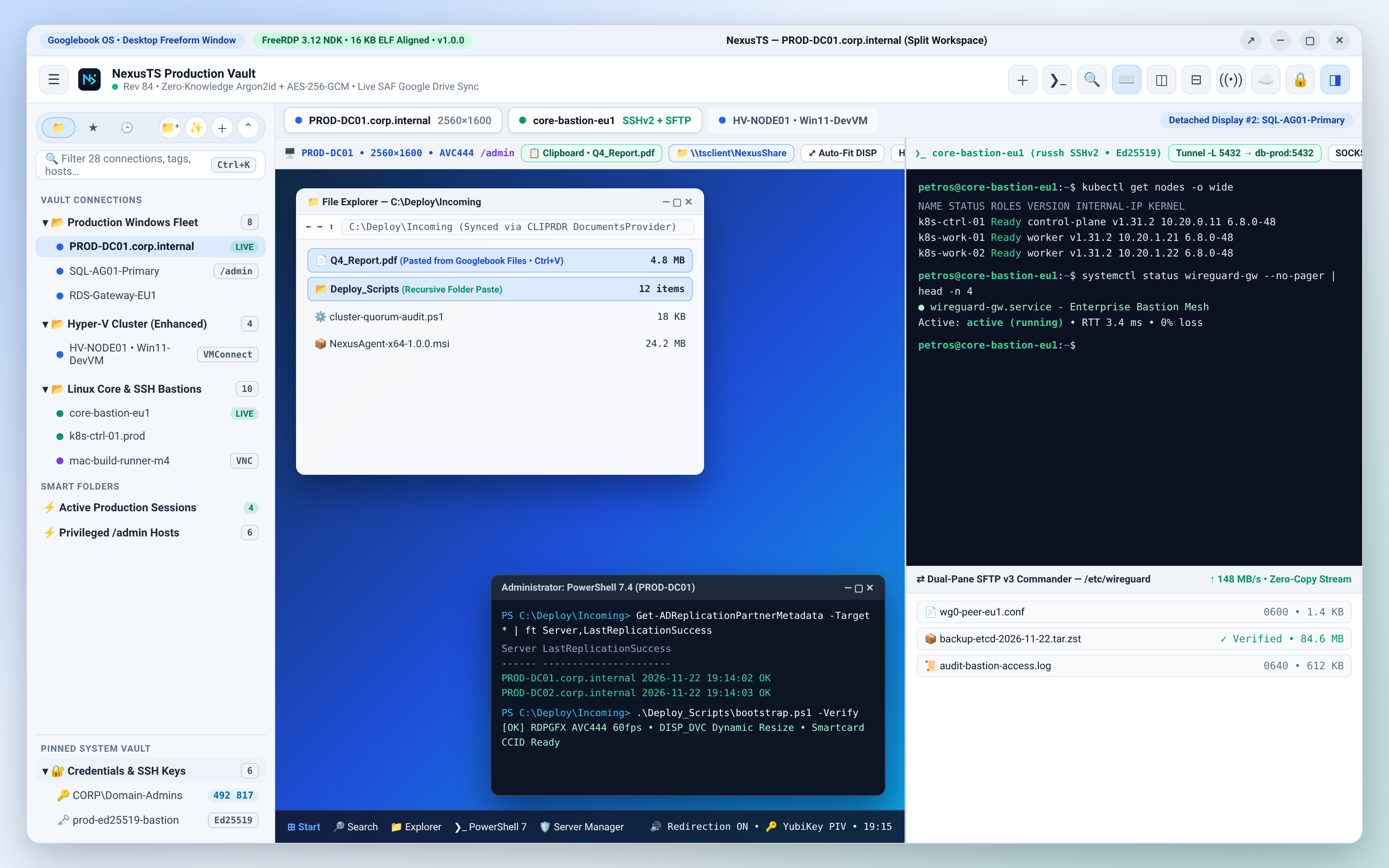
  1. Googlebook OS & Android (Split-Pane FreeRDP 3.12 + SSHv2/SFTP): https://raw.githubusercontent.com/petrosvassiliou/NexusTS/v1.0.0/docs/screenshots/nexusts-googlebook-android-rdp-split.png
  2. Googlebook OS & Android (Vault Overview Dashboard & Hardware Shortcuts): https://raw.githubusercontent.com/petrosvassiliou/NexusTS/v1.0.0/docs/screenshots/nexusts-googlebook-android-overview.png
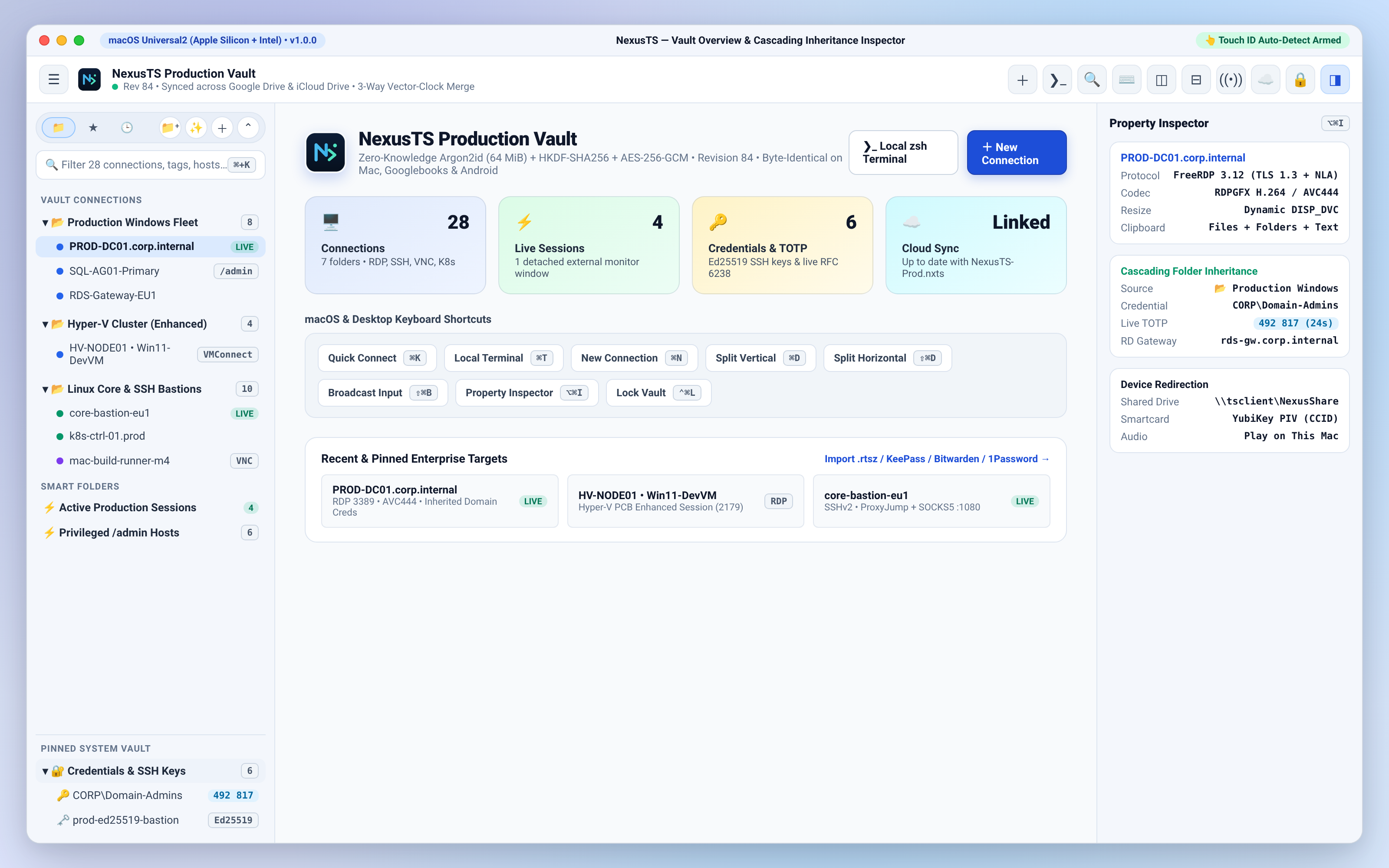
  3. macOS Universal2 (Overview + Auto Touch ID + Cascading Inspector): https://raw.githubusercontent.com/petrosvassiliou/NexusTS/v1.0.0/docs/screenshots/nexusts-macos-universal-workspace.png
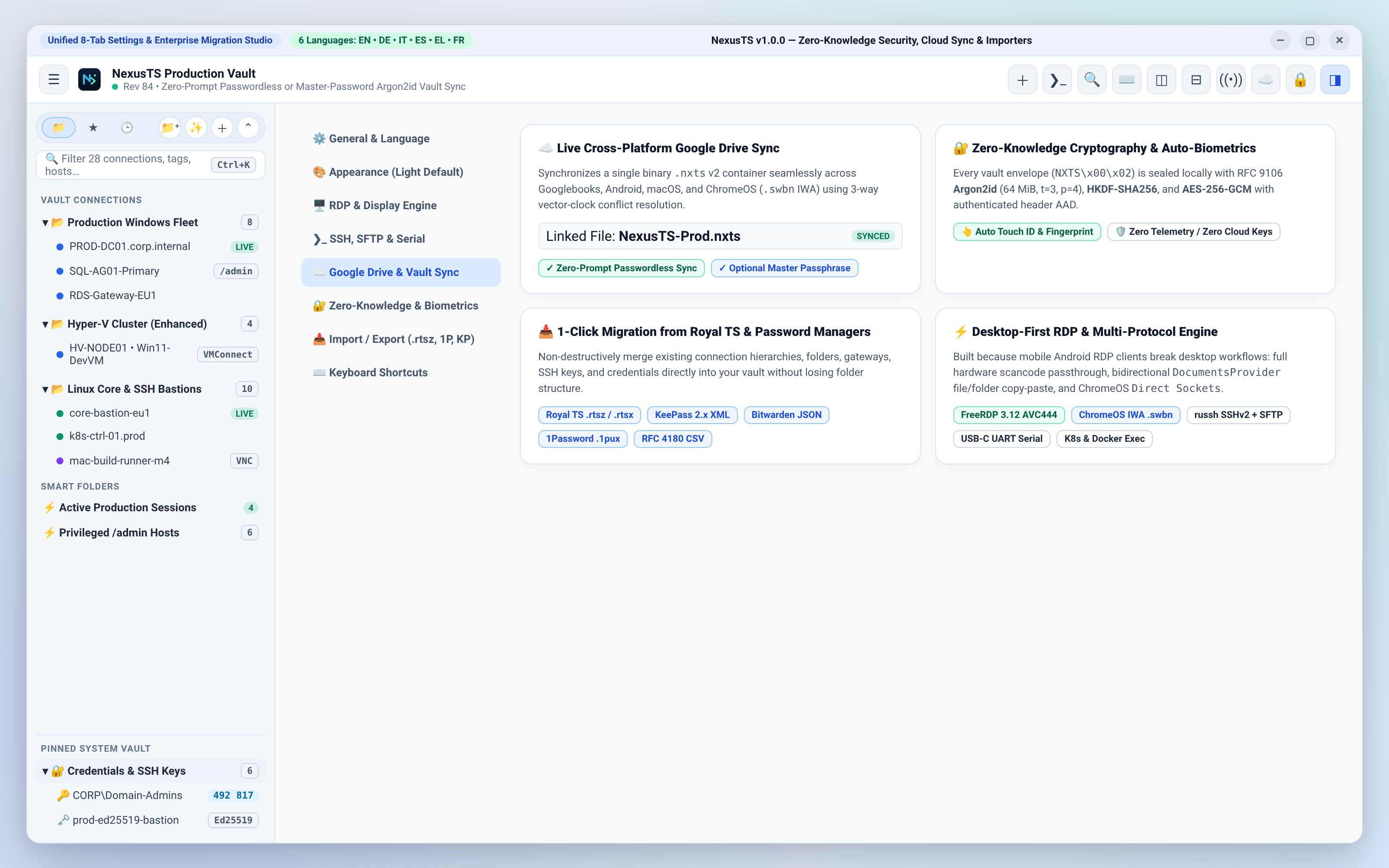
  4. Unified 8-Tab Settings, Cloud Sync & Royal TS / 1Password / Bitwarden Importers: https://raw.githubusercontent.com/petrosvassiliou/NexusTS/v1.0.0/docs/screenshots/nexusts-settings-sync-importers.png

What’s inside NexusTS 1.0

1. Desktop-Grade RDP (FreeRDP 3.12 C++20 Engine)

  • Adaptive RDPGFX H.264 / AVC444 Chroma hardware decoding + DISP_DVC dynamic resize (drag the window and Windows resizes live with zero reconnect) + HiDPI scaling (100%–200%).
  • True Bidirectional File, Recursive Folder & Text Copy/Paste (CLIPRDR): Implements a scoped Android DocumentsProvider with AOSP DocumentsUI copy metadata + window-focus & pre-paste staging—so Ctrl+C / Ctrl+V, right-click Paste, and Drag & Drop of files and nested folders work seamlessly between Windows Explorer and the local Files app (just like Finder on macOS).
  • Enterprise Redirection & Hyper-V: /admin console sessions, RD Gateway, NLA, Restricted Admin, Hyper-V Enhanced Session (VMConnect PCB on port 2179), \\tsclient\NexusShare drive redirection, 3-mode audio & mic redirection, and USB CCID Smartcard / YubiKey PIV passthrough.
  • Unobstructed Viewport: The telemetry/action bar sits strictly outside the remote desktop canvas so it never blocks remote titlebars or clicks.

2. Rust russh SSHv2, Dual-Pane SFTP v3, VNC, Serial & Cloud Workloads

  • SSHv2 & Bastions: xterm-256color / TrueColor terminal, Bastion ProxyJump chaining, visual -L / -R / -D SOCKS5 port-forwarding studio, Broadcast Input across split panes (Ctrl+Shift+B), OpenSSH Ed25519 key generator, and asciicast v2 (.cast) session recording.
  • Dual-Pane SFTP v3 & FTP File Commander with streaming transfers.
  • VNC / Apple Screen Sharing (ARD), USB-C Hardware Serial / UART Console (FTDI, CP210x, PL2303, CH340, CDC-ACM up to 921600 8N1 with Send BREAK), Kubernetes Pod / Docker Container interactive exec & live logs, plus built-in TCP Ping, Concurrent Port Scanner & Wake-on-LAN.

3. Royal TS-Style Hierarchy, Cascading Inheritance & 1-Click Migration

  • Cascading Folder Inheritance: Assign credentials, RD Gateways, or SSH jump hosts at a parent folder and let child folders/servers inherit them automatically.
  • Smart Folders, Dynamic Folders, Connection Templates & Live RFC 6238 TOTP codes right in the pinned Credentials vault and Property Inspector.
  • 1-Click Non-Destructive Importers: Import & export Royal TS (.rtsz / .rtsx), plus KeePass 2.x XML, Bitwarden JSON, 1Password (.1pux), and CSV.

4. Zero-Knowledge .nxts v2 Vault & Frictionless Live Google Drive Sync

  • Every vault is sealed locally with RFC 9106 Argon2id (64 MiB, t=3, p=4) + HKDF-SHA256 + AES-256-GCM with authenticated header AAD—100% byte-compatible across Googlebooks, Android, and macOS.
  • Live 3-Way Vector-Clock Sync over Google Drive (and iCloud Drive on macOS): works out-of-the-box with zero master-password prompts, or with a custom Master Passphrase backed by automatic hardware Touch ID / Fingerprint sensor detection.

5. Native Across Googlebooks/Android & macOS (Unified Crisp Light-First UI, 6 Languages)

  • Googlebook OS & Android (APK / AAB): Full freeform desktop windowing, multi-instance support, and 1-click tab tear-off onto external monitors (DetachedSessionActivity), 16 KB ELF page-aligned (arm64-v8a + x86_64).
  • macOS 14+ (Universal2 DMG): Native Apple Silicon + Intel build with local /bin/zsh PTY, automatic Touch ID sensor detection, and MenuBarExtra.
  • Fully localized in English, German, Italian, Spanish, Greek, and French.

Links & Downloads

Would love to hear your feedback—especially from anyone running a Googlebook, Android desktop/tablet + dock, or mixed Mac/Android homelab & sysadmin setup!


r/Googlebook • • 7h ago

Improve Fingerprint Read?

2 Upvotes

Hi. I have an Acer Googelbook with fingerprint access. It does not work well. Would it be beneficial to add 2 or more of the same finger?


r/Googlebook • • 9h ago

Antigravity on Googlebook

6 Upvotes

Anyone else use Antigravity? Just got the HP one during bf sale and am loving it, but it seems the Antigravity app is a few versions behind the desktop one, so it doesn't have orchestrator mode yet. Wondering how often they update the app and if they eventually will try to reach parity with the desktop one so it's not so behind.


r/Googlebook • • 9h ago

HP Googlebook for Photoshop Tasks?

3 Upvotes

Hi everyone. I haven’t been able to find much information on this yet, but perhaps someone here has some experience with it.

I’m wondering if an HP Googlebook would be powerful enough to handle the Android version of Photoshop (not the web version) for tasks like:

isolating product images, creating social media templates, working with multiple layers, using masks, or even performing some light generative fill. I already have a powerful desktop PC at home that handles everything else—like Illustrator, Canva, or Affinity and video editing—but I’m definitely open to something for when I’m on the go, especially to use alongside my Pixel 11. Could you help me out?

Thanks guys!🙏


r/Googlebook • • 10h ago

HP top bezel wavy reflection and slightly bumpy

1 Upvotes

Has anyone noticed that the top of the bezel for HP screen is wavy. It's very easy to see if you look at the light reflecting off it. It gets distorted. Look at it from the side or rub your finger across the top and feel it. I noticed it on the one I purchased and found it on two floor models. I can't unsee it now. I'm curious if anyone doesn't have this issue.


r/Googlebook • • 10h ago

Googlebook OS ability to grab the OneWheel app off my nearby phone is impressive...

5 Upvotes

r/Googlebook • • 13h ago

still not possible to watch DAZN streams on googlebook

3 Upvotes

there is no app to download and the native chrome browser always shows

"No key found!

No key found!

Fehlercode: 97-000--1"

Also firefox can't start a DAZN stream. Anybody knows a workaround?


r/Googlebook • • 13h ago

Are Android developments for Googlebook OS reciprocal with other Android devices?

Post image
6 Upvotes

r/Googlebook • • 14h ago

ASUS vs Dell XPS

6 Upvotes

I’m looking for input from those who have used both. I like the ASUS, particularly the matt screen and reflection control, but I am a power user and I find myself having to close apps due to memory utilisation one or twice a day.

ASUS: Matt Screen, Weight, Speakers / Trackpad
XPS: Aesthetics, 32GB, Snapdragon


r/Googlebook • • 17h ago

Sunloom: wallpapers that follow the sun, cropped for each of your displays

Thumbnail
gallery
3 Upvotes

Hey r/Googlebook!

I built Sunloom because I wanted a wallpaper that changes with the day: a bright picture by day and a dark one in the evening, fitted properly to my screen. I built it mostly with Claude Code, with some help from Antigravity.

  • Follows the day. Sunrise and sunset for your city, set hours, your system's light/dark theme, or only when you tap Next.
  • Fits every screen. One picture is cropped for your built-in display and any monitor you plug in, without stretching.
  • Works offline. It draws its own pictures on first start, so there's a wallpaper before anything has downloaded.
  • Keeps your taste. Keep what you love, Dislike what you don't, and a Disliked picture never comes back.
  • Credits every picture. Wikimedia Commons Featured Pictures and open museum collections, each with its author and licence under About this image.
  • Private. No account, no analytics, no ads. Nothing about you leaves your device.

It's GPL-3.0, and this is a release candidate (2.0.0-rc.3). I've been developing and testing it on a Dell XPS Googlebook, so I'd especially like to hear how it does on other hardware and with different monitors. I'm planning to put it on the Play Store later, after testing with a smaller group first, so I'd love feedback now.

📦 Download (signed APK + SHA-256): https://github.com/stevin-wilson/Sunloom/releases/tag/v2.0.0-rc.3

🔗 Source and issues: https://github.com/stevin-wilson/Sunloom

Bug reports and feedback are very welcome here or on GitHub.


r/Googlebook • • 23h ago

I like it.

22 Upvotes

HP Googlebook

1st day after arriving from Best Buy.

It set up easily.

It copied the Internet settings from my phone.

I was afraid re using it with my Google Workspace acct.

On Chrome I logged in to my Gmail account and the Workspace account.

So, it's not difficult to switch the account. Both are logged in.

I


r/Googlebook • • 1d ago

Googlebook's a November update! Getting better, XPS user

Thumbnail
youtu.be
26 Upvotes

r/Googlebook • • 1d ago

Hover state on videos not showing the progress bar.

7 Upvotes

I submitted a feedback ticket, then got an email prompting me to update. I'm on the most recent version. Still seeing an issue where hovering over a video won't bring up the bar. It's defaulting to presuming I'm on a phone screen just because the laptop has a touch screen.


r/Googlebook • • 1d ago

Installed GBOS86 on an old ASUS Zenbook (UX331UAL) and as a google fanboy (fanman?) I know I am going to wait for a year before buying one

Post image
18 Upvotes

First off: gbOS86 rocks!

Now for the good:

Is it usable? Yes. Does it feel like a laptop? Yes. Are there any apps missing from my workflow? No.

What would I get if I bought one right now? Multiple system users, Continue on other devices, and app casting — though I'm fine waiting to see which of those can make it to gbOS86.

Then why wait? Two words: Work profile. Once I have proper work profile support (whether via gbOS86 or eventually an official Googlebook), it can become the only laptop I need. Until then, my Chromebook stays my work laptop, my Mac mini stays my home workstation, and the ASUS is my leisure laptop.


r/Googlebook • • 1d ago

Chrome missing "Cast Tab" and other Cast related functionality

4 Upvotes

I purchased the Dell XPS as a secondary laptop a few weeks ago. I love the hardware and am willing to put up with the quirkiness of Googlebook OS for the most part. I know there have been a few threads discussing the Chrome browser, but I haven't seen anyone mention that the "Cast Tabs" feature is missing. On desktop chrome you can cast individual tabs and even add a cast button to the gui next to the extensions enabling quick access. On Googlebook OS this feature is completely missing. I'm aware that you can cast your entire screen, or an individual application, but this is not the same.

Google Slides also doesn't seem to let you cast a slideshow. It will let me click the button and select which chromecast that I want to cast to (NVIDIA shield in my case), but it doesn't work.

Also some websites detect that the browser is "Android" and restrict features. Owlbear Rodeo is one that I use that also has a built in cast feature. Basically it enables you to cast a player version of a map to a chromecast device, instead of the GM view. However, because it detects the browser as an Android browser, the functionality is disabled.

I get that this may be an Owlbear Rodeo problem and not a Google problem, still it seems like a lot of functionality around casting is missing and preventing me from running my DnD games from this laptop.


r/Googlebook • • 1d ago

Dell XPS: sound issue...possible one-of issue...

2 Upvotes

Background: To get around the inconsistent volume I'm using an external Sony Bluetooth speaker, it may have nothing to do with this report.

I was listening to a youtube video. I asked Gemini a question and it paused the video and answered my question. When the AI was gone the YT video resumed at a higher than 1:1 playback with no sound. Video settings still reflected 1:1, volume was not turned off. Closing apps/windows changed nothing. My fix was a laptop reboot. All good after reboot.


r/Googlebook • • 1d ago

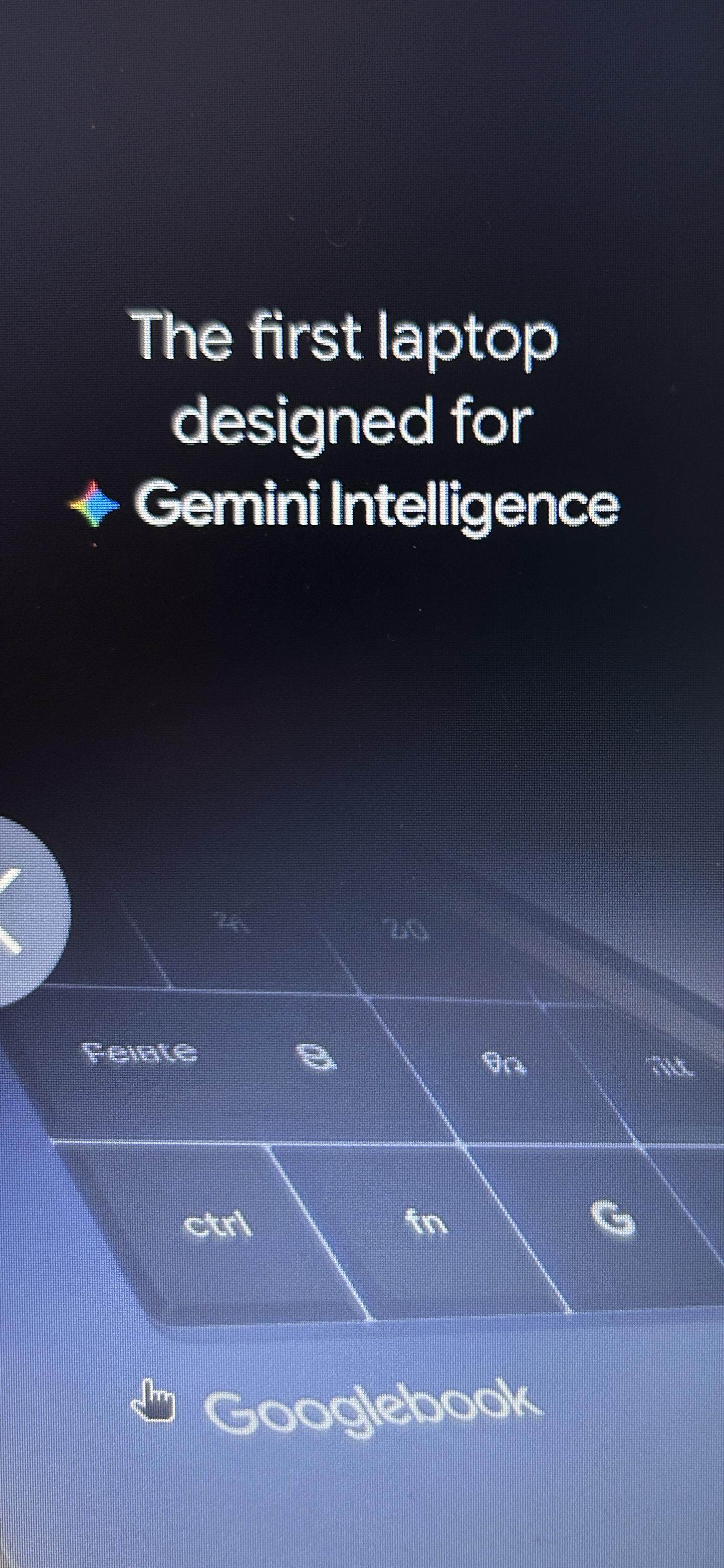
Ai used in Googlebook ad

Post image
16 Upvotes

Look at the keys above ctrl, fn, and google key


r/Googlebook • • 1d ago

Gemini intelligence features in italy

2 Upvotes

What gemini intelligence features are available on googlebook in Italy?


r/Googlebook • • 1d ago

What is udm=14 in Chrome?

1 Upvotes

Gemini started to recommend me this.


r/Googlebook • • 1d ago

Dell XPS13: Continuing inconsistent sound levels...

3 Upvotes

Just to let Dell/Google know, this is still an issue on the laptop speakers. I've not used any external speakers yet, but the volume ramping up at the beginning of videos, instead of playing at a consistent preset volume is annoying.


r/Googlebook • • 2d ago

Googlebook Compared to Pixel Tablet with Keyboard

3 Upvotes

I have a Pixel Tablet with an EIP keyboard case. How does the Googlebook compare? The Googlebook is based on Android right?

Do they essentially operate in the same way?


r/Googlebook • • 2d ago

Dell XPS: Cross Device task continuation...

7 Upvotes

I was recently in the Gemini app asking questions, on my Googlebook, then closed the Googlebook and picked up directly where I left off on my Android phone. This will be sooo slick when all our apps allow this frictionless experience.