Need help

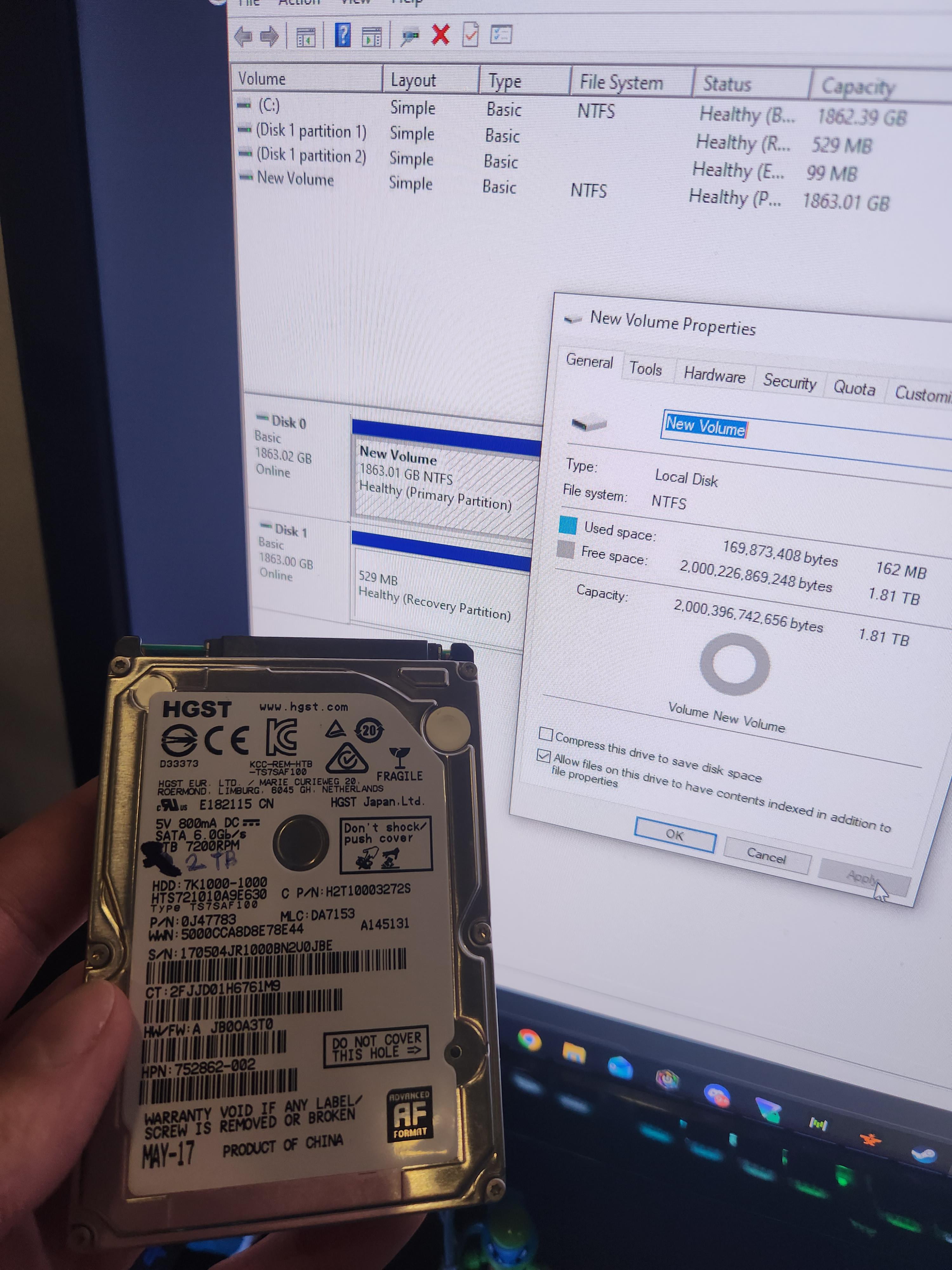

Bought this a few years ago brand new from Amazon I think?
Don't know much about HDD'S or SSD'S but I just plugged this in for the first time and allocated it. I can't find any info on it but the label say it's 1tb but my pc says it's 2tb. Possible mislabeling? Also, I unplugged it and it's still showing up on my pc, which is strange. Should I be worried about some virus or something? Some help would be appreciated.
2
Upvotes
4
u/hawkdeathpaw 8d ago
the 2nd drive is your internal hdd then becuase itll go away if it gets removed from pc try external hdd usb dock
2
u/LovitzG 8d ago edited 8d ago
I have that exact Hitachi TravelStar drive. It is definitely a 1TB drive and was the largest capacity they made. It's a great and quiet 7200 rpm drive with 32MB cache making it one of the faster laptop spinning drive at the time.
Somehow you have a 2TB drive in your computer that is NTFS formatted but never given a drive letter. Right click, open drive properties and find it what that drive is. It will NOT be the drive you have in your hand. If it's probably a 2nd drive matching your 2TB C: drive.
1
u/Candid-Party1613 8d ago
Sometimes it just hangs as if plugged in. Nothing too serious .
1
u/Wellcraft19 8d ago
From Gemini:
‘The string 170504jr1000bn2v0jbe is a unique factory serial number (or date/lot barcode) for a
1 TB HGST hard drive, rather than a retail model or part number.
Because serial numbers are unique to individual units, they do not return exact online catalog matches. However, the code breaks down into standard HGST manufacturing identifiers:
• Manufacturing Date ( 170504). The first six digits typically indicate a production date of May 4, 2017 (YYMMDD format).
• Capacity ( 1000). The four-digit number in the middle denotes a 1,000 GB (1 TB) storage capacity.
• Drive Series. Based on its 1 TB capacity and 2017 production date, this drive is most likely a 2.5-inch HGST Travelstar laptop drive (such as the 5400 RPM Travelstar 5K1000 or 7200
RPM Travelstar 7K1000).’
1
u/bridgetroll2 7d ago edited 7d ago
Pretty sure you're looking at the wrong drive in disk mgmt since the drive in question doesn't appear to be plugged in. Look open device manager and look under disk drives and see if it's there