r/HaremLitAuthors • u/blaashford • 14d ago
New subreddit for Men's Romance
reddit.com
2
Upvotes
r/HaremLitAuthors • u/blaashford • Oct 16 '26
Because a link post can't be updated, this is a new post, in a new format.
This is a checklist of things you must, should, or might want to do before launching your book. It's intended to serve as a reminder of ALL THE THINGS.
It's neither exhaustive nor prescriptive.
Please add your comments, corrections, additions, and discussion below so we can keep it updated.
r/HaremLitAuthors • u/Strong_Stranger_1880 • Sep 08 '26
Here's a super straightforward article on how to properly punctuate dialogue: https://www.authorlearningcenter.com/writing/fiction/w/character-development/6491/8-essential-rules-for-punctuating-dialogue---article
r/HaremLitAuthors • u/Gavin_Dune • 24d ago
I’m writing my first novel and see a fair amount of posts on social media about ARC and Beta readers pirating novels and publishing them. Is this something to be concerned about? What’s the best way of finding ARC and Beta readers you somewhat trust?
r/HaremLitAuthors • u/DazzlingOutcome6135 • Oct 17 '26
Morning,
I don't know whether anyone else uses Bookfunnel to market (or build a newsletter list) but I've starting to get a little bit of traction on it.
To try to build on that, I've setup my first promo to try to jump on the Malfoid trend. No idea if it'll fly, but figured I'd put details here if anyone has books they want to put in it?
r/HaremLitAuthors • u/Strong_Stranger_1880 • Oct 14 '26

Harem-Lit.com now has a Dungeon Checker: https://harem-lit.com/tools/dungeon-check
It not only checks if your book is in the dungeon, but there are also a bunch of helpful tips on what to do if your books has been dungeoned.
Here is the explanation of what the dungeon is, from the H-Lit page:
Amazon flags some books as adult products. A flagged book disappears from Amazon's main search bar, the All Departments search most shoppers use. It can still turn up in a narrower Kindle Store or Books search, or through a direct link, but most readers never search that way. You can't run Amazon ads on it, and Amazon doesn't tell you it happened.
r/HaremLitAuthors • u/Strong_Stranger_1880 • Oct 06 '26

Just adding a simple, muted text backdrop/blur plate can make a big difference.
In Affinity (or any other program), just draw a rectangle, color match it to the background color of the photo, put it behind the text layer, use the gaussian blur to blur it, and then lower the opacity. Done.
You can definitely get more creative with this, by using other colors, images, etc, but this the simplest method.
I know these covers are not great, I was just trying to whip up some examples as quickly as possible. 😅 I still think it shows the point I'm trying to make. Use a text backdrop!
r/HaremLitAuthors • u/B_A_Oliver • Sep 27 '26
Saw this on FB and stole it. I agree with just about everything that it says. The first chapter, especially the first paragraph of a book has to grab onto the reader or else you have a massive likelyhood of getting a DNF. Getting your readers emotionally invested with the main character is critical to ensure they actually read the whole book.
This is even more critical with the first book in a series. If the reader is already invested from prior books, then you have more leeway to keep them engaged with book two or later.
Once again I have zero options to add "flair" to this post. I've added a "spoiler" tag, just to see if that will get it past the auto-delete.

r/HaremLitAuthors • u/QuestWorkshop • Sep 22 '26
You, and probably any author who takes the craft seriously, have probably wished at least once that you could write faster. Imagine what would happen if you could double your output.
There is a lot of content out there promising that you can write anywhere from 4,000 to 10,000 words in an hour, but let's be honest... most of it is just a guru sales pitch trying to get you to buy something.
Lucky for you, I'm not selling anything. I'm just trying to help because I've found a way to consistently write around 5,000 to 7,000 words a day while taking care of my autistic son, a newborn baby, and doing freelance work.
My tips and workflow may or may not work for you. Everyone writes differently. But I hope that at least something I've learned can help you write faster, write better, or simply make writing a little easier.
Before I explain the first step that got me where I am right now, let me start by saying that even if you're a pantser, this will still help you write by the seat of your pants.
With that said, the first step is to stop guessing what needs to happen next.
In order to write faster, your brain should focus on one single task while you're working: writing.
Every time you have to stop and think about what happens next, you lose momentum. You also lose time that could have netted you another 100 words or more.
Before you write your first words of the day, you should already know what is going to happen.
And by that, I don't mean anything complex or overplanned. You don't need to write down every beat and scene or follow something like the Snowflake Method.
All you need is a simple, logical sequence of events that you can follow. Your brain can fill in the gaps while you write without forcing you to stop for several minutes to figure out where the story is going.
A simple example would be:
Notice that none of this explains how these things happen. I don't know what the main character is thinking when Truck-kun hits him. I don't know what the god looks like, how their conversation goes, or even how the main character reacts to being dead.
That's the stuff I get to discover while writing.
You don't need to plan everything. Just plan enough for the next one or two chapters. When you start running out of material, repeat the process.
By the time you start writing, your brain already knows the major events it needs to reach. You're still free to discover the dialogue, descriptions, character interactions, jokes, fights, and smaller events along the way.
You're basically combining plotting with writing by the seat of your pants.
This was the single biggest change that allowed me to write Beast Hunter's roughly 13,000 words in three days.
You're writing your chapter. The main character does something amazing, you're completely in the flow, and then you write feel instead of fell. Or maybe you write sqord instead of sword, and that dreadful red line appears, screaming:
"Hey, this is wrong!"
You sigh, stop writing, and fix the mistake.
While doing that, you notice another mistake the grammar checker didn't catch. And while fixing that, you realise there might be a better way to write the whole paragraph.
So you rewrite it.
That, my friend, is time lost.
To write faster, you need to separate your work into two very distinct modes: writing mode and editing mode.
You don't edit while you're in writing mode.
You edit while you're in editing mode, after you've written everything that needed to be written.
This is easier said than done, and I'll be honest with you: it will take some time and discipline. But once you get used to it, the results are amazing.
Every time you stop to fix a little mistake, your brain loses some of the creative flow that was pumping out word after word.
You don't want to lose the flow.
One thing that helps a lot is writing somewhere that allows you to completely turn off grammar and spell checking. Without those red lines distracting you, and with the bigger plan from Step One already in your head, the words can flow much more easily.
Let sqord be sqord.
You'll turn it into sword later.
AI.
Some love it.
Some hate it.
And while this part may draw some very heated comments, let me tell you this: I don't believe AI should write your novel for you.
I believe AI should be used as a tool to help you craft a better novel.
And guess what? AI is really good at handling the boring, mechanical parts of editing. Give it the right instructions and it can fix grammar, catch typos, and clean up mistakes while leaving your voice alone.
In other words, it can turn all those sqords into proper swords.
But don't blindly trust it.
Depending on how you use it, AI might also decide that your character needs a different name for absolutely no reason. It might rewrite something that was perfectly fine. Or it might make a man who only has a right hand suddenly use his left.
AI makes mistakes.
Sometimes really stupid ones.
Think of it less as someone writing or editing your story for you and more as a tool that helps you blast through the mechanical parts of edit mode faster for you to return to writing mode.
Let the AI deal with the sqords.
You deal with the story.
Before talking about why I think it's important to learn how to write on your smartphone, let me give you a quick rundown of my situation.
I'm a father. I have a son with autism and a newborn son. I also do freelance work and help my wife whenever she needs me.
While I would love to sit down for a whole hour or two and just write my novels, I can rarely go ten minutes without someone needing my attention.
So I had to find a way to write away from my computer and in short bursts.
The smartphone became the obvious answer.
Think about it. You probably have a lot of tiny windows of free time throughout your day. When you're using the bathroom. When you're waiting in line for something. Or when your wife wants you to sit next to her while she watches South Korean shows on Netflix.
You would be surprised by how many words you can pump out during those little windows.
This becomes especially powerful if you've already followed Step One and know what happens next. You can stop writing in the middle of a sentence, deal with whatever needs your attention, come back twenty minutes later, and immediately continue because you already know where the story is going.
So believe me: if you don't like writing on your smartphone, give it a real chance. Keep doing it until it starts feeling natural.
You don't need to find more hours in your day.
Start using the minutes you already have.
The title is kind of self-explanatory, but seriously:
Just have fun.
Learn to enjoy the process instead of staring at whatever you've written while worrying about whether someone will read it, whether the prose is good enough, or whatever other excuse your brain comes up with to stop you from writing.
Have fun.
Drink some coffee, tea, beer, water, or whatever you like.
Put on some music if that helps.
And write your story.
Again, this is what worked for me.
Your life, habits, and writing process may be completely different from mine. Some things here may work for you. Others may not.
But believe me, it's worth trying.
Even if all of this only helps you write an extra 500 words a day, that's still 3,500 extra words every week.
That's around 15,000 words a month.
For some of us, that's an entire short novel that wouldn't have existed otherwise.
And if you do try any of this, let me know if it worked for you.
Or, if you have your own tricks for writing faster, please share them. I'd love to try them myself, and maybe we can all steal—I mean, learn—from each other and grow as authors.
See you soon, my friends!
Now stop reading this and go write something.
r/HaremLitAuthors • u/blaashford • Aug 26 '26
Super useful info here. Especially Misty's comment
r/HaremLitAuthors • u/Apprehensive-Ad-1033 • Aug 25 '26
Hey guys. Sorry to bother you, but I’ve been working on getting my novel out there and following the KDP Pre-Launch Checklist like the Bible. However, I’ve hit an impasse: I can't post on Haremlit Readers (the FB group) because the mods have apparently vanished, so I can't get approved. Can anyone help me out?
r/HaremLitAuthors • u/RelationshipLeft7952 • Aug 23 '26
Is anyone interested in beta reading? I have a book that I’m almost done with that could use some feedback.
The premise is about a guy with a sixth sense who finds himself drawn deeper into the supernatural world thanks to two mysterious women. Will his gift be enough to keep him alive from then on?
r/HaremLitAuthors • u/AlvenKerr • Aug 21 '26
I'm starting out as an author and I pretty much pennyless.
What good *FREE* software can I use to write and manage my world bible, character bios, relationships and all that goes in producing a good book, and a good series.
I've started with Obsidian, simply because ChatGPT works well with it and can easily reference the material and find incoherences or missing information.
Any suggestions? I may move to paid software at a later point, but for now, that is not an expense I can justify.
r/HaremLitAuthors • u/blaashford • Aug 12 '26
Open discussion on your experience and thoughts.
Personally, I'm treating it like a business card: one thing I can hand people that tells them how to contact me, where to find me, and all about my stuff.
I don't think you need one, but I think you should have one.
r/HaremLitAuthors • u/Strong_Stranger_1880 • Aug 09 '26
The ebook cover is pretty easy to figure out, but paperbacks are a little more complicated. Here’s a rundown on how to format a paperback using the free version of Affinity. This is how I do it. Doesn’t mean it’s the most correct way or the only way. I usually use the last paid for Affinity, not the free Canva one…so I feel a little lost, but I managed to figure it out. Sorry I fumble around in the video a few times.
Video: https://www.youtube.com/watch?v=PQcZNWLbCYw
I’m trying to keep this as concise as possible. If you’ve never used Affinity, or any other program like Affinity, you might be overwhelmed. I recommend checking out some basic how-to Affinity videos on YouTube and getting more comfortable with the program, and then coming back to this.
I’m going to go through and explain everything with screenshots, and then there’s also a video of me doing everything (link above). But I hate talking and explaining everything during videos, so…it’s just a video with pleasant music. Combine the video, plus the text, plus the screenshots and uh…hopefully you can figure it out. If not, ask questions in the comments.
First off, Amazon tells you to make your ebook cover 2560 pixels x 1600 pixels. This is neither 5x8 or 6x9, the two most common paperback sizes. To save myself time, I make my ebook covers 5x8, since 5x8 is usually what I choose for paperbacks.
Before you begin making your paperback cover, you need to know what size book you are making (5x8, 6x9, etc) and how many pages it is once formatted to that specific size, which will be different from whatever it says your KU pages are. You can format the interior of your book using Atticus, Reedsy, Vellum, or Draft2Digital. You also need to choose between cream and white paper. Most fiction books use cream paper.
Once you have all of that information, you go and download a template from here: https://kdp.amazon.com/en_US/cover-templates
We’re going to pretend our book is 5x8, 300 pages, cream paper, with a black and white interior.
This is how that looks, all filled out. Then you hit that big yellow button that says ‘Calculate Dimensions’.

It will bring you to this next page, and you hit ‘Download Template’, just under the big yellow button. It will download a zipped file. Once you unzip it, there will be a jpg and a pdf waiting inside.
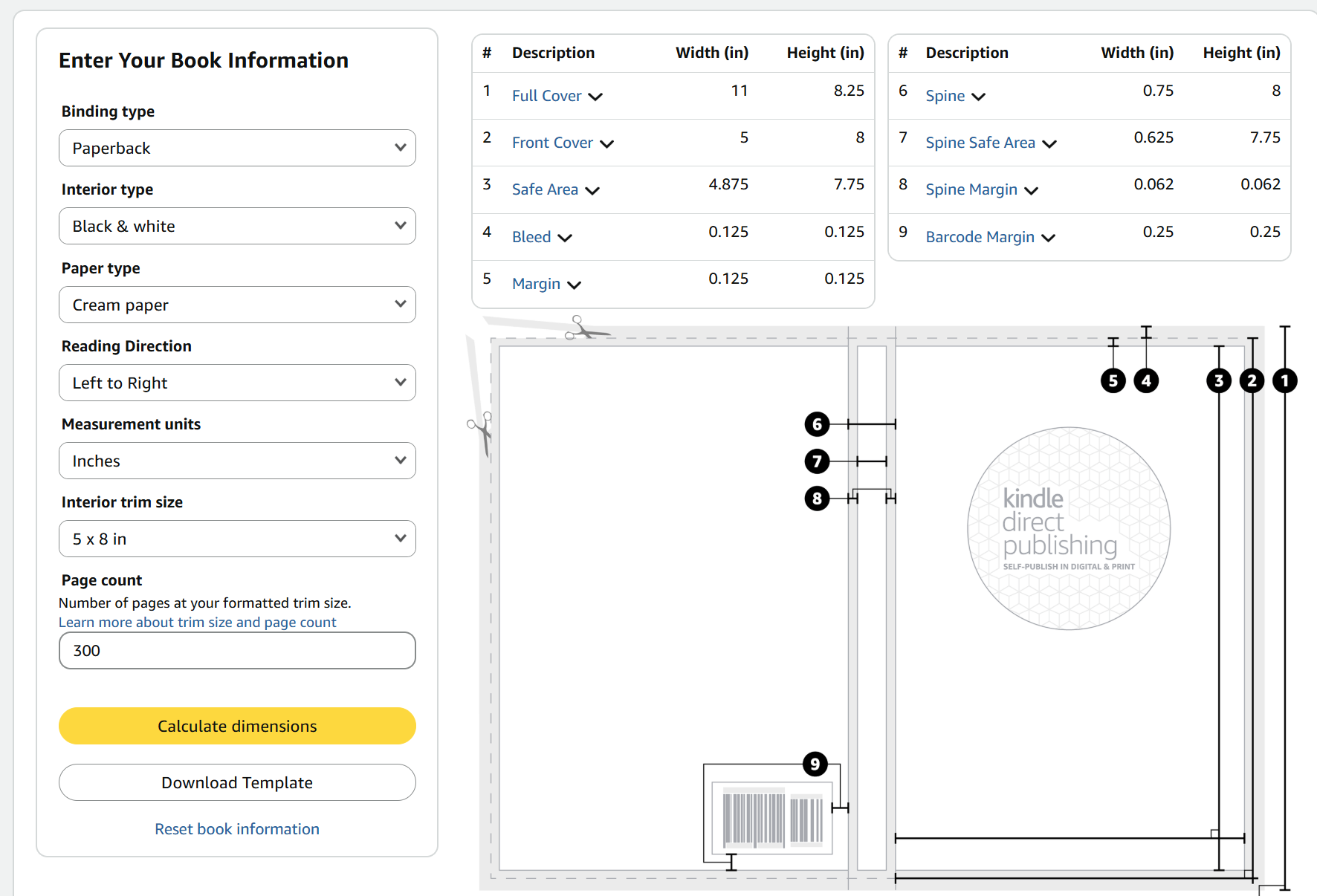
You’re going to Right Click on the jpg option and open it in Affinity.

This will be 600dpi. Your ebook cover is most likely not 600dpi. When you make a new canvas in Affinity, you can only go up to 400dpi, so all my ebook covers are 400dpi. For this reason, I resize this template to be 400dpi. Then, when I open my ebook cover and copy and paste it into here, I’m not stretching it to fit the 600dpi template.
To do this, go to Document > Setup > Resize > Document.

And then this box will pop up, and you do the drop-down thingie to change it to 400dpi, then click the ‘Resize’ button. (Technically, 300dpi is the KDP minimum requirement.)

Now you're going to save. File > Save As > Give it a title/put it in the folder you want it in. Affinity does not automatically save. You're going to get in the habit of saving constantly. It just becomes part of your workflow. Do not forget to keep saving!!! (I totally forgot to do this in the video.)
Next you’re going to open your paperback file. I prefer doing full wraps, which you may be able to do if you use gen-AI to extend your image, or if you used a cover artist, you could pay them to do it. (But keep in mind, you don’t make much money from paperbacks.)
If you don’t have the option for a full wrap, I’ll show you how to make a soft edge along the spine crease. I do this because Print On Demand (POD) printing is trash and it will never line up perfectly. Also, don’t be surprised if you order a copy of a book one day, order another one a month later, and it’s a completely different shade and lined up slightly different.
Oh, while we’re talking about colors: technically, anything that is printed should be CMYK. That’s what printers use. Screens use RGB. Your ebook cover file is probably RGB. But, it’s pretty much been agreed upon by indie authors and cover designers that KDP POD actually prints better if you use RGB. This jpg template is already in RGB, so you don’t have to do anything. Yay.
Next you’re going to go to File > Open and open up your book cover file. I made a random 5x8 book cover for this tutorial. While making it, I made sure to keep my text away from the edges. You might not have this luxury. If someone else made your ebook cover, they may not have left enough space for the paperback guide’s border. You may need to redo your typography. But for the purpose of this tutorial, we’re going to pretend your ebook cover was a perfect 5x8 and the text wasn’t too close to the edges. So yeah, go to File > Open, find your ebook cover and open it. Then copy and paste it into your paperback template. You will have to resize it just a tad and put it on the right side.
You have a Layers Panel on the bottom right in Affinity. Move the template to the very first layer and then drop the opacity so you can see your ebook cover and make sure all your text is inside the guides. If you’re like, “Layers? Opacity? WTF?” feel free to ask for clarification in the comments.

Yeah, that’s my warrior lady fake book cover. You need to have all your important bits inside the red border. This cover passes the border test.
Next we’re going to draw a box that will wrap around the spine and back cover. Go to the little rectangle draw shape option on the left side. Draw a box to line up with the front cover’s left edge, and then make the box a bit bigger than the top/bottom/far left edge. Click off the template in the layers panel (the little eye icon), so you can use the color match thingie (also on the right toolbar, it looks like a dropper), and color match to something on your cover, preferably something neutral that’s going to blend well. (After you click the color matcher tool, make sure you are clicked on the rectangle in your layers panel, or it won’t work.)

I went with this dark gray color. We’re going to keep it simple and just keep it this one solid color.
Make sure you’re clicked on the rectangle layer and go the FX icon on the bottom of the layers panel. Go to Gaussian Blur and blur it a bit. 3 should be good.

Click the little eye icon on your top layer where the template is, and then bump the rectangle over to line up with the dotted line. You can use the arrow keys on your keyboard. Click off the template. See? Faded edge.

So now when it prints slightly off it looks a tad better.
Now we have to tackle the spine typography and back cover blurb stuff. If you made your cover yourself, it’s easy to use the same fonts. If someone did your typography for you, you could ask for a png of just the title and possibly use that on the spine. I like doing all my typography myself, so it’s easy for me to make things match.
So anyway, do your best and use the Artistic text tool to type out the title for the spine and change the font using the drop down font options at the top. Then go down to the bottom right corner and click over to Transform and rotate counter clockwise 90 degrees.

Turn the top layer back on showing your template guide. Resize the title to fit the spine and centre it (the green line appears). Repeat all of that again for your author name.
Now we’re going to do the back cover blurb. Make sure your template layer is on. Draw a rectangle using the draw shape tool from the left toolbar and pick a bright color, like green. Perfectly line it up with the red guides of the template. I like to use the Navigator on the bottom right to zoom in and pull it right to the edge of the red border. I do this so I can properly centre the back copy text.

Now you're going to draw a box with the Frame Text Tool (toolbar on left side). Doesn’t matter where. Just somewhere on that bright green rectangle on the back. Then you’re going to copy and paste your blurb and slap it in that box. Make sure you’re clicked on the box in your layers panel and then choose your text’s color and font. I’m just going to keep it simple and use white and Times New Roman 12pt. Then you’re going to go to the text alignment at the top and choose Justify Left. Most trad pub books are done this way.

Make sure the Template is the very first layer and turn it on. You’ll see your borders and the yellow rectangle where Amazon will print your barcode. Move/resize your textbox until you like how it looks and then centre it on the bright green rectangle. You’ll see the green centre line pop up, and then you know you won.

Are you saving? Don’t forget to keep clicking SAVE.
Now go to your layers and get rid of that green box by turning off the eyeball. Do the same to the template. That’s it. That’s your very basic cover. You can add more stuff to it if you want, but for now we’re keeping it simple and stopping here.

Save it! Now export it. File > Export > Export.

New box pops up. On the left choose PDF (for print). Then go to the bottom right of the box and click Export.

Choose the folder you want to save it in/file name and click Save. There! You’re done!

r/HaremLitAuthors • u/Solomon_Ignis • Aug 06 '26
It's weird, but all these years later, I still struggle with the other parts of authorship. Building a patreon, social media, all of it.
For those that have built their following on those platforms, I have the rudimentary but honest question:
How did you do it in a mechanical sense? What were the nuts and bolts of building your following?
r/HaremLitAuthors • u/blaashford • Jul 31 '26
Use the discussion below to add more things that need clarified. We don't need to cover everything.
A2M: Ass to Mouth; Anal sex then oral straight after
AC: Author Central; where you set up and manage your Author Page on Amazon
ARC: Advance Reader Copy. A final version sent to readers in advance of the actual release. Cannot be explicitly in exchange for a review, but the understanding is there and most will.
BBEG: Big Bad Evil Guy; Primary book/series antagonist
DNF: Did Not Finish
Dubcon: Dubious Consent
FF or F/F: Female/Female; Two women having sex. Often conflated with them having an emotional relationship too. Doesn't have to be full lesbian (given the LIs have sex with the MC).
FtB: Fade to Black; no explicit sex scenes
HEA: Happily Ever After
HFN: Happily For Now
KDP: Kindle Direct Publishing
KENPC: Kindle Equivalent Normalised Page Count; the nominal length of your eBook, calculated because readers can change font size and thus the total pages. Somewhere around 250-300 words per page.
KU: Kindle Unlimited
LI: Love Interest
MC: Main Character
Noncon: Non-consent i.e. rape
NSA: No Strings Attached; Casual sex with a non-harem member
NTR: Netorare; Japanese term, can be simplified as cheating/cuckoldry
POV: Point Of View; Whether you're writing a book/chapter/section in First Person, Third Person etc
RFM: Romance for Men
RFW: Romance for Women
TBR: To Be Read
r/HaremLitAuthors • u/blaashford • Jul 30 '26
The Hard Rules can be found here. They're repeated below but in the unlikely event they are out of sync, the linked rules supersede the ones here.
A clarification post: https://www.reddit.com/r/haremfantasynovels/s/jjJTpg6eHU
These are NOT restrictions on what you can write and publish. They are restrictions on what you can promote in r/haremfantasynovels and the connected discord server, and have thus become the defacto genre expectations.
You can find their TOS here and their Content Guidelines here. These ARE restrictions on what you can publish on their site.
If the ebook is available on Kindle Unlimited, no more than 10% of the work can be available outside of KDP/Amazon. A recent exception has been made for ebook library copies. If you wish to make your ebook available for libraries, you can use Draft2Digital for distribution. You will need to mark it as 18+, which may limit which libraries accept it.
There are no publication restrictions for physical copies (paperback/hardcover). For example, you can have a paperback listed through Amazon, and also list the same paperback on other storefronts.
Amazon does not give a specific list, but here are some known topics to avoid when publishing using KDP: incest, pseudo incest, noncon, dubcon, mind control, sexual slavery, voyeurism, bestiality, knotting, forced breeding/heat, underage/loli, barely legal, ‘daddy/mommy’ in a sexual context, bodily fluids fetish content, etc.
Important: just because you see other books being published on Amazon with the above content does not mean it’s 100% okay to do the same. Amazon is notorious for letting ‘banned’ content slip through the cracks. It is possible they will remove your book(s), or terminate your entire account.
These are not rules that prevent you from promoting your works on the relevant places, but will get strong reactions from readers and may result in less sales or readers avoiding your future works. These are often referred to as Book Closing Moments/BCM.
These are things that aren't against the terms of service as written but could result in Amazon taking action, such as putting the work in Erotica, Dungeoning it, or even removing it. If you are in Erotica or the Dungeon, you will not be able to use Amazon ads for that particular book.
The ‘Dungeon’ means your book does not come up when searched for on Amazon, unless you have the exact title. This means pretty much no one finds your book. You can use Bookspry’s Dungeon Checker to see if your book is in the Dungeon, but it is not 100% accurate.
Amazon ‘rules’ can change without warning.
The general principle is: the more of these you break, the higher the risk. It's like a stacking debuff.
r/HaremLitAuthors • u/blaashford • Jul 30 '26
This is a checklist of things you must, should, or might want to do before launching your book. It's intended to serve as a reminder of ALL THE THINGS.
It's neither exhaustive nor prescriptive.
Please add your comments, corrections, additions, and discussion below so we can keep it updated
r/HaremLitAuthors • u/blaashford • Jul 26 '26
Hey everyone! I'm u/blaashford, a founding moderator of r/HaremLitAuthors.
This is our new home for all things related to writing and publishing in HaremLit. We're excited to have you join us!
What to Post
Post about your craft, your production, your marketing, anything to do with getting your work in front of as many readers as you can. Ask for advice, feedback, or guidance on how to navigate all the complexity. Give advice on the same either as comments or make your opinions known with a post.
Community Vibe
This is an author facing space. We're all about being authentic, friendly, constructive, and inclusive. Let's build a space where everyone feels comfortable sharing and connecting.
How to Get Started
Thanks for being part of the very first wave. Together, let's make r/HaremLitAuthors amazing.