r/Hubitat • • 3h ago

Homekey locks

2 Upvotes

I couldn’t really find anything online but I wanted to know if I could still use Apple Homekey through hubitat’s homekit integration. I don’t know if that makes sense… I bought an Aqara U400 for the UWB feature and homekey. Do you lose some of those features when you integrate into hubitat vs HomeKit?


r/Hubitat • • 16h ago

I just purchase a C8-Pro. I hate it.

0 Upvotes

Hello. I just purchased a C8-Pro, to replace a 10+ year old Vera hub. I only have a couple devices I need installed. A Yale door lock and some automatic blinds.

I'm shocked at how primitive the Hubitat interface is. It's worse than my Vera. I had this expectation that I'd install the Yale lock, get a nice interface, and I'd be happy. Just the opposite. Its terrible. I tried having AI walk me thru installing something pre-made, and after about an hour, I wanted to scream. I don't want to program anything. I dont want to tinker with it. I don't want to spend hours becoming a Hubitat guru. I want something that's just nice and works. I didn't think I'd be designing an interface. I'm not tech illiterate, I'm just not interested in applying much effort here.

Questions:

1- Have I purchased the wrong hub? What else instead?
2- Have users made nice interfaces I can just drop on top? Why didn't Yale make one? Did they? Where do I get them?
3- What am I overlooking? I'm finding it hard to believe everyone who buys this has to do this.

Thank you in advance for your replies.


r/Hubitat • • 2d ago

Using the source of the change of state in rules.

4 Upvotes

Is it possible to somehow use the source of the change of state to decide what to do in rules?
For example - if someone has physically switched a light off through the physical switch connected to the Zigbee switch, do one thing, if it's been turned off because it's going off as part of a scene or other reason decided by the hub, then either don't do anything or do something else...

The information is clearly internally available - it turns up in the device logs for example, but I can't see that it's accessible elsewhere....


r/Hubitat • • 6d ago

Anyone else have Xfinity MCT-350 Zigbee door sensors?

5 Upvotes

I bought a pack of 10 on ebay months ago and they pair great to the Hubitat. Instant communication with the hub when the door is opened or closed.

The problem I have is the battery lasts maybe two or three months tops before I have to replace them. I'm wondering if anyone else has these sensors and seeing the same issue. I'd like to know if these sensors just talk to much and I don't have it configured correctly or if I bought bad duracell 2450 batteries. On top of it all, the hub should warn me when I have low battery in a sensor and these sensors go from 100% to 0 instantly. There is no middle ground so I get no warning.

https://www.ebay.com/itm/193456529253


r/Hubitat • • 11d ago

I added Hubitat to my 3D floor plan home app, and I need Hubitat owners to tell me what's broken

7 Upvotes

I've been building an app called Home.io. It puts your smart home on a 3D model of your own house, so you tap the room instead of digging through lists. Lights glow in the rooms they're in, doors and locks show open or closed, and a leak or smoke alarm turns that room red.

It started on Apple Home and Home Assistant. The last update added Hubitat, and here's the honest part: I don't own a Hubitat hub. I built it against the Maker API, so I'd really like people who do own one to try it and tell me what's wrong.

How it talks to Hubitat:

Maker API, local only. You add Maker API on your hub, pick the devices, and type the hub's address, app ID and access token into Home.io. Nothing goes through a cloud of mine.

The token stays in the Keychain on that device. It isn't synced or put in backups, and it only goes to the address you typed.

Your Hubitat rooms become rooms on the model, and devices drop into them on their own.

It reads the hub every few seconds while the app is open.

Unlocking a door or opening the garage always asks for your PIN or Face ID first.

What it doesn't do yet: thermostats are shown but can't be set, and buttons, light color and hub variables aren't brought in.

Hubitat support is free, not part of the paid tier. The app runs on iPhone, iPad and Mac, and I use it on an old iPad on the wall that wakes up when you walk over. You get your house in by scanning with LiDAR, importing a Sweet Home 3D file, or drawing the rooms in the app.

https://apps.apple.com/us/app/home-io/id6823824273

If a device shows up wrong or doesn't show up at all, tell me the device and driver and I'll fix it.

r/Hubitat • • 12d ago

Has anyone triggered Hubitat rules from an outside webhook? Asking for a wand we built

2 Upvotes

Martin from Magic Wonders here, disclosure up front: this is our product.

We built Wand One, a wand that reads a gesture and fires a real trigger. Simple setups run through Alexa routines (that's what the video shows), advanced setups use IFTTT or webhooks.

We haven't tested it with Hubitat yet, so I'm curious how people here would wire something like this. Would you point a webhook at Maker API and let Rule Machine handle the rest, or is there a cleaner way? And what would you actually want a cast to do in your house?

If you want to see the rest of it, the Kickstarter runs until Nov 26: https://www.kickstarter.com/projects/magicwonders/wand-one-by-magic-wonders-where-magic-comes-to-life?ref=edgpo0


r/Hubitat • • 15d ago

when I “full reset” my C7 from the diagnostics tool menu, why does it not delete all the apps and drivers from my C7? is there a way to do a true factory reset?

4 Upvotes

r/Hubitat • • 14d ago

Brand new installation of homebridge is still showing all hubitat accessories! How do I get it to stop?

Thumbnail reddit.com
0 Upvotes

r/Hubitat • • 15d ago

Hubitat in 2026?

27 Upvotes

Hello!
I was a fairly early SmartThings user, and used Hubitat pretty much since the start. My Elevation #7 is still in use at my parents'. Now on my own and wanting to add some smarts to my apartment.

Is Hubitat still a good choice? Starting off with Zigbee lighting but will sprinkle some Z-Wave in there. Pretty much wanting to know what all has substantially changed since ~2020 and if it's still viable for new installs.

And yes, I’ll be updating the one at my parents soon :)


r/Hubitat • • 15d ago

External Dashboards

6 Upvotes

Ok I know we have Hubitat out of the box dashboards and a few others like sharptools.io but what would the community like to see in a dashboard offering?

Specially one that could run along side Hubitat and your other home automation gear locally?

I’m cooking up a few ideas but would love some additional inspiration. Especially the ideas that just don’t work with current dashboard offerings (Security cameras have been the worse for me! )


r/Hubitat • • 15d ago

Suggestions for a battery operated remote for devices

1 Upvotes

I am looking a battery operated remote for controlling 1 or 2 Z-wave devices. Something easy to carry and fit in a pocket. I was looking at a Zooz ZEN37. But is really meant for wall mounting and controlls 4 devices, costs quite a bit for what I am looking for and says it needs a custom driver for Hubitat.

Any other suggestions of something that might be a better fit for what I am looking for?


r/Hubitat • • 21d ago

Anyone got hubitat elevation to work on iPadOS 2.7

0 Upvotes

I can’t complete the software installation because non of the verification emails sent to my address reach me.

Has anyone got a solution?


r/Hubitat • • 21d ago

Anyone got hubitat elevation to work on iPadOS 2.7

0 Upvotes

I can’t complete the software installation because non of the verification emails sent to my address reach me.

Has anyone got a solution?


r/Hubitat • • 27d ago

I gave AI the keys to my hubitat. Here's the cleanup report.

44 Upvotes

I disabled the login for hubitat and let Claude loose on it. Now everything just works and the wife is happy! Really motivates me to install more smart devices now that management and reliability is vastly improved, I find myself wishing for a lot more automation now.

This was pretty much an automated process. I had to check if things worked periodically and report failures. For the motion sensor it asked me to stand in different places to collect data. Some rules/apps failed automatic updates, it gave me a link to my local hub and instructions to press "done" to enable it. In all it took about 3-5 hours (depending on how you count it), mostly all waiting for AI's next question. Pretty easy to do while playing some computer games - lol.

Claude summary below:

My smart home hub was quietly failing every night. An AI agent found out why.

I spent one long session letting an AI agent audit and tune up my Hubitat smart home hub. Here's what it found and fixed.

The audit turned up problems I didn't know about, and each one got fixed:

  • Three brightness rules had been failing every night for days, so my dimmers never got their settings. They're now replaced with one small app that works.
  • An app was rebooting the hub every night at 2 AM. It's been removed.
  • One setting made every light switch itself on after a power cut or restart. Lights now go back to how they were.
  • The sunset and sunrise floodlight rules were running from a stale saved copy of themselves. They're rebuilt as a small app.
  • Three dead devices, one empty rule and six paused rules were cluttering the hub. All removed.

Firmware updates broke the switches' links to the hub:

  • All seven Inovelli switches got new firmware. Afterwards, three of them silently stopped reporting:

    • one ignored its buttons
    • one stopped sending its radar data
    • one left the hub believing a light was on while it drew 0 watts
  • Each one had to be reconfigured to rebuild its reporting links with the hub.
  • Running those reconfigures and refreshes alongside the firmware updates flooded the Zigbee radio until it crashed. A hub reboot brought it back.
  • The fix is to do heavy radio work one device at a time, and to check each switch afterwards by comparing what the hub thinks against what the switch reports, such as power draw.

What got built or fixed:

  • Stair lighting: the switches have radar that tracks a person's position and height. The light now turns on when someone walks up the stairs, not down. A separate zone turns on the basement-door light when someone walks over to it.
  • Brightness schedule: morning 100%, evening 50%, night 24%, plus a 7–9 AM wake-up window for the bathroom.
  • Shortcuts and timers:

    • the small button on every dimmer jumps straight to full brightness
    • timed fan runs from the switch buttons
    • bathroom lights that turn off after an hour
    • a door-left-unlocked alert
  • Matching switches: every LED bar is now white at a dim 5% on and 2% off, instead of a mix of colors and brightness.
  • Upkeep: log noise cut from about 212 lines an hour to near zero, and the hub software updated after taking a backup.

The dashboards got rebuilt:

  • Two dashboards instead of one cluttered one. "Home" has what I check daily; "Lights & Fans" has every individual light and fan.
  • Home dashboard:

    • the front door lock
    • an "Indoor lights off" button (outdoor lights stay on)
    • a one-tap Lockdown button that turns everything off, locks the door and notifies my phone
    • a motion summary: first motion today, last motion last night, most recent motion, and the last activity on each floor
  • Button tiles that reset themselves. Each one is a virtual switch that switches back off on its own, with a proper icon instead of a generic toggle. It took four tries to find a tile setup the dashboard actually accepts.

What I'd do differently:

  • Back up and audit first. The first backup came after most of the changes.
  • After any firmware update, check every switch's reporting before moving on. Don't stack reconfigures on top of updates.
  • Re-read what each setting means before changing it. The power-cut setting above was one the agent had set itself.
  • Check the device itself, not the hub's cached values. The cache was wrong more than once.
  • Use small single-purpose apps instead of Rule Machine for scheduled jobs. Rule Machine kept running stale copies of its rules.

r/Hubitat • • 29d ago

Looking for Zigbee small plug in switch

4 Upvotes

Hi, am looking for Zigbee plug in switches that are small in size. I have some D-Link which are WiFi (they work ok, except one is broken)

Found these:

https://www.amazon.ca/BTSEURY-Monitoring-Overload-Protection-Zigbee3-0/dp/B0H4FPJV71

Never heard of the brand though, however they are a nic small size, and i have a D-Link which no longer works contacts no longer work).


r/Hubitat • • Oct 25 '26

Stop copy-pasting Groovy: a CLI workflow for deploying Hubitat apps, drivers, and libraries

4 Upvotes

I wrote up how we're using hubitat-deploy to reduce the copy/paste cycle between a local Groovy repository and the hub.

Repository (my project, MIT licensed): https://github.com/gilderman/hubitat-deploy

Full walkthrough: https://iliagilderman.substack.com/p/stop-copy-pasting-groovy-a-deployment

The basic loop is: edit locally → inspect with hubitat parse → hubitat push → verify with hubitat status and hubitat diff. Uploads are ordered libraries, drivers, then apps. First-time app instances can be created with hubitat install or push --install, but you still need to configure them and click Done.

One distinction that tripped up the workflow: the version number returned by a hub save is a concurrency token, not the application's release version. We keep an appVersion() string in the source, align it with the HPM manifest when applicable, and compare source as well as version labels.

Install from the repository with npm install -g . (Node 18+). Configure a gitignored .hubitat.json or HUBITAT_HOST / HUBITAT_USER / HUBITAT_PASS environment variables. It doesn't automatically load .env files.

Testing has limits: hubitat test always runs the CLI parser tests, and can optionally run per-project specs using biocomp/hubitat_ci. A successful parser test isn't proof that the app itself was tested; missing sandbox prerequisites can result in a skip. Uploads compile on the hub but don't prove physical-device behavior.

This is a local CLI foundation for CI/CD, not a ready-made GitHub Actions pipeline. A runner needs access to the hub. The tool uses undocumented admin endpoints, isn't affiliated with Hubitat, and sequential uploads aren't transactional.

How are others handling the Git-to-hub gap? Is a reliable local deploy-and-compare command enough, or have you found a useful test gate before automating deployment to a hub controlling your house?

Disclosure: this is my project and article. AI assisted development (Cursor is credited in the repository), and AI helped draft the article and this summary.


r/Hubitat • • Oct 25 '26

Is the Hubitat app pretty much useless?

13 Upvotes

Maybe I am missing something, but nothing seems to want to work

For starters... a basic light. It says "Kitchen light 100%" when the light is turned off. I can tap to toggle it on and again for back off and there's never any visual indication if it is off or on. "Light 100%" means it is off or on.

Then there's the :(. I don't get it. I add a garage door opener. I can open the web page on my laptop and there are the options "open" "close" etc

But the mobile app is just a red box that says :( and when you tap it says "missing attributes: door"

Like I said maybe there's a huge disconnect and I am missing something... but I'm not sure how you are supposed to use this in any productive way.


r/Hubitat • • Oct 22 '26

Virtual switches for control (might also be called "Scene")

2 Upvotes

Hi, i have many remote devices in Hubitat, they have on/off, dim and color settings. Is there a good way / plugin for me to create "Virtual" switches, so i might have 3 lights, in that virtual switch, when it turns ON / OFF they all do that, then DIM the same for all lights also able to set a color for ON (as i notice a few lights will reset the color if the power is lost).

I can then create a dashboard with just the virtual switch on it and have real remotes that interact with the virtual switch. I suppose you could call these "scenes" as well.. am looking for an easy way to manage them so it doesn't turn in to loads of coding in creating an icon.


r/Hubitat • • Oct 11 '26

Anyone used the ENVO small remotes?

3 Upvotes

Hi, looking at the ENVO remotes, they do a few of them, am looking at the 4 zone, which has on / off for each zone then holding each on / off will send "dimmer" updates (increase or decrease level), they look good and no bridge as they are ZigBee directly.

https://envolighting.com/products/control-gear/EV-ZB9001K12-DIM-Z4


r/Hubitat • • Oct 09 '26

Looking for smart lock recommendations for my Front Door/ Back Door

4 Upvotes

Hi folks,

I have a Hubitat C-5 and want to replace my existing Smart Locks which are over 5 years old and went bad. I’m looking for new locks that will:

  1. Work with Hubitat, in particular through the app that controls entry codes
  2. Is available on Amazon
  3. Either Z-wave or Zigbee, though Zigbee is preferable as it seems to work better in my house
  4. Does not require me to move my Hubitat away from its natural location all the way to the door to pair
  5. Will work with Alexa through Hubitat

r/Hubitat • • Oct 05 '26

Hubitat C-8 trying to add an Aeotec DSD37. Helping a friend

1 Upvotes

Friend bought a house that has fairly extensive automation. I believe the previous owner ran Home Assistant, but took his fairly extensive media, automation and security servers with him. He did leave a reasonably good document listing smart devices and what they control.

I recommended the C-8 to get him started, and showed him how to add devices. He’s been plugging along and I’ve helped him setup some automations and got him started doing his own. So far so good.

Until we came to some Aeotec Zwave repeaters that are supposed to provide access to devices in the attic. Some leak detectors, thermometer/hygrometer and gable fan.

He couldn’t add them. I went to his house and couldn’t add them. I brought them home and tried to add them to my C-7 and both C-8s with no luck.

Factory reset and it starts blinking. Start inclusion and push the action button and nothing happens. Try exclusion and repeat the attempted inclusion with no joy.

Is there an incompatibility I’m missing?

I’m thinking I’ll tell him to get one or two Zwave outlets and use them to extend the network, but I’m pretty hard headed and want to make the existing hardware work if at all possible.

Thoughts?


r/Hubitat • • Oct 03 '26

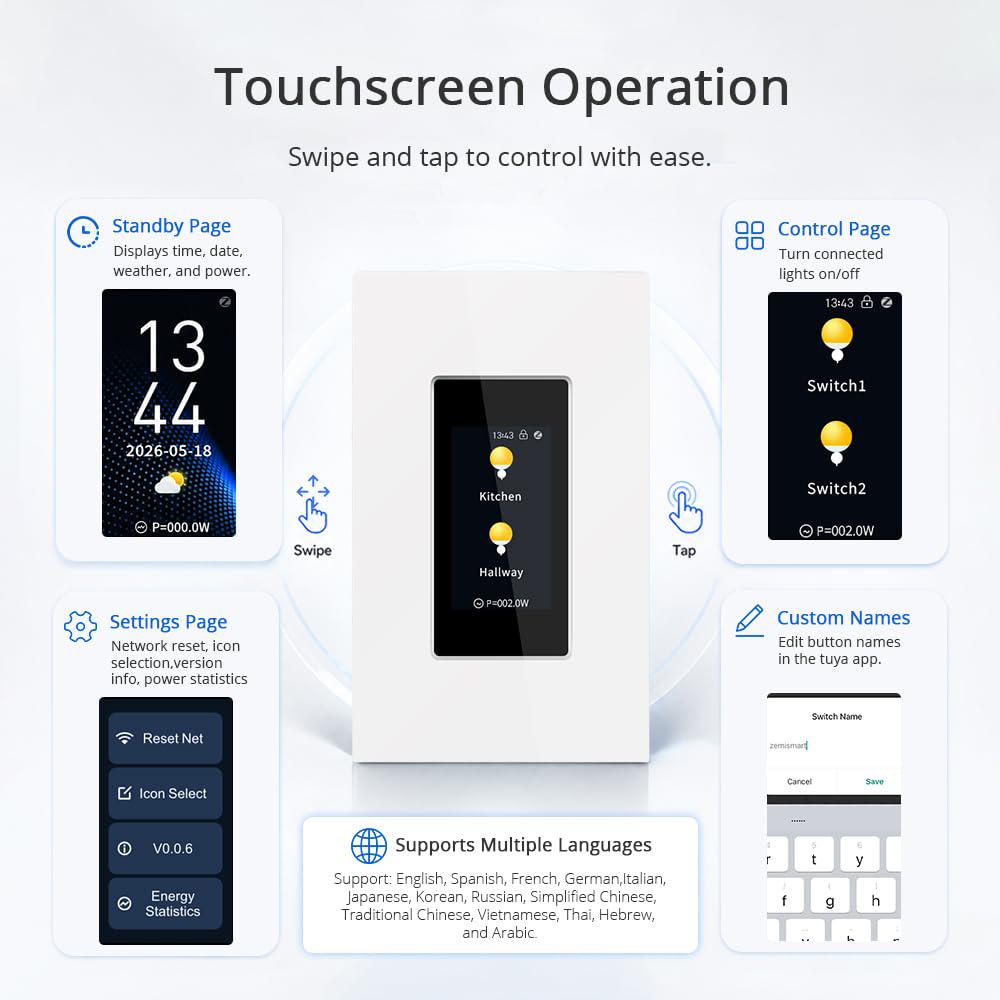
Decora (US) 1gang LCD touchscreen zigbee dimmer

Post image
8 Upvotes

Hi, anyone seen these? good price, 1 gang box size but can control 2 lights, switches, and dimming, also has power monitor.

https://www.amazon.ca/Zigbee-Touchscreen-Switch-Monitoring-2-Gang/dp/B0H6J5BCF9/ref=sr_1_25?sr=8-25


r/Hubitat • • Sep 21 '26

help me understand the Inovelli Blue Series Dimmer Switch

Thumbnail reddit.com
3 Upvotes

r/Hubitat • • Sep 09 '26

How hard is it to move from ST to Hubitat for simple switches...

7 Upvotes

I was using SmartThings with no issues for years until last week Samsung randomly decided to deactivate my primary email address. My smartthings is still working but I can't log into it so can't make any changes to my Z-Wave switches. I was thinking of picking up a C7 off ebay for $35 (actually already purchased) and was going to move these switches over to Hubitat. I am not looking for any complex automation, I just want to control my old GE Z-Wave switches. New switches, I've been buying Kasa and Tapo but have like 15 GE switches that still work. I am not looking for a hobby so nothing overly complex, just get everything working again, I think HA is more powerful than what I need.