r/HyperV • • 5d ago

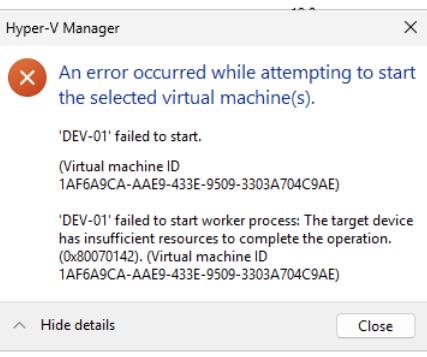
Hyper-V Refuses to Start

Cross post for visibility. Could use some advice here, I’m at my wits end.

3 Upvotes

15 comments sorted by

5

u/BlackV 5d ago

what is your vm config ? specifically memory (startup bytes, assigned, etc)

what happend when you lowered the ammount of ram allocated ?

how many CPUs?

dual channel

1

u/igrowpineapples 5d ago

Baremetal host:

- Dell PowerEdge R730 with 2x Xeon E-5 2687W v4 CPUs
- 256GB RAM Dual rank @ 2133MHz (16GB sticks)

VMs:

GitLab: Static, 16GB, 4 vCPUs
Homeridge: Dynamic, Startup mem 1GB, max 8GB, 4vCPUs
Plex: Same config as Homebridge
Technitium: Same config except 2vCPUs instead of 4
Windows VM: static, 32GB, 12 vCPUs
DEV-01: Static, 64GB, 24 vCPUs

All machines startup delay at zero, haven't touched memory or CPU priority settings either.

From what I know the vCPU overcommit shouldn't be producing this error, and it seems like memory related because it goes away if NUMA spanning is turned on? Correct me if I'm wrong. Total current assigned memory is just over 50GB. I get that there's a reservation of 8GB for the dynamic VMs but.. shouldn't this just shuffle machines around at startup?

5

u/intersectRaven 5d ago

Lower the vCPU count on the DEV-01 machine to fit 1 of your Xeon E-5 2687W v4s. Right now you set it to 24 but 24 is the maximum THREADS it can run so it's not assured that the VM will run everything on 1 physical CPU. Either that, or accept the slowdown associated with NUMA spanning and enable it.

5

u/igrowpineapples 5d ago edited 5d ago

That hurts my brain.

Xeon E-5 2687W v4s are 12c/24t, the VM being assigned 24 vCPUs is 50% of the system resources according to the window in HV, and it runs normally by itself.

This just baffles me, but you're right - lowering it from 24 to 12 lets it start. Why Can't I assign 24 if the physical CPU is 24t? I thought a vCPU was equivalent to a logical processor on the physical. Where am I misunderstanding?

Edit: never mind - I see, HyperV prevents overcommit of vCPUs with NUMA spanning off. Just the software doing what it should and me not knowing that one small detail.

5

u/krisdb2009 5d ago edited 5d ago

BTW, you only want to assign a VM as many cores as it really needs to fit its workload, there are some interesting reasons why to do this (NUMA locality, etc) Also, the host OS itself is technically a VM on the Hyper-V stack so it may be worth setting it’s CPU core count appropriately too. There is a BCDEDIT command to do that as well.

https://learn.microsoft.com/en-us/windows-server/virtualization/hyper-v/manage/manage-hyper-v-minroot-2016

https://techcommunity.microsoft.com/blog/windowsosplatform/cpu-oversubscription-and-new-cpu-jitter-counters-in-windows-server-2025/4392604

1

u/igrowpineapples 5d ago

The host.. what..? Okay. That’s strange. Doesn’t seem to have been my issue but good to know.

So I expanded a bit down below but the Dell PE is essentially my only computer. It runs Windows Server 2025, and I have a few virtual machines for homelab services and I thought I’d give myself essentially half of the Dell as a daily driver PC (one whole CPU of allocation plus 32-64GB of RAM). I do a bit of video editing, a bit of gaming, some toying around with my own (admittedly terrible) coding projects..

The two that had high CPU allocation are the two that I expect to be remoted into and using multiple applications at a time, which is why I figured a few extra threads would help those machines.

Everything else is pretty light, unless you’re suggesting that I could lower them to even 1-2 vCPUs each (maybe not plex, I don’t know?).

This is all my first delving into virtualization really so I’m learning as I go

2

u/krisdb2009 5d ago

Yea it’s a cool tidbit, when you install the Hyper-V role, windows switches out the boot sequence to start Hyper-V first (hence why Hyper-V is considered a bare metal hypervisor) then Hyper-V will virtualize the host OS but seamlessly pass everything through (USB, mouse, keyboard, video, etc)

It’s even more fun when you see that Windows 11’s “virtualization based security” uses Hyper-V under the hood, so most factory installations of Windows 11 are really virtualized VMs.

Just for extra fun, the XBOX shell and games are all virtualized as well in Hyper-V.

Microsoft really put all their eggs in the Hyper-V basket. Occasionally when I hear about how Hyper-V isn’t “production ready,” I just laugh.

1

u/igrowpineapples 5d ago

I did actually know about the Xbox consoles. They have been for like a decade, that’s how they got the backward compatibility working so easily - not even emulate, straight up simulate the right Xbox version. Brilliant.

Did not realize that about the role on server OS as well though. I suppose I really should read the docs instead of just wading into the deep end.

2

u/FiRem00 5d ago

Hello “cpu wait”

1

u/DependentResident116 5d ago

There is no reason to turn off numa spanning unless you run highly specialized low latency applications. Binding a VM to a numa node only improves memory latency in the fringes.

And mostly usefull if you have multiple sockets in a server.
And what the guys below me said, you want a VM load not exceed average 25% CPU load while keeping the cores per VM to the minimum.

1

u/igrowpineapples 5d ago

Honestly I’m just dicking around.

People are going to say ‘don’t’ but I’ve installed an RTX 3060, a few SAS SSD’s and shitton of RAM. All of it was free to me so it’s become my gaming rig. In this hyper-specific use case I do believe that the latency does matter, no?

I do use it for other home services as well which is why I’m virtualizing Win11 Pro. I was really fiddling with settings to see what type of performance I could squeeze out of the old chips with the new GPU, they severely bottleneck it lol.

I will keep that in mind for future though, and now knowing it won’t let me commit more than I have with NUMA off explains a LOT

1

u/DependentResident116 4d ago

Dicking around is the best way to learn. Especially on hyper-v. Ive (professionally) maintained fail-over clusters and storage space direct clusters for over 10 years, mostly learned from just doing.

Hyper-V is perfect for the usecase, just slap hardware together and it will run. I would say messing with NUMA nodes on a single socket PC/Server is just not worth it, but then again you did learn some valuable lessons already!

Good luck with your hyper-v endeavors !

1

u/Mehere_64 5d ago

Target device has insufficient resources to start. Figure out what you are over allocating.

-2

u/igrowpineapples 5d ago edited 5d ago

Thanks captain obvious lol; I didn’t know what I was over-allocating. The answer is NUMA spanning off means you CANNOT overcommit vCPUs which is both not obvious if you didn’t read the entire documentation and not mentioned in the error that just says “not enough resources”. In my brain NUMA spanning is just whether the machine can span nodes, not a hidden toggle that also disables having more vCPUs than you have CPUs. I get that I can’t assign say 36, because the CPU only has 24. It made ZERO sense to me that I had plenty of RAM but couldn’t allocate a 49th vCPU.

1

u/batezippi 4d ago

I believe in server 2025 numa spanning is disabled by default which prevents cpu overcommitting. Wasn’t the case before.
I think you need to reenable numa spanning