r/IntelliJIDEA • • 7h ago

New plugins settings format: anyone really finds it convenient?

7 Upvotes

Am I the only one thinking that the new way Settings / Plugins is organized is way more confusing than it used to be?

I don't understand why Jetbrains is changing features that work perfectly well instead of fixing the large number of bugs that have been sitting there for months or even often years. I already saw that with this new UI that tries to mimic Visual Studio Code, the non-modal commit window, and now this, although this is minor in comparison.

As I explained in the issue below, plugins were perfectly organized before, but now they're all put together, installed or not.

It's not possible not to install AI plugins and others, either (they're installed preemptively, it's not possible to uninstall them). Maybe that was the intent?

What a mess...

https://youtrack.jetbrains.com/issue/RUST-21660/Plugins-settings-are-very-confusing-in-2026.3.1


r/IntelliJIDEA • • 12h ago

IntelliJ-Community (Open Source) 2026.3: missing ANT plugin

2 Upvotes

The open source version of IDEA 2026.2 supported the ANT plugin, but the 2026.3 seems not able to find it any more. Was this an intentional change?


r/IntelliJIDEA • • 1d ago

What are some lessons you've learned while building complex IntelliJ Platform plugins?

2 Upvotes

I've been developing an Android Studio plugin called LeakLens, and working on it has given me a much deeper appreciation for the IntelliJ Platform.

The plugin started as an experiment to make Android memory leak investigation easier directly inside the IDE. It has gradually evolved into a more involved developer tool with several integrations:

  • External process integration through ADB.
  • HPROF parsing and heap analysis using Shark.
  • Code inspections using UAST.
  • Background analysis and asynchronous operations.
  • IDE tool windows, navigation and UI integration.
  • AI-assisted analysis and fix suggestions.

One thing I've realised is that building a plugin with a few actions and tool windows is quite different from building something that needs to run substantial analysis without disrupting the developer's workflow.

I've had to think about background task management, threading, IDE lifecycle, compatibility across Android Studio versions, and keeping external process execution reliable.

I recently presented the project at Droidcon India 2026, and it made me interested in learning more from people who have spent years building IntelliJ-based plugins.

A few questions for the community:

  1. What architectural patterns do you recommend for plugins that perform long-running analysis?
  2. How do you handle compatibility across different IntelliJ Platform versions without making the codebase difficult to maintain?
  3. What are your preferred approaches for integrating external command-line tools and managing their lifecycle?
  4. Are there any common plugin development mistakes that become painful as a project grows?

I'd particularly appreciate perspectives from developers who maintain mature IntelliJ Platform plugins.

Always interested in learning from people who know this ecosystem better than I do.


r/IntelliJIDEA • • 1d ago

Share a Local Folder Over HTTPS Without Deploying

Thumbnail instawormhole.com
0 Upvotes

r/IntelliJIDEA • • 2d ago

I built a modern terminal in Kotlin: Meet KetraTerm

Thumbnail gallery
0 Upvotes

Hey everyone!

I've released KetraTerm 1.0, an open-source terminal emulator written in Kotlin, and it's also available as a plugin for JetBrains IDEs!

KetraTerm has its own terminal engine and custom Swing renderer, designed to handle everything from everyday shell commands to demanding TUIs and coding agents.

Besides modern terminal compatibility, I've been working on features that make using the terminal inside an IDE more convenient:

  • Smart suggestions: Complete commands, arguments, paths, Git branches, and more. The engine also learns from successfully executed commands and your usage to improve future suggestions.
  • Project-aware completions: Suggestions can include files from your IntelliJ project, with optional inline completions.
  • Sticky command headers: Keep the command that produced an output visible while scrolling through it.
  • Command navigation: Jump between commands, select entire command blocks, and copy or export their output.
  • Customizable prompts: Choose between gutters and dividers, with visual indicators for failed commands.
  • Notifications and progress: Get alerts when long-running commands finish, along with terminal notifications and progress indicators.

On the compatibility side, KetraTerm supports Kitty keyboard, partial Kitty graphics with image rendering, Unicode 17 graphemes, TrueColor, modern underline styles, hyperlinks, synchronized output, and more.

The plugin adds its own terminal tool window, integrates with IDE settings and themes, and lets you open terminals directly in project directories.

I've also spent a lot of time on performance, particularly responsiveness and reducing JVM allocations. KetraTerm renders directly from its terminal grid, updating only the parts that have changed when possible.

The project is open source under the Apache 2.0 license, and development is ongoing. Contributions are very welcome!

I'd really appreciate feedback from users, especially anyone working with complex TUIs or coding agents. I'd love to hear how it works with your usual workflow and what could be improved!

JetBrains plugin: https://plugins.jetbrains.com/plugin/32589-ketraterm/

Website / Downloads: https://ketraterm.github.io/KetraTerm/

GitHub: https://github.com/ketraterm/KetraTerm


r/IntelliJIDEA • • 3d ago

Unable to disable features is dusgusting

0 Upvotes

I have 100+ big projects on my laptop. I switch between them once in a while. Every time i open something it just spells -5% on my battery instantly. Fan is blasting heat.
Any attempts to stop this behavior only costed me hours of pointless investigations with no result.
I only need 10% of essential features product provides. Like file tree navigation, git UI and syntax highlight. I don't need IDE to understand the code anymore. AI is doing it instead. And not the one built into the product. So please add a few more switches to your neat 10k+ parameters settings dialog. So i can disable most of it.


r/IntelliJIDEA • • 4d ago

A GitLab MR plugin for IDEA that also handles the part after merging — so you don't have to open the browser

2 Upvotes

My usual GitLab MR loop in IDEA kept getting interrupted: open the browser for diffs, open it again to comment, open it to read a failed pipeline's log, and then after merging go

back to the terminal for git fetch, switching branches, and deleting the merged local branch.

So I wrote a plugin that keeps the whole loop inside the IDE.

What you can do without opening GitLab

- List — filter by state, search across IID/title/branches, paginated loading

- Details — Overview, Markdown description, Discussions, Changes, CI tabs

- Review — read threads, reply, resolve/unresolve, like toggle, post comments

- Diff — per-file unified diff, comment on a selected line, generate a suggestion block, viewed marks that invalidate on new commits, or open the pair in IDEA's native diff

- Actions — merge, squash and merge, approve/revoke, close/reopen, draft/ready, rebase, set reviewers

- CI — every pipeline tied to the MR (including the one that runs on the target branch after merging) with its jobs; play/retry/cancel a job, retry or cancel a whole pipeline, watch

a pipeline and get a notification when it ends, and read coloured job logs with Ctrl+wheel zoom

- Create MR — branch drop-downs tagged local / not pushed / remote-only, target suggested from the branch prefix, automatic git push -u for unpushed commits (never forced — a

rejection stops and asks you to pull first)

- After merge — automatic fetch, plus optional checkout of the target branch and deletion of the merged local branch

How it differs from the bundled GitLab plugin

It doesn't replace it — both can be enabled at once, and it never modifies the bundled plugin's files. The differences are mostly about cleanup and dependency footprint:

BundledThis plugin
Local Git refresh after mergeDoesn't refresh (I verified: its merge path only updates MR data)Syncs the matching repo, fetches the rest in the background
Checkout target / delete merged local branchNot supportedOptional toggles, off by default
Creating an MR from an unpushed branchWon't push for youAutomatic git push -u, never forced
Implementation—Zero third-party deps, platform APIs only
Diff review maturityMore complete (draft comments, one-click suggestion apply)Basic; no draft-comment UI
AuthenticationOAuth + multiple accountsPersonal Access Token only, single server

My honest take: the bundled plugin is better for day-to-day review. What I add is the local side of merging, plus keeping the flow inside the IDE. If the bundled one is enough for

you, it's the lower-maintenance choice.

Still requires a browser (not pretending otherwise): resolving merge conflicts, editing CI config, labels/milestones, issue linking.

Java 25, no third-party dependencies, 29 test classes covering the pure logic (parsing, state classification, rendering).

- Marketplace: https://plugins.jetbrains.com/plugin/36206-gitlab-merge-tool

- Source: https://github.com/hakil/GitLabPlus

I'd like to know: is this "bundled plugin + local cleanup" positioning actually useful to anyone else? And which steps still force you into the browser?


r/IntelliJIDEA • • 6d ago

(Off-topic) Gotta admit, this splash screen slaps

Post image
0 Upvotes

It looks like the old "We're watching you" tech maintenance idents from the channel 2x2, which was basically a Russian copy of Adult Swim and was also overly creative (yet minimalistic) with its graphics. In these idents, there were also usually sorts of old-school scientific or surveillance themes.


r/IntelliJIDEA • • 8d ago

Github copilot chat on windows using greyscale instead of subpixel font rendering

1 Upvotes

Hello everybody, I've noticed that text is kinda blurry in github copilot chat window
I've realised, that it's because greyscale font smotthing is used instead of subpixel (default for windows).

So I wanted to ask:
Anyway I can change this?

Github copilot plugin version: 1.21.1-261
Intellij version: 2026.3

Thank you and have a nice day


r/IntelliJIDEA • • 10d ago

I built an IntelliJ IDEA plugin for running HTTPie requests from the editor

Thumbnail reddit.com
3 Upvotes

r/IntelliJIDEA • • 11d ago

I stopped reviewing pull requests in browser tabs and moved the whole review into IntelliJ

4 Upvotes

Reviewing PRs has become the hardest part of my week. There are more of them, most of the code is written with AI, and it usually reads fine line by line. What I actually need to check is the structure: who calls the function it changed, does it fit how the code already works, did it add a helper that already exists somewhere else.

The diff page can't tell me that. My IDE can. So I built a plugin that brings the review into the window I already have open.

How it works:

  • Pick a PR from a list in the IDE and press Start review. Your unfinished work goes into a named git stash, and the PR is checked out read-only.
  • Read full files with the changes in the gutter. Go to definition, find usages and tests all work, because it's real code.
  • When the PR changes a function, a note next to it says how many places outside the PR use it. Open it, read each place and tick it off (Python, Java and Kotlin for now).
  • Everyone's GitHub comments sit under their lines. Reply, resolve or suggest a fix right there.
  • Stacked PRs show as one card in build order, and each one is reviewed on top of the one below.
  • Finish review posts everything to GitHub as one review, and you're back on your branch with your work restored.

The video is a 2-minute tour. It's free and open source, works in IntelliJ IDEA, PyCharm, WebStorm and GoLand 2026.1+, and needs git and the GitHub CLI. Links are in the first comment.

What still sends you back to github.com when you review?


r/IntelliJIDEA • • 11d ago

I made a plugin that shows git branch + terminal status (⏳/✓) in IntelliJ project tabs

1 Upvotes

When you merge project windows into tabs on macOS, every tab is just a folder name. I kept clicking through tabs to find the right branch, or the one still running a command.

Branch Tab Title appends the branch and a busy/idle marker to the window title:

d ✓ release a ⏳ feature/PROJ-123_add-login

- Branch read from .git/HEAD (worktrees supported), refreshed every second

- ⏳/✓ comes from your terminal tab titles (zsh / tmux / Claude Code hook examples in the README)

- Optional regex to shorten branch names (feature/PROJ-123_add-login -> PROJ-123 add-login)

Caveats: it uses internal IntelliJ APIs, so it may break on IDE updates. Tested on IntelliJ IDEA 2025.3 (macOS, Classic terminal).

Marketplace: https://plugins.jetbrains.com/plugin/35988-branch-tab-title

Source (MIT): https://github.com/seunggabi/intellij-branch-tab-title

Feedback and PRs welcome.


r/IntelliJIDEA • • 12d ago

For when you have to use VS Code: I ported the Islands theme by generating it from IntelliJ's color schemes

Post image
4 Upvotes

I love the new Islands theme, but some projects (and some colleagues) push me into VS Code from time to time. The existing "JetBrains" themes there never looked right to me, so I built one that's generated from the IntelliJ Community sources instead of eyeballed.

The part I found interesting: getting the colors right meant reimplementing IntelliJ's attribute lookup. A scheme first checks the key, then its fallback chain (e.g. METHOD_CALL_ATTRIBUTES → DEFAULT_FUNCTION_CALL → DEFAULT_IDENTIFIER), and only then asks its parent scheme. Bundled parents behave a little differently. Example: Darcula explicitly defines STATIC_METHOD_ATTRIBUTES as "italic only". That beats Islands' DEFAULT_STATIC_METHOD, which is why `Objects.requireNonNull(...)` is white italic in IntelliJ and not blue. A theme built from a color picker gets exactly these details wrong.

What's in it:

- Islands Dark + Islands Light, editor and UI (main window, tool windows, popups, VCS and diff colors, console palette for the terminal)

- Java/Kotlin as in IntelliJ, with semantic colors when you use JetBrains' "Java and Kotlin by IntelliJ IDEA" language server in VS Code

- Python as in PyCharm, TS/JS/CSS as in WebStorm, Go as in GoLand, Rust as in RustRover (PHP and C/C++ approximated)

The same goes for navigation: I also made a small plugin that brings IntelliJ's "7 usages" / "1 implementation" / "↑ Interface" hints and Go to Test to VS Code: https://marketplace.visualstudio.com/items?itemName=andreashuthe.intellij-java-kotlin-navigation

Theme (free, Apache 2.0):

- Marketplace: https://marketplace.visualstudio.com/items?itemName=andreashuthe.intellij-islands-theme

- Open VSX: https://open-vsx.org/extension/andreashuthe/intellij-islands-theme

- GitHub: https://github.com/andreashuthe/intellij-islands-theme

Not affiliated with JetBrains. Just someone who misses IntelliJ when they're not in it. Feedback welcome!


r/IntelliJIDEA • • 12d ago

I made a Custom Splash Screen plugin so you can set now anything

4 Upvotes

r/IntelliJIDEA • • 12d ago

How to make IntelliJ Call Hierarchy prefer project source over Maven dependency?

1 Upvotes

I'm trying to improve navigation in IntelliJ IDEA when working on an application and a library at the same time.

Scenario:

  • My application depends on library version 0.0.2 through Maven.
  • I also have the next development version (0.0.3-SNAPSHOT) of the same library imported as a project in the same IntelliJ window.
  • The classes and methods involved still exist in both versions.

When I use Call Hierarchy (Ctrl+Alt+H) on a method, I get two different behaviours:

What I want:

methodA()
-> methodB() (resolved to 0.0.3-SNAPSHOT project sources)

A single hierarchy entry that resolves to the actively developed library module.

What I get without the module dependency:

methodA()
-> methodB() (resolved from 0.0.2) 
-> methodB() (resolved from 0.0.1)

The same method appears multiple times because IntelliJ resolves it from different library versions/JARs.

The problem is that adding the module dependency gives the navigation experience I want, but it also causes runtime issues because both the module and Maven artifact end up on the classpath, resulting in duplicate resources detected by tools such as Liquibase.

My goal is:

  • Keep the application running against the Maven dependency.
  • Keep the library project open in the same workspace.
  • Have Call Hierarchy prefer the module source version and avoid showing duplicate entries from multiple dependency versions.

Has anyone found a clean IntelliJ setup for this? Is there a way to make hierarchy/navigation prefer workspace modules while keeping runtime dependencies untouched?

Intellij IDEA 2026.2.3


r/IntelliJIDEA • • 12d ago

What code colour scheme do you use?

2 Upvotes

I personally find the default dark mode not good, variables have different colours, methods same colour as variables and etc...

I like Visual Studio (C#) style but i want every programming language to have its own separate colour.

Any better scheme plugins for Java?


r/IntelliJIDEA • • 13d ago

I made a plugin that warns you while typing when a change breaks your library's API

0 Upvotes

If you publish a library (open source or a shared module other teams use), some changes look harmless and still break every client: `int count()` → `long count()`, `send(String)` → `send(CharSequence)`, a new method on an interface, a renamed Kotlin parameter.

Bumpwise compares the code you're editing with the last published release (Maven Central, Nexus/Artifactory, npm, Go proxy, Packagist, crates.io), highlights what breaks, and offers an Alt+Enter fix that keeps it compatible, or "Bump the version". It also suggests the next version and drafts the changelog. No build, no config, runs locally.

Free for Java on Maven Central; Kotlin, TS/JS, Go, PHP, Rust and private repos are in the paid Team edition (30-day trial, free for OSS maintainers). Built with help from AI coding agents, tested against real releases.

https://plugins.jetbrains.com/plugin/35935-bumpwise

Feedback welcome, especially false positives.


r/IntelliJIDEA • • 13d ago

I made a plugin that draws a sequence diagram from any method, right-click and it's there

Post image
17 Upvotes

Call Sketch is a plugin I built for IntelliJ and the other JetBrains IDEs. Right-click a method, pick "Call Sketch: Draw Sequence Diagram", and it draws what that method calls, and what those calls call, as deep as you want.

Click any box or arrow and the editor jumps to that line of code.

Free for Java, Kotlin, TypeScript and JavaScript, no depth limit. You can hide getters and setters, private methods, constructors or whole packages, and export to PlantUML, Mermaid, SVG or PNG.

https://plugins.jetbrains.com/plugin/35865-call-sketch-sequence-diagrams


r/IntelliJIDEA • • 14d ago

Air using tokens while idle

0 Upvotes

Is anyone else noticing that in Air, Claude (and possible Codex) is consuming usage from their account while idle?

I went took a break for about 45 minutes. My Claude went from 32% 5 hour, 39% weekly to 36% 5 hour, 40% weekly used.

I read that there is a timeout setting internally somewhere, but I don't think it can be set manually.

In the Services panel, I can see codex-mcp-client and claude-mcp-client
They are not running any tools, but the timer is up to 3.5 hours. and I can't see anywhere to kill them.

I don't have Claude desktop open or any other desktop AI tools at all.
I double checked that there is no other access to my account. I've made sure to close the chat windows, mark sessions as Done.

I've taken to logging out of Claude in the Air/Claude CLI when I'm not actively working with it, but that's kind of a pain.

Anyone have any insights?


r/IntelliJIDEA • • 14d ago

I made a plugin that shows moved code and renames in the IntelliJ diff

1 Upvotes

Code reviews in IntelliJ always bugged me when someone moved a method. The diff shows it as a big delete and a big add, and you have to check by eye that nothing changed.

So I built Diff Sift. It works inside the normal side-by-side diff:

  • Moved code is marked, and you can click to jump to where it went
  • Renames are labelled
  • Formatting-only changes are greyed out
  • Comments-only changes are labelled
  • A summary line at the top tells you what kind of change it is

The formatting, comments and summary parts are free.

40 second demo: https://www.youtube.com/watch?v=DnWJlKs8lXs

Plugin: https://plugins.jetbrains.com/plugin/35895-diff-sift-moved-code-and-renames-in-diffs

Moves and renames are a one-off payment, no subscription, with a 30-day free trial.

Happy to hear what it gets wrong.


r/IntelliJIDEA • • 15d ago

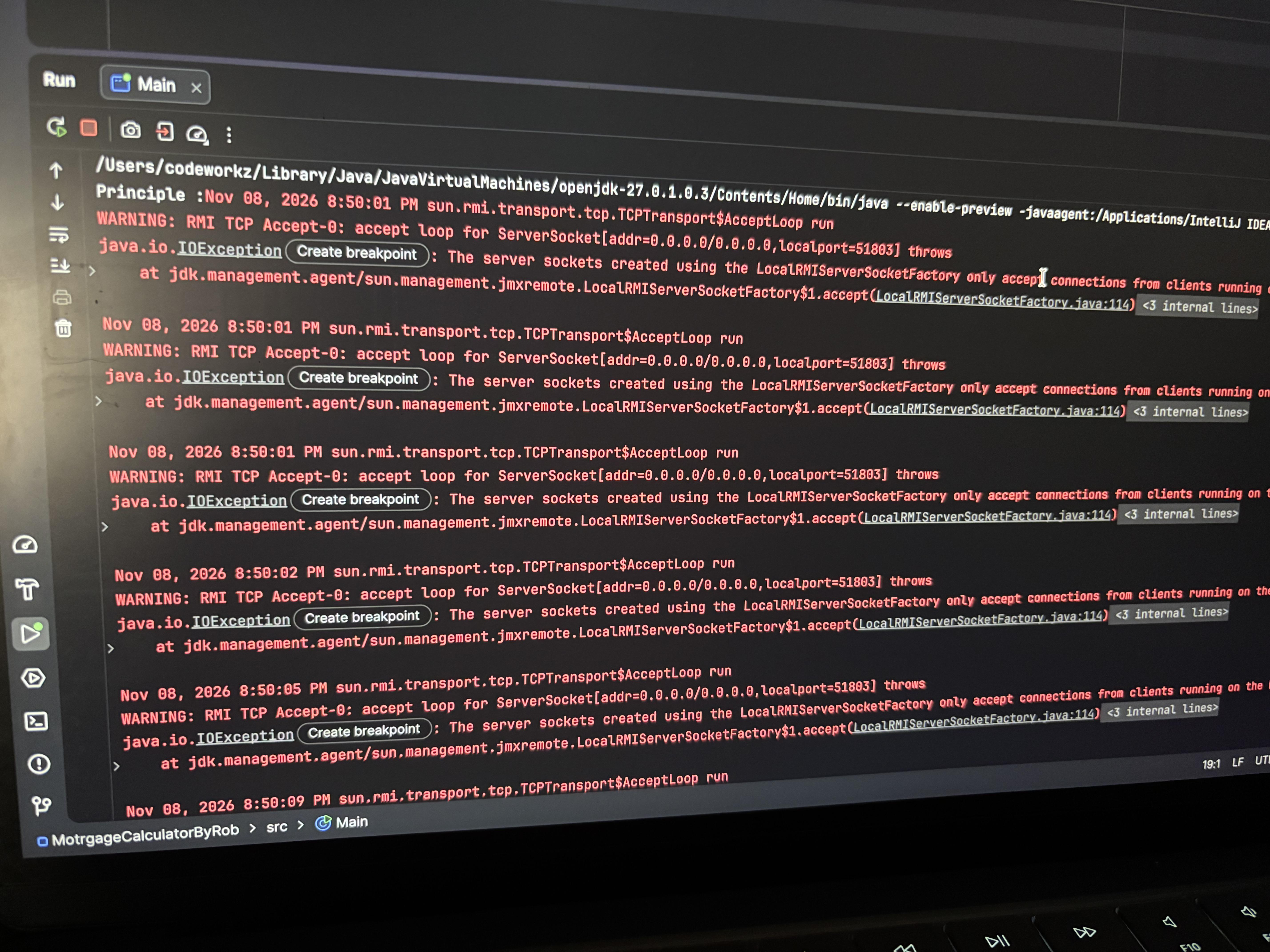
Intelli j

Post image
0 Upvotes

So I was making a mortgage calculator and I had a few bugs which I was working through when I finally fixed the program I began to have this error. I was using ChatGPT to figure out why this began happening. About one hour later and a bunch of troubleshooting the program runs but it displays this warning. The program will run in terminal inside IntelliJ without the warning. Like it should be. I really don’t understand this. I hoped onto my desktop and installed IntelliJ just copied the code over to a new project and it runs no problems. I am pretty stumped hopefully this community can shed some light.


r/IntelliJIDEA • • 17d ago

Using AI code reviews in IntelliJ without another plugin

Post image
0 Upvotes

I've always been a big IntelliJ fan, but lately I've spent more time in VS Code, partly because I've been developing AI Badger, an open-source tool for preparing code context for AI chats.

Recently I returned to IntelliJ for more hands-on Java coding and started thinking about building an IntelliJ plugin for Badger, similar to the VS Code extension I already have.

But then I tried running the CLI directly in IntelliJ's built-in terminal, and it turns out the experience is pretty good without a plugin.

The workflow is simple:

  1. Run badger review directly in the project terminal, or launch badger and select /review interactively.
  2. Copy the prepared review prompt and context into ChatGPT, Claude, or another web AI chat.

IntelliJ already lets you copy a Git diff, of course. But a diff alone often isn't enough for a meaningful AI review. What I wanted was something closer to a repository-aware diff, combining changes with project topology and relevant code context rather than just changed lines.

That's one of the main reasons I built Badger's review workflow in the first place.

Everything stays in the same project workspace, with the source code visible above the terminal. No dedicated IntelliJ plugin needed.

Screenshot shows my current setup.

For anyone interested, the project is open source: https://github.com/PVRLabs/aibadger

Curious whether others use CLI-based AI tools inside IntelliJ or prefer dedicated IDE plugins.


r/IntelliJIDEA • • 17d ago

WTF is that new update, It's all buggy, Where's open documentation window?

32 Upvotes

Today I updated IntelliJIDEA to 2026.3 and It sucks, First thing is new loading image, Who likes a grayscaled dramatic image? Ok, That's not that much of a big problem, Will change on next update, Then there's an AI promt screen ( air plugin ) when no tabs opened, Ok, They are just introducing new features, Fixin is as easy as disabling that plugin, But then things starts to get more worse.

First of all why open documentation button removed? I want to go to the file Itself not open It on a sidebar, I have adhd, I can't focus with sidebars, I need to open the file on another tab.

Then after a while, gray screen, can't event close app using task manager or alt + f4, There's useless gray IntellijIDEA tab stuck in toolbar.


r/IntelliJIDEA • • 18d ago

Run Configurations broken

1 Upvotes

So a few days ago, i updated my Intellij a bunch of times (I hadnt updated it in a while). Ever since then, my run configurations on my minecraft fabric 1.21.1 project have been broken.

I have tried deleting the .idea folder and the configurations and then restarting the project, but after loading the gradle project, they are still like this.

Edit: Okay so it can be easily fixed by just selecting a module, i was just being stupid