r/Kubuntu • • 6h ago

Kubuntu keeps restoring open windows after shutdown/restart — how do I disable this?

Post image
3 Upvotes

I’m using Kubuntu, as it was the only distro that adapted well to my laptop. Every time I shut down or restart the system, it restores the windows that were open beforehand. I couldn’t find the option to turn this off. Does anyone know how?


r/Kubuntu • • 9h ago

Can I use the USB boot disk(32GB USB stick) as general storage device?

5 Upvotes

I fully switched to Kubuntu now, still keep the USB boot disk(a 32GB USB stick) for system failure. Can I use this USB stick to store files? I notice it has a partition named "writable", can it be used and formated to exfat? I want to keep boot disk for Kubuntu system emergency while use the USB stick as general storage again. THanks.


r/Kubuntu • • 1d ago

Idle RAM usage is amazing on Kubuntu

1 Upvotes

Both Windows 11 and Ubuntu LTS running Gnome both had idle RAM usage hovering around 6.5 gb. Now that doesn’t sound like much, but when you have a laptop that only has 8gb DDR 5 and the cost to upgrade the ram will cost you a pretty penny, then Kubuntu and more importantly KDE becomes a minor miracle. My idle RAM running Kubuntu on both desktop and laptop is hovering around 2.3 gb. Tremendous. Just a thank you to the KDE team for pulling this off with a mature and polished DE.


r/Kubuntu • • 2d ago

Sadly, I think I'll leave Linux altogether once Kubuntu 24.04 LTS reaches end of life.

13 Upvotes

The reason is that it's the only distro that fully supports my laptop without requiring constant tweaking. Temps stay under control, performance is good, and the overall experience feels really snappy.

I made a huge mistake by going with an intel + nvidia combination. Throughout my linux journey, there have been only a handful of distros where this combination hasn't given me headaches. Specifically, Fedora 39, CachyOS, and Kubuntu 24.04 have worked great for me. With pretty much every other distro, I've had to tweak things constantly, and even then, I couldn't get everything working the way I wanted.

Either the temperatures would be too high, graphics wouldn't feel smooth, applications would take forever to launch, or, at worst, I wouldn't be able to get the maximum performance out of my GPU. The performance issues were so bad that even playing youtube videos would take 5–10 seconds to start, with the screen remaining blank until then.

Don't get me wrong, this isn't a rant. I genuinely love linux. I've been using it since my college days, and I want to continue using it. But it gets incredibly frustrating when even the smallest things don't work out of the box, or when something as basic as keeping idle cpu & gpu temps under control becomes a challenge.

I've tried so many distros, especially since the release of 26.04, hoping to find a suitable replacement that I can switch to once 24.04 reaches end of life. Unfortunately, nothing has worked to my liking so far. The biggest issues have consistently been high temps.

Kubuntu 24.04 LTS, on the other hand, has never given me any of these headaches.

Honestly, I regret choosing this dogshit intel + nvidia combination. I should have gone with amd cpu and gpu instead.

Specifications:

  • Laptop: dell g15-5530
  • CPU: intel i5-13450HX
  • GPU: nvidia rtx 3050
  • Display server: x11
  • Dual boot: Yes (Windows 11 + Kubuntu)

r/Kubuntu • • 2d ago

I just installed Kubuntu on my laptop!

23 Upvotes

If there is anything I should know or do please tell me. (also if there's a better clock to replace the default one on the panel let me know)


r/Kubuntu • • 2d ago

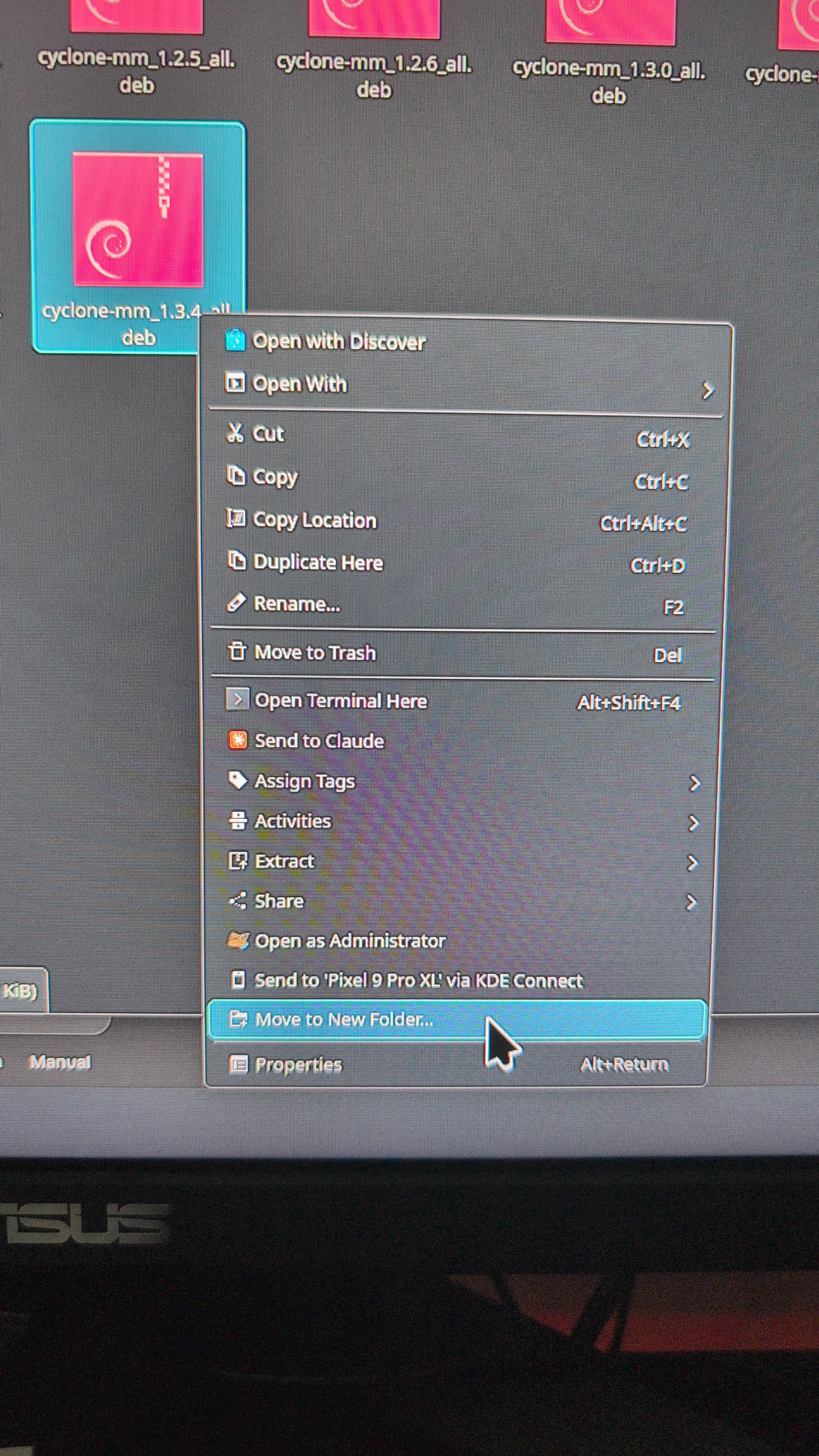
Copy to new folder

Post image
1 Upvotes

So I am trying to make a new mod manager specifically for Debian distros, and I found that when right clicking on my .deb installer file, there is a 'move to new folder' button. Is there a way to instead copy to a new folder rather than simply moving it?


r/Kubuntu • • 4d ago

These settings will automatic Turn on again after a while.

Post image
20 Upvotes

Does anyone know how to stop this from happening?


r/Kubuntu • • 3d ago

Discord ptt issues

Thumbnail reddit.com
2 Upvotes

r/Kubuntu • • 5d ago

Ever wished for DaVinci to be easy to install, much more performant and with all the codecs support on Linux?

15 Upvotes

Resolve is a great editor, but on Linux it’s a pain:

- The free version can’t open or export H.264 or H.265 (the normal MP4 from your phone or camera) or AAC audio
- It officially supports only a few distros and mostly expects an NVIDIA card (and they are still far from being perfect on Linux)
- Microphone recording is hit or miss
- The performance is just bad on low end devices

So Kinoklip copies Resolve’s pages, layout and shortcuts, and fixes those problems:

- H.264, H.265 and AAC work out of the box
- Runs on any GPU with OpenGL 3.3, including Intel and AMD integrated graphics
- One AppImage for every distro (x86_64 and ARM64)
- Edit, Color (nodes, wheels, power windows), Compositing (node graph, keyers, trackers), Audio and Deliver pages
- Free and open source (GPL-3.0)
- Performance is miles better.

1/3 of the whole project's code is testing programs which should catch anything that can break. It’s still young, so expect rough edges, although it is good enough for the majority of people. Bug reports are very welcome.

Download: https://github.com/SeniorMatt/kinoklip


r/Kubuntu • • 6d ago

Kubuntu feels so good

Thumbnail
gallery
303 Upvotes

r/Kubuntu • • 5d ago

I'm currently on the latest kubuntu

Thumbnail reddit.com
0 Upvotes

r/Kubuntu • • 6d ago

Zorin to Kubuntu

Thumbnail reddit.com
4 Upvotes

I already asked to the kde subreddit but I wanted to confirm if it's true


r/Kubuntu • • 6d ago

Fedora KDE 45 broke Secure Boot - Windows 11 and Kubuntu 26.04 fail with bad shim signature (Resolved)

Thumbnail reddit.com
1 Upvotes

r/Kubuntu • • 6d ago

App capture scrolling

3 Upvotes

Hello everyone,

Is there an app that performs scrolling capture? I tried CapScroll, but it’s not that great—it leaves visible seams where the images are joined. Does anyone know of any other software? Thanks.


r/Kubuntu • • 7d ago

Kubuntu 26.10 Plasma desktop not loading.

4 Upvotes

Hi. More often than not, after fresh login I can see only wallpaper - no panel, no right click menu. What is strange, some plasmoids, like clock, added directly to desktop are visible. I am able to start plasma from terminal under ctrl+alt+T but it takes a long time.

How can I diagnose the issue?


r/Kubuntu • • 7d ago

"NVIDIA-SMI has failed..."

5 Upvotes

Specs:

CPU: AMD Ryzen 5 2600

GPU: Nvidia GeForce RTX 3070

Okay, so I recently made the switch to Kubuntu, thanks to a help from a friend, but when I launched the system, I realized the UI seemed a bit blurry. I check the resolution, and it's stuck at 1024x768. Naturally, I go online to look for more answers, and I see it's most likely the driver not being up to date, cool. I go try and up date it, and it says that everything is up to date now. However, when I try to do nvidia-smi, I get the following error message: "NVIDIA-SMI has failed because it couldn't communicate with t
he NVIDIA driver. Make sure that the latest NVIDIA driver is installed and running." I've tried everything that I've seen online to fix it, but it doesn't change. So I'm just stuck at the resolution I'm despite my monitor of being capable of going up to 1920x1080. Any help would be greatly appreciated.

Solved! :)


r/Kubuntu • • 8d ago

Kubuntu 26.04 Wayland | How to set the middle display as primary?

7 Upvotes

Good day everyone,

I have a question. I'm currently using three Benq 4K displays with Kubuntu 26.04 (Wayland), and everything works fine except for one thing: Kubuntu detects Display 1 as the primary display instead of Display 2.

The only difference between my displays is their connections:

  • Display 1: DisplayPort to HDMI (DP port in screen is broken)
  • Display 2: DisplayPort
  • Display 3: DisplayPort

Does anyone know how I can set Display 2 (the middle screen) as my primary display, just like we could in the old days with X11?

Kubuntu 26.04 uses Wayland, and I can't seem to find the option to change the primary display.

I've already moved the taskbar to my second display (the middle screen), but I'd also like to make it the actual primary display.


r/Kubuntu • • 9d ago

Why can't I sign in?

Post image
8 Upvotes

I have a laptop that I use while I'm out and about. I haven't booted it up in a minute and I was met with this screen instead of my login screen. What's going on?


r/Kubuntu • • 9d ago

Material decoration can now remember where you left your windows on Wayland

Thumbnail
github.com
2 Upvotes

r/Kubuntu • • 9d ago

Anyone tried upgrading from 24.04 to 26.04 directly?

7 Upvotes

I am not asking about a fresh install. My OS is notifying me that 26.04 is ready and I can upgrade now.

I want to know if it is generally a bad idea to upgrade this way? If possible, I would love to skip a fresh install.

I do have my system and data backed up just in case!


r/Kubuntu • • 10d ago

Can anybody help me upgrade from 26.04.1 to 26.10?

10 Upvotes

As title said, i'm having a issue where i wanted to upgrade my version from 26.04 to 26.10 but failed even when i'm already following the instruction. Does anybody had the same problem as i am and is there any fix?


r/Kubuntu • • 9d ago

Check out my system updater plasmoid: aptupdate

2 Upvotes

Hello people,

At the end of september i have created aptupdate as a fork from bouteillerAlan/archupdate(GitHub) for Ubuntu / Debian based KDE distributions. The applet at original repo was made for Arch linux. I made apt adopdation, developing and improving with new specifications through Google models at antigravity.

It doesn't only support apt but also supports flatpak and snap if you have them in your system. You can also disable them in settings too.

Besides that i have added many useful features ranging from sophisticated update mechanism to adaptive accordion UI that would complete the main idea of the applet.

You can run updates silently in the background via pkexec (with sleep/shutdown inhibited while installing) or in Konsole. If you use nala, there is also an option for it in terminal mode (with --no-autoremove so nothing gets removed unexpectedly).

The popup groups pending updates into collapsible APT, Snap, and Flatpak sections that auto-expand when there are only a few packages. You can update everything at once, per ecosystem, or one by one and clicking a package opens its Ubuntu, Debian, Snapcraft, or Flathub page.

Phased Ubuntu updates are skipped by default so the counter matches what apt actually installs, with a toggle in settings if you want them included. It also checks /etc/os-release so Debian users don't get Ubuntu-only release upgrade banners.

Checks dpkg/apt locks and PackageKit over D-Bus before updating, so it won't clash with KDE Discover or unattended-upgrades. You can also cancel a running background update cleanly from the popup.

Keeps your last cached update list visible when you're offline instead of wiping it, and lets you know if your local APT lists are more than 3 days old.

Comes with a dedicated Notifications tab for update thresholds, security updates, Ubuntu release upgrades, and /var/run/reboot-required (with a restart button that triggers KDE's own reboot prompt).

Lets you set a startup delay after login and flexible check intervals (minutes, hours, or days) so it doesn't slow down boot. Cache and debug logs stay in $XDG_CACHE_HOME instead of cluttering KDE's Plasma config files.

If you try and face issues please let me know so i can fix them. And generally if you like it i would like to know your feedback too.

Repo: https://github.com/hadbilen/aptupdate


r/Kubuntu • • 10d ago

Conflicting info from Power Management Notification and "Power and Battery" menu. Which one should I believe?

Post image
6 Upvotes

Just got this notification saying the Battery is Critical and system will go to sleep, but when I check it it says 62% as shown in the screenshot. Which is the more credible source?