r/Lutris • • Nov 13 '25

Please read carefully

220 Upvotes

On this subreddit, we do not give support for pirated games.

Moderators will also delete all comments that are not respectful.
Lazy answers like: use Bottle or use Heroic or use "another app' instead of Lutris will also be deleted, this Subreddit is a place to help people to use Lutris.


r/Lutris • • 8h ago

Path not found error

1 Upvotes

Hello, I am trying to launch a game I installed last week. It was working fine before I went away for the weekend and now I am getting a path not found error, then "there is no windows program configured to open this type of file" error and then the path not found error comes up after I press ok 9 times and then it dissapears(the popup closes and opens again when I press ok). The game has a .lnk file to launch it, or thats what I used to launch it last week as there was no .exe for the game when I used the search function inside the prefix when I installed it. Has anyone had this error before and knows how I can fix it?

edit: here is the debug text

2026-11-23 10:34:50,509: Error reading color-scheme: g-dbus-error-quark
: GDBus.Error:org.freedesktop.DBus.Error.NameHasNoOwner: Could not acti
vate remote peer 'org.freedesktop.portal.Desktop': startup job failed (
3)
Traceback (most recent call last):
 File "/usr/lib/python3.15/site-packages/lutris/style_manager.py", lin
e 74, in _call_cb
   values = obj.call_finish(result)
gi.repository.GLib.GError: g-dbus-error-quark: GDBus.Error:org.freedesk
top.DBus.Error.NameHasNoOwner: Could not activate remote peer 'org.free
desktop.portal.Desktop': startup job failed (3)


r/Lutris • • 1d ago

Cheat Tables don't work in Lutris

1 Upvotes

So basically I've tried using .ct on games using lutris. I put the cheat engine and install it in the same wine prefix. Scanning and changing the value works but not cheat tables .ct files. They just don't become checked. They remain unchecked. I'm using cachyos.


r/Lutris • • 4d ago

Besoin d' aide pour installation d' un launcher privé sur Steam deck

Thumbnail reddit.com
1 Upvotes

r/Lutris • • 5d ago

Guide Call of Duty crashes on Arch Linux/Wine after AzureAttest DLLs load

1 Upvotes

Hi everyone, I’m trying to get Call of Duty running on Arch Linux through Wine/Proton/Lutris and I’m currently stuck at an early crash during startup. My system is an HP OMEN 16 with an Intel Core i7-14650HX (16 cores/24 threads, up to 5.2 GHz), 16 GB DDR5-5600 RAM (2×8 GB Micron, dual-channel), NVIDIA GeForce RTX 4060 Laptop/Max-Q 8 GB, Intel Raptor Lake UHD iGPU, WD PC SN810 1 TB NVMe, 1920×1080 144 Hz display, Arch Linux, kernel 7.3.4-arch1-2, Hyprland on Wayland, NVIDIA driver 620.70.06, and Vulkan 1.4.363. The game is installed at /home/harmeet/Games/COD/, with the main executables being cod.exe, sp26/sp26-cod.exe, and bootstrapper.exe; both cod.exe and sp26/sp26-cod.exe are approximately 219 MB and are PE32+ Windows x86-64 executables. I have lib32-gcc-libs, lib32-glibc, lib32-mesa, lib32-nvidia-utils 620.70.06, lib32-vulkan-icd-loader, and vulkan-icd-loader installed, and Vulkan correctly detects the RTX 4060 while DXVK also detects the NVIDIA GPU. I initially tested normal Wine 11.22-1; wine --version returns wine-11.22, wine cmd /c ver works, and a completely fresh 64-bit prefix at ~/Games/cod-wine-test was created using WINEARCH=win64 wineboot -u, but launching cod.exe produced Unhandled page fault on read access, EXCEPTION_ACCESS_VIOLATION, and 0xc0000005. I then tested Lutris 0.5.22 with GE-Proton11-12, using DXVK ON, VKD3D ON, Esync ON, Fsync ON, FSR OFF, BattleEye OFF and EAC OFF, with the prefix at ~/Games/cod-prefix and executable /home/harmeet/Games/COD/cod.exe; Lutris/UMU starts successfully, showing ntsync: up and running, but COD exits after a few seconds with messages including Proton: Error: unable to use parent for game drive, path, Proton: Executable is a unix path, launching with 'umu.exe', and a return code around 5/1280. I also bypassed Lutris and launched GE-Proton directly using STEAM_COMPAT_CLIENT_INSTALL_PATH="$HOME/.local/share/Steam", STEAM_COMPAT_DATA_PATH="$HOME/Games/cod-prefix" and the GE-Proton executable; Proton starts correctly, DXVK detects the RTX 4060M, but COD still exits. During troubleshooting I also found a large WINEDLLOVERRIDES environment at one point containing entries such as d3dcompiler_33 through d3dcompiler_47, d3dx10, d3dx9_43, and winemenubuilder; I searched Lutris configuration, my shell environment, GE-Proton and Protonfixes, but could not find that specific giant COD-related override stored in the obvious configuration, so I did not start randomly replacing DLLs or installing large Winetricks packages. The most important discovery came from running Proton/Wine with detailed debugging using WINEDEBUG=+seh,+tid,+process,+module: COD successfully loads AzureAttestManager.dll, AzureAttestNormal.dll, and azure-attest-manager.dll, then crashes with EXCEPTION_ACCESS_VIOLATION (0xc0000005) inside the COD process, with a backtrace including cod.exe + 00000000001D5749 and cod.exe + 000000000B1979F5. The logs also show missing/unimplemented Windows functionality including KERNEL32.dll.IsEnclaveTypeSupported, api-ms-win-core-enclave-l1-1-1.dll.CallEnclave, and CRYPT32.dll.CryptExportPublicKeyInfoFromBCryptKeyHandle, as well as Wine stub messages involving NtQuerySystemInformation. To rule out prefix corruption, I created another completely fresh Wine prefix and reproduced the same behavior: cod.exe loads AzureAttestManager.dll, AzureAttestNormal.dll, and azure-attest-manager.dll, followed by code=c0000005 (EXCEPTION_ACCESS_VIOLATION); there were also secondary exceptions involving discord_partner_sdk.dll and GFSDK_Aftermath_Lib.x64.dll, but the primary crash is in COD itself. I also searched /usr/lib/wine and /usr/share/wine for IsEnclaveTypeSupported and CallEnclave, and neither search returned an implementation. I checked available Arch Wine packages and found extra/wine 11.22-1, extra/wine-staging 11.22-1, wine-gecko, wine-mono, and winetricks; I also found aur/wine-git, but I have not tried Wine-Git yet. I have now installed Wine-Staging 11.22 and created another completely fresh prefix at ~/Games/cod-staging-test using WINEARCH=win64 wineboot -u. During prefix creation Wine-Staging printed warnings/errors such as Could not find dependent assembly Microsoft.Windows.Common-Controls, MESA-EGL: warning: pci id ... driver (null), egl: failed to create dri2 screen, Failed to open RpcSs service, and Failed to load ... win32k.sys, dxgkrnl.sys, and dxgmms1.sys; I’m not sure which of these are normal Wine initialization messages and which might actually matter. I have not yet completed the actual COD launch using the new Wine-Staging prefix. My next test is cd "$HOME/Games/COD" followed by WINEPREFIX="$HOME/Games/cod-staging-test" WINEDEBUG=-all wine ./cod.exe; if it crashes, I’ll collect WINEDEBUG=+seh,+loaddll output and grep for c0000005, access.violation, azure, attest, no implementation, failed, and cod.exe. My current understanding is that this does not look primarily like a GPU/Vulkan/DXVK problem because the RTX 4060 is detected correctly by Vulkan and DXVK, the game executables are 64-bit, and the same crash reproduces in completely fresh Wine prefixes. My strongest lead is that the game loads its Azure attestation DLLs immediately before the access violation while Wine reports missing Windows enclave/cryptographic APIs, but I don’t want to claim that Azure Attestation is definitely the cause without confirmation. I’m specifically looking for help determining whether this is a known Wine/Proton compatibility issue with this Call of Duty version, whether IsEnclaveTypeSupported() and CallEnclave() are implemented in newer Wine/Proton versions, whether a newer Wine-Git/Proton Experimental/GE-Proton version is known to work, whether the MESA-EGL/RpcSs/win32k/dxgkrnl messages are relevant, whether there is a legitimate Wine dependency or configuration I’m missing, and whether this particular game currently works under Linux at all. I’m not looking to bypass or disable the game’s security/attestation; I’m trying to determine whether Wine/Proton can legitimately provide the Windows functionality the game expects. I can provide the full Wine debug log, Lutris YAML, Proton output, vulkaninfo, inxi, package list, or any other diagnostic information if needed.


r/Lutris • • 8d ago

Lutris on BSDs and other UNIX platforms: A lot more viable than initially was thought

Post image
12 Upvotes

Here's a overview about the viability of porting Lutris to non-Linux platforms, with screenshots and a video preview, mainly focused on FreeBSD, while there is a independent OpenBSD port I prefer to took the path of least friction with upstream and the results seem promising so far, the biggest challenge right now is how to address the entire issue of the infrastructure behind the Lutris website and community scripts, which are Linux and GNU-centric.

The needed changes mainly boil down to changing Linux functions to functions that are part of the POSIX standard and native BSD tools; the launcher itself does not use anything that other UNIX-like systems don't already have, and as for dependencies there are only two optional dependencies that are absent in the FreeBSD ports.


r/Lutris • • 11d ago

Steam Frame Lutris

Thumbnail reddit.com
2 Upvotes

r/Lutris • • 12d ago

Help

1 Upvotes

I’m trying to run a game called Cap'n Crunch Crunchling Adventure on lutris that runs but the intro video the screen is white and I see no video,
I have another called Scooby-Doo! Mystery of the Fun Park Phantom do I need any files? Now for Scooby-Doo! Mystery of the Fun Park Phantom I have a invisible mouse and if I didn’t say already I’m on Linux mint and in lutris I’m using wine ge-8-26-x86_64


r/Lutris • • 12d ago

steamrt3

1 Upvotes

weird question and probably this is just intentional but: when i start a game via lutris it goes through the whole song and dance of downloading and unpacking steamrt3 / steamrt4 (depends on exact configuration). Am i stupid for thinking this file should be cached instead of re-downloaded every time, since its... the same file?

Or is this just to-spec behavior and something to deal with? A little annoying to have an extra 30-60 second boot-up time on several apps just because its downloading a file it feels like I should be able to keep locally

EDIT: oh this might be an umu issue actually and unrelated to lutris handling of proton. sorry


r/Lutris • • 13d ago

Thank you Lutris <3

Post image
11 Upvotes

r/Lutris • • 12d ago

System Shock Enhanced Edition thru GoG refuses to quit from main menu

Thumbnail reddit.com
2 Upvotes

r/Lutris • • 14d ago

Help with bakkesmod on arch

Thumbnail reddit.com
1 Upvotes

r/Lutris • • 15d ago

necesito ayuda para instalar war for cybertron

Thumbnail reddit.com
0 Upvotes

r/Lutris • • 16d ago

Lutris WIP - useful for OpenBSD?

Thumbnail github.com
4 Upvotes

Cross-posting here. Not sure if Lutris has considered adding support for any *BSD, but adding OpenBSD in wouldn't be too difficult...


r/Lutris • • 17d ago

How do I completely reinstall and delete everything in the steam folder?

1 Upvotes

So I had Arc Raiders running before I messed with the proton plus app and tried other builds, now even after deleting proton plus and everything about proton. Even the files on steam folder for proton and arc raiders, I can't seem to get Arc Raiders running without crashing. I reinstalled Arc Raiders, Proton 3 times already. I get to the loading/loading shaders and crashes. I used that command where steam reinstalls except the save files and game files 3x as well

I installed Bazzite on my other desktop and it works completely fine with a fresh install.


r/Lutris • • 17d ago

I make lutris presence for discord rpc

2 Upvotes

Hi, I started to play using lutris recently and for sometime I realize the discord rpc is really not working for me. Try many other things and seems fail for me too.

Thus I created this. https://github.com/aiondomisi/lutris-presence . Nothing fancy just showing the rpc (I dont know if this will influence the discord badge if you care)c Would like to share if anyone face the same problem as me.

Tested on flatpak discord patched with vencord and using native lutris. I'm using cachyos.
I'm not testing on other scenario but would love to hear some feedback or issues raise if possible. Thank you.


r/Lutris • • 17d ago

Genshin using lutris on fedora workstation

Thumbnail reddit.com
1 Upvotes

r/Lutris • • 18d ago

Guide How to play project reality on LINUX 60FPS

Thumbnail github.com
2 Upvotes

r/Lutris • • 18d ago

Error GTA IV Using Lutris Wine

Thumbnail gallery
5 Upvotes

r/Lutris • • 18d ago

​PES 2013 setup.exe gives "Runtime Error (at 102:342): Could not call proc" in Lutris

1 Upvotes

Hello everyone! I'm trying to install PES 2013 on Lutris using a setup.exe file. However, whenever the installer runs, I keep getting this popup error: Runtime Error (at 102:342): Could not call proc. I tried using System Wine and different versions, but it either fails with Umu or gives this runtime error. Does anyone know how to fix this or bypass the installer? Thanks!


r/Lutris • • 19d ago

Retroarch and Lutris issues

2 Upvotes

Hello friends, I am in need of assistance regarding retro games inside Lutris.
First I tried using the Retroarch runner through Lutris, but it doesn't launch at all. Then I tried forwarding my main retroarch install through the Lutris preferences UI, but that hasn't worked either.

Does anybody on the internet have a solution for this? It seems as though everyone either figured it out on their own, but didn't share their fix, or just flat gave up / used a different software to organize their games.

I will share any system or program information needed to figure this out. Thanks so much!


r/Lutris • • 22d ago

executable not found

1 Upvotes

pls help the first time i launch a windows game wth lutris (by choosing the .exe) it works fine but if i close the game and try to play it again later i get this error. im on bazzite and trying to play deltarune

This game has no executable set. The install process didn't finish properly.

Traceback (most recent call last):

File "/usr/lib/python3.14/site-packages/lutris/exception_backstops.py", line 35, in wrapper
result = function(*args, **kwargs)

File "/usr/lib/python3.14/site-packages/lutris/game.py", line 687, in configure_game
gameplay_info = self.get_gameplay_info(launch_ui_delegate)

File "/usr/lib/python3.14/site-packages/lutris/game.py", line 626, in get_gameplay_info
gameplay_info = self.runner.play() # type: ignore[attr-defined]

File "/usr/lib/python3.14/site-packages/lutris/runners/wine.py", line 1336, in play
raise MissingGameExecutableError(filename=game_exe)

lutris.exceptions.MissingGameExecutableError: This game has no executable set. The install process didn't finish properly.

Lutris log:
[INFO:2026-10-31 15:37:15,886:application]: Starting Lutris 0.5.22
[INFO:2026-10-31 15:37:16,338:startup]: "card1" is Intel Graphics (8086:4626 152d:1513 i915) Driver None
[INFO:2026-10-31 15:37:16,734:startup]: "card2" is NVIDIA GeForce RTX 4050 Laptop GPU (10de:28a1 152d:1522 nvidia) Driver 615.78.08
[ERROR:2026-10-31 15:37:18,320:wine]: The game doesn't have an executable
[ERROR:2026-10-31 15:37:18,322:exception_backstops]: DELTARUNE (wine) has encountered an error: This game has no executable set. The install process didn't finish properly.
Traceback (most recent call last):
File "/usr/lib/python3.14/site-packages/lutris/exception_backstops.py", line 35, in wrapper
result = function(*args, **kwargs)
File "/usr/lib/python3.14/site-packages/lutris/game.py", line 687, in configure_game
gameplay_info = self.get_gameplay_info(launch_ui_delegate)
File "/usr/lib/python3.14/site-packages/lutris/game.py", line 626, in get_gameplay_info
gameplay_info = self.runner.play() # type: ignore[attr-defined]
File "/usr/lib/python3.14/site-packages/lutris/runners/wine.py", line 1336, in play
raise MissingGameExecutableError(filename=game_exe)
lutris.exceptions.MissingGameExecutableError: This game has no executable set. The install process didn't finish properly.
[WARNING:2026-10-31 15:37:18,323:game]: The game has run for a very short time, did it crash?
[WARNING:2026-10-31 15:37:18,342:game]: No path found in LutrisConfig(level=game, game_config_id=deltarune-setup-1793440869, runner=wine)
[WARNING:2026-10-31 15:37:18,342:path_cache]: No path for DELTARUNE (wine)
i cant figure out how to add code blocks sorry

fixed

fixed


r/Lutris • • 22d ago

issue to load

Thumbnail reddit.com
1 Upvotes

r/Lutris • • 23d ago

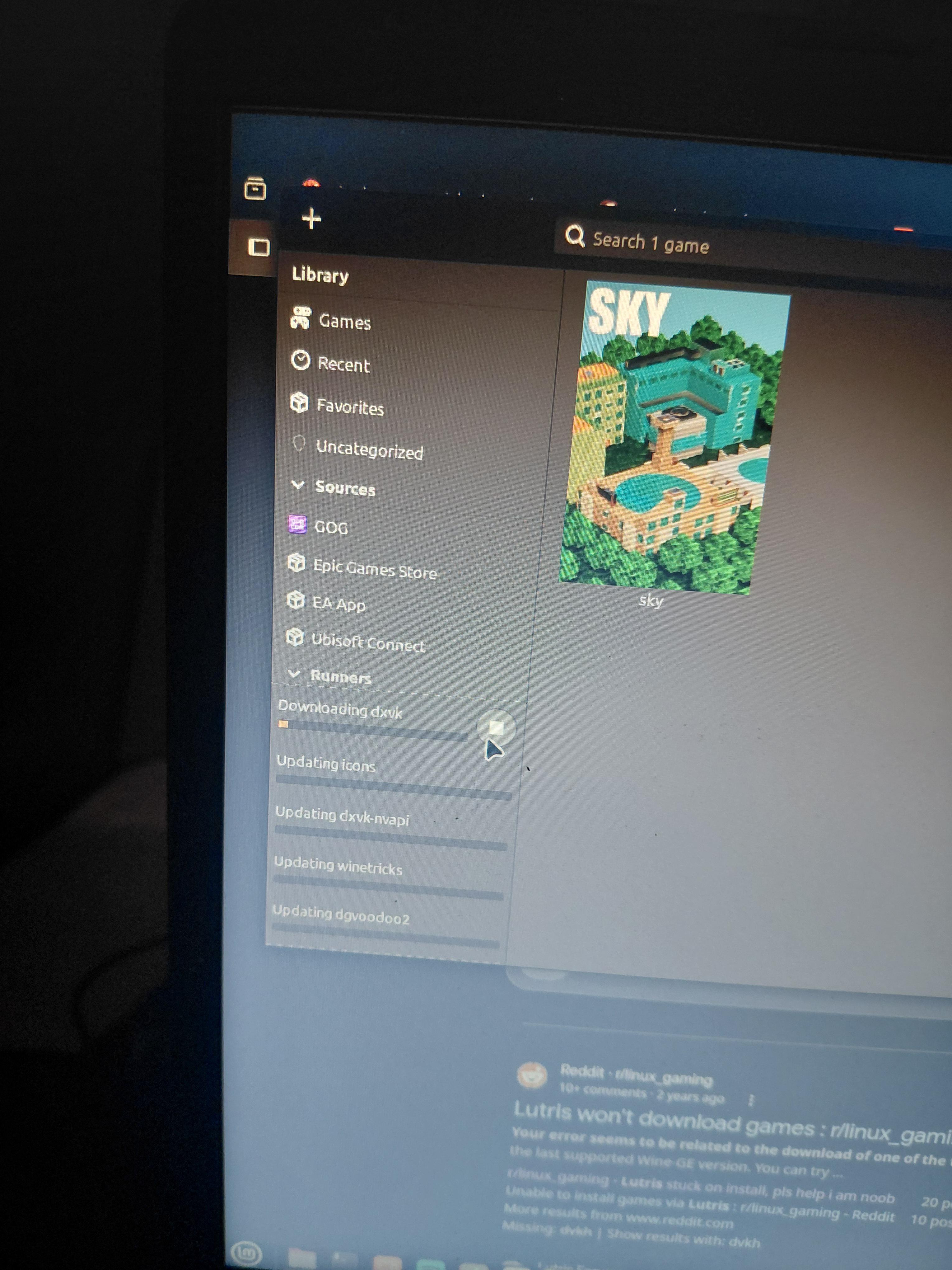
Lutris not downloading dxvk

Post image
3 Upvotes

I downloaded lutris , deleted it , re-downloaded it for a billion times , and it still wouldnt download dxvk , any solutions?

(No im not pausing the download , or is it stuck on pause no matter how much i press??)