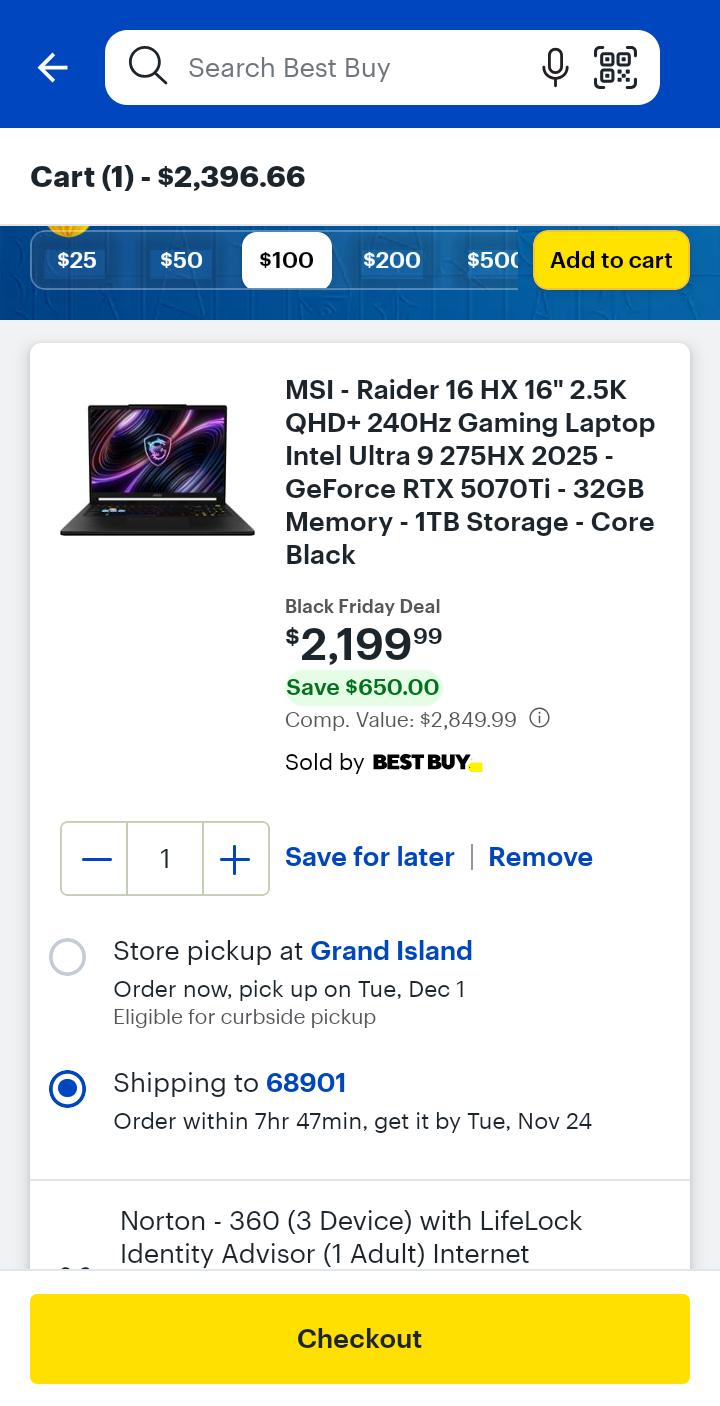
Well, ordered this from Best Buy from the early Black Friday deal.
Will see how it goes. Wanted an upgrade from my three year old Legion 7S. Still a good laptop I plan to keep using, but finding it is getting a bit slow with the new Autodesk Autocad and Revit I use nearly evety day at work. It has a AMD 8740 HS and RTX 4060.
Hey everyone! Red Bull Home Ground World Final 2026 is coming to Los Angeles December 10–13, and we have 10x general admission tickets to give away to the community.
We’ll also be there with an MSI booth featuring our latest laptops and desktops. Stop by, get some hands-on time with the systems, and check out our booth swag giveaways between the action.
Leave a comment answering this question to enter!
Who are you rooting for at Home Ground, and which VALORANT agent would you pick for a must-win match?
*One entry per person. We’ll randomly select 10x winners from eligible comments and contact winners through this MSI Reddit account. Please only enter if you can attend and cover your own travel expenses!
Entry deadline: November 29, 2026, at 11:59 p.m. PT.
Winner notification: November 30 via Reddit DM from this MSI account. Winners must respond within 48 hours.
Eligibility: Open to U.S. residents age 18 or older who can attend the event in Los Angeles.
Prize: General admission tickets only. Travel, accommodations, transportation, meals, and all other expenses are the winner’s responsibility.
Hi everyone, I’m having a frustrating issue with my MSI MAG 275UPD monitor. When connected to my laptop via HDMI, the monitor keeps losing signal or showing “HDMI 1 – No Signal.” Windows sometimes detects Display 2, but switching to Extend or Second screen only often causes a black screen, and it switches back to Duplicate. I’ve also noticed that the monitor works more reliably when my laptop charger is unplugged, but connecting the charger sometimes causes the signal to drop. Lowering the refresh rate to 60Hz helped temporarily, but I can’t consistently access the higher refresh rates (up to 288Hz). Dual Mode also seems to be causing problems, and at one point the monitor started cycling through solid colours like white, red, and green. I’ve tried changing display modes, switching Dual Mode on/off, reconnecting HDMI, power cycling the monitor, and lowering refresh rates, but nothing seems to fix it permanently. Has anyone experienced something similar or know what might be causing this?
Ich hab schon viele Fehler gehabt die die seltsamsten Lösungen erfordert haben aber das hab ich noch nie gesehen.
Ich hab grade "erfolgreich" mein PC ein Upgrade verpasst. Alles hat geklappt doch dan hab ich den PC wieder ausgeschaltet und konnte meinen Augen nicht trauen [siehe Video]
Is anyone playing GTA 6 on an MSI OLED monitor? I’m playing on PS5 and honestly struggling with how the game feels, especially the motion and overall smoothness. I feel like I’m not getting the most out of my monitor, and I’d really like to optimize everything. What settings are you using? HDR, response time, HDMI 2.1 PC/Console mode, gaming presets, or anything else that improves the experience? I’d love to hear from other MSI OLED owners who managed to make GTA 6 look and feel better. Any tips or recommended settings would be greatly appreciated!
I’m having a strange issue with my PC, and I’m trying to figure out whether my motherboard is faulty or if there’s some compatibility issue with my SSD.
My XPG SSD works in another motherboard, and another NVMe works in my MSI motherboard. However, my XPG SSD isn’t detected in my MSI motherboard.
I’ve already done:
Reseated the SSD and checked its connection.
Updated the motherboard BIOS through M-Flash.
Checked the BIOS storage and boot settings.
Tested my XPG GAMMIX S60 in another motherboard. It was detected and worked.
Tested another NVMe SSD in my MSI B550M-A PRO. It was detected successfully in the same M.2 slot.
Hey, I’ve had this issue with the D ram and CPU lights turning on just for a second. I’m not quite too sure what’s going on but everything boots completely fine and thermals are good. Could I please have some help my build is only not even a week old 😭
Specs AMD Ryzen 7 9800X3D 4.7 GHz 8-Core Processor MSI PRO X870E-S EVO WIFI MB ASRock Steel Legend Dark Radeon RX 9070 XT 16 GB Lexar THOR RGB 2nd Gen 32 GB
I have been playing with an MSI monitor and a PS5 now and when I go in the PS5 menu the pixel dances or when I played GTA and I’m in the menu the pixel dances, but I can’t be sure that it dances well I’m playing the game, but I feel like it is making the graphics. Worst I have changed every setting known to man that I’ve been told to online. How can I fix this? Please help me.
Hello everyone, i have the MSI Vector A16 HX A8WHG with the RTX5070TI and Ryzen 9 8940hx and my cpu fan has started to act up and needs to be replaced and my region didnt accept it in the warranty so i need to buy the cpu+gpu fans myself and have them installed locally. I will be getting the fans from USA and ive been looking for them on ebay and all but there are a lot.
Does anyone know what is the exact fan model for this chassis is or anyone who has brought the fans before. I dont want to buy the fans and then it turns out they dont fit. Would really appreciate if someone could help me out
I need help. I have a MSI motherboard however, MSI does not have the file I need to update my bios on their official page. The main issue is I got this PC from a buddy that bought it from he thinks best buy, prebuilt. How and where can I find the file to update my bios when I do not know the PC builder?
# MSI PRO B650-P WIFI — Mystic Light LED controller disappears with USB Error 43 when AIO ARGB is connected. Works after CMOS reset, fails again on reboot.
Hey everyone!
I'm dealing with a really strange RGB issue after installing a new Cooler Master AIO, and I've spent hours troubleshooting it without finding a permanent solution.
I'm hoping someone here has experienced something similar or knows what's actually causing it.
- **RGB Software:** MSI Center / Mystic Light and SignalRGB
## The problem
After installing the Cooler Master AIO, Mystic Light started displaying this message:
**"The mainboard's LED is abnormal. Please get into Support → Live Update and click Advanced to scan and update MB LED FW."**
The AIO has three ARGB devices (two radiator fans and the pump), all connected through the included 3-way ARGB splitter to a 5V JARGB_V2 header.
Mystic Light refuses to recognize the motherboard properly. Interestingly, it can still detect my MSI Clutch GM08 gaming mouse.
Windows Device Manager shows:
```
Unknown USB Device
(Device Descriptor Request Failed)
Instance ID:
USB\VID_0000&PID_0002\8&7A4E1FD&0&11
Status: Error
Problem: CM_PROB_FAILED_POST_START
Code: 43
```
However, when the motherboard's LED controller works correctly, Windows identifies it as:
```
USB\VID_1462&PID_7D78\A02022070803
HID\VID_1462&PID_7D78\9&3457DC83&0&0000
Status: OK
Problem: CM_PROB_NONE
```
Both the previously working MSI controller and the unknown USB device were reported on USB port 11, sharing the same parent USB root hub.
This strongly suggests that the unknown device is related to the MSI LED controller, although I haven't conclusively proven they are the same physical device.
## Troubleshooting performed
**1. Updated the LED firmware through MSI Center**
I followed MSI's instructions using Support → Live Update → Advanced.
Unfortunately, the issue persisted.
**2. Removed the failing USB device using PowerShell**
I shut down the PC, disconnected the NZXT PSU from AC power, and discharged residual power.
No permanent improvement.
**4. Followed MSI's Clear CMOS procedure**
This is where things got interesting.
I disconnected the AIO's ARGB cable, powered off the PSU, and shorted the motherboard's JBAT1 pins for approximately three minutes, following MSI's LED firmware recovery guide.
After booting without the ARGB cable connected:
**IT WORKED!**
Windows detected the MSI controller correctly again:
```
USB\VID_1462&PID_7D78
Status: OK
HID\VID_1462&PID_7D78
Status: OK
```
The unknown USB device disappeared, and Mystic Light recognized my motherboard again.
**5. Reconnected the AIO's ARGB lighting**
Unfortunately, the problem returned.
I tested both motherboard headers:
- **JARGB_V2_2:** The lights sometimes remained stuck on solid green, and the controller failed.
- **JARGB_V2_1:** The lights displayed rainbow effects, but the controller still failed with USB Error 43.
In one experiment, I connected the ARGB cable while the PC was already running and the controller was working.
I know hot-plugging ARGB isn't recommended, and I won't repeat it.
Surprisingly, Mystic Light successfully controlled the AIO's colors after that.
However, after shutting down and starting the PC again, the controller disappeared and Error 43 returned.
**6. Tried SignalRGB**
I installed SignalRGB to see whether the issue was specific to Mystic Light.
SignalRGB detected an MSI Bridge Service integration, but it couldn't properly control the motherboard while Windows reported the USB descriptor error.
I also noticed that the fans appeared to slow down after closing SignalRGB, although I haven't verified whether it was actually controlling their PWM curves.
## The strange part
The behavior seems reproducible:
**ARGB disconnected + Clear CMOS:**
- MSI LED controller detected.
- Windows reports no device errors.
- Mystic Light recognizes the motherboard.
**ARGB connected during startup:**
- MSI LED controller disappears.
- Unknown USB Device appears.
- Error 43 returns.
- Mystic Light loses motherboard control.
- ARGB LEDs may still illuminate, sometimes green or rainbow.
The AIO's cooling functionality itself seems unaffected. The problem appears to be related to RGB control.
## My current suspicions
I'm considering a few possibilities:
- MSI JARGB_V2 firmware compatibility issue.
- LED controller failing during cold boot initialization.
- Faulty ARGB splitter or one of the AIO's LED components.
- Electrical or signaling issue affecting the motherboard's LED controller.
MSI has an official troubleshooting guide addressing abnormal LED firmware behavior involving third-party ARGB devices, which sounds very similar to my situation.
## Questions
Has anyone experienced this specific behavior with the MSI PRO B650-P WIFI or another MSI AM5 motherboard?
Could the included Cooler Master ARGB splitter cause the MSI LED controller to fail during startup?
Has anyone permanently fixed `VID_1462&PID_7D78` disappearing and being replaced by `VID_0000&PID_0002` with Error 43?
Would updating my BIOS from its February 2024 version potentially help, or is this entirely related to the separate LED MCU firmware?
Does MSI provide a standalone LED firmware recovery utility specifically for the MS-7D78 motherboard?
Has anyone encountered a similar issue with a Cooler Master MasterLiquid 240L Core ARGB?
I'm trying to avoid repeatedly clearing CMOS, flashing firmware unnecessarily, or risking damage to the motherboard.
Any suggestions, troubleshooting experiences, or technical explanations would be greatly appreciated!
Has anyone flashed the vbios of a Gaming Trio, which shares the PCB with the Vanguard and Suprim, to the Suprim Bios version? Especially with a waterblock.
I have seen people use the Suprim bios on the Ventus 3x, so it should work on the Gaming Trio. Some even used the Aorus master bios.
Curious if anyone has had any experiences flashing the Gaming Trio vbios with something else.
After several days of troubleshooting MSI Center, I finally managed to resolve an issue involving recurring CC_engine_patch.exe executions, unexpected CMD windows and failed initialization.
The suspected cause was a mismatch between the Windows ProgramFilesDir (x86) registry path and MSI Center's actual installation directory.
Creating targeted NTFS junctions resolved the issue, including after a Windows restart.
I've documented the investigation, diagnostic steps, PowerShell checks and workaround in the official MSI forum:
I know, tried looking online on fixing the Monitors brightness beinf greyed out on windows 11. I just bought an Msi MAG 274Qpf oled a few days ago and haven't been able to change any of the settings
I've already turned off HDR everywhere in my windows settings as best I could but unfortunately still to no avail
I'm not quite sure what to do next? I'm also completely new to owning a pc so I'm not super sure about what else to look out first (first pc and first ever monitor)
I would appreciate anyone's help! I'll check on the comments when I wake up tomorrow morning, thank you
Edit: also if there's anything else I can do to limit thw possibilities of burn in, let me know. I know there's something about pixel refresh? Is it something I can do in the monitors settings and how often is it recommended to do it?
I pulled this old gaming desktop out of storage to run as a blender server, but it won't post.
On the mobo the CPU LED lights up, then goes off, then DRAM lights up, then off, Then CPU might come on again and off, finally it settles on VGA being lit.
There is no HDMI signal.
I've already removed all storage drives and the GPU.
I remember this beingva constant pain even when it was new it would do this.
Like it will get stuck on DRAM sometimes until you change which slot the RAM is in.
Model: MSI GF63 Thin 11SC As the title says these keys often fail to work and sometimes does work; Sometimes I have to press it hard and at other times I have to press the edges. I've googled it only to find a handful of others having the same problem with MSI laptops specifically on the "1" and "O" keys too and suggestions were to clean the keys, delete/reinstall keyboard drivers, and EC reset and I've tried all of them including keyboard accessibility options (sticky keys and all that) which I have no idea if it worked for the other people who raised the concern years ago as the thread just ended with no other following activities.
This problem came out of the blue as the night before I didn't really notice anything off with the keys in questions, was playing Deadlock and FF14 which heavily uses the "1" key, and today the keys just randomly went unresponsive and proceed to return to normal and go back to being hard to respond I can't really pinpoint a pattern when and how it becomes unresponsive and when it goes back to normal.
The last thing thing I did of importance concerning my laptop was that I bought a new charger yesterday as the charger the laptop came with 3 years ago recently broke. The new charger is not MSI and I planned on using it until I have enough money to buy an MSI one since I am tight on budget right now and need my laptop for college finals. I want to cover everything else before I take it to a computer tech to get it checked since that would cost money.
I remember when you buy an MSI motherboard back then, You would happen to be given a MSI Driver Pack or Utility DVD, this one I found that is intact and working on my old tech drawer, Although it is DVD-R and not the RW version. it's still cool to this day. 💿💿💿💿💿