r/MailChimp • u/maxthedog2369 • 4h ago
Technical Support Any idea what this means?
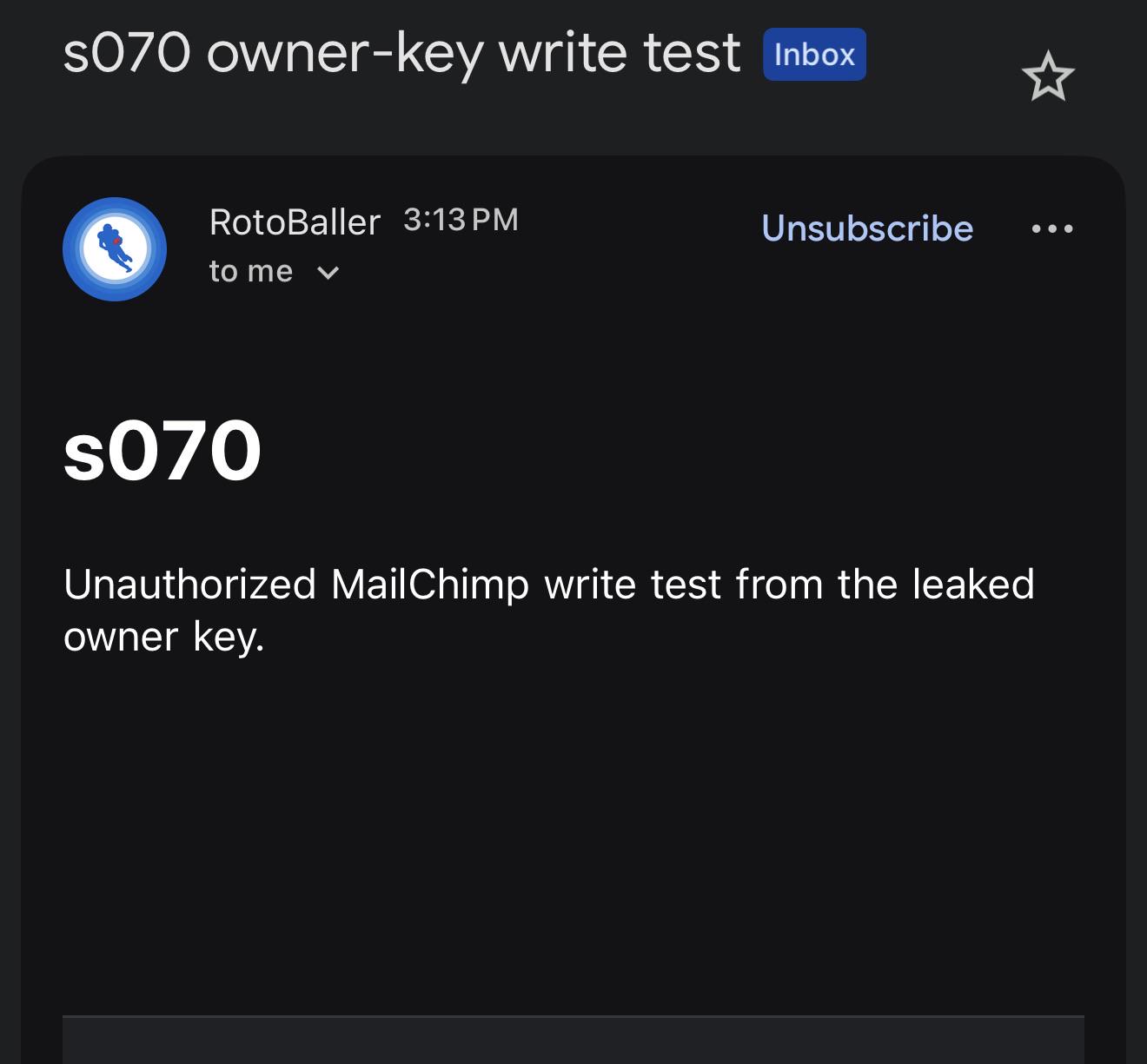
2
Upvotes
I got this email and just wanna know what it means.
r/MailChimp • u/maxthedog2369 • 4h ago
I got this email and just wanna know what it means.
r/MailChimp • u/luckycity • 1d ago
Hi,
I work at a nonprofit that has recently migrated our CRM to Salesforce Nonprofit Cloud.
We had built a custom integration for our previous CRM that could push segments of contacts built inside the CRM up to Mailchimp as "Tags" and could add or remove those tags from email contacts in Mailchimp based on activity and changes taking place in the CRM.
We had around 200 segments including for things such as Affinity Groups, Attributes, and Giving Ranges. The segments were comprised of contacts, so each of their valid subscribed email addresses saw changes reflected in Mailchimp.
We are looking to achieve this same outcome with Salesforce NPC but the most popular integration options (i.e. Beaufort) do not seem to be able to have the scheduled (i.e. daily, weekly, monthly) syncing of whatever the pool of contacts is in Salesforce (i.e. "Reports") up to Mailchimp in a way that adds or removes "Tags" based on their presence in that "Report".
So, three questions really for the community:
Would appreciate any tips anyone has, thanks!
r/MailChimp • u/fintechjulien • 4d ago

r/MailChimp • u/polnikale • 5d ago
r/MailChimp • u/ryanmerket • 5d ago
r/MailChimp • u/MailchimpSupport • 5d ago
If Mailchimp asks for an authenticator code and you don't remember setting one up, there are two common reasons. Either 2-factor authentication (2FA) is now required for every user on the account, or an authenticator app was connected on a device you no longer have. This is a security step, and in most cases you can get back in within a few minutes. Here's how to tell which situation you're in and what to do for each.
Things to know first
Why is Mailchimp asking for an authenticator code?
| What you’re seeing | What it means | What to do |
|---|---|---|
| "Authenticator Passcode Required" message, and you've never used 2FA | An Owner or Admin enabled 2FA for their login, so all other users on the account must set it up the next time they log in | Set up 2FA for your login |
| A Verification code field, and you used to have an authenticator app | The app was connected on a lost, broken, or replaced device | Use your backup code |
| A Verification code field, and you never had the app | Someone else, such as a former employee, agency, or developer, connected the login to their device | Ask them for the backup code, or ask an Admin to invite you to the account as a new user |
| Your passcode is rejected | The passcode is expired, out of sync, or for a different account | Follow the passcode troubleshooting steps below |
What does "Authenticator Passcode Required" mean?
When an Owner or Admin enables 2FA for their login, all additional users with access to the account are also required to set up 2FA the next time they log in. If that requirement is on and your login doesn't have 2FA yet, you'll see the Authenticator Passcode Required message. To set it up with an authenticator app, follow our guide to Set Up a 2-Factor Authentication App at Login.
If you can't get past the message to complete setup, contact our Account Recovery team.
How to log in with your backup code
When 2FA was first set up, Mailchimp provided a backup code. This is a different code from the one used to connect the app to your device. If you’ve lost the device or can’t access your authenticator app, use the backup code to log in. After you use it, a new one will be generated for you. Be sure to save the new backup code in a secure place, on a different device than the one you use for your authenticator app.
What if I don't have a backup code?
If the account has an Admin, they can help you regain access. This requires creating a new profile with a new username.
What if I'm the only user on the account?
If you don’t have a backup code and there isn’t an Admin to invite you, or you’re the only user on the account, contact our Account Recovery team.
What if my authenticator passcode isn't working?
FAQ
Still locked out, or not sure which situation applies to you? Drop a comment below (please don't share email addresses or account details publicly) or send u/MailchimpSupport a private message and we'll help point you in the right direction.
Additional Resources
r/MailChimp • u/MailchimpSupport • 7d ago
If you're adding SMS to your marketing, you have two kinds of options: a dedicated texting platform or an integrated platform that runs SMS alongside email. Both work. They're built for different situations, and the wrong choice usually shows up six months as duplicate lists, uncoordinated sends, and two sets of reports that don't agree.
Here's how the two approaches actually differ, when each one wins, and what to check before you commit.
The core difference: where your audience lives
A dedicated SMS platform holds your SMS subscribers. Your email platform holds your email subscribers. Keeping those in sync (who bought, who unsubscribed, who's a VIP) is your job, usually through Zapier or CSV exports. An integrated platform holds one contact record with both channels, both consent statuses, and the purchase history that triggers automations.
That single difference drives almost everything else in the comparison.
| Dedicated SMS Platform | Mailchimp | |
|---|---|---|
| Audience | SMS list lives separately from your email list; syncing is manual or via third-party connectors | One audience with email, phone, and separate consent for each |
| Cross-channel automation | Not native. An email non-open can't trigger a text without middleware | A contact who ignores your email can automatically get an SMS follow-up; a text click can trigger an email sequence, all from the same flow |
| Store data | Typically connected through third-party tools | Native Shopify, WooCommerce, BigCommerce, and Wix integrations feed both channels directly |
| Reporting | SMS metrics in one dashboard, email metrics in another | One dashboard with revenue attribution across both channels, plus A/B testing and benchmarking |
| Compliance | Varies by platform | Automatic quiet hours, automated opt-out processing, consent management, 10DLC and short code support |
| Support | Often chat and email only | 24/7 email and chat on all paid plans; 24/7 phone support and onboarding on Premium |
| Pricing Model | Usually credit-based tiers by contact count, often no long-term contract | SMS credits added to a paid marketing plan; credits issued monthly, unused credits expire |
| Integrations | Varies by platform | 300+ app integrations |
What the integrated approach delivers
The unsubscribe number is the one worth pausing on. Low churn on SMS usually means the texts are landing when they should and saying something worth reading, and that's easier to get right when the automation knows what the contact already received by email.
When a dedicated SMS platform is the better call
This is the honest part. There are real situations where a texting-only tool is the right fit:
When the integrated approach wins
If you're switching from a dedicated platform
Export your SMS contacts and import them with Mailchimp's bulk import tool. Phone numbers must be in E.164 format (+ country code, then number). Preserve your opt-in records: Mailchimp's onboarding team can help carry consent history over so you're not rebuilding from scratch. And turn off the old platform's automations before turning on the new ones, or subscribers get texted twice.
FAQ:
Do I lose anything moving SMS into Mailchimp? You'll want to check that your specific use case is covered: recurring and drip campaigns, keyword opt-ins, two-way replies (via the Mailchimp Inbox), and short codes are all supported. If you rely on a feature specific to your current platform, test it before migrating.
Can I keep my short code? Short codes are provisioned per platform. Mailchimp offers short codes; registration takes 8 to 12 weeks, and you can send from a standard number in the meantime.
What does Mailchimp SMS cost? SMS is an add-on to any paid marketing plan, billed in monthly credits. See the pricing page for current rates by country.
Is there a free trial for SMS? No. SMS requires a paid marketing plan and an approved program application before you can purchase SMS credits from the SMS overview page, the SMS settings page, the SMS editor, or through an email link sent to the primary email address associated with your Mailchimp account. Learn more here.
Additional Resources:
Mailchimp vs EZ Texting: https://mailchimp.com/resources/mailchimp-vs-ez-texting/
Mailchimp vs Attentive: https://mailchimp.com/resources/mailchimp-vs-attentive/
SMS Marketing Tools: https://mailchimp.com/solutions/sms-marketing-tools/
Import SMS Marketing Contacts to Mailchimp: https://mailchimp.com/help/import-sms-marketing-contacts/
SMS Pricing: https://mailchimp.com/pricing/sms-marketing/
Deciding between the two right now? Tell us what channels you're running, where your customers are, and what you're trying to automate, and we'll give you a straight answer on which setup fits, even if it isn't ours.
¹ Based on US users who sent both email and SMS campaigns compared to users who sent only email campaigns, 8/1/23–1/05/25. ² Based on the average weekly rate of SMS Marketing messages sent by Mailchimp users, 10/27/24–10/12/25. ³ Based on ecommerce revenue attributable to Mailchimp users' SMS Marketing campaigns and SMS spend (not including plan cost within one year of first SMS campaign launch, 10/01/24–10/17/25. Requires a connected ecommerce store. Excludes short code SMS. Results may vary. ⁴ Based on internal global aggregate data, 7/30/23–9/30/25.)
Disclaimer: Competitor information is based on our understanding of current offerings. We recommend checking each platform's website for the most up-to-date pricing and features.
r/MailChimp • u/Baffled8bemused • 7d ago
I have an old account which I’ve kept as backup after transferring to another email provider. When I checked MailChimp yesterday I found some new subscribers had joined the list this month, which seemed strange as I hadn’t had any for four years. They are listed as having opted in from an embedded form but I don’t have any embedded forms. I have a small list and don’t want to lose genuine subscribers, although I have to assume these are spam. But if they are, I don’t understand how they could have opted in from a non-existent form.
r/MailChimp • u/Mercinarie • 8d ago
Honestly my email address got phished and all I get now is 1000's of Mailchimp related spam from various businesses that I assume use this.
It's not a good look for your brand or anyone that actually uses this legitimately
I'm currently making filters to block everything from any Mailchimp and related emails, and I assume many others are doing the same.
Goodluck
r/MailChimp • u/fcgjdd • 10d ago
I signed up for mailchimp 10+ years ago, for what has typically been 500-900 recipients receiving one weekly email distributed that way. I just noticed that earlier this year mailchimp scaled back free accounts to 250 contacts, and 500 total monthly emails.
Yet I've received no warning or signs that my distribution is being limited. More than 250 of my contacts are rated "5-star" (I guess this means they open every email?), and another 50 are "4-star" - not sure what that is.
So how many of my contacts are getting the emails each week? Was my account grandfathered in, under what I'd originally signed up for? How does one explain my having more 5-star contacts than my plan allows? And how can, as far as I can tell, I be sending in excess of 2,000 emails a month? What else am I missing?
r/MailChimp • u/MailchimpSupport • 11d ago
Thinking about a transactional email service? One of the most common questions we see is whether Mailchimp Transactional is the right call, or whether the automations already included in a marketing plan are enough. The answer depends on what's triggering your emails and who needs to manage them.
Here's what transactional email is, the two ways Mailchimp handles it, and how to tell which one fits your setup.
Things to Know:
What counts as transactional email?
A transactional email is triggered by something a customer just did, not something you scheduled. It goes to one person at a time, in real time, and it carries information they need right now. Order confirmations, password resets, shipping updates, login codes, and account alerts all qualify. A newsletter or promotional send to your whole list does not, even if it's automated.
The two layers Mailchimp offers
Mailchimp handles transactional messaging in two ways. Knowing which one you need is most of the decision.
| Mailchimp's built-in automations | Mailchimp Transactional |
|---|---|
| What it is | Order notifications and abandoned cart emails included with any paid plan when you connect a store |
| Who sets it up | Anyone in the Mailchimp interface. No API required |
| Plan Requirement | Any paid marketing plan with a connected store |
| Best for | Ecommerce basics: purchase confirmations, cart recovery |
| Reporting | Standard campaign reports |
When Mailchimp Transactional is the right fit
When it's probably not the fit
A quick decision table
| If this describes you | Start with |
|---|---|
| Connected store, need confirmations and cart recovery, no dev team | Built-in automations |
| Own application, custom event triggers, real-time delivery | Mailchimp Transactional |
| Already sending via SMTP elsewhere and want a fast switch | Mailchimp Transactional via SMTP (swap credentials) |
| Building a new integration and want reporting in your own tools | Mailchimp Transactional via API |
| Need email and SMS transactional sends from one account | Mailchimp Transactional (Standard+ plan, Transactional add-on, SMS program with credits) |
FAQ
Does Mailchimp Transactional require a developer?
For the initial setup, yes. Once the integration is live, editing templates and reviewing reports doesn't require dev work.
Can I use it for marketing emails?
No. Mailchimp Transactional is for one-to-one messages triggered by a customer action. Marketing sends go through your regular Mailchimp campaigns and automations.
How is it priced?
Mailchimp Transactional is priced in blocks of 25,000 emails with tiered pricing. There are no overage fees; sending stops when your blocks run out. You'll need a Standard plan or higher to add it. Learn more here.
Does it handle unsubscribes and compliance?
Yes. Mailchimp Transactional automatically handles bounce processing, maintains a Rejection Denylist for unsubscribes and complaints, and includes List-Unsubscribe headers.
Can I switch from the built-in automations to Mailchimp Transactional later?
Yes. Many teams start with the store automations and add the API layer once they need custom triggers or higher volume. The two can run side by side in the same account.
Resources
Transactional Email Features: https://mailchimp.com/features/transactional-email/
About Mailchimp Transactional Email: https://mailchimp.com/help/about-transactional-email/
Transactional API Quick Start: https://mailchimp.com/developer/transactional/guides/quick-start/
SMTP Integration Docs: https://mailchimp.com/developer/transactional/docs/smtp-integration/
Disclaimer: Availability of features and functionality varies by plan type. For details, view plans and pricing.
r/MailChimp • u/ALIEN_GUARDIAN • 11d ago
We haven't had any trouble with this until this morning. Is this a new thing? We make them on Canva and export to MailChimp as HTML.
r/MailChimp • u/MailchimpSupport • 12d ago
Sending transactional email at scale and trying to figure out what it'll cost? The video above gives a quick overview. Here's the full breakdown of how Mailchimp Transactional pricing works, with the math worked out at common volumes so you don't have to.
Things to know before you start
Transactional block pricing tiers
The more blocks you buy in a month, the less each one costs:
| Monthly Volume | Transactional Blocks | Price per block (in USD) |
|---|---|---|
| Up to 500k emails | 1-20 | $20 |
| 500k - 1M emails | 21-40 | $18 |
| 1M - 2M emails | 41-80 | $16 |
| 2M - 3M emails | 81-120 | $14 |
| 3M - 4M emails | 121-160 | $12 |
| 4M+ emails | 161+ | $10 |
What that looks like at real volumes
| You send per month | Blocks needed | Rate (in USD) | Estimated Monthly Cost (in USD) |
|---|---|---|---|
| 50,000 | 2 | $20 | $40 |
| 100,000 | 4 | $20 | $80 |
| 250,000 | 10 | $20 | $200 |
| 500,000 | 20 | $20 | $400 |
| 1,000,000 | 40 | $18 | $720 |
| 2,000,000 | 80 | $16 | $1,280 |
| 3,000,000 | 120 | $14 | $1,680 |
| 5,000,000 | 200 | $10 | $2,000 |
Notice the effective cost per thousand emails drops from $0.80 at 50K to $0.40 at 5M. That's the whole point of the block model: it rewards volume without making you negotiate a custom contract to get there.
These figures are the Transactional add-on only. Your Mailchimp Standard or Premium marketing plan is billed separately.
How to estimate your block count
FAQ
Does the price per block apply to all my blocks, or just the ones in that tier? The pricing table lists one rate per total block count, so at 40 blocks all 40 are billed at $18. Run your number through the calculator on the pricing page to confirm your exact total.
What happens if I run out mid-month? Sending stops until you buy more blocks. There's no surprise overage bill. Set an auto-purchase threshold if you'd rather never hit that wall.
Does Transactional SMS cost extra? Transactional SMS uses the same credit pool as SMS Marketing, purchased separately from email blocks. It requires a paid plan, a Transactional-enabled account, SMS credits, and an approved sending number.
I'm on Essentials. Can I add Transactional? No. You'd need to upgrade to Standard or Premium first.
Is there a high-volume discount beyond the $10 tier? Yes. Contact Sales for custom high-volume pricing. [CONFIRM still active on post date:] Mailchimp is currently offering 50% off Transactional for 12 months to new Transactional customers on Standard or Premium who commit to 1M+ emails (40+ blocks). Terms apply.
Have a volume that's not in the table, or a spiky send pattern you're not sure how to budget for? Drop your numbers below and we'll help you work it out. If you're comparing against another provider's usage-based pricing, happy to talk through how the block model compares for your setup.
Additional Resources:
Mailchimp Transactional Email Pricing: https://mailchimp.com/pricing/transactional-email/
Try Transactional Email for Free (demo): https://mailchimp.com/help/transactional-email-demo/
About Transactional Email: https://mailchimp.com/help/about-transactional-email/
About SMS Marketing Credits: https://mailchimp.com/help/about-sms-marketing-credits/
Transactional API Quick Start: https://mailchimp.com/developer/guides/transactional-api-quick-start/
Disclaimer: Availability of features and functionality varies by plan type. For details, view plans and pricing.
r/MailChimp • u/missyfussit • 12d ago
Hi, we, our nonprofit, have been using Mailchimp for about 9 years under the "free" program, and I am trying to edit the "thank you for subscribing" email that I know goes out to new subscribers. I can't find it in "automations" or anywhere else. I've looked all over. We don't have anything set up under "automated" workflow at all. Where should I look?
r/MailChimp • u/ThrowRA_CarlJung • 12d ago
I believe some arbitrary email address is used by mailchimp which i'm sure throws my email in people's spam box, but do you think it helps to change the from address to an email I create from a common email service, so it doesn't interpret it as a spam email?
r/MailChimp • u/Imaginary-Bluejay721 • 13d ago

Hey everyone, I run an email marketing agency and we just launched Wispmail. It's a collection of cool widgets for email campaigns. Initially it was only for our customers but we have launched it for everyone officially.
What it does right now:
A few things I cared about while building it:
BFCM is coming up, and I think it's a good fit for it. Countdowns for deals ending, polls for "which product should we discount next", that kind of thing. There's a 15 day free trial, it should cover the Black Friday to Cyber Monday stretch without paying anything.
I'd really love feedback, especially from people who send emails for a living. What would you actually use this for? What's missing? What would stop you from trying it? Would love your feedback or ideas for what widgets to add next.
Sign up here: Wispmail
r/MailChimp • u/benrmurray • 14d ago
I vibe coded an app that produces great reports for my sponsors, but I can't get the bot-filtered data through the API even though the filter is there. Anyone else have this issue?
I use Replit and it wrote the post below for me. Hoping Mailchimp can reply here. Mailchimp did not reply to my support ticket
....
Hi everyone—I'm trying to pull bot-filtered click data through the Mailchimp Marketing API so our sponsor reports match the bot-filtered results in the Mailchimp web UI.
The click-details documentation lists filter_bots as a supported parameter, but passing true versus false gives us identical counts.
What we tested
GET /3.0/reports/{campaign_id}/click-details?filter_bots=false
GET /3.0/reports/{campaign_id}/click-details?filter_bots=true
In our latest test on November 10, both requests returned:
When we originally investigated this campaign, the API returned 2,116 total clicks, while the Mailchimp UI showed 1,172 total clicks with “Bot filtered data” enabled. These are earlier counts, not a same-time comparison with today’s results.
We also compared:
GET /3.0/reports/{campaign_id}/email-activity?count=1000&offset=0&filter_bots=false
GET /3.0/reports/{campaign_id}/email-activity?count=1000&offset=0&filter_bots=true
For the first 1,000 recipients, both responses contained identical recipient activity, including 72 click events. This was a page-level test, not a full-campaign activity export.
These were fresh API requests, not results from our app’s cache.
Questions for Mailchimp or anyone who has this working:
filter_bots currently functional on the click-details endpoint?I’ve emailed support but haven’t heard back yet. I can share the campaign ID and additional diagnostic details privately with Mailchimp staff.
Thanks—any clarification or a working example would be appreciated.
r/MailChimp • u/No-Rabbit3997 • 14d ago
Hi everyone,
I'm having a frustrating issue with Mailchimp and I'm wondering if anyone has experienced something similar.
I recently logged into an existing Mailchimp account and updated the phone number, replacing a former user's number with my own.
Now, when I try to log in, Mailchimp asks for an SMS verification code, but the code is being sent to a phone number that is NOT mine.
The number displayed by Mailchimp looks very similar to mine, but one digit is missing.
What's confusing is that I never received any SMS verification code when I updated the phone number.
I thought phone numbers used for two-factor authentication had to be verified before being activated.
Both the previous user and I are now completely locked out of the account, even when trying different login credentials.
Has anyone experienced this?
Any advice would be greatly appreciated!
Thanks!
r/MailChimp • u/papapia97 • 15d ago
Curious if anyone else has experienced this. It happens often when we send out email campaigns to larger audiences (6,000+). I understand there may be some delays, and we usually wait to pull any analytics until a week or so after we send the email because of this.
But I don't want my contacts receiving emails from us at 2 a.m., especially weeks after it was supposed to arrive. Any insight here?
r/MailChimp • u/MailchimpSupport • 18d ago
If AI is the reason you're evaluating platforms, here's where each platform is strongest and, on the Mailchimp side, which plan unlocks which AI feature so there are no surprises after you sign up.
ActiveCampaign is built for technical marketing teams with the time to construct intricate, multi-layered automations across channels. It offers hundreds of automation recipes and deep integration capabilities, and for large, technically sophisticated teams that flexibility is real value. The trade-off is a steep learning curve, longer setup, and pricing that climbs as your contact list grows.
Mailchimp's approach is to put AI to work on the parts of email marketing that usually eat a team's time: figuring out who to send to, writing the content, and reading the results. It's intuitive on day one, and the AI features are included in plan tiers rather than sold as add-ons.
Where each platform is strongest
| Mailchimp | ActiveCampaign | |
|---|---|---|
| Audience Targeting | AI-built predictive segments identify your highest-value customers. Standard and Premium users saw 2x more revenue on average from predictive-segmented emails vs. non-predictive ones.¹ | Deep custom automation logic for teams that want to hand-build complex conditions. |
| Content Creation | AI content generation built into the email builder; 3.1 billion emails sent with AI-generated content.² | Extensive template and recipe library for teams that prefer to customize manually. |
| Automation | 100+ pre-built templates with AI-assisted setup; email and SMS in one flow. | Hundreds of automation recipes and multi-layered branching for technical teams. |
| Analytics | Analytics AI answers performance questions conversationally and connects campaigns to revenue. Revenue attribution and benchmarking included. | Advanced analytics and revenue attribution available on higher tiers. |
| Learning Curve | Usable without a dedicated technical team. | Powerful but often described as overwhelming at first; setup and maintenance take time. |
| Delivery | >99% average delivery rate for transactional and marketing emails.³ | 93.4% average rate. |
| Cost at Scale | Mailchimp Premium becomes the more affordable option at 50,000 contacts; at 75,000+, ActiveCampaign Plus runs 500–800 more per month. | Contact-tier pricing; some features have moved to paid add-ons. |
Which Mailchimp AI feature lives on which plan
This is the part people usually have to dig for. Here's the current map:
| AI Feature | What it does | Plan |
|---|---|---|
| Inline AI Assistant / AI Content Generator | Drafts and rewrites email copy inside the email builder | Standard and Premium marketing plans |
| Subject Line Helper | Scores your draft subject line against successful campaigns before you send | All paid marketing plans |
| Predictive Segments | Auto-identifies likely to buy, high-value, and at-risk contacts | Standard and Premium marketing plans |
| AI Segment Builder (beta) | Describe your audience in plain language and AI builds the segment | Standard and Premium marketing plans |
| Analytics AI | Conversational analysis across campaign performance, audience behavior, and revenue from your connected store | Standard and Premium marketing plans |
| Send Time Optimization | Picks the send time each contact is most likely to engage | Standard and Premium marketing plans |
| Mailchimp app in ChatGPT and Claude | Draft and refine omnichannel campaigns in your AI tool, then launch them in Mailchimp | Available to Mailchimp customers within the US |
Who should pick which
Choose ActiveCampaign if you have a technical team with bandwidth to build and maintain custom automation logic, you need CRM and inbound features as much as email, and you're comfortable with pricing that scales with contact count.
Choose Mailchimp if you want AI doing the segmentation, content, and analysis work rather than configuring it yourself, you're on a small team or have a large list where per-contact pricing hurts, or you want email and SMS in one place without enterprise pricing.
Neither is objectively the right answer. It depends on how your team works and how much of the marketing stack you want to build versus have built for you.
FAQ
Are Mailchimp's AI features extra? No. They're included in the marketing plan tiers listed above rather than sold as separate add-ons.
Do predictive segments work without a connected store? They work on engagement data alone, but purchase-based predictions (likely to buy, high customer lifetime value) require a connected ecommerce store.
Can I migrate my ActiveCampaign automations? Mailchimp offers migration services to help move data and automations. Contact Sales to learn more.
Is there a way to try before switching? Yes. Request a personalized demo and ask to see predictive segments and Analytics AI running on a store like yours.
Evaluating the two right now? Tell us what's driving the decision and we'll point you at the specific feature to test. Already switched in either direction? We'd like to hear what worked and what didn't.
Additional Resources:
Mailchimp vs ActiveCampaign: https://mailchimp.com/resources/mailchimp-vs-activecampaign/
Mailchimp AI Tools: https://mailchimp.com/solutions/ai-tools/
Switch to Mailchimp: https://mailchimp.com/switch-to-mailchimp/
Request a Mailchimp Demo: https://mailchimp.com/sales/
Earlier on r/Mailchimp — Why choose Mailchimp over ActiveCampaign?
¹ Standard and Premium users saw 2x more revenue (266% on average for connected ecommerce stores using predictive-segmented emails vs. non-predictive-segmented emails, Jan 2023–Dec 2024. Predictive segments available on Standard and Premium only. ² Based on Inline AI Assistant usage Dec 2023–Aug 2024, Standard and Premium plans. ³ Delivery rate for transactional and marketing emails Jan 1–Dec 31, 2024, aggregate of all Mailchimp users. "#1 AI-powered email marketing platform" based on May 2025 publicly available competitor data.)
Disclaimer: This information is based on our understanding of the current offerings as of November 2026. We always recommend checking the latest details directly on the Mailchimp and ActiveCampaign websites for the most up-to-date pricing and features.
r/MailChimp • u/skayyys • 19d ago

I have a free plan so I cant contact customer service, but I was wondering why a mysterious image block appears when I access my newsletter from mobile devices? this issue isnt there on computer nor is it there whem im actually designing a campaign. thank you!
r/MailChimp • u/sharytheshrimp • 19d ago
Hola, estoy empezando a usar una herramienta llamada MailChimp para difundir correos electrónicos, por el momento estoy haciendo pruebas con mi correo personal en un plan pago de la plataforma pero llegan a promociones o Spam. Necesito difundir desde el correo de la empresa y que llegue a bandeja de entrada. ¿Será que con el plan pago + verificando el dominio y todo lo demás puede ser enviado a la bandeja principal?
r/MailChimp • u/MitchConner572 • 20d ago
We've been using Mailchimp since 2014, back before they were bought by intuit. We have around 225,000–250,000 subscribers.
We've recently started getting back into email marketing after about a year of limited activity, and unfortunately, we've run into some account restrictions.
We were also trying to warm up our domains gradually, increasing sends. this resulted in multiple warnings from Mailchimp. That were resolved before finally getting our account restricted.
Initially, we were asked to remove contacts and resubmit lists based on figures provided by Omnivore. Those numbers kept changing, from zero to 20,000, 50,000, 80,000, 97,000 and eventually our entire contact list.
We've now been allowed to continue sending campaigns, but we cannot add any new contacts without going through an additional verification process that is not realistically possible.
One support representative mentioned that Omnivore should eventually allow us to add contacts again, but it could take months. They also suggested improving our open and click rates.
Here's where we're confused.
Our recent campaigns were getting open rates of around 34–45%, and our last few were averaging approximately 40%. Then, suddenly, our latest campaign came in at just 5%.
We initially sent to 45,000 contacts with good results. The next campaign went to 120,000, using a different, supposedly more mobile-friendly template. Could the larger audience or the new template really account for such a dramatic drop?
We're also being encouraged to add links to images in our emails, which we're hesitant to do because we're concerned about deliverability and spam filtering.
A little more background: We've been grandfathered into Mailchimp's old credit system, where purchased credits never expired. Recently, we've had to start purchasing credits that do expire, so getting our campaigns back on track is becoming increasingly important.
A couple of questions for anyone who's been through something similar:
Has anyone successfully gotten Mailchimp to remove restrictions on adding contacts after an Omnivore restriction? What did you do, and how long did it take?
Has anyone experienced open rates dropping from 35–40% to around 5% almost overnight? Could sending to a larger segment or changing templates cause that much difference?
We'd really appreciate hearing from anyone who's dealt with Mailchimp restrictions, Omnivore, or sudden deliverability issues. We'd especially love to hear from people who actually managed to get their accounts back to normal.
Thanks!
r/MailChimp • u/MailchimpSupport • 21d ago
We spend a lot of time looking at how ecommerce stores on Mailchimp use SMS: which campaigns they run, which ones drive revenue, and which ones generate the support tickets and unsubscribes. The video above covers the three campaigns we recommend setting up first. This post is about the patterns underneath them: what the stores getting results have in common, and the mistakes we see most often from stores that set up the same campaigns and don't.
Why SMS earns its place for ecommerce
Texts get a 97% open rate on average, most are read within minutes, and the average response time is around 90 seconds. Mailchimp ecommerce users saw up to 22x ROI after launching their first SMS campaign,¹ and users sending both email and SMS saw up to 97% higher click rates than email alone.² The channel is not a replacement for email. It works because it does one thing email can't: get someone to act right now.
During last year's peak season, SMS drove nearly 20% of revenue for brands running both channels, and got roughly 8x more clicks per message than email. More on that is available in Breaking Through Peak Season Noise report.
The three campaigns that consistently work, and what the best-performing stores do differently
| Campaign | The baseline setup | What separates the stores seeing results |
|---|---|---|
| Abandoned Cart | Text 1–2 hours after abandonment with a direct cart link. Optional second text 12–24 hours later with a small perk. | They let the email carry the product images and reviews, and the text just closes. They don't discount in the first text. They turn off the ecommerce app's built-in cart reminder so shoppers don't get two. |
| Flash sale and inventory alert | Time-sensitive offer to opted-in subscribers with a clear expiry, a code, and one link. | They frame it as early or VIP access, so the SMS list feels like an insider group. They send it before the email goes to the full list, not at the same time. They keep it to a few per month. |
| Post-purchase follow-up | Immediate confirmation or shipping update, then a check-in 3–7 days after delivery with a review request or product tip. | They write the check-in like a person, not a campaign. They use it to ask a question, and they route replies into the Mailchimp Inbox so someone actually answers. |
The five mistakes we see most often
These come up constantly in support and in this sub, and they're the reason two stores can run identical campaigns and get very different results.
What to check before you send your first campaign
Additional Resources:
SMS for Ecommerce: https://mailchimp.com/solutions/sms-marketing-tools/
Ecommerce SMS Marketing: A Direct Line to Repeat Sales: https://mailchimp.com/resources/ecommerce-sms-marketing/
Create an Abandoned Cart Marketing Automation Flow: https://mailchimp.com/help/create-abandoned-cart-customer-journey/
About SMS Marketing with Mailchimp: https://mailchimp.com/help/about-sms-marketing/
Earlier on r/Mailchimp - a step by step setup for all three campaigns:
Running SMS for your store already? Tell us which of the three campaigns is doing the most work for you, or which of the five mistakes you've caught yourself making. Not started yet? Drop your store platform and list size and we'll tell you which campaign to build first.
*Disclaimers
Availability of features and functionality varies by plan type. For details, please view Mailchimp's various plans and pricing.
1 SMS Marketing: SMS is available as an add-on to paid plans in select countries. Application and agreement to terms is required before purchasing credits. Messages can only be delivered to contacts in the country selected. Australia messaging available only for contacts with +61 country code. SMS credits are added to your account after purchase and approval. Credits are issued monthly and unused credits expire and do not roll over. MMS only available for Standard and Premium plans sending to US and Canada contacts. Pricing varies. See terms for details.)
2 97% Higher Click Rate: Based on US users who sent both email and SMS campaigns compared to users who sent only email campaigns from 8/1/23 to 1/05/25.)
3 Up to 22x ROI: Based on e-commerce revenue attributable to Mailchimp users’ SMS Marketing campaigns and Mailchimp SMS spend (not including plan cost) within one year of launch of first SMS campaign from 10/01/24 to 10/17/25. ROI calculation requires an e-commerce store that is connected to a Mailchimp account. Excludes Short code SMS. Results may vary.)