What happens if I start a drop mow and the mower runs out of battery. Can I charge it and bring it back fully charged and have it pick up where it left off?
Just got my new Yuka Mini 2 set up and thought I would try out the automatic mapping feature. Watched the mower carefully map the 200 m² back yard and then decided to let it go for the first mow.
Everything was working brilliantly until it got to the edge mowing. The once careful robot then began to run itself into every boundary! It repeatedly fell off a 10 cm drop off into the garden beds, then decided to drag its body around the edge of the 7 cm concrete border. The once brand new robot quickly became covered in scratches and gouges as it plodded along. Corners? Why not jump those at full speed?!Next, it ran into the wooden fences and kept turning it's wheels, digging holes. Such brilliant obstacle avoidance (not).
For the next round, I decided to place virtual fences along every border. This worked brilliantly! The mower now avoided the boundaries. However, later most of the virtual fences were deleted without intervention. The next round of edge mowing saw little Yuki drag his other side against all obstacles. I suppose symmetry was the goal? Now he is scratched equally on both sides.
Frustrated, I deleted all the auto mapped areas and mapped them myself, leaving a boundary. This has worked for the most part. However, I now own a new machine that looks very much worse for wear.
I was excited about Lidar, auto mapping, and obstacle avoidance because I like to keep my things nice. This was a jarring experience that left me more than a little disappointed.
Anyone else have a similar story? Should I just chalk it up to the fact that the technology just isn't there yet? Are Mammotion's claims overblown? Is there a robot that actually avoids damaging itself?
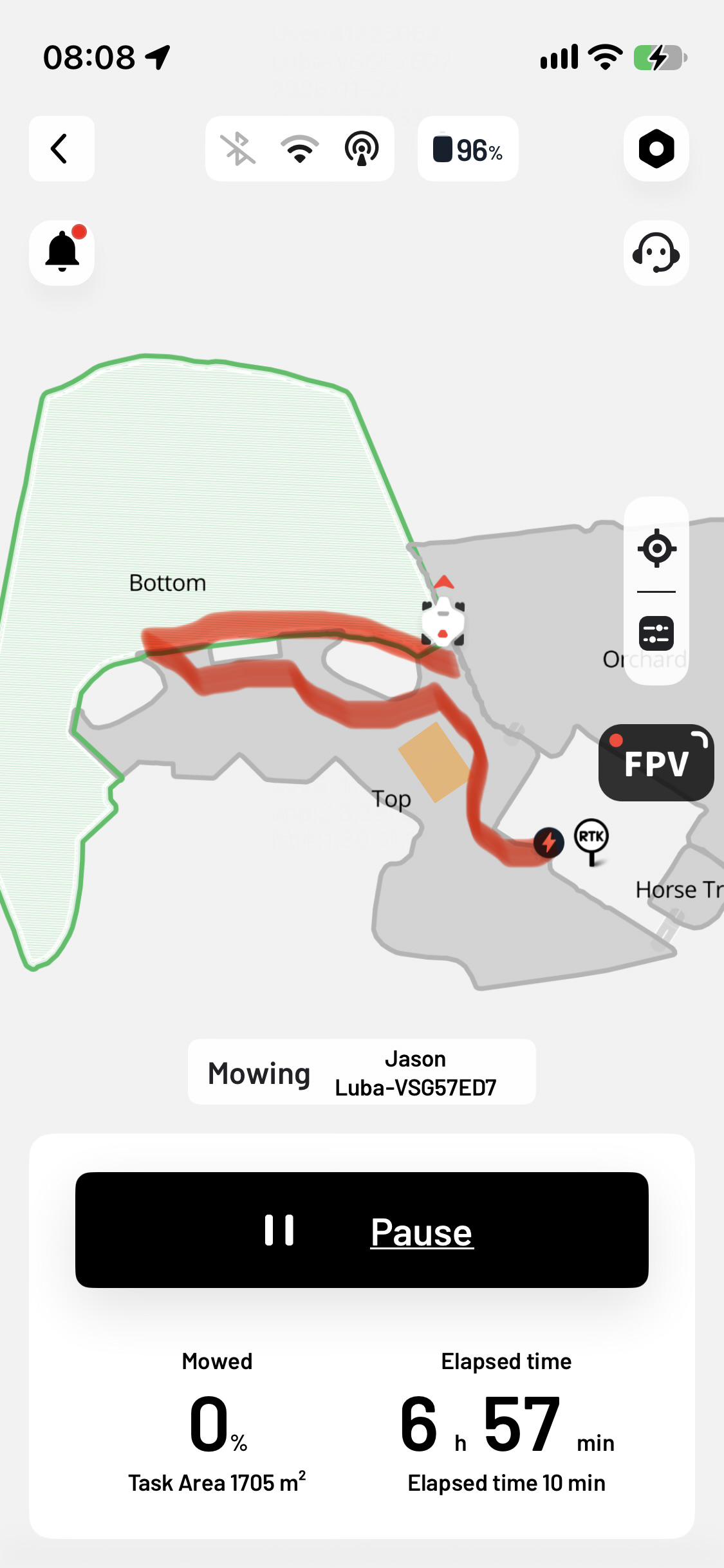
I was checking up on progress of the mower and noticed this. What's that white region? It's not something I had drawn. I just checked, the lawn is clear, no obstacles, the camera lens and lidar dome are both clean. Remains to be seen if the mower will go around or over it.
Can someone please explain why? Drives me crazy that it wastes so much time and creates ruts. There is a channel set up between the zone near the mower but somehow this is a direct route?
J'ai l'impression que depuis la mise à jour 1.30.31.19, le voyant vert de la station RTK reste avec la même luminosité la nuit qu'en journée alors qu'auparavant cette luminosité était moindre durant la nuit.
Time to replace your blades? Follow this walkthrough for removal, cleaning, and installation. Remember to use new screws with the new blades and check that each blade rotates freely. Save this video for when you need it!
I’m sure this has been asked but, I recently got a used LUBA 2 from Mac.bids a Amazon reseller. The mower says it’s bound to another account.
I showed all the information to mammotion and they said that since it’s not a reseller like ebay(?) they can’t do anything about it. Does anyone know a way to unbind the mower?
If you’re a previous owner can you unbind your mower please? Throwing out some hope.
Bonjour, j'ai bruit bizarre depuis un moment sur mon luna mini awd 1500, les lames sont changées depuis hier et le bruit continue. Voir vidéo. Pourriez-vous m'aider à trouver le problème, j'ai démonté le disque de coupe, tout nettoyé. Merci de votre aide.
Need to replace your main cutting disc? Watch this guide for preparation, removal, cleaning, and reassembly—including the correct disc orientation and final blade checks. Save it for your next maintenance session!
When starting a new task the machine seems slow, very noisy and can make several false starts before starting work. I attach a video clip showing something of this,on occasions it can take 5 or 6 apparent attempts to get going. It has had a cutting motor replaced earler this year but the probl;em has recurred. Has any one elase experienced this problem?
TL;DR: Sent my Luba 2 from Italy to the Mammotion service center in Poland for charging issues and condensation in the 3D Vision camera. Support prioritized the case, replaced 3 hardware modules under warranty (€0 cost), and shipped it back in about 3 weeks total. Great experience overall. Hey everyone,
People usually post on Reddit when things go wrong, so I wanted to share a positive experience with Mammotion EU Support and their repair center in Poland. The Issues: Towards the end of the mowing season, I started having charging reliability issues (docking/contact problems) along with condensation/moisture getting inside the 3D Vision camera module.
Timeline & Process:
Oct 16: Opened the support ticket and got the RMA approved.
Oct 20: UPS picked up the package from my place in Italy.
Nov 3: After standard transit and warehouse sorting, the unit was officially checked into the service center in Poland.
Nov 6: Support (shoutout to Emily, Unny, and Helen) had marked my ticket as priority, and the technicians completed the repair in just 3 days.
Mid-November: The Luba 2 arrived back home via UPS.
What Was Replaced (All Under Warranty – €0.00): According to the Service & Repair Report included in the box, they ran full diagnostics and replaced three components:
3D Vision Module
LUBA 1 / LUBA 2 Charging Station Module
Infrared Receiver & 4G Module (EU/UK/AU) – they caught a defect on the 4G card slot during inspection and replaced it proactively.
Current Status: I reassembled the bumper and the new 3D Vision module over the weekend, re-paired the robot with my RTK antenna (quick tip: technicians change the LoRa-RTK ID during factory testing, so make sure to check/re-enter your antenna ID in the app!), and tested basic movement and charging. Everything works smoothly.
Since it's already mid-November here in Northern Italy and the grass is done growing for the year, I've cleaned it up and put it into indoor winter storage—I'll run a full mowing test when spring arrives.
Overall, communication was clear, shipping was covered, and they didn't cut corners on parts. Credit where credit is due!
Man… if I could just go back to pre May 2026….. anyway, why should I upgrade out of 1.15.21.1? All the recent versions since seem to be causing heartburn
My first season done and following a good day servicing them I am really pleased overall with their achievements this year. A mile long drive, using 4G (so no RTK) and my home. I have mowed about five times this year to catch bits they miss or parts they can’t do - like steep slopes. Learnt my lesson not to update firmware regularly and instead wait until you had tested it for me 😉.
Hi team, is anyone else having issues with drifting maps? I’m trying to add a new lawn area and trying to refine a boundary. Two issues:
While the robot is in an already mapped area, it tells me that to start mapping a new area, it first has to be placed in a mapped area.
An area that’s just been mapped is drifting around. When the robot is inside the new area, the map shows it a meter outside of it.
Have already powered down the mower, removed the key, waited a while, the reinserted the key and powered up again.
This is very close indeed to already mapped areas. There are a few small low trees and bushes around with meters of space between them. I’ve done this many times before, I can do this blindfold. What is going on today? Anyone else seeing the map drift?
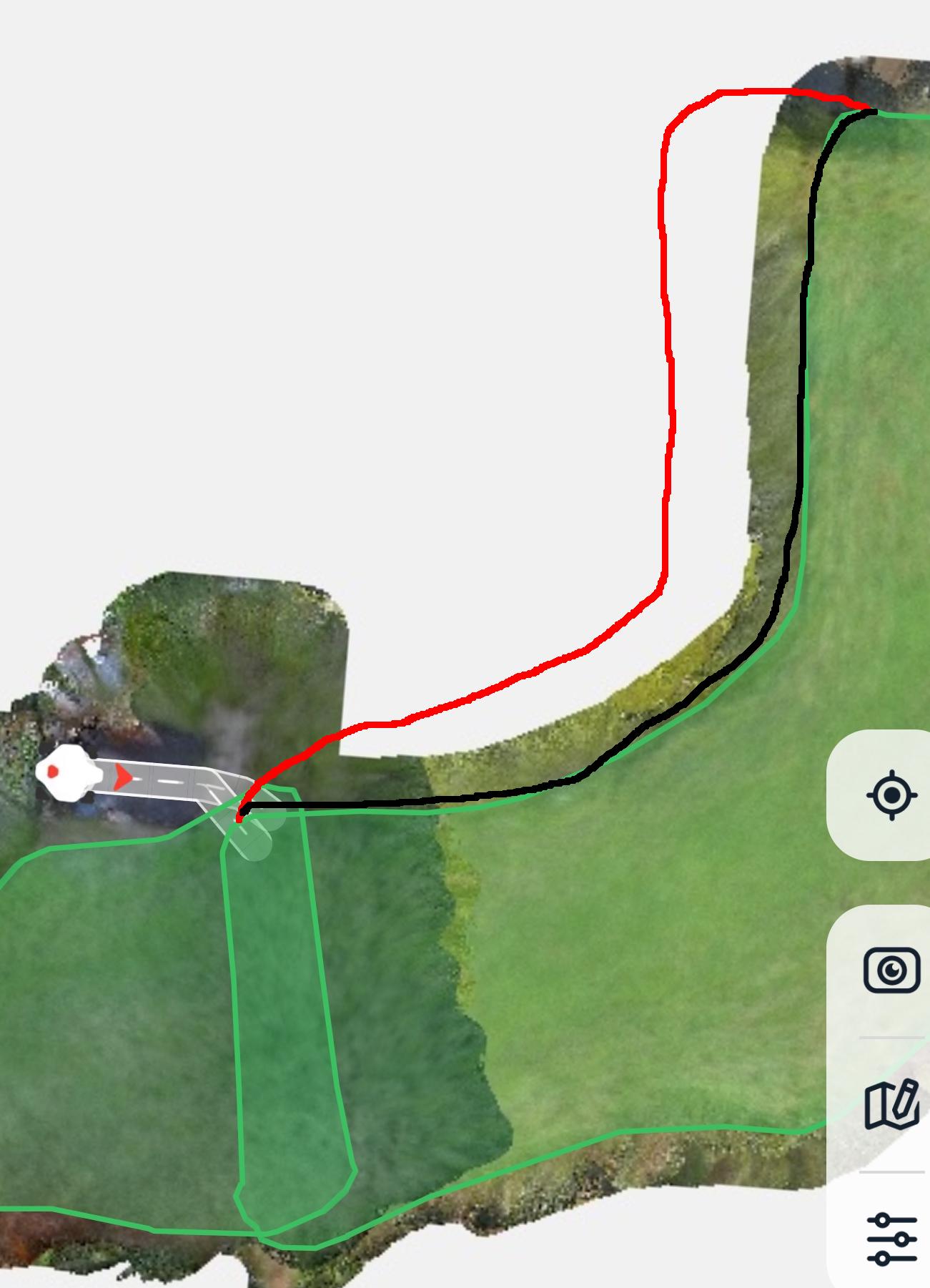
I'm trying to redraw a section of boundary so I could enlarge my area slightly. This image illustrates my attempt.
I first guided the mower along the red line from left to right. Once it reached the top right, I expected the Save button to become active. It didn't, so I guided the mower back along the black line from right to left. Once it reached the bottom left, the Save button activated. When I clicked it, the app was stuck with the Saving spinner for a long time. It was over 15 minutes before I noticed the app was actually still usable under the spinner. I expected the spinner to be modal. When I tried to exit out of the editing screen it asked me if I wanted to cancel the edit, so I did for now. Was that the expected behaviour? Should I have waited longer? How much longer?
This process is extremely confusing. I could not find any clear manual or video tutorial about this.
My Luba 2 went out to cut the front yard on schedule yesterday, and seemed to work normally. It returned to base to recharge, continued to finish the job, and returned to base completed. I received NO messages on my iPhone or app to suggest anything was wrong. The app shows the typical "Task started", "Battery is too low", "Returning to charge", "Task has continued" and "Task ended". Perfectly normal.
I also have the Mammotion integration into my Home Assistant, and just happened to see some notifications there. For the same period of time while the Luba was out cutting the front yard, it reported notifications of "The sensor in the left cutting disk motor failed", "The left cutting disk motor is overheating" and "The left cutting disk failed to start". Scary stuff.
I wouldn't have known anything was wrong unless I happened to see these notifications in Home Assistant! After seeing them, I went out to check my Luba for what might be wrong -- and sure enough, there was a piece of wire wrapped around the left cutting disk. The disk could still be turned by hand but there was some resistance to turning. I had to remove the disc and use needlenose pliers to remove the wire.
I went out to check the front yard and noticed about 6 (now one less!) small "flags" at the edge of my front yard that our local water utility company apparently planted to mark a residential water pipe. I guess they're planning on some digging there. Clearly, the robot had "mowed down" one of those flags and its little metal wire "flagpole" got wrapped around it.
WHY DIDN'T I GET THE NOTIFICATIONS ON MY iPHONE?! If I'd continued to ignore the problem (i.e. if I didn't happen to see the notifications via the HA plugin), this would likely have led to motor burnout.
Oh, and yes, I'm on the latest firmware and latest app, with all notifications enabled. Luba 2 3000H from May 2024.