r/NvidiaSupport • • 4d ago

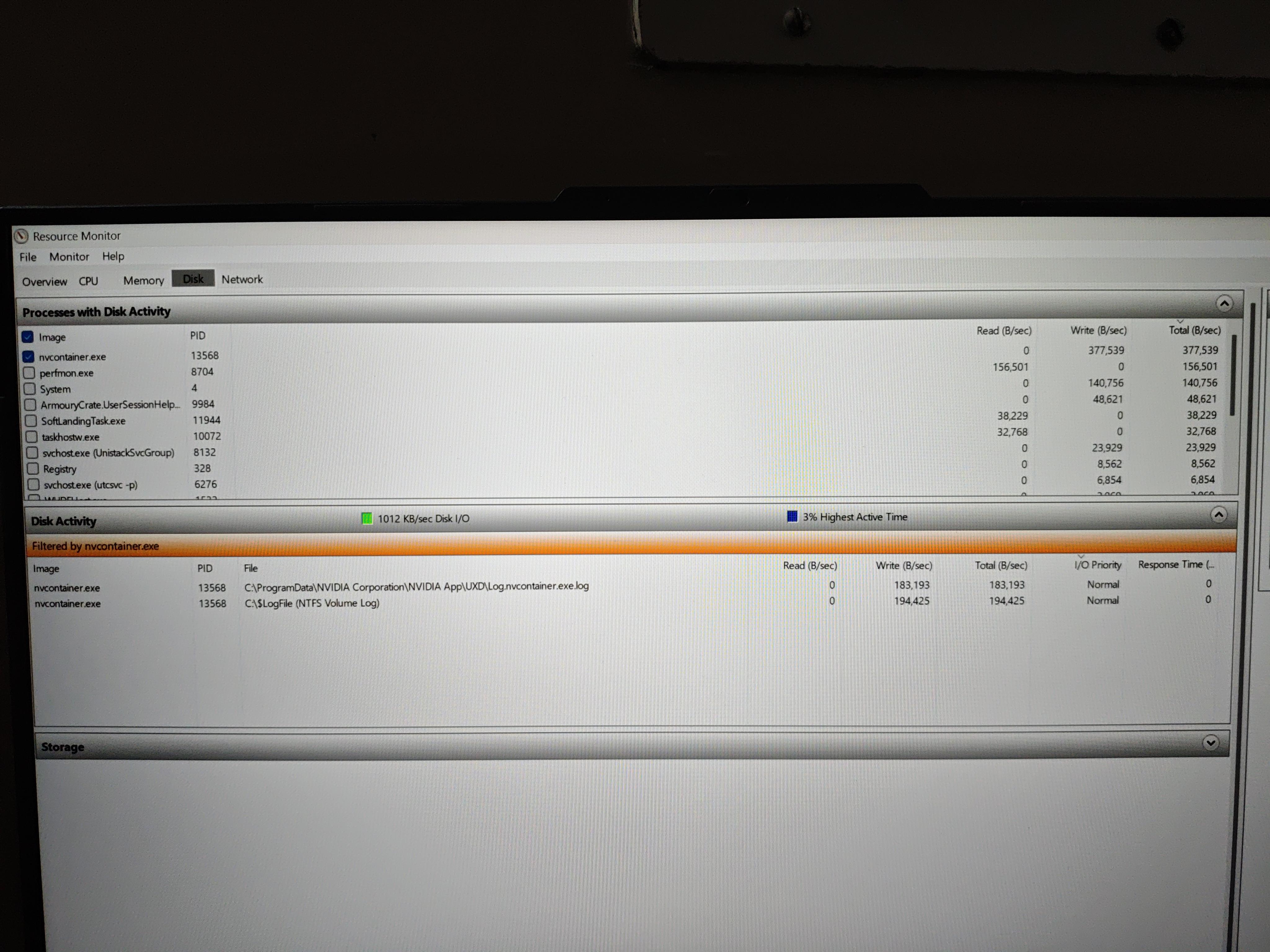
Help! Need help

Post image
1 Upvotes

I have rolled down my driver to version 617.42 , but still nvcontainer.exe keeps showing write 400000 - 300000 bytes /s even when my laptop is idle, i have done everything to fix this please help me , whenever i delete nvidia app it disappears but when i download again , it comes back. Please if anyone's knows anything, help me, I am scared that my SSD will get distroyed.

Laptop specs - Asus Rog strix g16 i7 13th hx rtx 4050.


r/NvidiaSupport • • 7d ago

Help! Have I been infected with the SSD issue on my 2tb drive with the new 621.24?

Thumbnail
gallery
2 Upvotes

Don't want an early funeral for my SSD because of driver update! Plz help!


r/NvidiaSupport • • 7d ago

Well i think im cooked

1 Upvotes

So , i tried doing a clean reboot from the reboot menu , i also tried uninstalling all nvidia drivers but its still doing that , i don’t know what to do anymore , its doing that when i start anything on the pc , its only normal when on desktop , please help me (im french btw sorry if my english is bad)


r/NvidiaSupport • • 7d ago

Some Nvidia drivers may cause excessive SSD wear. (Similar to amd).

Thumbnail
youtu.be
3 Upvotes

r/NvidiaSupport • • 9d ago

Projector problem from display port

2 Upvotes

Hi all,

Got a slightly strange problem getting the GPU to recognize our new projectors

We have a flightsim with a 3 projector display and a monitor into the HDMI socket

We have upgraded the projectors and run into problems.

Setup:

Nvidia rtx 3990ti card

3 x display port to HDMI adapters

3x Epson eb-fh18 projectors

All new.

So I have the HDMI port from the GPU plugged in to a monitor, that still works.

Projectors aren't recognized when plugged into the display ports.

So fat I've tried the following tests:

New projector, new cable, HDMI port- works

New projector , new cable,adapter, display port- doesn't work

New projector, new adapter, new cable , to another PC's display port- works!

New projector , spare HDMI lead, new adapter, display port - doesn't work

As a test I plugged in one of the old projectors which is via an old 15 pin lead, to an adapter , to the display port- worked again and popped up as a display in the Nvidia control panel.

I should say ,when I state doesn't work, that's no display listed in the control panel and nothing on the display

Any ideas?

Someone mentioned low voltage as a problem? Or something specific to the adapter that's not recognized by the card? Got to adapter in some way right!

Any help appreciated!!

Les


r/NvidiaSupport • • 12d ago

[Fix] NVIDIA G-SYNC kicks in LFC at ~60 FPS instead of 48 on high-refresh OLEDs: why it happens and a registry setting that changes it

Thumbnail reddit.com
1 Upvotes

r/NvidiaSupport • • 14d ago

Video player is glitching

2 Upvotes

This is a really weird glitch and I'm not too well versed in this stuff so sorry if it sounds a bit incoherent, but basically randomly when I try to watch videos my screen completely bugs out for a little and then calms back down. Then for a while a variety of visual glitches show up, sometimes changing when I switch from fullscreen to small. This can be the colors being off or the video being weirdly blurry or off-set in the video player and a bunch more.

It happens both with video files on my pc and videos played in a browser.
If this helps here is my graphics card: NVIDIA GeForce RTX 4060 Laptop GPU (8 GB) Intel(R) UHD Graphics (128 MB)

thanks for helping <3


r/NvidiaSupport • • 15d ago

NIS no longer working on Apex legends

1 Upvotes

NVIDIA Image Scaling (NIS) has stopped working in several games, including Apex Legends. Could you please help me troubleshoot and resolve this issue?

The Image Scaling option in the NVIDIA App's Apex Legends settings is completely greyed out and cannot be enabled or modified. As a result, only the sharpening effect seems to be working, while the actual upscaling functionality (rendering the game at a lower resolution and upscaling it to my display's native resolution) no longer works.

I've already tried using AI to troubleshoot the issue, but after several attempts, the conclusion was that NVIDIA Image Scaling may no longer be compatible with Apex Legends and certain other games.

Could you please confirm whether this is a known compatibility issue or a bug with the NVIDIA App or drivers, and help me find a way to restore NVIDIA Image Scaling functionality?


r/NvidiaSupport • • Oct 27 '26

Dell G16 RTX 4060 crashing under load, is my GPU failing?

Thumbnail gallery
2 Upvotes

r/NvidiaSupport • • Oct 24 '26

Trying to use the Dlss FG mod for 3000 series cards with dd2, anyone get this working?

Post image
3 Upvotes

r/NvidiaSupport • • Oct 21 '26

Help! Please help, very consistent issue

2 Upvotes

I have an RTX 4060 Ti and recently started experiencing weird graphical glitches in Rocket League, with black rectangles appearing on screen. Other games I try either crash or have issues running properly. This all started randomly one day, with no obvious changes to my PC. I’ve tried uninstalling and reinstalling my NVIDIA graphics drivers, but the problem persists. I’ve also tried several other troubleshooting steps with no permanent fix.
Has anyone experienced something similar or know what could be causing this? I’m trying to figure out if it’s a GPU issue, a driver problem, or something else. Any help would be appreciated.


r/NvidiaSupport • • Oct 03 '26

DXGI error device hung up

Thumbnail reddit.com
2 Upvotes

r/NvidiaSupport • • Oct 03 '26

Is this normal and can I delete it?

2 Upvotes

Just wanted to make sure if its possible to delee the dxcache bc it takes a lot of storage.
thank you :)


r/NvidiaSupport • • Oct 02 '26

What? ID check and signing documents are now required to buy a gaming card?

Thumbnail
videocardz.com
1 Upvotes

r/NvidiaSupport • • Oct 02 '26

Help! My game is pixelated after i turned off anti aliasing

2 Upvotes

So i used to never get the ultra quality even if my games were running on ultra so i found out its because of anti aliasing i turned it off the quality around me looks more like how it should at ultra but the graphics have become very pixelated please help fix this its happening in all the games i play. is it the nvidia app optimixzations or any game settings or amd settings? i have an RTX 3050 with 4gb vram and 8gb ram and a amd ryzen 5 6600H


r/NvidiaSupport • • Oct 01 '26

Somebody is tracking all this. Very impresive work and interesting read.

Post image
2 Upvotes

r/NvidiaSupport • • Sep 29 '26

Reliability monitor displays hardware errors (141, 1a8 and 1b8), although little to no noticeable problems have shown up

2 Upvotes

Hello. I learned about the reliability monitor recently an decided to check it out out of curiosity and to make sure my system is running correctly, and I came across a few reported hardware errors.

The two most recent of these problems (which occurred at the same time) have code 1b8 and 1a8, the parameters for both of them are all "aaaaaaaaaaaaaaaa"

The next two most recent ones, which occurred in different days, have code 141 and also have "aaaaaaaaaaaaaaaa" as parameters

The least recent one that's displayed also has code 141 and this time the parameters are:

P1: ffffa90aa3931010

P2: fffff80591085110

P3: 0

P4: ffffa90adbcba080

Found another two further back that happened at the same time and are similar to the above

The system has been acting normally all throughout, I haven't noticed any crashes or odd behaviour, I have been able to use the computer without hiccups of any kind. Only thing I might have noticed is that while playing Fortnite sometimes the screen would turn black for one frame, although this didn't reoccur in other games or applications.

I have been monitoring the temperature of the GPU and while gaming it stays between 60 and 80-85°C

A thing that is suspicious is that sometimes the PC struggles to boot, either taking longer to pass the mobo hardware checks or sometimes even requiring me to turn the PSU off and on again (these are very rare), most times when this happens with a bit of patience I get to boot into Windows just fine.

A couple of months ago I also noticed that my PSU cable wasn't inserted all the way, which caused me to accidentally shut off the PC when I touched it while cleaning, I have since pushed the cable further in, this hasn't stopped these slow boot episodes from happening but has made them rarer I think.

Although my system is functioning correctly I wanna make sure this isn't a sign of hardware that's about to fail.

I ran DX Diagnostic and found no issue, chkdsk also didn't find any issues, the mobo doesn't show any funny lights while running either and if it was a CPU issue I think I'd have noticed by now

The light pattern during those slow boots *appears* (not 100% sure) to be normal minus one of the red leds staying on for longer because of the extended hardware check sequence I suppose, I can't tell which led it is or if it's the same each time, my eyesight isn't sharp enough and neither is my phone's camera and it's also in a position it's hard to see

I'm gonna check the event viewer later, as soon as the OS's .dmp file.

Hardware specs are the following:

CPU: AMD Ryzen 7900X 12 cores

GPU: Nvidia RTX 4080 Super 16GB

OS Disk: SOLIDGM SSDPFKKW512H7 512GB SSD

Other disk: ST2000DM008-2UB102 2TB HDD

OS: Windows 11

PSU: Corsair 850W RMx SERIES 80 PLUS Gold

MoBo: GIGABYTE B650 AORUS ELITE AX V2 AM5

RAM: 64GB DDR5 Corsair Vengeance 6000 MHz (2x 32GB)

r/NvidiaSupport • • Sep 28 '26

Demon's Souls Remake on KytyPS5, running at 4K 120fps w/ DLSS + 4x framegen (local build/ 5090 + i9-14900k)

1 Upvotes

r/NvidiaSupport • • Sep 28 '26

Thieves steal NVIDIA-branded trailers hoping for AI hardware, only to find 20 tons of sand

Thumbnail
videocardz.com
1 Upvotes

r/NvidiaSupport • • Sep 28 '26

NVIDIA CEO Jensen Huang Explains Why The Pace Of AI Progress Does Not Scare Him

Thumbnail
youtu.be
1 Upvotes

r/NvidiaSupport • • Sep 25 '26

NVIDIA CEO Jensen Huang: “Now, if they say [that their models aren’t safe] … then I think the answer is that we have to shut the labs down.”

1 Upvotes

r/NvidiaSupport • • Sep 24 '26

NVIDIA Unleashes The Next Chapter of Neural Rendering & Path Tracing With RTX Kit SDK While RTX Mega Geometry 2.0 SDK Gives Devs the Ability To Stream Insane Levels of Detail

Thumbnail
wccftech.com
1 Upvotes

r/NvidiaSupport • • Sep 23 '26

Sky flickering

5 Upvotes

The sky in The Finals flickers when the map is set to afternoon or night-time conditions. I think it can flicker in other conditions, but I'm not sure. I tried uninstalling the drivers using DDU and installing different versions: I tried versions 616.92, 616.64 and 616.56, and I'm currently on version 610.88, but I'm still experiencing this issue.

By the way, I recently upgraded from an RX 5700 XT, and so far Nvidia has given me a horrible experience. Not to mention that with the 616.64 and 616.56 drivers, I experienced flickering on the desktop, and with all other drivers mentioned, the Telegram web chat flickers when I hover over images or videos, or when I scroll. Disabling hardware acceleration helped, and the issue only occurs in the Chrome browser.

Hardware:
RTX 5070 Ti
R7 5700 X3D
RAM 32 gb 3600mt/s
Asus B450m pro gaming motherboard
1440p 210 hz Asus VG27AQ5A monitor

Windows 11 up to date


r/NvidiaSupport • • Sep 23 '26

NVIDIA GeForce (@NVIDIAGeForce) 1.2K likes · 59 replies

Thumbnail x.com
0 Upvotes