r/ObsidianMD • • 13h ago

plugins I made Customization Studio, an Obsidian plugin for styling supported plugin interfaces

Post image
80 Upvotes

Hi everyone, I'm the developer of Customization Studio. It's now available in Community Plugins, and I'd love some feedback.

It adds visual settings for supported interfaces in Kanban, Spaced Repetition, Bases, Tasks, Dataview, Calendar, and Day Planner. The aim is to adjust their appearance without changing your notes or the other plugins' settings.

You can start with one of five presets, create your own profiles, import/export them, and adjust things like colors and spacing. Optional custom CSS is available too.

A heads-up: this is an early release. Theme and plugin-version compatibility still needs real-world testing. The Tasks, Dataview, Calendar, and Day Planner integrations are off by default; enable them under Integrations in a custom profile.

It's free and open source. If you try it, I'd be interested in which integration you use, what doesn't look right, and which visual controls you'd want next. Please include your theme and plugin versions when reporting an issue.
https://obsidian.md/plugins?id=customization-studio


r/ObsidianMD • • 1h ago

plugins With Gizmo, your Obsidian notes are proper apps.

43 Upvotes

For context, I'm a software engineer and a part-time historian. That means a lot of different plugins and trackers in my vaults for coding, researching, and writing. So every time I want something fancy supported, it meant installing another single-purpose plugin.

And so, as an engineer, I like to abstract and generalize things, naturally. Which led me to think, what if you can write minimal instructions in natural language, and turn your notes into properly functional apps without needing any other plugins? Like, a note is already an app. You just don't realize it. All you need is a common runtime.

Super excited to introduce Gizmo!

Instead of installing a dozen plugins or putting your life in databases, each app is a plain Markdown note in your vault. No JavaScript, no AI, no telemetry, and zero runtime dependencies.

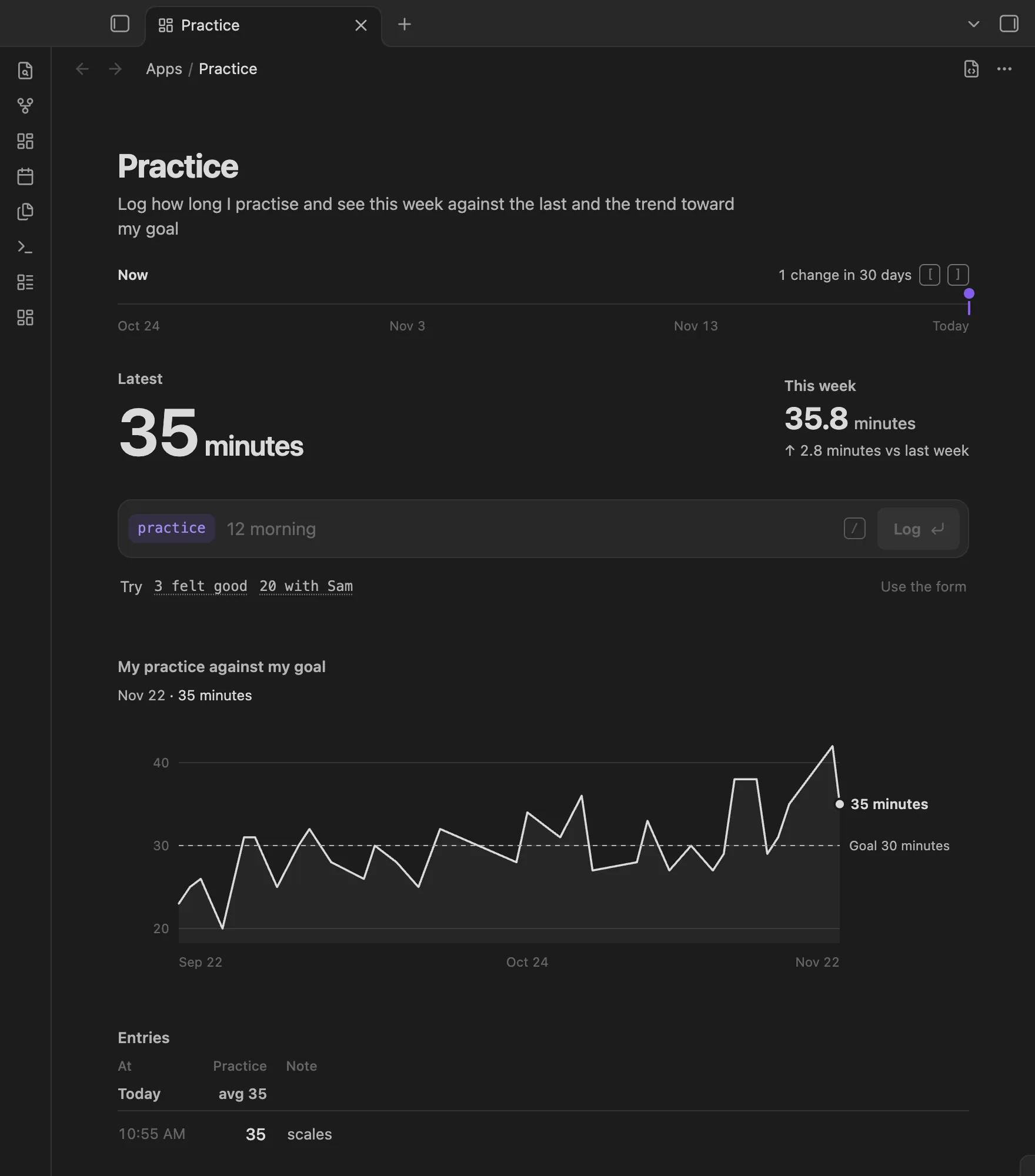
For example, here's an Obsidian note, and it's a workout tracking app. You just need a description, a "kit" (template) to use, and what the app should have. That's it.

---
app: Log my workout sessions and compare week-over-week trend against my goal
use: "[[Tracker kit]]"
with: {what: practice, unit: minutes, goal: 30}
---

And here's the app:

Ways to start

  1. There's a gallery of 14 ready-made apps. You can copy and modify any of them.

    1. Run Gizmo: New app from the gallery for Budget, Medication log, Project board, Decision journal, Bills and renewals, Vitals, Practice, Household chores, Book finder, Task inbox, Trip planner, Trades, Aurora watch, or Read later.
  2. Add 5 views to Obsidian Bases:

    1. Open any .base file (or embedded base block) and switch to Gizmo board (with drag-and-drop moves and Undo), Gizmo calendar (month or year heatmap), Gizmo timeline, Gizmo chart, or Gizmo number.

You can also open Gizmo: Do…, type a question like ? spend food per week since sep, and let Gizmo draw the chart and write the YAML panel or embed for you.

How Gizmo keeps your data safe

  • Plain files, sync-safe: Saved rows live in readable data.md files (so Obsidian Bases and Dataview can read them), backed by per-device append-only event logs so iCloud, Syncthing, and Obsidian Sync don't clobber concurrent edits.
  • Permissions and undo built in: Before an app touches other notes, folders, or the web, it shows a permission card listing exactly what it asks for. Try it first runs any app in an isolated sandbox that reads none of your vault notes and discards everything when closed. There's also an activity log with Undo and a 30-day time rail.
  • Beyond passive trackers: Shared kinds (like Spend shared across Budget, Bills and renewals, Trip planner, and Household chores), bank/broker/health CSV reconciliation, What if… previews up to a year ahead, and optional end-to-end encrypted sharing through ntfy (including write-only HTML guest pages for a partner or sitter who doesn't use Obsidian).
  • Desktop & mobile, MIT licensed (requires Obsidian 1.11.4+).

Links:


r/ObsidianMD • • 3h ago

showcase Automated D&D Character Sheet - Obsidian Plugin Preview

Thumbnail
youtube.com
14 Upvotes

I’ve been building an Obsidian plugin that brings character creation, levelling, dice rolls, spells and inventory together in one place, without needing other plugins. It has built in SRDs and will read your own notes or TTRPG CLI and automate the integration into your character sheet.

It’s coming soon, Free for all to use and I’ve put together a short preview. It’s my first video—I’m more comfortable coding than making content—but I’d love to hear what you think. i Hope to get this finished by the end of the month and a how to use video shortly after.


r/ObsidianMD • • 8h ago

plugins Customization Studio 1.2.0 is out: nine card shapes for Bases, light/dark profiles, and per-shape hover effects

14 Upvotes

Hey everyone, I just released a big update to Customization Studio, my plugin for making your Obsidian workspace feel like yours.

What's new in 1.2.0:

- Nine card shapes for Bases: Standard, Book, Poster, Circle, Spine, Polaroid, Trading card, Disc and Ticket

- Per-shape controls, including artwork size and shape-specific settings like Book depth or Disc protrusion

- Hover effects: Glow, Lift, Flip artwork and Wiggle

- Light and Dark variants for every profile, with Auto mode that follows Obsidian

- A neutral Default profile built from your current look, so nothing changes until you adjust something

- A master Enabled/Paused switch, and every change applies instantly with no reload

- Import/export now includes variants and shape settings

- A small "What's new" window after updates

The video shows every shape and hover effect in action, plus a few screenshots from my own vault.

Plugin page: https://obsidian.md/plugins?id=customization-studio

Source: https://github.com/Ahmedadel200066/Obsidian-Customization-Suite.

Small note: there are a few minor bugs I'm already aware of, and they'll be fixed in the next patch. If you run into anything else, tell me in the comments and I'll look into it.


r/ObsidianMD • • 17h ago

help Tablet layout

Post image
13 Upvotes

I'm planning on buying a tablet, and I'm asking whether this is what the layout looks like in the tablet? Or is it just the same as the mobile interface?


r/ObsidianMD • • 16h ago

help Are Obsidian Sync servers secure?

10 Upvotes

I really like how Obsidian is local, no need to worry about my data being sold, used to train an AI, or stolen.

But I'm considering using Obsidian Sync so I can have access to my notes on all my devices, but are their servers secure?

Or are they known to sell synced user data to third parties?

I know the solution to this concern is just setting up my own server, but I wanted to ask on here about Sync first because of how convenient Sync is.

Thanks!


r/ObsidianMD • • 4h ago

help Note Structure / Examples for Students

3 Upvotes

Hello everyone. I am a graduate student studying medicine. My entire didactic (coursework) year I didn't use Obsidian, but finding it recently I wish I had. I am in my clinical rotations and studying for rotation exams, which cover alot of different topics. Throughout rotations as I do questions / anki, I like to jot down info on each disease that I might not have known. Then, before my exams, I like to make what I call a "high-yield" sheet over each topics to make myself a day before the exam review sheet.

I struggle with formatting these notes in obsidian. I know everyyyone says "just write", but I am the type of person that needs structure / organization to notes or I will not use it (ADHD). Like just writing lines of notes prevents me from using it again. Anyone have any advice?

Obsidian has been a game changer for my capstone project (writing an EBM systematic review), I've been using ZotLit, which I think I have the concept of that fairly down? I'd take any tips anyone has on their ZotLit workflow too.


r/ObsidianMD • • 9h ago

updates Recent challenges with Obsidian

3 Upvotes

Hello all! I'd like to know if people have been having the same issues I've been encountering with Obsidian as of late. For reference, I'm currently on Obsidian 1.15.1 (installer 1.14.5) for macOS 26.5 on the 13" M4 MacBook Air. The vault size is ~4 gigabytes, and I've got 13 plug-ins loaded. The list of plug-ins is found at the end of this post.

For the last two major updates, the Obsidian app has been, at times, slow to load, buggy, and entirely unusable. For some days, I'll have to run the app in restricted mode, as plug-ins take dozens of seconds to load. On other days, a note or PDF will open to a blank page, usually requiring a restart to resolve the issue. Other problems include typing lag, where words appear on screen for what looks like a few milliseconds after they're actually typed; opening several PDFs causing the app to crash; community plug-ins, while enabled, loading incorrectly, loading to their default settings or not loading at all; community plug-ins enabling and disabling themselves; difficulties importing files, where they outright don't show in the files tab until a minute or so after importing; and other more minor issues.

I feel most of these issues stem from plug-ins, but I'm not entirely sure, as some issues occur even in restricted mode. The lagging text has been present for a few months, but the rest of these problems started around mid-September. All while a friend on Obsidian for Windows 11 says the app has never run better for them!

I've submitted some bug reports, but this post is open to a general discussion. So, let us know if you've encountered the same behaviour! All comments are greatly appreciated!

List of plug-ins:

Advanced Canvas

Advanced Tables

Better Word Count

Editing Toolbar

File Colour

Floating TOC

Hide Folders

Iconize

Keep the Rhythm

Link Embed

Novel Word Count

PDF++

Smart Typography


r/ObsidianMD • • 18h ago

help How do I register a CodeMirror LanguageSupport or LanguageDescription for code blocks with Obsidian?

2 Upvotes

I’ve kicked around in quite a few circles and gotten nowhere. registerEditorExtension is of course only for the giant EditorView in the sky. Attempting to insert my own new EditorView looks… out of place, and does weird things to the cursor and/or is a second-class pre citizen. Manually highlighting the DOM once it’s been rendered to get all the block, copy button, etc. in theory works, but I’m having a hard time with it and doesn’t really help the extensions, which even if I can bring them over, node.from will be all out of whack. Also I seemingly need to remap tags to Obsidian's CSS classes even though Obsidian surely knows how to handle t.comment.

I assume internally, Obsidian is using markdown({ codeLanguages: /*...*/ }) or something similar that takes in an array of LanguageDescriptions (or something similar) so it can just import all CodeMirror's prebuilt support. Unless Obsidian's using CM5 for that still, in which case this might be very bad for me :p But if there is some list, sometime and somewhere, u/kepano would it be possible to let us insert to that? Maybe a registerLanguageDescription (or some more direct way to touch it)? Does something like this already exist and I just missed it?

If anyone knows how to fix or workaround my problem, or a plugin that supplies in-code-block, CM6, custom syntax highlighting, maybe with extensions (which for those unenlightened looks more or less like anything fun besides the syntax highlighting itself, ie error messages (aka linting), autocomplete, other views, etc), that'd be great :D


r/ObsidianMD • • 17h ago

help Obsidian asking me to trust myself to open my own vault?

1 Upvotes

hello, i thought i had fixed the issue by myself but it seems like obsidian is probably ragebaiting me on this one

i created a new vault yesterday for worldbuilding, same location for the folder as the first one, same plugins, same themes, same settings—basically just a copy of the first created vault. i updated obsidian from 1.13.7 to 1.15.1 right before diving into any vault (mind you, it opened on the new vault because i closed the app on it last night), and now im getting this "Do you trust the author of this vault?". well, yes, because im the author of this vault

i deleted the new vault, manually installed every plugin (instead of copy-paste from one folder to another), and i relaunched the app a few times to test it. except now it's back, every time, and it's not asking me this when i open any other previous vault. does it have to do with any of my files (im still on windows 10 fyi) or the fact i updated my obsidian? thanks to anyone who'll help!


r/ObsidianMD • • 2h ago

help Looking for a way to have a window for tasks

0 Upvotes

I have a system in place where I have lists of tasks.

I have to finish them every 2-4 days, 5-9 days, 11-20 days etc. Whenever I do a task on the first day of the window, I get maximum points (4 for 2-4 days, 9 for 5-9 days). That point value counts down daily until reaching the other number (2, 9, 11). After that it starts counting up again until reaching the maximum again, at which point I call the task 'overdue'. When I do the task, the date I did it on gets noted and the window of when I have to do it again too, along with the day it's overdue. When it's overdue, the window of when I have to do it again starts the next day instead of, for example, 5 days after the finishing date.

This has all been working fine for me, except that it takes a lot of effort and time to keep noting all the dates by hand. I tried the tasks plugin but it doesn't seem to be able to handle the complexity of my system.

Does anyone know a way to automatically update the dates when I check the box? Simply put, I want

- [ ] "task" "last finished" ("day n" - "day m") - "day m + m-n"

for example

- [ ] Vacuum 20 nov (22-24 nov) - 26 nov

updating to

- [x ] - Vacuum 22 nov (24-26 nov) - 28 nov -


r/ObsidianMD • • 11h ago

help Beginner Guide

0 Upvotes

I have just started learning obsidian although i have yet to learn the system that sticks with me. I just want a system that helps me to recollect information and aid me in learning new skills like learning to code, playing instruments etc as i tend to forget things easily and want to store them in a neat manner. I have seen several screenshots of others system and obsidian homepages all looking amazing and i want to implement them, but i dont know how to yet.

Im asking for advice, tips and help from more seasoned users out there, as im lacking in knowledge whether its LLM integration, API, using css to edit and just a general lack of knowledge itself. Cheers to learning from you guys!


r/ObsidianMD • • 14h ago

sync Onedrive but no sync. Is it viable?

Post image
0 Upvotes

Writing a book in Obsidian, i already have obsidian sync. But I feel like it would be good practice to also manually save my vault in Onedrive.

I won't put too much effort into this, i will do this manually like every 10 chapters i write.

Is this smart? Stupid? Not a big tech guy so help me out!