r/OdoApp • • 5d ago

Odo 5.3 is Live! Build Your Own CarPlay Dashboard, 18 New Gauge Designs, Multi-Gauge Support & Long-Awaited OBDLink MX+ Compatibility!

Post image
31 Upvotes

This is another major update for Odo, especially for CarPlay users. I'm excited to introduce more customization options, 18 new speedometer designs, multi-gauge dashboards, and the long-awaited OBDLink MX+ integration!

Here's what's new:

🚗 Build Your Own CarPlay Dashboard

One of the biggest additions in this update!

  • Display up to 6 gauges simultaneously on CarPlay.
  • Choose between equally sized gauges or one large main gauge with smaller ones alongside it.
  • Customize each gauge independently with different styles, colors, and driving stats.
  • Bring your favorite iPhone gauge designs to CarPlay.
  • Choose from dozens of ready-made templates, including Cluster, Grand Tourer, Six Pack, and Navigator.
  • Gauges now maintain their positions even when data isn't available, keeping your dashboard layout consistent.

You can now create a personalized CarPlay dashboard with the gauges and information that matter most to you.

🎨 18 New Speedometer Gauge Designs

I've added 18 new designs to the Modern category, including Sweep, Chrono, Trace, and Tide.

  • Choose from multiple colors, including Mono, Blue, Green, Purple, Pink, and Amber.
  • Improved readability with bolder numbers and clearer units.
  • Available on both iPhone and CarPlay.

There are now even more ways to customize the look and feel of your speedometer.

🔌 Long-Awaited OBDLink MX+ Support

This has been one of the most requested OBD integrations!

After working through Apple's MFi approval process with OBDLink, Odo is now officially approved to communicate with the OBDLink MX+ using Apple's External Accessory framework.

You can now:

  • Connect your OBDLink MX+ directly from Odo's OBD settings.
  • Save the adapter to individual vehicles.
  • Automatically reconnect when you return to your vehicle.
  • Display supported live engine data on your iPhone and CarPlay dashboards.

OBDLink MX+ owners, I'd really appreciate your help testing this integration!

Although the integration has been developed and tested, I'd love to hear how it performs across different vehicles and setups.

Please share your experience with connection reliability, automatic reconnection, and live engine data. If you encounter any issues, mentioning your vehicle model would be especially helpful.

🗺️ Cities Explored

The previous Most Visited feature has been redesigned as Cities Explored.

  • See every city you've visited on an interactive map and in a list.
  • Explore your travel history by month, year, or all time.
  • Compare your exploration with previous periods.
  • Share your visited cities as images in five different styles, including maps and star charts.

🏎️ Share Reels: A Richer 3D World

I've also been working on making route replays more immersive.

  • Added a new Race Car.
  • Introduced roadside trees, guardrails, fences, and grass to the Game-style environment.
  • Improved vehicle movement for smoother and more natural replays.

The goal is to make your recorded drives even more enjoyable to replay and share.

⚡ More Improvements

  • New Odometer tile for CarPlay and custom Live Activity layouts.
  • RPM readings now display in full on the CarPlay Dashboard card.
  • Improved road accuracy on the All Routes map, especially for longer drives.
  • Simplified CarPlay settings with separate gauge and stats customization screens.
  • Better handling when location permission is disabled.
  • Improved translations, including OBD diagnostic descriptions.
  • Various UI refinements, performance improvements, and fixes.

💬 I'd Love Your Feedback!

Many of these features came directly from user suggestions, and I really appreciate everyone who has been sharing ideas and reporting issues.

I'm particularly interested in feedback on two things:

  1. Multi-Gauge CarPlay Dashboards: How do the new layouts look on your CarPlay screen? Are there any additional layouts or customization options you'd like to see?
  2. OBDLink MX+ Integration: If you own an MX+, please give it a try! I'd love to know your vehicle model, whether the connection works reliably, and how the live engine readings perform.

I've put a lot of effort into making Odo more customizable and useful for everyday drivers, and there's still much more planned.

Thanks to everyone who's been following the development, testing updates, and sharing feedback. Your suggestions genuinely help shape what comes next!

Looking forward to hearing what you think!

Learn more about the CarPlay gauges:

https://speedometerproapp.com/features/carplay-speedometer-gauge


r/OdoApp • • 5d ago

Odo reading is over reading

Post image
3 Upvotes

I sat down today and added all the past maintenance bills in the app with respective dates in the bill. It altered the odometer reading completely.

It does not get updated after connecting to OBD reader either.


r/OdoApp • • 7d ago

Live Comparison

2 Upvotes

Do you have to have a route loaded and be navigating for live comparison to work or does this just detect you have set off from a set location in the same direction.

Also on the map screen could the sound also have just alerts only like apple maps proper.

Many thanks


r/OdoApp • • 10d ago

Another version is live: Your CarPlay Speedometer Gauges Can Now Display Live OBD2 Engine Data - RPM, Coolant Temperature, Engine Load & More!

24 Upvotes

Your Favorite Gauges, Now With Engine Data

  • The app's own gauge designs on CarPlay can now show RPM, coolant or oil temperature, fuel level, battery voltage, throttle, engine load, or G-force, not just speed. Choose it under Gauge Shows in the CarPlay settings.
  • Each reading gets a scale that fits it: RPM counts in thousands like a real tachometer, battery voltage starts at 10 V, and temperature gauges cover cold starts too.
  • Red zones appear only where they mean something. A full tank or a charging battery stays calm.
  • The gauge now keeps its full width during navigation instead of shrinking to half the screen.
  • Everyone can now design a CarPlay gauge and preview it on iPhone. Premium shows it on your car's screen.

OBD Cards, Your Way

  • Hide the OBD cards you don't need on the Dashboard and Live tabs. Tap Customize Cards, or touch and hold a card.
  • Hidden readings are still read from the car and still feed your trips, gauges, and CarPlay.

Video Recording: Safer Long Drives

  • Long recordings are now saved as separate clips, 5 minutes each by default. Each clip is saved to Photos while the camera keeps recording, so a problem costs you one clip, not the whole drive.
  • Choose 3, 5, 10, or 15-minute clips, or turn it off for one continuous video, under Clip Length in the Video Recording settings.

Smarter Navigation

  • Roundabouts on Apple routes now show the roundabout icon and your exit number.
  • Turn arrows match the spoken instruction more reliably.
  • Fewer turn banners over other apps on CarPlay. They now appear only at a few key distances before a turn.
  • Routes from your past drives no longer show a U-turn for a loop ramp or a roundabout.
  • "Your usual road" is offered only when the route truly matches the road you take.

Polish

  • Gauge numbers appear in your language's digits, and more gauge labels are translated.
  • Clearer names for a few CarPlay gauge colors and looks.

We hope you love these updates!

Please take a moment to rate us if you're enjoying these new features. Your rating helps us grow and improve!

Have feedback? support@speedometerproapp.com


r/OdoApp • • 11d ago

Premium

3 Upvotes

I originally tried this app back however, when it was speedometer, looking at the latest update this looks really interesting now. I’ve been playing with it a bit today. Is it possible to get a trial of the premium even if it was only 24 hours? I could seriously see myself buying a lifetime for this?
Also is there a way to record my 0-60? Is that behind the premium paywall.

I do have a question, apparently my car the ODP port is protected behind an sgw module. it’s not the end of the world, but is there a way around this?


r/OdoApp • • 11d ago

Fuel entry

3 Upvotes

On fuel entry page, could it be possible to enter this in litres?
In the UK, fuel is sold by the litre so it’s difficult to enter in gallons


r/OdoApp • • 12d ago Bravo

Biggest CarPlay update: 50+ customizable CarPlay Speedometer Gauges, OBD2 data & 44 presets

30 Upvotes

One of the most requested features is finally here!

Odo 5.0 brings its biggest CarPlay update yet: a fully customizable CarPlay Speedometer and Digital Dashboard, featuring 50+ gauges, live driving statistics, and real-time OBD2 engine data.

Until now, Odo displayed driving stats on CarPlay through lists and grids. The new Gauge layout takes things much further, turning your CarPlay screen into a personalized driving dashboard.

Whether you prefer a classic analog speedometer, a modern digital gauge, or a dashboard packed with driving stats, you can make it your own.

Getting this update approved was quite a journey, too. Apple was particularly careful during the review process, given the restrictions around CarPlay interfaces. Really glad to see it finally approved and available!

What's new in Odo 5.0?

  • 50+ customizable gauges: Explore analog, digital, arc, needle, ring, segment, bar, tape, and other speedometer designs.
  • 6 dashboard arrangements: Position the gauge on the left, right, center, or top, or choose gauge-only and stats-only layouts.
  • 44 ready-made presets: Apply a complete dashboard design with one tap, then customize it further.
  • Full color customization: Personalize gauge colors, backgrounds, stat tiles, and icons. Supports light, dark, automatic day/night switching, and matching your iPhone.
  • Custom driving stats: Display GPS speed, average speed, top speed, trip distance, duration, altitude, heading, G-force, and more, in your preferred order.
  • Live OBD2 engine gauges: With a compatible OBD2 adapter, display RPM, coolant temperature, fuel level, battery voltage, throttle position, or engine load as the main gauge.
  • Up to 10 Hz refresh rate: Adjustable from 1 to 10 updates per second for smoother gauge animations.
  • Adaptive CarPlay layouts: Automatically adjusts to different screen sizes, from compact head units to ultrawide dashboards.

Getting started

  1. Update Odo to version 5.0 on your iPhone.
  2. Open Settings → CarPlay and select Gauge as the layout.
  3. Tap Customize Gauge to explore presets, gauge designs, layouts, colors, and driving stats.
  4. Connect to Apple CarPlay and open Odo.

All customizations can be previewed directly on your iPhone before driving.

Once on CarPlay, a single tap reveals controls to switch between the map and gauge, cycle through gauge designs and layouts, and access other Odo features.

What would your ideal CarPlay dashboard look like?

A clean digital speedometer? A classic analog needle? Or a full dashboard showing RPM, engine temperature, G-force, and trip statistics?

With 50+ gauges and 44 presets, which combination would you choose for your car?

If you try Odo 5.0, share a photo of your CarPlay screen! Feedback on the new gauges, layouts, and overall experience is always welcome.

More screenshots and details:

https://speedometerproapp.com/features/carplay-speedometer-gauge

A few things to know

  • GPS speed and trip statistics work without an OBD2 adapter. Engine readings require a compatible adapter and vehicle.
  • All customizations are configured on your iPhone before driving.

r/OdoApp • • 13d ago

CarPlay Gauge: R&D Update

Post image
32 Upvotes

One of the most requested features in Odo is finally showing some promising results in R&D!

If this approach doesn't cause device overheating and Apple allows it, we could bring the gauge to CarPlay this month.

I'm testing it extensively to make sure it's stable and reliable!


r/OdoApp • • 13d ago Bravo

Odo 4.6.0 is live: Heart Rate & Noise Tracking on Trips + Game-Style 3D Trip Replay! 🚗 🎮

Thumbnail
gallery
14 Upvotes

🎮 Game-Style 3D Trip Replay

  • Relive your completed trips in 3D, with your actual route and elevation.
  • 8 camera angles, including Cockpit, Chase, Helicopter, and Roadside TV.
  • Choose from sports cars, SUVs, motorcycles, trucks, buses, bicycles, and more. Customize your vehicle's color.

❤️ Heart Rate & Noise Tracking

  • See your heart rate throughout each trip, including average, peak, and how it changes with speed, acceleration, and braking.
  • Track environmental noise levels recorded by your Apple Watch.
  • Works with heart rate data saved to Apple Health, including compatible watches, bands, and chest straps.
  • Available for previously recorded trips, too!
  • Enable it in Settings → Health. Odo doesn't copy, store, or share your Health data.

🎬 Replay Video Improvements

  • 18 new scenes (28 total), from Neon Nights to an underwater reef.
  • Your vehicle now appears as a 3D model in Track and Map scenes.
  • Videos automatically match your trip length, up to 3 minutes.
  • Smoother GPS routes without artificial zigzags.
  • 16 additional background colors.
  • Finished videos are saved for easy resharing.
  • Smarter video quality adjustments for better performance.

📱 Lock Screen Controls

  • Optional Pause/Resume and Stop buttons in Live Activities.
  • Manage your trip without opening the app.

🔧 Maintenance

  • Track brake pads and rotors separately for front and rear.
  • Complete maintenance history with sorting and filtering.

🚘 OBD-II

  • New EV presets for VW ID.3, ID.5, ID. Buzz, ID.7 Tourer, Cupra Born, and Tavascan.
  • Battery temperature support for VW ID.4 and Audi Q4 e-tron.
  • Improved adapter connectivity and setup reliability.

✨ Other Improvements

  • Sharper full-page trip screenshots.
  • PDF attachments now include a Done button.
  • New driving safety reminders.
  • Various fixes and performance improvements.

See what your drives look like in a game, and share them with friends!

Many more improvements will come soon!


r/OdoApp • • 14d ago

What if Odo could show your drives as if they were part of a game?

8 Upvotes

Hey everyone, here's an early look at something I've been building for the next update.

You'll be able to turn any trip into a short 3D video that looks like a scene from a video game. Odo rebuilds your route as a game road, puts a 3D vehicle on it and replays the drive, ready to share as a Reel or Story.

What's coming:

  • 28 scenes: neon city nights, snowy roads, desert canyons, coastal drives, even Mars and the Moon
  • 8 camera angles: chase, cockpit, helicopter, trackside, top-down and more
  • Your vehicle, your paint: sports car, SUV, pickup, motorcycle, bike, bus and more, in any colour you like
  • Engine sound that follows the replay
  • A game road, not a raw GPS line: messy GPS gets smoothed into a clean road, and corners still look like corners
  • Up to 3 minutes, sized for Instagram Reels and TikTok

It all works from trips you've already recorded and renders on your iPhone afterwards. Nothing changes while you drive: it's purely a replay, a fun way to look back on a commute or a road trip.

Still a work in progress and being polished. It lands in the next version. Stay tuned!


r/OdoApp • • 16d ago

We replayed Kimi’s title-clinching lap in Odo. Now do yours 🏁

8 Upvotes

Congrats to Kimi Antonelli on becoming F1's youngest world champion! To celebrate, we used public race telemetry to recreate his final lap in Mexico City in Odo.

You can give your own drive or ride the same treatment:

  1. Record a drive or ride in Odo, or open one you've already saved.
  2. Play it back in Odo's F1-style replay mode.
  3. Share your clip in r/OdoApp

A winding road, a favorite bike loop, even your commute. Let's see what it looks like with the race treatment. 🏁


r/OdoApp • • 17d ago

Turn your drive into an F1-style track replay on iPhone

20 Upvotes

Odo's new Track Style turns a recorded GPS drive into a race broadcast–inspired replay video. See your speed through each bend, follow the speed graph as the replay plays, and compare two recordings of the same route.

🏁 What’s new in Track Style

  • Corner callouts and a speed graph show where you slowed down and picked up speed.
  • Ghost and Sectors overlay your previous drive on the same route and show where you gained or lost time.
  • 10 replay scenes include Rally, Snow, Night City, Synthwave, and Blueprint.
  • Engine soundtracks follow your speed, with options like F1, Sports Car, Motorcycle, and Electric. Trip photos appear where you took them, stops pass quickly, and you can customize the background and text colors.

We also added three GPS speedometer designs (Crest, Crest Dial, and Crest Pure), put Start, Pause, Resume, and Stop on one Apple Watch screen, and improved how reliably trip commands reach your iPhone. Navigation now looks for a route ahead before suggesting a U-turn, gives you a choice of map marker, and keeps the arrow steadier on hills. The update also improves elevation accuracy in cars that report incorrect altitude through CarPlay and lets you show the Emergency SOS button without setting up emergency contacts.

If you’re enjoying Odo, we’d appreciate an App Store review or a share with a friend who’d love to replay their drives. 🏁


r/OdoApp • • 22d ago

Fuel Tracking Feedback & Date Range Reset Bug

Thumbnail
gallery
2 Upvotes

Hi! I’ve started using Odo and wanted to share some feedback about importing fuel records and viewing the analytics.

I have 49 fuel entries dating back to early 2025. Each entry in my previous app shows the odometer reading, the amount of fuel purchased in liters, the total cost, and the average fuel consumption. When I switched to Odo, I exported those records to CSV and imported them.

Here are a few issues and suggestions:

  1. Distance calculated from fuel records: In Analytics, Odo doesn’t seem to use the odometer readings from fuel entries to calculate the distance covered during the selected period. Since these entries aren’t counted as trips, I can’t see my total distance or average fuel consumption based on the imported records. It would be useful to have that option.
  2. Fuel consumption in the entry list: The fuel history currently shows the date and cost. I’d also like to see the fuel consumption figure for each entry.
  3. Average consumption in Analytics: It would be helpful to include average fuel consumption in L/100 km alongside the existing totals and averages.
  4. Date range resetting: The date range defaults to the current month. If I change it to a full year, open a fuel or maintenance entry from the list below, and then go back, it resets to the current month. I have to select my preferred range again every time. Could Odo remember the selected date range when returning from an entry?
  5. Thousands separators and local number formatting: In Turkey, a single fuel purchase often costs 2,000–3,000 TRY or more. While drivers in some countries might spend around 100–200 in their local currency, our amounts regularly run into the thousands, so thousands separators make a noticeable difference in readability. Could Odo format amounts according to the phone’s regional settings? For example, the app currently displays an amount as 2150.32, but the Turkish format, 2.150,32 TL, would be much easier to read.

Thanks for your work on the app! These improvements would make it much easier to use Odo with an existing fuel history.


r/OdoApp • • 22d ago

Odo OBD-II Dashboard on iPhone Duo - So Much Vehicle Data at a Glance!

Thumbnail
gallery
14 Upvotes

Odo's live OBD-II dashboard looks nice on iPhone Duo!

The larger layout makes it easy to see tons of real-time vehicle data at once, including engine load, RPM, throttle position, coolant temperature, intake pressure, and much more.

Just connect a compatible OBD2 adapter and explore what your car is doing in real time.

And there's more: Odo also supports fault code diagnostics, custom PIDs, and live vehicle data on CarPlay.


r/OdoApp • • 22d ago

OBD Readers

1 Upvotes

Is there a list or recommendation of OBD readers?
Or requirements it needs to meet?


r/OdoApp • • 24d ago

Odo Speedometer: Now with iPhone Duo Support and an Apple Watch App

Post image
20 Upvotes

Hi everyone,
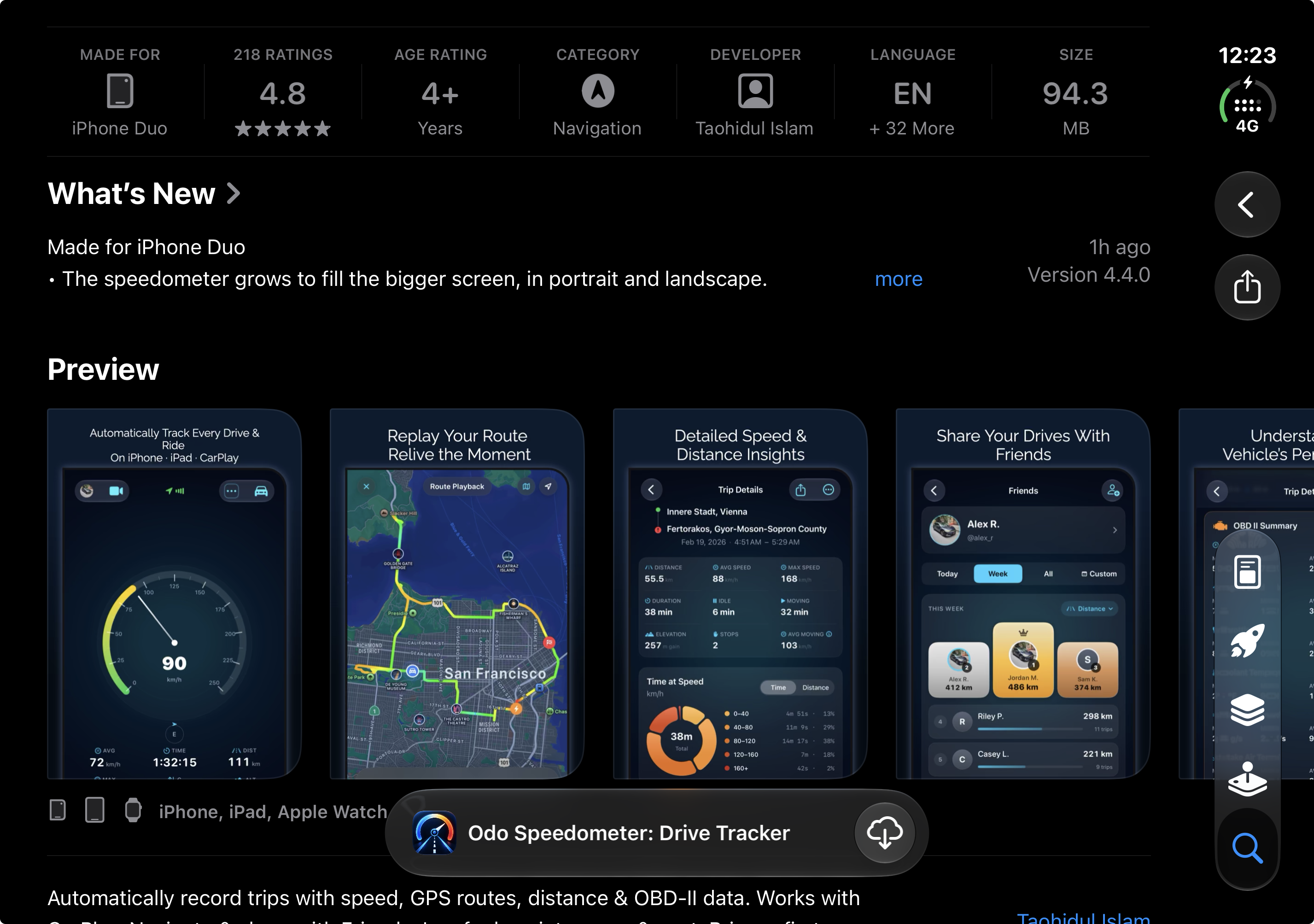
Odo 4.4 is rolling out on the App Store. The two big additions this time are iPhone Duo support and an Apple Watch app.

iPhone Duo
Odo now uses the bigger screen on iPhone Duo. The speedometer grows to fill the display in portrait and in landscape, and trip playback and the welcome screens resize to fit whatever window size you're using, so nothing gets cut off. If you have a Duo, I'd really like to hear how it feels in daily use and which screens you think could use more work.

Apple Watch
You can now start, pause, resume and end trips from your wrist. You can also ask Siri on your watch to do it, and on watchOS 26 you can add Odo to Control Center or the Action button so trip controls are one press away.

To be upfront: the Watch app is a proof of concept for now. It's a simple remote for your iPhone, and your live trip status still comes from the Live Activity in the Smart Stack. I kept it small on purpose so it's reliable and easy on the battery, and I plan to add more features over time. If there's something you'd want on your wrist, tell me in the comments. That will decide what comes next.

Also in this update

  • The Lock Screen Live Activity shows the vehicle you're driving.
  • You can share a whole trip page as one tall image (Share > Full Screenshot).
  • Stops at your saved places show the place name, and you can save an unnamed stop in one tap.
  • There's a new km/gal fuel economy unit for countries that sell fuel by the US gallon.
  • MGRS is now a coordinate format option.
  • OBD connections are better for older cars that use K-line.

Thanks for all the feedback so far. Bug reports and ideas are welcome here or at support@speedometerproapp.com.


r/OdoApp • • 25d ago

Merging Trips

3 Upvotes

Did something change?
I merged trips some time before. I am not able to merge trips. Where is that option?


r/OdoApp • • 29d ago

Auto Assign the vehicle by recognising the car on CarPlay!

3 Upvotes

I have 2 vehicles. One is a car and the other is a minivan. In the Bluetooth setting both cars have their own names. On the app there is a default vehicle assigned to the trips. However, I use both the cars depending on where I am going. I have an automation to start trip when car play is connected. Every trip I make gets assigned to the default vehicle.

Would it be possible to recognise which vehicle CarPlay is the phone connected to and auto assign the vehicle to the trip?


r/OdoApp • • 29d ago

Battery Consumption

2 Upvotes

When I start a trip, I have noticed my iPhone getting noticeably hotter and I have seen battery percentage going down as well.
How has your experience been? How can I optimize or minimize this?


r/OdoApp • • Oct 21 '26

App on Apple Watch ?

11 Upvotes

Ever considered an app on watch with basic functionality to start/end trips pause/resume trips?

Just a thought.


r/OdoApp • • Oct 20 '26

Feature request. Thoughts?

6 Upvotes

I can see that app records the pauses taken during a trip. Let’s say I went to McDonald’s drive thru, then post office and then met a friend for pick up and finally home. Now, app records the pauses taken during the whole trip when I don’t need to get out of the car. But it doesn’t let me save these pauses when they were actual destinations.

Can this be built? Will it be useful?

Let me know your thoughts.


r/OdoApp • • Oct 20 '26

How Did You Find the App, and Would You Share It With Others?

12 Upvotes

Hey everyone!

I've been building Odo for a while now, and many of its features, including CarPlay navigation, Convoy, OBD2, and vehicle tracking, have been shaped by feedback from the community. Thank you for that!

I'm trying to understand how people discover Odo and what makes them recommend it to others. I have three quick questions:

  1. How did you first discover Odo? App Store search, Reddit, YouTube, a friend, an ad, or somewhere else?
  2. Would you recommend Odo to a friend? If not, what's holding you back? Honest feedback is always welcome.
  3. Have you ever shared Odo on social media, or would you? Is there anything I could add to make sharing easier?

I'm an indie developer, and understanding how people discover and share Odo helps me focus on the right improvements and grow the app.

If there's anything you'd love to see in Odo, feel free to mention that too. I read every comment!

Thanks for being part of the journey!


r/OdoApp • • Oct 17 '26

Yo, please add a km/g

0 Upvotes

r/OdoApp • • Oct 16 '26

Odo 4.2 is Live: Emergency SOS, Live Location Sharing, CarPlay Alerts, EV & Hybrid Presets, More Accurate Automatic Trip Recording, and More!

Thumbnail
gallery
17 Upvotes

Hey everyone! The new version is live, with a focus on safety and more precise automatic trip recording.

🆘 Emergency SOS
Hold one button and the people you trust can see where you are, live, until you're OK.

How it works
- Hold the SOS button. You get a 5 second countdown, so an accidental press is easy to cancel.
- Your emergency contacts (up to 10) get a text with a link to your live location. Messages opens already filled in, so you just tap Send.
- Friends in Odo get a notification instead.
- Write your own message in settings, or use the default "SOS: I need help." Your location link is always added.

* The live location page
- The link opens a map in any browser. The people you alert don't need the app.
- They see where you are, your battery level, how accurate the location is, and when it last updated.
- Your location is shared for 6 hours or until you tap I'm Safe. Tap it and everyone you alerted hears that you're safe, and you can text your contacts in one tap.
- Need help for longer? Notify Again sends another notification to friends and an "I still need help." text to your contacts.

* It keeps working in the background
- Your location keeps sending while your phone is locked.
- If the app gets closed, it picks back up on its own once you've moved about 100 to 200 m.
- Your own Lock Screen stays clear during an SOS, so someone else holding your phone won't see it.

* Convoy SOS
- Hosts can turn on Convoy SOS. Then every member gets the button, and one press alerts the whole convoy too.
- The member who needs help shows up in red on everyone's map, CarPlay included, with Live Location and Directions one tap away.
- In CarPlay, you'll get a "Needs Help" alert with Directions when a convoy member or friend sends an SOS. Sending an SOS stays on the phone to keep your eyes on the road.

* Get set up in a minute
- Settings > Emergency SOS. Add your contacts and turn on Show SOS Button. It appears on the speedometer, the live map, during navigation and on the convoy screen.
- SOS costs a bit to run on my end, but I believe safety features shouldn't be locked, so I'm keeping it free for everyone for as long as I can.
- SOS is for reaching the people you know. For emergency services, call your local emergency number.

🎙️ Search by Voice
- Just say where you're going. Tap the mic in Navigate search, or the mic on the map in CarPlay.
- Add a stop mid-drive in CarPlay with Say a Place.
- Say "Home" or any saved place and it's right at the top.

🔋 EV and hybrid presets
- Ready-made OBD II data for 99 electric and hybrid vehicles: battery charge, cell voltages, temperatures and more. Pick your make, model and year and you're done.
- Trips now show your battery charge at the start and end of every drive.
- All your cell voltages in one bar chart on the Live tab, with your lowest cell highlighted.

✨ Smoother everyday use
- Navigate now lives in the top-right menu on the Speedometer tab.
- CSV fuel imports show your newest entries first in the preview.

🛠️ Auto-started trips are more reliable
Thanks to a few of you who sent detailed reports, I tracked down a rare crash that could stop a motion-started trip in its first minute while the phone was locked. That's fixed. Trips now also save after just 30 seconds (it used to be 5 minutes), so your early-drive data is safe no matter what.

If you run into any issues, please let me know here or at support@speedometerproapp.com and I'll do my best to fix them as soon as possible. I'm working hard to make Odo one of the most useful apps for driving and riding.

If you're enjoying the app, a review on the App Store would mean a lot and really helps. Thank you!

Drive & ride safe!


r/OdoApp • • Oct 15 '26

Silent crash during automatic trip recording (fix submitted)

9 Upvotes

Hello everyone,
I've identified an issue that affects automatic trip recording. When a trip starts through Auto Start, the app may crash silently in the background shortly afterward. When this happens, the distance stops updating at around 0.1 to 0.2 km, and the trip isn't saved.

A fix is ready and has been submitted to Apple. I've also asked Apple for an expedited review so the update reaches you as soon as possible.

Apologizes for the inconvenience and for any trips that were lost. Thank you to everyone who reported the problem. I'll post here as soon as the update is available. If you still have problems after updating, please let me know.

Thank you for your patience.