r/OneNote • u/Jealous_Dot590 • 26d ago
Project workflow review and recommendation - OneNote or Other
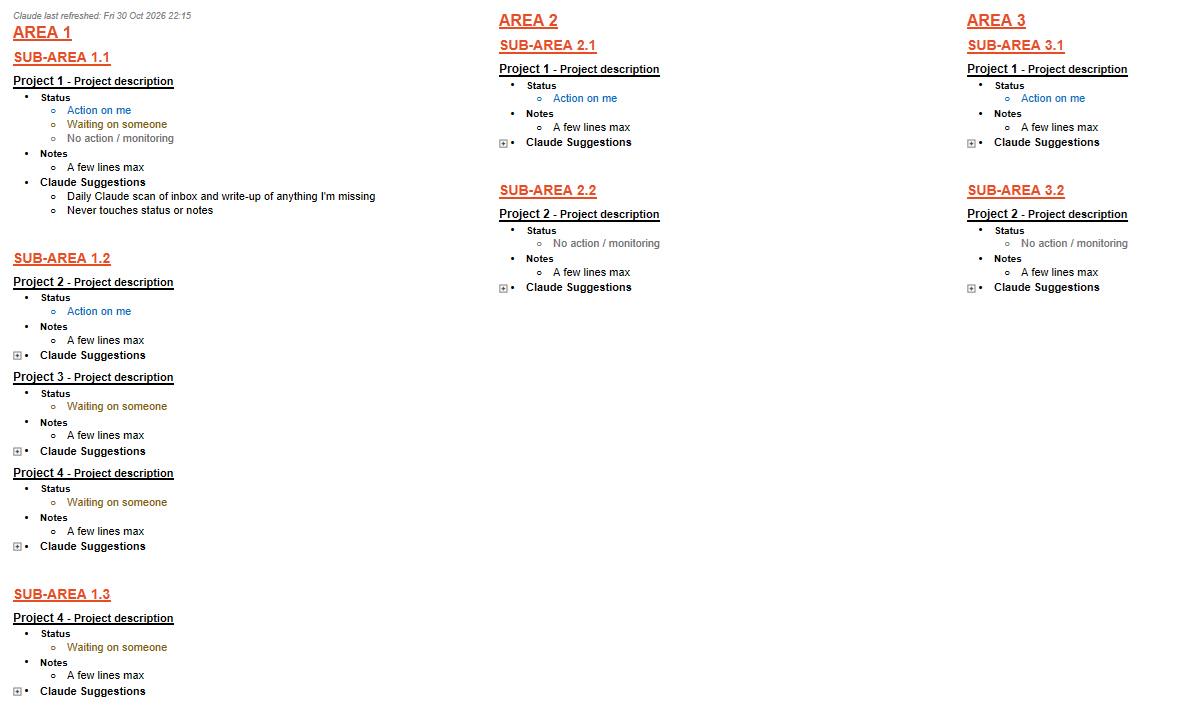
I still use OneNote for all my 'second brain' stuff and general notes. Over the last six months, I've started from the ground up with how I keep track of all my projects and the image is the system I've landed on after a number of iterations.
I wanted to run it past everyone and see if you had any suggestions:
- The setup is essentially project blocks split by area of responsibility with 1) Next actions, 2) Any notes and 3) Claude scan of my inbox and main notes adding any suggestions (always minimised). It's meant to be quick overview of everything and keeps me on track.
- The OneNote infinite canvas is pretty key to this setup. I'm able to zoom in and out around areas (the list is much bigger than the screen shot) and manually change actions as they're done and come through
- Just how my brain works - Being able to see all my responsibilities and projects at once makes it super clear on what's happening and quickly visually map any interconnection.
It works pretty well for me, and I'm not in a rush to change but obviously given its created via a text editor it does have some friction, clunkiness and crudeness. I was wondering if anyone thinks similar to me and could recommend a better setup? I'm open to OneNote or anything else.
Probably the closest I found is Trello, but the community there indicates its in deep decline and is an unloved bastard child for Atlassian. After giving it a bit of a go, it's close but it's very bloated.
Appreciate any thoughts!
•
u/AutoModerator 26d ago
Thank you for posting in the OneNote Subreddit! Please make sure your post is following our rules linked in the sidebar.
We have a wiki that is maintained by our community that has TONS of information (screenshots coming soon!): http://onenote-wiki.vercel.app
Our wiki is open source if you know how to use GitHub and would like to contribute: https://github.com/DudeThatsErin/OneNoteWiki
We also have a Discord server: https://discord.gg/5kv4bDUkpc
I am a bot, and this action was performed automatically. Please contact the moderators of this subreddit if you have any questions or concerns.
1
u/AnalythicSearch444 26d ago
This looks very interesting! Are those expandable lists at the Claude bullets? I've never seen that.
1
u/suit2020 23d ago
Nice work, thanks for sharing. Looks to be a well structured template, I’d be interested in how you prompted Claude to do the inbox and research relevant data point.
2
u/letstalk1st 26d ago
I use a lot of ... Link to paragraph... to move around. Otherwise i end up with notes in too many places