r/PCSX2 • • Jul 26 '24

Clarification: We Are Not the Official PCSX2

57 Upvotes

Hey everyone,

Just a quick clarification: This subreddit is not the official PCSX2. We're simply a community of fans who love discussing and sharing our experiences with PCSX2. If you're looking for official information or support, please refer to the official PCSX2 website and forums.

Additionally, please note that piracy will not be allowed or condoned here. Any posts or comments promoting piracy will result in a permanent ban.

Thanks for understanding and happy gaming!

You can also join the unofficial discord here https://discord.gg/nxxUrBNw


r/PCSX2 • • 9h ago

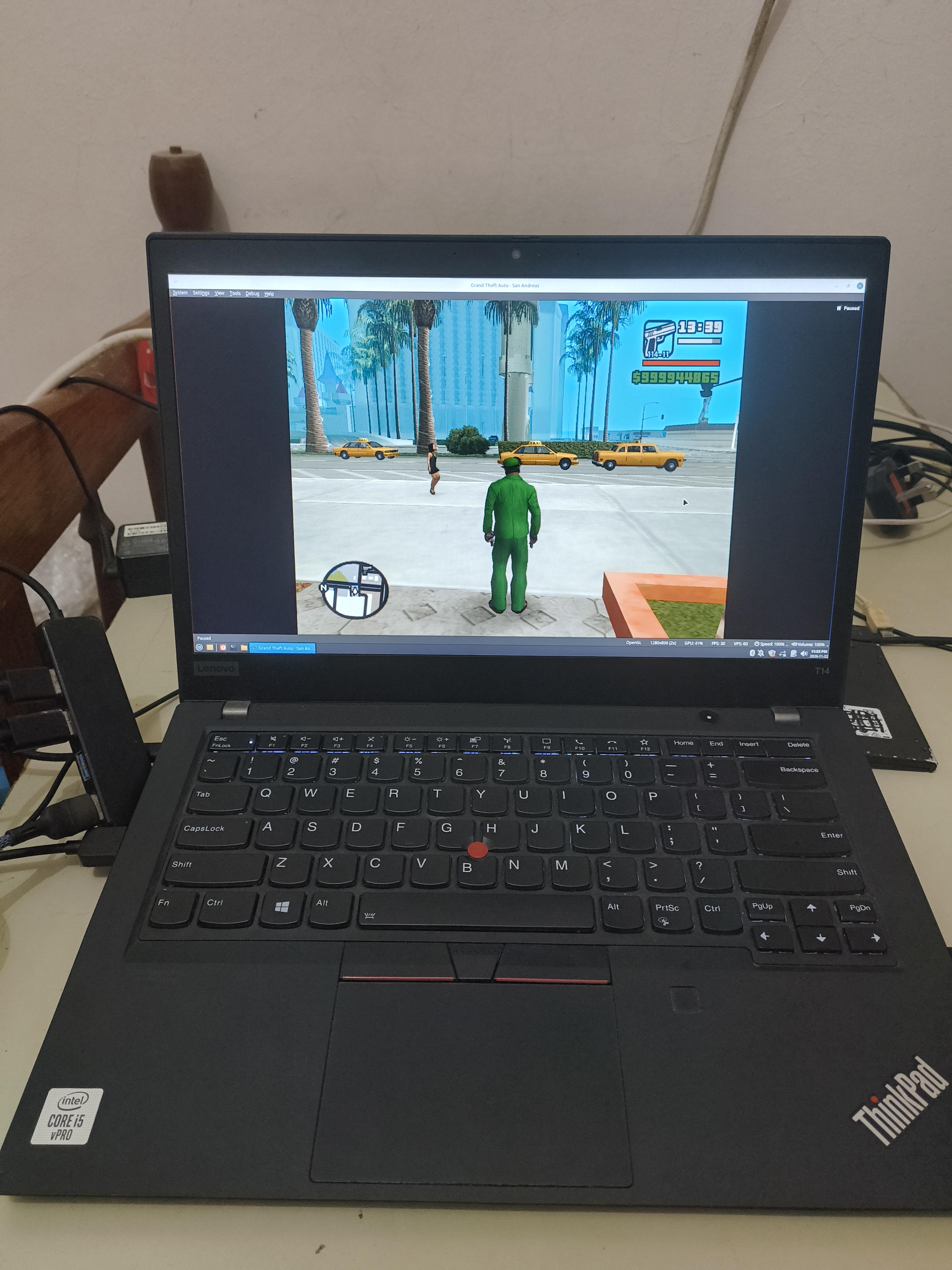
Support (Resolved) I running GTA SA on Thinkpad T14 Gen 1 i5 10th generation 16gb ram UHD 620 Linux mint xfce 2x resolution with 2 patch used .(powerprofilesctl set performance) Set up on Linux mint terminal improve the performance of GTA SA pcsx2. Correct me if I'm wrong ya. Happy GTA gaming.
Post image
10 Upvotes

I know the GTA SA pcsx2 can run almost on every of the medium range of PC nowadays, but this is the best experience so far for me, using the latest pcsx2 build, running at 30fps, 2x resolution, NTFS USA version, at stable frame rate. Remember Set up the terminal Linux mint to (powerprofilesctl set performance) this will make the Linux mint PC or laptop improve the performance of the pcsx2 and the FPS too . And two patch of pcsx2 GTA SA will make the vision and graphics clear, I forget about the name, you guys can take a look on two patch on latest pcsx2. Remember after playing the game, set up (powerprofilesctl set balanced) to reduce heat after gaming. Happy GTA and pcsx2 gaming everyone. Peace 🕊️

r/PCSX2 • • 1h ago

Support - General Game lags down to 5% speed consistently

1 Upvotes

First time using an emulator, excuse my ignorance.

Trying to run Marvel Nemesis, the game works fine in the menus and runs smooth. When loading into a map, it lags down to 5-10% speed and stays there. Audio is clipped. The screen shows random polygons and flashing lines and lights, not actually anything rendered in the game.

I've set my graphics adapter to my gpu (1660Ti), set it to Vulcan and Direct3D 11. The resolution is set to Native PS2, and everything else is default. No post processing or anything. Y'all have any idea? Please tell me it's a simple settings change and not an incompatibility with the game.


r/PCSX2 • • 1h ago

Other Does anyone have working cheats for Super Robot Wars Alpha 2 and Alpha 3?

0 Upvotes

I'm looking for the maxx money, max pp and all power parts x99 ones.


r/PCSX2 • • 3h ago

Support - General Why is Jax running so slow idk what im doing anymore

Post image
0 Upvotes

I had the most updated version and it was running bad so I downgraded and its still running slow


r/PCSX2 • • 5h ago

Support (Resolved) Black Screen PCSX2 Xenosaga

Post image
0 Upvotes

Hello friends

I'm on my first playthrough of Xenosaga and I'm emulating it. I've ran into this issue where after a cutscene I get this black screen with the mini map on the bottom right.

I've had this issue once during this playthrough after the intro cutscene and I somehow got by it at that time.

This time however I am leaving the colony to head to Miltia and I get the cutscene of the ship leaving, and instead of it giving me the next cutscene of Cherenkov waking up (I looked up how the scene is supposed to go) I get the intro cutscene of them in the desert, and when I skip it I get this black screen again.

Like the emulator doesn't know which part of the game I should actually be at I'm guessing.

I hope there's someone that could give me any advice or tips on how to get past this glitch please. I'm really enjoying the game and it's story thus far and want to see it through and it would be a real shame if I couldn't because of this annoying glitch.

update: solved. my iso was missing a hash. To solve I am now using a different iso.


r/PCSX2 • • 16h ago

Support - Graphics Probleme image qui saute

1 Upvotes

Bonjour, voici mon problème sur certain jeux j'ai des petit saut/tremblement d'image, comme je pourrais régler ce problème, Merci 🙂


r/PCSX2 • • 1d ago

Support - Performance Constant frame drops and stuttering on steam machine?

4 Upvotes

Hi fairly new to all this and using Emudeck I downloaded PCSX2 as well as a bunch of other emulators. Everything else works fine and games DO loads well enough but regardless of resolution scaling it always stutters and randomly drops 15 or so frames. I've just been using the default settings but am I missing something when it comes to running these games? Never had this issue on my steam deck so it being strange on the machine perplexes me


r/PCSX2 • • 1d ago

Support - Controller Haunting Ground on PCSX2 keyboard or xbox 360 c?

1 Upvotes

I’m planning to play theHaunting Ground, but I’m not sure whether it’s better to use a keyboard or an Xbox 360 controller. Which one should I try?


r/PCSX2 • • 1d ago

Other Need recommendations on what to play next, my brethren

0 Upvotes

Title


r/PCSX2 • • 1d ago

Video-patch showcase Primal PS2 running ultrawide (21:9/32:9) on PCSX2 test and gameplay, patch link in description

Thumbnail youtu.be
2 Upvotes

Link for pnach file in description, multiple aspect ratios supported. Currently work in progress


r/PCSX2 • • 2d ago

Support - Performance What level of PC do I need?

4 Upvotes

I've had fun on an old (not for gaming) laptop with games like Ape Escape 3, crash, and some other titles (they do be laggy tho) but I want to try play more games requiring a stronger PC (and no lag) like guitar hero, nba street, etc. What PC specs do you think I need?

I will be trying to find a secondhand PC on facebook marketplace unless you all tell me thats dumb

I am also planning on emulating some xbox 360 classic games like civ rev and nba 2k14 but im more focused on the playstation emulation.

Tia


r/PCSX2 • • 2d ago

Support - Graphics Are these white lines normal

Post image
1 Upvotes

I have them on GoW 2 are they normal, if not how do i fix?


r/PCSX2 • • 2d ago

Support - Controller MGS 2 + 3 Pressure Sensitivity Controls Fix

7 Upvotes

I’ve been trying to figure this out for a year or two now off and on. I’ve looked all over the internet, YouTube, and there’s nothing sure fire. How do we work around this or solve this issue? I figured by now there would be a patch or something along those lines, but there’s still no definitive solution to solving this games issue with the lack of pressure sensitive face buttons with today’s controllers. And it’s not like it’s a minor inconvenience, the game does not play at all how it’s supposed to without them. It really sucks too, because these are arguably some of the best games on PS2, and if there was a solution/fix to this problem newer players could really get into and enjoy the series for the first time. I know it’s a lot easier said than done, but i’d like to hear what everyone thinks as well as if anyone secretly has a way to fix this game mechanic entirely and well at that.


r/PCSX2 • • 3d ago

Support - Controller having a hard time trying to make Crash spin. Is there a way to assign a key to automatically rotate the left joystick?

Post image
0 Upvotes

Ive tried using macros but that didnt worksadly

Apprecite you boys


r/PCSX2 • • 3d ago

Support - Graphics I have some problems playing some games with higher resolution than the native

2 Upvotes

Games like Zill O'll Infinity keeps having problems for me.

It appears some square in texts and weird lines in the background, is there a way to solve it ?


r/PCSX2 • • 3d ago

Video I am building a ps2 version of my Christmas crime sim

Thumbnail youtu.be
8 Upvotes

Its a pain, its struggling but with the extra time im putting in, I am finding work arounds, I plan to give out disc version as part of some sort of support bundle XD building this on ps2 is so cool


r/PCSX2 • • 4d ago

Support - General Error keeps popping up. Does anyone know a fix?

Post image
2 Upvotes

Trying to play Haunted Mansion and this is my first time using PCSX2. Does anyone know a solution?


r/PCSX2 • • 4d ago

Support - General Ped 6 patched

0 Upvotes

Are tehre patches avilable for pes 6 pcsx2?


r/PCSX2 • • 4d ago

Support - Performance Does someone know a solution to this issue? The entire background suddenly becomes white in GoW2 during the 2nd Pegasus chase sequence

Post image
5 Upvotes

r/PCSX2 • • 6d ago

Support - Graphics Which Settings Give the Most Authentic PlayStation 2 Graphics on PCSX2 without messing up the aspect ratio?

Post image
165 Upvotes

r/PCSX2 • • 5d ago

Other Anyone mods Dynasty Warriors 4 Xtreme Legends?

0 Upvotes

I was able to find the Aura address, but it was only a visual effect and it did not apply any buffs. There was a modder who was able to successfully find it. Although he was unwilling to share his work, he stated that some enemy generals have Aura address with a flag that determines whether to give them stat boosts. I'm not sure how to find that flag. Any help would be appreciated.


r/PCSX2 • • 6d ago

Support - Graphics Question about FMV aspect ratio

5 Upvotes

To this day, I kept the aspect ratio for fmv same as the gameplay. 4:3.

but the screen for fmv always looks different than the gameplay screen.

I want it to be as if I'm playing on original hardware.

so should I change it to default or native? or leave it at 4:3?


r/PCSX2 • • 5d ago

Support - Graphics Julia's Merchant Portrait 4K HD Texture Replacement for Castlevania: Curse of Darkness

0 Upvotes

Before Image

After Image

With the recomp release of Castlevania: Curse of Darkness, I decided to play the game for the first time in over 2 decades. While Panda Venom's and Platinum Mimic's excellent 4k Texture Packs gave new life to an aging game, I noticed that the merchant portrait texture found in both texture packs were still heavily pixelated. I suspect that no ai upscale would be able to fix the portrait as the original texture was too pixelated to begin with.

Therefore, I took Julia's character image from the Castlevania Wikia, and I used Let's Enchance to ai upscale it to 4x the size of the inage character inage. I then cropped and edited the image with ginp to fit the 2048 x 2048 resolution. Unfortunately, the inage isn't a 1:1 match to the original inage found the game. However, the higher resolution makes up for it. My next goal is to either commission or wait for someone to release a Julia model from COD for Blender or XNA Lara so that I can take a higher resolution image of Julia in a pose similar to that found in the original game.

Instructions:

Please download the image from the imgur link here and rename the image to 7bfc85254dd39682-80949ed7941a53c0-00002653.png

Once done, replace the image with the existing one found in the replacement folder.

I apologize for using imgur for the replacement texture. While imgur renamed the image file, the image resolution and quality remained the same.

Special thanks to both Panda Venom and Platinum Mimic for releasing texture packs for Castlevania: Curse of Darkness.