r/PHbuildapc • u/Wide-Effective-1077 🖥 R7 5700x / RTX 3070ti • 4d ago
Build Help Temps o ptimization (min maxing)

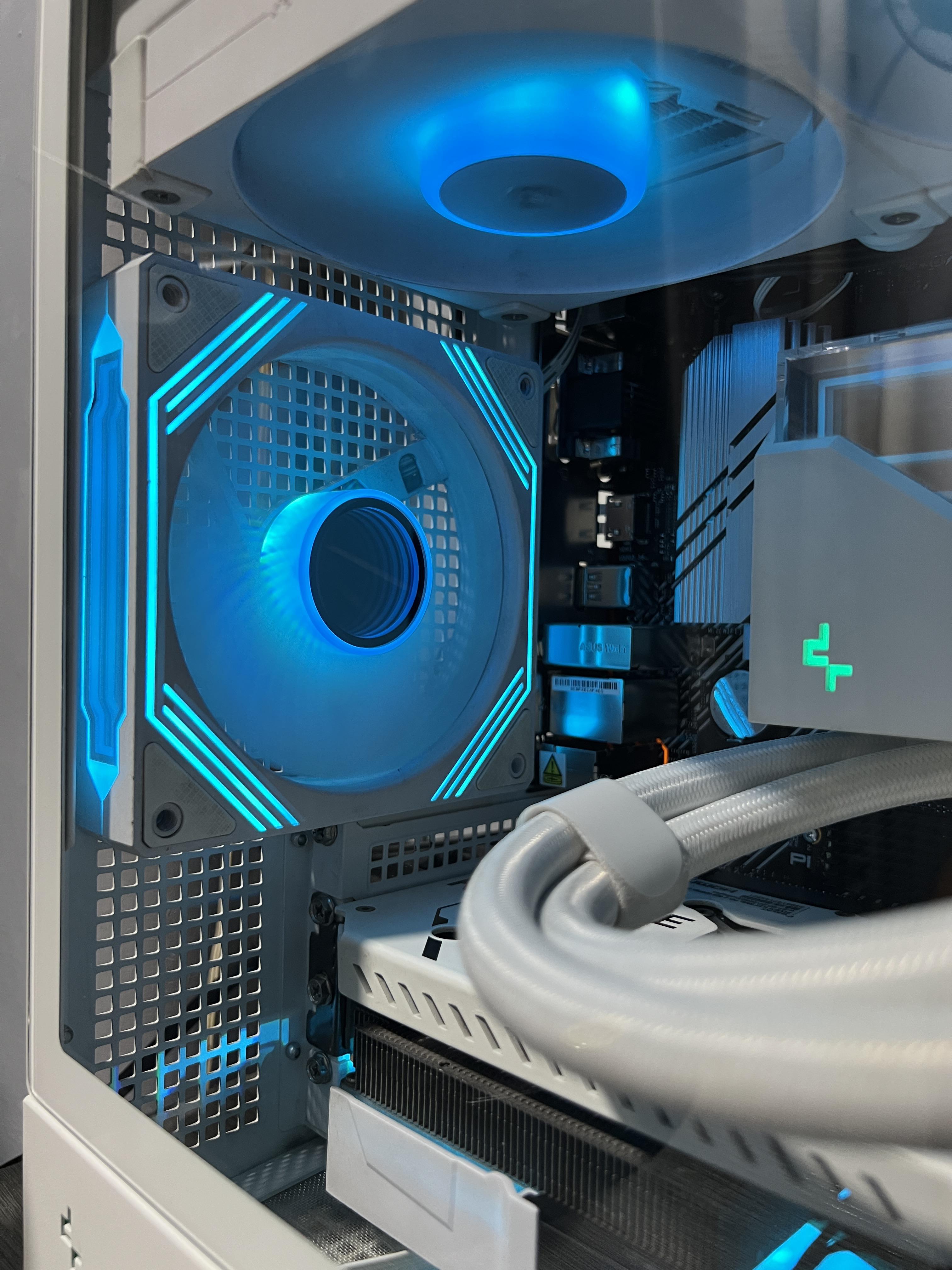

Hey guys, Just wanna ask. What's the ideal solution for this kind of a problem. When i play heavy graphics game, My CPU temps are spiking to 80. While on the other hand, playing cpu dependent games such as valorant only hovers around 48-52 deg.
My current set up is 1 front intake, 1 back exhaust and 2 radiator fans exhaust. I know that the heat coming from the gpu is being sucked through the radiator that's why my cpu temps spikes. I just wanna ask if my temps will improve if i:
a.) Change both front intake and back exhaust fans to a higher rpm fan such as deepcool FD12 argb.
b.) Set my back exhaust fan as intake
Thanks for the suggestions.
btw, front and back fans are inplay (openview?)
Edit:
Solutions done:
1.) Set front as exhaust and back as intake
-Temps were the same
2.) Set back as intake
-Temps are negligibly worse (1-3 deg)
The optimal set up for this one is my current set up. Setting front as intake and back as exhaust. The hot air rising from the gpu is getting sucked directly by the back exhaust.
I just found out the problem was me all along! Kidding aside,
I interchanged the CPU temps and GPU temps when i was doing the set up on TRCC 🤣
Now temps looks fine to my eyes.
Thank yall for your support and suggestion!
8
u/Famidesu235 4d ago
I think these are expected temps due to your case, airflow and case design lang talaga. best you could do is undervolt your CPU and GPU (not sure anong CPU meron ka, most Am4 doesnt need one pero shouldnt reach beyond 70 even)
4
u/MudPutik 4d ago
Sorry if off-topic, what's that mini monitor? Make and model? Thank you!
4
u/Cyllell Helper 4d ago
I'd swap the rear fan into an intake. That should help it a bit. Higher CFM fans should allow you to cycle more air too.
With your current layout, the only intake your CPU gets is whatever passes through the GPU first.
The rear fan is usually useful when you have a tower cooler blowing at it since it can immediately pull that heat out, but with an AIO you don't really get that.
Also why heavy games cause your CPU more heat. Because not only is the CPU itself running hot, but the air inflow it gets is hotter because the GPU is running hotter as well.
Valorant barely loads the GPU, my 6800 used to run without spinning the fans because of how lightweight it is. It only loads like 3 cores max on CPU side too. It's just very light in general. 80C is an inconsequential temp to the CPU anyway.
2
u/Due-Needleworker139 Helper 4d ago
What is your CPU by the way? Either way, your fan orientation is fine the way it is. You do not need to change it.
You can probably reduce your temps by doing the following:
1.Try repasting your CPU and see what happens.
2. You can change your fans to a better one like something from Arctic.
3. You can try to undervolt CPU as well.
4. Assuming you are willing to, you can replace your AIO to an air cooler or you can also change your case entirely.
2
u/kierbb i5-14400f | RTX 4070 | 32 GB DDR4 4d ago
add 2x 120mm slim fans at the bottom as intake
2
u/hazeeeelnut 4d ago
out of topic sir. Same case tayo, pabulong naman nung screen :D TY po :)
5
u/FrancisGat 🖥 Ryzen 7 7800X3D / RX 9070 XT 4d ago
My GF has the same case. Her temps have been pretty decent using arctic fans even with an ATX PSU.
Her setup is exactly the same airflow set up as yours with single intake. I did notice temps slightly improve when changing back fan to intake, but not enough to really affect anything.
More than anything, I think what will help most is setting custom fan curves. When I set it up on her PC, temps dropped by like 10 degrees or so. She doesn't really mind the fans being louder but arctic fans honestly are barely noticeable when on.
5
u/RantoCharr 4d ago
Flip the front fan as exhaust & the rear fan as intake.
Buy a 120mm fine mesh fan filter for the rear fan. Remove the top and front filters.
Since nahihigop ng AIO yung heat ng GPU, you want to exhaust the through the front so that the AIO can get fresh air from the rear fan.
Removing dust filters from exhaust fans will also help since nakakabawas ng airflow yan without any use since natratrap lang nila yung dust na palabas ng case.
4
u/evilmojoyousuck Helper 4d ago
those temps are completely normal
4
u/xMachii 4d ago
High temps are expected lalo na sa ganyang case and sff pc.
You can try undervolting the CPU if you know how to. I had a 5700x air cooled lang ng budget cooler sa NR200 ko, never ako naka experience ng 80 degrees sa cpu kahit sa synthetic benchmark.
3
u/Koxinator 4d ago
Flip the rear fan and make it intake.
2
u/sleepygeepy_ph Helper 3d ago edited 3d ago
Before doing anything drastic, how are you measuring your CPU temps?
Keep in mind that many CPU coolers, digital monitoring screens, and other temp monitoring doodads, can report inaccurate CPU temps by reading off values from the incorrect sensor on the motherboard.
What I suggest is install HWiNFO64 first and check what are the temps mentioned by these sensors:
Example below:
Compare the values reported by HWiNFO64 versus the one shown on your LCD monitoring.
If the CPU CCD1 (Tdie) sensor is reporting 80C while gaming on your Ryzen 7 5700X, then it is hotter than usual but not really a concern if you ask me. I would not be surprised if you are seeing a lower temperature in HWiNFO64 than what is shown on your LCD screen.
1
u/rain-men 3d ago
Undervolting is one of the best tool for SFF PCs. It can improve performance. I have a CH160 with a fan setup that's actually has opposite of what people werre recommending (because i chose aesthetic over better air flow) yet I rarely reach 80C on most games due to undervolt alone.
-1
u/novicez 🖥 9800X3D | RX9070XT 4d ago
A.) Get a bigger case Smaller cases will run hotter than bigger ones. This no secret.
B.) Go full custom loop with external radiator setup. Self explanatory.