r/PS5_Jailbreak • • 23h ago Bravo

Discussion I made the PS5 14.22 Kernel run on PC

Thumbnail
github.com
669 Upvotes

This is the first (public) faithful rehost of the PS5 14.22 kernel on QEMU.

With only 62 patches, it's 10x as pristine as the last known rehost on 13.60.

Hope this helps the community get further.


r/PS5_Jailbreak • • 3h ago

Discussion POV: sonic_iso after Cyberleak drops the GTA VI Xbox executable.

Post image
426 Upvotes

r/PS5_Jailbreak • • 15h ago

General Mario Kart World recomp running at 60fps on PS5

414 Upvotes

there are some casual frame drops, visual glicthes and some game crashes often, but I've been able to finish an entire cup!!


r/PS5_Jailbreak • • 12h ago

Discussion GTA dump might be coming soon, and Sonic_Iso deleted their profile on X

Thumbnail
gallery
375 Upvotes

r/PS5_Jailbreak • • 4h ago

Discussion cyberleek has released the exe

262 Upvotes

Early by a few hours


r/PS5_Jailbreak • • 16h ago

Discussion I'm building Relay — a PS5 Remote Play app for Android with a PlayStation Portal-style UI and features Sony doesn't offer

129 Upvotes

🎮 Relay — Bringing the PlayStation Portal Experience to Android, Handhelds, and Beyond!

Hey everyone! 👋

I've been developing an application called Relay, a PS5 Remote Play client designed to recreate the PlayStation Portal experience on Android phones, tablets, handheld gaming devices, and eventually other platforms.

My goal is to go beyond basic Remote Play functionality and create something that genuinely feels like a dedicated PlayStation handheld, complete with a Portal-inspired interface, system settings, controller customization, and additional features.

Relay is an independent project built on ideas, research, and open-source work from the PlayStation homebrew and Remote Play communities.

And I've got some pretty ambitious plans for this thing! 😂


🚀 Current Features & Development Progress

🎨 PlayStation Portal-Inspired Interface

  • Custom home screen and navigation
  • Portal-inspired menus and backgrounds
  • Animated transitions and visual effects
  • Quick settings and system menus
  • Interface optimized for touchscreens and controllers

🎮 Traditional PS5 Remote Play

  • Dedicated streaming mode for standard, non-jailbroken PS5 consoles
  • Focus on compatibility and familiar Remote Play functionality

🔓 Remote Play JB

A separate streaming mode designed for jailbroken PS5 consoles, allowing experimentation with features beyond traditional Remote Play.

Current testing includes:

  • 720p streaming
  • 1080p streaming
  • 1440p streaming
  • Approximately 60 FPS in tested configurations
  • Research into additional resolutions and streaming improvements

📸 PS5 Media Gallery Integration

Functionality under development for:

  • Browsing media stored on a jailbroken PS5
  • Previewing screenshots and videos
  • Transferring media between the console and device

⚙️ Portal-Style Settings & Quick Menus

  • Custom settings menus
  • Animated backgrounds
  • Portal-inspired transitions
  • Visual effects and navigation

🕹️ Touchscreen & Controller Support

Development is focused on phones, tablets, and dedicated gaming handhelds with support for touch and physical controls.


🛠️ Upcoming Features & Development Roadmap

🎮 Full Controller Remapping

One feature I'm particularly excited about!

I want a fully graphical DualSense controller displaying annotation lines that show exactly what every button is mapped to.

Users will be able to customize their controls through an interactive visual interface.

📶 Integrated Wi-Fi & Bluetooth Management

  • Wi-Fi connection management
  • Bluetooth controller pairing
  • Controller connection status
  • Network configuration directly through Relay's interface, within Android's supported capabilities

🎮 Automatic Controller Detection

  • USB gamepads
  • Bluetooth controllers
  • Improved handheld controller compatibility
  • Device-specific controller profiles

📺 Enhanced Streaming Controls

  • Portal-style resolution indicators
  • Streaming quality presets
  • Improved video settings
  • Consistent settings across supported devices

🌐 Live Game-Text Translation

I'm researching OCR-based technology that could translate text directly from a game's video stream.

Imagine playing a Japanese game and having its text translated while you play!

📱 Dedicated Launcher Mode

Turn an existing Android device into a dedicated PlayStation handheld!

Relay could serve as your device's default launcher, giving it a PlayStation Portal-style experience from startup.

✨ First-Boot Setup Experience

A complete onboarding experience inspired by the PlayStation Portal:

  • Welcome screen
  • Wi-Fi setup
  • Controller configuration
  • PS5 pairing
  • Streaming preferences

🔓 Expanded Jailbreak Streaming

Research into alternative streaming implementations, protocol improvements, and additional functionality for jailbroken PS5 consoles.

🔄 Unified System Update Interface

A Portal-inspired update interface integrated into Relay's settings for managing supported Relay updates.


📱 Current Devices & Platforms in Active Development

Here's where things get interesting!

Some of these devices are already running Relay, while others are experimental ports, early development targets, or ideas I'm considering.

✅ Very Active — Running Builds

Samsung Galaxy Tab S11

  • Very active development
  • Relay running

Google Pixel 9 Pro Fold

  • Very active development
  • Relay running
  • Foldable interface optimization

Razer Edge 5G

  • Very active development
  • Relay running
  • Razer Kishi V2 support

🛠️ Work in Progress

Retroid Pocket 3+

  • WIP

Retroid Universal Build

  • WIP
  • Goal: broader compatibility across Retroid handhelds

Nintendo Switch 1

  • WIP — HIGH PRIORITY!
  • One of my biggest experimental development targets

Nintendo Switch 2

  • WIP
  • I own one for testing
  • Still need Civilization VII for additional testing beyond the Lichii approach

iOS / iPadOS / tvOS

  • VERY early development
  • Universal app concept for iPhone, iPad, and Apple TV
  • I own an Apple TV for testing

Samsung Smart TV — Tizen

  • WIP

Windows 11

  • WIP

🤔 Experimental / Considering

PlayStation 4

  • Haha 😂 Maybe? I don't know yet!

PlayStation 3

  • This one would be pretty funny too!

PS Vita / PlayStation TV

  • Not sure how realistic this is
  • I've never really worked with a Vita
  • I do own a PlayStation TV for experimenting

Roku TV

  • Interested, but I need to investigate its platform limitations

Xbox Series X/S — Developer Mode

  • Considering this one
  • I own a Series S for testing

Xbox 360 — RGH

  • OMG, THIS ONE! 😂
  • Anyone out there experienced with Xbox 360 RGH homebrew development?
  • Seriously, I'd love to hear your thoughts!

ASUS ROG Xbox Ally

  • I really want to tailor Relay specifically for this device
  • Ideally as a default launcher
  • I also want to stay faithful to the Portal's UI

Any ideas for making that work well?

Steam Deck

  • Of course!
  • WHERE ARE MY STEAM DECK PEOPLE?! 🎮

👀 Special Interest — AYN Thor

AYN THOR!

I've already got some mockups for this baby, but unfortunately, I don't own one to test with.

I have BIG plans for this device.

AYN Thor, my dear... we're going to have some fun. 😂

If anyone owns one and would eventually be interested in testing, definitely let me know!


🧪 Community Testing — Testers Wanted!

I'm planning to post a link for anyone interested in testing Relay!

If you're interested, please complete the testing form in its entirety when it's available.

I'll have some specific questions because I'm really hoping to gather detailed feedback from the community.

I want to know:

  • What devices are you using?
  • What works well?
  • What doesn't?
  • What features matter most to you?
  • What would make Relay better than your current Remote Play application?

Your feedback will help shape development priorities.

I'll also be posting a public development roadmap!

Feel free to leave your requests, suggestions, and ideas in the comments. I'd love to know what would improve the experience for you.


🌐 UPDATE!!!!! — What About a Relay Social Platform?!

Okay, so here's another idea I've been working on...

How would everyone feel about a social platform built around Relay and the PlayStation community?

Think of something similar to Facebook, but designed around gaming.

💙 The Concept

  • NO ADS!
  • Community groups
  • Player profiles
  • Gaming discussions
  • Community posts
  • Polls
  • Friends and social connections
  • PlayStation-focused communities
  • Dedicated groups for homebrew, handhelds, and Remote Play
  • Integration with Relay

Eventually, I'd like this to become:

  • A website
  • A mobile application
  • A PS5 web application

🔗 Jailbroken PS5 Profile Linking

I'm also investigating ways to link jailbroken PS5 user profiles to Relay Social accounts.

The goal would be to make account linking and login as seamless as possible while keeping users in control.

I'm still working out the technical details and security considerations.

📊 I Want YOUR Opinion!

Would you actually use a social platform built around Relay?

I'm planning to create a community poll about this.

And if you have ideas for features, please share them!

Seriously, give me your best ideas. I want to hear them!


📚 Open-Source Credits & Acknowledgments

Relay builds on research, technical references, and work from the PlayStation Remote Play and homebrew communities.

Proper credit is extremely important to me.

Chiaki-ng — Street Pea & Contributors

https://github.com/chiaki-ng/chiaki-ng

One of the most important open-source PlayStation Remote Play projects.

Its research and implementation of console communication, streaming, controller support, and cross-platform compatibility have been major technical references for Relay.

Original Chiaki — Florian Märkl (thestr4ng3r) & Contributors

https://github.com/thestr4ng3r/chiaki

The original Chiaki project helped establish the open-source PlayStation Remote Play ecosystem.

Its foundational protocol implementation deserves recognition.

TP Play — mB14ck22

https://github.com/mB14ck22/tp-play

An open-source project based on Chiaki-ng, focused on native Android and iOS Remote Play clients.

Its architecture and mobile development approach are useful references.

Chiaki-ng Asobi AGPL Audit

https://github.com/chiaki-ng/asobi-agpl-audit

Technical research and documentation related to alternative Remote Play implementations and open-source licensing considerations.

I've also been investigating alternative streaming approaches and compatibility improvements.

Additional Acknowledgments

A huge thank-you to developers contributing to:

  • PlayStation homebrew
  • PS5 jailbreak research
  • Remote Play protocol documentation
  • Android game-streaming applications
  • Open-source console utilities

I'm also investigating PlayTranslate for potential OCR-based translation functionality.

These areas are still being researched and shouldn't be interpreted as completed integrations.

Transparency note: Some projects listed above are technical references rather than incorporated dependencies. A complete dependency list, applicable licenses, source-code obligations, and required attribution notices will be documented as development progresses.


💡 What Makes Relay Different?

My goal isn't simply to create another alternative to Sony's Remote Play application.

I want Relay to feel like an actual PlayStation handheld experience.

That means:

  • A complete handheld-style user interface
  • Detailed controller customization
  • Integrated device configuration
  • Improved support for Android gaming handhelds
  • Traditional Remote Play compatibility
  • Experimental features for jailbroken consoles
  • Dedicated launcher functionality
  • A potentially connected community experience

I also love the idea of taking Android hardware people already own and transforming it into a dedicated PlayStation streaming device.

Why buy another handheld if you can turn the one you already own into something awesome?


📢 Development Status & Disclaimer

Relay is currently in active development.

Some features are implemented, others are undergoing testing, and several are still part of the development roadmap.

Not every platform listed has a functioning build, and compatibility will depend on device hardware, operating system restrictions, and available development methods.

Relay is an independent community project. It is not affiliated with, sponsored by, or endorsed by Sony Interactive Entertainment.

PlayStation, PS5, PlayStation Portal, DualSense, and related trademarks belong to their respective owners.


💬 Community Discussion — I Want to Hear From YOU!

I've got a few questions for everyone:

  1. What features would make you choose Relay over your current Remote Play app?
  2. Are you more interested in standard PS5 Remote Play or the additional functionality being explored for jailbroken PS5 consoles?
  3. Would you turn your Android phone, tablet, or gaming handheld into a dedicated PlayStation Portal-style device?
  4. Which platform should I prioritize next?
  5. Would you use an ad-free Relay social platform with profiles, groups, and community features?
  6. What features would you want added to Relay Social?
  7. Is anyone interested in helping test Relay on devices I don't currently own?
  8. Any developers familiar with Switch homebrew, Xbox 360 RGH, PS Vita, or other platforms who want to share ideas?

Feel free to be brutally honest. Constructive criticism, feature requests, crazy ideas — I want to hear all of it!

This project is something I'm genuinely excited about, and I want the community to help shape where it goes.


💙 Join the Relay Community!

Relay Discord: https://discord.gg/UfZe7HhNW

Come hang out, discuss features, share ideas, follow development progress, and get involved with future testing!

More updates, screenshots, mockups, testing opportunities, and the development roadmap are coming!

Thanks for reading, everyone!

Let's build something awesome. 🎮💙

— Relay Development


r/PS5_Jailbreak • • 3h ago

Discussion Imagine how wild it would be if the PS5 Dump dropped same day as PC exe drop.

Post image
71 Upvotes

Just Saying.


r/PS5_Jailbreak • • 5h ago

Discussion ZhiThemes 0.1.1-alpha is out: automatic updates, your PS5's language, older firmwares and more

Post image
50 Upvotes

Hi everyone! A new version of ZhiThemes is out. It's a payload that puts custom themes on the real PS5 Home: folders, vertical covers, video wallpapers, your own font, themed Settings and Trophies, all edited live from your browser.

What's new in 0.1.1-alpha:

  • ⬇️ Automatic updates: this is the last version you need to install by hand. New versions install from the Home.
  • 🌍 Your PS5's language: menus and messages follow the system language (28 languages).
  • 🧪 Older firmwares: now works on 4.03, 6.02 and 7.00 as well as 9.00 to 13.60.
  • 📱 Editor on phones and tablets, reorganised, with a PS5 system icon picker.
  • 📦 New theme format: smaller themes, and your old ones are converted automatically.
  • 🎮 Up to 20 games in the row, smoother animated backgrounds, video wallpapers of any shape.
  • 🧾 New logs and a Report a problem button.

Coming next: custom tabs, a new folder design, and compatibility with OnionHEN and etaHEN.

Download + full changelog: https://github.com/itsRealZhi/ZhiThemes/releases

Coming from 0.1.0? Replace the ELF by hand once; after that, updates come by themselves.

Bug reports and theme screenshots are very welcome!


r/PS5_Jailbreak • • 8h ago

Discussion Prospero Sender Lite, the absolute fastest way to transfer files to the PS5, none of the extras.

Post image
42 Upvotes

https://github.com/sloppysteaks69/Prospero-Sender-Lite I hit sustained transfer rates of 1200MBps, that's megabytes, not bits. Inject the receiver elf and connect one or more compatible dongles to reach crazy speeds. I simplified the interface and made this all about speed. It doesn't use FTP so it isn't limited to slow file deletes, once you delete a folder its gone in a second. The receiver has support for realtek dongles 1gbps, 2.5gbps, 5gbps. And in theory 10gbps, but the 10gbps driver has never been tested.

Write speeds for a single file like a fpkg have hit ~950MBps. Write speeds to the internal drive are capped at 230 MBps, write speeds to an idle m.2 ssd are capped at ~600MBps while idling, with a game open speeds seem to be uncapped. I included in this app a lightweight 6mb game called quantum slipstream that can be remote installed and left running to keep high speed active.

This app sends data across up to 6 different links, the dongles in the image were tested on 50ft cables. It can activate your ps5s wifi and ethernet ports and use them both at the same time.

I recommend this dongle, I bought two cheaper $25 ones and one of them died within 3 days. This other brand still gets warm, but not scary hot like the cheaper one. https://www.amazon.com/Plugable-Ethernet-5000Mbps-ChromeOS-USBC-E5000/dp/B0DTBLB6WY/ref=sr_1_3_pp?crid=2QVHC1J6FNI49&dib=eyJ2IjoiMSJ9.0W2BmBFiAEkrA00gLSWDrKhbIz5R1PTcZTNav5kXY3C1T172T5gmeVZi99I6_uzXYFdTInK7f0a7l9urxoWRhN598MzouIJivMN1IXgfYZIizc6XCv3dBOtM43W7U6hwqCl2MVcfzfWnjMLAW5R86ilZP-xqwFxxxXJoG80GsYQDJitddc4NGGNMj6T2OUMOahqOu1xxl0Cy74FfJIRtV8zmEsKK5XZ3AjbgadyZXtk.pDPUVjx49GrZzIUCD6AWYu7peIl9svgg1zz1iRbEYts&dib_tag=se&keyword


r/PS5_Jailbreak • • 12h ago

Discussion (Possibly) Native Windows 11 loader

Thumbnail
github.com
29 Upvotes

just wanted share what I found from a developer on X, do you guys think this may be real or maybe just slop? gonna try it eventually on a spare ssd.


r/PS5_Jailbreak • • 22h ago

General EliVier Explorer – a PS5 file explorer built for comfort and for opening files (text, images, hex-viewer, MP3/playlists)

Thumbnail
gallery
27 Upvotes

Hi all!

I built a file explorer for jailbroken PS5s because I wasn't happy with the existing ones (no offense!). Some felt clumsy to use, some were plain buggy, and one even wiped my entire USB drive. So I made my own, with two goals:

Comfort (it should feel good with a controller on the couch) and opening files (look inside things without leaving the app).

## What it does

- Two panes, one per folder or drive. Internal storage (`/data`), USB drives and the rest of the filesystem. Sort by name, size or date; L1/R1 turn a page in long folders.

- Copy, move, delete, rename, new folder. Runs in the background with progress, cancel by holding a button, and it asks what to do when a name already exists (skip, overwrite, keep both). Big files are copied in chunks, so memory stays small.

- Careful by design: changes (delete, move, rename, copy into) are only allowed in `/data` and on USB/ext drives. Everything else, like system folders, is read-only: you can look at it and copy files out of it, but nothing there can be deleted or overwritten. Deleting needs you to hold a button, and symbolic links are never followed.

- Open files straight from the list (press Cross):

- Text: JSON, XML, logs, INI, Markdown and more, with line numbers and accents. Only the first 8 MB is read, so big logs open instantly.

- Images: JPG, PNG, BMP, GIF and TGA, plus DDS textures (BC1-BC5, BC7).

- Hex view: any file, however large (it only reads the part you look at), with a cursor, "go to offset" and a scroll bar. View only: nothing is written.

- MP3 player: title, artist, album cover, seek, volume and .m3u playlists. The music stops when you close the player.

- Anything else opens as hex, and the Options menu has "Open as..." for any file.

- Long file names scroll when you rest on them, and file types it can open get a coloured icon.

## Install

  1. Download the zip from the releases page (link below).
  2. Copy the `LAPY69432` folder to `/data/homebrew/` on the console (FTP).
  3. Start it from the home screen.

It needs a jailbroken PS5 that runs homebrew apps (I use etaHEN). Tested on my own console only so far, so please tell me what you run into.

## What's next

This is the first release. I want it to grow into the one tool you open to do things with your files.

Planned (not promised, and no dates):

- loading payloads straight from the explorer

- more file types

- ShadowMount integration

- more audio formats (OGG, WAV)

- hex editing

- ??? Tell me what you'd like to see!

## Notes

- The title ID is `LAPY69432` (the `LAPY` prefix is what lets the app get the file acces it needs.

- Built on the ps5-homebrew-ui kit by BlackBearReloaded (GPL-3.0). EliVier Explorer is GPL-3.0-or-later.

Source and downloads: Sourcecode & Release download


r/PS5_Jailbreak • • 2h ago Heartwarming

Discussion I tested loading times for ZSTD container formats and compared them with game folders, exFAT, FFPKG, and FPKG

Thumbnail
gallery
25 Upvotes

TL;DR: I recommend ZSTD with maximum compression, or FPKG with either fast or maximum compression. I strongly recommend AGAINST using uncompressed FPKG.

---------------------

I've been playing Stellar Blade recently, and the loading times when fast traveling between the Wasteland and Xion using exFAT have been absolutely unbearable.

I finally got fed up with it, so now that ZSTD is available, I decided to run a bunch of tests for my own reference.

Test Method

  • Test scenario: Fast traveling between the Wasteland and Xion using the phone booth at the connection between the two areas, measuring loading times in both directions.
  • All measurements were timed manually with a stopwatch. Each test was performed at least twice, and the results were averaged. There might be a margin of error of a few tenths of a second, but looking at the results below, these small differences are pretty much negligible.
  • Disclaimer: These tests only measure map loading times in Stellar Blade. Results could be completely different in other games.

Test Setup

  • Japanese PS5, firmware 12.4
  • All plugins updated to their latest available versions
  • ShadowMount+ v1.7 Beta12
  • ampr-emu-ng v0.50
  • Kraken Mount v0.3.1
  • Tested both internal storage and an external SSD. The external SSD is a 1TB KIOXIA EXCERIA PLUS I bought a few years ago, connected to one of the USB ports on the back of the PS5.
  • ZSTD was tested using ShadowMount+ with ampr-emu-ng. I also compared ShadowMount+ and Kraken Mount, and found that as long as the same version of ampr-emu-ng is used, there is no difference in loading times between the two.
  • Since firmware 12.4 doesn't currently support native FPKG loading, I tested FPKG using Kraken Mount instead. If native FPKG support becomes available in the future, I'll add those results as well.

Test Results

Internal Storage
see posted image

External SSD

see posted image

Conclusions

  1. Other formats (exFAT, game folders, FFPKG)

Of the formats other than FPKG and ZSTD, exFAT performed the worst overall, with extremely long map loading times. This matches exactly what I've experienced while playing.

Regular game folders offer no advantages over FPKG or ZSTD in terms of loading performance.

FFPKG falls somewhere between regular game folders and exFAT. Combined with the other test results, it seems that wrapping anything in FFPKG increases loading times, regardless of the underlying format. FFPKG definitely comes with a noticeable performance penalty.

Considering that all three of these formats also take up a huge amount of storage space, I'll probably stop using them altogether.

2. ZSTD

There is very little difference in loading times between ZSTD's fast compression and maximum compression settings. In fact, maximum compression was sometimes even slightly faster.

As for container formats, the folder format performed the best**.** Wrapping ZSTD in FFPKG adds roughly 3–5 seconds to loading times.

Since a ZSTD-compressed game folder actually contains only a handful of files anyway, using the folder format might be worth considering.

3. FPKG via Kraken Mount

When creating FPKGs, you can choose different compression levels. I tested both uncompressed and fast compression.

The results were pretty surprising: uncompressed FPKG offers absolutely no advantage. Its loading times were actually even worse than exFAT.

So I really wouldn't recommend creating FPKGs without compression.

FPKG with fast compression performs roughly on par with ZSTD overall.

(I also tested FPKG with maximum compression, but the loading times were essentially identical to fast compression, so I didn't include those results in the comparison.)

4. Internal storage vs. external SSD

Interestingly, I noticed that for both FPKG and ZSTD, the external SSD was actually faster than the PS5's internal storage in some cases.

I honestly have no idea why... Maybe it has something to do with the read performance characteristics of the internal storage versus the external SSD.


r/PS5_Jailbreak • • 22h ago

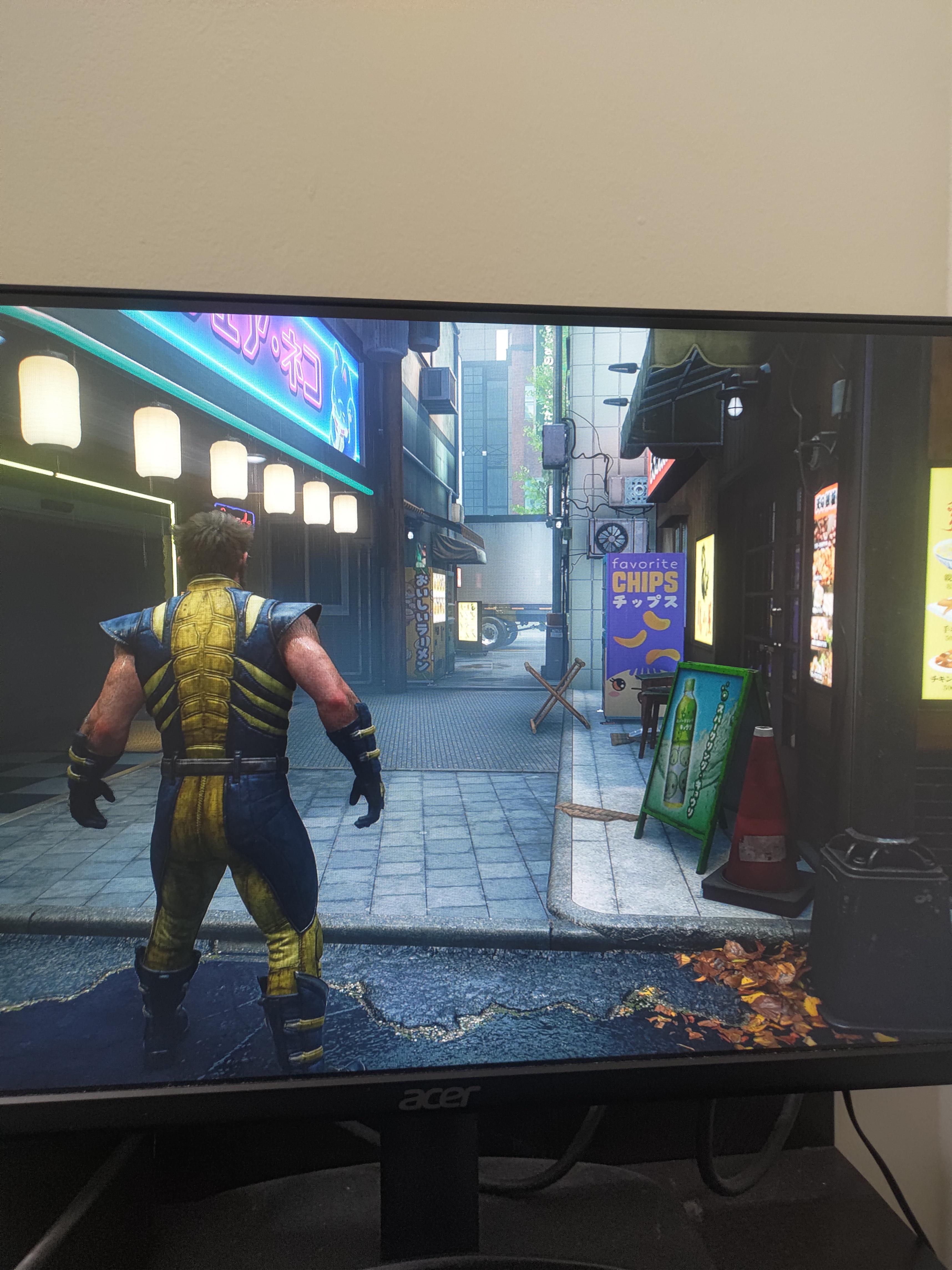
QUESTION Jean not spawning (Marvel's Wolverine)

Post image
23 Upvotes

Stuck at this mission named "in the shadows". Jean is supposed to appear here and open the arcade shutter but apparently she is nowhere to be found and it's soft locked in a way.

I have tried putting in fresh game files as well , restarted checkpoint multiple times , restarted the previous mission bad blood also multiple times , tried changing the outfits of logan.

The game is on internal ssd of ps.

Any idea how to progress in this?


r/PS5_Jailbreak • • 20h ago

QUESTION Has anyone gotten P3R DLC to run on their console yet?

Post image
8 Upvotes

Tried folder, exfat, ffpfsc, and fpkg. I'm on 10.01. The game seems to run perfectly fine but doesnt recognize any of the dlc packages I've also installed. Am I doing something wrong?


r/PS5_Jailbreak • • 15h ago

QUESTION Anything on CFW on low end fw?

6 Upvotes

Not sure if anyone or groups are working on super low fw's in this day in age anymore. I know anything below 4.xx is just much different than 4.xx-13.60 (im at 3.20) just curious to know if anyone has been trying to figure something out like a hybrid/minimal fw or cfw by chance. I never see anything for low versions and everyone is either clouded on FOMO for the game that just dropped or beefing about the devs that are keeping up with modern fws (it's not that deep tbh for the FOMO game, i don't feel like taking care of my virtual wife/girl after a long ass day from work/real chores and responsibilities and then dealing with my real ball busting wife inbetween the larp if you catch my drift).

Not trynna ragebait or start some bullshit, genuinely curious about the state of legacy jailbreaks and if there's potential for something big if some of us waited a long time on really low fw's


r/PS5_Jailbreak • • 10h ago

QUESTION Disc drive re-pairing

5 Upvotes

Anyone know the latest on disc drive re-pairing research & development? I’ve seen online that EchoStretch is potentially working on something but can’t confirm.

I say “re-pairing” intentionally as I had a Pro with a paired disc drive running on 13.60 but unfortunately the system was reset and I lost the pairing.

Hoping to get it back someday 🙏🏻


r/PS5_Jailbreak • • 7h ago

QUESTION Can i play Phantom blade zero on 13.6 in any way?

4 Upvotes

Since it’s still not available through the normal way (ps5 version) because its on a non-public firmware and the game was recently cr*cked on the windows/pc version, is there a way to play it? Not asking for sites, just a way to play it. I’ve heard of things like PC5 or Playden or something like that

Also i don’t think i can use Linux because i dont have a separate keyboard available (and mouse)


r/PS5_Jailbreak • • 19h ago

Discussion Best Linux Distro for PS5 ?

4 Upvotes

Looks like theres a wild Fedora version out, CatchyOS and Bazzite Deck, I guess also base Ubuntu.

So I'm looking for two things / Full GUI distro, for using it as Linux environment device/Dev home automation environment/ and 2nd STEAMOS/PROTON playing beast, Really wanna see if we could get BodyCam Zombies running on it. - Low settings ofc


r/PS5_Jailbreak • • 19h ago

QUESTION Is it just my PS5, or is anyone else having this issue with Kraken/Titan?

4 Upvotes

Every time I use Kraken mount or Titan core, my PS5 starts the game normally and everything seems completely fine. Then, suddenly…

THE PS5 JUST SWITCHES OFF. 💀

No warning, no error message, nothing. It just shuts down completely.

With kraken I load first kstuff and then the kraken elf (no icon appears on the menu), with titan I load it directly as it have kstuff and shadow mount embedded.

Has anyone else experienced this, or is my PS5 just deciding that it has had enough? 😂

Would be interested to know if this is a known issue or if there’s something I should be checking on my end.


r/PS5_Jailbreak • • 23h ago

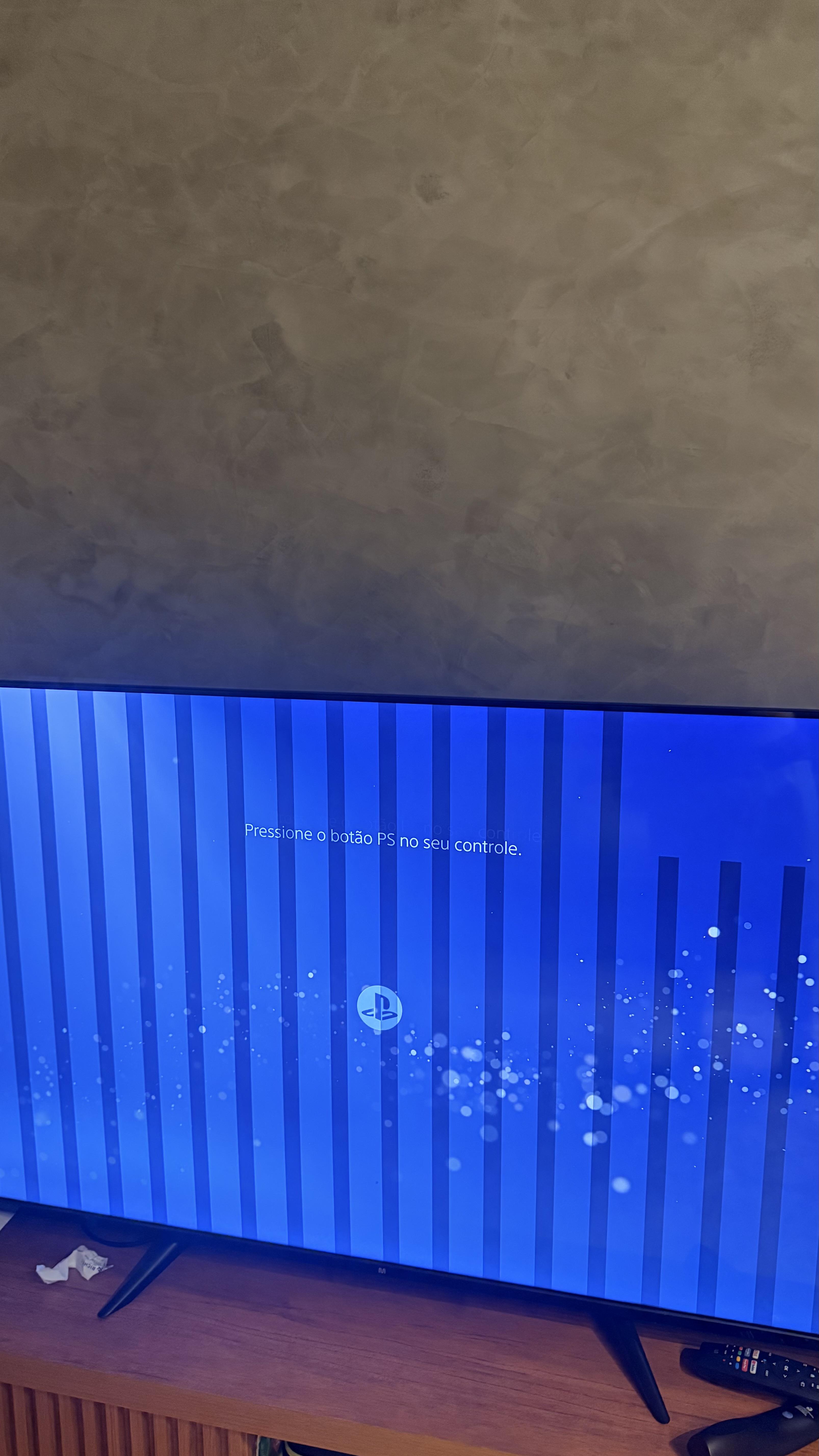
QUESTION Video Bug?

Post image
3 Upvotes

Hey folks, could you help me please?
I bought a new ps5 slim and jailbroken it yesterday.
But now my image is like this. Already tryed change the hdmi cable, but still the same.


r/PS5_Jailbreak • • 33m ago

QUESTION Anyone here using ps5 linux for steam games daily? I need few answers :)

2 Upvotes
  1. How long does it take to set up? (I already have working jailbreak and y2jb setup)

Lets say I wake up and want a quick game from steam. How long will that take me in a random morning from booting up to actually playing?

2. What is heaviest game you play on it? Just to get an idea how strong it is

3. Is it viable to use external SSD completly?


r/PS5_Jailbreak • • 2h ago

QUESTION Ps5 Linux on M.2

2 Upvotes

Hey guys, I know I need a external drive to boot Linux for the first time (correct me if I’m wrong). Once I boot it though, I’m planning to use an internal nvme as a main drive, for Linux generally. Will I still need the external drive every time when booting into Linux ? Or will I be able to just run the payload and it’ll read off the internal M.2 ?


r/PS5_Jailbreak • • 2h ago

QUESTION CONMEBOL in all game modes

2 Upvotes

Hey guys, yesterday I uploaded the FC27 licenses mod. Among the various questions and compliments—and, of course, some people just talking trash—there was a really interesting question: "Is it possible to unlock the CONMEBOL teams so they can be used in any game mode?" That’s something I’d been thinking about for a long time, but because I was so focused on finishing the licenses mod, I’d put it on the back burner. So, when I got home from work yesterday, I got straight to it. Rather than making you download the entire game again, I’m sharing a tool that acts as an installer and unlocks the CONMEBOL teams for all game modes. What does this tool do? It lets you use CONMEBOL teams in Friendly Matches, Custom Tournaments, and Manager Career mode. (I haven’t tested how they behave in Manager Career mode yet—I just confirmed that they show up.)

What do you need to install it?

The exFAT image I shared yesterday and a PC...

That’s it! Just extract the ZIP file; inside, you’ll see a file called "Instalar_exfat.cmd." Open it, and it will ask you to choose between English or Spanish. Select your language by pressing 1 or 2, then hit Enter. It will then ask you to specify the path to the exFAT file I uploaded yesterday. Once that’s done, it will prompt you to press "A" to apply the changes or "R" to restore the original settings.

That’s all there is to it—enjoy! I hope you’re all enjoying the licenses as much as I am. It used to really bother me to face teams like "MILANO," "BERGAMO," or "LOMBARDIA," or to play a World Cup with generic kits—especially as a Chilean, having to deal with generic kits was just too much, haha!

I think it’s safe to say this mod is now 100% complete.

https://x.com/Eme_E_Ce/status/2124908129964159032?a=0vIoYkgP_ei9NVpzw1E&s=20


r/PS5_Jailbreak • • 5h ago

QUESTION Anyone have the ps4 title Steel Assault installed and running fine?

2 Upvotes