r/PiCodingAgent • u/Florence-Equator • 7d ago
Use-case multiplexer-sidebar: A Herdr-style sidebar and floating pane-preview dashboard for sessions and agents, works for tmux and Zellij, single Python script, no dependencies


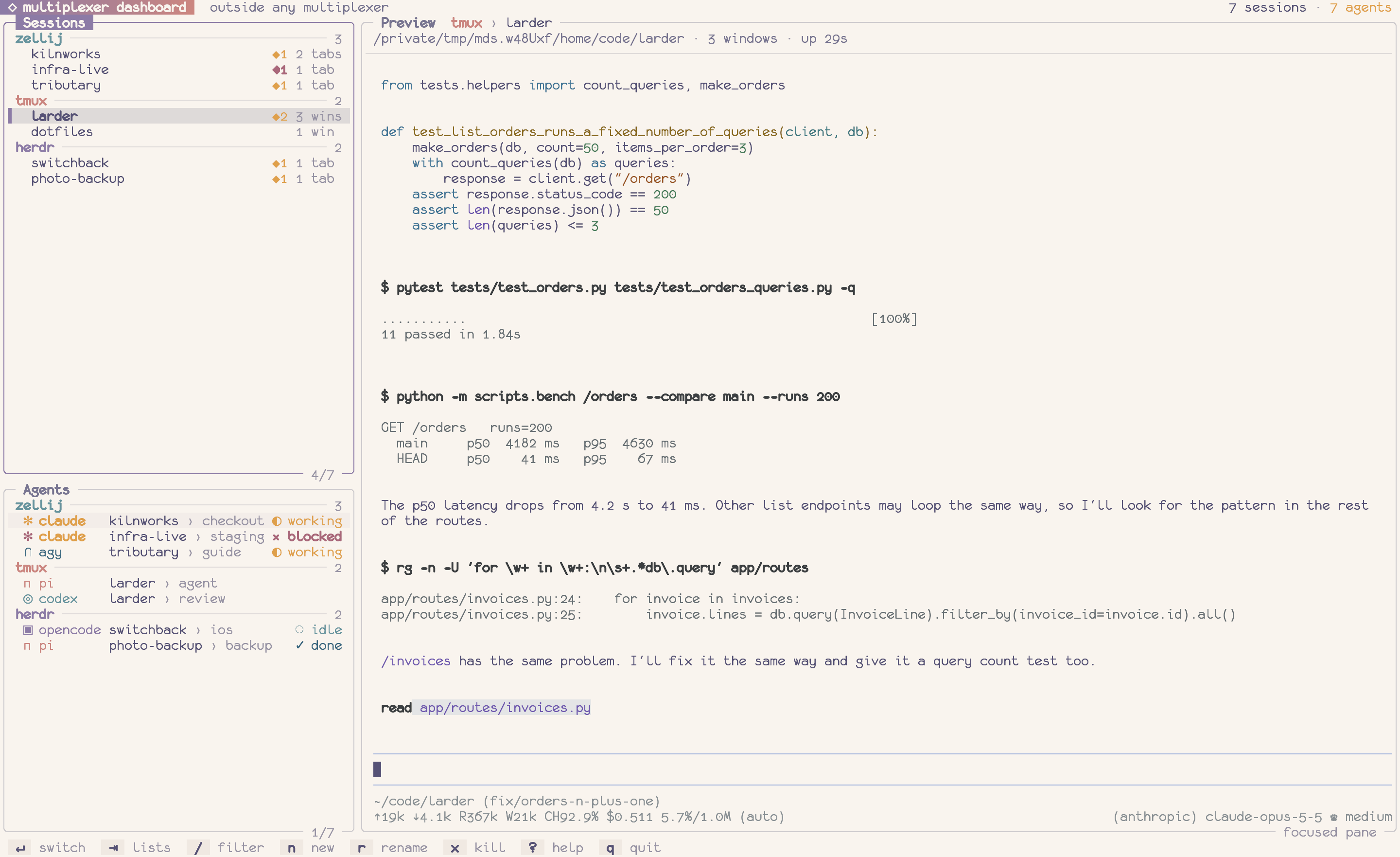
Hi everyone,
If you have ever used herdr, its sidebar is pretty iconic: it sits quietly on the side of your workspace and shows every project and every active coding agent in one clean list, so you can jump anywhere with a keystroke.
I built multiplexer-sidebar (also aliased as multiplexer-dashboard) to bring that Herdr-style sidebar directly to both tmux and Zellij (as well as herdr itself), while also letting it run as a floating dashboard with a live terminal preview.
Single Python script with no dependencies, and a classic TUI with zero lock-in
Looking at the screenshots above, you might expect a compiled Rust or Go binary. In reality, it is a single standalone Python script using only the Python 3.9+ standard library (not even curses).
- Copy-paste and run anywhere: There is nothing to compile and install. You can just copy-paste or
curlthis single file onto your laptop or any remote SSH box and run it immediately. - Modern Ratatui / Bubble Tea feel: Even though it is one stdlib file, the custom renderer is built to feel like a modern TUI framework, with automatic dark and light theme detection, mouse clicks and scrolling, responsive layout resizing, and live color terminal previews.
I want to keep using our beloved TUI without lock-in: Recently herdr shifted its focus to its desktop and mobile apps, which don't share agents with the open-source herdr TUI and are likely to leave the TUI behind the way Arc was (stop maintenance eventually by the browser company). More importantly, moving to a dedicated server plus a desktop or mobile app creates lock-in at both ends: your remote machine has to run their server, and your local device has to run their app. A classic TUI has no lock-in—it works in any terminal emulator, over any plain SSH connection, from any device. Building on top of those time-stand multiplexers like tmux and Zellij keeps that pure terminal workflow alive for the long haul.
Both a Herdr-like sidebar and a live-preview dashboard
You can run the script in two ways, or use both together:
- Sidebar mode (
--sidebar/--compact): Great if you like the herdr work style—one session per project, with multiple tabs or windows inside each project. Keep it open in a narrow 30-column pane on the left to see all your sessions (usehandlto fold or expand their tabs/windows) and every active coding agent (Claude Code, Codex, OpenCode, Pi, Gemini, etc.) right below. On smaller screens,--compactshrinks it down to a 3-column strip (or just resize the pane below 24 columns and it switches automatically). - Dashboard mode: Bind a key to open it in a centered floating pane. As you move through your sessions, tabs, and agents, the right side shows a live preview of that terminal pane so you can glance at the output before pressing Enter to jump there.
One unified tool across tmux, Zellij, and plain shells
If you use tmux on some machines and Zellij on others, this single script gives you the exact same look, vim-style keybindings (j/k to move, h/l to fold tabs, / to filter, n/r/x to create, rename, or kill sessions), and experience in both.
You can even launch multiplexer-sidebar in a plain shell with no multiplexer attached—such as right after you SSH into a server. It detects every running session across installed multiplexers, gives you live pane previews, and attaches right into whichever one you pick.
Quick install
Since it is just one file, installation is two lines:
Ready-to-paste keybinding and sidebar layout snippets for both tmux and Zellij are in the README: https://github.com/milanglacier/multiplexer-sidebar
Would love to hear what you think or any feedback if you give it a try!